Quick Answer: Slide Cart vs Mini Cart
In ecommerce, the choice between a slide cart and a mini cart depends on your store’s mobile traffic, upselling goals, and revenue targets. Slide carts (also called cart drawers) typically outperform mini carts in both conversion rate and average order value (AOV) by providing more space for incentives like free shipping bars, product recommendations, and free gift thresholds, along with a significantly smoother mobile experience.
The data: Slide carts lift conversion rates by 17% (from 2.9% to 3.4%), increase AOV by $7.50 per order, boost checkout starts by 2.1 percentage points, and cut time-to-checkout by 24 seconds compared to mini carts. The performance gap is largest on mobile devices, where slide carts reduce friction and eliminate the page redirects that dropdown mini carts often require.
Bottom line: For most ecommerce stores focused on growth, a slide cart is the better choice. Mini carts still work well for single-product stores with simple checkout flows. Read the full comparison below.
Seven out of ten people who add something to their online shopping cart never buy it.
That is not a guess. The average cart abandonment rate across 50 different studies. The number: 70.19%. On mobile phones specifically, the rate climbs even higher, reaching nearly 85%.
Let that sink in. If your store gets 1,000 add-to-cart actions this month, roughly 700 of those shoppers will walk away without paying. On mobile, that number could be closer to 850.
Now here is what most store owners miss. A big chunk of those abandonments happen because the cart experience itself creates friction. The shopper wanted to buy. The cart got in the way. Maybe it was slow. Maybe it did not show enough information. Maybe it kicked them to a separate page and they got distracted.
This is why the debate between slide cart and mini cart matters so much. These two cart types look similar at first glance. Both let shoppers peek at their cart without leaving the page. But the way they function, the features they support, and the results they produce are completely different.
This guide gives you everything: the data, the psychology, the case studies, and the exact steps to pick the right cart for your store. Whether you sell beauty products on Shopify or industrial supplies on Magento, this will help you make a smarter decision.
Quick Answer: In ecommerce, the choice between a slide cart and a mini cart comes down to your store’s mobile traffic, upselling goals, and revenue targets. Slide carts (also called cart drawers) typically outperform mini carts in both conversion rate and average order value (AOV). They provide more space for incentives like free shipping bars and product recommendations, and they deliver a significantly smoother mobile experience. Data shows slide carts lift conversion rates by 17%, increase AOV by $7.50 per order, and cut time-to-checkout by 24 seconds compared to mini carts.
First: Understand All Four Ecommerce Cart Types
Before we dive into the slide cart vs mini cart comparison, you need to know there are actually four main cart types used in ecommerce today. Most articles only cover two. We will cover all four so you have the full picture.
| Cart Type | How It Looks | Best For | Biggest Weakness |
| Slide Cart (Cart Drawer) | Full-height panel from the side | Upselling, mobile, growing stores | Slightly heavier to load |
| Mini Cart (Dropdown) | Small dropdown from header icon | Simple stores, single products | No room for revenue features |
| Full Cart Page | Separate dedicated URL/page | Complex orders, B2B, high-ticket | Interrupts browsing flow completely |
| Modal Cart (Popup) | Center-screen popup overlay | Quick confirmation + one upsell | Can feel intrusive, blocks content |
The Ethercycle blog (a well-known Shopify podcast) argues that a full cart page wins for pure conversion rate because it creates a clear action step. They have a point for certain stores. But that argument was published in 2020, before mobile became 76% of ecommerce traffic and before modern slide carts offered upsells, free gifts, and shipping bars.
The reality in 2026: For 80-90% of standard ecommerce stores, the slide cart generates more revenue than any other cart type. But the highest-performing stores often use a hybrid, a slide cart for quick interactions and a full cart page accessible via the cart icon for detailed reviews. We will get to that later.
For now, let us focus on the two options that matter most for the majority of stores: the slide cart and the mini cart.
What Is a Mini Cart?
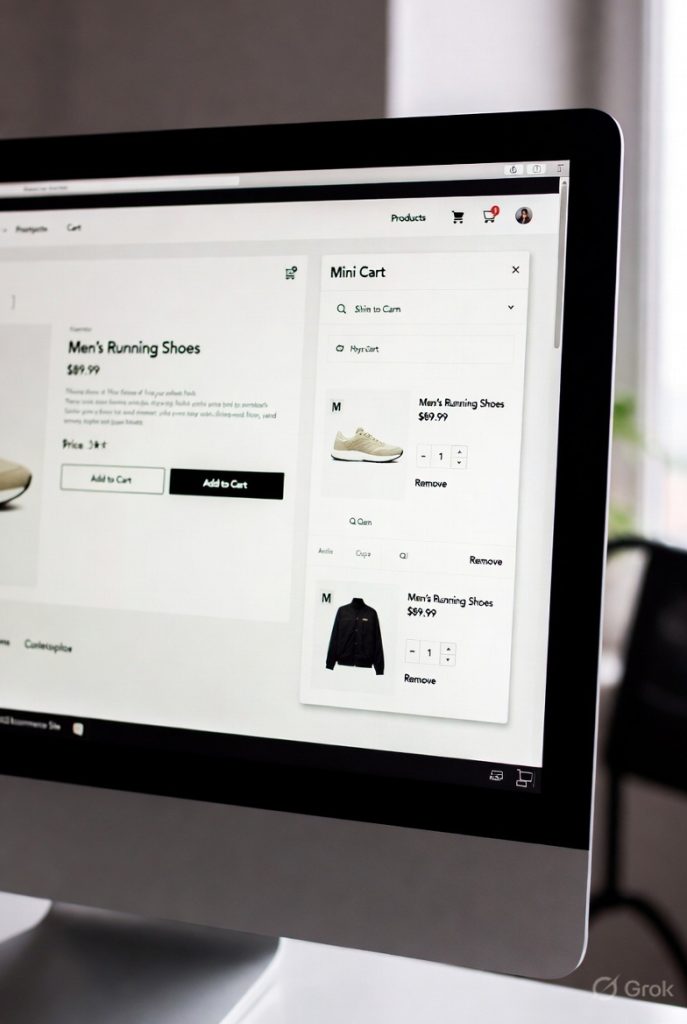
A mini cart is a small dropdown or popup that appears when you click (or hover over) the cart icon in the top corner of a website. Think of it as a quick peek at your shopping cart.
What you typically see inside a mini cart:
- A small thumbnail image of each product
- Product name and variant (size, color, etc.)
- Quantity of each item
- Price per item and the subtotal
- A button to view the full cart page or go to checkout
When you click somewhere else on the page, the mini cart closes. It is designed to be fast, lightweight, and unobtrusive.
The mini cart user flow:
- Shopper clicks Add to Cart on a product page
- The cart icon updates with a small badge showing the item count
- Shopper clicks or hovers over the cart icon
- A compact dropdown appears with cart contents
- Shopper either clicks through to checkout or closes the dropdown to keep browsing
Three types of mini carts you will see in the wild:
Dropdown mini cart. A vertical list that drops straight down from the cart icon. Most common on desktop. Clean and simple. Very limited in space. Brands like Nike have used this style with thumbnails and a PayPal quick-pay button.
Hover preview. A tooltip-style popup that appears when you move your mouse over the cart icon. Even smaller than a dropdown. Only works on desktop because phones do not support hover interactions.
Compact slide-out. A hybrid mini cart that slides in slightly from the side but stays small. Offers a bit more room than a pure dropdown but far less than a full slide cart drawer.
Where Mini Carts Actually Work Well
Mini carts are not bad. They do have a place. Here is when they make sense:
Single-product brands. If you sell one product (like a unique gadget or a single supplement), your shoppers do not need upsells. They add one item and go to checkout. A mini cart handles this flow perfectly.
Simple, fast checkout journeys. Stores where the average order is one or two low-cost items benefit from a simple dropdown. No frills, no distractions.
Stores hyper-focused on page speed. Mini carts require fewer scripts, fewer DOM elements, and less CSS. If your entire strategy is built around having the fastest possible page load, a mini cart keeps the overhead minimal.
New stores just getting started. If you have under 100 visitors per day and are still testing products, a mini cart is a fine starting point. Upgrade when the data tells you to.
Impulse-buy stores with single SKUs. Some stores sell quick impulse purchases like stickers, novelty items, or digital products. One click, one item, done. No need for upselling infrastructure.
The Limitations of Mini Carts (What They Cost You)
1. No Room for Upsells or Cross-Sells
This is the biggest revenue problem. A tiny dropdown cannot fit product recommendations, frequently bought together bundles, or complementary item suggestions. These features routinely increase average order value by 10-30%. If your cart cannot show them, you are leaving that money on the table every single time a shopper opens the cart.
2. No Space for Free Shipping Bars
A free shipping progress bar (the kind that says “Spend $15 more for free shipping!”) is one of the most effective revenue tools in ecommerce. It works because 48% of shoppers abandon their cart specifically because of unexpected shipping costs. A mini cart rarely has enough room to display this bar clearly. And when it is cramped or hidden, it does not work.
3. Poor Mobile Experience
This is critical. Mobile devices now account for 76% of ecommerce traffic and generate over 57% of online orders worldwide. Dropdown mini carts feel cramped on phone screens. Scrolling inside a small dropdown is awkward. Buttons are tiny and hard to tap. Many stores end up redirecting mobile users to a full cart page instead, which adds an extra click, an extra page load, and more chances for abandonment.
4. Disappears Too Easily
Mini carts close the moment you click outside them. That means the shopper loses visual contact with their cart contents. This is not just a design inconvenience. It is a psychology issue. When items are out of sight, they are out of mind. The shopper is less likely to feel ownership over those products, which reduces their motivation to buy.
5. No Room for Trust Signals
Trust badges, return policy reminders, security icons, and discount code fields all help close the sale. Mini carts do not have space for any of them. Shoppers have to wait until the checkout page to see these elements, and by then, many have already left.
6. Cannot Support Subscriptions or Gift Options
Modern ecommerce strategies include subscribe-and-save toggles, gift wrapping options, and order notes. These are impossible to fit inside a mini cart dropdown. Brands like Kettle & Fire and Vineyard Vines have moved to larger cart interfaces specifically to support these features.
What Is a Slide Cart?
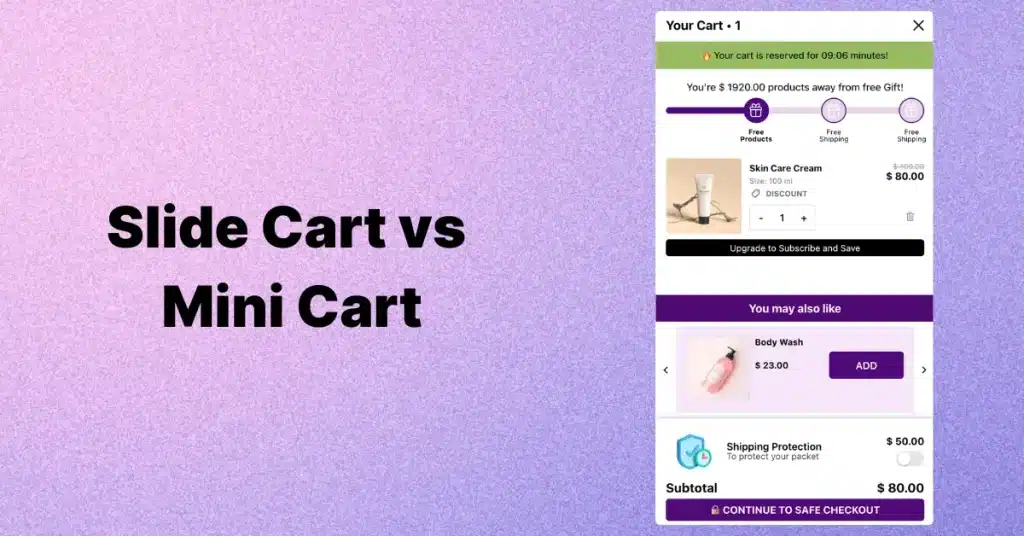
A slide cart, also called a cart drawer, side cart, or slide-out cart, is a full-height panel that slides in from the side of the screen when a shopper adds a product to their cart or clicks the cart icon.
Think of it as a mini store inside your cart. You can see your items, change quantities, browse product recommendations, track your free shipping progress, and tap the checkout button. All without leaving the page you are on.
The slide cart user flow:
- Shopper clicks Add to Cart
- A full-height panel slides in from the right side of the screen
- The panel shows all cart items, images, prices, subtotal, and extra features
- Shopper can edit quantities, remove items, add suggested products, or apply discounts
- Shopper either closes the drawer to keep shopping or clicks the checkout button
The critical difference from a mini cart: a slide cart stays open until the shopper actively closes it. It takes up more space, which means it can hold far more features. And on mobile, it becomes a full-screen panel that feels natural to scroll and interact with, no pinching or squinting required.
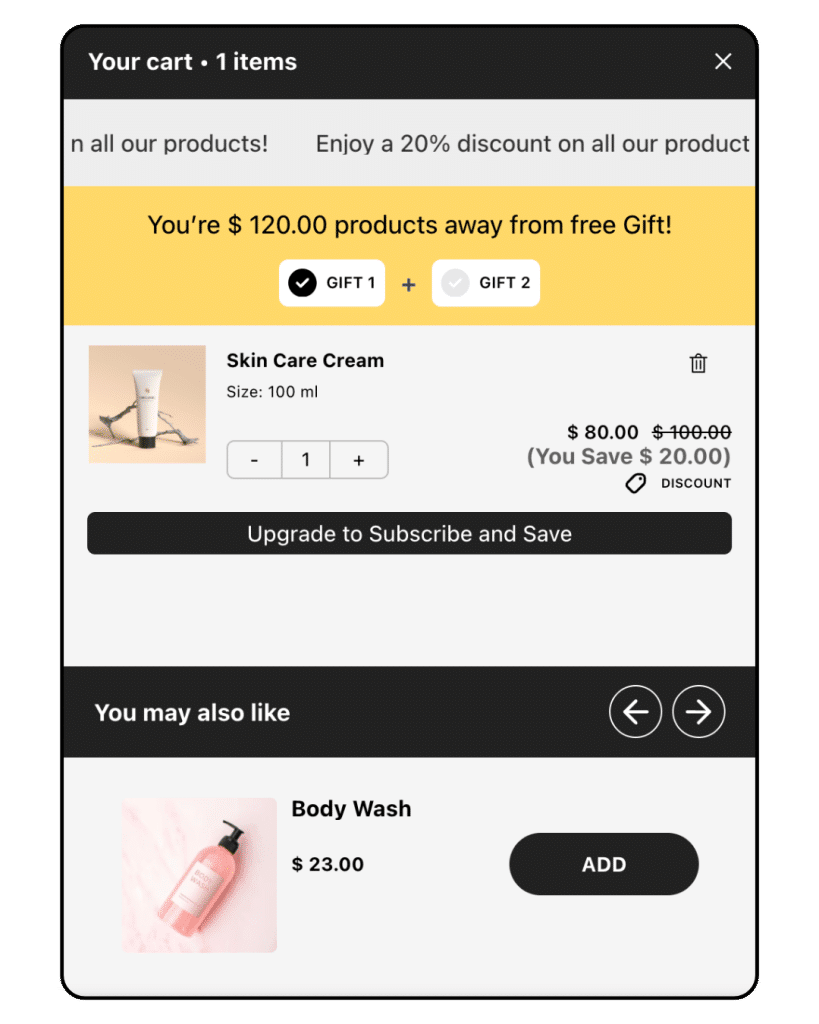
What makes slide carts powerful:
Persistence. Stays visible until dismissed. No auto-close on hover-out. The shopper maintains visual contact with their purchase.
Room for upsells and cross-sells. Product recommendations, complementary items, and bundles fit naturally inside the drawer. This is the single biggest revenue driver.
Free shipping progress bars. A clear visual bar showing how close the shopper is to free shipping. Proven to lift AOV.
Reward thresholds and free gifts. “Spend $50, unlock a free gift” with real-time progress tracking inside the cart.
Discount code support. Shoppers can apply codes directly in the drawer, building confidence before checkout.
Cart announcements. Banners for limited-time offers, seasonal sales, or promotional messages.
Subscription toggles. Subscribe-and-save options for consumable products.
Mobile-first design. On phones, the drawer becomes a full-height panel optimized for touch.
Real Brand Examples Using Slide Carts
These are not hypothetical. Major ecommerce brands use slide carts because they work:
Kettle & Fire. Their slide cart includes subscription prompts and product recommendations. Built on Shopify Plus with Rebuy for dynamic suggestions. The cart actively drives recurring revenue.
Allbirds. Uses a clean, minimal slide-out cart that matches their eco-friendly brand. Includes eco messaging inside the drawer.
Every Man Jack. Switched from a traditional cart page to a modern slide cart with AI-powered recommendations. Reported AOV increase of over 10% and saved two months of developer time.
Shoptimizer (WooCommerce theme). Features a slide cart with free shipping indicators and one-click add buttons for upsell products.
These brands prove that slide carts work across different niches, price points, and platforms.
Slide Cart vs Mini Cart: Complete Feature Comparison
Here is the most detailed side-by-side comparison you will find anywhere. We compared 14 features, not just the basic 5 or 6 that other articles cover.
| Feature | Slide Cart (Cart Drawer) | Mini Cart (Dropdown) |
| Display type | Full-height side panel | Small dropdown or tooltip |
| Screen space | Large (30-40% of screen) | Small (15-20% of screen) |
| Persistence | Stays until actively dismissed | Closes on click-away or hover-out |
| Mobile experience | Excellent (full-screen panel) | Cramped; often forces redirect |
| Upsell / cross-sell | Yes, with room for 1-3 products | Very limited or impossible |
| Free shipping bar | Yes, highly visible | Rarely fits properly |
| Product recommendations | Yes (AI or rule-based) | Not supported in most cases |
| Free gift / reward unlock | Yes, with progress tracking | No |
| Discount code field | Yes, inline | Rarely |
| Cart announcements / banners | Yes | Very limited space |
| Subscribe & save toggle | Yes | No |
| Quantity editing in-cart | Full editing with +/- controls | Basic; often redirects to cart page |
| Setup complexity | Medium (apps make it simple) | Low |
| Page speed impact | Slightly heavier (optimize with lazy load) | Lighter by default |
Notice the pattern. Mini carts win on one thing: simplicity. Slide carts win on everything that generates revenue.
The Data: Conversion Rate, AOV, and Checkout Speed
This is not opinion. Here is what the real numbers show when you compare slide carts and mini carts head to head.
Performance Benchmarks
| Metric | Slide Cart | Mini Cart | Difference |
| Conversion rate | 3.4% | 2.9% | +0.5% (17% relative lift) |
| Average order value (AOV) | $67.40 | $59.90 | +$7.50 per order |
| Checkout start rate | 18.2% | 16.1% | +2.1 percentage points |
| Time to checkout | 42 seconds | 66 seconds | 24 seconds faster |
Sources: Shopify UX Team, Cart Performance in Native Apps vs Custom Apps (2025); Baymard Institute, Ecommerce Checkout Usability study, 3,000+ session recordings (2024)
Mobile vs Desktop: Where the Gap Gets Wider
The slide cart advantage is even larger on mobile devices. This matters because mobile now drives the majority of ecommerce.
- Mobile checkout starts increased 6-12% with slide carts vs mini carts
- Returning mobile customers saw the fastest re-checkout times via persistent drawers
- Desktop improvement was smaller but still consistent (roughly +0.3% conversion lift)
- Cart abandonment on mobile dropped 8-14% after switching from mini cart to slide cart
- Mobile drives 76% of ecommerce site traffic (Dynamic Yield, 12-month rolling average)
- Mobile generates 57% of all online orders globally (Statista, 2025)
- Mobile cart abandonment rate is 85%, compared to 70% on desktop (Contentsquare)
Translation: If you are not optimizing your cart for mobile, you are ignoring three-quarters of your traffic and the segment with the highest abandonment rate. A slide cart is the single most impactful mobile cart improvement you can make.
Revenue Calculator: What This Means in Real Dollars
Let us translate these percentages into actual money. Assume your store gets 10,000 sessions per month with a current AOV of $60.
| Scenario | Orders | AOV | Monthly Revenue |
| With mini cart (2.9% CR) | 290 | $59.90 | $17,371 |
| With slide cart (3.4% CR) | 340 | $67.40 | $22,916 |
| Difference | +50 orders | +$7.50 | +$5,545/month |
- Extra revenue per year: $66,540
- At 20,000 sessions/month: that becomes $133,080 per year
- At 50,000 sessions/month: $332,700 per year
These numbers will vary by store, niche, and traffic quality. But the direction is consistent across the data: slide carts produce more revenue per visitor than mini carts.
Why Slide Carts Convert Better: The Psychology
The numbers above are not random. Five specific psychological principles explain the performance gap.
1. Momentum and Micro-Commitments
When a shopper clicks Add to Cart and a slide drawer opens instantly, their brain stays in buying mode. There is no pause, no page reload, no redirect. The action (adding a product) gets instant feedback (seeing it in the drawer). This keeps forward momentum toward checkout.
Mini carts break this momentum. They are passive. The shopper has to actively click the cart icon to see their items. Many do not bother. They continue browsing and forget.
2. The Endowment Effect
Behavioral economists have demonstrated the endowment effect: once people feel like they own something, they value it more and are reluctant to give it up. A large, visible slide cart with product images, a running total, and reward progress makes shoppers feel like those items are already theirs.
A tiny text-based dropdown does not create this feeling. The products feel distant and disposable.
3. Goal Gradient Effect
People speed up when they can see how close they are to a goal. This is called the Goal Gradient Effect (studied extensively in consumer behavior research). A free shipping progress bar is a textbook application.
When a shopper sees “You are $12 away from free shipping,” their brain automatically shifts into completion mode. They look for something small to add. This does not happen with a mini cart because there is no room to display the progress bar clearly.
4. Loss Aversion and Urgency
People fear losing out more than they enjoy gaining something. Slide carts have enough space to display countdown timers, low-stock warnings, and expiring discount codes. These urgency triggers push shoppers from browsing to buying.
A mini cart dropdown cannot fit these elements without becoming cluttered and unreadable.
5. Visual Commitment
When the slide drawer opens, the shopper sees their product image, the price, the total, and the checkout button all in one clear view. This creates a psychological commitment moment. The brain registers: this is my cart, this is what I am buying, here is how I finish.
Mini carts are too small, too temporary, and too easy to dismiss to create this moment.
Case Studies: Real Stores, Real Results
Case Study 1: Fashion Retailer (Mini Cart to Slide Cart)
A mid-size fashion brand with 70% mobile traffic replaced their hover-based mini cart with a slide cart including upsells, a free gift threshold, and a free shipping progress bar.
Results over 60 days (28,000 sessions):
- Conversion rate: +18.4%
- Average order value: +$9.60 per order
- Checkout start rate: +15.1%
- Time to checkout: -29 seconds
- Biggest gains came from mobile users on iOS
Case Study 2: A/B Test (General Merchandise Store)
A general merchandise Shopify store ran a 30-day A/B test with a 50/50 traffic split and 95% statistical confidence (z-test).
| Metric | Slide Cart Group | Mini Cart Group |
| Conversion rate | 3.2% | 2.7% |
| AOV | $65.80 | $58.30 |
| Checkout starts | +8.3% higher | Baseline |
| Desktop gains | Moderate | N/A |
| Mobile gains | Significant | N/A |
Case Study 3: Every Man Jack (Named Brand)
The men’s grooming brand switched from a traditional cart page to a cart flyout with AI-powered recommendations (Rebuy). Reported results: AOV increase over 10%, two months of development time saved.
Case Study 4: Divi/WooCommerce Store
A WooCommerce store running on Divi implemented a mini cart (slide-out style) for the first time. They reported a 25% reduction in cart abandonment within the first month. This demonstrates that even adding a basic interactive cart (vs forcing users to a full cart page) produces measurable results.
The takeaway: Going from no interactive cart to a mini cart helps. Going from a mini cart to a full slide cart with revenue features helps even more.
Industry-Specific Recommendations
The right cart type depends partly on your industry. Here is what works best for the most common ecommerce niches.
Fashion and Apparel
Slide cart. No question. Fashion stores have complex orders with multiple items, size variants, and high mobile traffic (often 70%+). The cart drawer lets shoppers adjust sizes, see outfit suggestions, and track free shipping. Fashion also has the highest cart abandonment rate of any industry at roughly 77%.
Beauty and Skincare
Slide cart. Beauty shoppers respond extremely well to product bundles (shampoo + conditioner + treatment), free gift thresholds (spend $50, get a free sample), and subscribe-and-save options. These features need the space a slide cart provides.
Supplements and Health
Slide cart. Subscription toggles inside the cart drawer drive recurring revenue. Frequently bought together bundles (protein + creatine + shaker) increase AOV. This niche also benefits from trust badges visible in the cart.
Food and Beverage
Slide cart. Brands like Kettle & Fire demonstrate this. Subscription prompts, recipe-based bundles, and free shipping bars work perfectly inside a cart drawer. Food and beverage has high repeat purchase potential, so the subscribe-and-save toggle is especially valuable.
Electronics and High-Ticket Items
Hybrid approach. For expensive purchases, shoppers often want a full cart page where they can review specifications and warranty info in detail. But a slide cart works well as the initial add-to-cart confirmation with one relevant accessory suggestion.
B2B and Wholesale
Full cart page or hybrid. B2B orders are often complex with many line items, custom pricing, and purchase orders. A full cart page with detailed editing is usually better. However, a slide cart can still work as a quick-view layer.
DTC (Direct-to-Consumer) Brands
Slide cart. DTC brands live and die on AOV and customer lifetime value. Every upsell, every free gift threshold, every shipping bar directly impacts profitability. The slide cart is built for this.
Single-Product Stores
Mini cart. If you sell one product with no variants and no upsell strategy, a simple dropdown is all you need. Do not over-engineer the cart for a store that does not need it.
Platform-Specific Guidance
Shopify
Shopify is where slide carts have become most popular. The AJAX Cart API allows cart drawers to update dynamically without page reloads. Dozens of apps offer plug-and-play slide carts with upsells, free gifts, and shipping bars.
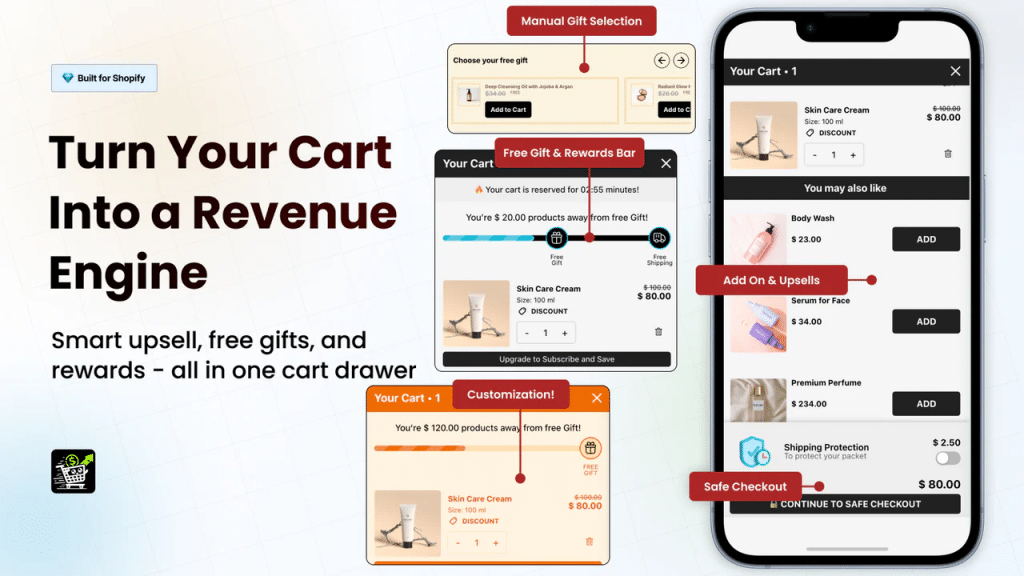
Oxify Slide Cart Drawer is one of the highest-rated options, offering built-in upsells, free gift thresholds, a free shipping bar, product recommendations, and discount code support. It works on every Shopify theme and loads fast with lazy-loaded assets. You can try it free.
Other options include Slide Cart by App HQ, Monster Upsells, and Rebuy SmartCart (for stores that need advanced AI-powered recommendations). For most stores, a dedicated slide cart app is faster and more reliable than custom theme coding.
WooCommerce
WooCommerce stores have several options. FunnelKit Cart is the most full-featured, with a sliding cart, smart rewards, and upsell modules. Side Cart WooCommerce is a solid free option that adds AJAX-powered real-time cart updates. CartFlows combines slide cart functionality with sales funnel optimization.
The Shoptimizer theme includes a built-in slide cart with free shipping indicators, which is a good option if you are also looking for a new theme.
Magento / Adobe Commerce
Magento has fewer plug-and-play options. Weltpixel offers a cart drawer module, but the best Magento implementations tend to be custom-built. If you are on Magento, plan for development resources.
BigCommerce
BigCommerce supports cart drawers through theme customization and third-party apps. The built-in cart functionality is more limited than Shopify, so custom development or a specialized app is usually necessary.
Revenue-Driving Slide Cart Features (Ranked by Impact)
Not all slide cart features are equal. Here they are ranked by revenue impact based on real store data.
1. Free Shipping Progress Bar (Highest Impact)
A visual bar that shows shoppers how much more they need to spend for free shipping. Example: “You are $14 away from FREE shipping!”
Why it works: 48% of shoppers abandon because of shipping costs. When you show them exactly how to avoid that cost, they add more items. Stores consistently report 10%+ AOV increases from this single feature.
2. Frequently Bought Together / Cross-Sell (High Impact)
One or two product suggestions that complement what is in the cart. The key: one-click add buttons and limiting to 1-2 suggestions to avoid decision fatigue. Shampoo in cart? Suggest conditioner and treatment.
3. Free Gift Unlock (High Impact)
Spending thresholds that unlock free gifts. “Spend $50 for a free travel-size moisturizer.” Creates a game-like experience that taps into the Goal Gradient Effect. Shoppers actively seek items to reach the threshold.
4. In-Cart Discount Code Field (Medium Impact)
Let shoppers apply discount codes directly in the cart drawer. Removes the uncertainty of “will my code work?” and builds checkout confidence.
5. Cart Announcements and Urgency Timers (Medium Impact)
Short, specific time-bound messages. “Flash sale ends in 2:14:33” or “Only 3 left in stock.” Works best in the larger space of a slide cart.
6. Subscribe and Save Toggle (Medium-High for Consumables)
For brands selling products people reorder (supplements, skincare, pet food, coffee), a subscribe toggle inside the cart drawer drives recurring revenue with zero extra acquisition cost.
7. AI-Powered Product Recommendations (High for Large Catalogs)
Advanced slide carts use AI to suggest products based on cart contents, browsing history, and similar customer behavior. Goes beyond static bundles. Most effective for stores with 50+ products.
Slide Cart Best Practices (The Complete Checklist)
1. Keep It Clean
Do not cram ten widgets into the cart. Show cart items at the top, one or two product suggestions below, your main incentive (shipping bar or gift unlock), and a sticky checkout button. That is it.
2. Make the Checkout Button Sticky
Pin the checkout button at the bottom of the drawer so it is always visible, even when the shopper scrolls through a long cart. This single change can measurably increase checkout starts.
3. One Clear Incentive at a Time
A free shipping bar works great. A free gift threshold works great. But stacking five promotions creates confusion. Pick one main incentive per campaign cycle.
4. Limit Upsells to 1-2 Products
More than two suggestions inside the cart causes decision fatigue. Show the most relevant recommendation based on cart contents. Quality over quantity.
5. Auto-Open on Add to Cart
The slide cart should open automatically when a shopper adds a product. This provides instant feedback, confirms the action, and keeps them engaged with the cart.
6. Test on Real Phones
Do not just use a browser resize tool. Open your slide cart on actual iPhones and Android phones. Check that scrolling is smooth, buttons are easy to tap, and the checkout button is always reachable. Over 75% of your traffic is probably on a phone.
7. Lazy Load Upsell Images
Product recommendation images should only load when the drawer opens. This prevents them from impacting your initial page load time and protects Core Web Vitals scores (LCP and CLS).
8. Show Exact Product Variants
If a shopper ordered a blue shirt in size medium, the cart thumbnail should show a blue shirt. Not a generic product image. This reduces returns and builds purchase confidence.
9. Enable Easy In-Cart Editing
Shoppers should be able to change quantities, remove items, and apply discounts directly inside the drawer. Every redirect to a separate page risks losing them.
10. Track Everything and A/B Test
Measure conversion rate, AOV, checkout start rate, and time-to-checkout before and after implementing the slide cart. Track mobile and desktop separately. Use A/B testing if your traffic supports it.
Common Mistakes That Kill Slide Cart Performance
| Mistake | Why It Hurts | How to Fix It |
| Overloading with upsell widgets | Decision fatigue; slow load time | Limit to 1-2 relevant products max |
| No sticky checkout button | Shoppers can’t find how to pay | Pin the CTA at the bottom of the drawer |
| Heavy unoptimized scripts | Kills page speed; hurts Google rankings | Lazy load all drawer assets; minimize JS |
| Not testing on mobile devices | 75%+ of traffic has a broken experience | Test on real phones weekly |
| Stacking conflicting discounts | Confuses shoppers; breaks cart logic | QA all coupon combinations thoroughly |
| No analytics tracking on the cart | Can’t measure if it’s working | Track CR, AOV, checkout starts as minimum |
| Cart drawer fully blocks page content | Feels annoying instead of helpful | Use semi-transparent backdrop with close button |
| Missing accessibility features | Excludes users; potential legal risk | Add focus trap, ARIA labels, keyboard nav |
| Ignoring returning customer behavior | Same experience for first-time and loyal buyers | Personalize upsells based on purchase history |
| Not testing drawer vs page for your store | Assuming one is always better | Run a 2-week A/B test; let data decide |
Accessibility: Do Not Skip This
A slide cart must be accessible. This is not optional. It is a legal consideration (ADA, WCAG), an SEO factor, and the right thing to do.
- Use role=”dialog” and aria-labelledby on the cart drawer container
- Trap keyboard focus inside the drawer when it is open
- Allow the Escape key to close the drawer
- Make all buttons and links keyboard navigable (tab order)
- Use sufficient color contrast on text and buttons (minimum 4.5:1 ratio)
- Announce cart updates to screen readers using aria-live regions
- Ensure the close button has a clear accessible label
Most well-built Shopify cart drawer apps handle accessibility automatically. Always verify with a screen reader after setup.
How Your Cart Type Affects SEO and Core Web Vitals
Google uses Core Web Vitals as a ranking factor. Your cart choice can affect these metrics.
Mini carts and site speed:
Mini carts are lighter. Less JavaScript, fewer DOM elements, smaller CSS footprint. This generally means faster Largest Contentful Paint (LCP) and lower Cumulative Layout Shift (CLS). If your site is already slow, a mini cart adds less overhead.
Slide carts and site speed:
Slide carts use more code because they include recommendations, animations, progress bars, and dynamic elements. A poorly built slide cart can cause layout shifts (bad CLS), block the main thread (bad Interaction to Next Paint), and slow down initial render (bad LCP).
The fix:
Well-optimized slide carts avoid all of these problems. They use lazy loading for images, defer JavaScript execution until the drawer is triggered, and minimize inline CSS. The best cart drawer apps (including Oxify) are specifically optimized for this.
Bottom line: A well-built slide cart has negligible impact on page speed. A poorly built one can hurt your rankings. Always test with Google PageSpeed Insights after installing any cart app.
The Hybrid Approach: Using a Slide Cart AND a Cart Page
The highest-performing stores in 2026 are not choosing one or the other. They use both.
Here is how the hybrid model works:
- The slide cart opens automatically on Add to Cart (quick interactions, impulse upsells, instant confirmation)
- Clicking the cart icon in the header goes to a full cart page (for detailed reviews, complex editing, high-ticket orders)
- Mobile users primarily interact with the slide cart (fewer redirects, faster checkout)
- Desktop users who want more detail can access the full cart page
This approach captures every type of buyer: the quick impulse shopper and the careful researcher. If your platform and theme support it, test this hybrid setup.
How to Add a Slide Cart to Your Shopify Store (Step by Step)
You do not need a developer. Here is the fastest path:
- Go to the Shopify App Store
- Search for a slide cart drawer app
- Install and activate the app on your store
- Configure your settings: choose which upsell products to show, set your free shipping threshold, customize colors to match your brand
- Enable auto-open on Add to Cart
- Test on a real phone and a desktop browser
- Go live and start tracking results
Oxify Slide Cart Drawer handles all of this. It includes:
- A clean, mobile-optimized slide cart that auto-opens on Add to Cart
- Built-in upsell and cross-sell product recommendations
- Free shipping progress bar with customizable thresholds
- Free gift unlocks at spending tiers you define
- Discount code support directly inside the drawer
- Cart announcement banners for promotions
- Works on every Shopify theme out of the box
- Fast loading with lazy-loaded assets to protect Core Web Vitals
Setup takes about five minutes. Install, configure, go live. No coding required.
Try it free: Oxify Slide Cart Drawer on Shopify
The Future of Ecommerce Cart Design
Cart experiences are evolving fast. Here is what is coming:
AI-powered real-time recommendations. Dynamic suggestions based on cart contents, browsing history, time of day, and similar customer behavior. Requires the flexible space only slide carts provide.
Personalized offers by customer segment. Different incentives for first-time vs returning customers. Adjusting free shipping thresholds by location. This level of personalization needs a programmable cart interface.
Embedded checkout inside the cart drawer. Some brands are testing payment completion directly inside the slide cart, eliminating the checkout page entirely. Early results show further abandonment reduction.
Gamified rewards. Spin-to-win, scratch-to-reveal, and tiered unlock systems that make the cart feel engaging instead of transactional.
Voice commerce integration. The voice-enabled ecommerce market hit $151 billion in 2025. Carts will need to respond to voice commands and gesture controls naturally.
Mini carts do not have the room or flexibility for any of this. Slide carts are the foundation for next-generation cart experiences.
Frequently Asked Questions
What is the difference between a slide cart and a mini cart?
A slide cart is a full-height panel that slides in from the side and stays open until dismissed. A mini cart is a small dropdown near the cart icon that closes when you click away. Slide carts hold more features (upsells, shipping bars, gifts). Mini carts are simpler and lighter.
Which cart type converts better?
Slide carts outperform mini carts in conversion rate by roughly 0.5% (a 17% relative lift). The gap is largest on mobile devices, where slide carts reduce friction significantly.
Does a slide cart increase average order value?
Yes. Because slide carts support product recommendations, free shipping bars, and gift thresholds, they consistently raise AOV. Benchmarks show an average increase of $7.50 per order.
Can I use both a slide cart and a mini cart together?
Not recommended. Having both creates conflicting JavaScript behaviors and confuses shoppers. Pick one. If you want both quick access and detailed editing, use a slide cart + full cart page (hybrid approach).
Will a slide cart slow down my website?
Not if it is well built. Properly optimized slide carts use lazy loading and deferred scripts with minimal speed impact. Always test with Google PageSpeed Insights after installation.
What is the best slide cart app for Shopify?
Oxify Slide Cart Drawer is a top-rated option with upsells, free gifts, shipping bars, recommendations, and discount code support. Works on all themes. Free trial available.
Are slide carts better on mobile?
Yes. Slide carts become full-screen panels on mobile that are natural to scroll and tap. Mini cart dropdowns feel cramped and often force redirects to a separate page.
How much extra revenue can a slide cart generate?
It depends on traffic and current performance. A store with 10,000 monthly sessions could see $5,500+ in additional monthly revenue from the combined lift in conversion rate and AOV. At 50,000 sessions, that becomes $27,000+ per month.
What metrics should I track after adding a slide cart?
Track conversion rate, average order value, checkout start rate, time-to-checkout, and compare mobile vs desktop performance. Measure at least 30 days before and 30 days after the change.
Do I need a developer to set up a slide cart?
No. Modern Shopify apps like Oxify handle the full setup. Install, configure settings, and go live in five minutes.
What is the best cart type for a Shopify store?
For most Shopify stores, a slide cart is the best choice. It converts better, works great on mobile, and supports revenue features that mini carts and cart pages cannot match. For high-ticket or complex B2B orders, a hybrid (slide cart + cart page) works best.
Is a cart page better than a slide cart?
In most cases, no. Cart pages interrupt the browsing flow by redirecting the shopper to a new URL. Slide carts keep them on the same page. However, for complex orders or high-ticket purchases, a cart page can be useful as a secondary review step.
The Bottom Line
Mini carts are simple, fast, and easy to set up. They work for stores with one or two products and no upsell strategy.
Slide carts are built for growth. They give you space for upsells, recommendations, free shipping bars, gift unlocks, and a mobile experience that actually works. The data shows they convert better, produce higher order values, and move shoppers to checkout faster.
If you are running an ecommerce store and you have not tested a slide cart yet, this is the easiest high-impact change you can make. You do not need more ads. You do not need more traffic. You need a better cart.
The revenue is already in your store. A good slide cart helps you capture it.
Ready to Upgrade Your Cart?
Try Oxify Slide Cart Drawer free for 7 days. See the revenue difference in your own store data.