 Oxify
OxifyFOMO Countdown Timer in Cart: Setup, Examples, Apps & FTC Rules (2026)
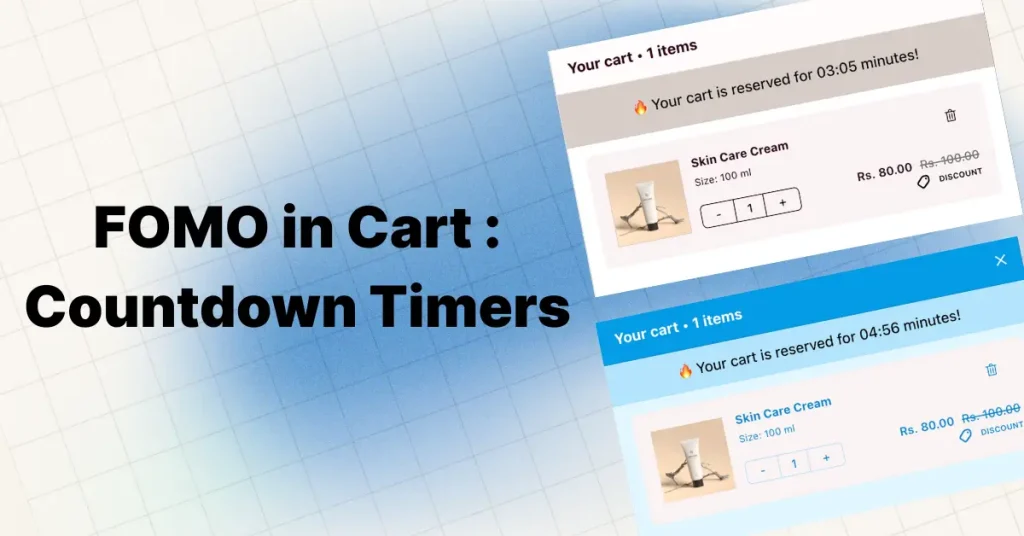
Quick Answer: A FOMO countdown timer (FOMO timer) is a ticking clock that counts down to a real deadline, like a sale ending, so shoppers decide now. As a cart timer it works best inside the cart drawer, just above the checkout button, set to 10–30 minutes. Keep it honest: the FTC names fake countdown timers a deceptive dark pattern.
Key Takeaways
- Placement beats design: a timer in the cart drawer, right above the checkout button, sits at the actual buy-or-leave moment.
- Length: 10 to 30 minutes for a cart timer; under 5 feels manipulative, over 60 does nothing.
- Honesty is the law: the FTC's 2022 dark-patterns report names fake countdown timers as deceptive. Tie every timer to a real deadline.
- Shopify does not reserve stock in the cart. A "your cart is reserved" message is only true if your app actually holds or releases something at zero. Details below.
- Measure it honestly: compare timer-on vs timer-off windows on conversion rate and return rate.
You see "Only 3 left!" while shopping online. Your heart rate spikes. You click "Buy Now" before a second thought crosses your mind.
That reaction has a name: FOMO, the Fear of Missing Out. It is one of the most studied and effective conversion rate optimization (CRO) tactics in ecommerce, and when applied honestly, it is also one of the few that genuinely benefits both the merchant and the shopper.
But here is the mistake most Shopify merchants make: they slap countdown timers on product pages, where shoppers scroll past them and forget by the time they reach checkout. The timer fires before the decision moment.
The fix is simple. Put the countdown timer in the cart, right inside the cart drawer or cart page where the actual buy-or-leave decision happens. That single placement change is the difference between a timer that decorates your store and one that moves revenue.
This guide covers the psychology, Baymard's latest cart-abandonment reasons, the four timer types, real brand examples and copy you can reuse, cart timer vs checkout timer on Shopify, mobile-first implementation, FTC compliance, and the Shopify cart timer apps that actually work inside the cart drawer, with ratings and prices checked on October 11, 2026.
What Is a FOMO Cart Countdown Timer?
A FOMO cart countdown timer is a visible, real-time clock displayed inside a shopper's cart that counts down to a specific event: a discount expiring, a cart reservation ending, a flash sale closing, or stock running out. It works by tying an emotional cost (losing something) to inaction.
The mechanism is loss aversion, the most cited finding in behavioral economics. In their landmark 1979 paper in Econometrica, Daniel Kahneman and Amos Tversky proposed prospect theory and showed that people weigh losses roughly twice as heavily as equivalent gains. That paper is today the most cited paper in economics, and the core finding has been replicated globally, including a 19-country 2020 replication published in Nature Human Behaviour.
A countdown timer turns an abstract decision ("should I buy this?") into a concrete loss frame ("am I about to lose this deal?"). The brain answers the second question faster, and almost always more decisively, than the first.
Why Cart Abandonment Happens in 2026 (Latest Data)
Before deploying any urgency tactic, you need to understand what you are actually fighting.
According to the Baymard Institute's 2025 meta-analysis of 50 independent studies, the average global cart abandonment rate is 70.22%. That means 7 out of every 10 shoppers who add something to their cart leave without buying.
Mobile usually converts worse than desktop, and most Shopify stores now get the majority of their sessions on phones, so mobile is where most of your abandonment happens. (Many articles quote a precise "85% mobile abandonment" figure; we could not trace one to a current public study, so we do not repeat it.)
Baymard's current reasons data (updated September 22, 2025) lists why US shoppers abandon. 42% were "just browsing / not ready to buy." Excluding them, the top reasons are:
- Extra costs too high (40%): Shipping, taxes, and fees.
- Delivery was too slow (20%).
- Didn't trust the site with credit card information (19%).
- Site wanted me to create an account (18%).
- Too long or complicated checkout (17%).
Source: Baymard Institute, cart abandonment rate statistics. None of these is "no timer." That is the honest framing: a timer does not fix cost or trust problems (fix those with a free shipping bar and trust badges in the cart drawer). It works on the indecision hiding inside that 42% "not ready to buy" group. For the fixes that address the other reasons, see our roundup of Shopify apps that reduce cart abandonment.
Baymard estimates $260 billion in lost orders across the US and EU is recoverable through better checkout design and UX, including urgency tactics applied honestly. A cart countdown timer does not fix shipping costs or trust issues, but it does directly address the silent killer those numbers don't show: indecision. Most "abandoned" carts are not actively rejected. They are simply postponed forever.
The Psychology Behind Cart Timers
Three behavioral mechanisms are doing the actual work when a timer appears in a shopper's cart.
1. Loss aversion (Kahneman & Tversky)
As above: losses feel about twice as heavy as equivalent gains. A ticking timer reframes "save 20%" (gain) as "you are about to lose 20%" (loss). Same offer, different psychological weight.
2. Urgency bias and decision fatigue
By the time a shopper reaches their cart, especially in the evening, they have already made hundreds of small decisions. Cognitive resources are depleted. An open-ended question ("should I buy this or wait?") triggers analysis paralysis. A timer collapses the question into a binary: "buy now or lose the deal."
This pairs with the famous Iyengar and Lepper (2000) jam study, where shoppers facing 24 jam varieties bought far less often (around 3%) than shoppers facing only 6 (around 30%). Less to evaluate, more action. A timer shrinks the decision space the same way.
3. Anchoring
Without a timer, the customer's mental purchase timeline is vague ("maybe later this week"). A visible "14:32 remaining" replaces that fuzzy anchor with a precise one. Every thought after that gets evaluated against the new deadline, not the old indefinite one.
A note on intensity: Gal and Rucker's 2018 review in the Journal of Consumer Psychology showed the famous "2x" loss-aversion ratio is context-dependent, not a universal constant. The principle holds, but you should not expect every timer to double conversions. Expect a modest effect during real promotional windows, and measure it on your own store.
The 4 Types of Countdown Timers (And When to Use Each)
| Timer Type | How It Works | Best For | Example |
|---|---|---|---|
| Evergreen (per-user) | Starts when an individual visitor lands or adds to cart; tracked via session cookie | Always-on promotions, cart reservation holds, email funnels | "Your cart is reserved for 14:58" |
| Fixed-date (global) | Counts down to a universal deadline shared by all visitors | Black Friday, product launches, real flash sales | "Sale ends Nov 29, 23:59 — 6h 42m left" |
| Looping (recurring) | Resets daily/weekly/monthly on a schedule | Daily deal sites, rotating offers | "Today's deal ends in 8:42:15" |
| Stock-based | Shows real inventory count, often paired with a time reservation | Limited editions, genuine low stock | "Only 2 left, cart held 14:07" |
Be careful with looping timers. If your "limited time" offer resets every 24 hours and customers notice, you have manufactured fake urgency, which the FTC has specifically called a dark pattern (more on this below).
How a Cart Timer Actually Reduces Abandonment
Airlines, hotels, and Ticketmaster have used cart reservation timers for decades. Ecommerce is finally catching up. When customers see a countdown in their cart drawer, four shifts happen:
- Faster decision-making. The timer interrupts tab-switching and comparison shopping. Shoppers stop bouncing to competitor sites and focus on the cart in front of them.
- Higher perceived value. Scarcity heuristics make the exact same offer feel more valuable when there is a visible deadline on it.
- Less overthinking. "Should I really buy this?" becomes "do I want to lose this?" The brain answers the second question faster.
- Clarity replaces ambiguity. "Sale ends soon" is noise. "Expires in 14:32" is a deadline customers can act on.
How big is the effect? You will find plenty of "timers lift conversion 8 to 25 percent" and single-brand "40% more orders on Black Friday" claims online, mostly published by timer-app vendors, and we could not trace them to a sample size or a control group. The honest answer: the effect is largest when the deadline is real, the discount is meaningful, and the timer sits in the cart. Run your own timer-on vs timer-off comparison (framework below) before you trust anyone's percentage, including ours.
Does a Shopify Cart Timer Actually Reserve Stock?
This is the question almost no timer guide answers, and it decides whether your timer is honest. Shopify does not reserve inventory when a product is added to the cart. Stock is committed when the order is placed, so two shoppers can hold the last unit in their carts at the same time, and whoever pays first gets it.
That means a message like "Your cart is reserved for 15:00" is only true if something real happens at zero. Your options:
- Tie the timer to the price, not the stock. "Your 15% off expires in 14:32" is honest if the discount really comes off when the clock hits zero. This is the cleanest option for most stores.
- Use an app that acts at zero. Some cart timer apps empty the cart or remove the discount when the timer ends (Scarcity.AI's listing, for example, says its cart timer empties the cart at zero). That makes the deadline real, even though Shopify itself is not holding stock.
- Say "held" only if it is. If nothing happens at zero, drop the word "reserved" and use a real sale deadline instead.
The same logic applies to "Only 3 left" badges: show them only when they read your actual inventory count.
Where to Place Your Timer: Location Beats Design
Timer design matters far less than timer location. A boring timer in the right place beats a beautiful timer in the wrong place every time.
| Placement | Our rating | Why |
|---|---|---|
| Cart drawer / side cart | ★★★★★ Highest | The exact decision moment, right next to the checkout button. |
| Abandoned cart email | ★★★★☆ High | A GIF timer can carry a real offer deadline into the inbox, where the shopper has already left the cart. |
| Cart page | ★★★★☆ High | Same decision moment as cart drawer, slightly lower visibility. |
| Product page | ★★★☆☆ Moderate | Builds initial urgency but often forgotten by checkout. |
| Announcement bar | ★★★☆☆ Moderate | Good for sale awareness, weak at the decision point. |
| Exit-intent popup | ★★★☆☆ Moderate | Catches leavers, but feels intrusive if overused. |
| Homepage banner | ★★☆☆☆ Low | Awareness only, far from the decision. |
| Checkout page | ★★☆☆☆ Low | Too late. Most abandonment happens before checkout. |
The stars are our editorial judgment of how close each spot sits to the buy-or-leave decision. They are not measured conversion results, so test them on your own store.
The best combination: an announcement bar timer for sitewide awareness ("Spring Sale ends Sunday"), paired with a cart drawer timer for conversion pressure at the moment of decision ("Your 15% off expires in 15:00"). We compare the two bar placements in cart drawer announcement bar vs sitewide bar.
Cart timer vs checkout timer: can you add a countdown to Shopify checkout?
People search for both, and on Shopify they are different builds. A cart timer lives in your theme (cart drawer or cart page), so any app or theme code can add one on any plan. A checkout timer would have to live inside Shopify's checkout, which themes cannot touch: on the information, shipping and payment steps, custom content requires checkout UI extensions, which are Shopify Plus only. App pricing reflects this: Scarcity.AI's listing, for example, puts its checkout-page scarcity message on a separate Plus plan ($12.99/month, checked October 11, 2026). On other plans, apps that advertise a "checkout timer" usually mean a timer shown just before checkout, in the cart or drawer. That is also where it works best, because most abandonment happens before the shopper ever reaches checkout.
12 Real-World Cart Timer Examples From Big Brands
These are recognizable patterns from large sites that you can model. We re-checked one (Ticketmaster, against its help centre on 11 October 2026); the quoted timer wording for the others illustrates the pattern rather than being a verbatim capture, and brands change their sites often.
- Amazon Lightning Deals. Time-remaining countdown + "% claimed" progress bar. Time scarcity plus quantity scarcity in one widget.
- Booking.com. "We're holding this price for 14:23." Evergreen timer that starts on listing view, tied to the shopper's session.
- Airlines (United, Delta, Southwest). "Your selected seats are held for 20:00." Pioneered the cart reservation timer. Maps 1:1 to ecommerce cart timers.
- Ticketmaster. Fixed-date countdowns before on-sale, then a hold timer on every checkout page. Its help centre says the held tickets are released to other fans when time runs out and that the length is set according to ticket demand, so it varies by event and time of day; the article gives no fixed number of minutes.
- Fashion Nova. Weekend flash sales with announcement-bar timers and aggressive 40–60% off discounts.
- Gymshark. Sitewide countdown bar during semi-annual sales plus low-stock flags on individual products.
- ColourPop. Timers on limited-edition launches with "selling fast" and stock counters. The scarcity is verifiable, which builds trust.
- Best Buy Deal of the Day. 24-hour fixed-date timer that resets daily with a new featured product.
- ASOS. End-of-season sale countdowns in the announcement bar across every page.
- Forever 21. GIF-based timers inside abandoned cart emails, alongside a limited-time discount code.
- Kylie Cosmetics. Pre-launch homepage timers, then stock-quantity countdowns once products go live.
- Shopify stores. Show a deadline directly inside the slide-out cart drawer with a cart drawer or cart-timer app. If the message says "reserved," make sure something really happens at zero (see does a cart timer reserve stock?).
What should a cart timer say? Copy examples you can reuse
A good cart timer message names the offer, shows the time left, and only promises what really happens at zero. Use these as starting points:
| Situation | Timer copy | What must be true at zero |
|---|---|---|
| Flash sale with a code | "Your 20% off expires in 14:32" | The discount is removed from the cart |
| Store-wide fixed deadline | "Sale ends tonight at 11:59 PM ET: 3h 12m left" | Prices return to full price for everyone |
| Genuinely low stock | "Only 2 left in size M" | The count reads your live inventory |
| Cart timer that clears the cart | "Check out within 15:00 or your cart will be cleared" | The app really empties the cart |
| Shipping cut-off | "Order in 2h 05m for same-day dispatch" | Your warehouse really ships same day before the cut-off |
| Free-gift window | "Add $15 in the next 10:00 to unlock a free mini" | The gift offer really ends |
Timer Strategy by Funnel Stage
Most stores only run timers at the bottom of the funnel. The stores winning at this run a layered system.
| Funnel Stage | Timer Type | Example | Goal |
|---|---|---|---|
| Awareness | Fixed-date homepage timer | "Spring Sale starts in 3 days, get early access" | Build anticipation, capture emails |
| Consideration | Product page timer + stock counter | "20% off, ends in 2h 14m, only 5 left" | Convert browse to add-to-cart |
| Decision | Cart drawer evergreen timer | "Cart reserved for 15:00, complete checkout to keep discount" | Convert cart to purchase |
| Retention | Email timer for next purchase | "Add matching accessories in 24h for 15% off" | Increase LTV |
Timer Duration by Sale Type
| Sale Type | Cart Timer Duration | Notes |
|---|---|---|
| Flash sale (2–4 hours) | 10–15 minutes | Aggressive, paired with 30–50% off |
| Daily deal (24 hours) | 20–30 minutes | Resets if customer returns the same day |
| Seasonal sale (3–7 days) | 15–20 minutes | Layered with the sitewide sale deadline |
| Limited stock | 15 minutes | Paired with real stock counter |
| BFCM | 10–15 minutes | Heaviest urgency, real deadlines only |
These ranges are our working rules of thumb, not measured results; the A/B framework below shows how to test them on your own store.
Hard rule: under 5 minutes feels manipulative and doesn't give buyers time to enter payment info. Over 60 minutes is functionally no timer at all.
Industry-Specific Strategy
Fashion and apparel. Shorter timers (10–15 min). Pair with size-specific low stock ("Only 2 left in size M"). Match timer visual to brand: minimalist for premium, bold for streetwear.
Electronics and tech. Longer timers (20–30 min). These shoppers compare specs across tabs, so don't rush them. Combine with price-match guarantees so urgency doesn't trigger price-anxiety.
Beauty and cosmetics. Medium timers (15–20 min). High impulse category. Pair with free-gift unlock thresholds ("Add $15 more in the next 10 minutes for a free mini").
Health and wellness. Use timers sparingly. Customers are skeptical of urgency in this category. Stick to honest seasonal/launch windows.
Mobile vs Desktop: Treat These as Different Channels
With most Shopify sessions on phones, your mobile timer experience is the more important one.
Mobile best practices:
- Position the timer directly above the checkout button (highest-visibility area on a phone cart screen).
- Use compact, readable fonts (14–16px minimum).
- Keep messaging short: "Expires in 12:34" beats "Your exclusive limited-time discount will expire in:".
- Make sure the timer does not push the checkout button below the fold. On mobile, every pixel of vertical space is conversion.
- Keep the timer light. Google's 2016 mobile research found 53% of mobile visits were abandoned when a page took longer than 3 seconds to load, and Shopify's enforced performance rule for apps is that an app may not lower your storefront's Lighthouse performance score by more than 10 points (Shopify's performance requirements, checked 11 October 2026). Run Lighthouse on your cart with the timer on and off.
Desktop best practices:
- Place timer at the top of the cart drawer.
- Larger font (18–22px).
- Add explanatory text: "Your discount expires in:".
Touch target rule: Apple Human Interface Guidelines (44×44 pt) and Google Material Design (48×48 dp) both require minimum touch target sizes. Keep that much clearance around your checkout button so the timer never overlaps with the buy CTA. Test on real iPhones and Pixels, not just browser emulators.
Cart Timers in Abandoned Cart Emails
Your timer strategy shouldn't end at your site. Abandoned cart emails are the natural home for a deadline, because the offer in the email can genuinely expire. A GIF countdown in the email only makes sense if the code or price it points to really ends when the clock hits zero.
Email timer rules:
- First email goes out within 1 hour of abandonment (purchase intent peaks there).
- Use a GIF countdown showing real time left on the offer.
- Show clear product images of what they left.
- Subject line: "Your cart is waiting, 2 hours left for 15% off."
- Follow up at 24 hours with stronger urgency.
Email clients do not run JavaScript, so an email timer is a GIF that renders the clock when the email is opened. Tools: Sendtric and Mailtimers generate standalone GIF timers you can embed in most email platforms, and some email platforms offer their own countdown blocks.
FTC Compliance and FOMO Ethics: This Is Not Optional in 2026
Before you build anything, read this section. Getting this wrong is now a legal risk, not just a brand-trust risk.
The FTC's September 2022 report "Bringing Dark Patterns to Light" explicitly named fake countdown timers as a deceptive design pattern. The FTC's enforcement authority comes from Section 5 of the FTC Act, which prohibits "unfair or deceptive acts or practices." That means any timer that creates a false impression of urgency can be enforced against, in theory and increasingly in practice.
If you sell to UK shoppers, the rules changed in April 2025. The unfair-commercial-practices rules now sit in the Digital Markets, Competition and Consumers Act 2024, which replaced the Consumer Protection from Unfair Trading Regulations 2008, and the CMA can now decide breaches itself and fine up to 10% of global turnover (CMA announcement, 7 April 2025). The CMA's guidance (CMA207) uses this as an example of a banned practice: telling a shopper an offer will end when a countdown clock runs out, when it does not actually end. EU consumer law (the Unfair Commercial Practices Directive), Australia's ACCC and several other regulators have parallel rules, so check the ones where you sell.
Specifically prohibited:
- Timers that reset every page load while still claiming "limited time."
- "Only X left" badges when actual inventory is unlimited.
- "Sale ends midnight" messaging when the same sale runs every day.
- "One-time offer" codes that work every visit.
Safe to use:
- Timers tied to a real, externally verifiable deadline (Black Friday, product launch, end-of-season sale).
- Cart reservation timers that genuinely release inventory back to stock on expiry.
- Stock counters that reflect actual current inventory.
Beyond legal risk, fake urgency erodes repeat purchase rates fast once customers spot it. The pattern is: new-customer conversion holds up for a while, then repeat customers learn your timers don't mean anything and start waiting for the "next" deadline. Once shoppers screenshot a reset timer, it tends to travel.
The simple test: if your countdown timer is telling the truth, it is FTC-compliant and trust-building. If it isn't, fix it or remove it.
What Makes a Cart Timer Actually Work
Six characteristics separate timers that lift revenue from timers that decorate your store:
- Visible without being a billboard. Contrasting brand colors, no flashing animations, no exclamation-mark spam.
- Honest deadline tied to a real event. Black Friday timer ends at midnight on Black Friday. Period.
- Reasonable timeframe. 10–30 minutes for cart reservations. Not 3, not 120.
- Mobile-first design. Above the checkout button, doesn't push CTAs below fold.
- Simple, specific copy. "Expires in 12:34" beats "act now!!!"
- Progressive visual urgency. Subtle color shift from neutral to red in the last 2 minutes, no panic animations.
Common Mistakes That Kill Cart Timer Effectiveness
- Under 5 minutes. Reads as pressure-selling. Buyers need time to enter payment info.
- Over 60 minutes. Customers leave, get distracted, forget.
- Running 24/7 on every page. Trains customers to ignore them.
- Resetting fake timers. Already covered, but worth repeating: legal risk plus trust collapse.
- Mobile timer that overlaps checkout button. Worse than no timer.
- No follow-up when carts expire. An abandoned cart email that honestly says the offer has ended (or gives one final, real deadline) recovers some of the orders the timer did not.
Accessibility: The WCAG 2.1 Standard Almost No One Talks About
This matters legally (ADA exposure in the US, EAA in the EU) and ethically.
- Screen reader support. Use
aria-live="polite"so screen readers announce the timer without interrupting the user. Never usearia-live="assertive"on a per-second timer, it makes the page unusable. - Color contrast. Timer text must meet WCAG 2.1 AA: minimum 4.5:1 ratio for normal text. Run your colors through a contrast checker. Red on dark backgrounds is a common failure.
- Motion sensitivity. Respect
prefers-reduced-motion. Users with vestibular disorders need a static or minimally animated timer. - Cognitive accessibility. WCAG 2.1 guideline 2.2.1 (Timing Adjustable) recommends warning users before time expires and offering an extension. Under-5-minute timers can be actively harmful here.
A/B Testing Framework for Cart Timers
Don't guess what works for your audience. Test:
- Duration: 10-minute vs 20-minute cart timer on a flash sale.
- Placement: Top of drawer vs above checkout button.
- Color treatment: Brand-color vs red.
- Copy: "Expires in 12:34" vs "Complete checkout in 12:34 to keep your 25% off."
Run each test for 200–400 cart sessions per variation before drawing conclusions. Track conversion rate, AOV, revenue per visitor, cart-to-purchase time, and return rates together. A timer that lifts conversions but also lifts returns is a net negative.
Best Shopify Cart Timer Apps Compared (Checked October 11, 2026)
If you are on Shopify, here is how the main cart-timer apps compare. Most "countdown timer" apps only work on product pages or announcement bars; only some genuinely live inside the cart drawer. Ratings, review counts, plans, prices and Built for Shopify badges were read off each app's Shopify App Store listing on October 11, 2026. Disclosure: the first two are our apps.
| App | Rating (reviews) | Cart drawer support | Free plan / entry price | Built for Shopify | Best for | Skip it if |
|---|---|---|---|---|---|---|
| Oxify Cart Drawer & Upsells (our app) | 4.9 (40) | ✅ Urgency timer built into the cart drawer's announcement bar | No free plan; 14-day free trial, then $9.99/mo up to 100 orders/month | Yes | All-in-one slide cart with timer + upsells + free gifts in one app | You only need a timer and want to keep your current cart drawer; price rises with order volume |
| Oxify Countdown Timer Bar (our app) | 5.0 (4) | Timer bar, announcement bar and FOMO popup; listing names product, cart and drawer placements | Free | No | A free sitewide sale-deadline bar alongside your existing cart | You want a long review track record: it has 4 reviews |
| Essential Countdown Timer Bar | 5.0 (1,730) | Cart timers on the Essential plan; check placement on your theme | Free plan (1,000 timer views/mo, product page and top-bar timers); cart timers from $9.99/mo | No | Largest review base in this table, broad placement options | You need a free cart timer: cart timers start on the paid Essential plan |
| ET Cart Timer | 4.9 (87) | ✅ Cart page and side cart, with a reserve message | Yes; Premium $5.95/mo | No | Dedicated cart timer with a customizable expiry action | You also want sitewide sale bars or popups; it focuses on the cart |
| Scarcity.AI: Countdown Timer | 4.7 (31) | ✅ Cart timer; listing says the cart is emptied at zero | No (free on development stores only); $4.99/mo, 7-day free trial | Yes | Timers that actually do something at expiry, holiday presets | You need a free plan on a live store, or emptying carts would frustrate your shoppers |
| Hextom: Countdown Timer Bar | 4.9 (766) | Announcement-style timer bar | Yes; Premium $9.99/mo | Yes | Sitewide sale-deadline bars; recurring, daily and weekly timers on Premium | You need the timer inside the cart drawer itself |
Naming notes, because older guides (including earlier editions of this one) get them wrong: our dedicated timer's listing is now called Oxify Countdown Timer Bar, the scarcity cart-timer is listed as Scarcity.AI: Countdown Timer, and ET's cart timer is listed as ET Cart Timer (its description still says "ET Countdown Cart Timer"). Updates since our September edition: Scarcity.AI's free tier is for development stores only, and Essential Countdown Timer Bar's cart timers start on its paid Essential plan. "Cart drawer support" reflects what each listing describes; always test on your own theme during the trial, because drawer compatibility is theme-specific.
Also checked: if you were looking for the app named FOMO ‑ Countdown Timer Pro, its App Store page says it is not currently available (October 11, 2026). RushCart: Cart Countdown Timer is free and lists cart page and cart drawer timers that clear or extend the cart at zero, but it had no reviews yet, so we left it out of the table.
Key questions when choosing:
- Does it actually run in the cart drawer, not just on the cart page? These are different placements.
- Can you customize the design to match your brand without coding?
- What is the page-weight impact?
- What happens at expiry: discount removed, cart cleared, redirect?
- Does it support honest fixed-date timers, or only evergreen ones that risk dark-pattern territory?
If you want an all-in-one cart solution: Oxify Cart Drawer & Upsells (our app) has the urgency timer built directly into the slide-out cart, alongside upsells, FBT recommendations, free gifts, and free-shipping bars. Timer, recommendations, and checkout button all live in the same visible area, which shortens the distance between urgency signal and buy action.
If you want a dedicated timer app: Oxify Countdown Timer Bar (our app) is free and adds a countdown bar, announcement bar or FOMO popup, with fixed-date, evergreen, daily and session timers. It works well when you already have a cart drawer and want the deadline visible across the rest of your store. More on the Shopify countdown timer page. If review count matters most to you, Essential Countdown Timer Bar and Hextom have hundreds to thousands more reviews; if you want a timer that acts on the cart at zero, ET Cart Timer or Scarcity.AI is the more specialized pick.
When NOT to Use a Cart Countdown Timer
Timers are wrong for some stores and some situations.
- Everyday essentials. Paper towels, toothpaste, detergent. Use subscribe-and-save instead.
- Luxury and premium brands. A timer on a $2,000 bag reads as desperation. Use waitlists and invite-only access instead.
- No real deadline. If there is no sale, no real low stock, no actual flash window, skip the timer. Consider a "soft cart lock" message like "We've held your price for 30 minutes" that creates psychological comfort without manufacturing urgency.
- Checkout conversion already above 80%. You're near the ceiling. Focus on AOV growth (upsells, bundles) instead.
- Brand-new store still building trust. Fix product quality, transparent pricing, and reviews first. Add timers after you have a baseline of credibility.
The diagnostic question: is there a real reason for urgency right now? If no, don't manufacture one.
How to Measure Cart Timer Success
Track these weekly during every timer-enabled promotion:
- Cart abandonment rate — primary indicator.
- Conversion rate — purchases ÷ visitors.
- Average order value (AOV) — timers sometimes lift AOV as shoppers maximize a limited-time deal.
- Revenue per visitor (RPV) — captures both conversion rate and AOV in one metric.
- Cart-to-purchase time — should measurably shorten with a timer running.
- Return rate and CSAT — if conversions rise but returns and complaints also rise, the net is negative.
Compare 2–4 weeks of timer-on vs timer-off data during similar promotional windows. There is no universal "good" lift to aim for; what counts is whether revenue per visitor rose without return rate or complaints rising with it.
How to Add a Countdown Timer to Your Shopify Cart (7 Steps)
- Plan the sale first. Real dates, real discount, real products. Timer follows reality, not the other way around.
- Install a cart-timer app. Pick from the comparison table above. If you want timer + upsells + free gifts together, install Oxify Cart Drawer & Upsells. If you only want a sale-deadline bar, install Oxify Countdown Timer Bar (free), or use a dedicated cart timer from the table above.
- Configure the timer. 10–20 minutes for flash sales, 20–30 for longer promotions. Brand colors, simple copy.
- Test on real devices. Run a test purchase on your phone, tablet, and desktop. Confirm the timer renders, doesn't break checkout, and the expiry action works.
- Launch with the sale. Don't run timers between promotions.
- Measure for 2–4 weeks. Compare to the equivalent non-timer period.
- Iterate. Adjust duration, placement, and copy based on what the data says. Don't guess.
Start with a single weekend flash sale. Measure. Then expand from there.