Seven out of every ten shoppers who add a product to their cart on your Shopify store will leave without buying. That is not speculation. The aggregated data from 50+ studies puts the global average cart abandonment rate at 70.19%, and Shopify stores specifically fall in the 67–72% range.
But here is what most guides miss: the biggest revenue leak is not at checkout. It happens between the cart and checkout. Roughly 50–60% of shoppers who add items to their Shopify cart never even start the checkout process. You cannot email these people. You cannot SMS them. They are gone before you ever capture their contact information.
This is exactly where a Shopify cart drawer changes the equation.
A cart drawer (also called a slide cart, side cart, or mini-cart) is a slide-out panel that opens the moment a shopper adds a product. No page redirect. No momentum lost. The shopper reviews their items, sees the total cost, applies a discount code, and moves to checkout without ever leaving the page they were browsing.
Our analysis of 20,000+ Shopify stores shows that stores using optimized cart drawers see a 3.2X revenue multiplier before checkout, compared to 2.2X for standard cart pages. Merchants consistently report 10–25% improvements in their cart-to-checkout conversion rate after switching.
This guide focuses entirely on how a cart drawer prevents cart abandonment at the source. Not generic recovery tips you have read a dozen times, the actual mechanics of why shoppers leave at the cart stage and how a well-built slide cart intercepts each of those reasons in real time.
1. Why the Cart-to-Checkout Gap Is Your Real Problem
Most Shopify merchants obsess over checkout abandonment when they should be focused on cart abandonment, the moment shoppers leave before checkout even begins.
Here is why. The real ecommerce purchase funnel looks like this for an average Shopify store:
- 1,000 visitors land on your store
- 750 view at least one product page (75%)
- 46 add something to their cart (roughly 4.6% add-to-cart rate)
- 18–23 begin the checkout process
- 13 complete the purchase
Look at the drop between “add to cart” and “begin checkout.” You lose 50–60% of interested shoppers right there, before checkout ever starts. And because these shoppers never entered their email address, Shopify’s built-in abandoned checkout recovery cannot reach them. No automated recovery email will save you here.
This is the gap a cart drawer is designed to close. It keeps the shopper engaged immediately after the add-to-cart action. Instead of redirecting them to a separate /cart page (where they lose momentum, get distracted, or start second-guessing), the cart drawer slides open right where they are. The path from “I want this” to “I’m buying this” stays unbroken.
That 50–60% drop is where the real cart abandonment revenue loss sits. Not at checkout optimization. Not in email sequences. In preventing the exit before checkout even begins.
2. Abandoned Cart vs Abandoned Checkout: Why This Changes Your Strategy
These are not the same thing, and confusing them leads to the wrong investments.
Abandoned cart means the shopper added items but left before starting checkout. They never entered their email, phone number, or shipping details. You have no way to contact them directly. Shopify does not track these as “abandoned checkouts” in your admin because no checkout session was ever created.
Abandoned checkout means the shopper entered the checkout flow and provided at least their email address, but did not complete payment. Shopify flags these as abandoned after 10 minutes of inactivity and can send automated recovery emails.
The strategic difference is this: abandoned checkouts are recoverable through email, SMS, and retargeting. Abandoned carts are only preventable. Once someone closes the tab without reaching checkout, your only options are exit-intent popups (if you caught them in time), web push notifications (if they opted in), or paid retargeting ads. All of these are more expensive and less effective than preventing the abandonment in the first place.
A cart drawer is a cart abandonment prevention tool. It works at the cart stage, before checkout, which is precisely where recovery tools cannot reach.
3. The 8 Reasons Shoppers Abandon Carts (And Which Ones a Cart Drawer Fixes)
Survey data from large-scale ecommerce usability research (excluding the 43% who were “just browsing”) identifies these reasons for cart abandonment among shoppers who had genuine purchase intent:
#1. Extra costs too high: 48% Shipping fees, taxes, and handling charges that appear at checkout create sticker shock. Nearly half of all intent-based abandonments happen because the final price was higher than expected.
Cart drawer fix: Direct. Show estimated total, taxes, and shipping inside the drawer before checkout.
#2. Required account creation: 26% Forcing account creation adds friction that kills impulse purchases.
Cart drawer fix: Direct. Lead straight to checkout with express payment buttons (Shop Pay, Apple Pay, Google Pay) that skip account creation entirely.
#3. Do not trust the site: 25% Shoppers will not enter payment details on a site that does not look secure.
Cart drawer fix: Direct. Display trust badges, payment method icons, and return policy at the moment of decision.
#4. Delivery too slow: 24% Unclear or long delivery windows cause shoppers to hesitate.
Cart drawer fix: Partial. Show estimated delivery date inside the drawer (“Arrives by March 5”).
#5. Cannot see total cost upfront: 21% Shoppers want the full price early, not after three pages of forms.
Cart drawer fix: Direct. Real-time subtotal that updates as quantities change, plus inline shipping estimates.
#6. Checkout too long or complicated: 18% The average checkout has 23 form elements. The ideal needs only 12–14.
Cart drawer fix: Direct. Zero page redirects. One tap from “Add to Cart” to the checkout button. No loading screens, no intermediate pages.
#7. Website errors or slow loading: 17% Research shows 40% of shoppers leave if a page takes more than 3 seconds.
Cart drawer fix: Direct. A well-built AJAX-powered drawer opens in under 300ms with no page reload.
#8. Not enough payment methods: 13% If a shopper does not see Shop Pay, PayPal, or a Buy Now Pay Later option, they may leave.
Cart drawer fix: Direct. Payment method icons displayed inside the drawer confirm their preferred option is available before they reach checkout.
A cart drawer directly addresses 6 of the top 8 Shopify cart abandonment reasons. No single other optimization, not email recovery, not checkout redesign, not retargeting, covers that many causes simultaneously. That is why prevention at the cart stage matters more than recovery after the fact.
4. What a Shopify Cart Drawer Actually Does Differently
A Shopify cart drawer is a slide-out side panel that appears from the edge of the screen (typically the right) when a shopper clicks “Add to Cart.” The page does not reload. There is no redirect to a /cart URL. The product page or collection page the shopper was browsing stays exactly where it was, with the cart sliding over it.
The technical mechanism behind this is AJAX (Asynchronous JavaScript). The cart sends and receives data from Shopify’s cart API endpoints (/cart/add.js, /cart/update.js, /cart.js) without triggering a full page load. Since Shopify’s May 2025 update, the cart/update.js endpoint also natively supports discount code validation, which means shoppers can apply promo codes inside the drawer without reaching checkout.
Why this matters for cart abandonment: Every page redirect creates what UX researchers call a “decision point.” It is a moment where the shopper’s brain switches from shopping mode to evaluation mode. They see a loading screen and think: Do I really need this? Let me check the price on Amazon first. I should compare reviews. What was I looking for originally? Each of these moments is a cart abandonment trigger.
A cart drawer eliminates that decision point entirely. The shopper stays in browsing mode. The cart feels like a natural extension of the page, not a commitment. This “soft commit” psychology is what separates cart drawers from cart pages in conversion data.
Cart Drawer vs Cart Page: The Data
| Cart Drawer | Cart Page | |
|---|---|---|
| Page reload required | No (AJAX) | Yes |
| Shopper stays on current page | Yes | No |
| Typical open speed | Under 300ms | 1–3 seconds |
| Mobile experience | Full-height panel, app-like | Full page, clunky forms |
| Upsell surface area | High (visible in the drawer) | Limited |
| Psychological effect | Soft commit, keeps browsing momentum | Hard stop, creates evaluation moment |
| Revenue multiplier (20,000+ stores) | 3.2X | 2.2X |
One important nuance: cart drawers excel at keeping casual browsers moving toward checkout, but some high-consideration shoppers (especially for expensive items) prefer to see a full cart page before committing. The highest-performing Shopify stores use a hybrid setup, a drawer for quick adds and momentum, with a “View Full Cart” link for shoppers who want a detailed review. This approach lets each shopper self-select the experience that matches their buying mode.
5. How a Cart Drawer Fights Each Abandonment Trigger
This is the section most cart abandonment guides skip. They list the reasons people abandon their Shopify carts, and they list cart drawer features, but they never connect the two with specifics. Here is the direct mapping between cart abandonment causes and cart drawer solutions.
Fighting Surprise Costs (48% of abandonments)
The single most effective element inside a cart drawer is the free shipping progress bar. When a shopper sees “You’re $15 away from FREE shipping!” the psychology shifts. Shipping cost goes from a frustration to a challenge, something they can control by adding one more item.
The data backs this up. Set the free shipping threshold 15–30% above your current average order value. If your AOV is $55, set the bar at $65–$70. This is high enough to drive incremental revenue but close enough that shoppers feel they are almost there.
Multi-tiered progress bars amplify this effect further. Instead of a single free shipping threshold, stack rewards: free shipping at $50, a free gift at $75, a 10% discount at $100. Each tier visible inside the drawer motivates continued adding. Stores using tiered progress bars report up to 260% revenue lift compared to those without any threshold indicator.
Beyond the progress bar, showing the running subtotal with estimated tax and shipping costs inside the drawer, before checkout, directly addresses the sticker shock that drives cart abandonment. When the shopper already knows the total, there is no “surprise” left at checkout to trigger abandonment.
Fighting Checkout Friction (18% of abandonments)
The average ecommerce checkout involves 23 form elements. A cart drawer reduces the perceived steps to zero. Here is the difference in the shopper’s experience:
Without a cart drawer: Click “Add to Cart” → page redirects to /cart → review cart → click “Checkout” → enter email → enter shipping → enter payment → confirm. That is 4+ distinct page loads and multiple decision points.
With a cart drawer: Click “Add to Cart” → drawer slides open (same page) → tap “Checkout” → enter payment details. One page load. One decision point.
Express checkout buttons inside the drawer (Shop Pay, Apple Pay, Google Pay) reduce this even further. A shopper with Shop Pay configured can go from “Add to Cart” to order confirmation in under 60 seconds, with most of their information auto-filled. These express payment buttons belong inside the drawer, not hidden on the checkout page.
Fighting Distrust (25% of abandonments)
Trust is fragile at the cart stage. The shopper is deciding whether to hand over their credit card to your store. At this exact moment, they are subconsciously scanning for reassurance signals.
Inside a cart drawer, the most effective trust elements are:
- Payment method icons: Visa, Mastercard, PayPal, Shop Pay, Apple Pay, Google Pay logos tell the shopper their preferred payment method works here.
- “Secure Checkout” badge: Simple, but it registers at the subconscious level.
- One-line return policy: “Free returns within 30 days” or “100% money-back guarantee.” Keep it to a single line. The shopper does not need a full policy page, they need a safety net they can see at a glance.
These trust signals take seconds to enable but directly address 25% of all cart abandonment.
Fighting Cost Opacity (21% of abandonments)
A cart drawer with a real-time discount code field solves a problem that most merchants do not even realize they have.
When your drawer has no visible discount code field, shoppers with a promo code from your email campaign or influencer partnership cannot find where to enter it. What happens next is damaging: they either activate a browser coupon extension (like Honey or Capital One Shopping) which may override your code with an affiliate code from a coupon aggregator, or they leave your site entirely to Google “[YourBrand] coupon code” and potentially never return.
Since Shopify’s May 2025 update to cart/update.js, discount codes can be validated natively inside the cart. No workaround needed. A discount field in the drawer with real-time validation (showing strikethrough pricing and the savings amount) keeps the shopper on your site, using the code you intended them to use, and seeing their savings before checkout removes the last cost-related objection.
A smart implementation hides the discount input behind a small text link (“Have a promo code?”) so that shoppers without a code are not triggered into searching for one.
Fighting Mobile Abandonment (78–85% mobile cart abandonment)
Mobile shoppers make up over 60% of all ecommerce traffic, but they experience the highest cart abandonment rates, 15–20 percentage points higher than desktop users. The reasons are structural: smaller screens make forms harder to fill, distractions are one swipe away, and full-page cart redirects feel clunky and slow on mobile connections.
A cart drawer is inherently better on mobile because it feels native. A full-height slide panel with large touch targets, a sticky checkout button that stays visible while scrolling, and no page redirects, this is the same interaction pattern shoppers experience in native apps. It reduces the cognitive gap between “adding to cart” and “buying.”
Touch targets inside the drawer should meet the 44x44px accessibility standard to prevent mis-taps. The discount code input field needs to remain accessible when the mobile keyboard opens (a common bug that causes invisible “Apply” buttons). And the checkout button must be sticky, always visible at the bottom of the drawer regardless of how many items the shopper scrolls through.
Creating Urgency (When It Is Honest)
Urgency elements inside a cart drawer push shoppers from “maybe later” to “buy now.” Countdown timers (“Your cart is reserved for 15 minutes”), low-stock alerts, and limited-time announcement banners are effective when used credibly.
The critical rule: do not fake it. If the timer resets every time someone reopens the drawer, shoppers notice and trust erodes. Countdown timers work best during genuine sales events, for products with genuinely limited stock, or during peak shopping periods like Black Friday where the urgency is real.
Seasonal data supports this. The lowest cart abandonment rates occur during Black Friday and Cyber Monday, when real urgency and real discounts drive immediate action. The highest rates hit during summer months when casual browsing peaks and there is no reason to buy now. A cart drawer with a countdown timer during a genuine sale event recreates that Black Friday psychology on demand.
6. What Makes a High-Converting Cart Drawer: Feature Breakdown
Not all cart drawers are equal. A basic theme drawer that only shows product names and a checkout button captures maybe 10% of the potential. Here is what separates a functional drawer from one that actively drives revenue.
Must-Have Functional Layer
Every cart drawer needs these elements just to work properly:
Product thumbnails with titles and selected variants (size, color, etc.). Quantity controls with clear + and − buttons. A visible “Remove” button for each item. A real-time subtotal that updates instantly when quantities change. A prominent high-contrast “Checkout” button that stays sticky at the bottom. Express payment options (Shop Pay, Apple Pay, Google Pay). A “Continue Shopping” close option so shoppers do not feel trapped.
Without these basics, the drawer creates friction instead of removing it.
Revenue-Driving Layer
These are the features that transform the drawer from a passive holding area into an active conversion and AOV engine:
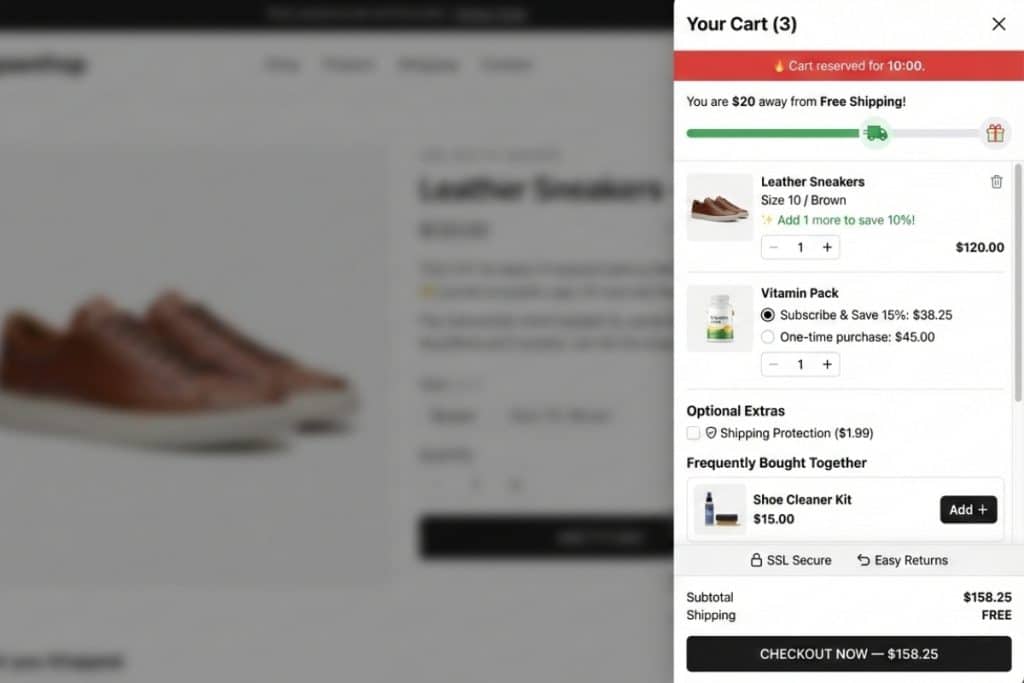
Free shipping progress bar: The highest-ROI single element. Visually shows the shopper how close they are to unlocking free shipping. Multi-tiered versions that stack rewards (free shipping → free gift → discount unlock) significantly outperform single-threshold bars.
Smart upsells and cross-sells: 2–3 relevant product suggestions with one-click add. “Frequently bought together” or “Complete your look” framing outperforms generic “You may also like.” AI-powered recommendations that learn from your catalog and browsing patterns convert significantly better than manually curated suggestions. Critical limit: never show more than 3 upsells. Research shows that more options overwhelm shoppers and can actually increase cart abandonment rather than reduce it.
Free gift rewards: Set rules like “Spend $75, get a free travel pouch.” When the shopper hits the threshold, the gift appears in the drawer automatically with a “FREE” badge. Letting shoppers choose which free gift they want (rather than auto-adding one) increases perceived value and deepens purchase commitment through the act of choosing.
Discount code field with real-time validation: Validates codes against Shopify’s backend in real time. Shows strikethrough pricing and savings amount. Auto-applies codes from email and SMS discount links (e.g., yourstore.com/discount/SUMMER20) when the drawer opens.
Volume discount messaging: “Buy 2, save 10%. Buy 3, save 15%.” Displayed in real time as shoppers adjust quantities. This drives multi-unit purchases directly from the drawer.
Trust signals: Payment icons, secure checkout badge, one-line return policy. Covered in detail in Section 5.
Countdown timer: Strategic urgency tool for sales events and limited-stock products. Covered in detail in Section 5.
Delivery estimate: “Arrives by March 5” near the checkout button. Reduces the uncertainty that causes 24% of abandonments.
Subscription upgrade option: For stores with repeat-purchase products, showing a “Subscribe & Save 15%” toggle inside the drawer turns one-time purchases into recurring revenue. Integrates with subscription apps like ReCharge, Appstle, and Seal.
Add-on services: Gift wrap, shipping protection, and warranty options with one-click toggles. These increase AOV while feeling helpful rather than pushy.
Sticky cart icon: A persistent floating cart button visible on every page. On mobile, this gives shoppers one-tap access to their cart from anywhere in the store. It acts as a constant, gentle reminder that items are waiting.
Design and UX Principles
The drawer must feel fast, clean, and non-intrusive. White space matters, so do not cram every feature into a cramped panel. The checkout button must be sticky (always visible while scrolling). Aim for under 300ms open time and test with Lighthouse or GTmetrix. Build mobile-first with a full-height drawer on phones and a narrower side panel on desktop. Test on actual physical devices, not just browser previews, because real-device behavior (touch targets, keyboard overlap, scroll physics) differs from emulation.
Accessibility is not optional: keyboard navigation, ARIA roles, and focus trapping ensure the drawer works for all shoppers. Beyond being the right thing to do, accessible design often improves usability for all users.
7. Cart Drawer Configuration by Store Type
A fashion store and an electronics store should not configure their cart drawers the same way. Cart abandonment patterns differ by industry, price point, and purchase consideration level, and your cart drawer configuration should reflect those differences.
Fashion & Apparel (68–75% cart abandonment rate)
Fashion shoppers are visual and impulsive. They add items to see how a “cart” looks and often treat the cart as a wishlist. Your cart drawer should lean heavily on visual upsells (“Complete the Look” with styled outfit suggestions), free shipping progress bars (fashion AOVs often sit just below free shipping thresholds), and size/variant confirmation inside the drawer so shoppers do not have to go back to the product page to double-check.
Free gift rewards work exceptionally well in fashion. A “Spend $75, get a free accessory” threshold feels natural because accessories complement the primary purchase. Countdown timers during seasonal sales drive urgency effectively because fashion shoppers understand limited seasonal inventory.
Electronics & Gadgets (72–80% cart abandonment rate)
Electronics shoppers are researchers. They compare across multiple tabs and stores. The cart drawer for electronics should prioritize trust signals heavily (security badges, payment icons, warranty information), show estimated delivery dates prominently (electronics buyers care about when, not just whether), and offer shipping protection add-ons since higher-value items create higher anxiety about damage or loss.
Upsells should focus on accessories and bundles (“Add a case and save 15%”) rather than alternative products. Showing comparison shoppers a volume discount or bundle deal inside the drawer gives them a reason to buy from you now instead of continuing their research elsewhere.
Grocery & Essentials (50–60% cart abandonment rate)
These stores see the lowest cart abandonment rates because purchases are need-driven. Cart drawer configuration should focus on speed above all else, fast open times, minimal visual clutter, and a prominent checkout button. Subscription upgrade options (“Subscribe & Save 10% on weekly delivery”) are highly effective here because the purchase will repeat regardless.
Upsell and cross-sell recommendations should focus on complementary items the shopper may have forgotten (buying pasta? suggest sauce) rather than premium alternatives.
Luxury & High-Ticket (80–85% cart abandonment rate)
High cart abandonment rates in luxury are normal and expected because shoppers need more time to decide. The cart drawer should never use aggressive urgency tactics (countdown timers feel cheap on a $2,000 product). Instead, focus on trust signals (authentication badges, warranty details, secure checkout), a clean and elegant design that matches the brand experience, and a clear “View Full Cart” option that lets the shopper take their time reviewing details on a dedicated page.
Offering financing or installment options (Affirm, Klarna, Shop Pay Installments) inside the cart drawer directly addresses the price hesitation that drives luxury abandonment.
8. The Mobile Abandonment Problem (And Why Cart Drawers Are the Fix)
Mobile drives over 60% of ecommerce traffic but carries a cart abandonment rate of 78–85%, that is 15–20 percentage points higher than desktop. This is where most of your revenue is leaking, and the structural reasons are well-documented.
Small screens make forms painful. Entering shipping addresses and credit card numbers on a 6-inch screen with a virtual keyboard is inherently harder than on a desktop. Every additional form field costs more on mobile than on desktop.
Distractions are one swipe away. A text message, a social media notification, a different app, the mobile environment actively competes for your shopper’s attention. Any pause or friction in the buying flow increases the odds that a notification pulls them away.
Page redirects kill mobile momentum. On desktop, a new tab loads quickly and the shopper barely notices. On mobile, a full page redirect means a loading spinner, a layout shift, and a moment where the shopper’s brain switches from “buying” to “waiting.” That moment is when they leave.
A cart drawer solves all three of these structural issues. There is no page redirect because the drawer slides over the current page in under 300ms. Express checkout buttons (Shop Pay, Apple Pay) skip form entry entirely by using stored payment and shipping information. And the drawer’s persistent, always-available nature means the shopper can return to their cart instantly from any page with a single tap on the sticky cart icon.
For Shopify merchants, reducing mobile cart abandonment through cart drawer optimization is not optional, it is where the majority of your abandoned revenue sits. The specific mobile UX requirements are: full-height drawer that does not leave confusing gaps behind it, touch targets meeting the 44x44px minimum, a sticky checkout button that does not scroll out of view, discount code input fields that remain usable when the keyboard opens, and smooth close/open animations that feel native rather than janky.
9. Behavioral Patterns Inside the Cart Drawer: What Makes Shoppers Stay or Leave
Understanding what happens inside the cart drawer after it opens reveals where cart abandonment actually occurs and which optimizations make the most difference. This is based on behavioral data from our analysis of cart drawer interactions across Shopify stores.
The First 3 Seconds
When the drawer opens, the shopper’s eyes follow a predictable pattern: product image first, then price, then the checkout button. If the subtotal creates sticker shock (higher than expected), the shopper’s next move is almost always to close the drawer. Not to remove items, but to abandon entirely.
This is why showing the running total prominently and transparently (including estimated tax and shipping) is critical. The shopper should never be surprised by the number they see.
The Upsell Decision Window
When upsell recommendations appear in the drawer, the shopper has approximately 5–8 seconds of engagement before scrolling past them. During this window, the recommendation either registers as relevant (“Oh, I do need socks with these shoes”) or irrelevant (“Why are they showing me a hat?”).
AI-powered recommendations that match the actual cart contents outperform generic bestseller suggestions by a significant margin because they pass the relevance test within that 5–8 second window. Manual curation can work for small catalogs, but it cannot scale or adapt to each individual cart composition.
The Discount Code Moment
When a shopper applies a discount code and sees the savings reflected in real time (strikethrough on old price, new total highlighted), this is the moment of highest purchase intent in the entire cart drawer experience. The shopper just saved money. They feel good. They are psychologically primed to click “Checkout.”
This is also the ideal moment to display an upsell suggestion, “You saved $12. Add matching earrings for just $8 more.” The “saved money” psychology creates receptivity to one more add that is still cheaper than their savings.
Cart Drawer Open-Close Cycling
Some shoppers repeatedly open and close the cart drawer without proceeding to checkout. This is a strong signal of indecision. They want the product but something is holding them back. Common causes: uncertainty about size/variant, shipping cost concerns, or comparing your price against a competitor.
Smart interventions at this point include: showing a reassurance message after the second open (“Still deciding? This item has a 30-day free return policy”), triggering a small discount nudge after the third open, or offering a “Save for Later” option that captures their email in exchange for holding the cart. These interventions work because they address the indecision rather than ignoring it.
10. How to Set Up a Cart Drawer on Shopify
Option 1: Your Theme’s Built-In Drawer (Free, Basic)
Most Shopify 2.0 themes (Dawn, Sense, Craft, and others) include a basic cart drawer. Go to Online Store → Themes → Customize, open Theme Settings, find the Cart section, and select “Drawer” as the cart type. Customize colors and button text, save, and test on both desktop and mobile.
This gives you a functional AJAX cart drawer, but with no upsells, no progress bars, no free gifts, no discount code field, no trust badges, and no analytics. It is better than a full cart page redirect, but it captures only a fraction of the potential.
Option 2: Install a Full-Featured Cart Drawer App (Recommended)
For the complete optimization, a dedicated cart drawer app like Oxify Cart Drawer adds every feature discussed in this guide:
Step 1: Install and Activate. Install from the Shopify App Store. Oxify activates automatically with any Online Store 2.0 theme. No code, no theme edits, no developer. Setup takes under 2 minutes.
Step 2: Configure the Free Shipping Progress Bar. In the Oxify dashboard, set your free shipping threshold at 15–30% above your current AOV. If your AOV is $55, set it at $65–$70. Add additional tiers for stacked rewards: free shipping at $65, free gift at $85, discount unlock at $100.
Step 3: Enable Smart Upsells. Choose between AI-powered recommendations (which analyze your catalog and each shopper’s behavior) or manually curated products. Set 2–3 product suggestions per cart.
Step 4: Set Up Free Gift Rewards. Define spending thresholds and select gift products. Choose auto-add (gift appears automatically) or manual selection (shopper picks from a menu of options).
Step 5: Add the Discount Code Field. Toggle on the discount code input. Oxify validates codes in real time against Shopify’s backend and shows savings with strikethrough pricing. Codes from email links auto-apply when the drawer opens.
Step 6: Enable Trust Signals. Toggle on payment icons, “Secure Checkout” badge, and your return policy one-liner. Takes seconds.
Step 7: Configure Urgency Elements. Set up the countdown timer for use during sales events or for limited-stock products. Add low-stock alerts where relevant.
Step 8: Activate the Sticky Cart Icon. Enable the persistent cart button so shoppers always have one-tap drawer access from any page.
Step 9: Test on Real Devices. Open your store on a real iPhone and a real Android phone. Test adding products, opening the drawer, applying a discount code, and proceeding to checkout. Verify the mobile keyboard does not cover the discount “Apply” button and the sticky checkout button stays visible.
Option 3: Custom Code (For Developers)
For full control, edit or create sections/cart-drawer.liquid in your theme. Use Shopify’s Section Rendering API (/?section_id=cart-drawer). Hit AJAX endpoints: /cart/add.js, /cart/update.js, /cart.js. Use the discount parameter in cart/update.js (added May 2025). Trigger the drawer with JavaScript event listeners on cart:updated.
Note for Shopify Plus merchants: Shopify Scripts are being permanently shut down June 30, 2026. Migrate to Shopify Functions before the deadline if you are using Scripts for price manipulation or custom discount logic.
11. Cart Drawer ROI: Calculating What Cart Abandonment Costs You
Before optimizing your cart abandonment rate, quantify the opportunity. This framework uses your own Shopify data.
Step 1: Pull Your Numbers
Open your Shopify admin and find these three numbers under Analytics → Overview and Analytics → Reports → Behavior:
- Monthly sessions
- Add-to-cart rate (Shopify average benchmark: 4.6%)
- Cart-to-purchase conversion rate (average: roughly 30% of carts convert)
Step 2: Calculate the Cost of Abandonment
Monthly carts created = Monthly sessions × Add-to-cart rate
Monthly completed purchases = Monthly carts created × Cart-to-purchase conversion rate
Monthly abandoned carts = Monthly carts created − Monthly completed purchases
Revenue lost to abandonment = Monthly abandoned carts × Your average order value
Step 3: Apply Conservative Recovery Estimates
A well-optimized cart drawer typically improves the cart-to-checkout conversion rate by 10–25%. Using a conservative 15%:
Example for a store doing $50,000/month:
With 100,000 monthly sessions and 4.6% add-to-cart rate = 4,600 carts created. If 30% convert (1,380 purchases) at $65 AOV = roughly $89,700 in sales. The 3,220 abandoned carts represent approximately $209,300 in unrealized revenue per month.
A 15% improvement in cart-to-checkout rate recovers 483 additional purchases = $31,395/month in recovered revenue, or $376,740 per year.
Now factor in AOV increases from upsells, free gift thresholds, and volume discounts inside the drawer. Merchants using a complete cart drawer feature set report 15–30% AOV lifts on top of the abandonment reduction.
Step 4: Compare Against Cost
Oxify starts at $19.99/month with a 14-day free trial. The math speaks for itself.
12. Measuring Cart Drawer Performance
Track these metrics to understand whether your cart drawer is working and where to optimize further.
Add-to-cart rate: Are people adding products? Benchmark: 3–5%. This measures pre-drawer performance and tells you whether your product pages are doing their job.
Drawer open rate: What percentage of add-to-cart events result in the drawer being engaged with (not immediately closed)? If shoppers are closing the drawer within 1 second, there may be a design or speed issue.
Cart-to-checkout rate: The core metric. What percentage of shoppers who have items in the drawer proceed to checkout? This is where cart drawer optimization directly shows its impact.
Average order value (AOV): Is it increasing after you added the progress bar, upsells, and free gift thresholds? Compare pre-optimization and post-optimization AOV.
Upsell conversion rate: What percentage of shoppers who see a cart drawer upsell actually add it? Oxify’s analytics dashboard tracks this in real time alongside click-through rates and recommendation performance.
Revenue per visitor (RPV): The ultimate health metric that combines conversion rate and AOV into a single number. If RPV is going up, the drawer is working.
Checkout completion rate: Shopify average is approximately 45%. If your drawer is doing its job getting shoppers to checkout, and completion rate is still low, the problem is in checkout itself (a different optimization).
What to A/B Test
Run one test at a time and give each test 2–4 weeks of data before deciding.
Test the progress bar position, top of the drawer vs bottom. Test the number of upsell products, 1 vs 2 vs 3. Test checkout button copy, “Checkout” vs “Secure Checkout” vs “Complete Purchase.” Test with countdown timer vs without. Test with trust badges vs without. Test the free shipping threshold at different levels relative to your AOV. Test drawer background color and overall design.
Small changes produce measurable results. One documented case found that simply adding a sticky checkout button improved cart-to-checkout conversion by 6.8%.
13. Mistakes That Increase Abandonment Instead of Reducing It
These are the most common cart drawer errors we see across Shopify stores, each one actively increases cart abandonment instead of reducing it.
Too many upsells. Showing 4–5+ product recommendations turns the drawer into a sales gauntlet. Shoppers feel overwhelmed and close it. Stick to 2–3 highly relevant suggestions. The drawer should feel helpful, not aggressive.
Hidden or scrolled-away checkout button. If the shopper has to scroll past upsells, trust badges, and an announcement banner just to find the “Checkout” button, you will lose them. The checkout button must be sticky, always visible at the bottom, regardless of drawer content length.
Slow-loading drawer. Anything over 300ms feels laggy. Heavy cart drawer solutions that block the main page from rendering defeat their own purpose, they add friction instead of removing it. Well-built apps load scripts asynchronously so the cart drawer JavaScript does not interfere with your page speed score.
No discount code field. Since Shopify now supports native discount code validation in the cart via cart/update.js, there is no excuse for omitting this. A shopper with a promo code who cannot enter it in the drawer will either leave to search for the field, activate a browser extension that hijacks your attribution, or abandon entirely.
Cluttered design with no white space. Every feature in the drawer competing for attention means none of them get attention. White space helps the shopper’s eye focus on what matters: the products, the total, and the checkout button.
Ignoring mobile testing. A drawer that looks perfect in a desktop browser preview can be unusable on a 5.5-inch phone screen. Touch targets too small. Keyboard covering the discount input. Checkout button hidden behind the bottom navigation bar. Test on real physical devices: iPhone SE (small), iPhone 15 (standard), and at least one Android phone.
Stacking popups. A cart drawer opening simultaneously with a newsletter popup, an exit-intent offer, and a cookie consent banner creates chaos. Respect the shopper’s attention. Suppress other popups when the cart drawer is open.
Fake urgency. A countdown timer that resets every time the drawer opens is not urgency, it is a lie. Shoppers recognize it, and it erodes the trust you are trying to build. Dishonest urgency tactics can actually increase cart abandonment by damaging credibility. Use timers for genuine limited-time offers only.
14. 30-Day Implementation Plan
Days 1–3: Foundation
Install your cart drawer app (Oxify’s 14-day free trial requires no credit card). Test the basic drawer on desktop, mobile (iOS + Android), and tablet. Fix any visual issues with button sizing, scrolling, or layout conflicts with your theme.
Days 4–7: Revenue Features
Configure the free shipping progress bar with your threshold set 15–30% above current AOV. Add multi-tiered rewards if your margins support it. Enable AI-powered upsell recommendations (2–3 products). Add the discount code input field. Set up “Frequently Bought Together” bundles.
Days 8–14: Trust and Urgency
Enable payment method icons and the “Secure Checkout” badge. Add your return policy one-liner. Activate the countdown timer for current or upcoming sales. Add estimated delivery date messaging. Enable the sticky cart icon for mobile.
Days 15–21: Mobile Optimization and Free Gifts
Test the drawer on 3+ real phone models. Verify the discount code field works when the mobile keyboard is open. Configure free gift reward tiers. Choose between auto-add and manual gift selection. Run the complete add-to-checkout flow on mobile and fix any friction points.
Days 22–25: Baseline Recovery Stack
Enable Shopify’s free built-in abandoned checkout email (Marketing → Automations → Abandoned checkout emails). This only covers abandoned checkouts (shoppers who entered their email), but it is free and takes 5 minutes. If you are using Klaviyo, Omnisend, or Shopify Email, set up a 3-email recovery sequence with discount links that auto-apply in your cart drawer when shoppers click through.
Days 26–30: Measure and Iterate
Review all metrics: add-to-cart rate, drawer engagement, cart-to-checkout rate, AOV, and upsell conversion in Oxify’s analytics dashboard. Start your first A/B test, checkout button text is a good starting point because it is easy to implement and produces clear results. Document your baseline numbers. Calculate the revenue impact using the ROI framework from Section 11.
What is Shopify cart abandonment?
Cart abandonment on Shopify happens when a shopper adds products to their cart but leaves without completing the purchase. The average Shopify cart abandonment rate falls between 67–72%, and on mobile specifically it climbs to 78–85%.
What is the difference between an abandoned cart and an abandoned checkout on Shopify?
An abandoned cart means the shopper added items but left before starting checkout, no email captured, no way to contact them. An abandoned checkout means they entered the checkout flow, provided their email, but did not complete payment. Shopify’s built-in recovery emails only work for abandoned checkouts. This distinction is why preventing abandonment at the cart stage with a cart drawer is so important.
What is a Shopify cart drawer?
A cart drawer (also called a slide cart, side cart, or mini-cart) is a slide-out AJAX-powered panel that appears when a shopper adds a product. It lets them review items, adjust quantities, apply discount codes, and proceed to checkout without leaving the current page. No full page reload occurs.
How does a cart drawer reduce Shopify cart abandonment?
A cart drawer prevents abandonment by eliminating the page redirect between adding a product and reviewing the cart. It shows cost transparency (subtotal, shipping, discounts) before checkout, displays trust signals at the decision-making moment, enables express checkout that skips account creation, and keeps the shopper in browsing mode instead of triggering an evaluation decision point. Data from 20,000+ stores shows a 3.2X revenue multiplier for optimized cart drawers versus 2.2X for standard cart pages.
How many upsell products should I show in a cart drawer?
Stick to 2–3 highly relevant products. More than 3 overwhelms shoppers and can increase abandonment rather than reduce it. Relevance matters more than quantity, a recommendation that matches the cart contents converts significantly better than a generic bestseller.
Can I add a discount code field to a Shopify cart drawer?
Yes. Since Shopify’s May 2025 update, the cart/update.js endpoint natively supports discount codes on all Shopify plans. Oxify includes this with real-time validation, strikethrough pricing, and auto-apply from email and SMS discount links. Custom implementation is also possible using Liquid and JavaScript.
Does a cart drawer slow down my Shopify store?
Well-built cart drawer apps load scripts asynchronously, meaning they do not block your page from rendering. Typical JavaScript footprint is 30KB–150KB, for context, a single unoptimized product image is often 500KB–2MB. The conversion rate improvement from an optimized cart drawer far outweighs any marginal speed impact.
Should I use a cart drawer or a cart page?
For most stores, a cart drawer should be the default due to its speed and reduced friction. The highest-performing stores use both: a drawer for quick adds and upsells, with a “View Full Cart” link for shoppers who want a detailed review before committing. This hybrid approach lets each shopper self-select their preferred experience.
What is the best free shipping threshold for my cart drawer progress bar?
Set it 15–30% above your current average order value. If your AOV is $55, set the threshold at $65–$70. This is high enough to drive incremental revenue but close enough that shoppers feel they can reach it by adding one more item. Pull your current AOV from Shopify Analytics → Overview.
Does Oxify Cart Drawer work with my Shopify theme?
Yes. Oxify is compatible with every Online Store 2.0 theme and is Built for Shopify certified. It works with popular page builders like PageFly and GemPages. Setup requires no code and takes under 2 minutes.
Start Preventing Cart Abandonment at the Source
Cart abandonment recovery emails and SMS sequences have their place. But they are reactive, they chase shoppers after the damage is done, and they only work when you have captured contact information.
A cart drawer is proactive. It works at the exact moment cart abandonment happens: the space between “Add to Cart” and “Begin Checkout.” It addresses 6 of the top 8 reasons shoppers leave. It works on mobile where 70% of your abandoned revenue sits. And it does all of this before the shopper ever leaves your site.
The math is simple. If you can close even part of that 50–60% cart abandonment gap between cart and checkout, the revenue impact compounds across every visitor, every day.
Your next steps:
- Check your current cart-to-checkout rate in Shopify Analytics
- Calculate your abandonment cost using the ROI framework in Section 11
- Install Oxify Cart Drawer. 14-day free trial, zero code, under 2 minutes
- Follow the 30-day plan to optimize feature by feature
- Measure, test, and iterate