
Oxify Oxify
Shopify cart drawer & upsell app

Your cart should sell, not just add up.

Shopify gives you a list of items and a checkout button. Oxify turns that same drawer into your highest-converting surface — a free-gift progress bar, one-click cross-sells, Subscribe & Save and automatic volume discounts. One install, any theme, live this afternoon.

★★★★★  5.0 on the Shopify App Store 1,000+ Shopify stores Built for Shopify
+30% Average AOV lift across active stores
4 Revenue touchpoints from one install
10 min Typical setup, with no developer
30-day ROI guarantee or a full refund
See how it works

Merchants running Oxify on their cart

1234567891011
The problem

Your cart page isn’t selling anything.
It’s a receipt.

You paid for the click. You paid for the session. Then the highest-intent moment on your entire store — the second an item goes in the cart — passes without a single offer. That is the cheapest revenue in ecommerce and most stores leave all of it.

Default Shopify cart

  • A shopper adds one item and never sees a reason to add a second.
  • Cross-sells live in a different app — if they exist at all.
  • Subscriptions are a separate decision on a page most shoppers never reach.
  • Discounts need a code the shopper has to find, copy and remember.
  • Raising AOV means stitching three or four apps together, each with its own bill.

With Oxify

  • A progress bar shows exactly how close they are to a free gift — so they add one more.
  • Frequently Bought Together sits in the drawer itself, one click to add.
  • Subscribe & Save appears in the cart, with the saving shown before checkout.
  • Bundle and volume discounts apply the moment qualifying items land in the cart.
  • One install covers the product page, the cart and post-purchase. One bill.
Four levers, one drawer

Every way a cart can be worth more

Most apps do one of these and call it a cart drawer. Oxify runs all four from the same install, so they never fight each other over the same discount.

Reward the next item

A visible goal — free shipping, then a free gift — turns “done shopping” into “what else gets me there?”

Offer the obvious pair

Frequently Bought Together in the drawer, priced and added in one tap. No new page, no lost cart.

Convert to recurring

Subscribe & Save at the point of decision, with the saving spelled out — not buried on a product page.

Price the bigger basket

Volume and bundle discounts apply automatically through Shopify’s own discount engine.

Free gift & reward tiers

One more item is a goal, not a decision

Set the thresholds — free shipping at $50, a free gift at $75, a bigger gift at $120. The drawer shows the shopper exactly how far they have to go, and the bar moves as they add. It is the single highest-yield thing you can put in a cart.

  • Unlimited tiers: free shipping, free product, percentage or fixed discount
  • Shopper picks the gift, or you set it — both are supported
  • Thresholds convert automatically per market with Shopify Markets
  • Removing an item rolls the reward back cleanly, with no orphaned free products

Why it works: the gap to the next reward is concrete and small. Shoppers close small gaps.
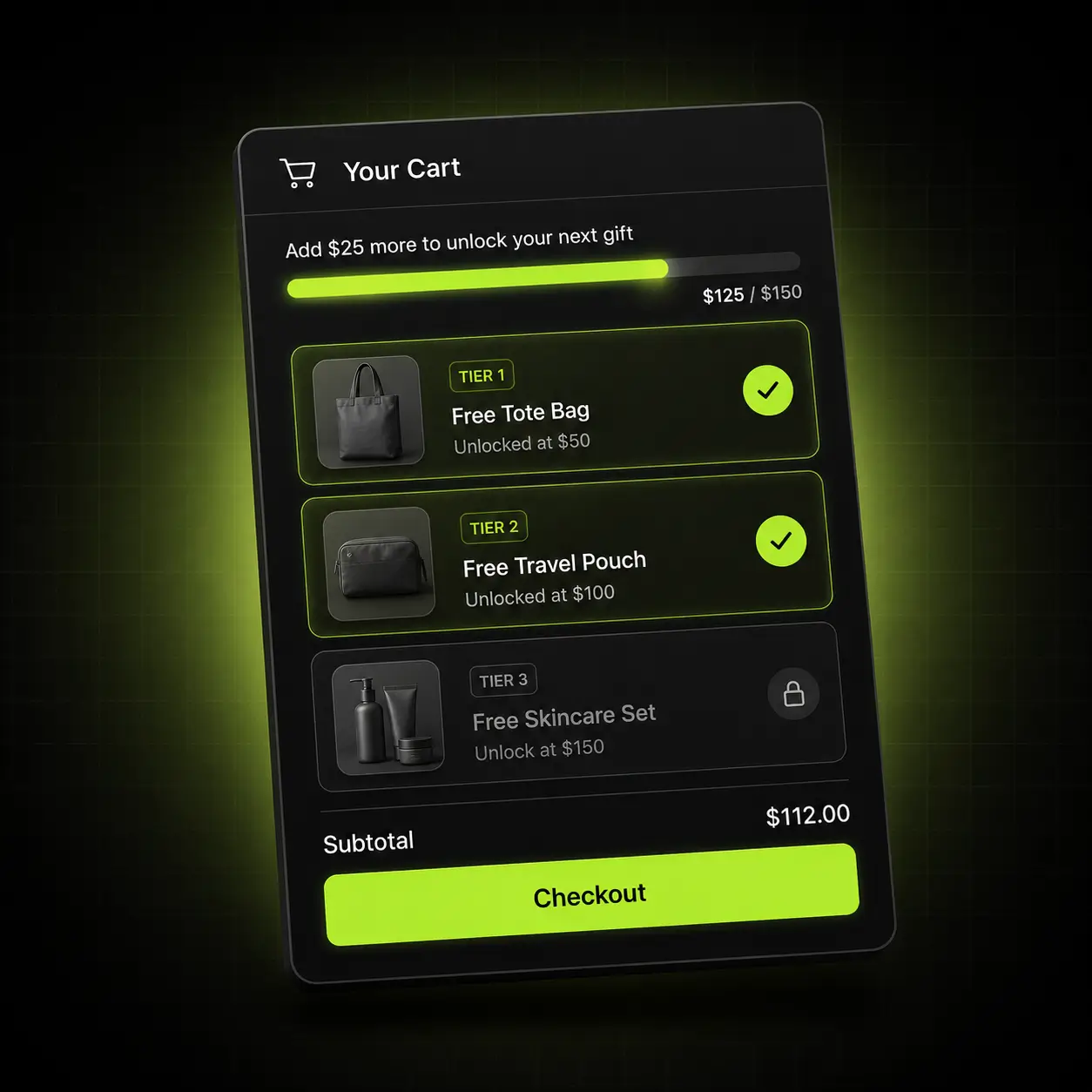
Oxify cart drawer showing three free-gift tiers and a progress bar
In-cart upsells & cross-sells

Every cart becomes a bigger order — without a code

Frequently Bought Together renders inside the drawer with a one-tap add. No redirect, no new page, no chance to lose the cart. Recommendations respect variants, bundles and subscription products so nothing broken ever gets offered.

  • Manual pairings or automatic recommendations, per product or collection
  • Respects variants, inventory and subscription-only items
  • Built-in analytics show which offers actually earn, not just which get shown
  • Also runs on the product page and post-purchase from the same rules

Track it: revenue per offer is reported separately, so you can turn off the ones that only add clutter.
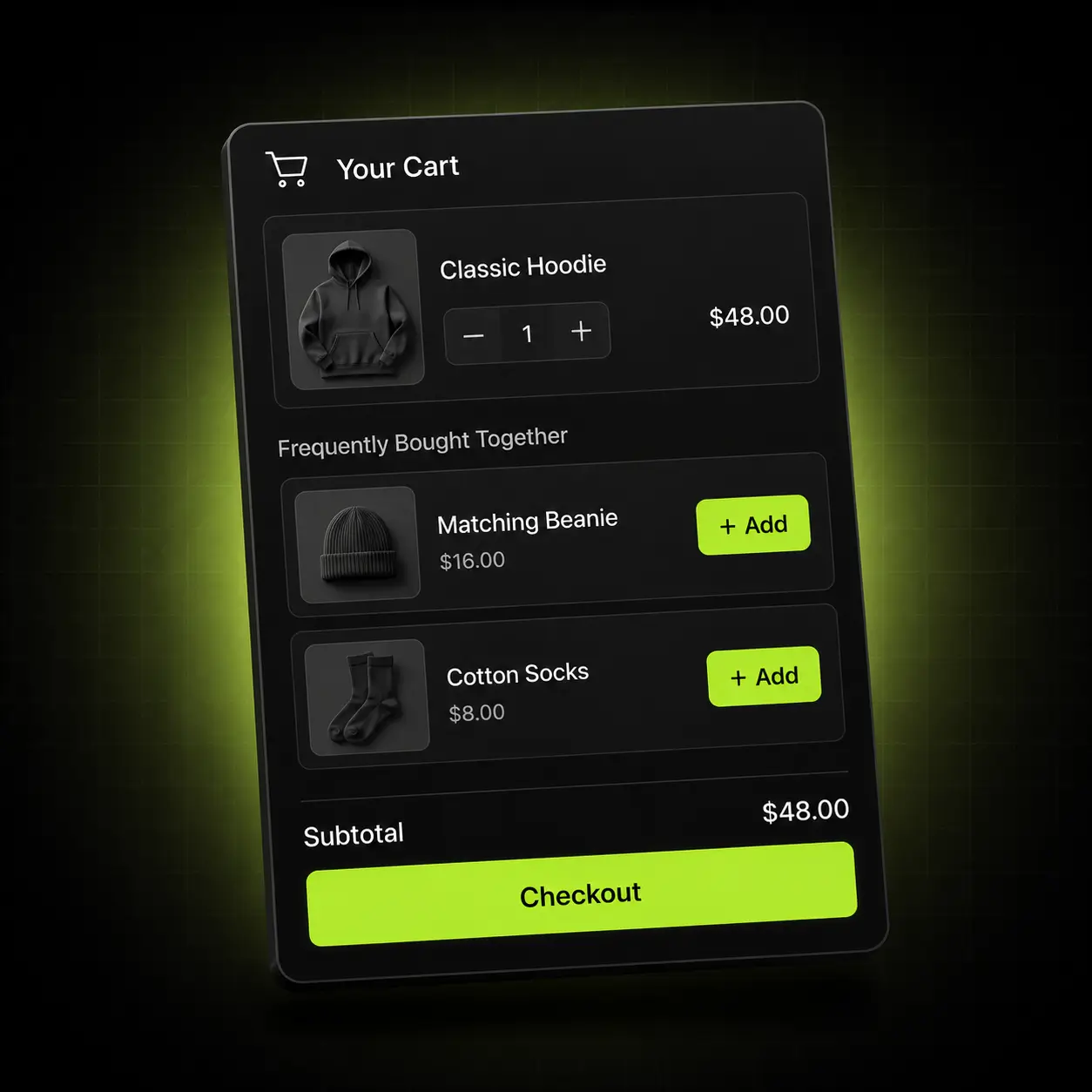
Frequently Bought Together cross-sells inside the Oxify cart drawer
Subscribe & Save in the cart

One-time buyers become recurring revenue

The subscribe option belongs where the buying decision is actually made. Oxify puts the toggle in the drawer with the saving shown in currency, not just a percentage — and hands the subscription off to the app you already run.

  • Works with ReCharge, Appstle, Seal and Shopify’s native subscriptions
  • Shows the saved amount and the delivery interval before checkout
  • No separate subscription landing page to build or maintain
  • Falls back gracefully to one-time if a product isn’t subscription-eligible

Compounding: a subscriber converted in-cart costs you nothing in ad spend on every order after the first.
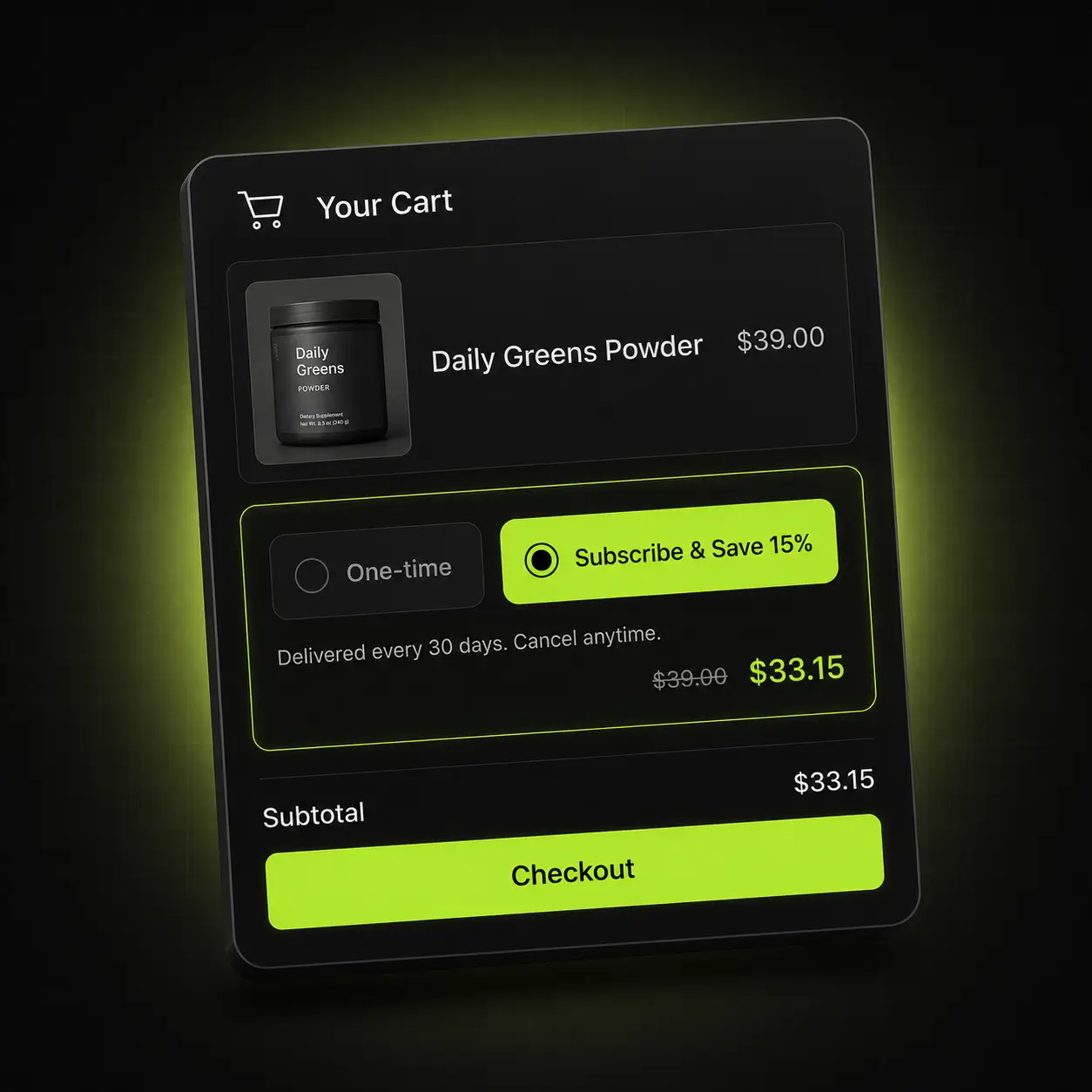
Subscribe and Save upgrade option inside the Oxify cart drawer
Product page add-ons & volume discounts

Start raising the order before the cart

Add-ons sit on the product page, so the basket is already bigger by the time the drawer opens. Volume and bundle discounts then price it — buy 2 save 10%, buy 3 save 15% — through Shopify’s own automatic-discount engine, so they never collide with your campaign codes.

  • Warranties, gift wrap, express handling and accessories as one-tap add-ons
  • Quantity breaks, mix-and-match bundles and BOGO from one rule builder
  • Applies through Shopify Automatic Discounts — no codes to distribute
  • Stacks predictably with gift tiers instead of cancelling them out

Highest-margin revenue on the page: add-ons carry almost no fulfilment cost and no additional ad spend.
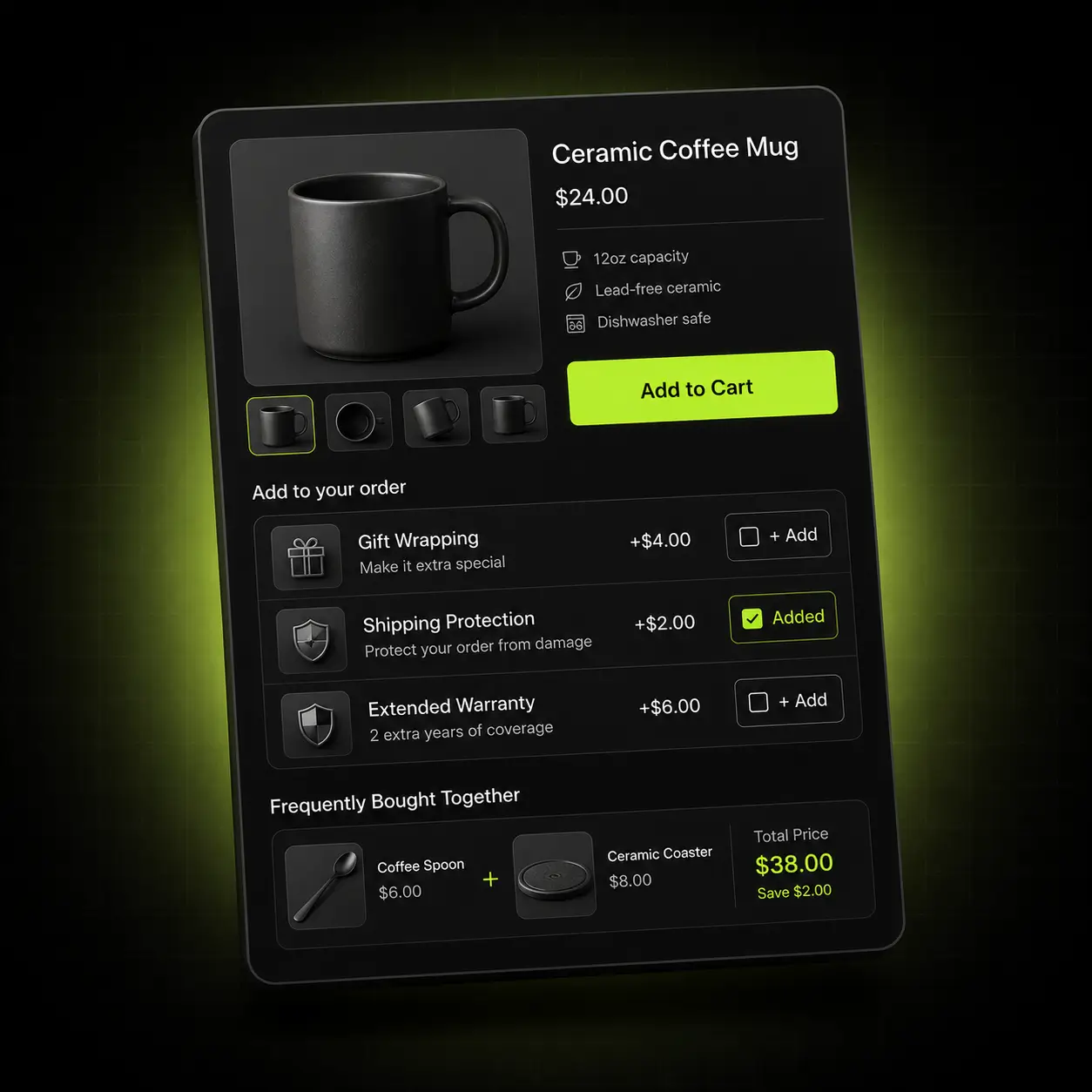
Product page add-ons and upsells powered by Oxify
Coverage

Four chances to raise the order.
One install.

Most stores bolt on a separate app for each of these and then spend their time refereeing the conflicts between them. Oxify owns all four touchpoints, so the rules are written once and the discounts agree with each other.

Product page

Add-ons and Frequently Bought Together before the item is even in the cart.

Cart drawer

Gift progress, cross-sells, Subscribe & Save, volume pricing.

Sticky cart

A persistent basket that keeps the reward goal in view on every page.

Post-purchase

A one-click offer after payment that needs no second checkout.
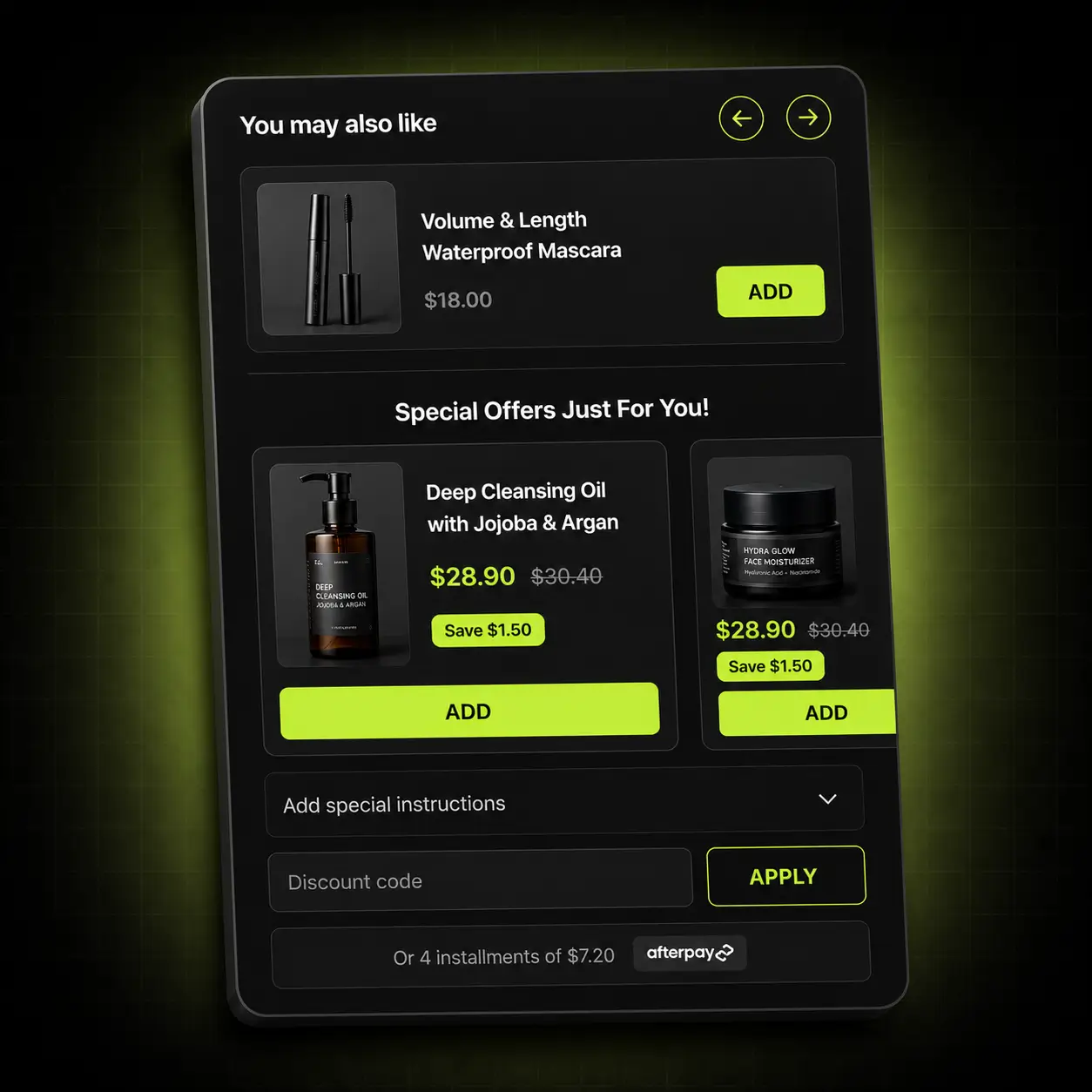
Oxify product recommendation panel
Who it works for

The offer that fits your catalogue

Cart merchandising is not one tactic. What lifts a supplement store is not what lifts an apparel store. Here is where we’d point you first.

Apparel & accessories

Wide catalogues where a second item is genuinely useful.

Start with: Run gift tiers at 1.4× your current AOV, with FBT on size-adjacent items.

Supplements & consumables

Refill cycles that reward a subscription decision made early.

Start with: Lead with Subscribe & Save in-cart, then a volume ladder on multi-month packs.

Home, beauty & giftable goods

High gifting intent and strong bundle logic.

Start with: Bundle discounts plus a free-gift threshold set just above your median order.

Comparison

One app instead of four

The real cost of a cart-drawer app is rarely its own price. It is the three other apps you install to finish the job, and the support tickets that follow when their discounts disagree.

CapabilityTypical cart drawer appOxify
Free gift & reward tiersUsually a separate appUnlimited tiers, built in
Cart drawer cross-sellsBasic or noneManual + automatic, with per-offer revenue
Product page add-onsSeparate appIncluded
Subscribe & Save in-cartThird-party onlyNative, with ReCharge / Appstle / Seal
Volume & bundle discountsSeparate appIncluded, via Shopify’s discount engine
Discount conflictsCommon across stacked appsOne rule set, no collisions
Multi-currency + RTLOften a paid add-onIncluded
Theme changes requiredOften, plus a developerNone — app embed block
Setup timeHours, sometimes daysAbout 10 minutes
Typical monthly cost3–4 apps stackedOne bill, from $9.99
ROI guaranteeNone30 days, full refund

Comparison reflects the common feature split across popular cart-drawer apps on the Shopify App Store. Competitor pricing and features change — re-check before quoting this.

How it works

Live in about ten minutes

No developer, no theme edits, no staging copy of your store.

01

Install

Add Oxify from the Shopify App Store. It connects through an app embed block — no theme files touched, nothing to undo later.

02

Match your theme

Fonts, colours, radius and button style pull from your theme, then you adjust anything you want in a visual editor.

03

Set the offers

Pick your gift thresholds, choose cross-sells, switch on Subscribe & Save and build the volume ladder.

04

Publish and watch

Go live and read per-offer revenue in the dashboard. Keep what earns, switch off what doesn’t.

Pricing

One plan. Every feature. Priced by order volume.

Nothing is locked behind a higher tier — the only thing that changes is how many orders your store does. Start at $9.99/month, 14 days free.

Total monthly store ordersPrice
0–100 orders$9.99/month
101–200 orders$19.99/month
201–500 orders$29.99/month
501–1,000 orders$49.99/month
1,001–2,000 orders$79.99/month
2,001–3,000 orders$99.99/month
3,001+ orders$149.99/month

Based on your store’s total monthly orders, not just orders Oxify influenced. Billed through Shopify.

Enterprise
$299/month

For high-volume brands that would rather we built it than build it themselves.

Talk to sales
  • Done-for-you setup We configure your gift tiers, cross-sells, subscriptions and volume rules around your catalogue and your margins — you approve, we ship it.
  • Custom design templates A cart drawer built to your brand rather than adapted to it, matched to your theme by our designers.
  • Priority support A dedicated channel with the people who build the app, and your feature requests at the front of the queue.
Proof

5.0 on the Shopify App Store

1,000+ stores run Oxify on their cart. Here is what they say about it.

★★★★★

“Best cart drawer we’ve used. The free shipping bar and manual gift selection are exactly what we needed, and the amount of customisation available is unusual for this price.”

Nutty VillageShopify merchant
★★★★★

“We replaced two apps with this one and the discount conflicts we’d been fighting for months simply stopped. Support answered in minutes both times we asked.”

Go Ayurveda DhanvantriShopify merchant
★★★★★

“Set the gift threshold just above our average order and watched AOV move inside the first week. Setup genuinely took about ten minutes.”

FreshLuxeShopify merchant
Already on another cart app?

Switching is a Tuesday, not a project

If you’re running UpCart, Slide Cart, Rebuy or a stack of separate gift and bundle apps, the migration is short and we do the setup with you.

We map your current offers

Send us a screenshot of your existing tiers and cross-sells and we’ll rebuild them before you switch anything on.

Nothing is left behind

Oxify uses an app embed block. Uninstalling the old app leaves no leftover Liquid in your theme to clean up.

Run both for a week

Keep your current app installed while you compare. There is no theme conflict, and the trial is free either way.

Get started

Stop shipping receipts. Start shipping offers.

Fourteen days free, about ten minutes to set up, and a refund if it doesn’t pay for itself. There isn’t much left to think about.

The 30-day ROI guarantee

Install Oxify, put it live, and give it thirty days. If your average order value hasn’t increased in that window, email us and we refund 100% of what you paid. No conditions about ad spend, no minimum order count, no arguing about attribution — if the number didn’t move, you don’t pay.

FAQ

Shopify cart drawer & upsell apps — frequently asked questions

What is a Shopify cart drawer app?

A cart drawer is the slide-out panel that appears when a shopper adds an item, instead of sending them to a separate cart page. A cart drawer app replaces Shopify’s default drawer with one you control — so you can add a free-gift progress bar, cross-sells, subscription options and volume discounts at the highest-intent moment in the session.

How long does setup actually take?

About ten minutes for a standard configuration. Oxify installs as an app embed block, inherits your theme’s fonts and colours automatically, and everything after that is a visual editor. No theme files are modified, so uninstalling leaves nothing behind.

Do I need a developer?

No. There is no code to paste and no Liquid to edit. If you want something unusual — a custom layout or a rule we don’t support out of the box — our team will build it with you on a call.

Will it work with my theme?

Yes. Oxify runs on Online Store 2.0 themes including Dawn, Impulse, Prestige, Motion and Warehouse, and on most older themes too. If your theme has a custom cart implementation, book a call and we’ll confirm before you install.

Does it conflict with my existing discount codes?

No. Volume and bundle discounts run through Shopify’s native automatic-discount engine rather than a parallel system, so your campaign codes keep working alongside them. This is the usual reason stacked cart apps break each other, and it’s why we built it this way.

What happens if a shopper removes an item?

The reward state recalculates immediately. If they drop below a gift threshold the free product is removed from the cart and the progress bar rolls back, so you never ship a free item on an order that didn’t qualify.

Does it work for international stores?

Yes. Gift thresholds and discount tiers convert per market through Shopify Markets, and the interface supports 8+ languages including right-to-left layouts.

Does it slow my store down?

The drawer loads asynchronously and does not block rendering. It is a small script delivered from a CDN, and it replaces a stack of apps that each add their own — so most stores that switch to Oxify end up with fewer requests than they started with.

Which subscription apps does it work with?

ReCharge, Appstle, Seal Subscriptions and Shopify’s native subscriptions. The in-cart Subscribe & Save toggle hands off to whichever one you already run — you do not need to migrate subscribers.

What exactly does the ROI guarantee cover?

If your average order value has not increased within 30 days of going live, we refund 100% of what you paid. We ask that the app was actually live with at least one offer configured — beyond that there are no conditions.

How is my store’s data handled?

Oxify only requests the Shopify scopes it needs to read products and write cart and discount data. We do not sell data, and everything is deleted on uninstall in line with Shopify’s data-retention requirements.

Can I try it before committing?

Yes — 14 days free, no credit card, and you can uninstall from your Shopify admin at any time. The 30-day ROI guarantee starts after that if you decide to stay.

Increase Your AOV” Shopify Playbook

Sign up to get weekly conversion tips, upsell strategies, and proven tactics used by top Shopify brands to grow revenue faster.

Ask AI about Oxify App