A skincare brand on Shopify came to us last month doing okay revenue but a flat AOV.
They already had a “thank you page upsell” set up. They thought that was enough.
We turned on a post purchase upsell funnel. Same products. Same traffic. Same ad spend.
In 30 days, they added $27,860 in extra revenue at a 9.46% conversion rate — almost double the industry average.
Here’s the screenshot from inside their Oxify dashboard:
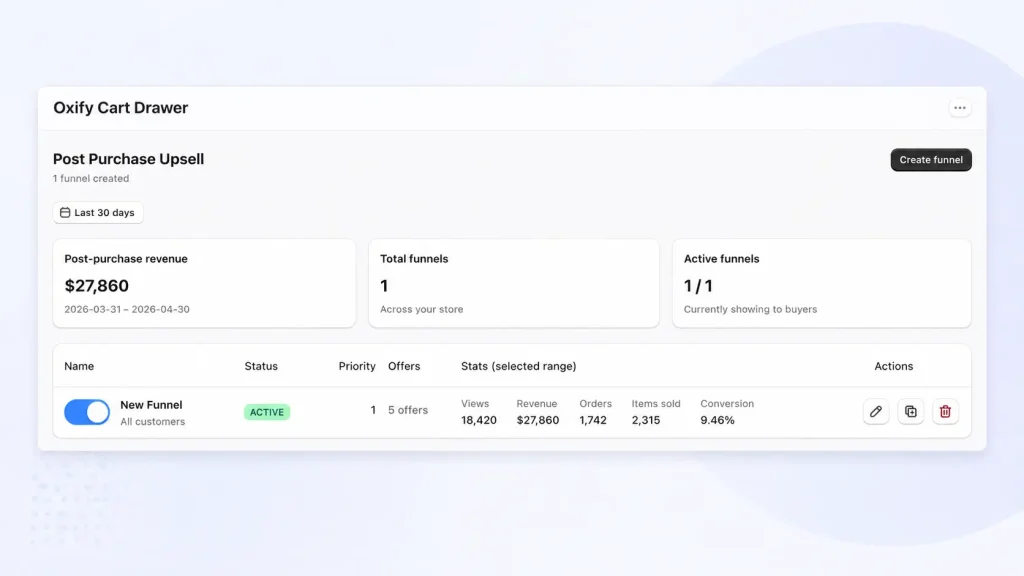
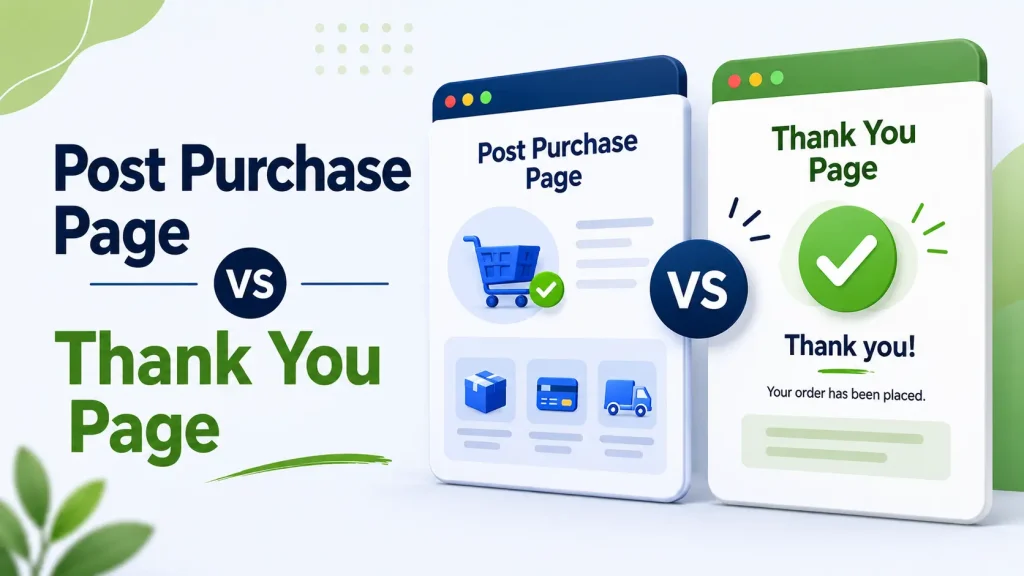
The reason this worked? They finally understood that the post purchase page and the thank you page are not the same thing.
This guide explains the difference, shows you the real numbers, and walks you through the exact setup the skincare brand used.
Quick Summary
- Shopify post purchase page = a one-click upsell shown after payment but before the thank you page. Average AOV lift: 5.6%. Take rate: 3–8% (top funnels hit 9%+).
- Thank you page (also called the order status page) = the order confirmation page shown at the very end. Customers revisit it 2.6 times on average.
- They are NOT the same. Order: Pay → Post Purchase Page → Thank You Page (Order Status Page).
- ⚠️ 2026 alert: Shopify is forcing all non-Plus stores to upgrade their Thank You + Order Status pages by August 26, 2026 — old custom scripts will break.
- You need both. Skipping one cost the skincare brand thousands per month before they fixed it.
Why Most Shopify Owners Confuse These Two Pages
I run a Shopify app company (Oxify) and talk to dozens of merchants every week. The same question keeps coming up:
“I already have a thank you page upsell. Why do I need a Shopify post purchase page too?”
The answer is simple: they show at different moments, work with different payment methods, and unlock different kinds of revenue.
Skip one, and you leave money on the table — sometimes a lot of it. Stores running both correctly see AOV go up by 5–15% within the first month (the skincare brand above hit it in 14 days).
This guide breaks down the difference in plain English, shows you the real numbers, and gives you a simple plan to set up both pages the right way.
The Checkout Flow: Where Each Page Actually Lives
Here’s the full path a Shopify shopper takes:
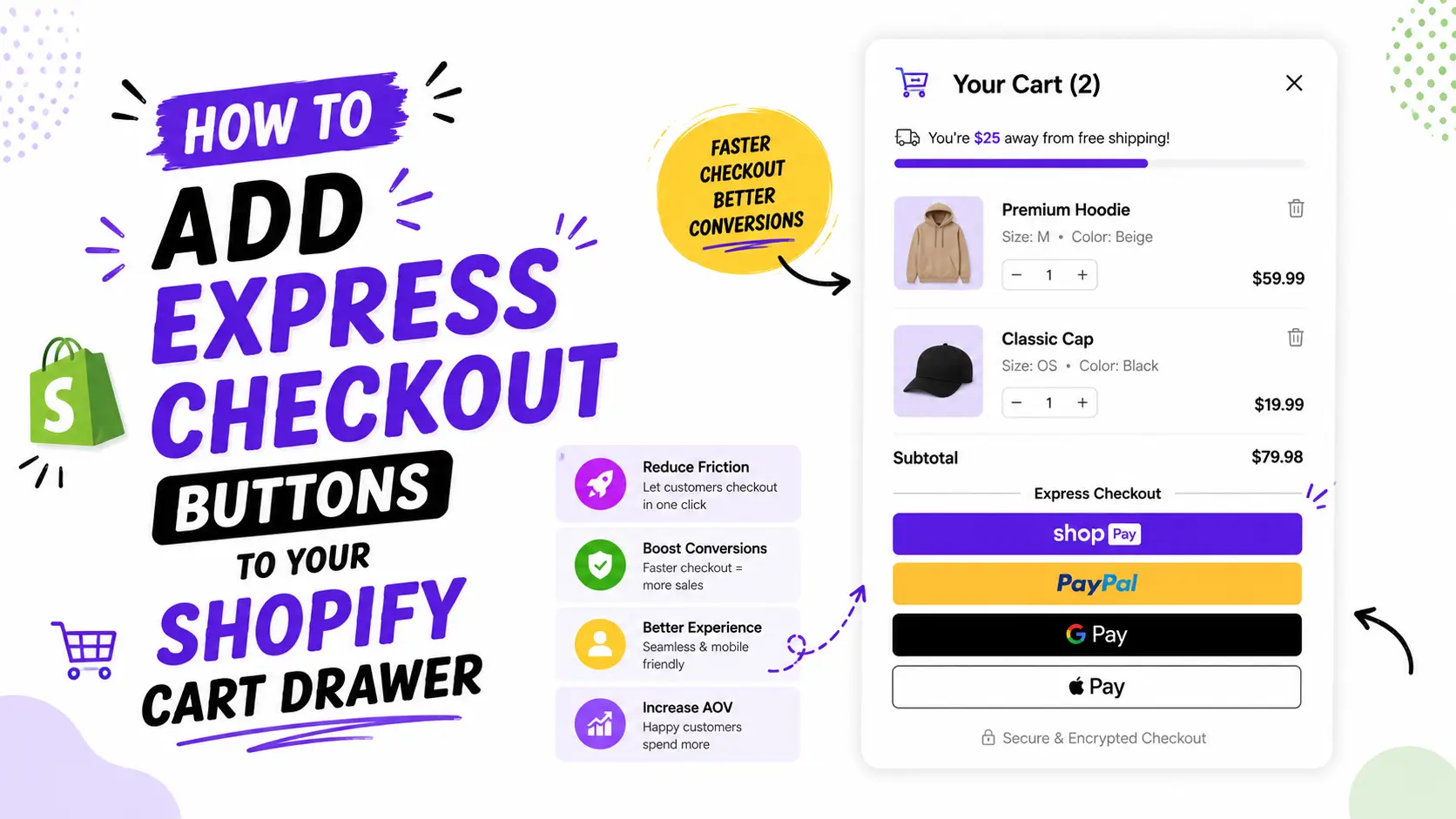
- They open your cart drawer and review their items.
- They go to checkout and enter shipping + payment info.
- They hit “Pay Now.”
- ⚡ The Post Purchase Page loads. They see one extra offer. One click to add or skip.
- ✅ The Thank You Page (also called the Order Status Page) loads. Order confirmed.
If your store skips step 4, your customer goes from “Pay Now” straight to “Thanks!” — and you miss the most valuable selling moment in e-commerce.
What Is a Shopify Post Purchase Page?
A Shopify post purchase page is a single offer that pops up the second after the customer pays.
Their card is already charged. Their address is already saved. So accepting the offer is literally one click — no checkout, no re-typing.
The Real Numbers (From 40,000+ Shopify Stores)
These stats come from ReConvert’s analysis of over 40,000 active Shopify merchants:
- 5.6% — average AOV lift from post purchase upsells
- 3–8% — typical take rate (the skincare brand above hit 9.46%)
- 91% of stores using post purchase tools say it’s “effective” for growth
- Zero — risk of losing the original sale (it’s already paid)
For comparison, thank you page upsells convert at only 1.7% because customers have to checkout again.
Why Post Purchase Pages Work So Well
Right after payment, the customer’s brain is in “yes mode.” Marketers call this the buyer’s high. They feel good about their decision. They’re not thinking about prices — they’re excited.
This is the perfect moment to offer:
- A bigger size or quantity of what they just bought
- A matching item (charger, batteries, refill, accessory)
- A discounted bundle
- A subscription upgrade
- A one-click downsell if they decline the first offer
One Critical Limitation Most Guides Skip
Shopify’s one-click post purchase upsells don’t work for every payment method. If a customer paid with:
- Klarna, Afterpay, or Affirm (BNPL)
- Apple Pay, Google Pay, or Shop Pay
- PayPal in some setups
…the one-click upsell won’t show. About 20% of typical Shopify orders fall into this group.
That’s why smart stores set up both post purchase pages AND thank you page offers — to catch every customer no matter how they paid.
Case Study: How a Skincare Brand Added $27,860 in 30 Days
Let’s go deeper into the brand from the intro.
The brand: A direct-to-consumer skincare store on Shopify selling moisturizers, serums, and cleansers in the $25–$60 range.
The problem: They were getting decent traffic and converting at a healthy rate. But their AOV was stuck. They had a basic “Thank You” page upsell that converted at around 1.7% (industry average) and they assumed that was as good as it gets.
What we changed: We turned on a multi-step post purchase upsell funnel inside their Oxify dashboard. The funnel had:
- Upsell 1: A complementary skincare bundle at 15% off
- Downsell 1 (if they declined): A travel-size version at a lower price
- Upsell 2 (if Upsell 1 accepted): A subscription option for repeat delivery
- Downsell 2: A one-time add-on like a face cloth
The customer’s payment was already vaulted, so each accepted offer was added to the original order with a single click. No friction.
The Results After 30 Days
Here’s what the dashboard showed:
| Metric | Result |
|---|---|
| Post-purchase revenue | $27,860 |
| Funnel views | 18,420 |
| Orders with upsells added | 1,742 |
| Items sold via upsells | 2,315 |
| Conversion rate | 9.46% |
| Time to set up | About 45 minutes |
Why This Beat the Industry Average
The standard post purchase take rate is 3–8%. This brand hit 9.46% — almost double the bottom end of the range. Three reasons:
- The downsell flow caught the “no” votes. When someone declined the bundle, they didn’t just leave — they saw a smaller, cheaper version. A lot of those converted.
- The offer was tightly relevant. Skincare buyers love bundles. Showing them a related set at 15% off was a near-perfect match.
- Items per order went up too. Look at the numbers: 1,742 orders had upsells, but 2,315 items were sold through the funnel. That means many customers added more than one item from the funnel sequence.
The Math That Matters
At a $27,860 monthly lift, the projected annual impact is $334,320. The Oxify subscription cost (full Pro plan) is around $79.99/month — so the ROI is roughly 348x.
This is why a post purchase upsell isn’t optional anymore. It’s the highest-leverage 45 minutes of work most Shopify stores are skipping.
What Is a Thank You Page (Order Status Page)?
The thank you page (Shopify’s official name is the Order Status Page) is the final stop after checkout. It’s the page that confirms the order, gives the order number, and shows tracking info.
Here’s a stat most marketers don’t know: the average customer visits their thank you page 2.6 times — coming back to check shipping status, look up tracking, or find your support info.
That’s 2.6 chances to do more than just say “thanks.”
What a Modern Thank You Page Should Do
The basics (do these first, always):
- ✅ Confirm the order at the top in plain language
- 📦 Show the order number, items, address, and expected delivery
- 🔍 Give a clear tracking link
- 💬 Show your support contact in case anything goes wrong
The smart additions (this is where money is made):
- 📱 SMS opt-in for shipping updates (turns one sale into a future channel)
- ⭐ Referral program (“Give $20, Get $20”)
- 📝 “How did you hear about us?” survey (kills attribution problems)
- 🎥 Welcome video from your founder
- 🛒 Soft cross-sell with a discount code for next order
- 🎁 Loyalty program signup
Real Brand Examples
- Bite Toothpaste offers a cash incentive for customers who post their unboxing on TikTok — generating a flood of free user-generated content.
- Kosas Cosmetics shows shoppers exactly how much store credit they earned through Catch — driving immediate repeat purchases.
- Gymshark uses social follow widgets to convert one-time buyers into long-term followers.
What NOT to Put on Your Thank You Page
- ❌ Return policies (creates doubt, increases refunds)
- ❌ Aggressive upsells with hard sells (feels pushy)
- ❌ Anything that says “There’s an issue with your order”
- ❌ Too many widgets stacked together
Post Purchase Upsell vs Thank You Page Upsell: The Real Difference
This is the question most merchants ask, so let’s settle it:
| Factor | Post Purchase Upsell | Thank You Page Upsell |
|---|---|---|
| Where it shows | Between checkout & order confirmation | After the order is fully created |
| One-click checkout? | ✅ Yes (payment vaulted) | ❌ No (full re-checkout needed) |
| Conversion rate | 3–8% (top funnels: 9%+) | 1.7% |
| Works with BNPL/wallets? | ❌ Often blocked | ✅ Always shows |
| Risk to original order | Zero | Zero |
| Customer mood | Buyer’s high (excited) | Calm (looking for reassurance) |
| Best offer type | One-click bundles, upgrades | Discount codes, soft cross-sells, referrals |
| 2026 Shopify update affects it? | Indirectly | ✅ Directly |
The takeaway: A post purchase upsell makes more money per offer. A thank you page upsell catches the customers your post purchase upsell can’t reach. You need both.
Why Both Pages Are Critical For Your Store (The Real Math)
Most blogs say “use both.” Almost none show you why. Let’s run the actual numbers.
Imagine a Shopify store doing 1,000 orders/month at $60 AOV = $60,000/month.
Scenario A: No Post Purchase Page, Basic Thank You Page
- 1.7% of customers accept a thank you page upsell at $30 = 17 extra sales × $30 = $510/month
- Total: $60,510/month
Scenario B: Post Purchase Page Only
- 5% take rate on $30 upsell = 50 extra sales × $30 = $1,500/month
- BUT: ~20% of customers (BNPL/wallet) never see the offer = lost revenue from 200 customers
- Total: $61,500/month
Scenario C: Both Pages Working Together (The Right Setup)
- Post purchase page: 5% × 800 eligible customers × $30 = $1,200/month
- Thank you page upsell catches the 200 BNPL/wallet customers: 1.7% × 200 × $30 = $102/month
- Smart thank you page also drives 30-day repeat purchases: ~3% repeat lift = roughly $1,800/month in compounding revenue
- Total: $63,102/month
Difference between Scenario A and Scenario C: $2,592/month, or ~$31,000/year.
The skincare brand in our case study saw an even bigger lift because they ran a multi-step funnel with downsells — pushing their take rate from 5% to 9.46%.
The Two Jobs You Cannot Mix
Here’s the deeper reason both pages matter, and why you can’t just pick one:
The post purchase page does one job: maximize revenue from each transaction. The customer is in buyer’s high. Their card is vaulted. There’s zero friction. Asking them anything other than “do you want to add one more thing?” is a wasted moment.
The thank you page does a different job: turn this transaction into many future transactions. The customer is no longer buying — they’re confirming. They want reassurance, tracking, and a reason to come back. Trying to hard-sell here breaks trust and triggers refunds.
If you mix the two jobs (heavy upsell on thank you page, branding fluff on post purchase page), both fail.
The 2026 Shopify Upgrade Most Stores Are Ignoring
Here’s something almost no other guide is talking about — and it directly affects every Shopify merchant reading this.
Shopify is forcing all non-Plus stores to upgrade their Thank You and Order Status pages by August 26, 2026. (Shopify Help Center)
Plus stores already had to upgrade by August 28, 2025.
What This Means for You
If you’ve customized your thank you page using:
- Additional scripts
checkout.liquid(Plus only)- Older third-party apps that haven’t updated
…those customizations will break when Shopify auto-upgrades your store.
What You Need to Do Before August 2026
- Go to Settings → Checkout in your Shopify admin
- Look for the “Upgrade Thank you and Order status pages” notice
- Recreate your customizations using app blocks and web pixels (the new way)
- Test thoroughly — including tracking pixels, post-purchase upsells, and analytics
Apps built on Shopify’s new checkout extensibility framework are already compatible. Older apps may need replacing.
If you act now, you avoid panic in August 2026.
How Oxify Slide Cart Drawer Powers Both Pages (In One App)
Most stores end up with 4–5 different apps to handle cart upsells, post purchase offers, and thank you page widgets. The result? Slow site speed, app conflicts, higher monthly bills, and a messy admin.
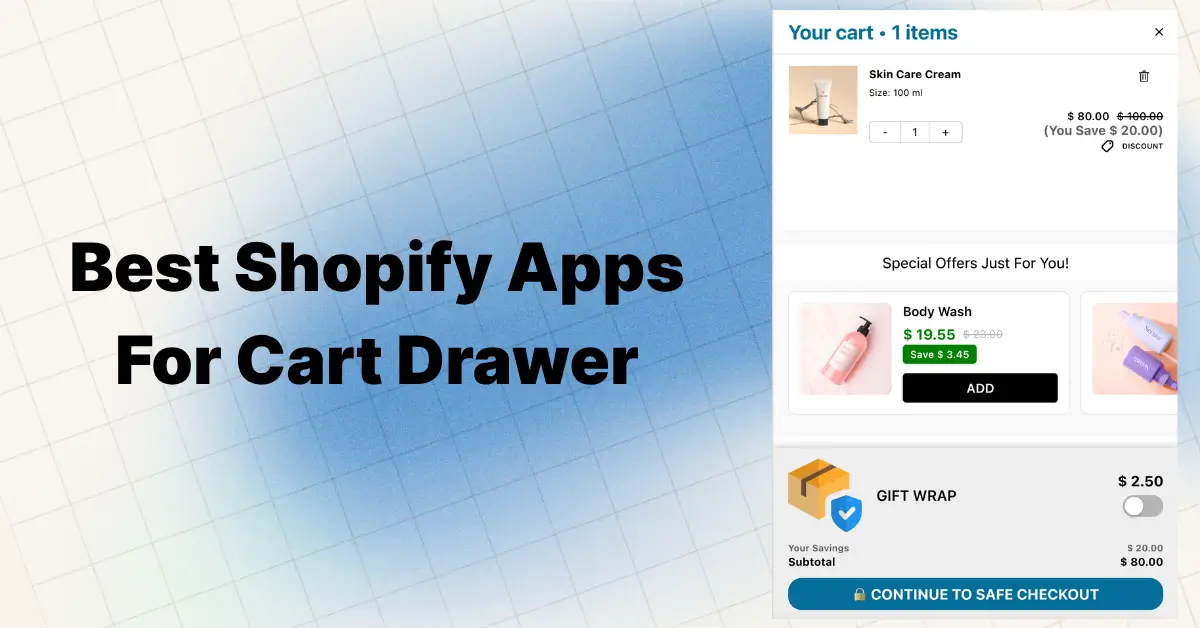
Oxify Slide Cart Drawer is built differently. It’s a full-funnel app — meaning it covers everything from cart drawer to post purchase upsell to thank you page boosters in a single, lightweight install.
The Funnel Behind the Skincare Case Study
Here’s what the actual funnel looked like inside Oxify (this is the same structure that delivered the $27,860 result):
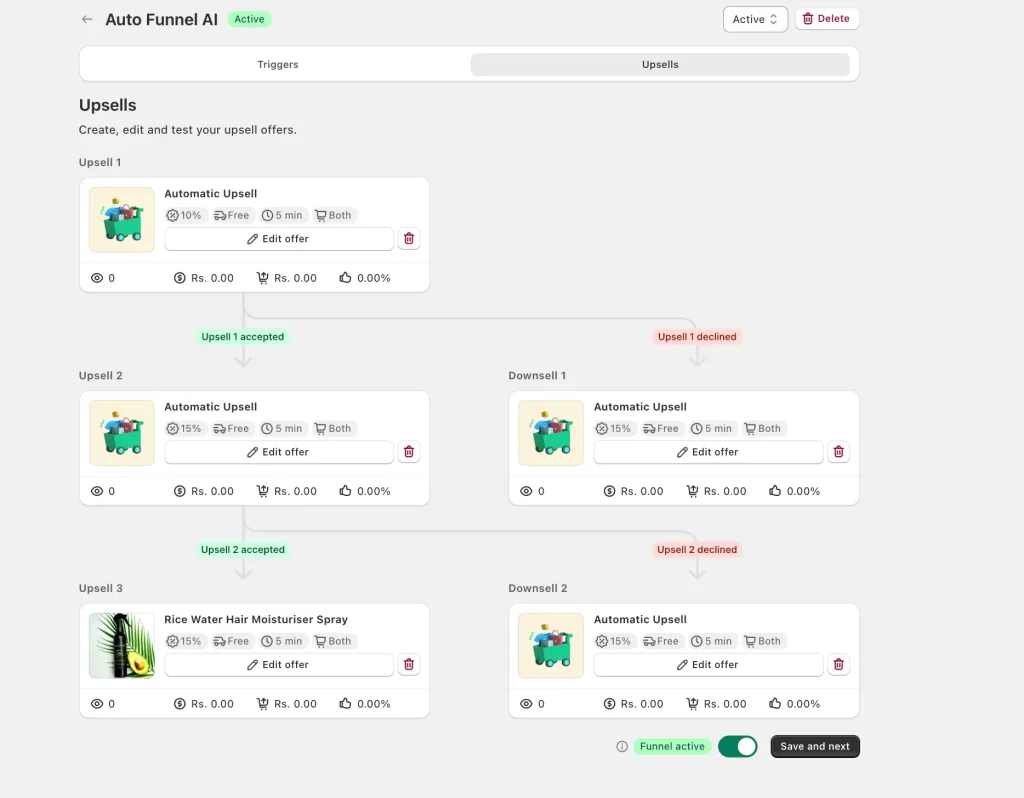
This is what beats a single offer:
- Upsell 1 shows after the customer pays
- If they accept → they see Upsell 2 (a related upgrade)
- If they decline → they see Downsell 1 (a cheaper or smaller offer)
- The funnel keeps going to Upsell 3 / Downsell 2, capturing every type of buyer
Most stores show one offer and call it a day. With a multi-step funnel like this, even customers who say “no” to the first offer have a second chance to convert — without any extra friction. This is exactly how the skincare brand pushed their post purchase take rate to 9.46%.
What Oxify Does in the Cart (Before Checkout)
- 🛒 Slide cart drawer with cart upsells
- 🎁 Free gifts when carts cross a value threshold
- 🚚 Free shipping bar progress nudges
- 💸 Volume discounts and BOGO offers
- 🤖 AI product recommendations and Frequently Bought Together
- ⏰ Countdown timer for urgency
- ✅ Trust badges to boost confidence
What Oxify Does on the Post Purchase Page
- One-click upsells with zero re-entry of payment info
- Multi-step upsell + downsell funnels (see screenshot above)
- Smart product matching based on what was just bought
- Mobile-first, sub-second loading offer pages
- Clean Accept / Decline buttons (no dark patterns)
- Built-in shipping protection and subscription add-on support
- Compatible with Shopify’s new checkout extensibility (2026-ready)
What Oxify Does on the Thank You Page
- Post-purchase upsell widgets that work with all payment methods (catches the 20% of BNPL/wallet customers your one-click offer misses)
- Cross-sell offers and discount codes for the next order
- Fully compatible with Shopify’s 2026 thank you page upgrade
Why Stores Switch to a Single Full-Funnel App
- ⚡ Faster site speed (one optimized app vs four bloated ones)
- 💰 Lower monthly cost (one subscription instead of four)
- 🛠️ One support team to talk to when something breaks
- 📊 One unified dashboard for cart, post purchase, and thank you metrics
- ✅ Already built on Shopify’s new checkout framework — no surprises in August 2026
📌 See Oxify Cart Drawer & Upsell on the Shopify App Store — 5.0 rating, Built for Shopify badge
The 5 Biggest Mistakes Shopify Stores Make
After auditing hundreds of stores, the same problems keep showing up:
- No post purchase page at all. Free 5–15% AOV lift, ignored.
- Single offer with no downsell. If they say no, you’re done. Smart funnels keep going (this is what doubled the skincare brand’s take rate).
- Same offer for every customer. A $200 jacket buyer should never see the same upsell as a $15 phone case buyer.
- Boring thank you page. Just an order summary = wasted real estate (remember: 2.6 visits per customer).
- Ignoring the 2026 Shopify deadline. Custom scripts and old apps will break in August 2026.
Step-by-Step Setup Plan (Do This in Order)
Step 1: Audit Your Current Flow
Place a test order on your store. Check:
- Does a post purchase page show? Or does it skip straight to thank you?
- Is your thank you page just an order summary?
- What happens if you pay with Apple Pay or PayPal?
Step 2: Check Your 2026 Shopify Status
Go to Settings → Checkout. Look for the upgrade notice. If it’s there, plan your upgrade now — not in July 2026 when everyone is panicking.
Step 3: Build a Multi-Step Post Purchase Funnel (Not Just One Offer)
Use the same structure that worked for the skincare brand:
- Upsell 1: A 15–30% off bundle of what they just bought
- Downsell 1 (if declined): A smaller, cheaper version
- Upsell 2 (if accepted): A complementary item or subscription
- Downsell 2: A subscription or first-month-free offer
Step 4: Upgrade Your Thank You Page
Add elements in this priority order:
- Clear order summary + estimated delivery
- SMS opt-in for shipping updates
- Referral program widget
- “How did you hear about us?” survey
- Soft cross-sell with discount for next order
Step 5: Track These KPIs Every Week
For your post purchase page:
- Take rate per step in the funnel (Upsell 1, Downsell 1, etc.)
- Revenue per upsell offer
- AOV (compare to last month)
For your thank you page:
- SMS opt-in rate
- Referral clicks
- Survey completion %
- 30-day repeat purchase rate
Step 6: A/B Test One Thing per Month
Don’t change everything at once. Test:
- Month 1: post purchase Upsell 1 (Product A vs Product B)
- Month 2: discount type (% off vs $ off)
- Month 3: thank you page widget order
Frequently Asked Questions
What is a Shopify post purchase page?
A Shopify post purchase page is a one-click offer screen that appears after a customer pays but before the thank you page loads. It allows them to add an extra product to their order with a single click — no re-entering payment info.
What is the difference between a post purchase upsell and a thank you page upsell?
A post purchase upsell uses one-click checkout (the card is already vaulted) and converts at 3–8% (top funnels can hit 9%+). A thank you page upsell requires a full new checkout and converts at around 1.7%. But thank you page upsells work with BNPL and digital wallets, while post purchase upsells often don’t.
Are the post purchase page and thank you page the same thing?
No. The post purchase page shows right after payment but before the order is final, and is built for one-click upsells. The thank you page (or order status page) shows after everything is complete and is the official order confirmation.
Can I have both a post purchase page and a thank you page?
Yes — and you absolutely should. They appear in this order: post purchase page first, then thank you page. They catch different customers and serve different jobs.
What’s a good take rate for a post purchase upsell?
Industry average is 3–8%. Multi-step funnels with downsells can push this above 9% (the skincare brand in our case study hit 9.46%). If you’re below 3%, your offer probably isn’t relevant enough.
Why doesn’t my post purchase page show for some customers?
Because Shopify’s one-click upsells don’t work with most BNPL options (Klarna, Afterpay), digital wallets (Apple Pay, Google Pay), or some PayPal flows. About 20% of orders are affected. Use thank you page offers as a backup.
Do I need different apps for the post purchase page and the thank you page?
Not anymore. Apps like Oxify Slide Cart Drawer handle cart upsells, post purchase upsells, and thank you page boosters in one install — saving site speed, money, and admin time.
What’s changing for thank you pages in 2026?
Shopify is requiring all non-Plus stores to upgrade their Thank You and Order Status pages by August 26, 2026. Custom scripts, old apps, and checkout.liquid customizations will stop working. You’ll need to use Shopify’s new app blocks and web pixels instead.
How many post purchase offers should I show?
A multi-step funnel works better than a single offer. Start with one upsell, then a downsell if they decline, then a second upsell if they accept. Three to four steps is the sweet spot — beyond that, drop-off becomes too high.
Does a post purchase upsell hurt my original sale?
No. The original order is already paid and confirmed before the post purchase page even loads. It’s pure upside.
How much extra revenue can a post purchase page realistically add?
It depends on traffic, AOV, and offer relevance. The skincare brand featured in this guide added $27,860 in 30 days. At the typical 5% take rate on a $30 upsell, a store doing 1,000 orders/month adds about $1,500/month. The compounding effect over a year is usually 5–15% of total revenue.
Final Word: Stop Treating These as One Page
Here’s the simple truth:
- Post purchase page = where you make extra money (today)
- Thank you page = where you make extra customers (long term)
The skincare brand in our case study added $27,860 in 30 days by getting this right. They didn’t change their products. They didn’t increase ad spend. They just stopped treating the post purchase page and the thank you page as the same thing.
If you only optimize one, you’ll grow slowly. If you optimize both — and survive Shopify’s August 2026 update — your store compounds: higher AOV today, more repeat buyers next month, more referrals next quarter.
The good news? You don’t need a giant tech team. With one well-built app, you can have both pages working in under an hour.
Get Started With Oxify
If you run a Shopify store and want one app that handles your cart drawer, post purchase upsell funnels, AND thank you page boosters — try Oxify Cart Drawer & Upsells.
- ⭐ 5.0 rating
- ✅ Built for Shopify badge
- 🎁 Free plan available
- ⚡ Already 2026 Shopify-update compatible
- 🔁 Multi-step upsell + downsell funnels built in (the same structure that drove $27,860 for the skincare brand)
Your checkout works hard. Make every page after it work harder too.