
How to Add Express Checkout Buttons to Your Shopify Cart Drawer
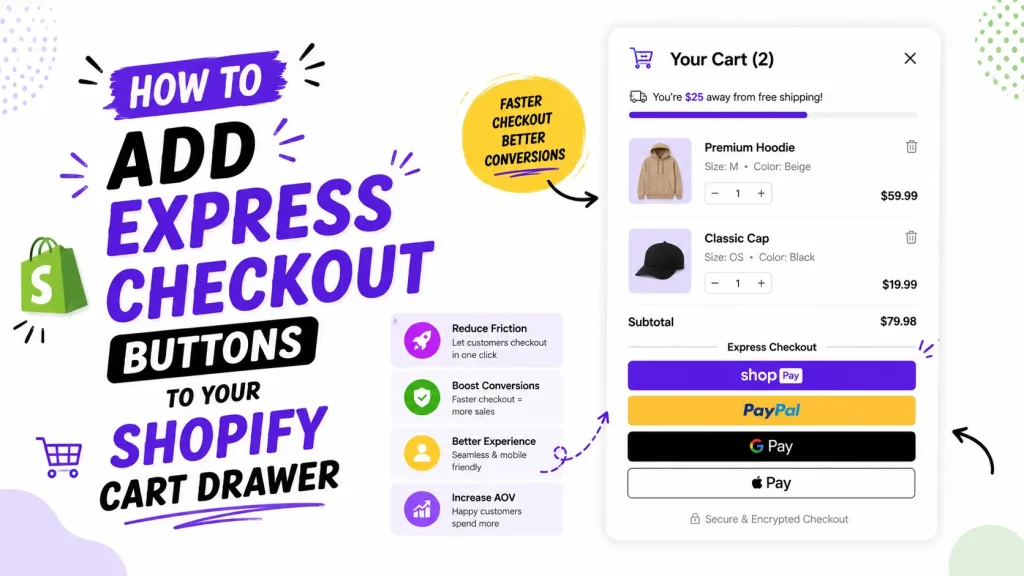
Quick answer: To show express checkout buttons (Shop Pay, Apple Pay, Google Pay, PayPal) in a Shopify cart drawer, activate the wallets under Settings → Payments, then make the drawer output Shopify's content_for_additional_checkout_buttons. Horizon 4.2's drawer already does; Dawn 16.0's does not. A drawer app can reuse a hidden copy placed in layout/theme.liquid.
Express checkout buttons let a shopper pay with a saved wallet in one tap, right inside the cart drawer, without typing an address or card number. The catch is that they often do not show up. It depends on your theme, your payment settings and how your drawer is built. This guide gives you the working snippet, the no-code route with Oxify Cart Drawer & Upsells (our app), and a checklist for when the buttons go missing. On October 11, 2026 we also read the current code of Shopify's two free reference themes to see what each one actually does.
What are express checkout buttons?
They are one-tap pay buttons that use payment and shipping details a shopper already saved. Shopify's help center calls them "accelerated checkout buttons" and names these wallets:
- Shop Pay (Shopify's own fast checkout)
- PayPal
- Google Pay
- Apple Pay (shoppers must use Safari on an Apple Pay compatible device)
- Amazon Pay
Shopify's developer changelog (December 2025) also lists Venmo as a payment method of its own, available only in the accelerated checkout placement. Which buttons a shopper sees depends on their device, browser and saved accounts. An Android user will not see Apple Pay. At checkout, Shopify orders the buttons dynamically so the fastest method for that customer comes first, which means you cannot set the order yourself. In the cart, Shopify's docs say you can show all of the buttons your store has enabled. The full list is in Shopify's accelerated checkouts guide.
Why put them in the cart drawer (and what the evidence says)
The drawer is the first thing a shopper sees after adding a product, so it is the earliest point where someone who is ready to buy can skip the checkout form. Shopify's docs suggest placing the buttons near the checkout input of the cart form so shoppers can choose between regular and accelerated checkout.
On speed and conversion, Shopify's Shop Pay page says Shop Pay can convert up to 50% better than guest checkout, and Shopify's enterprise checkout page calls it a 4x faster checkout than guest checkout (both pages read October 11, 2026). Those are Shopify's own figures, measured against guest checkout rather than against other wallets, and neither was measured in a cart drawer. A 1.72x conversion figure still circulates in older guides, including an earlier version of this one. We could not find it on Shopify's current Shop Pay page, so we removed it.
What real stores show. In our October 2026 check of 475 live Shopify stores, 243 (51.2%) had native cart-drawer markup or a drawer setting in their saved pages, and the first product page of 83 of 451 stores (18.4%) contained Shopify's dynamic checkout button element. We read each store's HTML on October 11, 2026. We did not look for express buttons inside drawers, so this shows how common drawers and product-page wallet buttons are in a hand-picked sample that skews toward larger brands. It does not tell you whether a given drawer shows the buttons, or whether they raise conversion.
Where should the buttons go in the drawer?
Below the main checkout button is the default pattern. In the code of Shopify's own free themes, the buttons sit directly under the checkout button (on Dawn's cart page and in Horizon's drawer).
We would also keep them below your upsells and free shipping bar, so shoppers see the offer before the fast exit. That is our judgement, not a measured result. If Shop Pay sits at the very top, some shoppers may check out before they ever see your upsell, so compare average order value before and after you move anything. You can add upsells to the cart drawer and keep express checkout in the same drawer: upsells up top, express checkout below.
The fastest way: add them with Oxify Cart Drawer & Upsells
If you use Oxify Cart Drawer & Upsells (our app), most of this is point and click.
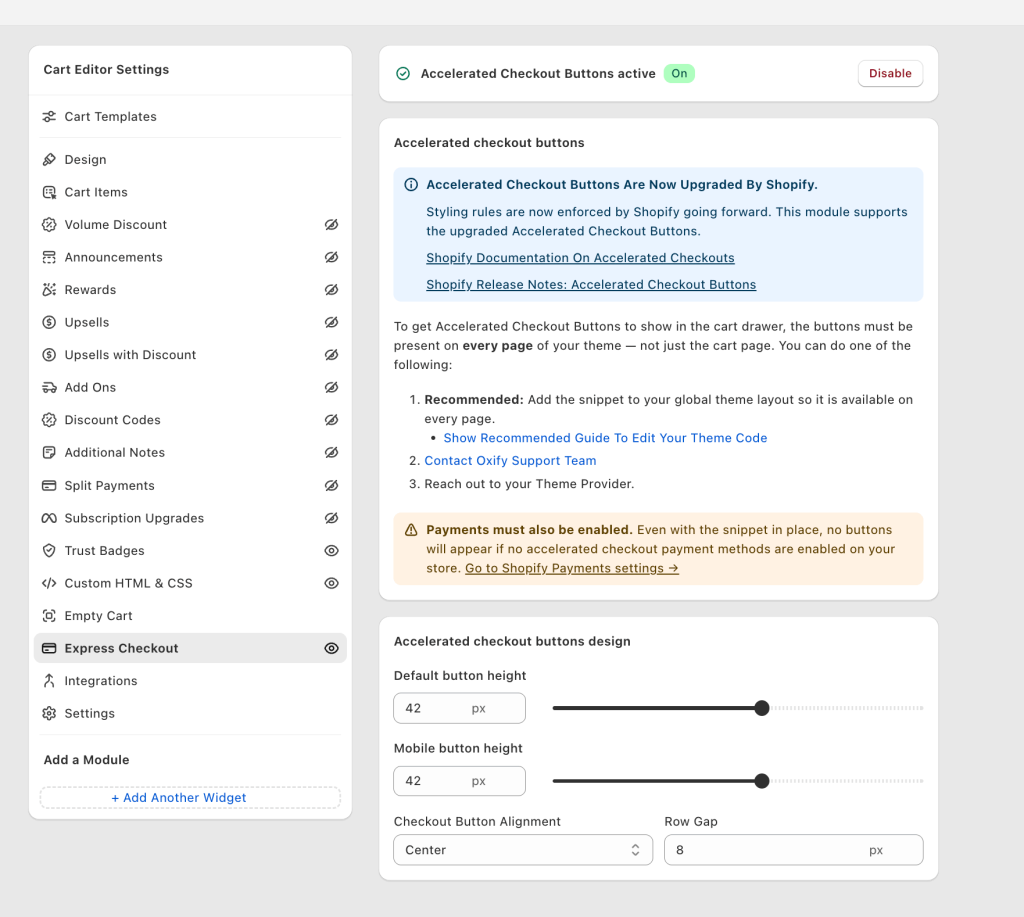
- Open Oxify Cart Drawer & Upsells in your Shopify admin.
- Find the Accelerated Checkout Buttons module and switch it from Off to Enable.
- Open the design settings: set button height for desktop, button height for mobile, alignment, and the gap between rows.
- Add the one-time snippet below so the buttons exist for the drawer to use (more on why in a second).
- Turn on your payment methods, then test on a phone and a desktop.
The app handles the hard parts: cloning the buttons into the drawer, re-drawing them when the drawer reloads, and keeping them inside Shopify's styling rules. You just flip the toggle and add one snippet.
Who should skip it: if your theme's own drawer already shows the buttons (Horizon does, with its Accelerated checkout buttons setting on) and you do not need upsells, free gifts or a progress bar in the drawer, the theme setting is free and enough.
The working snippet (and why it is needed)
Shopify's docs say accelerated checkout buttons can go anywhere in a theme, including a cart drawer, and that Shopify re-renders them when the section holding them is requested again through the Section Rendering API. That works when your theme's own drawer outputs the buttons. A drawer built in JavaScript, such as an app's, does not run your theme's Liquid, so it needs buttons that already exist on the page to copy. For that, the button code must be present on every page of your theme, not just the cart page, because the drawer can open anywhere.
The fix is to add a hidden reference copy to your global layout. The drawer then clones from it.
Step 1: Go to Online Store → Themes → Edit code → layout/theme.liquid
Step 2: Paste this just before the closing </body> tag. The display:none wrapper hides it from the page itself. It only acts as a source the drawer copies from.
{% comment %} Oxify Cart: Accelerated Checkout Buttons {% endcomment %}
{% if additional_checkout_buttons %}
  <div style="display:none" aria-hidden="true">
    {{ content_for_additional_checkout_buttons }}
  </div>
{% endif %}
Important: this goes in layout/theme.liquid, not your cart template. If you only add it to the cart page, the buttons show only when the drawer is opened while the shopper is already on /cart.
Shopify's own themes already output the buttons on the normal /cart page: Dawn 16.0.0 does in sections/main-cart-footer.liquid, and Horizon 4.2.0 does through its cart summary. Check yours first, because adding the block twice shows duplicate buttons. If your cart page has none, add this simpler snippet to sections/main-cart-footer.liquid:
{% if additional_checkout_buttons %}
  {{ content_for_additional_checkout_buttons }}
{% endif %}
Save, reload any page, and the drawer should now show the express buttons.
No-code app vs manual code: which should you pick?
Both routes use the same Shopify buttons. The difference is who handles the messy parts.
| What matters | Manual code only | Oxify Cart Drawer & Upsells |
|---|---|---|
| Edit theme files | Yes, and you maintain it | One guided snippet |
| Re-draws buttons when drawer reloads | You build it | Handled for you |
| Design controls (height, align, gap) | Custom CSS | Built-in settings |
| Upsells and free gifts in the same drawer | No | Yes |
If you are comfortable in theme code and only want the buttons, the manual route works. If you also want upsells and free gifts in the same drawer, the app saves you building the rest.
Why your express checkout buttons are not showing in the cart drawer
Work down the list in order.
1. Payment methods are not turned on, or the wallet is not available to that shopper. No buttons show if you have not activated accelerated payment methods. Go to Settings → Payments and switch on Shop Pay plus any others, such as PayPal, Google Pay or Amazon Pay. Even then, availability is per shopper: Apple Pay needs Safari on a compatible device, so test it on a real iPhone or Mac, not in Chrome on a laptop.
2. The drawer never outputs the buttons. This is the cause most specific to cart drawers. Dawn 16.0.0's drawer does not output Shopify's button code at all (see the table below), so there is nothing to show. For an app-built drawer, the reference snippet must live in layout/theme.liquid, not only on the cart page.
3. Your theme's switch is off or missing. Horizon has a theme setting called Accelerated checkout buttons under its Cart settings, on by default, that controls the buttons in its cart summary. Other themes label it differently or have no such setting, so open Theme settings → Cart in the theme editor and look.
4. The drawer re-rendered and dropped them. Drawers rebuilt by JavaScript after the page loads can lose buttons that were placed by hand. Shopify re-renders the buttons when the section that holds them is requested again, so a drawer that swaps in its own markup instead of that section's output can lose them. You need something that re-draws the buttons after each reload, which is what the app does.
5. Too many buttons, so they wrap and look broken. In the cart, Shopify lines the buttons up in a row and switches to a full-width vertical stack when there is no room. To force the stack, add the class additional-checkout-buttons--vertical to the container that holds content_for_additional_checkout_buttons. See the styling limits below.
Which themes show express buttons in the drawer? We read the code
On October 11, 2026 we read the current source of Shopify's two free reference themes on GitHub and searched their cart-drawer files for Shopify's express button output.
| Theme (version read) | Drawer shows the buttons? | Where the buttons are in the code | Stores in our sample |
|---|---|---|---|
| Dawn 16.0.0 | No | Only the cart page: sections/main-cart-footer.liquid. The drawer files have no match. | 47 of 446 named themes |
| Horizon 4.2.0 | Yes, when the Accelerated checkout buttons setting is on (it defaults to on) | snippets/cart-summary.liquid, which the drawer renders under the checkout button | 18 of 446 named themes |
The last column comes from the same store check: of the 446 stores that exposed a theme name, Dawn was the most common name (47), then Horizon and Prestige (18 each) and Broadcast (16). Impulse appeared on 9 stores and Pipeline on 7. Paid themes such as Prestige, Impulse and Pipeline are not open source, so we could not read their drawers. Check each theme's cart settings or documentation. Stores on older or customized copies of Dawn and Horizon may differ.
To repeat the check, open snippets/cart-drawer.liquid in Dawn v16.0.0 and search for additional_checkout_buttons. You will find nothing. In Horizon, the drawer renders the cart-summary snippet, which outputs the buttons when settings.show_accelerated_checkout_buttons is on.
If you are on Dawn and want to skip the app, Shopify's docs describe adding the same two-line Liquid block next to the checkout input. In Dawn that is the CartDrawer-Checkout button in snippets/cart-drawer.liquid. We read that code but did not test the edit on a live store, and a theme update can overwrite it. For more on what each theme's drawer includes, see what a cart drawer is and which themes have one.
Express buttons and discount codes
Shopify's Apple Pay help page warns that a shopper who taps Apple Pay on the cart cannot go to checkout to type a discount code. Codes work with Apple Pay only if the shopper enters them on the checkout page before tapping the button. If your offers depend on codes, test the flow with Apple Pay on a real device. Our guide to cart drawer discount codes covers how to apply a code to the cart before the shopper reaches the buttons.
Choosing which buttons to show
You have less control here than most guides imply. Shopify decides which wallets render, and in what order, for each shopper. What you control is which payment methods are activated under Settings → Payments, the layout, and the styling limits below. Shopify's help center warns that hiding accelerated checkout options might hurt conversion, so remove a wallet only if it causes a real problem, such as buttons wrapping badly on phones.
What Shopify lets you style (checked October 11, 2026)
Shopify renders the buttons inside a custom element with a closed shadow DOM, so CSS selectors and scripts that target the markup inside them do not work. According to the accelerated checkout developer docs, you style them with CSS custom properties instead:
- Button height: 25 px to 55 px. The defaults are 44 px on product pages and 42 px in the cart's vertical stack, and 54 px in the cart's horizontal row.
- Corner radius: 4 px by default in the cart.
- Alignment in the horizontal row, left (
start) by default, and an 8 px row gap in the vertical stack.
Click tracking works the same way. Do not depend on the markup inside the buttons. Listen to the wallet elements Shopify lists, such as shop-pay-wallet-button, shopify-apple-pay-button, shopify-google-pay-button, shopify-paypal-button and shopify-amazon-pay-button. These are the limits every cart drawer works within, ours included.
Measure it, do not set and forget
After it is live, watch your numbers for a week or two:
- Checkout completion rate. Is more of your cart traffic finishing?
- Average order value. If it drops, your buttons may be too high and shoppers are skipping upsells.
- Mobile vs desktop. Compare the two separately.
- Sales by wallet. Shopify's payments finance report can be filtered by payment method to show how much each wallet brought in.
Change one thing at a time so you always know what caused the move. For other drawer settings worth testing, see how to customize your Shopify cart drawer.
Quick setup checklist
- [ ] Accelerated payment methods activated under Settings → Payments
- [ ] Express checkout module enabled in Oxify Cart Drawer & Upsells, or your theme's Accelerated checkout buttons setting switched on
- [ ] Reference snippet added to
layout/theme.liquid(not the cart template) if your drawer comes from an app - [ ] Buttons not duplicated on the cart page
- [ ] Express buttons placed below your upsells
- [ ] Tested on a real phone, a desktop, and Apple Pay in Safari on an Apple device
- [ ] Tested a discount code flow if your offers use codes
- [ ] Watched conversions for a week to confirm the lift
Frequently Asked Questions
What is an express checkout button?
Do express checkout buttons really improve conversions?
Why are my express checkout buttons not showing in the cart drawer?
Where exactly do I paste the code?
layout/theme.liquid, just before the closing </body> tag. That makes the buttons available on every page so an app-built drawer can copy them. Do not use the cart template for this: a snippet that exists only on the cart page shows the buttons only when the drawer is opened on /cart.Why does Dawn not show express checkout buttons in the cart drawer?
layout/theme.liquid.My express buttons disappeared after I changed themes. Why?
layout/theme.liquid, so it does not move with you. Horizon has an Accelerated checkout buttons setting under Cart; Dawn's drawer outputs none. Re-add the snippet to the new theme and check its cart settings.How many express checkout buttons should I show?
Will express checkout hurt my upsells or average order value?
Can I add express checkout buttons without touching code?
Can customers use a discount code with Apple Pay in the cart drawer?
Ready to add express checkout to your cart drawer?
Express checkout buttons are one of the quickest ways to shorten the path from cart to paid. The trick is getting them to actually show up and placing them so they help instead of hurt.
Install Oxify Cart Drawer & Upsells (our app) and turn on express checkout in a few clicks. The App Store listing shows a 14-day free trial and a 4.9 rating from 40 reviews (checked October 11, 2026), so you can test it on your own store before you commit.