 Oxify
OxifyShopify preorder & back in stock app
A free Shopify preorder app, so out of stock never means out of business
Never lose a sale to “sold out” again. Take preorders and deposits, and send back-in-stock notifications the moment stock returns — free, with no caps.
Merchants running Oxify apps












A sold-out page converts at zero per cent
You paid the same acquisition cost to land this visitor as you did for any other. They wanted the product enough to reach the page. Then Shopify greyed out the button and the visit was worth nothing — and the demand you just proved existed went to a competitor who had stock.
The default out-of-stock page
- A greyed-out button and no way to express intent.
- Demand you can see in analytics but cannot capture or act on.
- Restock news depends on the shopper remembering to come back.
- Upcoming products can’t be sold until the stock physically lands.
- No cash up front, so the restock is funded entirely by you.
With Oxify Preorder
- A working preorder button with a clear badge and delivery expectation.
- Deposits, partial or split payments, so cash arrives before stock does.
- A waitlist that emails automatically the moment inventory returns.
- Sell upcoming products before they arrive and size the run to real demand.
- Preorder-specific messaging and discounts, set per campaign.
Four things a preorder page does that a sold-out page can’t
This is not only about recovering a lost order. It changes how you buy inventory.
Capture the sale now
The shopper is on the page with intent today. In three weeks they will be somewhere else.
Fund the restock
A deposit taken at preorder is working capital you did not have to borrow.
Size the order to real demand
Preorder volume is the only honest forecast you will ever get for a new product.
Own the waitlist
Every signup is a customer you can email — not a visitor who left with nothing.
Replace the dead button with a working one
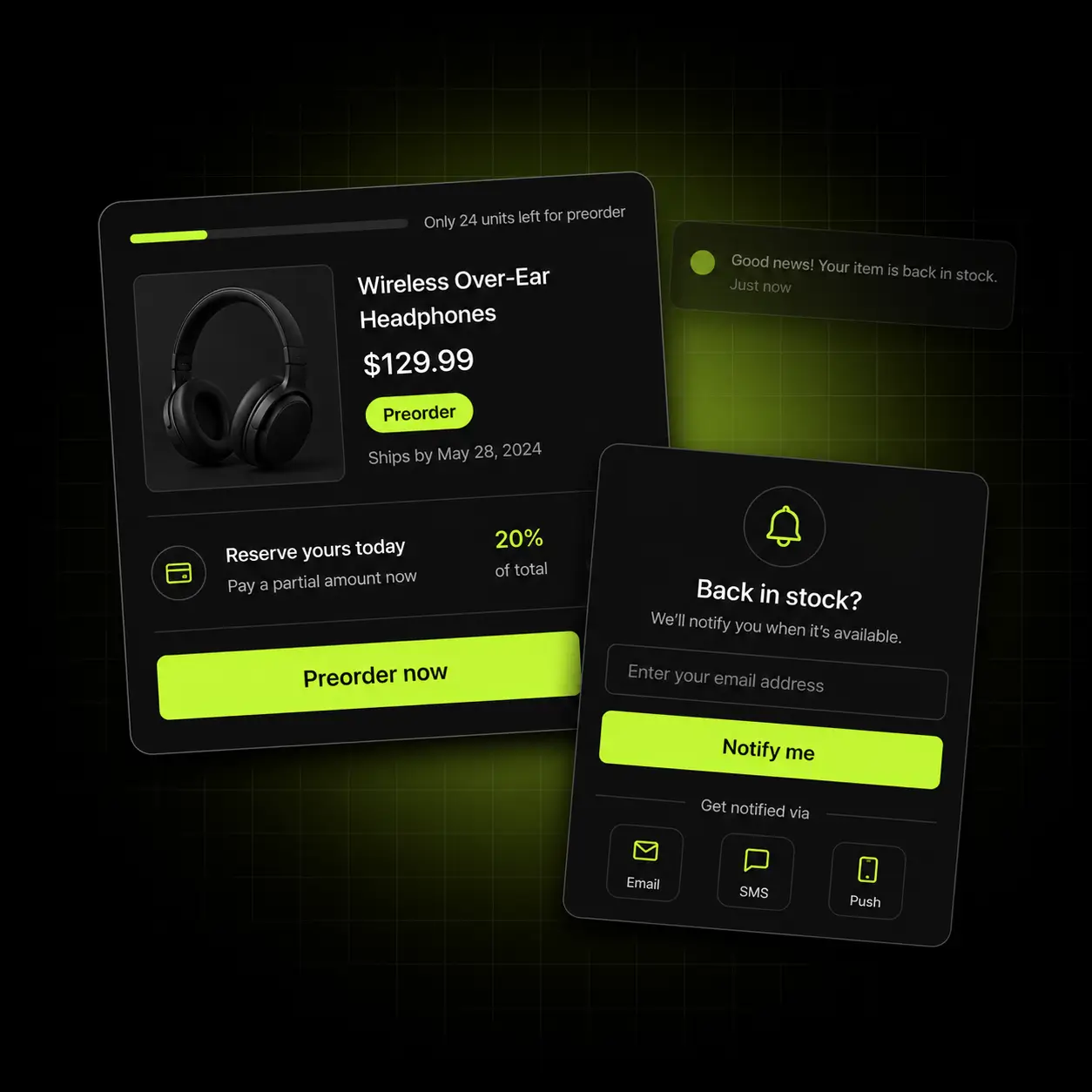
A "Pre-order now" button appears automatically when stock hits zero, with a badge and an estimated shipping date so nobody is surprised later. Set it per product, per collection or store-wide.
- Automatic preorder button and badge when inventory reaches zero
- Estimated shipping date shown on the button, in cart and at checkout
- Per-product, per-collection or store-wide rules
- Preorder-specific discounts to reward the wait
Set expectations hard: the delivery date on the button is what prevents the ticket three weeks later.
Without an app: Shopify’s own Continue selling when out of stock setting (Inventory section of a product or variant, Inventory tracked on) lets orders through at zero stock, but adds no preorder label, delivery date or deposit, and it does not apply to Shopify POS (Shopify Help Center, checked 11 October 2026). Oxify Preorder & Back in Stock lists Shopify POS and Shopify Flow under “Works with” on its App Store page, but Shopify’s developer docs say preorders built as selling plans can’t be taken through POS (read 13 October 2026), so test POS before you rely on it. Full walkthrough: does Shopify have a built-in preorder feature?

Get paid before the stock lands
Charge the full amount, a fixed deposit, or a partial payment now with the balance later. It lowers the commitment for the customer and turns your restock into something the customer funds rather than something you gamble on.
- Full payment, fixed deposit or percentage deposit at checkout
- Partial and split payment options for higher-ticket items
- Balance collected when the product is ready to ship
- Clear breakdown shown before the customer commits
The cash-flow argument: at a 30% deposit, every $1,000 of preorders puts $300 in your account before the stock exists.
The shopper who won’t preorder still wants it
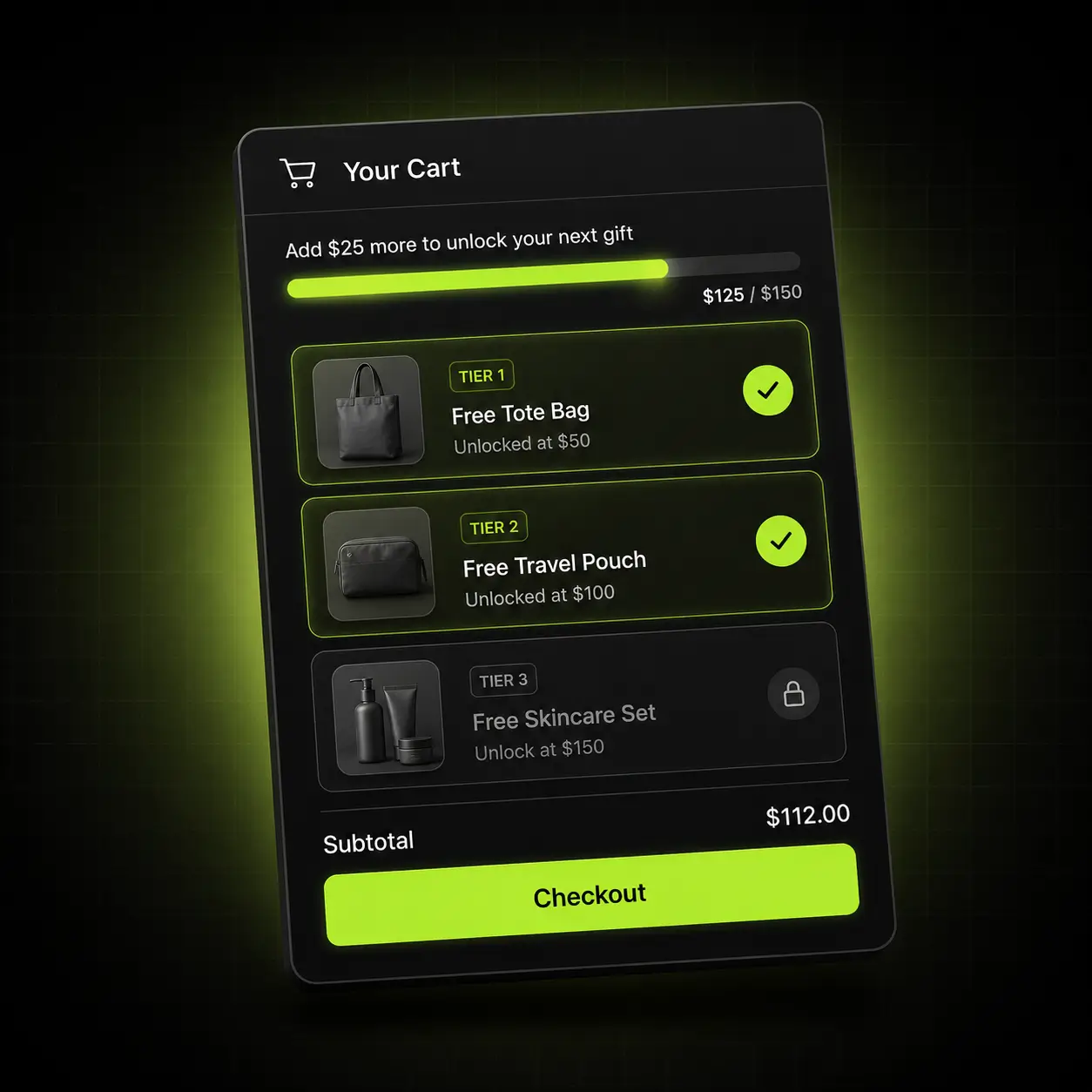
Not everyone will wait, and not every product should take preorders. For those, a "notify me when available" waitlist captures the email and sends an automatic restock alert the moment inventory returns — to a list of people who have already told you exactly what they want.
- Email capture on any out-of-stock product page
- Automatic restock alerts sent the moment inventory returns
- Per-variant signup, so the alert matches the size or colour they wanted
- Waitlist volume shows you which restocks are actually worth doing
Email alerts: the App Store listing describes automatic back-in-stock emails. If you want SMS or push restock alerts as well, STOQ, Notify Me! and Timesact name them in their plans (checked 13 October 2026; see the comparison below).
Sell it before it exists
Preorder is not only a stockout tool. Open coming soon products for preorder ahead of launch and you get demand data, early revenue and a launch-day audience — before committing to a manufacturing run.
- Open preorders on products that have never had stock
- Schedule when preorders open and close
- Cap preorder quantity so you never oversell a run
- Preorder-only pricing or an early-bird discount
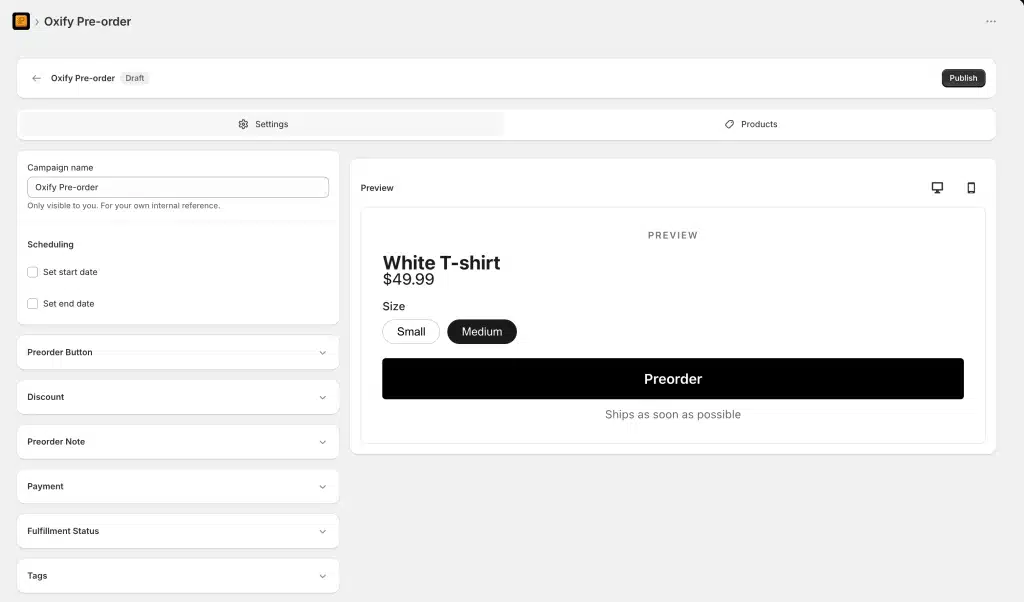
Better than a forecast: preorder volume is demand people paid to express. In the campaign editor, scheduling is two checkboxes (Set start date, Set end date) beside the Preorder Button, Discount, Preorder Note, Payment and Fulfillment Status panels.
Every stage of a product being unavailable
Out of stock is not one situation. Coming soon, sold out, on backorder and restocking are four different problems with four different right answers.
Coming soon
Preorder before launch, with a cap and a scheduled open date.
Sold out, restocking
Preorder with a deposit and a clear delivery date.
Sold out, no date yet
Waitlist capture with an automatic restock alert.
Back in stock
The alert goes out and the waitlist converts.
How preorders work in Shopify
A Shopify preorder is a selling plan, which Shopify calls a deferred purchase option, that a preorder app attaches to a product variant. There is no single preorder switch: the plan combines four policies that decide when the customer pays, when the order ships and when stock is counted. Shopify’s developer documentation describes them like this:
| Policy | What it decides | Options Shopify lists |
|---|---|---|
| Billing | When the customer pays | The full amount at checkout, or a deposit at checkout with the balance charged on a set date or a set number of days after checkout |
| Delivery | When the order is fulfilled | As soon as possible, on a set date, or unknown |
| Inventory | When stock is committed | When the order is placed, or when it is fulfilled |
| Pricing | Any price change on the preorder | Optional: one fixed adjustment, such as a preorder discount |
Source: About pre-order and Try Before You Buy (TBYB), Shopify developer documentation, read 13 October 2026.
Shopify stores the customer’s payment method so the balance can be charged later without contacting them, but scheduling that charge and handling a failed payment is the app’s job. An order carries only one deferred due date: if a cart mixes preorders with different dates, Shopify applies the earliest, or due on fulfillment if any line uses it. The same page lists the limits: preorders need Shopify Payments, PayPal Express, Adyen on Shopify or (for some merchants) Stripe; they can’t be taken through Shopify POS, on draft orders or for B2B; and they don’t support Buy X Get Y discounts, cart permalinks or checkouts still customised with checkout.liquid.
Oxify Preorder & Back in Stock is new and free. It launched on 8 July 2026, and on 13 October 2026 its App Store listing showed no reviews yet and no Built for Shopify badge. The store data it asks to edit includes purchase options, payment mandates and payment terms, the pieces this model uses for deposits and balance charges.
The approach that fits your supply chain
Whether you should take a deposit, the full amount, or just an email depends on how confident you are about the date. Here is where we’d point you first.
Made-to-order & small batch
Long lead times and production runs sized to demand.
Start with: Preorder with a 30% deposit and a capped quantity, so the run is funded and never oversold.
Drops & launches
Hype, scarcity and a known launch date.
Start with: Scheduled preorders opening ahead of launch, with early-bird pricing and a hard cap.
Fast-moving consumables
Frequent stockouts on predictable bestsellers.
Start with: Back-in-stock alerts rather than preorders — the restock is close enough that an email beats a deposit.
What free plans cap, checked 13 October 2026
On 13 October 2026 we read the pricing and ratings of the first six apps listed on the Shopify App Store’s Pre-orders category page. All six have a free plan, all six cap it, and all six carry the Built for Shopify badge. Here is how they compare with Oxify Preorder & Back in Stock. Oxify publishes this page and makes the last app in the table.
| Preorder app | Rating (reviews) | Built for Shopify | Free plan limit | Cheapest paid plan | Deposits / partial pay |
|---|---|---|---|---|---|
| Preorder, Back In Stock - STOQ | 5.0 (3,811) | Yes | 10 preorders a month | $10/mo | Not itemised* |
| Notify Me! Back in Stock Alert | 4.9 (3,900) | Yes | 5 preorders | $9.90/mo | Paid plan, from $9.90 |
| Preorder Now Presale Timesact | 5.0 (2,107) | Yes | 20 orders a month | From $5/mo | Paid plan, from $5 |
| REZ Preorder, Back In Stock | 5.0 (1,601) | Yes | 20 preorders a month | $4.99/mo | Not itemised* |
| PreOrder Globo | Back in Stock | 4.9 (1,949) | Yes | First 20 preorders | $9.90/mo | Paid plan, from $9.90 |
| Essent Preorder Back in Stock | 5.0 (1,310) | Yes | 25 preorders a month | $4.95/mo | On the free plan |
| Oxify Preorder & Back in Stock (our app) | No reviews yet | No | No cap | None, it is free | On the free plan |
* Not itemised: the free plan lists no deposit feature, and the paid plans say “all features unlocked” without naming one.
How we checked: we opened the first six listings in the order the category page showed them and copied the rating, review count, Built for Shopify badge, free plan and cheapest paid plan from each. Five of the six also list a charge of $0.10 to $0.30 per preorder once a paid plan’s monthly limit is passed. Oxify’s details are from its own listing the same day. Plans change, so re-check before you decide.
Pick a different app if: you want an established review history (the six above have 1,310 to 3,900 reviews; Oxify Preorder & Back in Stock launched on 8 July 2026 and has none yet); the Built for Shopify badge matters to you (all six carry it, Oxify’s preorder app does not); or you want SMS or push restock alerts: STOQ, Notify Me! and Timesact name SMS in their plans, while the Oxify listing describes email alerts. Dibs – Preorders & Backorders, listed further down the same page, is also free (5.0 from 143 reviews, Built for Shopify, deposits, partial and split payments listed) and is not in the table above. Oxify publishes this page. For a longer list, see 15 back-in-stock and preorder apps compared.
Live in about ten minutes
No developer, no theme edits, no republish.
Install
Add the app from the Shopify App Store. It connects through an app embed block — no theme files touched.
Choose your rule
Preorder automatically at zero stock, or manually on specific products and collections.
Set payment & dates
Full payment or a deposit, plus the delivery expectation the customer will see.
Turn on the waitlist
Enable back-in-stock alerts for anything you would rather not preorder, then publish.
Free. Not “free tier”.
The six top-listed preorder apps we checked on 13 October 2026 all cap their free plans at 5 to 25 preorders, and five of the six list a per-preorder charge once a paid plan’s limit is reached. Deposits and back-in-stock alerts are both included here at no cost.
No trial to expire, no credit card, no usage cap and no “upgrade to unlock” on any feature listed here.
Install freeSo what’s the catch?
- Every feature on this page is free. There is no locked tier behind it.
- No trial clock — the app does not stop working after 14 days.
- No usage cap, no order limit and no branding you have to pay to remove.
- We build paid apps too, and free apps are how merchants meet us.
- If you never install the paid one, this still costs you nothing.
- Uninstall whenever you like — it leaves nothing behind in your theme.
When you want to raise average order value rather than just fix one surface, our paid app covers the product page, the cart, the sticky cart and post-purchase from one install — from $9.99/month with a 30-day ROI guarantee.
See Oxify Cart Drawer & Upsells- Free gift & reward tiers A live progress bar toward free shipping and free gifts, with unlimited tiers.
- In-cart upsells & Subscribe & Save Frequently Bought Together and subscription upgrades inside the cart drawer.
- One rule set across four surfaces Product page, cart, sticky cart and post-purchase, with no discount collisions.
A new app, and we’d rather say so
Oxify Preorder & Back in Stock launched on the App Store on 8 July 2026. When we checked on 13 October 2026 it had no reviews and no Built for Shopify badge, while each of the six top-listed preorder apps has 1,310 to 3,900. We would rather tell you that than borrow credibility from our other apps — here is what we can honestly point to instead.
Recently launched — no reviews yet
Part of the Oxify family
Seven Oxify apps on the Shopify App Store share the same support team. The team behind this one also runs Oxify Cart Drawer & Upsells (4.9 from 40 reviews, checked 13 October 2026).
No theme edits
Installs as an app embed block, so trying it costs you nothing and uninstalling leaves nothing behind.
Free means low risk
There is no trial, no card and no contract — if it doesn’t suit your workflow you have lost ten minutes.
Preorders are better with a deadline
Capturing the demand is the first half. These free apps handle the second.
Oxify Countdown Timer Bar
Also free. Counts down to when preorders close or when the product ships. See the countdown timer app.
Oxify Announcement Bar
Also free. Announces the restock or the preorder window above every page. See the announcement bar app.
Oxify Cart Drawer & Upsells
Our paid app — raise the value of the preorder with gift tiers and in-cart cross-sells. See the cart drawer upsell app.
Not ready to install?
Get the free Store Optimization Checklist
Cart friction, upsell gaps, merchandising and trust fixes — the audit we run on every store. No call, no install.
Shopify preorder & back in stock apps — frequently asked questions
What is Oxify Preorder & Back in Stock?
Oxify Preorder & Back in Stock is a free Shopify app from Oxify (listed as “Oxify App”) that adds a preorder button and badge to sold-out, low-stock, coming-soon and made-to-order products, takes a deposit, partial or split payment at checkout, and emails shoppers on a waitlist when stock returns. It launched on the Shopify App Store on 8 July 2026; on 13 October 2026 its listing showed no reviews yet and no Built for Shopify badge. Every feature is free, with no preorder cap, and the app is available in 8 languages.
How does Oxify Preorder & Back in Stock compare with Notify Me! and STOQ?
Notify Me! Back in Stock Alert (4.9 from 3,900 reviews) and Preorder, Back In Stock - STOQ (5.0 from 3,811) are established, Built for Shopify apps; Oxify’s is new, with no reviews and no badge yet. Their free plans are capped: Notify Me! at 5 preorders, with partial payment from $9.90 a month; STOQ at 10 preorders a month, with paid plans from $10. Both name SMS restock alerts in their plans, while Oxify’s listing describes email alerts. Oxify Preorder & Back in Stock has no preorder cap and includes deposits for free. Figures from the live listings, 13 October 2026.
What does a preorder app do?
It replaces the greyed-out button on an out-of-stock or upcoming product with a working preorder button, so you can take the order — and optionally a deposit — before the stock exists.
How do pre-orders work on Shopify?
The customer checks out as normal and the order is created in Shopify, flagged as a preorder. Behind it, the preorder app attaches a selling plan to the variant that sets when the customer pays (in full, or a deposit now and the balance later), when the order ships and when stock is committed. Shopify’s developer documentation (read 13 October 2026) says preorders work only with Shopify Payments, PayPal Express, Adyen on Shopify or, for some merchants, Stripe, and can’t be taken through Shopify POS, on draft orders or for B2B. How preorders work in Shopify, above, has the detail.
How do I show a pre-order button on Shopify when inventory is zero but still accept orders?
Shopify’s own Continue selling when out of stock setting (Inventory section of a product or variant, with Inventory tracked on) lets orders through at zero stock but adds no preorder label, delivery date or deposit. A preorder app adds the Pre-order button, badge, estimated ship date and optional deposit. Oxify Preorder & Back in Stock (our app) switches to preorder automatically when stock reaches zero, per product, collection or store-wide.
Which preorder app lets me convert sold-out items into preorder products quickly?
Choose an app with an automatic zero-stock rule, so you are not editing products one by one. Oxify Preorder & Back in Stock (our app) offers that rule per product, per collection or store-wide, and needs no coding. It launched on 8 July 2026 and has no reviews yet; the six top-listed preorder apps we checked on 13 October 2026 have 1,310 to 3,900 each.
Is there a free preorder app for Shopify?
Yes, several. The six top-listed preorder apps we checked on 13 October 2026 all have a free plan, but each caps it at 5 to 25 preorders, and Dibs – Preorders & Backorders (5.0 from 143 reviews) is free too. Oxify Preorder & Back in Stock (our app) is free with no preorder or email cap, and every feature on this page is included. We also sell paid apps, such as Oxify Cart Drawer & Upsells and Oxify Quantity Breaks, but you are never required to install them.
Should I take a deposit or the full amount?
Take a deposit when the delivery date is uncertain or the item is expensive; it lowers the commitment for the shopper. Take the full amount when the date is firm and close. We would start at 20–30%: at 30%, every $1,000 of preorders puts $300 in your account before the stock exists.
Can I take a deposit or partial payment on a pre-order?
Yes. Charge a fixed deposit or a percentage at checkout and collect the balance when the product is ready to ship. The customer sees the full breakdown — deposit now, balance later — before committing. On 13 October 2026 only one of the six top-listed preorder apps (Essent) listed partial payment on its free plan.
What is the difference between preorder and back-in-stock?
A preorder takes the money now for later delivery. A back-in-stock alert takes only an email and notifies them when it returns. Use preorders when you know roughly when it lands; use the waitlist when you don’t.
Can customers get notified when a product is back in stock?
Yes. A “notify me when available” form appears on any sold-out product, and the restock email goes out automatically the moment inventory returns — per variant, so they hear about the exact size or colour they wanted. The App Store listing describes email alerts; if you need SMS, STOQ, Notify Me! and Timesact name it in their plans.
Can I preorder a product that has never had stock?
Yes. Open preorders on an upcoming product ahead of launch, which gives you demand data and early revenue before you commit to a manufacturing run.
How do I stop overselling a preorder?
Set a quantity cap per campaign. Preorders close automatically once it is reached, which matters most on limited runs where overselling means refunding.
How do I show an estimated shipping date on pre-order items?
Set the expected dispatch or shipping date per product or per campaign, and it appears with the pre-order button so the delivery expectation is clear before checkout. Setting it accurately is what prevents the “where is my order” ticket three weeks later.
Is there a Shopify app that does both preorders and back-in-stock alerts?
Yes. Oxify Preorder & Back in Stock does both in one free app: sold-out and upcoming products get a pre-order button and badge, with the option of a deposit or partial payment, and shoppers who would rather wait can sign up for an automatic back-in-stock notification per variant. One tool means one set of rules for what happens when inventory hits zero.