 Oxify
OxifyShopify product bundles & BYOB app
The Shopify quantity breaks & bundle app that sells three where you sold one
Raise order value with quantity breaks, BOGO and build-your-own boxes. Discounts apply at checkout automatically. Rated 4.9 ★ · one flat $14.99/month · 14-day free trial.
Merchants running Oxify apps












A bigger basket is a pricing decision you never made
With one price per product, a shopper has no reason to take a second unit. Shopify’s own automatic discounts can reward a bigger basket without a code, but they live in the admin, and by default nothing on the product page tells the shopper that three is cheaper per unit than one. A bundle app adds that storefront layer, plus the builder for mix-and-match and Build Your Own Box sets.
Without bundling
- One price per product, so there is no reason to take two.
- Quantity discounts sit in an admin rule, so by default the product page does not show the ladder.
- Gift sets are usually built as separate products with their own inventory.
- BOGO is a Buy X Get Y rule you build and maintain by hand for each offer.
- No way to let the customer assemble their own box.
With Oxify Quantity Breaks
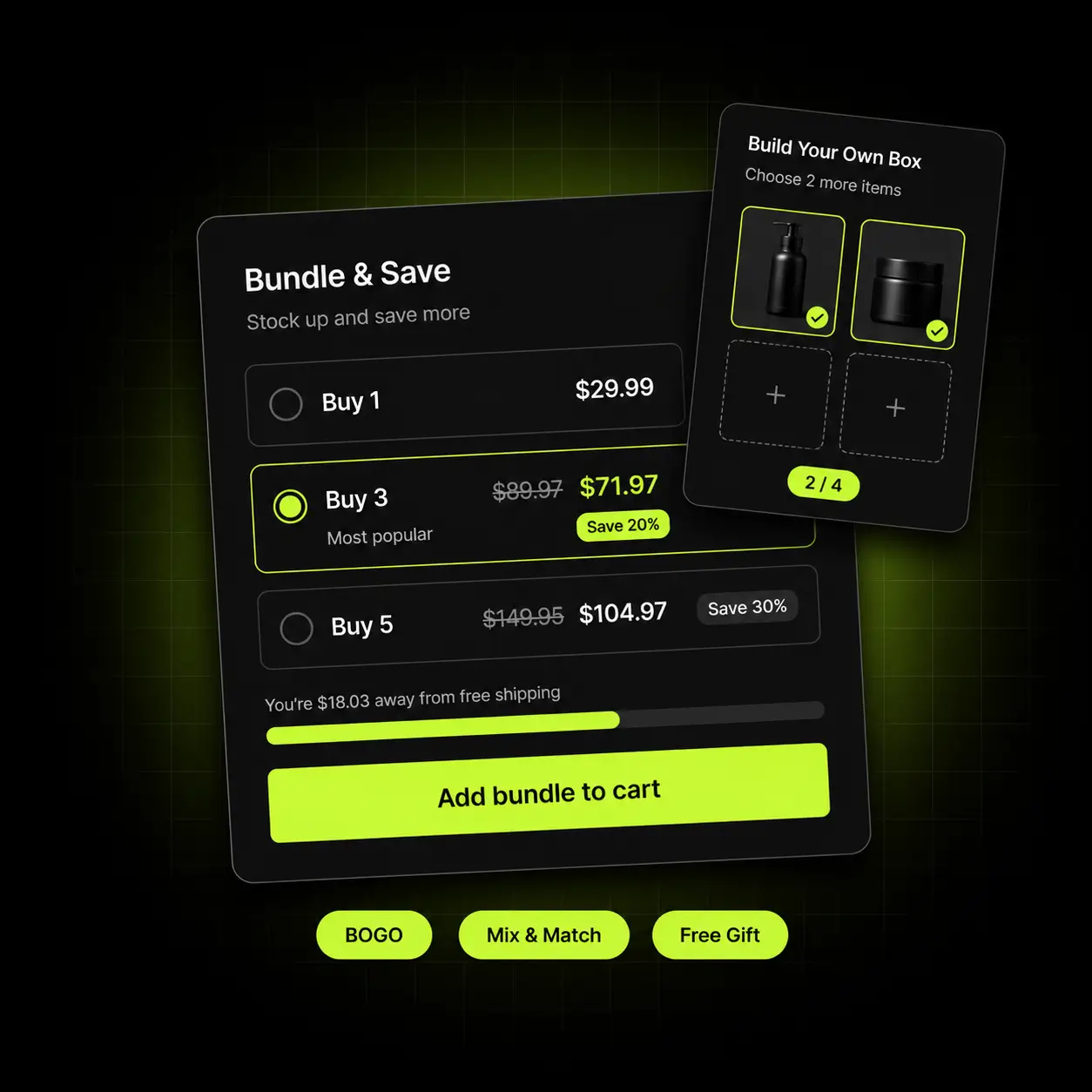
- Quantity breaks shown on the page, applied automatically as they qualify.
- Mix-and-match sets across a collection, with no duplicate SKUs.
- BOGO and free-gift offers applied at checkout with no code.
- A Build Your Own Box builder for curated multi-item purchases.
- Everything runs through Shopify’s discount engine, not a parallel system.
Pick the mechanic that fits your catalogue
Product bundles on Shopify are not one tactic — quantity breaks, volume discounts, combo deals and curated sets each earn differently. These cover almost every catalogue, and they all run from the same install.
Quantity breaks
Buy 2 save 10%, buy 3 save 15%. The simplest lever and usually the first one to try.
Build Your Own Box
The customer assembles a set from a collection at a fixed price or tier.
BOGO & free gift
Buy one get one — or buy X get Y — applied automatically with no code to distribute.
Fixed-price & mix-and-match
Curated sets and mix-and-match bundles priced as one thing — no duplicate SKUs, no inventory sync.
Make the third one obvious
Quantity breaks and volume discounts are the same lever with different framing — tiered pricing that rewards the bigger order. Show the ladder on the product page and the discount applies the moment the quantity qualifies. No code, no cart maths, and the next tier is always a concrete target rather than fine print.
- Unlimited tiers per product or collection
- The ladder is shown on the page, so the next tier is a visible goal
- Applies automatically through Shopify’s discount engine
- Percentage or fixed-amount discounts per tier
Start here: quantity breaks are the least setup of the five — one product or collection, one ladder, no curation.

Let the customer curate it
Pick any 6 from this collection for $45. A BYOB builder removes the usual objection to a fixed gift set: nobody has to accept an item they don’t want in order to get the ones they do.
- Fixed-price or tiered box building from any collection
- Set minimum and maximum item counts
- Live progress toward the box target as they add
- No duplicate SKUs and no separate inventory to maintain
Why offer it beside a fixed set: the usual objection to a gift set is the one item the shopper didn’t want.
Buy X, get Y — with no code involved
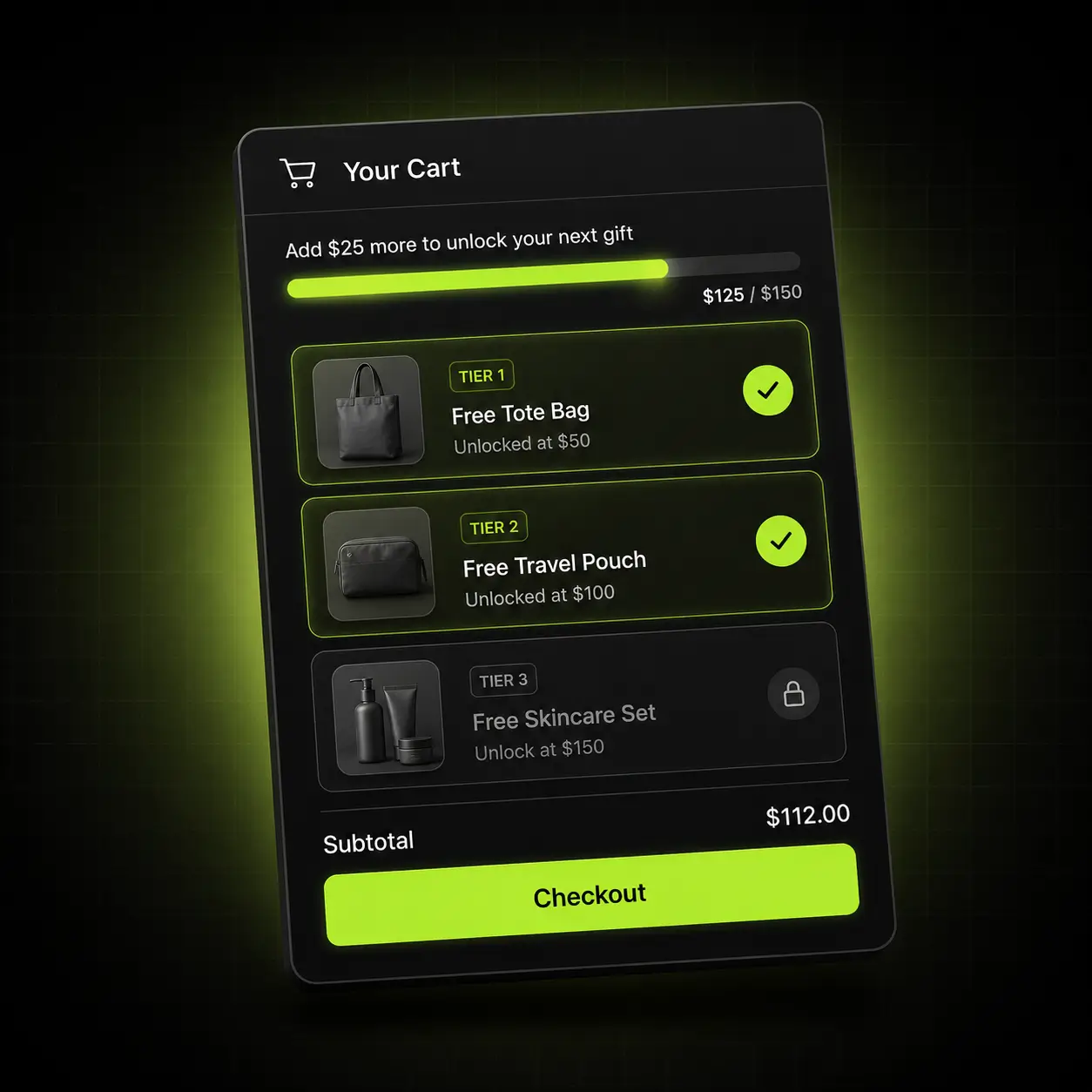
Buy one, get one — applied automatically at checkout — and free-gift offers that add themselves when the condition is met. Because it runs through Shopify’s native discount engine, Shopify’s own combination settings decide whether it stacks with your campaign codes.
- Buy X get Y, at any ratio and any discount level
- Free gift added automatically when the condition is met
- Applies at checkout with no code to distribute or leak
- Follows Shopify’s own discount-combination settings
No leaked codes: automatic discounts cannot end up on a coupon site.
Find out which bundle actually earns
Bundling is guesswork until you measure it. Run two offers against each other, read the revenue per bundle rather than the click-through, and keep the one that moved the number.
- A/B test bundle offers against each other
- Revenue attributed per bundle, not just impressions and clicks
- See which tier shoppers actually land on
- Analytics dashboard with per-offer breakdown
Why it matters: without revenue attribution you are guessing which bundle works.
Bundles wherever the basket is being built
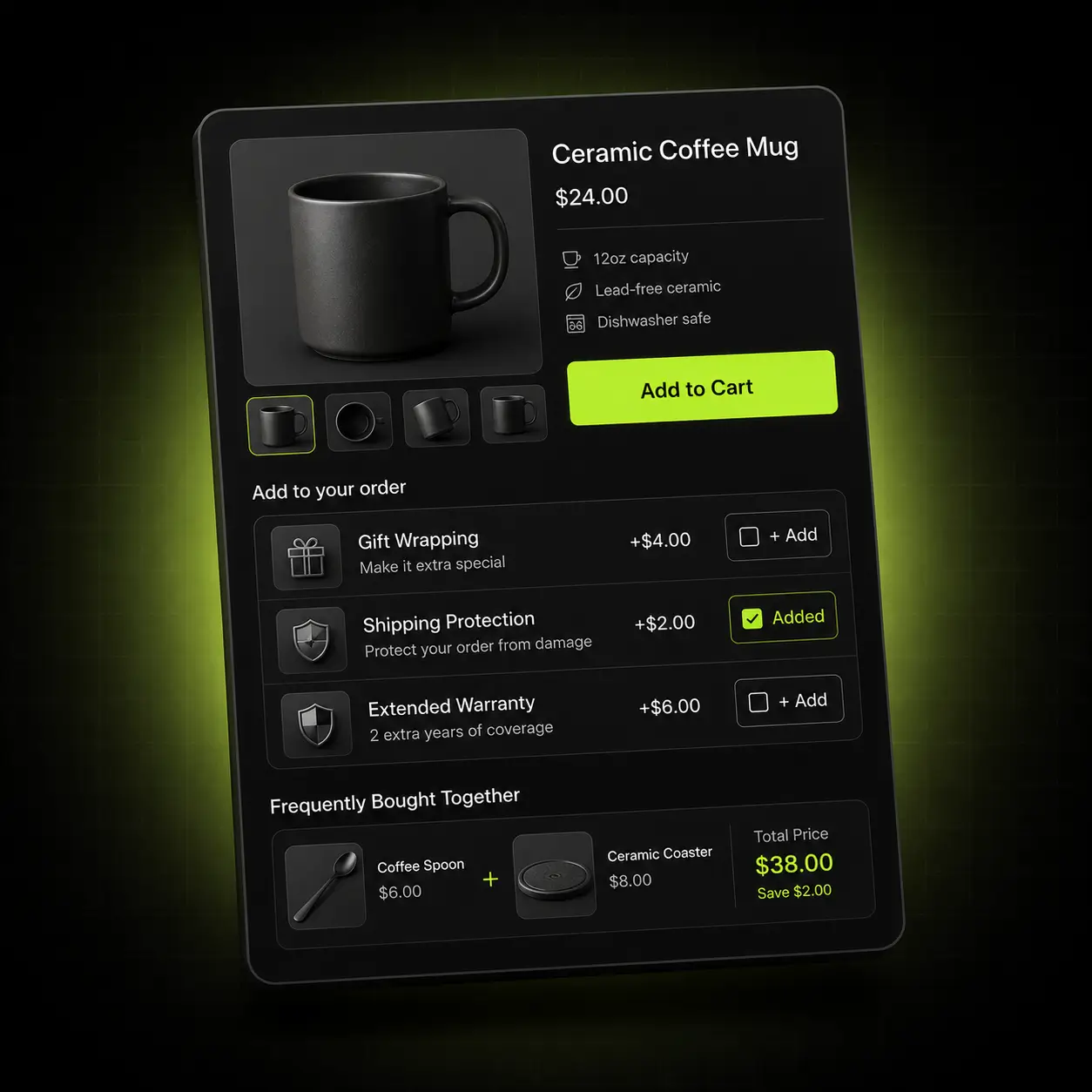
An offer that only exists on the product page misses everyone who arrived through search or a collection. These are the four places bundling earns.
Product page
The quantity ladder and the BYOB builder.
Collection page
Mix-and-match offers across the whole collection.
Cart
The discount applied and shown as a saving before checkout.
Checkout
Automatic discounts, with no code to enter.
The bundle that fits your catalogue
The right mechanic depends on whether your products are interchangeable, complementary or consumable. Here is where we’d point you first.
Supplements & consumables
Predictable repurchase and multi-month buying.
Start with: A quantity ladder on multi-month packs — buy 2 save 10%, buy 3 save 15% is an easy first test.
Beauty, food & giftable goods
Strong set logic and high gifting intent.
Start with: A Build Your Own Box at a fixed price, plus a curated fixed-price set alongside it.
Apparel & accessories
Complementary items rather than repeat units.
Start with: Mix-and-match across a collection, with BOGO on the categories you need to move.
How the bundle apps compare on their live listings
Bundle apps price in different units — bundles, orders, bundle sales or added revenue — so $14.99 on one is not $14.99 on another. On 13 October 2026 we read the App Store listing of Oxify Quantity Breaks & BYOB and of eight other bundle and quantity-break apps, and copied each plan as the vendor lists it. Oxify publishes this page and makes the first app in the table.
| Bundle app | Rating (reviews) | Built for Shopify | Free plan, live store | Paid plans, per month |
|---|---|---|---|---|
| Oxify Quantity Breaks & BYOB (our app) | 4.9 (13) | Yes | None; 14-day free trial | $14.99, one plan ($129.99/yr) |
| Simple Bundles & Kits | 4.8 (803) | Yes | Free: 3 bundles, 50 orders/mo | $14 / $39 / $149, by Shopify plan |
| Easy Bundles: Bundle Builder | 4.9 (1,415) | Yes | Free: up to $500 bundle sales/mo (not on Shopify Advanced or Plus) | $29 / $49 / $99, by bundle sales |
| FBP | Fast Bundle & Upsell App | 5.0 (3,543) | No | None (free on development stores) | $19 / $49 / $139, by bundle sales |
| Kaching Bundles App & Upsells | 5.0 (6,282) | Yes | None (free on development stores) | $14.99 / $29.99 / $59.99, by added revenue |
| Pumper Bundles Quantity Breaks | 4.9 (3,559) | Yes | Free: up to $300 extra revenue | $9.99 / $29.99 / $49.99, by extra revenue |
| AOV.ai Bundles Quantity Breaks | 5.0 (1,651) | Yes | Listed as free | No paid plan listed |
| Bundler » Product Bundles App | 4.9 (2,729) | Yes | Free: quantity breaks and Buy X Get Y, no revenue or order limit | $9.99 / $19.99, flat (mix-and-match, analytics) |
| Frequently Bought Together CBB | 4.9 (1,207) | Yes | Free: 3 manual bundles | $9.99 / $24.99 / $39.99, by monthly orders |
Ratings, review counts, badges and plans were read from each App Store listing on 13 October 2026. Plan limits are in each vendor’s own units, so they are not like-for-like, and vendors change them — check the listing before you decide.
Who should pick a different app
- You want a free plan on a live store. Bundler’s free plan includes quantity breaks and Buy X Get Y with no revenue or order limit, AOV.ai is listed as free, and Pumper is free up to $300 of extra revenue. Oxify Quantity Breaks & BYOB has a 14-day free trial, then one paid plan; six of the eight apps above list a free plan.
- You weigh review history most. Oxify’s listing has 13 reviews (4.9); the eight apps above have between 803 and 6,282, led by Kaching Bundles (5.0 from 6,282) and Pumper (4.9 from 3,559).
- You need bundle stock synced to a 3PL or sold through Shopify POS. Simple Bundles & Kits and Easy Bundles list inventory sync and POS; Oxify’s listing does not, because its bundles are discounts on your existing SKUs.
Live in about ten minutes
No developer, no theme edits, no discount codes to distribute.
Install
Add the app from the Shopify App Store. It connects through an app embed block — no theme files touched.
Pick a mechanic
Quantity breaks, BYOB, BOGO, free gift or a fixed-price set.
Set the offer
Choose the products or collection, set the tiers, and write what the shopper sees.
Publish and test
Go live, then A/B a second offer against it and keep the one that earns.
One plan. Every feature.
Build Your Own Box, A/B testing and revenue analytics are all included on the one plan — there is no higher tier to climb to.
Or $129.99/year and save 28%. 14-day free trial, no usage cap and no “upgrade to unlock” on any feature listed here.
Start 14-day free trialThe fine print
- One plan, every feature on this page. There is no locked tier behind it.
- 14-day free trial — you are not charged until it ends.
- No usage cap, no order limit and no branding you have to pay to remove.
- Pay yearly at $129.99 and you save 28% against $14.99 a month.
- Billed in USD through Shopify, every 30 days on the monthly plan.
- Cancel or uninstall whenever you like — it leaves nothing behind in your theme.
When you want to raise average order value rather than just fix one surface, Oxify Cart Drawer & Upsells covers the product page, the cart, the sticky cart and post-purchase from one install — from $9.99/month with a 30-day ROI guarantee.
See Oxify Cart Drawer & Upsells- Free gift & reward tiers A live progress bar toward free shipping and free gifts, with unlimited tiers.
- In-cart upsells & Subscribe & Save Frequently Bought Together and subscription upgrades inside the cart drawer.
- One rule set across four surfaces Product page, cart, sticky cart and post-purchase, with no discount collisions.
Rated 4.9 by merchants running it
Built for Shopify is Shopify’s own badge for apps that meet its standards for performance, design and integration. The listing carried it on 13 October 2026.
13 reviews on the Shopify App Store (12 five-star, 1 four-star, checked 13 October 2026)
✓ Built for Shopify
A performance bar set by Shopify
To carry the badge an app must not lower a store’s Lighthouse performance score by more than ten points (Shopify’s requirement).
Works with your stack
The App Store listing says it works with Checkout, Shopify Admin, GemPages, PageFly and EComposer, plus bundle, subscription, gift-with-purchase and cart drawer apps.
Part of the Oxify family
Seven Oxify apps on the Shopify App Store share the same support team, including Oxify Cart Drawer & Upsells (4.9 from 40 reviews, checked 13 October 2026).
Bundles set the price. The cart closes it.
Bundling raises the basket on the product page. These apps carry it through to checkout.
Oxify Cart Drawer & Upsells
Our paid app — free gift tiers and in-cart cross-sells that run alongside your bundle pricing.
Oxify Countdown Timer Bar
Free on the App Store. A deadline that makes the bundle worth taking today.
Oxify Announcement Bar
Free on the App Store. Puts the bundle offer above every page on the store.
Not ready to install?
Get the free Store Optimization Checklist
Cart friction, upsell gaps, merchandising and trust fixes — the audit we run on every store. No call, no install.
Shopify product bundle apps — frequently asked questions
What is Oxify Quantity Breaks & BYOB?
Oxify Quantity Breaks & BYOB is a Shopify bundle app from Oxify (listed as “Oxify App”) for quantity breaks and volume discounts, BOGO and Buy X Get Y, free gifts, mix-and-match sets and a Build Your Own Box builder, with A/B testing and revenue analytics per bundle. On 13 October 2026 its Shopify App Store listing showed 4.9 from 13 reviews and the Built for Shopify badge. It costs $14.99 a month or $129.99 a year on one plan with every feature, after a 14-day free trial; there is no free plan.
How does Oxify Quantity Breaks & BYOB compare with Kaching Bundles and Pumper?
Kaching Bundles App & Upsells (5.0 from 6,282 reviews) and Pumper Bundles Quantity Breaks (4.9 from 3,559) are both Built for Shopify, have far more reviews than Oxify’s 13, and bill on the extra revenue their bundles bring in. Kaching costs $14.99 a month up to $1,000 of added revenue and $29.99 up to $5,000, with no free plan for live stores; Pumper is free up to $300, then $9.99 up to $1,000 and $29.99 up to $5,000. Oxify Quantity Breaks & BYOB is $14.99 a month whatever the bundle revenue, so it costs the same as Kaching or more than Pumper while bundles earn under $1,000 a month, and less than either above that. Figures from the live listings, 13 October 2026.
What is a product bundle app?
A Shopify product bundle app lets you sell products together at a different price than they cost individually — quantity breaks, fixed-price sets, mix-and-match, BOGO or a build-your-own box. Oxify Quantity Breaks & BYOB (our app) applies the discount automatically at checkout through Shopify’s discount engine rather than through a code.
What’s the difference between quantity breaks and volume discounts?
In practice, nothing — they are two names for the same tiered pricing: buy more units, pay less per unit. “Quantity breaks” is the term merchants use; “volume discount” is what the customer experiences. Either way it is one offer, set up once.
Which Shopify app is best for quantity breaks?
It depends on what you weigh most. Picks by situation, from the live listings on 13 October 2026: free with no revenue or order limit, Bundler (4.9 from 2,729 reviews), whose free plan includes quantity breaks; the most reviews, Kaching Bundles App & Upsells (5.0 from 6,282), from $14.99 a month by added revenue; free until bundles earn $300, Pumper Bundles Quantity Breaks (4.9 from 3,559); listed as entirely free, AOV.ai Bundles Quantity Breaks (5.0 from 1,651); Build Your Own Box, mix-and-match, A/B testing and analytics on one $14.99 plan, Oxify Quantity Breaks & BYOB (our app, 4.9 from 13 reviews).
Which bundle type should I start with?
Quantity breaks. They need no curation because they apply to your existing catalogue, and one ladder such as buy 2 save 10%, buy 3 save 15% is quick to test. Add Build Your Own Box or fixed sets once you know which products shoppers buy together, and read revenue per bundle before you add more.
Do I need to create separate bundle products?
No. Bundles are applied as pricing rules over your existing products, so there are no duplicate SKUs and no second stock level to sync. Inventory keeps counting down on the original SKUs, so if an item sells out, it sells out everywhere at once.
Will bundle discounts conflict with my discount codes?
Bundle discounts apply through Shopify’s native discount engine, not a parallel system. The ladder or box progress shows on the product page, the saving shows in the cart, and the discount applies at checkout with no code to enter. Whether two discounts stack is set by Shopify’s own combination settings, so test your most-used code against a bundle in the free trial before a sale.
What is Build Your Own Box?
The customer picks their own combination from a collection — “any 6 for $45” — rather than accepting a set you curated. You set minimum and maximum item counts, and the customer sees live progress as they build. The pool can be one collection, several, or a hand-picked product list.
Does it work with subscriptions?
Yes, according to the App Store listing, which names subscription apps among the tools it works with — so bundle pricing can apply to subscription products as well as one-time purchases. Confirm your specific subscription app during the 14-day free trial, before a sale depends on it.
Do I need a developer, and will it work with my theme?
No developer is needed: there is no code to paste and no Liquid to edit — the app installs as an app embed block and everything after that is a visual editor. The listing says it works with any theme, and it runs on Online Store 2.0 themes including Dawn, Horizon, Impulse, Prestige, Motion and Warehouse.
Does it slow my store down?
It carries the Built for Shopify badge (checked on its App Store listing on 13 October 2026), and one of Shopify’s requirements for that badge is that an app must not lower the storefront Lighthouse performance score by more than ten points. That is Shopify’s bar, not our measurement — run your own speed test before and after switching it on during the free trial.
What happens if I uninstall it, and how is my data handled?
Everything is removed cleanly. Because it installs as an app embed block rather than editing theme files, there is no orphaned Liquid left behind to clean up. The app requests only the Shopify scopes it needs, we do not sell data, and everything is deleted on uninstall in line with Shopify’s data-retention requirements.
How much does it cost?
$14.99 a month, or $129.99 a year (save 28%), after a 14-day free trial. It is one plan with every feature and no bundle or order cap, but no free plan: six of the eight other bundle apps we checked on 13 October 2026 list one. Oxify Cart Drawer & Upsells, a separate app, starts at $9.99/month, priced by total monthly store orders; you do not need it to run bundles.
How do I create quantity breaks on Shopify?
Install a quantity breaks app, pick the products or collections, and set the tiers, for example buy 2 and save 10%, buy 3 and save 20%. The tiers appear on the product page as selectable options and the discount applies automatically at checkout, with no code for the shopper to enter. In Oxify Quantity Breaks & BYOB the same setup also covers BOGO, mix-and-match and Build Your Own Box.
Can I build custom product bundles with volume discounts?
Yes. Build Your Own Box lets shoppers assemble a custom bundle, for example any 6 from a collection for a fixed price, and quantity breaks add tiered volume discounts to single products. Both apply automatically at checkout with no code. Pair the app with Oxify Cart Drawer & Upsells if you also want in-cart upsells and free-gift tiers on the same order.