 Oxify
OxifyShopify Frequently Bought Together app
Frequently bought together on Shopify, for the pairing they’d forget
Sell the set, not just the product. One-tap “frequently bought together” offers, built from what your shoppers already buy together, on the product page and in the cart. Rated 4.9 ★ · 14-day free trial.
Merchants running Oxify












A great pair is worthless if the shopper never sees it
You already know which two products go together. Your shopper doesn’t, and they are not going to browse for it. The pairing has to appear at the moment they are already committed to buying — which means product recommendations on the product page and in the cart, not a related-products row three scrolls down.
Shopify's related products
- A generic “you may also like” row, chosen by no one in particular.
- Buried below the fold, after reviews and shipping tabs.
- Clicking one navigates away and abandons the product they were about to buy.
- No bundle price, so there is no reason to take both.
- Nothing in the cart drawer at all, which is where intent is highest.
With Oxify FBT
- Pairings you choose, or automatic recommendations from real order data.
- Directly under the buy button and inside the cart drawer.
- One tap adds it — no navigation, no lost cart.
- Bundle pricing applied automatically through Shopify’s discount engine.
- Per-offer revenue reporting, so you keep what earns and kill what doesn’t.
Four things a real FBT block has to get right
A pairing block only earns when it is seen at the right moment, easy to accept, worth accepting and measurable. These are the four things we would check in any frequently bought together app, ours included.
Placement at peak intent
Under the buy button and in the cart drawer — the two moments the shopper has already decided.
One tap, no navigation
The pair is added in place. Nothing that risks the original product leaving the cart.
A reason to take both
Bundle pricing shown as a saving in currency, applied automatically with no code to remember.
Proof of what earns
Revenue attributed per offer, so the block is a decision you can measure rather than a widget you hope helps.
Product bundles on the product page, where the decision happens
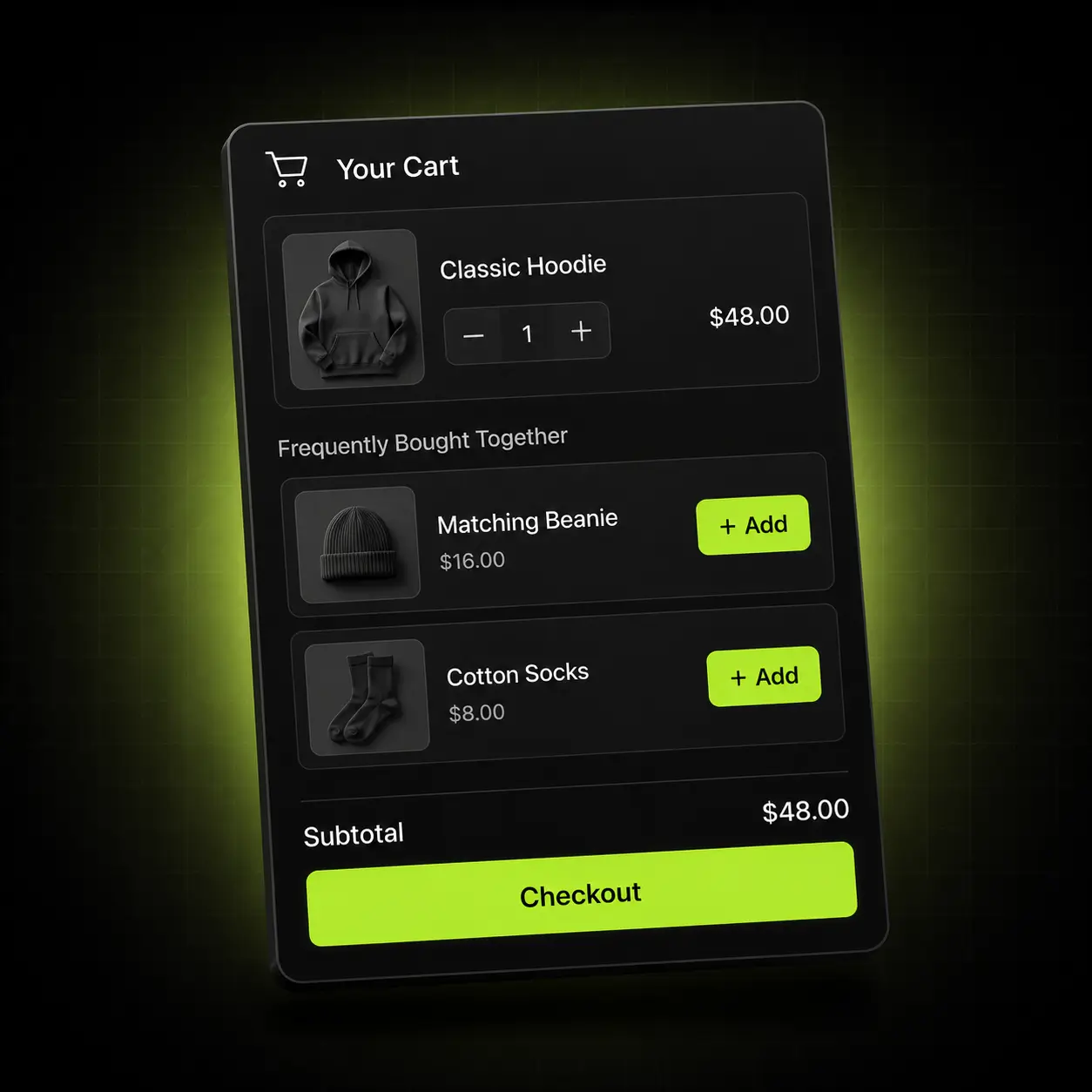
The FBT block renders inside the cart drawer with one-click add to cart, and again on the product page under the buy button. Recommendations respect variants, inventory and subscription-only products, so nothing broken is ever offered.
- Manual pairings, or automatic recommendations built from your order history
- Runs on the product page and in the cart drawer from the same rule
- Respects variants, stock levels and subscription eligibility
- Per-offer revenue analytics show which pairs actually earn
Why it converts: the shopper never leaves the page they were buying on.

AI product recommendations chosen by your data, not your guess
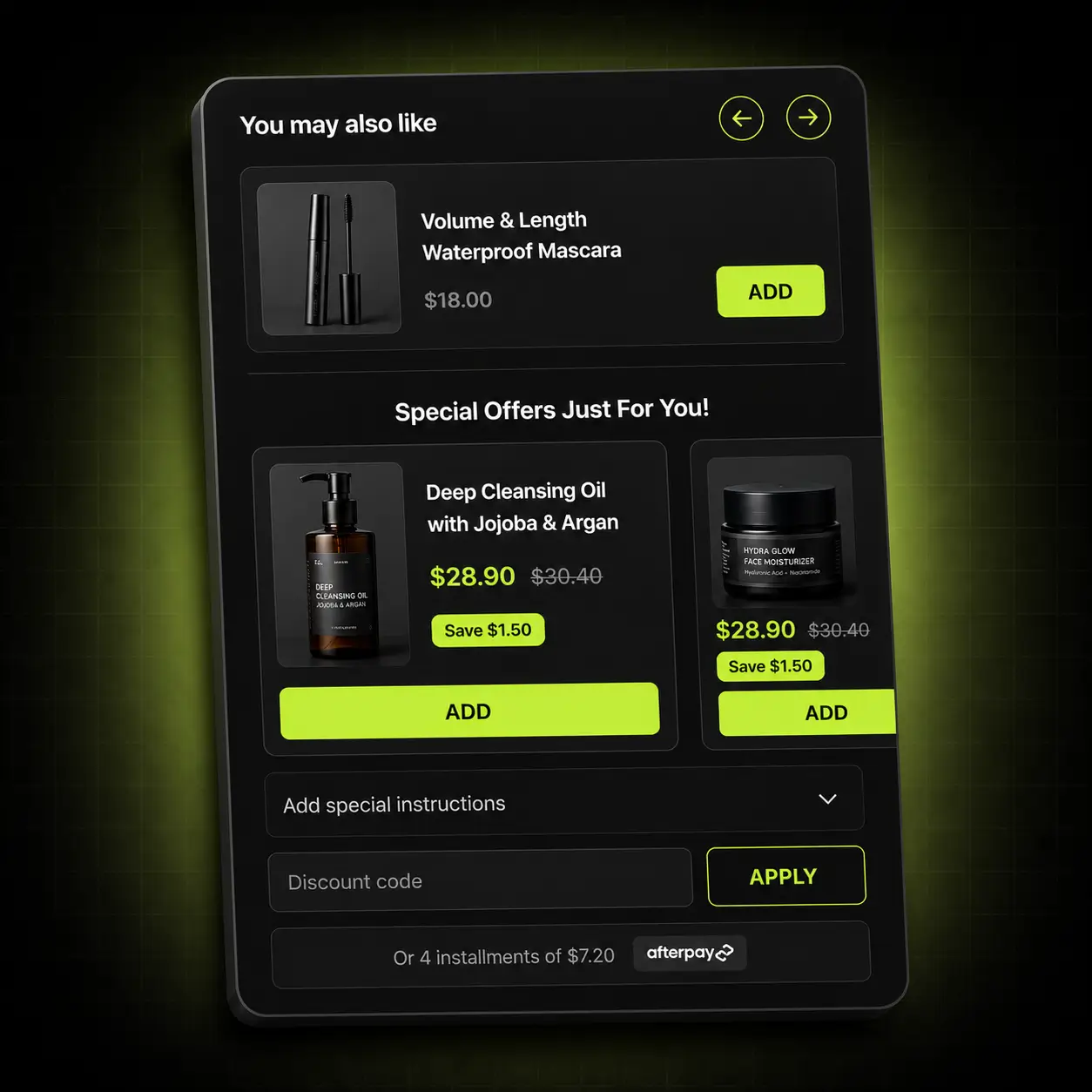
Point Oxify at a product and its AI product recommendations surface what your own customers actually buy alongside it. Override any of it by hand when you know better than the data — and you often do.
- Automatic recommendations generated from real order history
- Manual override per product or per collection
- Exclude products you never want offered, like clearance or heavy-shipping items
- Fallback rules so a new product is never left with an empty block
Keep control: automatic where it helps, manual where your merchandising knows better.
Start the bundle before the cart
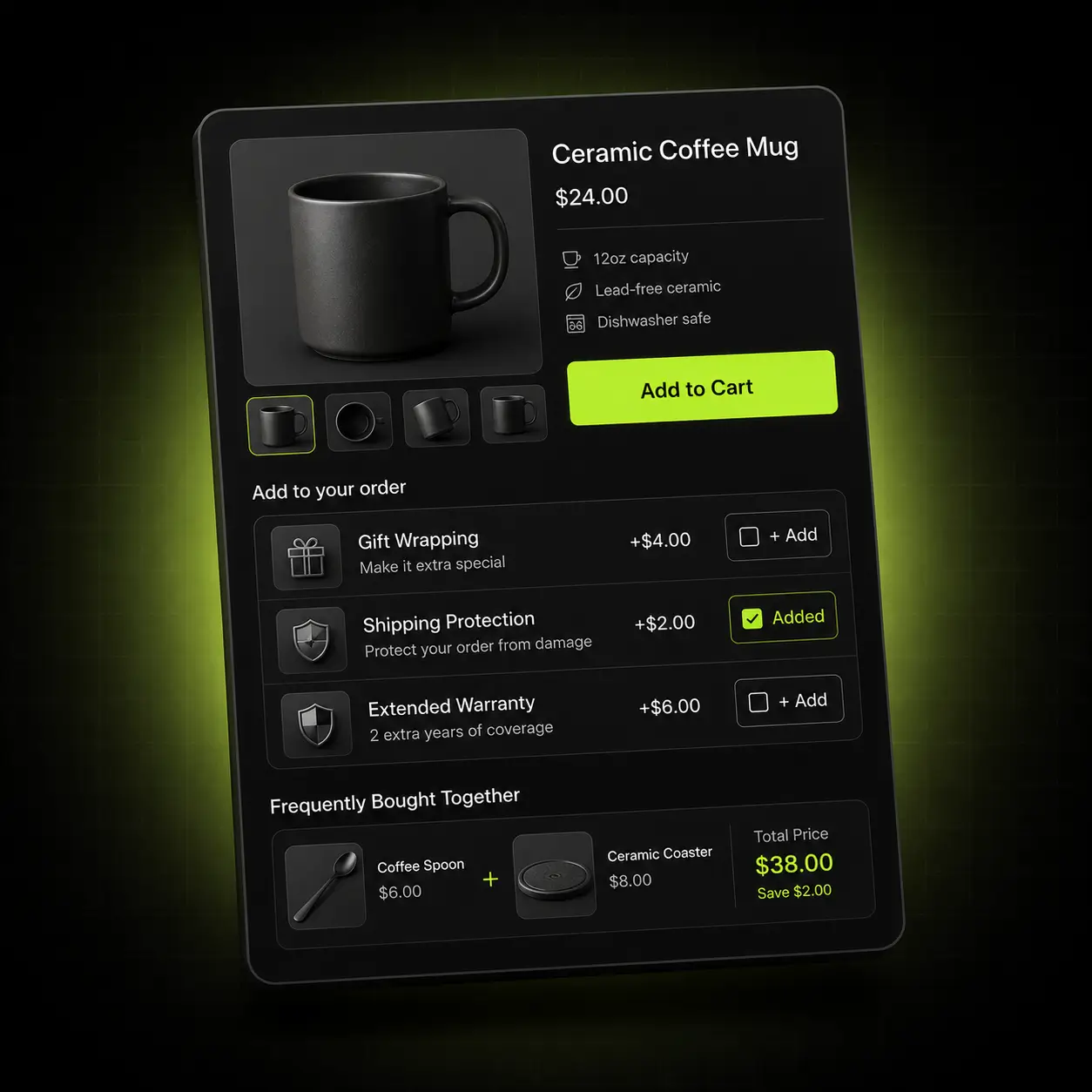
Warranties, gift wrap, express handling, accessories — the low-friction extras that carry almost no fulfilment cost. They sit as checkboxes on the product page, so the basket is already bigger by the time the drawer opens.
- One-tap add-ons rendered under the buy button
- Per-product, per-collection or store-wide rules
- Highest-margin revenue on the page — no extra ad spend, minimal fulfilment cost
- Works alongside FBT rather than competing with it for the same space
Compounding: add-ons raise the basket that FBT and gift tiers then build on.
Give the second item a reason to exist
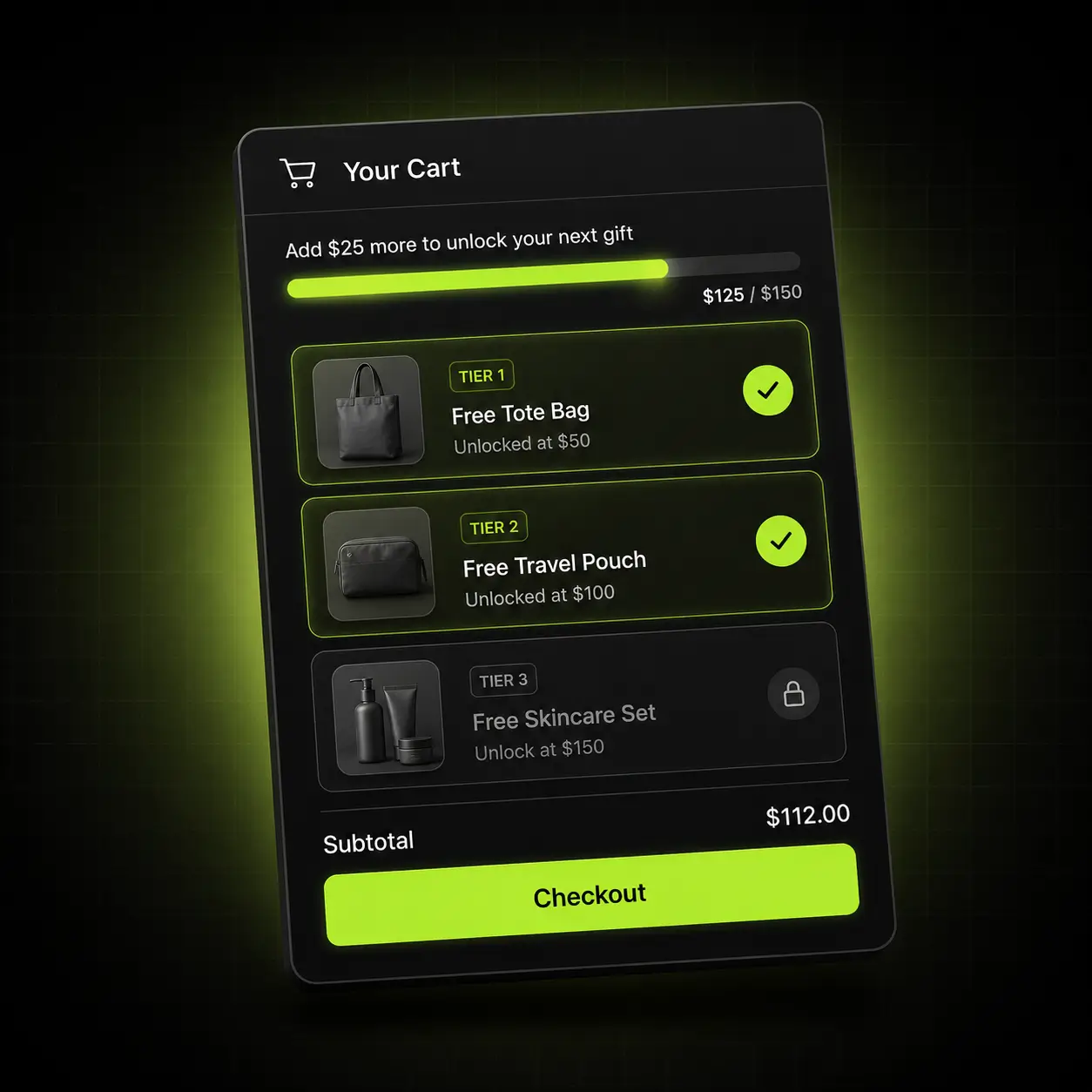
FBT tells the shopper what goes with it. A gift threshold tells them why to bother today. Run both and the second item stops being optional — it becomes the thing that unlocks the reward.
- Free shipping and free gift thresholds shown as a live progress bar
- Tiers convert per market automatically with Shopify Markets
- Stacks predictably with bundle pricing instead of cancelling it out
- Reward rolls back cleanly if the shopper removes an item
The combination is the point: FBT supplies the candidate, the threshold supplies the urgency.
FBT in every place it can earn
A pairing shown once is a widget. A pairing shown at each point of decision is a system. Oxify covers all four from one install, so the rules are written once and the discounts agree with each other.
Product page
The FBT block and add-ons directly under the buy button.
Cart drawer
The same pairings at the highest-intent moment in the session.
Sticky cart
A persistent basket that keeps the bundle and reward goal in view.
Post-purchase
A one-click offer after payment that needs no second checkout.
The pairing that fits your catalogue
Frequently bought together is not one tactic. What lifts an apparel store is not what lifts a supplement store. Here is where we’d point you first.
Apparel & accessories
Wide catalogues where a second item genuinely completes the first.
Start with: Size-adjacent and colour-matched pairs, plus a gift threshold at 1.4× your current AOV.
Supplements & consumables
Stacks and protocols customers already buy together.
Start with: Protocol bundles — the two products your repeat customers pair — with a multi-month volume ladder.
Home, beauty & giftable goods
Strong bundle logic and high gifting intent.
Start with: Curated sets at a visible bundle saving, plus gift wrap as a product-page add-on.
Oxify vs Frequently Bought Together CBB, Essential and Wiser
Three frequently bought together apps from the first page of the Shopify App Store search for “frequently bought together”, read from each live listing on 13 October 2026. All three have far more reviews and a free plan; Oxify puts FBT in a cart drawer with free-gift tiers and post-purchase offers. They bill on different bases, so check the row that matches how you sell. For the wider field, see our list of the 15 best frequently bought together Shopify apps.
| Listing fact | Oxify Cart Drawer & Upsells | Frequently Bought Together CBB | Essential Upsell & Cross Sell | Wiser AI ‑ Upsell & Cross Sell |
|---|---|---|---|---|
| App Store rating | 4.9 (40 reviews) | 4.9 (1,207 reviews) | 5.0 (2,424 reviews) | 4.9 (562 reviews) |
| Built for Shopify | Yes | Yes | Yes | No |
| Free plan for a live store | No — 14-day trial | Yes — up to 3 manual bundles | Yes — up to $100 of extra revenue generated | Yes — up to 50 orders a month |
| Price at 100 orders/month | $9.99 | $24.99 | Not set by orders | $9 |
| Price at 400 orders/month | $29.99 | $24.99 | Not set by orders | $49 |
| Billed on | Total monthly store orders | Orders a month | Extra revenue the app generates: $9.99 to $500, $19.99 to $1,000, $39.99 unlimited | Monthly store orders |
| Where the listing places offers | Product page, cart drawer, post-purchase and thank-you page | Product and cart pages | Product page, cart drawer (cart offers from $19.99) and post-purchase | Product page, cart drawer, checkout, post-purchase and thank-you page |
| Free gifts | Unlimited gift and free-shipping tiers | Free-item bundle discount; no gift tiers listed | Buy X get Y bundles; no gift tiers listed | Free gifts and a rewards bar listed |
| On the App Store since | January 2024 | March 2017 | June 2024 | April 2017 |
Pick a different app if: you want to test FBT free on a live store (all three have a free plan; Oxify has a 14-day trial instead); review history is your first test (Essential Upsell & Cross Sell has 2,424 reviews and CBB 1,207, against Oxify’s 40); you want AI recommendations across the home page, search and checkout from one app (Wiser lists all three, though it is not Built for Shopify); or you only need an FBT widget on the product page, where a dedicated app is simpler. Oxify publishes this page and makes Oxify Cart Drawer & Upsells. “Not on its listing” or “not listed” means the listing does not mention it, not that the app cannot do it.
Live in about ten minutes
No developer, no theme edits, no staging copy of your store.
Install
Add Oxify from the Shopify App Store. It connects through an app embed block — no theme files touched, nothing to undo later.
Match your theme
Fonts, colours, radius and button style pull from your theme, then you adjust anything you want in a visual editor.
Build your pairs
Accept the automatic recommendations, or set pairings by hand per product and per collection. Add bundle pricing if you want it.
Publish and measure
Go live and read revenue per pair in the dashboard. Keep what earns, switch off what doesn’t.
One plan. Every feature. Priced by order volume.
Nothing is locked behind a higher tier — the only thing that changes is how many orders your store does. Start at $9.99/month, 14 days free.
| Total monthly store orders | Price |
|---|---|
| 0–100 orders | $9.99/month |
| 101–200 orders | $19.99/month |
| 201–500 orders | $29.99/month |
| 501–1,000 orders | $49.99/month |
| 1,001–2,000 orders | $79.99/month |
| 2,001–3,000 orders | $99.99/month |
| 3,001+ orders | $149.99/month |
Based on your store’s total monthly orders, not just orders Oxify influenced. Billed through Shopify.
For high-volume brands that would rather we built it than build it themselves.
Talk to sales- Done-for-you setup We configure your offers, rules and targeting around your catalogue and your margins — you approve, we ship it.
- Custom design templates Built to your brand rather than adapted to it, matched to your theme by our designers.
- Priority support A dedicated channel with the people who build the app, and your feature requests at the front of the queue.
4.9 on the Shopify App Store
Rated 4.9 from 40 reviews on the Shopify App Store (checked 13 October 2026). Here is what they say about it.
“So easy to set up! I was able to manually create cross-sells and I am very excited to see if this allows my customers to discover more products that were meant to be purchased together!”
“This app has helped us in increasing the average cart value and upselling. Will recommend this app anyone who is looking for a cart drawer!”
“Fantastic app and customer service. Much better than native Shopify carts and has helped increase revenue. Highly recommended for anyone looking to upgrade their cart designs”
Switching is a Tuesday, not a project
If you’re on a dedicated bundles or recommendations app — or a stack of them — the migration is short and we do the setup with you.
We map your current offers
Send a screenshot of what you run today and we’ll rebuild it in Oxify before you switch anything on.
Nothing is left behind
Oxify installs as an app embed block. Uninstalling your old app leaves no orphaned Liquid in your theme to clean up.
Run both for a week
Keep the incumbent installed while you compare. There is no theme conflict, and the trial is free either way.
The 30-day ROI guarantee
Install Oxify, put it live with at least one offer, and give it thirty days. If your average order value hasn’t increased in that window, email us and we refund 100% of what you paid. No conditions about ad spend, no minimum order count, no arguing about attribution — if the number didn’t move, you don’t pay.
Not ready to install?
Get the free Store Optimization Checklist
Cart friction, upsell gaps, merchandising and trust fixes — the audit we run on every store. No call, no install.
Shopify Frequently Bought Together apps — frequently asked questions
What is Oxify Cart Drawer & Upsells?
Oxify Cart Drawer & Upsells is the Shopify app that runs Oxify’s frequently bought together block. It is made by Oxify (listed on the App Store as “Oxify Cart Drawer & Upsell” by Oxify App) and shows FBT pairs under the buy button and in a slide-out cart drawer, alongside free-gift and free-shipping progress bars, one-click cross-sells, Subscribe & Save, volume discounts, product page add-ons and post-purchase and thank-you page offers. It is rated 4.9 from 40 reviews, is Built for Shopify, and costs $9.99 to $149.99 a month by total store orders, with every feature on every tier and a 14-day free trial (listing checked 13 October 2026).
How does Oxify compare with Frequently Bought Together CBB and Essential Upsell & Cross Sell?
Both have many more reviews: Frequently Bought Together CBB is rated 4.9 from 1,207 and Essential Upsell & Cross Sell 5.0 from 2,424, against 4.9 from 40 for Oxify, and all three are Built for Shopify. Both have a free plan, which Oxify does not: CBB allows up to 3 manual bundles and Essential up to $100 of extra revenue generated. At 100 orders a month CBB costs $24.99 against Oxify’s $9.99; Essential charges by the extra revenue it generates, from $9.99 to $39.99 a month. Oxify’s difference is what sits around the FBT block: free-gift and free-shipping tiers, Subscribe & Save and volume discounts in the same drawer, billed by store orders. Figures from the live listings, 13 October 2026.
What is a Frequently Bought Together app for Shopify?
A frequently bought together (FBT) app shows a shopper the products customers usually buy alongside the one they are viewing and lets them add the set in a single tap, usually at a bundle price. Amazon made the format familiar. Shopify’s default related-products row is a browsing aid, not an offer, so the pairing and the price come from an app.
How do I add frequently bought together to my Shopify product page?
Install a frequently bought together app, because the default product page only has a related-products row. With Oxify, install from the App Store, enable the app embed, and the FBT block appears under the buy button. There is no theme code to paste and no developer needed; it takes about ten minutes. If your product template is heavily customised, book a call and we’ll confirm first.
What’s the difference between frequently bought together and related products?
Related products is a browsing aid — a generic row of similar items that navigates the shopper away. Frequently bought together is an offer: complementary products shown with a bundle price and a one-click add, built from what customers actually purchase together. One helps people browse; the other raises order value.
Where does the FBT block appear?
Two places, from the same rule: on the product page directly under the buy button, and inside the cart drawer. The cart placement matters because the shopper has already decided to buy, so adding the pair is nearly frictionless. You write the rule once and it covers the product page, the cart drawer and the sticky cart.
Are recommendations automatic or manual?
Both, and you choose per product. Automatic recommendations are generated from your own order history. Manual pairings override them wherever your merchandising knows better, which is often for new products or seasonal sets. We compare the two approaches in manual vs AI frequently bought together.
Can I offer a discount when items are bought together?
Yes. You set a bought-together discount per pairing, a percentage or a fixed amount off when both items are taken. It applies automatically through Shopify’s discount engine, so there is no code for the shopper to enter, and the saving is shown in currency on the block so they see the reason to take both before they tap.
Does it work with variants and subscriptions?
Yes. Recommendations respect variant availability, live inventory and subscription eligibility. If a recommended product goes out of stock it stops being offered immediately and your fallback rule takes over, so the block is never empty and never shows something unbuyable.
How do I know whether it is working?
Revenue is attributed per offer, not just impressions and clicks. You can see which pairings earned money, so you can keep those, swap weak automatic pairs for manual ones and switch off the ones that only added clutter.
Will it work with my theme?
Yes. Oxify runs on Online Store 2.0 themes including Dawn, Impulse, Prestige, Motion and Warehouse, and on most older themes too. If your theme has a heavily customised cart or product template, book a call and we’ll confirm before you install.
Does it slow my store down?
Shopify’s only enforced performance rule is that an app must not lower a store’s Lighthouse performance score by more than 10 points, and Built for Shopify repeats that limit (Shopify’s performance requirements). To judge any FBT app on your own store, run Lighthouse on a product page with the block switched on and off and compare. Oxify’s App Store listing shows the Built for Shopify badge (checked 13 October 2026).
Does it conflict with my discount codes?
No. Discounts run through Shopify’s native automatic-discount engine rather than a parallel system, so your campaign codes keep working alongside them. Stacked apps fighting over the same discount is the usual failure mode, and it is why we built it this way.
Can I try it before committing, and what does the ROI guarantee cover?
Yes. The trial is 14 days free with no credit card, and you can uninstall from your Shopify admin at any time. If you stay and your average order value has not increased within 30 days of going live, we refund 100% of what you paid. We ask only that the app was live with at least one offer configured.
What does “frequently bought together” mean?
Frequently bought together, also called frequently purchased together or often bought together, is the block Amazon made famous: products other shoppers bought in the same order as the one you are viewing, offered as a set you can add with one click. On Shopify it is a cross-selling block on the product page or in the cart, and it works best when the pair is genuinely complementary, such as refills with the device, rather than merely popular.
How do I find products that are frequently bought together?
Start with your own orders: export them from Shopify and look for products that keep appearing in the same order. That is what Oxify’s automatic recommendations do for you, generated from your order history, and you can override any pairing by hand where your merchandising knows better, such as new products or seasonal sets. We compare the two approaches in manual vs AI frequently bought together.