
Manual vs AI Frequently Bought Together: Which Converts Better?
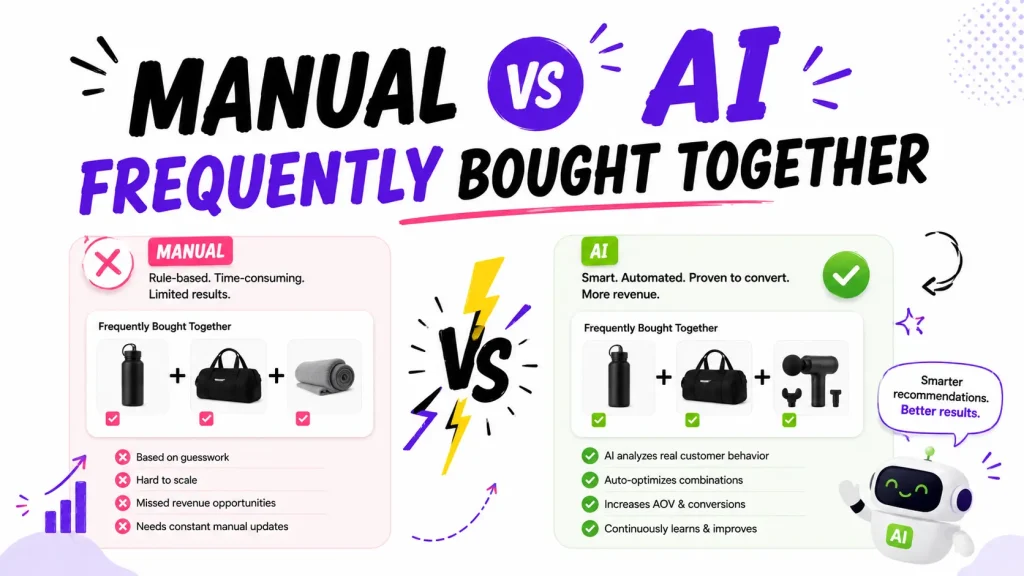
Short answer: AI usually converts better once you have real sales data, and the numbers back it up. One benchmark found AI-picked pairings hit a 3.8 percent add-to-cart rate, versus 1.56 percent for hand-picked ones. That is more than double. But there is a catch most guides miss: the bundle discount matters more than who picks the products. An FBT box with no discount barely converts. Add a small 5 to 10 percent bundle discount and the same box can lift your average order value in a big way.
So the real game is not just manual vs AI. It is this: pick the right method for your store size, then attach a discount and place the box where buyers actually are. This guide shows you how, with real data.
The 20-second answer
- Brand new store (under ~50 orders): start manual. AI has no data to learn from yet.
- Growing store (200+ orders): switch to AI. It spots patterns you cannot.
- Most stores: go hybrid. Let AI handle the catalog, hand-pick your top sellers.
- Everyone: add a 5 to 10 percent bundle discount and show the box on the product page, in the cart, and after checkout. This beats arguing about manual vs AI.
What is Frequently Bought Together?
Frequently Bought Together (FBT) is the "buy these together" box you see on a product page. It shows 2 or 3 items that go well with the one you are viewing, plus a one-click "Add all to cart" button. Amazon made it famous, and it is one of the most reliable ways to grow sales without buying more traffic.
It does three things well:
- Lifts average order value. A one-item order becomes a two or three-item order.
- Helps shoppers discover add-ons they did not know you sold.
- Removes decision fatigue. You pre-pick the answer, so people click instead of leaving.
There are two ways to fill that box. You pick the items yourself (manual), or software picks them from your sales data (AI). Here is how each works, and which one wins.
Manual FBT: you pick the pairings
With manual FBT, you hand-pick which products show together. You decide the phone case goes with the phone, and the socks go with the shoes.
The good:
- Full control. Every pairing matches your brand.
- Works on day one. No order history needed.
- Great for curated brands, kits, and obvious combos like skincare routines or full outfits.
The bad:
- It does not scale. A 200-product store means hundreds of pairings by hand.
- It goes stale. You have to update it as your catalog changes.
- It is a guess. You think two items pair well, but real buyers may disagree.
Shopify's free Search & Discovery app lets you do basic manual pairings (it calls them "complementary products"). It is fine for a hobby store under about 30 orders a month. But it has no bundle discount, no one-click add-all, and almost no analytics, so most growing stores outgrow it fast.
AI FBT: the data picks the pairings
With AI FBT, software reads your past orders and finds which products people actually buy together. Then it shows those pairs automatically.
Here is a simple example of how it thinks. Say 200 of your orders include "running shoes." Of those, 40 also include "performance socks" and 25 include a "shoe cleaning kit." The system spots both pairings and ranks socks higher, because more people bought them together. As new orders come in, it recalculates. A weak pairing at 100 orders can become a strong one at 300.
The good:
- Scales on its own. Add a product and the system folds it in.
- Finds hidden gems you would never guess by hand.
- Updates itself as buying habits change.
The bad:
- It needs data. With few orders, it has nothing to learn from.
- This is the "cold start" problem. New stores, new products, and new visitors all lack history.
- It can feel random early, before it has enough signal.
How much data does AI need? The rough rule, repeated across the Shopify world:
- Under 50 orders: not enough. Stay manual.
- 50 to 100 orders: basic pairings start to show.
- 200+ orders: AI pairings get reliable across your catalog and usually start beating manual picks. The biggest engines keep improving up to tens of thousands of orders.
So which one actually converts better?
For stores with real sales data, the evidence points to AI.
- One benchmark study found AI-picked cart suggestions hit a 3.8 percent add-to-cart rate, versus 1.56 percent for static manual picks. That is more than double. (Source: a Growth Suite benchmark.)
- Recommendation engines drive serious money at scale. Industry analyses commonly credit around a third of Amazon's sales to its recommendation system.
- In Oxify's own product-page analytics, frequently bought together offers brought in $8,294 of one store's upsell revenue in a single window, sitting right alongside cross-sells and add-ons.
But here is the part almost every "manual vs AI" article skips:
The bundle discount is a bigger lever than the method.
An FBT box with no discount converts almost nobody. The same box with a small 5 to 10 percent bundle discount can lift average order value by 8 to 35 percent, based on what Oxify sees across merchant stores. An independent 2026 Shopify upsell study (EasyApps) puts in-cart upsell lift at 10 to 30 percent. Either way, the discount plus smart placement moves the needle far more than whether a human or the algorithm picked the items.
So the smart order of priority is:
- Add a real bundle discount to your FBT offer.
- Place the box in high-intent spots: product page (under Add to Cart), cart, and post-purchase.
- Then pick manual or AI based on your order volume.
One more thing the data is clear on: relevance beats volume. Baymard Institute's research warns that irrelevant recommendations erode trust across your whole store. Show 2 or 3 products that truly fit, never a wall of random items.
Manual vs AI: side by side
| Manual FBT | AI FBT | |
|---|---|---|
| Who picks pairings | You | The algorithm |
| Works on day one | Yes | No (needs orders) |
| Scales to big catalogs | No | Yes |
| Finds surprise pairings | No | Yes |
| Typical add-to-cart rate | Lower (~1.5 percent) | Higher (~3.8 percent) |
| Best for | New or curated stores | High-volume stores |
| Order sweet spot | Under 50 orders | 200+ orders |
| Effort to maintain | High | Low |
When to use each (quick framework)
Use manual if:
- You have fewer than 50 orders or fewer than 50 products.
- You run a curated brand and want control over every pairing.
- Your combos are obvious (kits, routines, complete outfits).
Use AI if:
- You have 200+ orders and a growing catalog.
- You have too many products to pair by hand.
- You want to catch non-obvious pairings.
Use hybrid (best for most growing stores):
- Let AI handle the bulk of your catalog.
- Hand-pin your top 10 to 20 sellers to their ideal partners.
- You get scale and control at the same time.
Which tool should you use, and what it costs
Most stores reach for an app, because a dedicated tool adds the discount, the one-click add-all, and the analytics the free option lacks. Here is how to think about it.
The landscape:
- Free and built-in: Shopify Search & Discovery handles basic manual pairings. Good for tiny stores, but no bundle discount and no analytics.
- Dedicated FBT and bundle apps: add AI pairings, bundle discounts, one-click add-all, and reporting. This is what most growing stores use. For full breakdowns, see our best Frequently Bought Together apps and best upsell apps comparisons, plus our guide on how to choose a bundle app.
What it costs (and the small-retailer angle):
- Most FBT and bundle apps price by order volume or bundle revenue, not store size. That is good news if you are small: new and low-volume stores qualify for the cheapest tier, and several apps offer free plans for stores under roughly 50 to 100 orders a month.
- Oxify Cart Drawer starts at $9.99 a month, scales by order volume, and includes a 14-day free trial on every plan. See full pricing.
High-ticket stores (like electronics):
- If you sell expensive items, pick a tool that prices by order volume, not revenue. A store doing 150 high-value orders pays the same low tier as a store doing 150 cheap ones, even though its revenue is far higher. Oxify Cart Drawer prices by order volume, so high-ticket, lower-volume stores stay on an affordable plan.
- For considered purchases, relevance and trust matter most. Pair AI suggestions with a few hand-picked accessories, warranties, or add-ons, and keep every suggestion genuinely useful.
How to set up FBT on Shopify (step by step)
You can have this live in about 5 minutes. No code.
- Check your order count. Under 50? Start manual. Over 200? AI is ready.
- Pick an app. Shopify's free Search & Discovery does basic manual pairings. For bundle discounts, one-click add-all, and real analytics, use a dedicated app like Oxify Cart Drawer.
- Turn on the app embed. Online Store, then Themes, then Customize, then App embeds.
- Set your pairings. Choose 2 or 3 complementary products per bestseller, by hand or with AI.
- Add a bundle discount. Start at 5 to 10 percent. This is the step that makes it convert.
- Place the box well. Product page under Add to Cart, plus the cart and the post-purchase or thank-you page.
- Test on mobile. Most shoppers are on phones, so check it looks clean there.
- Watch the numbers (see benchmarks below). Cut dead pairings, keep winners.
Not sure how upsell, cross-sell, and bundle differ? Our product page upsell guide breaks it down.
How to switch from manual cross-sell lists to AI
Already have manual cross-sell lists and want to move to AI? Do it without losing your best pairings:
- Export what you have. Note your current manual pairings, especially for your top sellers.
- Install an app with both modes (manual and AI), so you can run them side by side.
- Turn on AI for the catalog and let it learn from your order history.
- Hand-pin your proven winners. Keep the manual pairings that already convert, and let AI fill the rest.
- Compare for two weeks. Track add-to-cart rate and attributed revenue. Keep what wins, drop what does not.
This hybrid path means you never lose a high-converting pairing while the AI catches the ones you missed. Our guide on adding upsells to your cart drawer walks through the setup.
Benchmarks: how to know it is working
Track four numbers for your FBT box:
- Impressions: how often it shows.
- Click-through rate: aim for roughly 3 to 5 percent.
- Add-to-cart rate: aim for roughly 1 to 3 percent.
- Attributed revenue: the actual money it brings in.
If clicks are high but add-to-cart is low, the wrong products are showing. Fix the pairings or the placement.
Common mistakes to avoid
- No discount. The number one reason FBT flops.
- Too many items. Stick to 2 or 3. More just confuses people.
- Wrong placement. Burying the box where no one scrolls.
- Set and forget. Pairings and offers need a refresh now and then.
- Pricier add-ons. Keep suggested items the same price or cheaper than the main product, so the "yes" feels easy. (This is also Shopify's own advice.)
Where Oxify fits
If you want both manual and AI pairings in one place, plus the bundle discount that actually drives conversions, Oxify Cart Drawer handles FBT across the full journey: product page, cart drawer, and post-purchase. You get one-click add-all, three recommendation algorithms, real analytics, and a clean mobile widget. The numbers are not theoretical: one store pulled in over $1,16,000 in cart drawer revenue in a single month from in-cart upsells alone, and frequently bought together offers are a steady line in Oxify's product-page analytics.
Want to stack even more AOV? Pair it with Oxify Quantity Breaks, the most complete all-in-one bundle app, to add volume discounts on top of your bundles, so buying more of the same item also unlocks a better price. (See our best quantity breaks apps guide.) Together they cover both "buy these together" and "buy more of this."
Ready to launch FBT that actually converts? Start your free trial of Oxify Cart Drawer and turn single-item orders into bigger carts. Every plan includes a 14-day free trial.
The bottom line
- New or curated store? Start manual.
- High order volume? Go AI. It converts better once it has data (roughly 3.8 percent add-to-cart versus 1.56 percent for manual).
- Most stores? Use a hybrid. AI for the catalog, manual for top sellers.
- Everyone? Add a bundle discount and place the box in high-intent spots. That beats arguing about manual vs AI.
The method is a small choice. The offer is the big one. Fix the offer first, and your Frequently Bought Together box will pay for itself.