
FBT vs Cross-Sell vs Related Products: The Real Difference (2026)
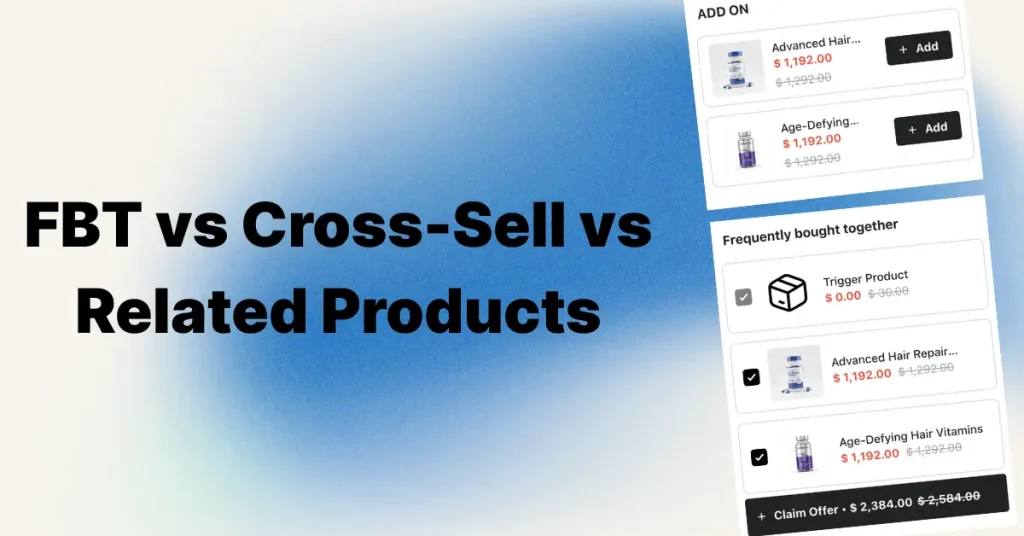
Frequently Bought Together (FBT) shows products that customers actually bought in the same order. Cross-sell is the broader strategy of suggesting any complementary product. Related products show similar alternatives from the same category.
The one-line rule:
- FBT and cross-sell add items to the cart — they raise items per order
- Related products swap items — they keep a shopper browsing instead of bouncing
- FBT is a type of cross-sell — specifically, the version backed by order data
| Feature | FBT | Cross-Sell | Related Products |
|---|---|---|---|
| Relationship | Bought together | Complementary | Similar / substitute |
| Data source | Real co-purchase history | Manual rules or AI | Tags, collections, product type |
| Goal | More items per order | More items per order | Reduce bounce, aid discovery |
| Best placement | Product page, below Add-to-Cart | Cart drawer, checkout, post-purchase | Product page, bottom |
| Shopify native support | Partial (manual "complementary") | Partial (manual "complementary") | Yes — auto-generated, free |
| Example app cost (listings checked 11 Oct 2026) | Free–$39.99/mo (Code Black Belt) | Free–$29/mo (Selleasy) | $0 (built in) |
For most Shopify stores in 2026 the correct answer is not "pick one." It is: FBT with a bundle discount on your top-selling product pages, cross-sells inside the cart drawer paired with a free shipping bar, and related products at the bottom of the product page for discovery.
The Oxify Cart Drawer & Upsells app (our app; Built for Shopify, 4.9 rating, from $9.99/month) runs the first two from one place — FBT bundles with discounts, cart cross-sells, auto-applied discount codes, and free gifts — while Shopify's own free tooling handles the third.
Quick Answers
- Is FBT a cross-sell? Yes. FBT is the data-driven subset of cross-selling.
- Is FBT the same as related products? No. FBT suggests things you buy with it. Related products suggest things you buy instead of it.
- Does Shopify have FBT built in? Not automatically. Shopify auto-generates related products for free, but complementary products (the ones that power a "Frequently bought together" widget) must be set manually in the free Search & Discovery app — or generated from order data by a third-party app.
- Which raises AOV the most? No neutral dataset ranks them, so this is reasoning from placement, not a measured result: FBT is the likelier high-acceptance offer because it sits where shoppers are deciding, and cart cross-sell reaches a larger audience because every buyer passes through the cart. Measure incremental revenue (below) rather than trusting either.
- How much order data does FBT need? As a rule of thumb (not a Shopify limit), plan on roughly 50–100 orders on a product before co-purchase patterns mean anything, and 200+ before an automated engine is reliable.
- Why does my FBT widget recommend the same bestseller everywhere? Because it's scoring on confidence instead of lift. A popular product co-occurs with everything, so a naive engine suggests it on every page.
Why These Three Get Confused
Three sections on a Shopify product page can look almost identical. "Frequently Bought Together." "You May Also Like." "Customers Also Bought." Same row of product cards. Same small Add-to-Cart button. Same stated goal — sell more.
Under the hood they are not the same thing, and the naming across the industry is genuinely messy:
- "Frequently Bought Together" should mean real co-purchase data — items that end up in the same order.
- "Customers Also Bought" is looser. Those customers bought both items at some point, not necessarily in one transaction.
- "You May Also Like" and "Related Products" almost always mean similar items — same tag, same collection, same product type.
- "Complete the Look" and "Complementary Products" are cross-sells, usually curated by hand.
The distinction matters because each one does a different job in a different spot on the page. Mix them up and you burn your highest-value slot on your lowest-value widget.
This guide breaks down what each one actually is, where it goes, what it costs, what to expect from it, and how to sequence the setup. The placement guidance comes from running Oxify Cart Drawer & Upsells across real merchant stores.
What Is FBT (Frequently Bought Together)?
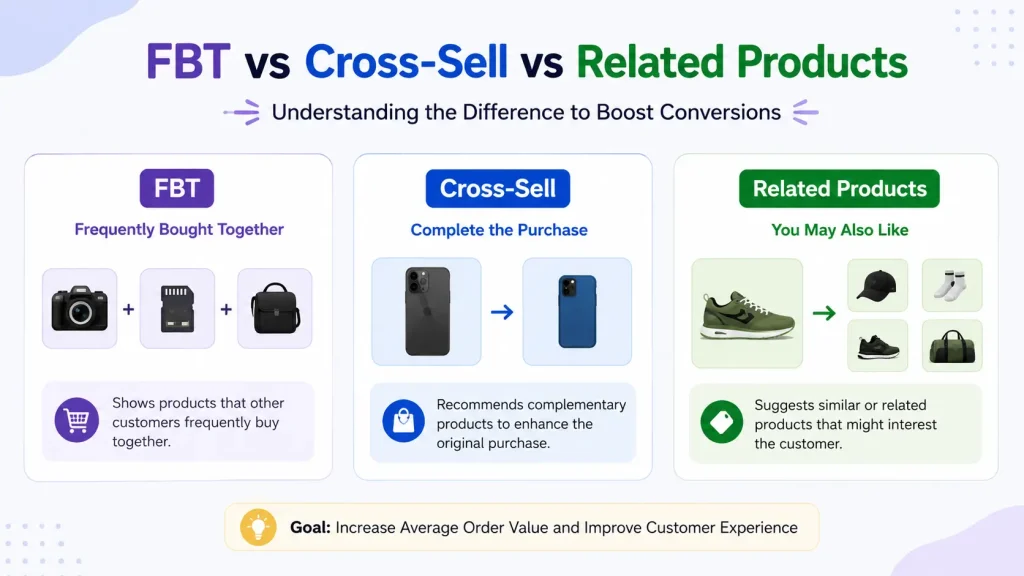
FBT shows products that customers actually bought together in the same order.
Think of a camera. The FBT widget shows a memory card and a camera bag. Why those two? Because past customers bought all three in one checkout. The data picks the products. You don't.
Key traits of a real FBT widget:
- Pulls from real order history — or AI trained on co-purchase patterns
- Shows 2–3 products, not 8
- Has a single "Add all to cart" button
- Usually carries a small bundle discount
- Shows a combined bundle price, not just individual prices
Amazon made this format famous. Its "Frequently bought together" and "Customers who bought this item also bought" widgets are the blueprint every Shopify FBT app copies. The much-quoted figure that roughly 35% of Amazon purchases come from its recommendation engine traces back to a 2013 McKinsey analysis — it is a decade-old number about a company with data most Shopify stores will never have, so treat it as directional, not a target.
The reason the format works is simpler than the statistic: the suggestion isn't random. It reflects what real shoppers did with their own money.
If you want specific setups, our guide on frequently bought together for beauty products on Shopify covers one of the highest-converting categories, and we've rounded up the best frequently bought together Shopify apps and the best Shopify cross-sell apps if you're comparing tools.
How FBT Actually Decides What to Show
Almost every article on this topic stops at "it uses order data." Understanding the next layer down is what separates merchants who trust their widget from merchants who quietly ship bad recommendations for six months.
There are two families of algorithm behind FBT widgets.
Market basket analysis (association rules). This looks at whole orders and scores every product pair on three measures:
- Support — how often the pair appears across all orders. Basically, is this combination common enough to matter?
- Confidence — of the people who bought A, what share also bought B? This is the number that sounds most persuasive and misleads most often.
- Lift — how much more likely B is because A was bought, compared to B's normal rate. Lift above 1 means a genuine relationship. Lift of 1 means no relationship at all. Lift below 1 means buying A actually makes B less likely.
Item-to-item collaborative filtering. The approach Amazon published back in 2003 and the reason its widget scaled. Instead of mining orders for rules, it builds a similarity matrix between items based on the customers who bought them. It handles enormous catalogs well, which is exactly why the format became ubiquitous.
Why this matters to you in practice: confidence without lift is the single most common source of a bad recommendation.
Say 60% of everyone who buys a phone case also buys your best-selling screen protector. Confidence is 60% — that looks like a strong pair. But if 58% of all your customers buy that screen protector anyway, the lift is about 1.03. The case had essentially nothing to do with it. You've just handed your most valuable product-page slot to an item the shopper was going to buy regardless, and you've attached a discount to it.
That's the base-rate trap, and it's why FBT widgets so often fill up with your bestsellers. A popular product co-occurs with everything, so a naive engine recommends it everywhere. When you review your generated pairs, the question is never "do these get bought together?" It's "do these get bought together more than chance would predict?"
The Cold Start Problem
With thin order data, an FBT engine surfaces pairs bought together once or twice. That isn't "frequently" anything — it's coincidence wearing a social-proof label, and shoppers who spot the mismatch discount every suggestion you make afterwards.
This is the well-known cold start problem, and it hits three situations: a brand-new store, a newly launched product in an established store, and any long-tail SKU that simply doesn't sell often enough to generate a pattern. In all three, the algorithm has nothing real to work with, so it either stays silent or falls back to popularity — which lands you straight back in the base-rate trap.
Honest rule: don't run automated FBT on a product with no co-purchase history. Hand-pick complementary products there instead, and switch to data-driven FBT once the volume exists.
Five Ways FBT Gets It Wrong
Even with sufficient data, these are the failure modes worth checking for before you publish a widget:
- Popularity bias. The base-rate trap above. Your bestseller appears in every widget because it appears in every order.
- Spurious pairs. Two products bought together with no functional relationship — a keyboard and a paperback. The correlation is real; the recommendation is nonsense to a human reading it.
- Variant collision. The widget recommends the same product in a different size or colour. Technically it was "bought together" (someone ordered two sizes to try), but you're now suggesting a shopper buy the thing they're already buying.
- Stale models. Many engines compute pairs on a schedule and don't adapt in real time. Seasonal shifts, new launches, and discontinued lines leave the widget recommending last quarter's catalog.
- Out-of-stock recommendations. Nothing erodes trust faster than an "Add all to cart" button that fails because item two is unavailable. Confirm your app filters on inventory before it renders.
The fix for all five is the same and takes twenty minutes: before you publish, open your generated pairs and read them as a customer would. Any pair you can't justify in one sentence gets removed. This is why the hybrid approach below beats pure automation for most stores.
Manual vs Automatic vs Hybrid
| Approach | Best for | Strength | Weakness |
|---|---|---|---|
| Manual — you pick every pair | Under ~30 SKUs, new stores, hero products | Your product knowledge beats a thin dataset; zero bad pairs | Doesn't scale; goes stale as the catalog changes |
| Automatic — engine picks from order data | 200+ SKUs with real volume | Scales across the whole catalog; updates itself | Popularity bias, spurious pairs, cold start on new items |
| Hybrid — engine proposes, you approve | Most growing stores | Coverage of automation with a human sanity check | Needs a periodic review habit |
For most merchants the honest answer is hybrid: let the engine generate, then manually override your top 10–20 revenue products where a bad pair costs you real money. Automation is for the long tail, not the hero SKUs.
What Is Cross-Sell?
Cross-sell is the umbrella. It's any moment you suggest a complementary product to raise the order value.
The customer keeps the original item. They add something alongside it.
Cross-sell examples:
- Buy a phone → suggest a case
- Buy a coffee machine → suggest beans and filters
- Buy a dining table → suggest matching chairs
- Buy a yoga mat → suggest a strap and block
FBT is one type of cross-sell — the data-driven one. Cross-sell also covers manual rules, AI recommendations, cart drawer offers, checkout extensions, and post-purchase offers. Our cart upsell strategy guide for Shopify covers the full funnel.
The Four Cross-Sell Touchpoints
Cross-sell isn't one placement, it's four — and each one demands a different offer. The mistake merchants make is running the same recommendation at all four.
| Touchpoint | Shopper mindset | Right offer | Risk |
|---|---|---|---|
| Product page | Still evaluating the main item | FBT bundle with combined price | Distraction from the primary Add-to-Cart |
| Cart drawer | Committed, reviewing the order | Cheap, obvious add-on + free shipping progress | Interrupting a shopper heading to checkout |
| Checkout | Wallet out, minimal patience | One low-friction item, no decisions | Any friction here costs the whole order |
| Post-purchase | Paid, relieved, no risk left | Higher-value offer, one click, no re-entering payment | Almost none — the order is already banked |
Post-purchase deserves special attention because the risk profile is unique: the original order is already captured, so a declined offer costs you nothing. It's the only touchpoint where you can be genuinely ambitious with price.
The cart drawer is the opposite — it's the highest-traffic touchpoint (every buyer passes through it) but also the most fragile, because the shopper is already moving toward checkout. That's why cart cross-sells need to be cheap, obviously relevant, and addable in one tap without leaving the drawer. Apps built specifically around the drawer, like Oxify Cart Drawer & Upsells (our app), handle this by keeping the add-to-cart inline so the shopper never loses their place.
The Cross-Sell Price Ratio
Rule of thumb: keep the cross-sell item at roughly 25% or less of the main product's price. A $200 jacket pairs well with a $40 scarf. A $200 jacket plus a $180 second jacket is a second buying decision, and most shoppers defer it.
This is the single easiest cross-sell fix, and it's the one most merchants skip because their app defaults to "best sellers" rather than "cheap and obviously useful."
Why Cross-Sell Needs No Extra Ad Spend
Cross-sell reaches shoppers who are already on your site and already committed, so the incremental revenue has no acquisition cost attached. The catch is cannibalization: some of those add-ons would have been bought anyway, which is why the measurement section below matters. More setup detail in our Shopify upselling strategies guide.
What Are Related Products?
Related products are similar items. Not complementary. Not bought together. Just alike.
A black t-shirt → other black t-shirts. A running shoe → other running shoes. A nightstand → other nightstands.
The signal behind them is usually the same product tag, collection, product type, or vendor. On Shopify specifically, related recommendations are the one intent the platform generates for you automatically — no app, no configuration, no cost.
This is the "keep browsing" tool, not the "add to cart" tool.
When Related Products Actually Help
Related products do one job well: they keep the visitor on your site when the current product is not quite right.
- Wrong colour? Show the same shirt in other colours.
- Wrong price? Show alternatives in the same category.
- Wrong style? Let them pivot without leaving.
This is why related products belong at the bottom of the product page. By the time a visitor scrolls that far, they've already decided this specific product isn't the one. You're catching them before they bounce.
Where Related Products Go Wrong
Putting a "Related Products" row right next to Add to Cart is a conversion leak. You're effectively saying, "Are you sure? Look at these other ones." Related products belong below the fold. Always.
What Shopify Gives You for Free (and What It Doesn't)
This is the part most comparison articles skip, and it's the part that decides whether you need to pay for anything at all.
Shopify's product recommendations API supports two intents: related and complementary. They behave very differently.
| Intent | Who generates it | What it powers | Cost |
|---|---|---|---|
| Related | Shopify, automatically | "You may also like" at the bottom of product pages | Free, built in |
| Complementary | You, manually, in the free Search & Discovery app (up to 10 per product) | "Frequently bought together" / "Complete the look" widgets | Free, but manual |
| Data-driven FBT | A third-party app reading your order history | Auto-updating co-purchase bundles with combined pricing and discounts | Paid app |
What this means practically:
- If you have under ~30 SKUs, install the free Search & Discovery app and hand-pick complementary products. You'll get a "frequently bought together" style widget for $0. Your own product knowledge will likely beat an algorithm running on thin data.
- If you have hundreds of SKUs, manual pairing stops scaling and your curation goes stale every time the catalog changes. That's the point where a data-driven FBT app pays for itself.
- Either way, related products cost nothing and should already be live at the bottom of every product page.
Note the important nuance: Shopify's free complementary recommendations are manual and carry no bundle pricing or discount. The "add all three and save 10%" mechanic — the thing that actually lifts acceptance — requires an app.
Where Does Upsell Fit In?
Upsell is the fourth tool, and it works differently from all three above.
| Strategy | What happens | Example |
|---|---|---|
| Upsell | Customer replaces their choice with a better one | Standard hoodie → Premium hoodie |
| FBT | Customer adds items based on real co-purchase data | Camera + memory card + case |
| Cross-sell | Customer adds a complementary item | Coffee machine + beans |
| Related products | Customer might swap to a similar item | Black t-shirt → Navy t-shirt |
The shortcut: upsell = upgrade. FBT and cross-sell = additions. Related products = alternatives. For post-purchase upsell, see our best Shopify post-purchase upsell apps roundup.
What to Expect From Each Widget
Most articles quote a single "10–30% AOV lift" and move on. That number is an outcome of many things working at once, not a promise from one widget. We don't print click-through benchmarks here: we have no first-hand data to back one, and a single range hides too much variation by category, price point and traffic quality. This is what each widget is doing and the first number to check in your own analytics.
| Widget | Placement | What it's actually doing | First number to check |
|---|---|---|---|
| FBT bundle | Product page, below Add-to-Cart | Adding items at peak consideration | Share of bundle views that end in an add-all |
| Cart drawer cross-sell | Slide cart | Adding items at peak intent, on every cart | Items per order on carts that saw the offer |
| Related products | Product page, bottom | Preventing an exit, not adding revenue | Exit rate on that page |
| Post-purchase offer | After checkout | Zero conversion risk to the original order | Acceptance rate per offer shown |
Click-through rate is a vanity metric on its own. A 6% CTR on a widget that pushes a $4 add-on to a $300 order is worth less than a 2% CTR on a $60 add-on.
The Measurement Problem Nobody Mentions: Cannibalization
Here is the uncomfortable question almost no article on this topic asks. When a shopper clicks your FBT widget and adds a memory card, did the widget cause that sale — or would they have searched for a memory card and bought it anyway?
Your app's dashboard cannot tell the difference. It attributes every add to itself. That's not dishonesty on the app's part; it's a genuine limit of click attribution. But it means the "revenue generated" figure in any upsell app is an upper bound, not a measurement.
The real number you care about is incremental revenue — sales that would not have happened otherwise. Three ways to get closer to it, in ascending order of rigour:
- Watch store-level AOV, not widget revenue. Turn the widget on and compare AOV across comparable periods. If attributed widget revenue is climbing but store AOV is flat, you're cannibalizing, not adding.
- Check whether the recommended product's total sales grew. If the memory card was already selling 100 units a month and still sells 100 after launch — but 40 now come through the widget — the widget moved the channel, not the needle.
- Run a holdout. Show the widget to 90% of traffic and nothing to 10%. Compare AOV between groups. This is the only method that actually answers the question, and it's worth doing once on your highest-traffic product before you roll the format out everywhere.
This matters most when a bundle discount is attached. If 30% of the shoppers accepting your 10% bundle discount were going to buy both items anyway, you've just donated margin to your most committed customers. That's the difference between a widget that looks like it earns its subscription and one that actually does.
The metrics worth tracking, in order: incremental revenue per impression → contribution margin after discount → attach rate → CTR. Most dashboards show you that list backwards.
Mobile Changes the Placement Rules
Most placement advice — including most of the advice above — is written for desktop, where a product page has room for a widget below the buy button without pushing anything important off screen. On a phone the same placement behaves differently.
On a phone, a three-product FBT widget directly below Add-to-Cart can occupy an entire screen height, pushing product description, reviews, and shipping information far down the page. You've solved for the buyer who wants the bundle and penalised the buyer who's still deciding.
What to do instead on mobile:
- Collapse to two products, not three. Vertical space is the constraint, not attention.
- Consider placing FBT below the description rather than immediately below Add-to-Cart, and test it. The desktop rule isn't automatically right here.
- Lean harder on the cart drawer. On mobile the slide cart is a full-screen, focused surface with no competing content — arguably a better cross-sell environment than the product page. That is why cart-drawer cross-sells are the first thing to test on a mobile-heavy store.
- Check tap targets. A checkbox-style FBT widget designed for a mouse is frustrating at thumb size, and frustration reads as a broken site.
- Always preview both. Whatever your app shows you in its desktop editor, open the real product page on a real phone before launch.
This is a large part of why we built Oxify Cart Drawer & Upsells around the drawer rather than the product page — on a mobile-first store, the drawer is where the attention actually is, and it's the one surface where an upsell doesn't compete with anything else for space.
How to Decide Which One You Need
Choose FBT if:
- You sell products with natural pairings — electronics and accessories, beauty routines, pet food and treats
- Your top products have 50+ orders showing genuine repeat co-purchases
- You can absorb a 5–10% bundle discount without wrecking margin
Choose cross-sell if:
- You're a new store or launching a new product with no co-purchase data yet
- You sell apparel, food, or subscription items where the add-on is obvious to a human
- You want a result this week rather than after a data-collection period
Choose related products if:
- You have a deep catalog with many variants — fashion, home decor, books
- Your shoppers compare several options before buying
- Your problem is first-visit bounce, not order size
The answer most articles dodge: you don't choose. You run all three in different spots. FBT on the product page near the buy button, cross-sells in the cart drawer, related products at the bottom. What you're really choosing is the order you build them in — which is the next section.
Best Practices for Each
FBT Best Practices
- Wait for real volume — 50+ orders on the product before trusting automated suggestions, 200+ before trusting them without review
- Place it below price and Add-to-Cart, in the top half of the product page
- Show 2–3 products maximum — acceptance drops as evaluation cost rises
- Add a 5–10% bundle discount — this is the single biggest acceptance lever
- One "Add all to cart" button — never make a shopper add items one at a time
- Sanity-check the pairs manually before going live; an algorithm doesn't know that two products are mutually exclusive variants
Cross-Sell Best Practices
- Pick the touchpoint by intent — cart drawer is high intent, post-purchase is highest and carries zero risk to the original order
- Respect the 25% price ratio
- One offer per touchpoint — three stacked cross-sells in one place is a decision-freeze machine
- Make it cart-aware — base the suggestion on what's actually in the cart, not on a static best-seller list
- Pair it with a free shipping bar — "you're $12 from free shipping" next to a $15 add-on gives the shopper a concrete reason to add (see our Shopify cart drawer free shipping bar guide)
Related Products Best Practices
- Bottom of the product page only — never near Add-to-Cart
- Tag products consistently — bad tags produce bad suggestions, and Shopify's auto-generated related intent leans on your catalog structure
- Use Shopify's built-in section unless you have a recommendation engine measurably beating it
Which Drives the Most Sales?
No neutral dataset ranks these, so this is reasoning from where each one appears, not a measured result. If you're forced to rank them for revenue lift:
1. FBT with a bundle discount. Likely the highest acceptance per impression. Real co-purchase data plus a discount gives shoppers both social proof and a reason to act now.
2. Cart drawer cross-sell. Probably lower per-impression acceptance, but it appears on every single cart rather than only on product pages that have co-purchase data, so in total revenue it can win.
3. Related products. Does not directly raise sales — it saves them. Expect a bounce-rate improvement, not a revenue line.
The realistic stack: FBT on your top 10 products, cart drawer cross-sell with a free shipping bar, post-purchase upsell after checkout. That's what Oxify Cart Drawer & Upsells (our app) is built to run from one place, instead of stitching three or four apps together.
How to Implement All Three (4-Week Plan)
Week 1 — Related products (free):
- Enable Shopify's built-in related products section at the bottom of product pages
- Clean up tags, collections, product types and vendors so the auto-generated suggestions make sense
- Done. No app needed.
Week 1 (also free) — Manual complementary products:
- Install Shopify's free Search & Discovery app
- Hand-pick complementary products for your top 10–20 SKUs
- This gives you a "frequently bought together" style widget at zero cost while you accumulate order data
Week 2 — Cart drawer cross-sells:
- Install a cart drawer app such as Oxify Cart Drawer & Upsells (our app)
- Add a free shipping bar at a threshold just above your current AOV, so one cross-sell gets the shopper over it
- Configure 2–3 cart-aware cross-sell rules for your main categories
- Add an auto-applied discount code to lift acceptance
Weeks 3–4 — Switch to data-driven FBT:
- Wait until your top products clear 50+ orders
- Turn on FBT on the product page, below price and Add-to-Cart
- Review the generated pairs manually before publishing
- Set a 5–10% bundle discount and cap the widget at 2–3 products
Week 5+ — Measure and prune:
- Track incremental revenue per impression, not just CTR
- Remove any widget whose incremental revenue per impression does not cover its discount and app fee, rather than leaving it to clutter the page
- Check contribution margin, not just AOV
- Add a post-purchase upsell as the final layer
Our customize Shopify cart drawer guide covers colours, copy and layout once the basics are live.
Tools for Each on Shopify
FBT tools
- Shopify Search & Discovery — free, manual complementary products, up to 10 per product. Best starting point for small catalogs.
- Oxify Cart Drawer & Upsells (our app) — Built for Shopify, 4.9 rating from 40 reviews, from $9.99/month with a 14-day free trial. FBT bundles with discounts on product pages, plus cart cross-sells and free gifts in the same app.
- Frequently Bought Together (Code Black Belt) — an Amazon-style FBT widget, 4.9 rating from 1,200+ reviews. Free plan for up to 3 manual bundles; paid plans $14.99–$39.99/month by order volume.
- Selleasy — 4.9 rating from 2,748 reviews. Free up to 50 orders/month, then $9, $19 and $29/month tiers by order volume. Covers product page, cart, checkout and post-purchase.
- Full breakdown in our best frequently bought together Shopify apps roundup
Cross-sell tools
- Oxify Cart Drawer & Upsells (our app) — in-cart cross-sells, post-purchase and product page offers from one app
- Rebuy Personalization Engine — AI recommendations across cart, checkout and post-purchase, per its listing.
- UpCart — cart drawer focused with cross-sell modules. On 11 October 2026 the UpCart listing showed "not currently available"; check the listing before installing.
Related products tools
- Shopify's built-in related products section — free, auto-generated, adequate for the discovery job
- Wiser AI — AI-powered related-product and FBT recommendations if you need personalization beyond tags. 4.9 rating from 560+ reviews; free for stores with up to 50 orders/month.
Cost Comparison
| Strategy | Free option? | Example listing prices (checked 11 Oct 2026) | Hidden cost |
|---|---|---|---|
| FBT | Partly — free manual complementary products via Search & Discovery, or a free tier (Code Black Belt: 3 manual bundles; Selleasy: up to 50 orders/month) | Code Black Belt $14.99–$39.99/month; Selleasy $9–$29/month | Bundle discount costs 5–10% margin on every accepted offer |
| Cross-sell | Partly — Selleasy's free tier covers up to 50 orders/month | Selleasy $9–$29/month; Oxify Cart Drawer & Upsells (our app) from $9.99/month | App stacking once you want multiple touchpoints |
| Related products | Yes — Shopify built-in, auto-generated | $0 built in; Wiser AI is free up to 50 orders/month, then from $9/month | Bad tagging produces bad suggestions |
| All three combined | Partly | Oxify Cart Drawer & Upsells (our app): $9.99/month up to 100 orders, $49.99/month at 501–1,000 orders | One subscription instead of several, but the price steps up with order volume |
The trap: a separate FBT app, cart drawer app and discount app means three subscriptions that don't share state. A full-funnel app like Oxify Cart Drawer & Upsells (our app) starts at $9.99/month and keeps the FBT bundle discount, free shipping bar and free-gift threshold on the same cart total.
Brand Examples
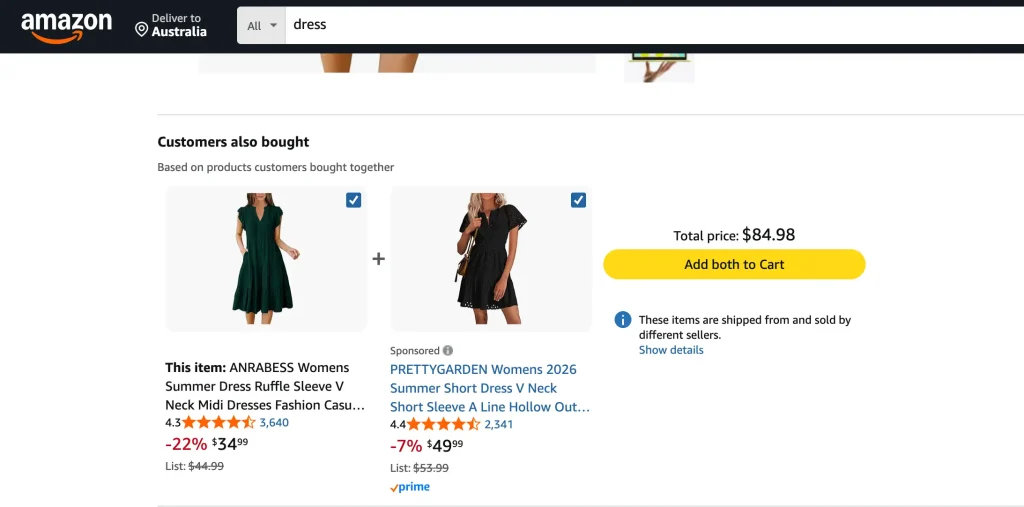
FBT — Amazon. The best-known example, and the format every Shopify FBT app replicates: two or three items, a combined price, one add-all button. In the screenshot below Amazon titles the widget "Customers also bought" with the subtitle "Based on products customers bought together", a reminder of how loosely these labels get used. It shows two items with checkboxes, a total price and an "Add both to Cart" button, and one of the two items is marked Sponsored.
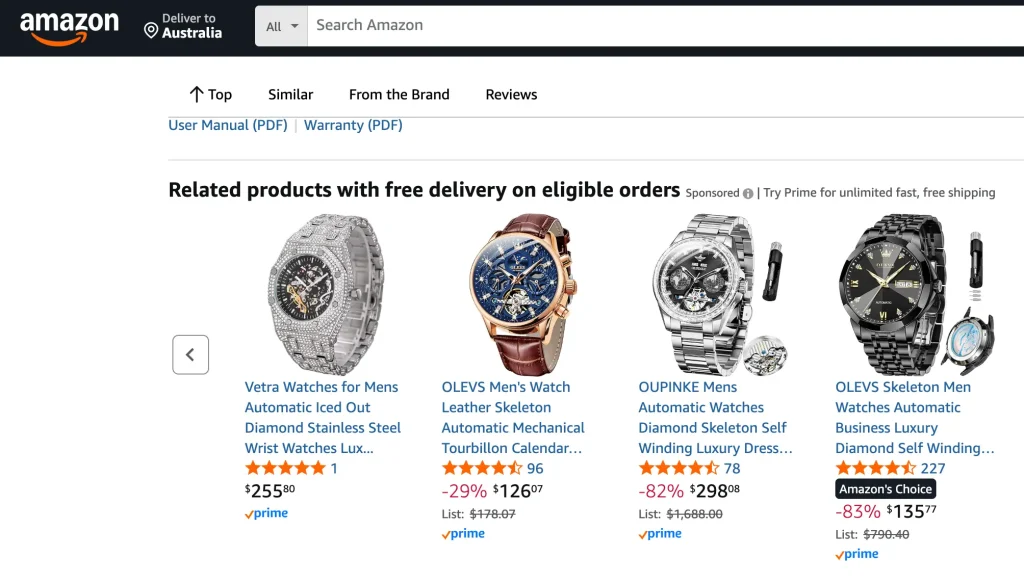
Related products — Amazon. Lower on the product page, a "Related products" carousel shows near-identical alternatives (here, other automatic watches) for the shopper who has decided this item is not the one. The carousel carries a Sponsored label in this screenshot. Pure discovery, no add-all button.
How Bundling and FBT Affect AOV
Where the lift actually comes from:
- More items per cart — the whole mechanism, stated plainly
- Bundle discounts — they reframe multiple items as a deal rather than a bigger bill (discount math in our product bundle pricing strategy guide)
- Social proof — "frequently bought together" signals that real customers chose this combination
- Compounding across touchpoints — FBT plus cart cross-sell plus post-purchase gains stack, because each catches a different shopper at a different moment
Where the lift evaporates:
A 20% AOV jump is worthless if contribution margin drops 25%. The most common failure is stacking discounts on top of an FBT bundle — a site-wide code, a volume discount and a bundle discount all firing on the same order. Track contribution margin per order, not AOV. If you're layering offers deliberately, our stack buy more save more discounts guide covers how to do it without eating the margin.
Why FBT With a Discount Beats Plain FBT
This is the biggest lever most merchants leave unused.
A plain FBT widget says: "Customers also bought these." Social proof, but no reason to act today.
An FBT widget with a discount says: "Customers also bought these — buy all three together and save 10%." Social proof plus a reason to act now.
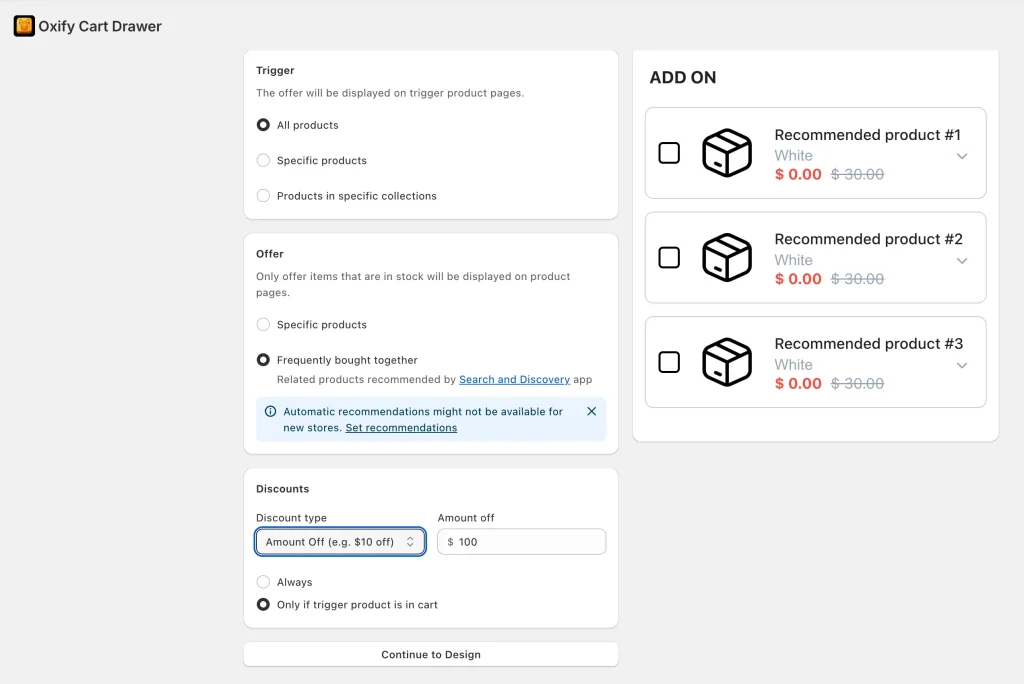
Two discount formats that work:
- Percentage off the bundle — "Save 10% when you buy all 3 together." Easiest to communicate, works across price points.
- Fixed amount off — "$15 off when you add the matching kit." Reads as more generous on higher-priced products.
The Oxify Cart Drawer & Upsells FBT module supports both, alongside a separate module for auto-applied discount codes inside the cart drawer.
Which Industries Benefit Most?
Best for FBT
- Electronics & accessories — cameras need memory cards, phones need cases, laptops need adapters. The pairings are obvious, consistent, and high-margin.
- Beauty & skincare — customers buy routines, not single products (see our FBT for beauty products on Shopify guide)
- Pet supplies — food, toys and treats land in the same order, and replenishment cycles are predictable enough to make the data reliable fast
- Home & furniture — room-based buying creates strong natural co-purchase clusters
Best for cross-sell
- Apparel & fashion — "complete the look" framing
- Food & beverage — low-friction, low-price add-ons
- Subscription boxes — one-time add-ons inside subscription flows (see subscription upsell in slide cart)
Best for related products
- Fashion with many variants — comparison shoppers
- Home decor — highly subjective style choices
- Books and media — discovery is the entire value proposition
Poor fits
- Single-product stores — none of the three apply; focus on quantity offers instead
- Luxury / high-AOV ($1,000+) — related products and post-purchase only; in-flow add-ons read as cheapening
- B2B with long sales cycles — these mechanics are tuned for impulse-friendly carts
Common Mistakes to Avoid
Calling a manual rule "frequently bought together." If it isn't backed by order data, label it "Complete the look" or "Pairs well with." Shoppers who spot the mismatch discount every suggestion you make afterwards.
Turning on automated FBT on day one. With ten orders of history, the algorithm is showing you coincidences. Curate manually until the volume is real.
Showing related products near Add to Cart. Conversion leak. Move them below the fold.
Running four widgets on one product page. The shopper freezes. Two is the ceiling.
Skipping the bundle discount on FBT. Social proof alone gives no reason to act today.
Recommending expensive add-ons. Breaking the 25% price ratio turns a small yes into a second buying decision.
Optimizing CTR instead of margin. A widget can look great in the dashboard and lose money once the discount is netted out.
Paying for four separate apps. An FBT app, cart drawer app, discount app and post-purchase app separately costs more and — worse — none of them know what the others are doing. A full-funnel app like Oxify Cart Drawer & Upsells (our app) runs all four from one place.
How Oxify Handles FBT, Cross-Sell and Discounts in One App
Oxify Cart Drawer & Upsells (our app) is Built for Shopify with a 4.9 rating across 40 reviews on its App Store listing (checked 11 October 2026), starting at $9.99/month:
| What you need | How Oxify handles it |
|---|---|
| Product page FBT with bundle discounts | FBT module with percentage or fixed discount on the bundle |
| Cart drawer cross-sell | Cart-aware in-cart upsells and cross-sells with free shipping bar and reward progress bar |
| Auto-applied discount codes | Automatic discount codes in the cart drawer — no manual entry |
| Free gift with purchase | Auto and manual free gift selection, plus BXGY flows |
| One-click cart upsells | Shipping protection, add-ons and bundle upsells inside the slide cart |
| Volume discounts & buy more save more | Tiered discount logic that stacks with FBT |
| Countdown timer + sticky cart | Built-in FOMO timers that pair with FBT widgets |
| Post-purchase & thank-you page upsell | Offers after checkout with no risk to the original conversion |
| Multi-currency + multi-language | Works across markets — see our multi-currency cart drawer guide |
| Built-in analytics | Product-page upsell analytics split revenue into cross-sell, frequently bought together and add-on revenue, with orders, items sold and AOV with upsells. These are attributed figures, so apply the cannibalization check above. |
The point isn't that one app does everything. It's that FBT, cross-sell and discount logic need to talk to each other. A shopper who accepts the FBT bundle should see the free shipping bar update immediately, the discount apply automatically, and the free-gift threshold recalculate against the new total. With three separate apps those signals don't connect, and shoppers see contradictory messages in the same cart.
Pricing:
- $9.99/month — up to 100 orders
- $19.99/month — 101–200 orders
- $29.99/month — 201–500 orders
- $49.99/month — 501–1,000 orders
- 14-day free trial on every plan
Switching from another app? See Best Rebuy alternative, Best UpCart alternative, Best iCart cart drawer alternative, and Best Kaching cart drawer alternative.
Decision Framework: What to Set Up First
1. "Does this product need something else to work?"
- Yes → FBT or cross-sell
- No → skip FBT, use related products
2. "Do I have order data showing real pairings?"
- Yes, 50+ orders → data-driven FBT works
- No → hand-pick complementary products in the free Search & Discovery app until you do
3. "Is the customer browsing or buying?"
- Browsing → related products keep them moving
- Buying → FBT and cross-sell raise the order
FAQ
What is the difference between frequently bought together and cross-selling?
Are related products and FBT the same thing?
What is the difference between "frequently bought together" and "customers also bought"?
Does Shopify have frequently bought together built in?
How much order data do I need before FBT works?
How does a frequently bought together algorithm actually work?
Why does my FBT widget keep recommending my bestseller?
What's the difference between FBT and an upsell?
Is my upsell app's reported revenue accurate?
Can I run FBT, cross-sell and related products on the same product page?
What's the cheapest way to start with FBT?
The Takeaway
FBT, cross-sell and related products solve three different problems.
- FBT turns one purchase into two or three, using real order data
- Cross-sell is the broader strategy — anywhere you suggest something complementary
- Related products save the sale when the current product isn't quite right
Merchants who get this right don't pick one. They run all three — in different spots, for different reasons, never stacked on top of each other.
Start free: turn on Shopify's related products, hand-pick complementary products in Search & Discovery, and measure. Then add a cart drawer cross-sell with a free shipping bar, and switch to data-driven FBT with a bundle discount once your top products clear 50 orders. That's the full stack, built in the right order.