
Manual Gift Selection on Shopify: Let Customers Choose Their Free Gift (2026 Guide)
Picture this. A shopper fills her cart with skincare. At checkout, a small window pops up. It says, "You've earned a free gift! Pick one." She sees three options. A lip balm. A face mask. A travel pouch. She grins, picks the lip balm, and hits "buy."
That tiny moment of choice just made her 90% more likely to shop with you again.
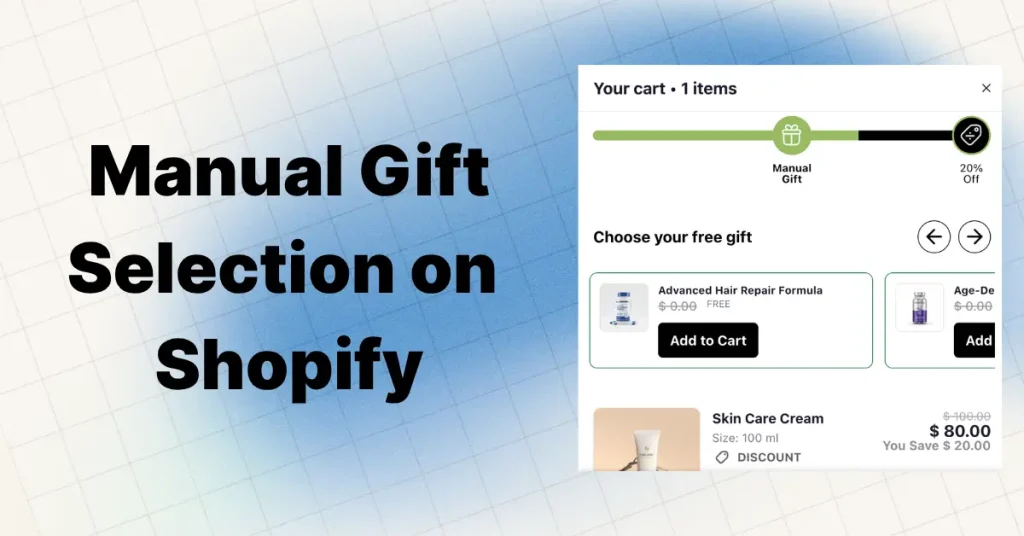
That's the power of manual gift selection on Shopify. Instead of auto-adding a random freebie, you let the customer pick one from a short list. It feels personal. It feels earned. And it quietly lifts your cart value.
In plain words: manual gift selection is a feature where a shopper chooses their own free gift with purchase (GWP) from a list of 2 to 5 options after hitting a cart goal. You'll also hear it called a "gift picker," "gift slider," or "customer choice gift widget."
Here's how it plays out on the storefront:
- Shopper adds items to the cart
- A gift popup or cart message says they've unlocked a free gift
- They see 2 to 5 gift options with images and names
- They click the one they want
- It lands in their cart at $0
No "why did you send me this?" emails. No returns. No wasted inventory. Just a happy buyer.
This is different from automatic gift selection, where the store decides the gift and drops it into the cart without asking. Both work. But they work very differently, and one usually wins for engagement. We'll get into the details below.
Manual vs. Automatic Gift Selection: Honest Comparison
Most Shopify merchants choose between two styles of free gift campaigns. Here's the real side-by-side:
| Feature | Manual Gift Selection | Automatic Gift (Auto-Add) |
|---|---|---|
| Customer picks gift? | Yes | No |
| Feels personal? | High | Low to medium |
| Inventory control | Smarter (spreads across SKUs) | Risky (stuck with one SKU) |
| Return rate | Lower | Higher (unwanted gifts) |
| Setup speed | 10 to 15 minutes | 5 minutes |
| Best for | Skincare, fashion, food, gifts | Simple GWPs, low-SKU stores |
| Typical AOV lift | 15% to 25% | 5% to 12% |
| Customer engagement | High (interactive moment) | Low (passive) |
| Cart abandonment impact | Lower | Higher if gift feels off |
Bottom line: Auto-gifting is easy and fast. Manual gift selection takes a bit more planning, but the conversion and loyalty lift is worth it for most brands. If you're already running a cart drawer with a free shipping bar, adding manual gift selection on top of that stack is usually the next logical move.
Why Letting Customers Choose Beats Auto-Gifting (Real Data)
Auto-gifting has one big problem. Not everyone wants the same thing.
A woman buying face cream doesn't want a men's beard oil sample. A dog owner doesn't want a cat toy. When the gift feels random, the magic fades. Worse, it can feel like you just dumped old stock on them. That kills the goodwill the gift was supposed to build.
Letting people choose changes everything. Here's the proof:
- 90% of free gift receivers said they'd buy again from that store (Harris Interactive)
- 72% of gift card recipients spend more than the gift's value when redeeming (Prepay Nation)
- Brands running gift pickers often see 15% to 25% higher AOV vs. auto-gifting
- Product bundles and gift offers lift AOV 10% to 30% during peak seasons
Why does choice do this? Four reasons:
- It feels like a reward, not a leftover. The customer trusts you more.
- It cuts wasted inventory. Gift picks spread across SKUs, not one sad pile.
- It lifts perceived value. A chosen gift feels worth more than a forced one.
- It reduces buyer's regret. People are happier with choices they made themselves.
That's the kind of loyalty most brands would pay a fortune for. And the best part? It costs you almost nothing to set up beyond what you're already spending on the gift itself.
The Psychology Behind Why Choice Sells
There's a famous study from Columbia University called the Jam Study. Researchers set up two booths in a grocery store. One had 24 jams. The other had 6.
The big booth drew crowds. But only 3% of visitors bought. The small booth converted at 30%. Ten times higher.
The takeaway? People love options, but only up to a point. Too many choices freeze the brain. It's called choice overload, and surveys show 64% of consumers feel it often while shopping online.
This is exactly why the best Shopify gift picker campaigns offer 2 to 4 gifts, not 10. Just enough to feel in control. Not so many that shoppers bail.
There's another powerful force at work: the endowment effect. Once someone picks a gift, they mentally "own" it. That psychological ownership makes them less likely to abandon the cart and more likely to hit checkout. They don't want to lose what they already feel is theirs.
Then there's the goal gradient effect. When a progress bar shows "$8 away from a free gift," shoppers speed up spending. This is the same behavior loyalty apps use, and it works beautifully with gift selection. Pair it with the right cart upsell strategy and you're stacking two conversion levers at once.
Finally, there's the reciprocity principle. When you give someone something valuable, they feel a quiet pull to give back. In ecommerce, that "giving back" looks like repeat purchases and positive reviews. A free gift, especially one the customer chose, triggers this response hard.
When Manual Gift Selection Works Best (And When It Doesn't)
Not every store needs manual gift selection. Here's an honest look.
It works best for:
- Beauty and skincare brands — Customers have strong opinions on scents, shades, and skin types
- Apparel and fashion stores — Size, color, and style preferences vary wildly
- Food and beverage shops — Flavor picks make the gift feel custom
- Subscription boxes — Choice adds excitement to each order
- Gift shops and holiday GWP campaigns — High emotional investment
- Multi-SKU stores — You have inventory to spread across options
- High-AOV brands — Perceived-value boost compounds
It's less useful for:
- Single-SKU brands with one hero product (just give it away)
- Super low-margin stores where any gift hurts (try free shipping threshold instead)
- Stores with extremely limited inventory on gift candidates
- Very new stores still nailing down product-market fit
If you're in one of the "less useful" categories, a free shipping bar in your cart drawer often outperforms a gift campaign for less effort.
4 Ways to Set Up Manual Gift Selection on Shopify
Shopify doesn't have a dedicated "manual gift selection" feature built in. But you have four real paths to get there. Let's walk through each one.
Method 1: Native Shopify (Buy X Get Y Discount)
Cost: Free Difficulty: Easy Limitations: No gift picker popup, no auto-add, no tiers
This is the simplest way, but the most limited. You create a "Buy X Get Y" automatic discount that makes specific products free when the cart hits a condition.
Step-by-step setup:
- Go to Shopify admin → Discounts → Create discount → Buy X get Y
- Name the discount (like "Free Gift over $50")
- Under Customer buys, set the trigger (minimum quantity or minimum amount)
- Under Customer gets, choose your gift product (or multiple gift products from a collection)
- Under At discounted value, select Free (100% off)
- Set max uses per order to 1 (so shoppers can't claim unlimited gifts)
- Choose Automatic as the discount type
- Save the discount
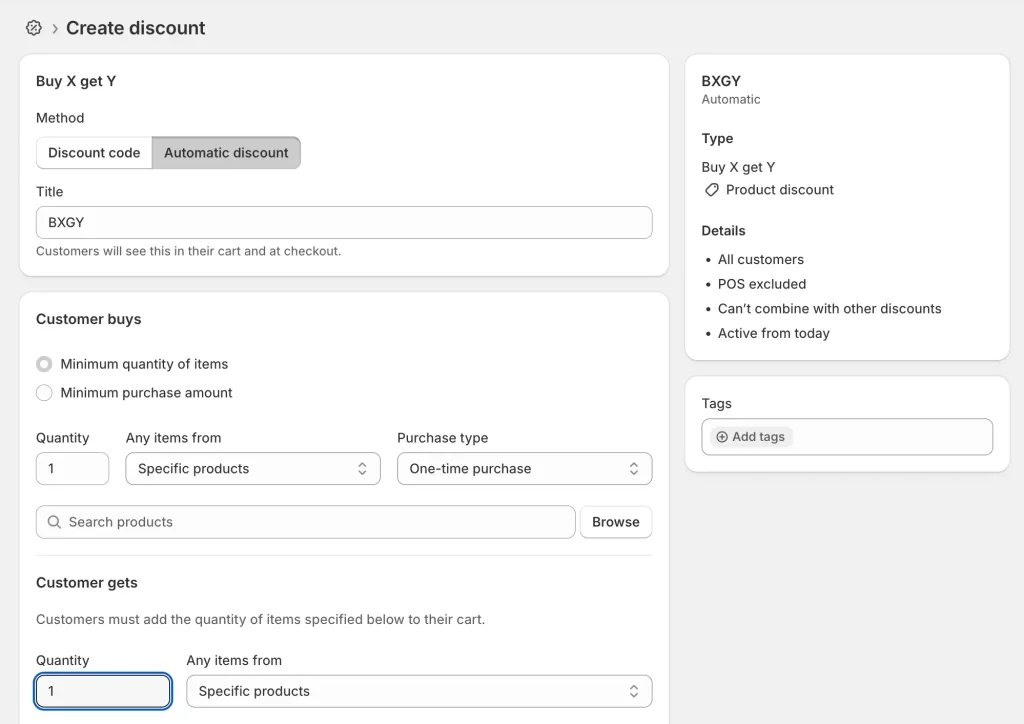
How customers experience it:
When a customer hits the threshold, any gift product they add to the cart becomes free. If you set up multiple gift products in the same discount, that's basically "manual gift selection" on the cheap. The customer goes to the gift collection, picks what they want, adds it, and sees it discounted to $0 at checkout.
The three big catches:
- No popup or picker UI. You need to tell customers they've qualified through banners, cart notes, or email. Most people will never know.
- Customer has to manually add the gift. It won't appear automatically. This adds friction.
- No tiered gifts. You can't do "spend $50 get gift A, spend $100 get gift B" with one discount.
Who this method is for: Brand-new stores testing the waters, or merchants who want zero app costs and can tolerate some manual lift on the customer's end.
Method 2: Shopify Free Gift App (Easiest and Most Powerful)
Cost: Free to ~$30/month for most Difficulty: Easy Limitations: App dependency
This is how 95% of serious Shopify merchants run manual gift selection. A dedicated free gift app handles everything native Shopify can't: the popup, the gift picker UI, auto-add, auto-remove, tiers, and branding.
Step-by-step setup (works with most apps):
Step 1: Pick your trigger. Decide what unlocks the gift:
- Minimum spend (like $50 or $75)
- Buying a specific product
- Buying from a collection
- First-time order
- Customer tag (VIPs, subscribers)
Pro tip: Set your trigger 15% to 20% above your current AOV. If your AOV is $60, unlock the gift at $70. Just out of reach is the sweet spot.
Step 2: Choose 2 to 4 gift options. Stick to this rule. Less is more. Pick gifts that:
- Match the buyer's cart vibe (skincare gifts with skincare orders)
- Cost you under 10% of the order value
- Move slow inventory if possible
- Feel worth picking, not cheap
Step 3: Install a Shopify free gift app. Head to the Shopify App Store and search "free gift" or "gift with purchase." Common picks include BOGOS, Gift Box, Monk, Kite, and Salepify. Most offer free plans to start. (Full comparison in section 7.)
Step 4: Build the offer. Inside the app:
- Name your campaign (like "Spring GWP")
- Set the trigger
- Add your 2 to 4 gift products
- Turn on "customer selection" or "manual pick" mode
- Write a friendly message like "You earned a free gift! Pick yours."
- Choose where the popup shows: product page, cart drawer, or checkout
- Customize colors to match your brand
Step 5: Test before launch. Always. Act like a real shopper:
- Does the popup show at the right moment?
- Do all gift options display clearly with images?
- Does the gift add at $0?
- Does the cart total stay correct?
- Does it work on mobile?
- Does the gift auto-remove if the cart drops below the threshold?
Step 6: Promote it. A free gift nobody sees is wasted. Place it on:
- Homepage banner
- Product pages
- Cart drawer (critical — this is where intent is highest)
- Email campaigns
- Exit-intent popups
Method 3: Shopify Functions or Custom Code
Cost: Developer fees ($500 to $5,000+) Difficulty: Hard (requires dev) Limitations: Ongoing maintenance
Shopify Functions replaced Shopify Scripts for most merchants in 2024. They let developers build custom discount logic directly on Shopify's backend. For manual gift selection specifically, a custom build gives you total control:
- Completely custom picker UI
- Unlimited tier logic
- Deep integration with customer data, CRM, and loyalty
- No recurring app fees
When this makes sense: Large Shopify Plus brands doing $5M+ in GWP-driven revenue, or stores with promotion logic too unusual for any app.
When this doesn't: 99% of stores. The ROI rarely beats a good app unless you're scaling massively.
If you go this route, you'll typically hire a Shopify developer or agency. Expect 2 to 6 weeks of build time plus ongoing maintenance whenever Shopify updates Functions.
Method 4: Cart Drawer With Built-In Gift Picker (Our Recommended Approach)
Cost: From $19.99/month Difficulty: Easy (5–10 minute setup) Limitations: None for most use cases
This is the cleanest approach that's been gaining traction in 2026. Instead of stacking a separate free gift app on top of your theme cart, you use a modern cart drawer that has manual gift selection built in alongside upsells, free shipping bars, cross-sells, and progress bars — all in one place.
This is exactly what we built Oxify Cart Drawer for. It's Built for Shopify certified, runs on Shopify Functions (so it's fast), and handles manual gift selection, auto-add gifts, progress bars, and cart upsells from a single dashboard.
Why this wins for most merchants:
- One app instead of three. A separate free gift app + cart drawer app + upsell app usually costs more and conflicts more often.
- Everything shows in the cart drawer. Shoppers see the gift picker, progress bar, and upsell at the same high-intent moment — right before checkout.
- Less site speed impact. Fewer scripts, faster pages.
- Better mobile experience. Gift picker, progress bar, and cart all in one clean drawer that works on phones.
- Built-in support for both auto and manual gifting. Switch between "Free Gift Automatic" and "Free Gift Manual → Pick Gift" from one dropdown.
Step-by-step setup inside Oxify Cart Drawer:
Step 1: Install the app from the Shopify App Store. It's free to try.
Step 2: Open the Rewards section in the Oxify dashboard and click Add Reward.
Step 3: Configure Reward #1 with these settings (see screenshot below):
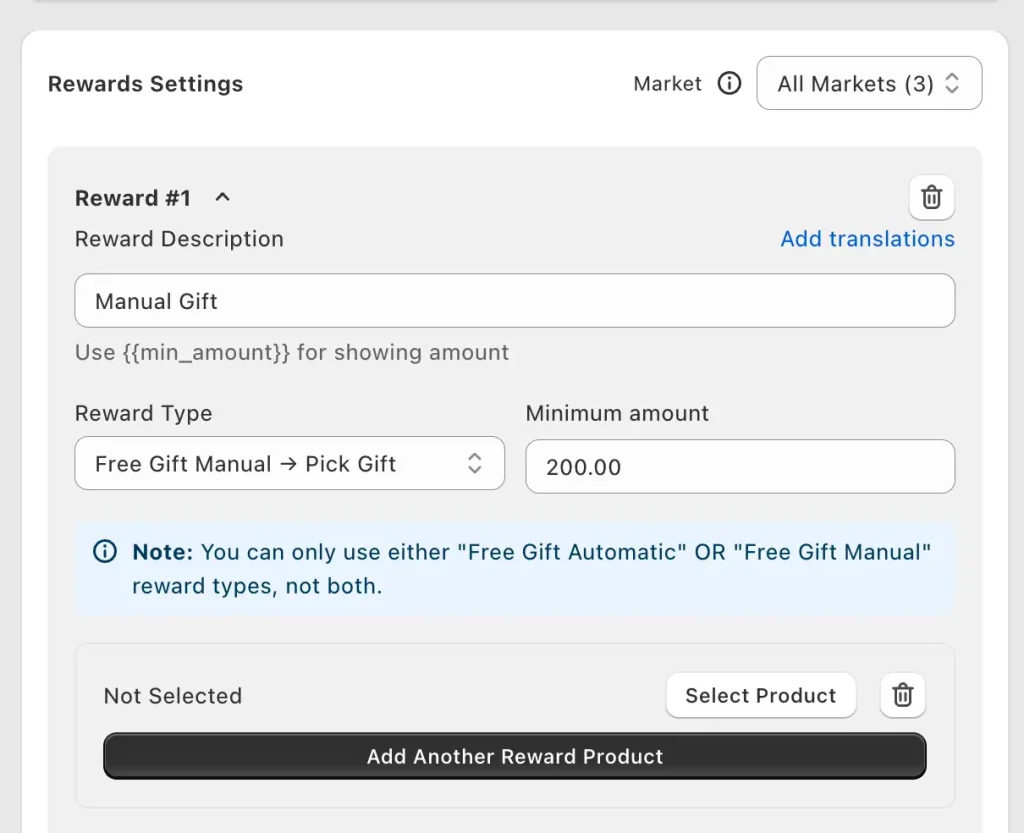
- Reward Description: Label it clearly (like "Manual Gift"). You can use
{{min_amount}}to auto-show the cart threshold in the customer message. - Reward Type: Select
Free Gift Manual → Pick Giftfrom the dropdown. This is the setting that lets customers choose their gift instead of auto-adding. - Minimum amount: Set your cart threshold. In the example above, it's $200 — meaning shoppers who hit $200 can pick a free gift.
Step 4: Add your gift products. Click Select Product under each reward slot. Add 2 to 4 gift options. You can click Add Another Reward Product to build out the full picker.
Note: Oxify lets you run either "Free Gift Automatic" or "Free Gift Manual → Pick Gift" per reward slot, not both on the same reward. If you want a tiered setup (e.g., $100 auto-gift + $200 manual pick), create two separate rewards.
Step 5: Publish and test. Add items to your cart on the storefront. The gift picker should appear in your cart drawer when the threshold is hit. Pick a gift and confirm it lands at $0.
Step 6: Stack with other cart features. Because Oxify is an all-in-one cart drawer, you can layer manual gift selection with a free shipping bar, discount code field, and cart upsells — all in the same drawer, without installing another app.
Full walkthrough with more examples: How to add a free gift in your Shopify cart drawer.
Takes about 10 minutes end to end. No code. No extra app subscriptions.
Best Shopify Free Gift Apps for Manual Selection
Not every free gift app supports real manual gift selection. Some only auto-add. Here's an honest comparison of the main options on the Shopify App Store:
| App | Manual Selection? | All-in-One Cart? | Free Plan? | Best For | Starting Price |
|---|---|---|---|---|---|
| Oxify Cart Drawer | Yes | Yes (cart drawer + upsells + GWP) | Free trial | Stores that want gift picker + cart drawer + upsells in one app | $9.99/mo |
| BOGOS | Yes | No | Free plan | Advanced GWP, tiers, bundles | Free / $29.99+ |
| Gift Box | Yes (up to 10 tiers) | No | Free plan | Simple standalone GWP | Free / $19.99+ |
| Monk Free Gift | Yes | No | Free plan | Widget customization | Free / $15+ |
| Salepify | Yes | Partial | Free plan | Progress bar + gifts | Free / paid tiers |
| EG Auto Add | Limited | No | Free plan | Mostly auto-add | Free / $14.99+ |
| Kite Discount & Free Gift | Yes | No | No | Tiered gifts + Plus checkout | $19/month |
How to pick the right app:
Ask yourself three questions:
- Do I only need a gift picker, or also a cart drawer, bundles, BOGO, and upsells?
- Just gifts → Gift Box or Monk (standalone apps)
- Gift picker + cart drawer + upsells in one → Oxify Cart Drawer
- Advanced tiered GWP only → BOGOS or Kite
- Where do I want the gift picker to show?
- Product page → most apps support this
- Cart drawer → pick a cart-drawer-native solution like Oxify
- Checkout → BOGOS, Kite, or Qikify (Shopify Plus)
- How much customization do I need?
- Standard look → any app works
- Deep brand match + one clean cart experience → Oxify or Monk
- Heavy targeting rules → BOGOS or Monk
If you're comparing broader cart apps, our roundup of the best Shopify cart drawer apps covers which ones handle GWP natively and which ones don't.
How to Pick the Right Gift (So It Doesn't Kill Your Margins)
The gift matters more than the threshold. A bad gift kills the campaign no matter how smart the setup is.
Rules for picking great gift products:
- Keep gift cost under 10% of the order value. If your threshold is $75, your gift should cost you under $7.50 to fulfill (product + packaging + any shipping weight).
- Match the cart category. Skincare gifts with skincare orders. Tea gifts with tea orders. Keep it on-theme.
- Use items with high perceived value but low real cost. Sample sizes, branded accessories, travel pouches, and limited-edition mini items all work great.
- Avoid anything that could cause returns. No fragile items, no allergen-heavy products, no sizes that might not fit.
- Move slow stock. GWP is a fantastic way to clear inventory. Just make sure it's still relevant and useful.
Gift ideas by category:
- Beauty / Skincare: Lip balm, face mist, sample-size serum, travel pouch, makeup bag
- Food / Beverage: Flavor sample pack, branded mug, recipe card, cocktail mixer
- Apparel: Socks, tote bag, hair tie, sticker pack, branded keychain
- Home goods: Candle sample, coaster set, kitchen towel, microfiber cloth
- Supplements / Wellness: Single-serve sample, branded shaker bottle, meal planner
Red flags to avoid:
- Expiring products with less than 6 months of shelf life
- Items that require sizing decisions
- Products with mixed reviews on your own store
- Anything that looks like obvious old stock
When in doubt, test two gift sets for a week and see which one drives more AOV. Stacking it with other discount triggers can also compound the effect.
Case Study: 22% AOV Lift in 6 Weeks
Let's see how this plays out. A small skincare shop was offering a free $12 lip balm with any order over $60. Conversion bumped a little, but not much. Some customers even emailed asking for a different shade, which created extra support load.
Then they switched to manual gift selection. Customers could now choose between:
- A lip balm (3 shade options)
- A mini face mist
- A travel-size serum sample
All three gifts cost the store under $4 each to fulfill. The threshold stayed at $60.
In six weeks:
- Average order value jumped from $63 to $77 (a 22% lift)
- Gift-related support tickets dropped 68%
- Repeat purchases within 30 days climbed 14%
- Cart abandonment on qualifying carts dropped 9%
Same gift cost. Same traffic. Same ad spend. The only change was letting the customer pick.
This isn't a freak outcome. Brands that A/B test manual vs. auto-gifting often see 15% to 25% higher AOV with manual selection. The math is simple: customers who feel in control are customers who check out.
For deeper AOV plays beyond just gift selection, we've covered more options in our Shopify upselling strategies guide.
Advanced Strategies: Tiers, Progress Bars, and Personalization
Ready to level up? These advanced moves push a basic gift picker into serious AOV territory.
Add a Progress Bar
Show "You're $12 away from a free gift!" in the cart drawer. The goal gradient effect kicks in, and shoppers add one more item to close the gap. This one move alone can lift qualifying carts by 15% to 20%.
Pair a gift-picker progress bar with a free shipping threshold for a double trigger. Example: "Spend $50 for free shipping. Spend $75 to pick a free gift."
Build Tiered Gifts
Instead of one cart threshold, build a ladder:
- Spend $50 → pick 1 gift
- Spend $100 → pick 2 gifts
- Spend $150 → pick 3 gifts
It feels like a game. Games sell. Tier apps like BOGOS, Gift Box (up to 10 tiers), and Kite handle this out of the box.
Personalize Gift Options by Collection
Shoppers buying skincare see skincare gift options. Shoppers buying candles see candle gift options. This is one of the most powerful upgrades you can make to a gift picker, and BOGOS, Monk, and a few cart drawer apps support it.
Match Gifts to the Season
Sunscreen samples in July. Hot cocoa in December. Rotate gifts every 4 to 6 weeks. This keeps repeat buyers engaged and prevents the "same-old gift" fatigue that kills GWP campaigns after month 3.
Show Gift Value Clearly
"Free gift worth $18" beats plain "Free gift." Numbers activate the perceived-value brain. Put the dollar value right in the gift picker.
Add Urgency
"Today only" or "while supplies last" pushes fence-sitters off the fence. Use sparingly so it doesn't lose punch.
Offer a "No Thanks" Option
Respect shoppers who don't want a gift. Forcing it annoys people and clutters their cart. A clean skip button builds trust.
Stack With Free Shipping
A gift + free shipping combo is the AOV double-whammy. Set your gift threshold just above your free shipping threshold, and shoppers hit both.
Use Exit-Intent Reminders
If a shopper is about to leave without claiming their gift, show a quick popup. "Don't forget your free gift! Pick one before checkout." Cart abandonment drops.
Common Mistakes to Avoid
Even a smart strategy can flop. Here's what kills most GWP campaigns:
- Offering too many gifts. Stick to 2–4. Choice overload is real.
- Picking gifts that don't match your brand. A luxury store offering cheap swag cheapens every order.
- Hiding the offer. Shout about it. Homepage, cart drawer, email, social. Silence = no claims.
- Ignoring mobile. 70%+ of Shopify traffic is mobile. Test the popup on a phone.
- Running the same gift year-round. Rotate every 4–6 weeks.
- Forgetting auto-remove. If the cart drops below threshold, the gift should disappear. Otherwise shoppers game the system.
- Setting the threshold too high. If redemption is under 5%, you've priced the gift out of reach. Lower it 10%.
- Not tracking results. Use app analytics, Shopify reports, or GA4 to measure AOV lift, not just gift redemption.
- Stacking too many discounts. Gift + BOGO + coupon + free shipping can confuse shoppers and crush margins. Pick 2, not 4.
- Choosing an app that slows your store. Always check page speed after install. Modern apps built on Shopify Functions are fast; older script-based ones drag.
How to Measure Success
Before you launch, know what "winning" looks like. Track these four metrics for 30 days after launch, compared to the 30 days before:
- Average Order Value (AOV). The headline metric. Aim for a 10%+ lift minimum.
- Conversion rate. Did overall conversion go up, down, or stay flat? Some gift campaigns boost AOV but tank conversion (too high a threshold).
- Gift redemption rate. Out of qualifying carts, what % claimed the gift? Healthy redemption is 60%+. Under 40% means low visibility or a weak gift.
- Repeat purchase rate (30 days). Did gift recipients come back faster than non-recipients?
If your app doesn't show these numbers in a dashboard, pull them from Shopify reports or Google Analytics. Anything else — like "customer satisfaction" or "email opens" — is a nice-to-have but not the core four.
You should also watch cart abandonment. If it spikes, the gift picker may be interrupting flow. Move it to the cart drawer instead of a full-page popup and re-test.
FAQs About Manual Gift Selection on Shopify
Can I do manual gift selection on Shopify without an app?
Does manual gift selection slow down my store?
How many gifts should I offer at once?
What if a customer doesn't want any gift?
Will free gifts hurt my profit margins?
What's the difference between manual and auto-add gifts?
Can I offer different gifts to different customer segments?
How do I promote a free gift offer?
What's the ideal cart threshold for a free gift?
How long should a GWP campaign run?
Final Thoughts: Give Customers the Gift of Choice
Free gifts are nice. But free gifts customers actually want are powerful.
Manual gift selection turns a nice-to-have into a moment that matters. It makes shoppers feel seen. It builds loyalty. It lifts average order value. And it costs almost nothing extra to set up once you have the right tools in place.
If you've been auto-adding the same freebie for months and wondering why it's not moving the needle, try this. Swap one auto-gift for a three-option picker. Watch what happens in 30 days.
Your Next Steps
- Pick your cart threshold today (15–20% above AOV)
- Choose your setup method from section 6 (we recommend a cart drawer with built-in gift picker for the smoothest experience)
- Build a 3-gift offer with items under 10% of order value
- Install Oxify Cart Drawer to get manual gift selection, progress bars, and cart upsells in one app
- Launch it this week
- Track AOV and redemption rate for 30 days
Your customers will thank you. Your cart values will thank you. Your inventory report will thank you too.
The next time someone checks out from your store, give them a little gift. But let them choose it. That's where the real magic happens.