 Oxify
OxifyShopify Discount Code in Cart Drawer (Before Checkout)

Updated October 13, 2026: app ratings, prices, badges and availability re-checked. Covers Dawn 16 and Horizon.
Short answer: A Shopify discount code in cart (drawer or /cart page) can be applied before checkout on every plan. On Horizon, turn on Theme settings → Cart → Allow discounts in cart. On Dawn and other themes, POST the code to /cart/update.js as { "discount": "CODE" } and check discount_codes[].applicable, or add the cart discount code field with an app. For a box on your theme’s own drawer, Dcart (4.9 from 114 reviews, $5.99/month) or Dr Stacked (4.9 from 177, from $4.99/month); for a new drawer that adds upsells and gifts too, Oxify Cart Drawer & Upsells (our app, 4.9 from 40 reviews, from $9.99/month) or Cartix (4.9 from 46, $7.99/month). App Store listings read October 13, 2026.
Two catches trip most people up. The discount value replaces every code already on the cart, so send the old codes plus the new one, comma-separated. And a bad code still returns HTTP 200, so applicable: false is the only sign it failed. Add sections to the same request so the drawer redraws with the new total. Need it on the cart page, or want to make a code mandatory? Both are covered below.
How we checked this guide: on September 17, 2026 we sent real requests to /cart.js and /cart/update.js on a live Shopify storefront. We compared the results with Shopify's Ajax Cart API reference, the current Dawn and Horizon source code on GitHub, and Shopify's help page on discount combinations. On October 11 and again on October 13, 2026 we re-checked every app's rating, price, Built for Shopify badge and availability on its Shopify App Store listing. Disclosure: Oxify publishes this guide and makes Oxify Cart Drawer & Upsells, so it is our app. It's one of the options below, but the free code method comes first because it's the right answer for many stores.
Which method should you use?
| Your setup | Best method | Cost | Time |
|---|---|---|---|
| Horizon (or another theme with a built-in discount field) | Turn on the theme setting | Free | 2 minutes |
| Dawn or a Dawn-based theme, and you're comfortable editing theme code | The cart/update.js code below | Free | About 30–60 minutes |
| Any theme, and you don't want to edit code | A cart drawer or discount-field app | $3.99–$9.99/month to start | About 10 minutes |
| Your cart drawer already comes from an app | That app's own discount setting | Included in the app | 2 minutes |
| Headless or Hydrogen store | Storefront API cartDiscountCodesUpdate | Free | Developer time |
Which row is probably yours? It comes down to your theme. Horizon is the first row and Dawn is the second. On any other theme, check whether it has its own discount-code setting; if it does, use the first row.
Old answers say there's no cart discount API. That's outdated.
Search Shopify Community threads or Stack Overflow and you'll still find answers saying the cart can't hold a discount code, so the only way is a workaround. That was true for years: Shopify only checked codes at checkout. The usual hacks were:
- The
/checkout?discount=CODEredirect. It sends the shopper straight to checkout with the code attached. The drawer never shows the lower price. - The
/discount/CODEcookie trick. Scripts loaded that URL in a hidden iframe or a backgroundfetchso Shopify would set adiscount_codecookie, then hoped checkout picked it up. - Fake price previews. Themes calculated a "discounted" total in JavaScript that Shopify never confirmed.
All of these hold one code at a time, and none of them tell you whether the code actually applies. That changed on May 21, 2025, when Shopify added a discount parameter to /cart/update.js (Shopify changelog). Now several codes can sit on the cart, Shopify reports whether each one applies, the drawer shows the real total, and the codes carry through to checkout, Shop Pay and other express checkout buttons. So if a tutorial still tells you to redirect to /checkout?discount= or load a hidden iframe, skip it. (Plain /discount/CODE share links in emails are still fine. More on that below.) New to drawers? Start with what a cart drawer is.
What is a cart discount code, and what is a cart-level discount?
A cart discount code (also called a cart coupon code or promo code) is a code the shopper enters in the cart (the drawer or the /cart page) instead of at checkout. Shopify saves it on the cart, so the lower total shows before checkout and the code carries into checkout.
A cart-level discount is a discount on the cart as a whole, such as 10% off the order or $15 off orders over $100, rather than on one product. Themes such as Dawn show it as a savings line near the subtotal. In Liquid it lives in cart.cart_level_discount_applications, while product-specific discounts appear on each item in line_item.line_level_discount_allocations (Shopify Liquid cart reference).
The two overlap but aren't the same. A code can create a cart-level discount (an order discount) or a line-level one (a product discount). Automatic discounts show up in the same places without any code.
Option 1: No-code path in the theme editor
Horizon: a built-in toggle
Shopify's newer Horizon themes include a discount field in the cart. In the theme editor, click the gear icon for Theme settings, open Cart, and check Allow discounts in cart (in Horizon's config/settings_schema.json this is show_add_discount_code, and it's on by default). It's a theme-wide setting, so it covers both the cart drawer and the cart page. If your Horizon store has no code field, someone probably switched it off. The code behind it (assets/cart-discount.js in the Horizon repo) works the same way as the method below. It adds the new code to the existing ones, sends them to cart/update.js, and checks discount_codes[].applicable. Most Horizon stores can stop reading here.
Dawn: what the theme editor can and can't do
Dawn has no discount toggle. Its Cart footer section on the cart page only accepts three block types: Subtotal price, Checkout button and app blocks. There's no Custom Liquid block there, and the cart drawer has no blocks at all, so you can't add a drawer code field from the editor. What you can do on the cart page is add Dawn's Custom Liquid section to the cart template (Add section → Custom Liquid) and paste the markup and script from the cart page section below into it. It sits below the cart footer rather than beside the subtotal, but it needs no file edits. For the drawer, you need a code edit (Option 2) or an app.
Any theme: use an app
Dawn and many older themes show discounts that are already on the cart. They just don't include a box for typing one in. If you don't want to maintain theme code, an app can add the box. The trade-off is a monthly fee. There are two kinds of app:
- Add-on apps (Dcart, Dr Stacked, KartDiscount, Discount Code Display) add a field to the drawer your theme already has. They're lightweight, but how the field looks depends on your theme's CSS.
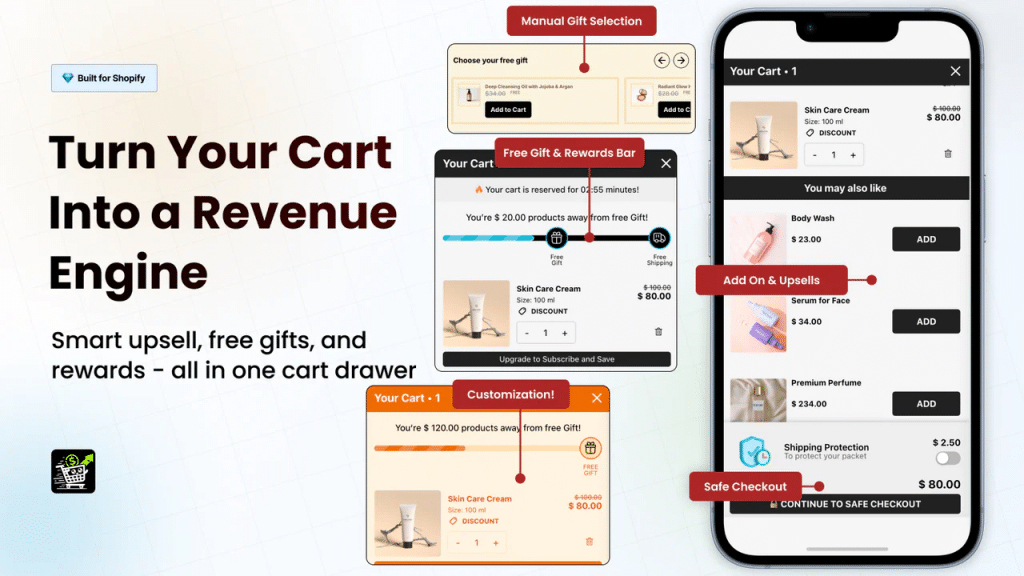
- Replacement apps (Oxify Cart Drawer & Upsells, Cartix) replace the whole drawer. You get the discount field along with upsells, gifts and a progress bar in one design, but your theme's own drawer styling goes away.
| App | Rating (Oct 13, 2026) | Paid plans from | Type | Best for |
|---|---|---|---|---|
| Oxify Cart Drawer & Upsells (ours) | 4.9 (40), Built for Shopify | $9.99/mo up to 100 orders, 14-day trial | Replacement | A new drawer with a code field, upsells, gifts and a progress bar in one app |
| Dcart ‑ Discount in Cart | 4.9 (114) | $5.99/mo, 7-day trial | Add-on | A simple code box with discount combinations, on a small budget |
| Dr Stacked Discounts on Cart | 4.9 (177) | $4.99/mo (stacked codes from $9.99; $19.99 on Shopify Plus), 14-day trial, free on development stores | Add-on | Stores that let shoppers combine several codes |
| KartDiscount | 4.8 (97) | $4.90/mo (stacking from $8.90; more on Advanced and Plus plans), 3-day trial | Add-on | A code box plus extra discount features like stacking |
| Discount Code Display | 4.7 (44) | $3.99/mo, 11-day trial | Add-on | Showing shoppers which codes are available |
| Cartix Cart Discount + Upsell | 4.9 (46), Built for Shopify | $7.99/mo, 5-day trial | Replacement | A cheaper replacement drawer with a code field, upsells and progress bars |
Only Oxify Cart Drawer & Upsells and Cartix showed the Built for Shopify badge on their listings on October 13, 2026. Dcart, Dr Stacked, KartDiscount and Discount Code Display did not. We list Oxify first because it's our app, so weigh that. If you only need a code field on your theme's own drawer, Dcart or Dr Stacked is the cheaper choice. Our take on each:
- Oxify Cart Drawer & Upsells (our app): a full replacement drawer, not just a code box. The code field comes with upsells, free gifts and a progress bar in one design. Pricing depends on monthly orders: $9.99 for up to 100 orders, then $19.99, $29.99, $49.99, $79.99, $99.99 and $149.99, with a $299 Enterprise plan. See the Oxify Cart Drawer & Upsells features and setup.
Pros: one app covers the code field, upsells, gifts and the progress bar; 14-day trial; 4.9 rating; Built for Shopify.
Cons: it replaces your theme's drawer styling; only 40 reviews, fewer than Dcart (114) or Dr Stacked (177).
Skip it if: you only want a code box on your theme's existing drawer. An add-on app costs less. - Dcart: choose it if all you need is a code box. There's one $5.99 plan.
Pros: supports discount combinations and gift cards; keeps your theme's drawer.
Cons: no upsells; the field's look depends on your theme's CSS; only a 7-day trial.
Skip it if: you also want upsells or a reward bar in the drawer. - Dr Stacked: choose it if combining several codes is your main goal.
Pros: built around code stacking; the longest trial among the add-ons (14 days); the most reviews in this table (177).
Cons: the free plan only covers development and free-trial stores, so a live store pays from $4.99/month, and stacked discounts need the $9.99 Pro plan. Shopify Plus stores must use the $19.99 plan.
Skip it if: you only need one code at a time and want the cheapest option. - KartDiscount: a code box plus extra discount features.
Pros: a low $4.90 starting price; stacking on the $8.90 Lite plan.
Cons: Shopify Advanced and Plus stores pay extra ($4 and $9 more per month on the Basic plan, according to the listing); only a 3-day trial.
Skip it if: you're on Shopify Plus and comparing on price, since the surcharges add up. - Discount Code Display: for advertising your codes to shoppers.
Pros: the cheapest start ($3.99); an 11-day trial.
Cons: the $3.99 plan caps pop-up impressions at 100 a month; showing codes can lower margins if most shoppers would have paid full price, so test it first.
Skip it if: you don't want every visitor to see your codes. - Cartix: the cheapest replacement drawer here.
Pros: one $7.99 plan includes the code field, upsells and reward bars; Built for Shopify.
Cons: the 5-day trial is short, so test it on a quiet week.
Skip it if: you want to keep your theme's own drawer design.
Some apps have disappeared. On October 11 and again on October 13, 2026, UpCart (Upcart—Cart Drawer Cart Upsell, by Rokt) showed Shopify's "This app is not currently available on the Shopify App Store. If you have support questions, contact Rokt directly." notice, so we've taken it out of the table. Older guides also still recommend Dcode, shoplab: Discount Code in Cart and Carter, but on September 17, 2026 all three listings showed the same notice. Listings can come back, so check the App Store before you rely on any of them. For a wider comparison of drawers, see our best Shopify cart drawer apps roundup.
Option 2: Add the field with theme code (Dawn example)
This method is for drawers that belong to your theme. If an app draws your drawer, anything you add in Liquid won't show up inside it, so use the app's setting instead. So open your cart and confirm which drawer actually appears before you edit theme files. Make these changes on a duplicate theme first. The example targets Dawn 16 (the current release), where the drawer HTML lives in snippets/cart-drawer.liquid, sections/cart-drawer.liquid renders it, and Dawn's own JavaScript refreshes the section cart-drawer into #CartDrawer. For other themes, find the matching section ID and container. Search your theme's JavaScript for getSectionsToRender or sections:.
How the API behaves (from our live tests)
| Request body sent to /cart/update.js | What discount_codes contained afterward |
|---|---|
{"discount":"AAA1"} | [{code:"AAA1", applicable:false}] |
{"discount":"BBB2"} (sent next) | [{code:"BBB2", …}]. AAA1 was removed. |
{"discount":"AAA1,BBB2"} | Both codes |
{"discount":" aaa1 , ccc3"} | aaa1, ccc3. Spaces were removed, and the letter case stayed as typed. |
{"discount":""} | []. All codes were removed. |
{"discount":"ZZZ","sections":"cart-drawer"} | The code, plus sections["cart-drawer"] with the updated drawer HTML |
Every one of these calls returned HTTP 200, even for codes that don't exist. Shopify's reference page lists the discount parameter but doesn't show discount_codes in its sample response. The live response does include it, and Shopify's own Horizon theme relies on it, so it's the right field to check.
Step 1: Add the markup
In snippets/cart-drawer.liquid, find <div class="cart-drawer__footer". Paste the markup below just inside that div. Dawn already lists applied cart-level discounts in the same place, so the savings lines keep working. The field starts collapsed on purpose: a large empty code box sends shoppers off to search for coupons.
<div class="ox-discount" data-ox-discount>
  <button type="button" class="ox-discount__toggle" data-ox-toggle
          aria-expanded="false" aria-controls="ox-discount-panel">
    Have a promo code?
  </button>
  <div class="ox-discount__panel" id="ox-discount-panel" hidden>
    <label class="visually-hidden" for="ox-discount-input">Discount code</label>
    <div class="ox-discount__row">
      <input id="ox-discount-input" type="text" autocomplete="off"
             autocapitalize="characters" spellcheck="false"
             enterkeyhint="done" placeholder="Enter code">
      <button type="button" class="button" data-ox-apply>Apply</button>
    </div>
  </div>
  <p class="ox-discount__msg" data-ox-msg role="status" aria-live="polite"></p>
  <ul class="ox-discount__codes list-unstyled" data-ox-codes></ul>
</div>
The data-ox-codes list is filled in by JavaScript. Liquid's cart object shows discount titles through cart_level_discount_applications, but the code strings a shopper can remove come from the Ajax cart's discount_codes.
Step 2: The JavaScript
Create assets/ox-cart-discount.js. This script reads the codes already on the cart, adds the new one, checks applicable, and removes the code again if it didn't apply. It redraws the drawer from the returned section HTML, and it lets shoppers remove codes one at a time.
(function () {
  var SECTION_ID = 'cart-drawer'; // Dawn's drawer section
  var DRAWER_SEL = '#CartDrawer'; // container Dawn re-renders
  var ROOT = (window.Shopify && Shopify.routes && Shopify.routes.root) || '/';
  var JSON_HEADERS = { 'Content-Type': 'application/json', Accept: 'application/json' };

  function same(a, b) { return a.trim().toLowerCase() === b.trim().toLowerCase(); }
  function codesOf(cart) { return (cart.discount_codes || []).map(function (d) { return d.code; }); }

  function getCart() {
    return fetch(ROOT + 'cart.js', { headers: { Accept: 'application/json' } })
      .then(function (r) { return r.json(); });
  }

  // The discount param REPLACES all codes, so always send the full list.
  function setCodes(codes) {
    return fetch(ROOT + 'cart/update.js', {
      method: 'POST',
      headers: JSON_HEADERS,
      body: JSON.stringify({ discount: codes.join(','), sections: SECTION_ID })
    }).then(function (r) {
      if (!r.ok) throw new Error('HTTP ' + r.status);
      return r.json();
    });
  }

  function msg(text, isError) {
    var el = document.querySelector('[data-ox-msg]');
    if (!el) return;
    el.textContent = text || '';
    el.classList.toggle('is-error', !!isError);
  }

  function repaint(cart) {
    var html = cart.sections && cart.sections[SECTION_ID];
    if (html) {
      var next = new DOMParser().parseFromString(html, 'text/html').querySelector(DRAWER_SEL);
      var current = document.querySelector(DRAWER_SEL);
      if (next && current) current.innerHTML = next.innerHTML;
    }
    renderCodes(cart);
  }

  function renderCodes(cart) {
    var list = document.querySelector('[data-ox-codes]');
    if (!list) return;
    list.textContent = '';
    (cart.discount_codes || []).forEach(function (d) {
      if (!d.applicable) return;
      var li = document.createElement('li');
      var btn = document.createElement('button');
      btn.type = 'button';
      btn.dataset.oxRemove = d.code;
      btn.setAttribute('aria-label', 'Remove code ' + d.code);
      btn.textContent = '×';
      li.append(d.code + ' ', btn);
      list.appendChild(li);
    });
  }

  function apply(code) {
    code = (code || '').trim();
    if (!code) { msg('Enter a code first.', true); return Promise.resolve(); }
    msg('Checking…');
    return getCart()
      .then(function (cart) {
        var codes = codesOf(cart).filter(function (c) { return !same(c, code); });
        return setCodes(codes.concat(code));
      })
      .then(function (cart) {
        var hit = (cart.discount_codes || []).filter(function (d) { return same(d.code, code); })[0];
        if (hit && hit.applicable) {
          repaint(cart);
          msg(code.toUpperCase() + ' applied.');
          return;
        }
        // Not applicable: take it back off so it doesn't follow the shopper to checkout.
        var keep = codesOf(cart).filter(function (c) { return !same(c, code); });
        return setCodes(keep).then(function (clean) {
          repaint(clean);
          openPanel(); // repaint re-collapsed the field; reopen it so the shopper can retry
          msg('"' + code + '" can\'t be used with the items in your cart.', true);
        });
      })
      .catch(function () { msg('Something went wrong. Please try again.', true); });
  }

  function remove(code) {
    return getCart()
      .then(function (cart) {
        return setCodes(codesOf(cart).filter(function (c) { return !same(c, code); }));
      })
      .then(repaint)
      .catch(function () { msg('Could not remove that code.', true); });
  }

  function openPanel() {
    var panel = document.getElementById('ox-discount-panel');
    var toggle = document.querySelector('[data-ox-toggle]');
    if (!panel || !toggle) return;
    panel.hidden = false;
    toggle.setAttribute('aria-expanded', 'true');
  }

  document.addEventListener('click', function (e) {
    var t = e.target;
    if (t.closest('[data-ox-apply]')) {
      apply(document.getElementById('ox-discount-input').value);
    } else if (t.closest('[data-ox-remove]')) {
      remove(t.closest('[data-ox-remove]').dataset.oxRemove);
    } else if (t.closest('[data-ox-toggle]')) {
      var toggle = t.closest('[data-ox-toggle]');
      var panel = document.getElementById('ox-discount-panel');
      var opening = panel.hidden;
      panel.hidden = !opening;
      toggle.setAttribute('aria-expanded', String(opening));
      if (opening) panel.querySelector('input').focus();
    }
  });

  document.addEventListener('keydown', function (e) {
    if (e.key === 'Enter' && e.target.id === 'ox-discount-input') {
      e.preventDefault();
      apply(e.target.value);
    }
  });

  // Show codes already on the cart (including ones added by /discount/CODE links).
  document.addEventListener('DOMContentLoaded', function () {
    getCart().then(renderCodes).catch(function () {});
  });

  // Dawn redraws the drawer after add/change, which wipes the list. Fill it again.
  // subscribe() lives in Dawn's pubsub.js; PUB_SUB_EVENTS in constants.js ('cart-update').
  if (typeof subscribe === 'function' && window.PUB_SUB_EVENTS) {
    subscribe(PUB_SUB_EVENTS.cartUpdate, function () {
      return getCart().then(renderCodes).catch(function () {});
    });
  }
})();
Load it in sections/cart-drawer.liquid or in layout/theme.liquid, next to Dawn's cart-drawer.js:
<script src="{{ 'ox-cart-discount.js' | asset_url }}" defer></script>Two Dawn-specific notes. First, when a shopper adds or changes an item, Dawn redraws the drawer with its own code (renderContents in cart-drawer.js and CartItems in cart.js), which clears the code list the script filled in. The last block in the script handles this: Dawn's product-form.js and cart.js publish PUB_SUB_EVENTS.cartUpdate (the string 'cart-update', defined in assets/constants.js) through subscribe() in assets/pubsub.js, so the script re-reads the cart and redraws the list. Because theme.liquid loads constants.js and pubsub.js with defer before any section script, they're available by the time this script runs. Second, Dawn's request helper fetchConfig() sends the same Content-Type: application/json and Accept: application/json headers used above, so you can swap in fetch(routes.cart_update_url, { ...fetchConfig(), body }) if you prefer Dawn's own helpers.
Cart page instead of the drawer? See the next section. The section ID is different there.
Step 3: Mobile-safe CSS
.ox-discount { margin-bottom: 1rem; }
.ox-discount__toggle { background: none; border: 0; padding: 0; text-decoration: underline; cursor: pointer; color: currentColor; }
.ox-discount__row { display: flex; gap: .5rem; margin-top: .75rem; }
.ox-discount__row input { flex: 1; min-width: 0; height: 44px; padding: 0 12px; font-size: 16px; } /* 16px stops iOS zoom */
.ox-discount__msg { margin: .5rem 0 0; font-size: 1.3rem; }
.ox-discount__msg.is-error { color: #b42318; }
.ox-discount__codes li { display: inline-flex; align-items: center; gap: .25rem; margin: .5rem .5rem 0 0; padding: 2px 8px; border: 1px solid currentColor; border-radius: 99px; font-size: 1.2rem; }
.ox-discount__codes button { background: none; border: 0; cursor: pointer; font-size: 1.6rem; line-height: 1; }
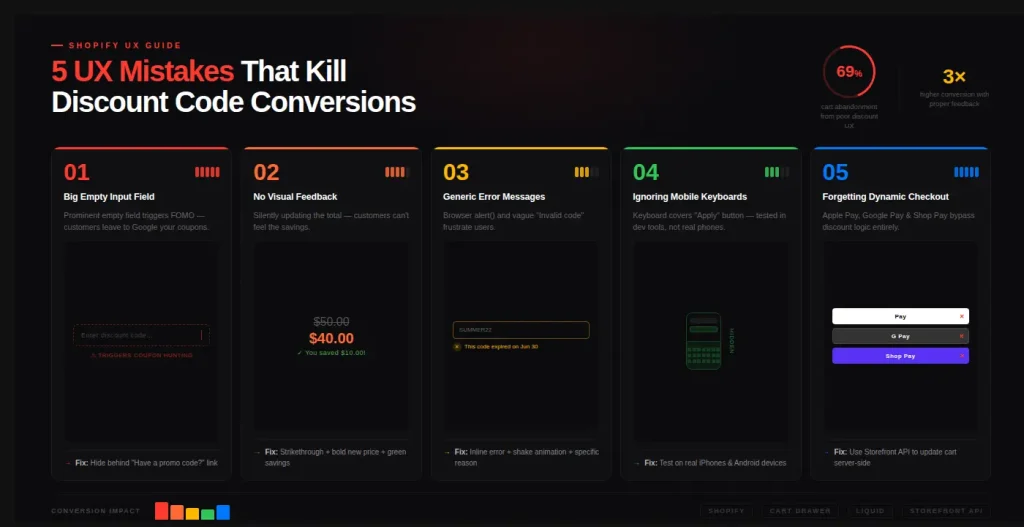
Test on a real iPhone and a real Android phone. Browser developer tools won't show the on-screen keyboard covering the Apply button.
Headless: Storefront API
Hydrogen and other custom storefronts don't use the Ajax cart. Use the cartDiscountCodesUpdate mutation instead. It also replaces the full list of codes and returns discountCodes { code applicable }. See Shopify's Hydrogen discount codes guide.
mutation ($cartId: ID!, $codes: [String!]!) {
  cartDiscountCodesUpdate(cartId: $cartId, discountCodes: $codes) {
    cart { discountCodes { code applicable } cost { totalAmount { amount currencyCode } } }
    userErrors { field message }
  }
}
How to add a discount field on the cart page (Dawn)
The same markup, CSS and script work on Dawn's full cart page (/cart), with two changes. First, paste the markup into sections/main-cart-footer.liquid, inside <div class="cart__blocks">, and load the script from that section. Second, change the two settings at the top of the script:
var FOOTER = document.getElementById('main-cart-footer');
var SECTION_ID = FOOTER ? FOOTER.dataset.id : 'cart-drawer';
var DRAWER_SEL = '#main-cart-footer';
Why not just write 'main-cart-footer'? Because that's the section type. On a JSON cart template, the real section ID looks like template--12345__cart-footer, and Dawn prints it in the footer's data-id attribute. Dawn's own cart.js reads it the same way. If you send the wrong ID, sections comes back without the footer and the totals don't redraw. The script loads with defer, so the footer already exists when these lines run.
Using both the drawer and the cart page? Dawn also renders the drawer on /cart, so the two copies of the markup would share the same IDs. Wrap the drawer copy in {% unless template.name == 'cart' %}…{% endunless %} so only one field exists on each page.
No file edits? Use the Custom Liquid section described in Option 1. Paste the markup, then the script wrapped in <script>…</script> tags instead of the asset link, and add the CSS in <style> tags. Because the field sits outside the footer, Dawn's redraws won't touch it, and the script still refreshes the totals in #main-cart-footer.
Make a discount code mandatory (with an "I don't have a code" box)
Some stores, such as wholesale, referral-only or event shops, want every shopper to either enter a code or confirm they don't have one. On Dawn's cart page you can do this by disabling the #checkout button until one of the two is true. Paste this markup into sections/main-cart-footer.liquid, inside cart__blocks and above the buttons block:
<div class="ox-require-code">
  <label>
    <input type="checkbox" id="ox-no-code">
    I don't have a discount code
  </label>
  <p id="ox-require-hint">Apply a code above, or tick the box to continue.</p>
</div>
Then add this script to assets/ox-require-code.js and load it from the same section with defer:
(function () {
  var ROOT = (window.Shopify && Shopify.routes && Shopify.routes.root) || '/';
  var hasCode = false; // an applicable code is on the cart
  var noCode = false;  // shopper ticked "I don't have a code"
  var timer;

  function update() {
    var btn = document.getElementById('checkout');
    var box = document.getElementById('ox-no-code');
    var hint = document.getElementById('ox-require-hint');
    var footer = document.getElementById('main-cart-footer');
    if (!btn) return;
    if (box) box.checked = noCode; // restore after Dawn redraws the footer
    var empty = footer && footer.classList.contains('is-empty');
    var ok = hasCode || noCode;
    btn.disabled = empty || !ok;
    if (hint) hint.hidden = ok;
  }

  function refresh() {
    return fetch(ROOT + 'cart.js', { headers: { Accept: 'application/json' } })
      .then(function (r) { return r.json(); })
      .then(function (cart) {
        hasCode = (cart.discount_codes || []).some(function (d) { return d.applicable; });
        update();
      })
      .catch(update);
  }

  document.addEventListener('change', function (e) {
    if (e.target.id === 'ox-no-code') { noCode = e.target.checked; update(); }
  });

  document.addEventListener('DOMContentLoaded', function () {
    refresh();
    var footer = document.getElementById('main-cart-footer');
    if (!footer) return;
    // Dawn and the discount script replace the footer HTML after every cart change.
    new MutationObserver(function () {
      clearTimeout(timer);
      timer = setTimeout(refresh, 150);
    }).observe(footer, { childList: true, subtree: true });
  });
})();
How it works. The script reads /cart.js and checks whether any entry in discount_codes has applicable: true. The checkout button is enabled only if a valid code is on the cart or the box is ticked, and it stays disabled on an empty cart, as Dawn intends. Dawn redraws the footer after every quantity change, and so does the discount script, which resets the checkbox. A MutationObserver watches the footer, re-checks the cart, and restores the shopper's choice.
Know the limits. This only controls the cart page button. It's a nudge, not a rule Shopify enforces. Express checkout buttons (Shop Pay, Apple Pay), the drawer's own checkout button and direct /checkout links skip it. If you use the drawer, apply the same idea to #CartDrawer-Checkout. If the rule must be enforced, use a cart and checkout validation function. Otherwise, hide express buttons on the cart page.
Troubleshooting
The code "applies" but nothing changes
- You reported success because the request returned 200. Shopify returns 200 even for invalid codes. Check
discount_codes[].applicableinstead. applicableis false. Common causes: the code is expired or scheduled for later, the cart doesn't meet a minimum amount or quantity, the discount only covers certain products or collections, the code is limited to certain customers or markets, or the usage limit has been reached. Test with a code that has no conditions first. An empty cart also reportsfalse.- It's a free-shipping code. The cart has no shipping line, so a valid shipping code can show
applicable: truewhile the drawer total stays the same. The savings appear at checkout. Horizon shows a separate shipping message for this case, and you should do the same. - An earlier code disappeared. You sent only the new code. Because
discountreplaces the whole list, merge the existing codes as the script above does. - The totals didn't redraw. Your
sectionsID or container selector doesn't match your theme. LogObject.keys(cart.sections)to see which sections came back. - The field doesn't appear at all. An app is drawing your drawer, or you edited the live theme while previewing a different one.
Codes won't combine
Whether codes can combine depends on each discount's Combinations setting in Shopify admin → Discounts. Both discounts must allow combining with each other's type. According to Shopify's combination rules, an order can use up to 5 product or order discount codes and 1 shipping code. Only one shipping discount can apply to an order. Combining a product discount with an order discount, or two order discounts, is only available to stores that meet Shopify's eligibility criteria (for example, no checkout.liquid customisations). When codes conflict, Shopify applies the best combination for the shopper, so the code you just added may show applicable: false even though it's valid on its own. Tell the shopper plainly that the code can't be combined with the ones already applied. Before turning combinations on, read about stacking discounts without wrecking margins.
Automatic discounts
Automatic discounts, including ones created with Shopify Functions, don't need an input field. They show up on their own in cart_level_discount_applications and in each line item's line_level_discount_allocations, and Dawn already displays both. They never appear in discount_codes, which only lists codes. If a code and an automatic discount both allow combining with each other's type, both apply. If not, Shopify keeps the better deal. Store-wide limits apply too: Shopify allows up to 25 active automatic discounts. If you still depended on Shopify Scripts, note that they stopped running on June 30, 2026, so move that logic to Shopify Functions or an app.
Express checkout and share links
A code saved on the cart through cart/update.js is stored on the cart itself, so it carries into checkout, unlike the old /checkout?discount= redirect. Test Shop Pay and Apple Pay on your own store before a big campaign. Our express checkout buttons guide covers the setup. Share links like yourstore.com/discount/SUMMER20?redirect=/cart are also more useful than older guides suggest. In our test, visiting one set a discount_code cookie and added the code to the cart's discount_codes immediately. That means the drawer script above shows it as soon as the shopper lands, with no extra code for email or SMS links. You can pair the drawer with a free-shipping progress bar so the discount and the free-shipping goal appear together.
Common design mistakes
- A large, always-open code box tells shoppers without a code that they're overpaying. Hide it behind a "Have a promo code?" link.
- No clear confirmation. Show the code as a removable tag and show the savings line. Don't change the total without explanation.
- Vague errors. "Can't be used with the items in your cart" is more helpful than "Invalid". Don't use
alert(). - Font size under 16px on mobile. iOS zooms in when the field is tapped, which breaks the drawer layout.
FAQ
Does Shopify have a discount code field in the cart by default?
Can customers apply a discount code before checkout in Shopify?
What is a cart-level discount in Shopify?
How do headless or Hydrogen stores apply a cart discount code?
How do I read discount_codes from the cart/update.js response?
Why did my first discount code disappear when I added a second?
How many discount codes can a Shopify order use?
Why is my discount code not working in the Shopify cart?
Will a /discount/CODE link show in the cart drawer?
Where do shoppers enter a promo code on a Shopify store?
How much does a cart discount code app cost, and is there a free option?
What is the best app for cart drawer discount codes?
Summary
- Horizon: turn on Allow discounts in cart.
- Dawn or a similar theme, free: merge codes, POST them to
/cart/update.jswithsections, checkdiscount_codes[].applicable, and redraw the drawer. - Cart page or mandatory code: use the
main-cart-footersection ID fromdata-id, and gate#checkoutwith the checkbox script. - No code: use an add-on app such as Dcart or Dr Stacked for a simple box, or a replacement drawer such as Oxify Cart Drawer & Upsells (our app) or Cartix if you also want upsells and gifts.