 Oxify
OxifyShopify Free Gift With Purchase: 4 Ways to Set It Up (2026)
Short answer: Shopify has no dedicated free gift with purchase feature. Use a Buy X Get Y discount: set Customer buys to a minimum purchase amount and the gift to Free. It costs nothing but only counts specific products or collections and never adds the gift to the cart. For auto-add and a "spend $X more" progress bar, use a cart app.
Set your threshold about 20 to 30 percent above your current average order value, pick a gift that costs you little but feels valuable, and put the message in the cart. That is the whole playbook.
This guide is the strategy and method comparison: which gift with purchase (GWP) offer to run, and which of the four setup routes fits it. If you already know you want the gift to drop into the slide cart on its own, skip to our step-by-step tutorial on how to automatically add a free gift to the Shopify cart drawer.
Key facts (verified October 11, 2026)
- Buy X Get Y's "Customer buys" section offers Minimum quantity of items or Minimum purchase amount, so "spend $75, get a gift" is native (Shopify Help: Buy X Get Y).
- The qualifying items must still be Specific products or Specific collections.
- Shopify's own wording: the free "get" item "is never automatically added to the cart". The shopper adds it.
- A Buy X Get Y discount can be assigned to specific Markets, so the gift can differ by country without an app. Discounts created before market assignment arrived (May 2026) keep global behaviour until re-saved.
- Shopify Scripts stopped executing on June 30, 2026. Any guide that still offers Scripts as a gift method is out of date.
Correction first: what most guides still get wrong
If you have read other articles on this, you have probably seen this claim:
"Shopify's Buy X Get Y cannot do spend thresholds. It only triggers on products and quantities."
That used to be true. It is not anymore.
Shopify added a minimum purchase amount option to Buy X Get Y. Their own developer changelog names the use case directly: promotions like "Spend $100, get a free gift." The Buy X Get Y help doc shows the Customer buys section offering Minimum quantity of items or Minimum purchase amount.
So what is the real limitation? Two things:
- Scope. The "Any items from" field still requires specific products or specific collections. You cannot say "spend $75 on literally anything." You can say "spend $75 from these collections."
- Discovery. The discount zeroes the gift's price, but Shopify never puts the gift in the cart. The shopper has to go find it. Most never do.
Number two is the one that kills offers. A gift nobody sees is not a promotion, it is a rounding error.
The four methods, compared
| Method | Spend threshold | Auto adds gift | Progress bar | Customer picks gift | Cost |
|---|---|---|---|---|---|
| Buy X Get Y discount | Yes, scoped to products or collections | No | No | No | Free |
| Shopify Flow | Post order only | Yes, after payment | No | No | Free on eligible plans |
| Custom theme code | Yes | Yes | If you build it | If you build it | Developer time |
| Cart app | Yes, store wide | Yes | Yes | Yes | Free to about $30/month |
On Shopify Scripts: several guides still list it as a fifth option. Skip it. Scripts stopped executing on June 30, 2026, and had already been closed to new merchants before that.
Method 1: Native Buy X Get Y
Shopify admin, then Discounts, then Create discount, then Buy X Get Y.
- Under Customer buys, choose Minimum purchase amount and enter your threshold
- Under Any items from, pick the qualifying products or collections
- Under Customer gets, pick the gift and set the discounted value to Free
- Tick Set the maximum number of uses per order and enter 1, so the gift can only be claimed once per order
- Under Markets, assign the discount only to the markets where the gift ships, if it is not a worldwide offer
Automatic discount or discount code? The same Buy X Get Y can run either way. As an automatic discount it applies to every qualifying cart. As a discount code ("GIFT75") it only applies when the shopper enters the code, which suits an email or influencer-only gift. If the gift code must work alongside another code, tick the right classes under Combinations.
Good for: a clean product pairing, or a collection-scoped spend offer you want to test at zero cost.
Where it falls down: no storefront message, no progress bar, no gift picker, and the shopper has to add the gift themselves.
Method 2: Shopify Flow
Flow can watch for an order that meets a condition and add a product after the fact.
Good for: surprise and delight, loyalty gestures, VIP gifting.
Bad for: average order value. The customer sees nothing before paying, so it cannot influence how much they spend.
Method 3: Custom theme code
A developer wires the AJAX cart API to inject the gift line at a threshold, paired with an automatic discount to zero it. Cart changes get watched, /cart/add.js injects the gift, /cart/change.js pulls it back out when the cart drops.
Good for: stores with a developer already on payroll and unusual rules.
The hidden cost: the add-to-cart call is the easy part. The progress bar, the removal logic, the discount interactions, and theme update maintenance are where the hours go.
Method 4: A cart app
Where most stores land. The reason is not the gift logic. It is that the gift and the message about the gift end up in the same place: the cart, at the moment someone is looking at their total. The full click-by-click setup, including auto-add, auto-remove and the progress bar, is in how to add a free gift in your Shopify cart drawer.
The Shopify free gift with purchase feature in Oxify Cart Drawer & Upsells (our app) shows this route end to end: the auto-added gift, the gift picker and the reward bar in one cart.
5 gift with purchase offers, and which method runs each
"Free gift with purchase" covers several different promotions. Pick the offer first; the method follows from it.
| Offer | Example | Simplest method |
|---|---|---|
| Spend threshold gift | Spend $75, get a free travel-size serum | Buy X Get Y (collection-scoped) or a cart app (store-wide, with a progress bar) |
| Product-triggered gift | Buy the espresso machine, get a free milk jug | Buy X Get Y with the machine as "Customer buys" |
| Choose-your-gift | Pick one of three samples at $60 | A cart app with a gift picker. See manual gift selection on Shopify |
| Tiered gifts | Sample at $50, full size at $100 | A cart app with stacked reward tiers. See tiered cart rewards on Shopify |
| Gift by country | UK gets a tote at £60, US gets a mug at $75 | Market-assigned Buy X Get Y, or an app with per-market thresholds. See Shopify free gift by country |
Two offers are easy to confuse with GWP. A BOGO ("buy 2, get 1 free") usually gives more of the same product and is covered in the BOGO apps roundup. A quantity break lowers the unit price as units rise; what quantity breaks are explains the difference and how the two work together. And if by "gift options" you mean gift wrap or a gift message rather than a free product, see how to add gift wrapping to Shopify.
Best Shopify free gift apps that automatically add the gift
Six free gift with purchase apps that auto-add the gift to the cart, verified against their live Shopify App Store listings on October 11, 2026. Check current pricing before you commit, since plans change.
| App | Rating (reviews) | Free plan | Paid from | Key features |
|---|---|---|---|---|
| Oxify Cart Drawer & Upsells (our app) | 4.9 (40), Built for Shopify | Trial only | $9.99/mo, 14 day trial | Auto and manual gifts, cart total or item count triggers, stacked reward tiers, per-market thresholds, slide cart, upsells, FBT, AI recs, BOGO, volume discounts, post purchase upsell, subscriptions |
| Oxify Quantity Breaks & BYOB (our app) | 4.9 (13), Built for Shopify | Trial only | $14.99/mo or $129.99/yr, 14 day trial | Full bundle builder, mix and match, quantity breaks, tiered pricing, BOGO, Buy X Get Y, free gifts, cart progress bar, A/B testing, analytics |
| BOGOS: Free Gift Bundle Upsell | 5.0 (4,473), Built for Shopify | Yes, 30 lifetime orders | $29.99/mo | Tiered gifts, gift popup slider, POS and headless, advanced targeting, analytics |
| EG Auto Add to Cart Free Gift (EasyGift) | 4.9 (1,136), Built for Shopify | Yes, limited (one auto-added gift, up to 10 variants) | $14.99/mo | Rule based auto add, geo targeting, product group triggers, scheduling, reminder banner |
| Monk Free Gift with Purchase | 4.9 (593), Built for Shopify | Trial only | $1 first month (current promo), 7 day trial | Deep widget styling, checkout upsells, auto removes gift when conditions fail |
| BOGO+ Free Gift & Buy X Get Y | 4.7 (187), Built for Shopify | Yes, to $500/mo app-generated revenue | $17.99/mo | Tiered gifts up to 3 levels, progress bar, volume discounts, order history targeting |
Ratings, review counts, badges and entry prices checked on the Shopify App Store on October 11, 2026. All six carry the Built for Shopify badge. BOGO+'s free plan now runs up to $500 a month in app-generated revenue, and Monk's listing currently shows only a $1 first-month promo, with full pricing on Monk's own site.
How to actually choose (best for, and who should skip each):
- You want the gift plus the rest of the cart funnel in one app → Oxify Cart Drawer & Upsells (our app). Skip it if you only need one auto-added gift and want a free plan: it has a 14 day trial, not a free tier, and 40 reviews against thousands for BOGOS.
- Your gift is really a bundle offer → Oxify Quantity Breaks & BYOB (our app). Skip it if you want a standalone gift promotion with no bundles; a gift app or a cart app is simpler.
- You want gift-only depth and run POS or headless → BOGOS. Skip it if budget is tight: the free plan covers 30 lifetime orders, then paid plans start at $29.99 a month.
- You only need auto-add and nothing else → EG Auto Add to Cart Free Gift. Its free plan runs one live gift rule. Skip it if you also want a slide cart and upsells from the same app.
- Widget styling is your priority → Monk Free Gift with Purchase. Skip it if you want a free plan: the listing offers a 7 day trial and a $1 first-month promo, then sends you to Monk's site for regular pricing.
- Tightest budget, basic tiers → BOGO+ Free Gift & Buy X Get Y. Skip it once you outgrow the free cap if $17.99 to $77.99 a month (by Shopify plan) is more than a gift promo earns you.
Comparing BOGOS against cheaper options in more depth? See the BOGOS alternatives roundup.
Oxify Cart Drawer & Upsells is the one we build, and it is the strongest pick when the gift is part of a wider AOV strategy rather than a standalone promo. Most gift apps do gifts and stop. This one runs the gift, the progress bar, the upsells, frequently bought together, AI recommendations, BOGO, volume discounts, countdown timers, sticky cart, and post purchase offers from a single cart, which means one bill and no two apps fighting over the same drawer.
Setting it up in Oxify Cart Drawer & Upsells
Here is the real setup, screen by screen.
Step 1: Choose the reward basis
Open the cart editor and go to General Settings.
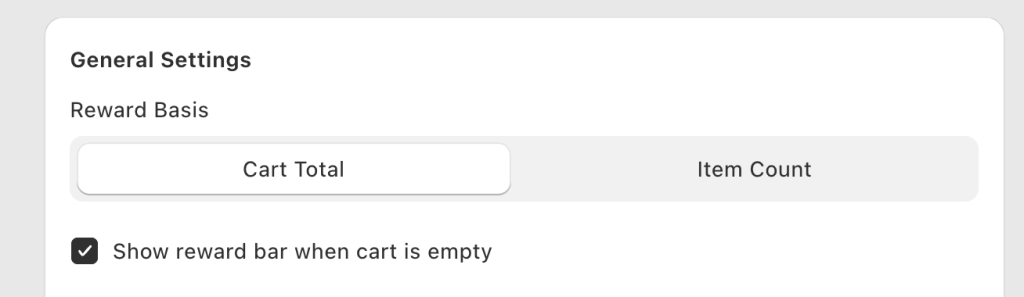
This one toggle decides what your gift is measured against, and it matters more than people expect.
- Cart Total. The gift unlocks at a spend level. Best when you sell products at mixed prices and you want to lift order value in dollars.
- Item Count. The gift unlocks at a unit count, for example three items. Best when your products are similar in price, or when you want to move units rather than revenue. Consumables, refills, socks, supplements, anything bought in multiples.
Item count is the option most guides never mention, and it suits the right catalog. "Add 1 more item for a free gift" is a smaller ask than "spend $18 more," because the shopper does not have to do arithmetic.
Also notice Show reward bar when cart is empty. Leave this on. An empty cart is normally a dead end. A bar that already says what is waiting at $50 turns it into a starting line. We go deeper on that in empty cart design for Shopify.
Step 2: Configure the reward
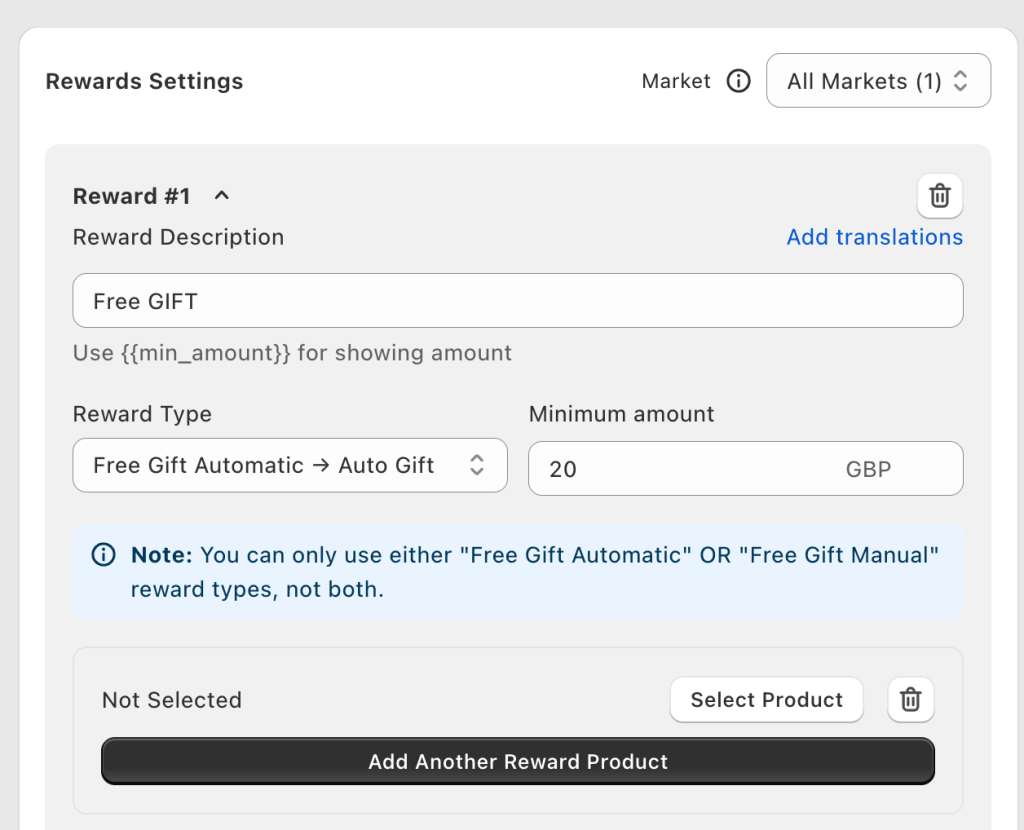
Five things to get right on this screen:
- Market. The dropdown scopes the reward per market. If you sell in multiple currencies, set the threshold separately for each rather than letting one number convert badly. A £20 threshold and a $20 threshold are not the same offer. See multi currency cart drawer setup.
- Reward Description. This is what the customer reads. Use the
{{min_amount}}merge tag so the bar prints the real number instead of you hardcoding it. Write "Spend {{min_amount}} for a free gift," not "Free GIFT." A specific label tells the shopper exactly what to do next. - Reward Type. Free Gift Automatic drops the gift in on its own. Free Gift Manual lets the shopper pick. Note the constraint on screen: one or the other per reward, not both. Automatic is simpler and clears specific stock. Manual usually feels better and cuts "I did not want that" tickets. Full walkthrough in manual gift selection on Shopify.
- Minimum amount. Your threshold, in the market's currency. Read the threshold math below before typing a number.
- Add Another Reward Product. Use this when you want several eligible gifts instead of one. Useful when a single gift could sell out mid campaign.
Step 3: Check it live
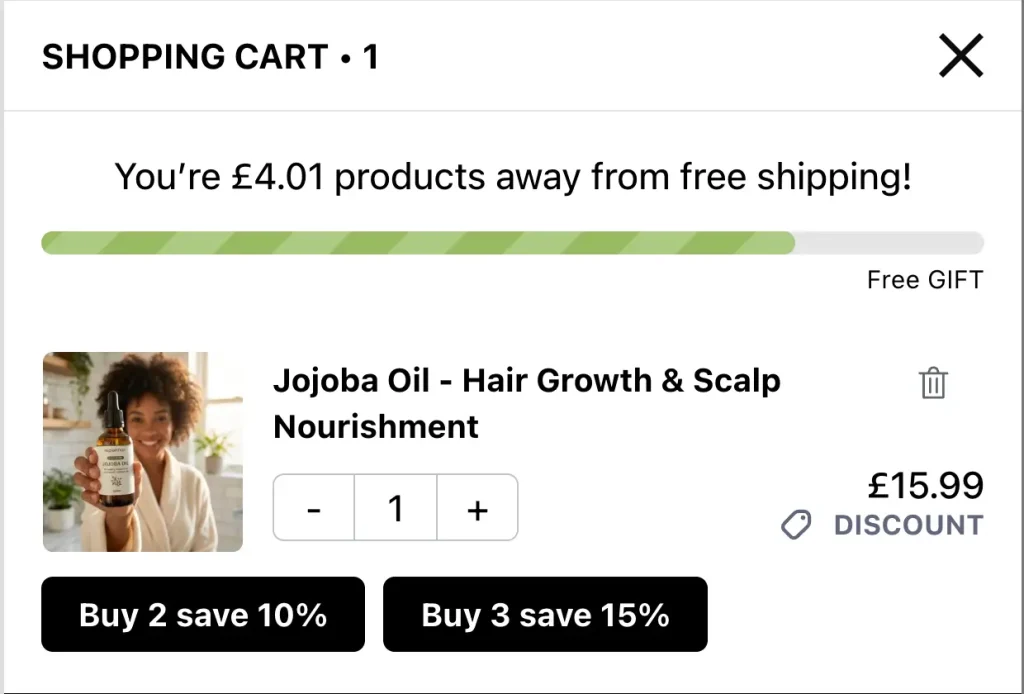
Two things worth noticing:
- The tiers stack. Free shipping and the free gift sit on the same bar, so there is always a next goal instead of the bar going dead after the first one. More in our free shipping bar guide.
- Quantity breaks sit right underneath. "Buy 2 save 10%" hands the shopper a way to close the gap instead of making them go hunting (see what quantity breaks are). The gift creates the goal, the quantity break provides the path.
That second point is what most stores miss. Telling someone they are £4 short is half the job. Showing them how to close it is the other half.
Try it on your store. Plans from $9.99/month with a 14 day free trial.
Pick the gift before you build anything
Four traits of a gift that works:
- Cheap for you, valuable to them. Small sizes, accessories, consumables. Not clearance stock, which reads as "we are dumping this on you."
- Light and small. A gift that pushes the parcel into a heavier shipping band is not free. Check weight before price.
- Related to the cart. A free sock with a shoe makes sense. A free phone case does not.
- In steady supply. Running out mid campaign means tickets and bad reviews.
Run the margin check. Gift cost, plus its share of packaging and shipping, against the extra profit from the order size you are unlocking. A $6 gift that lifts order value by $20 at 55 percent margin nets you roughly $5 per triggered order. If those numbers are close, lower the gift cost. Do not lower the threshold.
Threshold math
- Get your real AOV. Shopify admin, Analytics, Reports, average order value, last 60 to 90 days. Not the figure you remember from last year.
- Set it 20 to 30 percent above AOV. This is a rule of thumb, not a measured benchmark. If your AOV is $60, aim at $75 to $80. Far enough that people must add something, close enough that one item does it.
- Check the gap against your average product price. If your average product is $30 and your AOV is $60, a $75 threshold works. A $65 threshold does nothing, because most carts already clear it.
- On item count basis: set it one unit above your average units per order. If people usually buy 2, unlock at 3.
The expensive mistake: if most carts already pass the threshold, you are giving product away on orders you were already getting.
The stacking trap that costs real money
This shows up in Shopify community threads constantly and almost nobody covers it.
- Customer builds a $210 cart and unlocks your $200 free gift
- They apply a 25 percent sitewide code
- Subtotal falls to about $158
- The gift is still sitting in the cart
You just shipped free product on an order that no longer qualified, on top of a 25 percent discount. Across a promo weekend that is a real number.
How to avoid it:
- Decide before launch whether gift rewards can combine with codes at all
- Check your discount combination settings in Shopify admin
- Use an app that removes the gift when the cart drops below the tier, and confirm it evaluates the post discount subtotal
- Test that exact sequence yourself before going live
More on how codes behave inside a drawer: Shopify cart drawer with discount code. On layering offers deliberately: how to stack buy more save more discounts.
Setup checklist
- Pull your real AOV from Shopify Analytics
- Decide cart total or item count as your reward basis
- Pick one gift, so the results are readable
- Do the margin math, including shipping weight
- Set the threshold 20 to 30 percent above AOV
- Set it per market if you sell in multiple currencies
- Use
{{min_amount}}so the bar shows the real number - Choose automatic or manual gift, not both
- Leave the reward bar on for empty carts
- Show the gift with a photo and a name, not the words "free gift"
- Set inventory rules so the gift cannot oversell
- Test the down path. Cross the threshold, remove items, cross back under. The gift must leave
- Test with a code applied. See the stacking trap above
- Check it on a phone. If the message sits below the fold, it does not exist
- Record starting AOV, conversion rate, and gross margin
Mistakes that quietly kill the offer
- The gift stays hidden. The message belongs in the cart, next to the total.
- The threshold is too low. You are paying for orders you already had.
- The gift does not come back out. Test that path every time.
- Wrong reward basis. Using cart total when your catalog is flat-priced makes the ask feel bigger than it is.
- Vague copy. "Free gift over $75" is weaker than showing the item with its name.
- Running it forever. Rotate it, or it becomes the base price in the customer's head.
- Ignoring shipping weight. A heavy gift erases the gain silently.
- No opt out. Some people do not want it. Let them remove it.
- No path to the threshold. Telling someone they are $12 short without showing what to add is a dead end.
How to tell if it worked
Two weeks of normal traffic, compared against the two weeks before:
- Average order value. The thing you are trying to move.
- Conversion rate. If AOV rose but conversion fell, you added friction.
- Gross profit per order. Not revenue. Profit. This is where a badly costed gift shows up.
- Share of orders hitting the threshold. As a rough guide, under about 10 percent suggests it is set too high, and over about 60 percent suggests it is too low.
Change one variable at a time.
Related: Offering free minis and samples? See the best Shopify apps for beauty and skincare brands (including how to stop a gift repeating on subscription renewals).
FAQs
Does Shopify have a built in free gift with purchase feature?
How do I add a free gift with purchase on Shopify?
Can Shopify add the free gift to the cart automatically?
What is the best app to automatically add a free gift to the cart?
Which Shopify app shows "You're $10 away from a free gift" in the cart?
How do I set up tiered free gifts on Shopify?
Can customers choose their own free gift on Shopify?
How do I do a free gift with a discount code on Shopify?
Can a free gift stack with a discount code?
Can I run different thresholds for different countries?
What is the difference between a gift with purchase and BOGO?
How does Shopify gift with purchase compare to Magento 2?
Start where the decision happens
The gift is not the offer. The message in the cart is the offer.
A great gift nobody knows about does nothing. An average gift with a live bar next to the checkout button, plus an obvious way to close the gap, moves real money.
Install Oxify Cart Drawer & Upsells and set up free gifts with a rewards bar in a few minutes. Plans from $9.99/month, 14 day free trial on every plan.