
How to Add Gift Wrapping to Shopify: 3 Methods That Work (2026)
Short Answer
Shopify has no built-in gift wrapping, so you add it one of three ways: an app toggle in your cart drawer (no code), a hidden "Gift Wrap" product added with the Ajax Cart API (free), or per-item line item properties (custom build). Keep a DIY gift wrap product published to the Online Store channel, or add-to-cart fails.
Your customer just picked the perfect birthday present from your store. Cart loaded. Ready to buy.
Then it hits them — "I still need to wrap this thing."
Some of those buyers will leave for a marketplace where gift wrapping is one checkbox away. A gift wrap option in your Shopify cart takes that job off their plate and makes your store feel more premium. Priced above your packing cost, it also adds margin to every gifting order.
This guide covers three methods for Shopify gift wrapping: a no-code app setup, a free DIY approach, and a full custom build. It also includes four dedicated gift wrap apps whose ratings and plans we re-read on October 11, 2026, a check of how gift messages reach (or miss) Shopify's packing slip, pricing starting points, and the mistakes that kill gift wrap uptake.
Why Gift Wrapping Is Worth Adding
Gift wrap sounds like a small thing. For the right store, it isn't. You will see big market-size and survey numbers quoted about gift wrapping elsewhere; we could not trace most of them to a primary source, so here is the case without them:
- Your Average Order Value goes up. A $3–$7 gift wrap add-on costs you materials and a minute or two of packing time, and it is a small fee next to a $40+ gift.
- Gift buyers get a one-stop option. If a shopper needs the item wrapped and your store can't do it, the convenience of a marketplace with a gift checkbox is one tab away.
- Your brand feels more premium. A well-wrapped package turns a standard delivery into an experience the recipient associates with you.
- It creates a gifting signal you can use. A gift wrap order tells you it is going to a new person, which is useful for packing slips (no prices) and for post-purchase messaging.
How many orders will include it? That depends heavily on your category and on how visible the option is, so treat it as something to measure, not assume. Track the share of orders with the gift wrap line item for four weeks after launch.
Related: best Shopify apps to reduce cart abandonment
Method 1: Use a Cart Drawer App (No Code Needed)
Best for: Store owners who want this live today. No theme editing. No developer.
This is the fastest path. Cart drawer apps handle the toggle UI, the pricing logic, the gift message field, and the theme integration. You install, configure, and it's live.
Why the Cart Drawer Is the Best Spot
Most gifting apps let you place the option on the product page, the cart page, or the cart drawer. For most stores the cart drawer is the first place to try.
The cart drawer is the last panel people see before clicking checkout. The buyer has already chosen the product, so a small add-on is a light extra decision rather than a new one. It is also the one place every buyer passes through, whichever product page they came from. We have no measured placement ranking, so treat this as a starting point to test. If you are still on a full cart page, here is how the cart drawer compares with the cart page.
What to Look For in a Cart Drawer App
Not all apps do this well. Here's what actually matters:
- Gift wrap toggle inside the cart drawer — not buried on the product page or checkout
- Gift message field — so the buyer can add a personal note
- Flexible pricing — flat fee per order, per item, or free above a cart value threshold
- Clean mobile experience — if the toggle is cramped or hard to tap on a phone, people ignore it
- Theme App Extension support — so it looks native to your theme, not bolted on
Recommended: Oxify Cart Drawer
Oxify Cart Drawer & Upsell (our app; 4.9 from 40 reviews, Built for Shopify, checked October 11, 2026) lists gift wrap among its features and handles it with a dedicated Add-Ons module built right into the cart drawer. You don't need to create a hidden product or write any code — just enable the Add-Ons feature, set your gift wrap title, upload an icon, set the price, and it's live.
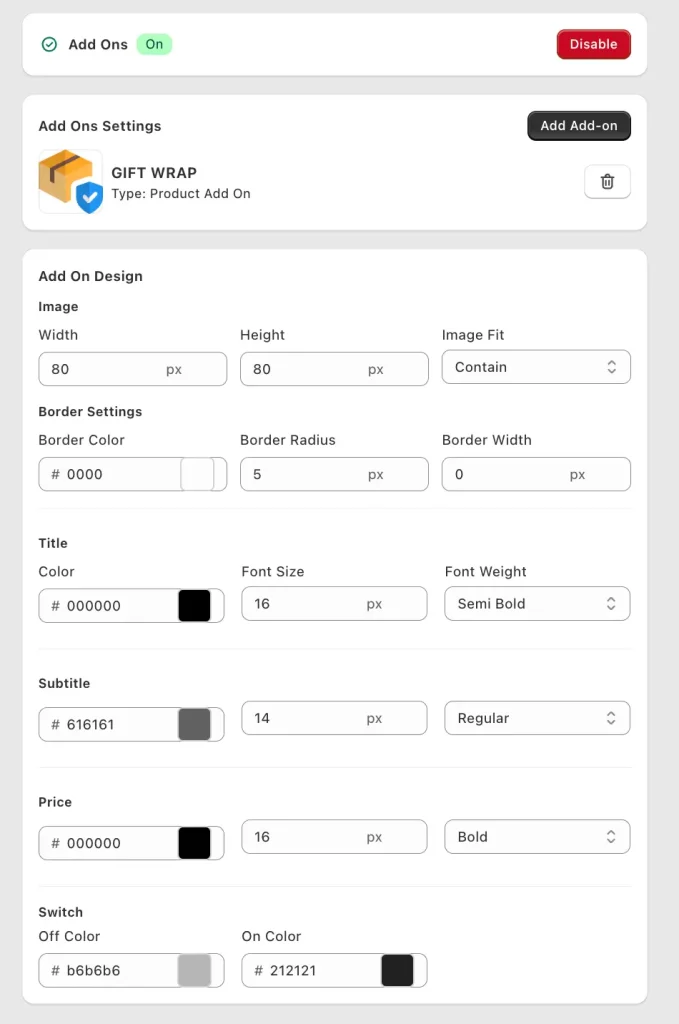
Here's what the setup looks like inside Oxify's dashboard:
- Toggle the Add Ons feature on
- Add a "GIFT WRAP" add-on with a Product Add On type
- Set your price (e.g., $2.50)
- Upload a custom image/icon for the gift wrap option
- Customize everything — title font size, subtitle color, border radius, switch on/off colors
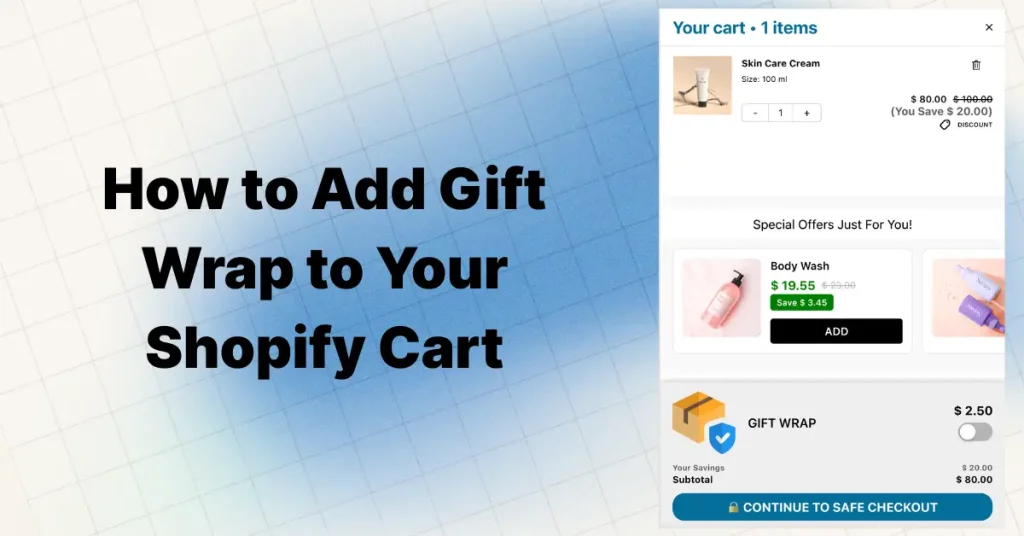
The customer sees a clean toggle inside the cart drawer: a gift wrap icon, the label "GIFT WRAP," the price ($2.50), and a simple on/off switch. One tap adds it to their order. No page reload. No confusion.
What you get with it:
- Built-in Add-Ons system — gift wrap is one add-on type inside the cart drawer, with full design controls (image size, border settings, font weight, switch colors), so you don't write the checkbox and script from Method 2 yourself.
- Pairs with other revenue features — stack it alongside a free shipping progress bar, in-cart product upsells, and free gift thresholds all inside the same drawer.
- Clean mobile UI — the toggle is tap-friendly and doesn't break the cart layout on small screens.
- Stays inside the drawer — the toggle, price and image live in the same panel as the checkout button, so shoppers see it without scrolling a separate page.
You can also use the same Add-Ons module for other extras beyond gift wrap — shipping protection, priority handling, extended warranties — all as simple toggles in the cart.
When you combine gift wrap with a progress bar and a smart upsell, your cart drawer becomes a full conversion engine — not just a checkout step.
Pros: Fast setup. Professional design controls. Works on mobile. No code needed. Cons: Monthly app fee. Slightly less flexibility than a full custom build. Skip it if gift wrap is the only thing you want from your cart: the cheapest live-store plan of Wrapin in the table below is $3.99/month, against $9.99/month for Oxify's 0–100 orders plan (both listings read October 11, 2026). Skip it too if gifting is the core of your store and you need several wrap styles, gift boxes or shipping to several recipients, because a dedicated app below is built for that. More on the Oxify cart drawer and upsell app.
Dedicated Shopify Gift Wrap Apps (Checked October 11, 2026)
If you don't want a full cart drawer app, a dedicated gift wrap app is the other no-code route. These four each have 130+ reviews in the Shopify App Store. On October 11, 2026 we re-read each listing's rating, plans and Built for Shopify status. One thing changed from our September notes: Wrapin's and Super's "Free" plans are only for test or development stores, so neither has a free plan for a live shop.
| Gift wrap app | Rating (reviews) | Plans for a live store | Built for Shopify | What the listing says about placement and focus |
|---|---|---|---|---|
| Wrapin ‑ Gift Wrap & Options | 4.8 (378) | $3.99, $5.99 or $7.99/mo; 7-day free trial. The "Free" plan is for test and trial-plan stores only | Yes | Gift wrap and gift message on product and cart pages; multiple gift options only on the $7.99 plan |
| Giftship: Gift Options & More | 4.8 (267) | $29.99/mo (Micro, aimed at Shopify Basic-plan stores, $0.10 per order above 200) up to $399.99/mo; 7-day free trial | No | Full gifting suite: gift messages, wrap, slide-cart option blocks; multi-address shipping and box builder on higher plans or as add-ons |
| Super: Gift Wrap, Gift Message | 4.7 (255) | $9.99/mo covers gift messages and gift receipts only; one gift wrap needs $12.99; unlimited wraps $19.99; 7-day free trial. "Free" is for development stores only, and paid plans are listed for all stores except Shopify Plus | Yes | Gift wrap in a pop-up or checkbox on cart and product pages (Pro plan); gift receipt option to hide prices |
| Wrapped: Gift Wrap & Messages | 4.8 (131) | $9 to $99/mo, tiered by monthly gift sales (up to $1k, $10k, $50k or $100k); 7-day free trial | Yes | Gift blocks on the product page, cart page and cart drawer; a payment-page block labelled Checkout-PLUS |
Plan rules matter more than the headline price. Super's cheapest plan does not include a gift wrap line, only the message and receipt, and Wrapped's tiers follow your monthly gift sales, so check which tier your peak month lands in. On Shopify Plus, read the plan notes first: Super's paid plans exclude Plus stores, and Wrapped's checkout block is labelled for Plus. Source for every row: the app's own Shopify App Store listing, fetched October 11, 2026.
Pick a dedicated app if gifting is central to your store (multiple wrap styles, gift boxes, shipping to several recipients). Pick a cart drawer app with an add-on toggle if gift wrap is one extra among upsells, a free shipping bar and free gifts, so you run one app instead of two.
Method 2: Create a Hidden Gift Wrap Product (Free DIY)
Best for: Store owners comfortable with Shopify admin and a little copy-paste coding.
This is the classic DIY approach. You create a "Gift Wrap" product, keep it out of your collections and search, and add a checkbox to your cart that adds or removes it using Shopify's Ajax Cart API.
Step-by-Step Setup
Step 1 — Create the product
Go to your Shopify admin → Products → Add product.
- Name it "Gift Wrap" or "Gift Wrapping Service"
- Set the price ($3–$7 is the sweet spot for most stores)
- Upload a photo of your actual wrapping — customers want to see what they're paying for
- Set the product to "Active" and keep it published to the Online Store sales channel. This is the step most tutorials get wrong: if you unpublish it from the Online Store,
/cart/add.jscannot add it and the checkbox silently fails. Instead, remove it from every collection, and hide it from search engines with theseo.hiddenmetafield (Shopify's documented method for hiding a product from search engines and your sitemap) - Uncheck "Track quantity" so inventory doesn't block orders, and uncheck "This is a physical product" if you don't want the wrap itself to add shipping weight
- Save the product and copy the variant ID (you'll need this for the code)
Watch out: If you run store-wide discounts like "Buy 2, get $5 off," the gift wrap product counts as a product and can trigger or absorb the discount. Shopify discounts can't exclude a product by tag directly, so point the discount at a collection instead, such as an automated collection with the condition "Product tag is not equal to gift-wrap."
Step 2 — Find your cart template
Go to Online Store → Themes → Edit code. Look for your cart template:
cart.liquid(older themes)main-cart-items.liquidandmain-cart-footer.liquid(Online Store 2.0 cart page)cart-drawer.liquid(if your theme has a slide-out cart)
Which file you need depends on your cart type. In our October 2026 check of 475 live Shopify stores (a hand-picked sample of well-known direct-to-consumer brands that skews toward larger, app-heavy stores; homepage and first product page read on October 11, 2026), 243 stores (51.2%) showed native theme cart-drawer markup or a drawer setting, a cart page was positively indicated on only 13, and the cart type could not be determined for 201, so the page count is a floor, not a share. Dawn was the most common theme name among the 446 stores that exposed one (47 stores). We also read Dawn's source on GitHub on October 11, 2026 (theme version 16.0.0): the drawer markup lives in snippets/cart-drawer.liquid, rendered by sections/cart-drawer.liquid, while the cart page's note field and checkout button sit in sections/main-cart-footer.liquid. Other themes name these files differently; our cart drawer customization guide has steps for Dawn, Horizon, Prestige and Impulse.
Step 3 — Add the checkbox
Drop this where you want the gift wrap option to appear. The Liquid at the top checks the cart for the gift wrap variant, so the box stays ticked after the page reloads (without it, a shopper who ticks the box and reloads sees an empty box while the wrap is already in the cart):
{%- assign gift_wrap_in_cart = false -%}
{%- for item in cart.items -%}
  {%- if item.variant_id == YOUR_VARIANT_ID_HERE -%}{%- assign gift_wrap_in_cart = true -%}{%- endif -%}
{%- endfor -%}
<div class="gift-wrap-option" style="padding: 16px 0; border-top: 1px solid #e5e5e5;">
  <label style="display: flex; align-items: center; gap: 8px; cursor: pointer;">
    <input type="checkbox" id="gift-wrap-toggle" {% if gift_wrap_in_cart %}checked{% endif %} />
    <span>🎁 Add gift wrapping — $5.00</span>
  </label>
</div>
Step 4 — Add the JavaScript
This script listens for the checkbox change, then uses Shopify's Cart AJAX API to add or remove the gift wrap product. It listens on the document, so it keeps working if your theme re-renders the cart drawer's HTML:
<script>
  const GIFT_WRAP_VARIANT_ID = YOUR_VARIANT_ID_HERE;

  document.addEventListener('change', function (event) {
    if (event.target.id !== 'gift-wrap-toggle') return;
    if (event.target.checked) {
      fetch('/cart/add.js', {
        method: 'POST',
        headers: { 'Content-Type': 'application/json' },
        body: JSON.stringify({ id: GIFT_WRAP_VARIANT_ID, quantity: 1 })
      }).then(() => location.reload());
    } else {
      fetch('/cart/update.js', {
        method: 'POST',
        headers: { 'Content-Type': 'application/json' },
        body: JSON.stringify({ updates: { [GIFT_WRAP_VARIANT_ID]: 0 } })
      }).then(() => location.reload());
    }
  });
</script>
Replace YOUR_VARIANT_ID_HERE in both Step 3 and Step 4 with your actual variant ID number.
Step 5 — Add a gift message field (optional but recommended)
<div class="gift-message" style="margin-top: 12px;">
  <label for="gift-note">Gift message (optional):</label>
  <textarea id="gift-note" name="attributes[Gift Note]" form="cart" rows="3"
    placeholder="Write your personal message here..."
    style="width: 100%; margin-top: 6px; padding: 8px; border: 1px solid #ddd; border-radius: 4px;">
  </textarea>
</div>
The form attribute matters. A field only travels with the cart form if it sits inside the <form> tag or names that form's id. In Dawn 16.0.0 (read on GitHub, October 11, 2026) the cart page form has id="cart", and its checkout button and note field both carry form="cart". The drawer's form is CartDrawer-Form and its checkout button carries form="CartDrawer-Form", but the drawer's built-in note field has no form attribute, because Dawn's cart-note script saves that note with a separate request when it changes. So in a Dawn drawer, put form="CartDrawer-Form" on your textarea; without it the message is not sent at checkout. Other themes use other ids, so look for the <form> tag in your cart file.
The message is saved as a cart attribute and shows in the order's details in your admin. It does not appear on Shopify's default packing slip by itself: Shopify's packing slip variable reference (read October 11, 2026) documents order.note and line_item.properties but no variable for cart attributes, and community threads disagree on whether order.attributes prints there. If the message has to print, save it in the cart note instead (a field named note; reuse your theme's own note field rather than adding a second one) or add it to the packing slip template, and print a test order before launch.
Pros: Completely free. Full control over placement and design. Lightweight. Cons: Requires code editing. Hard to scale for per-item wrapping or multiple wrap styles.
Method 3: Full Custom Build (Advanced — Best UX)
Best for: Brands with a developer who want total control over the gifting experience.
This goes beyond a simple checkbox. You're building per-item wrapping, multiple wrap styles, dynamic pricing, and a UI that feels like it was designed into the theme from day one.
What You Can Build
- Per-item gift wrap — Let customers choose exactly which items get wrapped
- Multiple wrapping tiers — Standard tissue paper, premium gift box, eco-friendly bag (with images for each)
- Dynamic pricing — Charge per item, flat per order, or free above a cart threshold
- Visual previews — Show a thumbnail of each wrapping style
- Item-level gift messages — Different notes for different items in the same order
How It Works (Technical Overview)
You'll work with:
- Liquid templates for the cart UI
- JavaScript + Fetch API for seamless add/remove without page reloads
- Line item properties for attaching wrap choices and messages to specific items
- Shopify's AJAX Cart API endpoints:
/cart/add.js,/cart/update.js,/cart/change.js
The key difference from Method 2: instead of one global checkbox, you use line item properties to attach wrapping instructions to individual products. This gives your fulfillment team clear per-item instructions.
Example: Adding Line Item Properties
fetch('/cart/add.js', {
  method: 'POST',
  headers: { 'Content-Type': 'application/json' },
  body: JSON.stringify({
    id: PRODUCT_VARIANT_ID,
    quantity: 1,
    properties: {
      '_gift_wrap': 'Premium Box',
      '_gift_message': 'Happy Birthday, Sarah!'
    }
  })
});
Properties prefixed with an underscore (_) are hidden from the customer at checkout but visible in your order admin. Whether they print on a packing slip depends on your template, so print a test slip. Shopify's packing slip variable reference documents line_item.properties, which makes per-item properties a documented way to put wrapping instructions in front of a packer.
Pros: Best possible customer experience. Handles complex gifting scenarios. Full brand control. Cons: Needs a developer. Takes time to build and maintain.
How to Word the Gift Wrap Offer
Gift wrapping is an emotional add-on more than a logical one, so the wording is worth testing. We have not measured these variants; treat them as hypotheses to A/B test, not results.
- Name the benefit, not the fee. "🎁 Make it a gift" speaks to the buyer's goal, while "Add gift wrap — $5" reads as a line item. Run each for a few weeks and compare the share of orders that include the wrap.
- Show what they get. A thumbnail of your real wrapping plus one line such as "Wrapped in recycled kraft paper and natural twine" makes the price easier to accept.
- Mind the fee against the order. A flat $5 is a bigger ask on a $12 order than on a $60 one. For low-priced items, consider a lower fee or free wrapping above a threshold.
- Say what it saves them. "We wrap it and include your message" tells the buyer exactly which chore they no longer have to do.
Eco-Friendly Gift Wrapping (The 2026 Angle)
If you offer gift wrapping, your materials are part of the offer: shoppers can see them, and some will care about the waste.
What works well:
- Recycled kraft paper with twine (looks premium AND eco-conscious)
- Reusable fabric wraps or cotton bags
- Soy-based ink printed tissue paper
- Compostable tape and recyclable ribbon
What to avoid:
- Metallic or glitter wrapping paper (not recyclable)
- Excessive plastic packaging inside the gift box
- Making sustainability claims you can't back up — the FTC's Green Guides are strict about this
If you go the eco route, call it out in your gift wrap description. Something like "Wrapped in recycled kraft paper and natural twine" adds perceived value and aligns with customer values. It may even justify a slightly higher wrapping fee.
How Much to Charge for Gift Wrapping
Pricing too low kills perceived value. Pricing too high adds friction. These tiers are starting points to test, not a published benchmark; price above your real material and packing-time cost:
| Tier | What's Included | Price Range | Best For |
|---|---|---|---|
| Basic | Branded tissue paper + sticker seal | $2–$4 | Apparel, books, small accessories |
| Standard | Full wrapping paper + ribbon + gift message card | $5–$7 | Jewelry, cosmetics, mid-range gifts |
| Premium | Gift box + ribbon + printed message card + branded bag | $8–$12 | Luxury items, high-end gift sets |
Do the margin math once: add up paper, ribbon, card and tape per order, then add the packer's time at your hourly cost. If basic wrap costs you around a dollar in materials and a minute or two of labor, a $4–$5 fee is one of the highest-margin lines in your catalog. If it takes ten minutes, it is not.
Pro tip: "Free gift wrapping over $75" is a threshold incentive: it gives customers a reason to add items to unlock the perk, the same mechanic as a free shipping bar with a different reward. The $75 is only an example. As a reference point, among the 165 stores in the same 475-store check that showed a free-shipping threshold in US dollars near the top of their homepage, the median was $75 (quartiles $50 and $124.50). Those are amounts printed on homepages on October 11, 2026, not shipping policies and not a recommended gift wrap threshold, so start from your own average order value.
Watch Out for Shipping Impact
Gift wrapping can increase your package size. If you're using dimensional (DIM) weight pricing from carriers like UPS or FedEx, a bulky gift box might push you into a higher shipping tier. Use compact materials — tissue paper and ribbon add presentation without adding box size.
Where to Place the Gift Wrap Option
Placement matters more than the feature itself: the best gift wrap UI does nothing if nobody sees it. We have not measured conversion by placement, so this is the order we would try them in, not a ranking of results.
- Cart drawer — The last panel before checkout, with the product choice already made. In the store check above, 243 of 475 stores showed drawer markup or a drawer setting, so about half the sample already had a drawer to put it in.
- Cart page — The right spot if your theme uses a cart page instead of a drawer. Place it above the checkout button, not below the fold.
- Product page — Works for stores where most products are gifts (jewelry, personalized items), because the buyer decides before reaching the cart. Less useful for general stores.
- Checkout (Shopify Plus only) — Checkout UI extensions on the information, shipping and payment steps are available only to Shopify Plus stores (shopify.dev, checked October 11, 2026), and by this point the buyer has already committed to the order.
If you're not using a cart drawer yet, here's a deeper look at slide carts versus mini carts.
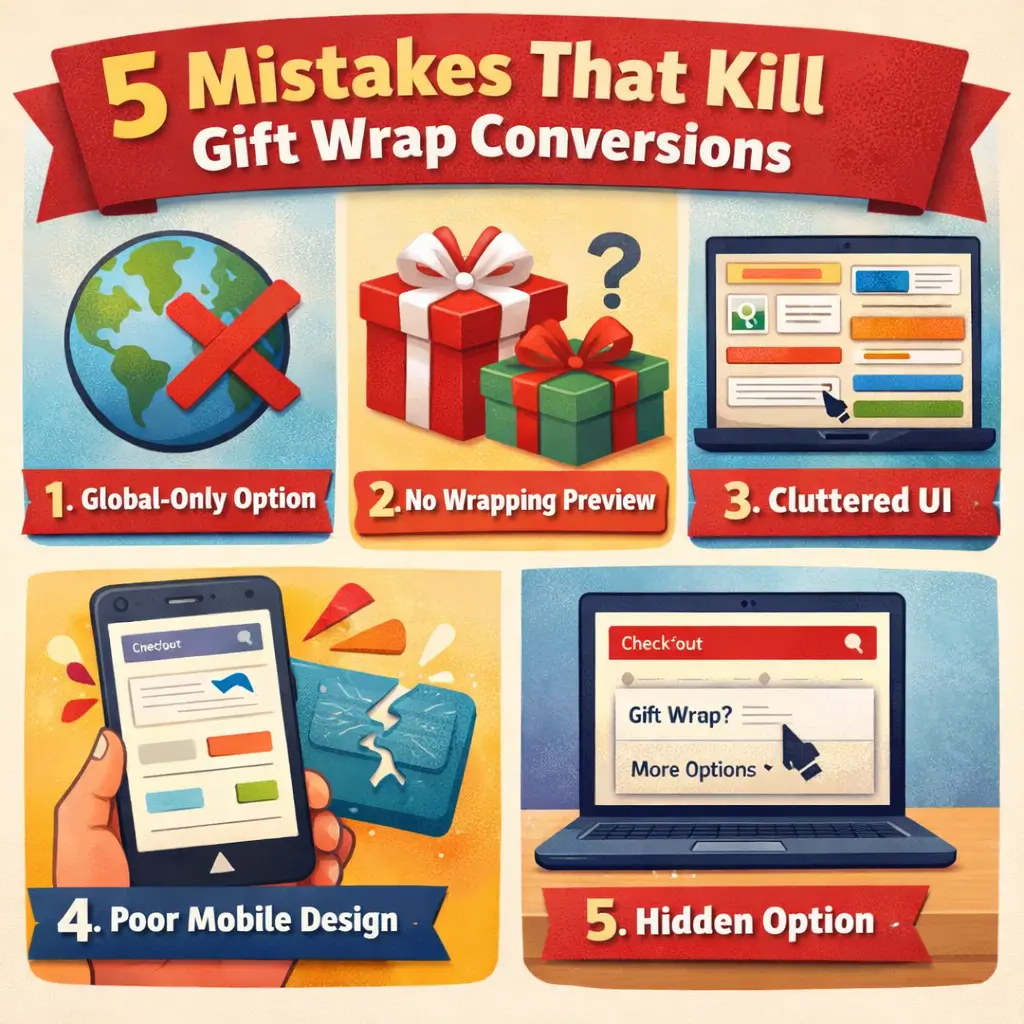
5 Mistakes That Kill Gift Wrap Conversions
These are the usual reasons a gift wrap option goes unused.
1. Making it a global-only option
Customers want to wrap specific items, not their entire cart. If someone orders a birthday gift and a pack of batteries, they don't want both wrapped. Start with a global option (it's easier), but know that per-item wrapping is what advanced stores move toward.
2. Not showing what the wrapping looks like
A plain checkbox that says "Add gift wrap $5" doesn't sell. Add a small thumbnail of your actual wrapped product. When people can see premium wrapping paper or a clean gift box, the $5 becomes a no-brainer.
3. Overcomplicating the UI
Offering 6 wrapping styles, 3 card types, and a font picker sounds fun in theory. In practice, it causes decision fatigue and drop-offs. Start with one or two clean options. You can always add more later.
4. Ignoring mobile
Check your analytics: for many stores most visits are on phones. If the gift wrap toggle is tiny, overlaps with other elements, or breaks the cart layout — people won't use it. Always test on a real phone (not just browser dev tools) before going live.
5. Hiding the option
If people don't see it, they can't use it. Don't bury gift wrap below the fold or inside a collapsible section that nobody opens. Make it visible. A small, clean toggle near the cart total is all it takes.
Related: Trust Badges in Cart Drawer — Where to Place Them for Maximum Impact
Fulfillment: How to Actually Deliver on the Promise
The front-end feature is useless if your warehouse can't execute it. Here's what your team needs to know:
Packing slips and gift receipts
When an order has a gift wrap attribute or gift note, your fulfillment team should automatically switch to a gift receipt that hides item prices. Shopify's packing slip template is editable Liquid (Settings → Shipping and delivery → Documents → Packing slip template, per Shopify's help center), so you can hide prices when a gift flag is present. Of the apps above, Super lists a "Gift Receipt: Ask to hide order price" feature on all three paid plans.
Gift message handling
- Small stores (under 50 orders/day): A handwritten note adds an incredible personal touch. Customers notice.
- High-volume stores: Use printed cards. Set up a template that pulls the gift message from the order note (a documented packing slip variable) or from a field you have tested on a real order; see Method 2, Step 5.
Wrapping materials
Keep your materials organized and pre-cut during peak seasons. Pre-cutting paper to your most common box sizes and pre-assembling bows is the single biggest time saver, so time a few orders before and after and price the service on the real number.
Stock up on materials during post-holiday clearance sales. You'll pay a fraction of the retail price for wrapping paper, tissue, and ribbon.
Order tagging
Use Shopify Flow or your cart app's built-in tagging to auto-tag gift wrap orders. This lets your fulfillment team filter and prioritize them instantly.
When Gift Wrap Works (and When It Doesn't)
Gift wrap isn't a universal feature. It works brilliantly for some stores and adds nothing but clutter for others.
Offer it if you sell:
- Jewelry, accessories, watches
- Cosmetics and skincare
- Toys and children's products
- Personalized or custom items
- Candles, home decor, lifestyle products
- Food and beverage gift sets
In these categories, gift wrap tends to be used often enough to justify the packing workflow. Measure your own uptake rather than relying on anyone's average.
Skip it if you sell:
- Commodity or bulk products
- B2B supplies
- Digital products
- Large furniture or appliances
- Tech gadgets bought for personal use
For general stores where gifting isn't the primary purchase reason, uptake is usually low, and a gift message field alone (a free cart attribute) may be enough without the wrapping workflow.
Seasonal Gift Wrap Calendar
Gifting demand clusters around specific dates. Plan your promotions and wrapping inventory around these windows:
| Season | When to Start Promoting | Tactic |
|---|---|---|
| Valentine's Day | January 25 | "Free gift wrapping on all orders this week" |
| Mother's Day | April 20 | Highlight premium wrapping tiers |
| Father's Day | May 25 | Bundle with gift message feature |
| Back to School | August 1 | For stores selling stationery, tech accessories |
| Halloween | October 1 | Themed wrapping for candy/costume stores |
| Black Friday / Cyber Monday | November 15 | Free wrapping as a differentiator in ad copy |
| Holiday Season | November 20 | Full push — all tiers, prominent placement |
| Birthdays | Year-round | Always-on option in cart drawer |
During peak gifting seasons, try running "Free Premium Gift Wrapping on All Orders" as a limited-time promotion. It can work well in email campaigns and ad copy as a differentiator.
Related: Shopify upselling strategies by placement
Which Method Should You Pick?
Here's the quick decision:
| Your Situation | Best Method |
|---|---|
| Want it live today, zero coding | Method 1 — Oxify Cart Drawer or similar app |
| Comfortable editing theme code, want it free | Method 2 — Hidden product + checkbox |
| Need per-item wrapping or multiple wrap tiers | Method 3 — Full custom build |
| Gift-heavy store (jewelry, toys, cosmetics) | Method 1 or 3 depending on budget |
| General store, just testing the concept | Method 1 or 2 — keep it simple, measure results |
For most stores, start with Method 1. Get it live in minutes, measure whether your audience actually uses it, and graduate to a custom build later if the data justifies the investment.
Frequently Asked Questions
Does Shopify have a built-in gift wrap feature?
How much should I charge for gift wrapping?
Can I offer gift wrap per item instead of per order?
Will gift wrap slow down my store?
Does gift wrapping actually increase sales?
Can I offer free gift wrapping as a promotion?
How do I hide prices when shipping a gift?
Does gift wrap affect my Shopify discount codes?
How do I add gift wrapping to Shopify without an app?
/cart/add.js with that variant ID when checked and /cart/update.js with quantity 0 when unchecked. Add a textarea named attributes[Gift Note] so the gift message is saved on the order.Why won't my gift wrap product add to the cart?
seo.hidden metafield instead. Also check that you used the variant ID, not the product ID, and that inventory tracking is off.Can customers add a gift message in the Shopify cart?
attributes[Gift Note] with a form attribute pointing at your cart form (in Dawn, cart on the cart page and CartDrawer-Form in the drawer) saves the message as a cart attribute on the order in your admin. It will not print on the default packing slip. For the drawer, see order notes in the Shopify cart drawer. Gift wrap apps add a styled message field without code.Can I add gift wrapping or a gift message at Shopify checkout, and how does it reach the recipient?
Final Thoughts
Gift wrap isn't flashy. It won't go viral. But it quietly does three things that matter for your store:
- Adds margin to gifting orders when the fee sits above your packing cost
- Removes a reason for gift buyers to leave your store
- Makes your brand feel thoughtful — and customers remember that
The stores that win at ecommerce aren't always the ones with the biggest ad budgets. Sometimes they're the ones that thought about the small things — like saving someone a trip to buy wrapping paper.
Pick a method. Get it live. Watch what happens during your next gifting season.
Want the easiest path to a gift wrap toggle in your cart? Oxify's cart drawer includes built-in gift wrap, free shipping bars, upsells, discount code support, and frequently bought together bundles — all inside one cart experience.