
Add a Terms and Conditions Checkbox on Shopify (Cart vs Checkout)
Quick answer: To add a terms and conditions checkbox on Shopify, put it on the cart (drawer or page) and block Checkout until it is ticked. A checkbox on the Shopify checkout page itself needs Plus. Never pre-tick it, log the consent on the order, and test Shop Pay and Buy Now, which can skip a cart-only box.
They tap Checkout. Nothing happens. A line appears: "I agree to the Terms and Returns policy." Unticked. They tick it. Checkout opens.
That is the whole feature. The hard part is the seat: the cart page, the cart drawer and the checkout each miss a different route to the Pay button, and the checkout is closed to most plans.
Last checked October 11, 2026: Shopify's checkout and Cart API docs, the Dawn and Horizon theme source on GitHub, and the App Store listings named below. Oxify Cart Drawer & Upsells (our app) has a terms checkbox in the drawer. We are not your counsel and this is not legal advice.
Key Takeaways
- Not universal law. Many stores rely on a linked policy at checkout. A forced tick is a choice, not a default Shopify rule.
- Non-Plus: you usually cannot add a custom checkbox on payment steps. Cart drawer or cart page is the workaround.
- Plus: Checkout UI extensions can put the box next to Pay. That is closer to "purchase" consent.
- Never pre-tick. Pre-ticked terms are how consent arguments start.
- Express / Shop Pay can skip a drawer-only box. Which routes exist depends on the theme: stock Dawn shows wallet buttons on the cart page but not in the drawer, while Horizon shows them in both unless a theme setting is off. Preview them.
Do You Actually Need the Checkbox?
Search intent here is mixed: "Shopify wants me to add terms," "EU lawyer said tick the box," and "how do I stop checkout until they agree."
Split the job:
| Job | Usually enough | Often not enough |
|---|---|---|
| Show policies exist | Footer + checkout policy links Shopify already prints | Hiding policies behind a tiny link with no name |
| Prove they saw a specific version | Checkbox + store timestamp and policy URL/version on the order | A box with no log |
| EU digital goods, waive 14-day withdrawal | Consent at purchase, clear "you lose the right" text, often checkout | A cart-drawer tick they can complete then abandon |
| Age / restricted goods | Follow your market's age-gate rules (often stricter than a terms box) | One generic "I agree" |
If a lawyer in your market said you need a recorded tick, put the box as close to Pay as your plan allows. If they said "link the policies," do not add friction for SEO.
Why the Cart Drawer Became the Default Seat
Shopify Checkout Extensibility lets you add blocks on information, shipping, and payment steps — Plus only. Shopify's checkout UI extension docs (API version 2026-07, read October 11, 2026) say extensions for those three steps are available only on a Plus plan.
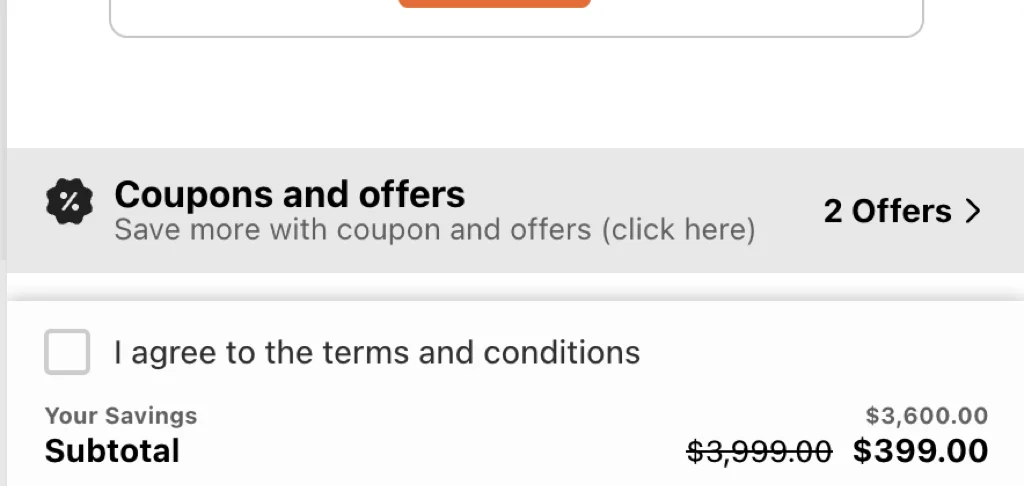
On Basic / Grow / Advanced you cannot drop a custom "I agree" widget on the payment step. Terms apps therefore started on the cart page and write the agreement date into the order's additional details. Several now name the drawer too: on October 11, 2026 the free plan of RT: Terms and Conditions Box listed a checkbox for both the cart page and the cart drawer, and the Saio and Terms and Conditions Pro+ listings name the drawer as well (table below).
A cart drawer is the same idea for stores that never show /cart, and that describes a lot of stores. In our October 2026 check of 475 live Shopify stores, 243 (51.2%) showed native cart-drawer markup or a drawer setting, a cart page was positively indicated on only 13, and 201 could not be classified, so 13 is a floor. We read two saved pages per store, so that shows what the markup contained, not what shoppers click. More on the trade-off in cart drawer vs cart page.
If the box only lives on /cart, the drawer's Checkout button bypasses it.
That is the gap: a cart-page-only box misses drawer-first stores, a drawer-only box misses Buy Now and wallets on the product page, and a Plus checkout block misses only the wallets that skip the step it sits on, so preview those.
Cart Page vs Cart Drawer vs Checkout: Pick One Seat
| Placement | Plan needed | Catches | Misses |
|---|---|---|---|
Cart page (/cart) | Any | Desktop shoppers who visit the cart page | Drawer-first themes, Buy Now buttons, express wallets |
| Cart drawer | Any | Everyone who checks out from the slide-out | Buy Now on the product page, Shop Pay from anywhere but the drawer |
| Checkout step | Plus + Checkout Extensibility | Every path, including wallets that render your block | Wallets that skip the step your block sits on — preview each |
One more thing before you pick: checkout.liquid is gone for the steps where a required tick would live. Shopify's checkout docs (read October 11, 2026) say it is unsupported for the Information, Shipping, and Payment steps. checkout.liquid and additional scripts were sunset for the Thank you and Order status pages on August 28, 2025, and script tags on those two pages were sunset for Plus stores on August 28, 2025 and for non-Plus stores on August 26, 2026, a date that has now passed. Old tutorials that say "paste this into checkout.liquid" no longer apply to anyone. Checkout customization now means Checkout UI extensions, and the ones for the information, shipping, and payment steps — where a required terms tick would live — are still Plus-only.
No-App Version: I-Agree Checkbox in Dawn Without an App
Most "shopify agree to terms checkbox without app" tutorials give you roughly this, added to sections/main-cart-footer.liquid above the checkout button:
<div class="cart__terms">
  <input type="checkbox" id="agree-terms" required>
  <label for="agree-terms">
    I agree to the <a href="/policies/terms-of-service">Terms</a>
    and <a href="/policies/refund-policy">Returns policy</a>.
  </label>
</div>
<script>
  document.querySelector('#checkout').addEventListener('click', function (e) {
    if (!document.querySelector('#agree-terms').checked) {
      e.preventDefault();
      alert('Please agree to the Terms and Returns policy first.');
    }
  });
</script>
It works — on the cart page. Three limits, the first checked against Dawn's source on October 11, 2026 (main branch on GitHub, latest release v16.0.0):
- It never reaches the drawer.
main-cart-footer.liquidrenders/cart, and its Checkout button isid="checkout". Dawn's slide-out issnippets/cart-drawer.liquid(rendered bysections/cart-drawer.liquidand driven byassets/cart-drawer.js), and its button isid="CartDrawer-Checkout", so the#checkoutguard above finds nothing there. Drawer-first stores that paste the cart-page snippet have a checkbox nobody ever sees. - Buy Now and wallet buttons skip it. Dynamic checkout buttons on the product page go straight to checkout, and Dawn's cart page renders wallet buttons under its Checkout button when the store offers them. In our October 2026 store check, a Shopify dynamic-checkout button element was present in the saved product-page HTML of 83 of the 451 stores that had a product page (18.4%); that counts markup in the page, not every wallet button a shopper sees. To make the checkbox unskippable, untick "Dynamic checkout buttons" in the product section of the theme editor — and accept the conversion cost, or move the box to Plus checkout.
- An
alert()proves nothing. No record lands on the order. See the next section.
Where a shopper can route around the box depends on the theme. We read the cart files of both Shopify themes on October 11, 2026:
| Theme | Checkout button | Wallet buttons in the cart | What a guard has to cover |
|---|---|---|---|
| Dawn (main branch; latest release v16.0.0) | Cart page: #checkout in sections/main-cart-footer.liquid. Drawer: #CartDrawer-Checkout in snippets/cart-drawer.liquid | Cart page: yes, under Checkout when the store offers them. Drawer: none in the stock markup | Two buttons (page and drawer). Wallets on the cart page and Buy it now on the product page go around both |
| Horizon (main branch) | #checkout in snippets/cart-summary.liquid, used by both the cart page block and the drawer | Same snippet, shown while the "Accelerated checkout buttons" theme setting is on (it defaults to on) | One snippet covers both cart surfaces; wallets need that setting off. Product-page buy buttons are a separate route |
Horizon changes the map. Horizon has no main-cart-footer.liquid. Its cart is built from web components (<cart-items-component> and friends) and block files under blocks/, each with its own scoped CSS and JavaScript, so the Dawn snippet above has nowhere to paste. On Horizon your realistic options are a custom block or edit a developer writes (the shared cart-summary.liquid is the one place to guard), or an app that injects into the drawer. Check which theme family you are on before you follow any 2023 tutorial: Dawn-style sections and Horizon-style blocks are different codebases. In the same store check, Dawn was the most common theme name among the 446 stores that exposed one (47), and Horizon came joint second with Prestige (18 each).
Record the Consent, or the Box Is Theater
A checkbox that blocks a button is UX. A checkbox that writes evidence is a dispute exhibit. Chargeback teams and "the customer says they never agreed" tickets want: this person ticked this box at this time against this policy version.
The mechanism on cart surfaces is cart attributes. Post them with the tick and they land on the order under Additional details:
fetch('/cart/update.js', {
  method: 'POST',
  headers: { 'Content-Type': 'application/json' },
  body: JSON.stringify({
    attributes: {
      'Terms accepted': 'Yes',
      'Terms accepted at': new Date().toISOString(),
      'Terms version': '2026-08-20'
    }
  })
});
Run that when the shopper presses Checkout with the box ticked, not only when they tick it. /cart/update.js is the documented Ajax Cart API endpoint for attributes: Shopify's reference (read October 11, 2026) says to POST an attributes object of key-value pairs, and the keys carry through checkout onto the order. Three caveats:
- Attributes belong to the cart, not the account. They are consent for this cart. The same reference says
/cart/clear.jsdoes not remove cart attributes or the cart note, so a tick can survive an emptied cart and end up on an order for a different basket. That is why the timestamp belongs at the Checkout click. - Clearing is on you. If the shopper unticks the box, post the keys again with empty values and confirm with
/cart.jsthat they are gone. The reference does not document clearing an attribute, so test it on your theme, or you will log consent that was withdrawn. - Private keys cannot be read back. Start a key with a double underscore and Shopify treats it as a private attribute: hidden at checkout, visible on the order in admin, but absent from the Ajax API and Liquid. Fine for the log; not for remembering whether the box is ticked.
Whatever app you use, place a test order and open it in admin. Most App Store listings in the table below promise a consent date, and in some cases the time, on the order. Only one, the paid plan of TermCheck Pro, says it also saves a terms version. For any other app, if you need the version, write it yourself with the snippet above. More on where order data shows up in order notes in the cart drawer.
The 3-Bucket Test (What to Ask Counsel)
Before you turn the feature on, put your store in one bucket. It is a scoping tool, not a statute.
- Link-only. Physical goods, no special waivers. Shopify policy links at checkout. No extra box. Lowest friction.
- Recorded tick. You need a timestamp, policy version, and IP or customer id on the order. Cart drawer or cart page checkbox that writes order attributes / additional details. Still preview express pay.
- Purchase-tied waiver. Digital goods, subscriptions, or a withdrawal waiver. Counsel often wants the text next to the pay button, not only in a drawer they left. Plus checkout extension or a specialist compliance app. A drawer tick alone can be the wrong artifact.
If you are in bucket 3, do not celebrate a cart checkbox as "GDPR done."
How to Add It Without Blocking Honest Buyers
- Link the named policies in the label: Terms, Returns, Privacy — not "policies."
- Leave the box unchecked.
- Block the drawer Checkout button until it is ticked. Show a one-line error, not a silent fail.
- Save to the order: checkbox true and a timestamp, plus a policy URL or version string if you can. If the app writes nothing to the order, the box is theater.
- Preview Shop Pay, Apple Pay, and Google Pay everywhere your theme shows them: the cart page, the drawer if it has wallet buttons (stock Dawn's does not, Horizon's does), and the product page. If those skip the box, tell counsel. Either move the box to Plus checkout, add a cart-page backup, or accept the gap in writing. See express checkout buttons in the cart drawer.
- Check the box stays ticked when the cart updates. In Dawn's
cart-drawer.js(read October 11, 2026) a cart change swaps the drawer's inner HTML from a section render, so a checkbox inside it comes back unticked and a listener bound straight to the Checkout button is lost. A box that resets after "+1" trains people to rage-tap. Persist the state (session storage, or a normal cart attribute rather than a__private one) and bind the guard ondocumentwith event delegation. - Translate the label per market. A Spanish storefront with an English "I agree" is a worse consent record than none — put the label in your locale files or the app's per-language fields. See translating the cart drawer.
- Test on a real phone, not just responsive mode. The tap target should be the whole label row, not the 16px square.
- After two weeks, compare checkout conversion on mobile vs desktop. If mobile drops and desktop does not, the box is fighting thumbs. Shorten the label. Do not shrink the tap target.
In Oxify the terms checkbox lives in the cart drawer next to Checkout. Pair it with drawer customization so the legal line is readable, not 9px gray.
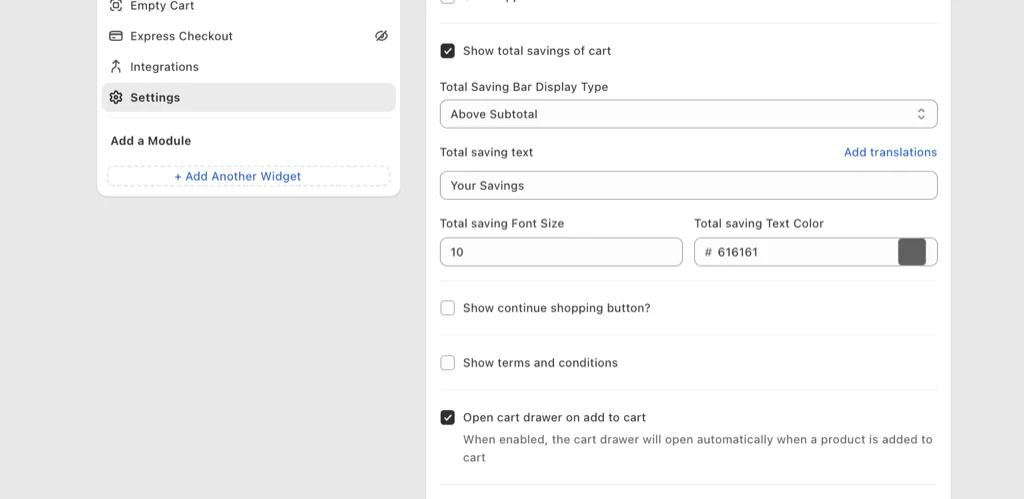
In Oxify the checkbox is a single Show terms and conditions toggle in Settings — off by default, which is the right default. Turn it on only after the 3-bucket test above says you need it.
Copy That Does Not Read Like a Trap
- Use: "I agree to the Terms and the Returns policy." Each phrase is a link.
- Skip: "I agree to everything including future changes and marketing." That is how people bounce. Marketing consent is a different checkbox. Do not bundle it.
Common Use Cases (Match the Label to the Risk)
- Refund / final-sale policy. "I understand sale items are final." Name the policy and link it.
- Privacy notice. Link the privacy policy by name, as its own line or tick.
- Age verification. "I confirm I am 18+." Note: many markets require a real age gate for restricted goods; a checkbox is the floor, not the ceiling.
- Import duties. "I understand international orders may incur customs fees I pay on delivery." Kills a whole ticket category for cross-border stores.
- Preorder / made-to-order lead times. "I accept the 4–6 week production time."
App Options and Pricing
If you want an app instead of theme code, these are the terms-checkbox apps we read on the App Store on October 11, 2026: dedicated terms apps first, then Oxify. Ratings, review counts and prices come from each live listing and move often, so verify before installing. The "listing says" column is vendor text, not something we tested on a live store.
| App | Rating | Pricing | Listing says | Skip it if |
|---|---|---|---|---|
| RT: Terms and Conditions Box | 4.6 (382 reviews) | Free plan; Plus Checkout plan $14.99/mo, 14-day trial | Free plan: checkbox on the cart page and cart drawer, blocks checkout until ticked, logs consent date and time on each order. Paid plan: required checkbox at checkout that works with Shop Pay and express checkout. | You need the checkout-step version without the paid plan, or a policy version on the order (the listing mentions date and time). |
| TN Term and Condition Checkbox | 4.9 (563 reviews) | Free on development stores only; $6.99, $10.99 or $12.99/mo, 7-day trial | Works with all cart drawers, Buy It Now and express checkout buttons. Logging the consent date on the order starts on the $10.99 Advanced plan. | You want a free plan on a live store, or consent logging on the cheapest plan. |
| Terms and Conditions checkbox | 4.9 (22 reviews) | $4.99 or $14.99/mo, 7-day trial; no free plan listed | Cart drawer and cart page, Buy It Now and additional checkout buttons, consent date in the order's details. | You want a free plan or a larger review base. |
| Terms and Conditions Pro+ | 4.0 (34 reviews) | $0.99, $1.99 or $4.99/mo, 7-day trial; no free plan listed | Cart-page checkbox that works with the cart drawer or mini cart; records who agreed, with date and time. Dynamic checkout buttons are listed from the $1.99 plan. | You want a free plan, or express-button support on the cheapest plan. |
| Saio: Terms and Conditions | 4.0 (16 reviews) | $5.99/mo, 5-day trial; no free plan listed | Checkboxes for terms, age and location confirmation on the cart and drawer. The listing text mentions neither order logging nor express buttons. | You need an order record or express-button coverage. |
| TermCheck Pro | No reviews yet (listed August 28, 2026) | Free plan with TermCheck Pro branding; Pro $7.99/mo, 7-day trial | A native checkout extension that puts the checkbox at checkout and says it works on every plan; Pro saves consent text, timestamp and a terms version to the order. | You want a track record. Shopify's docs limit extensions on the checkout steps to Plus, so ask the vendor which target it uses and test on a real order. |
| Oxify Cart Drawer & Upsells (our app) | 4.9 (40 reviews) | From $9.99/mo for up to 100 orders a month, 14-day trial; no free plan listed | A terms checkbox is one of the cart-customization features on its listing; the tick sits in the drawer next to Checkout, inside a cart-drawer and upsell suite. | You only want a terms box, or need the tick at checkout or on wallet routes; the listing does not claim either. |
All five cart-based terms apps above name the cart drawer on their listings, so the old picture of terms apps as cart-page-only tools is out of date. A listing is still a claim: confirm the drawer, Buy It Now and wallet routes on your own theme, Horizon especially, before you pay.
Dedicated Terms App or Drawer Suite?
Pick by the route shoppers take to the Pay button, not by the feature list:
- You only need a tick on the cart or drawer: a dedicated app. RT's listing offers a free plan covering the cart page and drawer, with the consent date and time logged on each order.
- You already run a cart drawer app with a terms toggle: use it and keep one app fewer. In Oxify that is the Show terms and conditions toggle.
- Counsel wants purchase-tied text (bucket 3): a checkout-level box. Plus stores can use a checkout UI extension; RT's paid plan and TermCheck Pro both list one. Test the express-checkout routes either way.
Frequently Asked Questions
How do I add a terms and conditions checkbox on Shopify?
Can I add a checkbox to the Shopify checkout page?
Is there a free terms and conditions checkbox app for Shopify?
Can I add an I agree checkbox to Dawn without an app?
Does the Dawn snippet work on the Horizon theme?
How do I record customer consent on Shopify orders?
Is a terms and conditions checkbox required on Shopify?
Is a cart-drawer tick enough for EU digital goods?
Should the terms box be pre-checked?
What about Shop Pay and Apple Pay?
Does Oxify store the agreement on the order?
What to Do Next
Bucket 1: do nothing extra. Bucket 2: checkbox on the cart you actually use (drawer if that is where Checkout lives), named links, log on the order, express-pay preview. Bucket 3: counsel + Plus checkout or a compliance app.
Drawer-first stores can require the tick in Oxify Cart Drawer & Upsells next to the Checkout button, in the same bag as upsells; plans start at $9.99/mo with a 14-day trial. A dedicated app makes more sense if you only want the tick, want a free plan (RT's listing shows one), or need express-button or checkout-step coverage that Oxify's listing does not claim. Do not add a legal box just to look professional.