 Oxify
OxifyShopify Cart Drawer vs Cart Page: Which Converts Better? (October 2026)
Your Shopify cart is either your biggest revenue leak or your most powerful sales tool, and it comes down to one decision: Shopify cart drawer or Shopify cart page?
Short answer (October 2026): A Shopify cart drawer is a slide-out cart on the current page; the Shopify cart page is the separate /cart page. For most stores selling items under about $100, the drawer usually converts better: shoppers keep browsing and see a free shipping bar and upsells. High-ticket, configurable and B2B orders do better on a cart page.
- Best of both: open the drawer on add to cart and keep a "View full cart" link to
/cartfor shoppers who want to review. - Switch in Dawn: Online Store → Themes → Customize → Theme settings → Cart → Cart type: Drawer, Page or Popup notification.
- The best public data is vendor data: iCart's 2025 report on 10,000+ of its merchants found drawer stores at a 3.2x "revenue before checkout" multiplier vs 2.2x for cart pages. Useful direction, not a controlled test.
- Do not auto-open the drawer everywhere: skip it on configurable, high-ticket and quick-reorder flows (see when not to open the drawer).
This guide is specifically about the drawer-versus-page decision. If you just want the basics of what a drawer is, read our explainer on what a cart drawer is on Shopify; if you are choosing an app, see the best Shopify cart drawer apps.
In this guide, you will learn exactly what each cart type does, which one fits your store, the psychology behind why one converts better, and how to set everything up step by step. Plus, we will show you how Oxify Cart Drawer & Upsells (our app) helps merchants turn their cart into a real profit center.
Cart Drawer vs Cart Page: The Quick Definitions
What is a Shopify cart drawer?
A Shopify cart drawer (also called a slide-out cart or side cart; full explainer in what is a cart drawer) is a panel that slides in from the side of the screen when a shopper clicks "Add to Cart." No page reload happens. No redirect. The customer stays exactly where they are.
Picture this: a customer is browsing your best-selling collection. They tap "Add to Cart" on a hoodie. Instead of being sent to a completely different page, a smooth panel slides in from the right. It shows the hoodie, a progress bar saying "You're $12 away from free shipping," and a matching beanie suggestion below. They tap "Add" on the beanie without thinking twice.
How it works technically: Cart drawers use Shopify's AJAX Cart API (/cart.js, /cart/add.js, /cart/update.js) to fetch and update cart contents dynamically. In Dawn and other OS 2.0 themes, it is powered by Section Rendering API and web components like <cart-drawer>. This means the browser never needs to load a new page.
Where the drawer code lives in Dawn: when Cart type is set to Drawer, layout/theme.liquid renders snippets/cart-drawer.liquid and loads cart-drawer.js on every page; sections/cart-drawer.liquid is only a wrapper that re-renders the same snippet after each cart update. Edit the snippet, not the section, to change the drawer markup (more in our guide to customizing the Shopify cart drawer).
What a cart drawer typically includes:
- "X" button or overlay click to close
- Compact list of cart items (image, title, price, quantity)
- Subtotal and checkout button
- Quick quantity edit and remove buttons
- Optional: upsells, progress bars, discount fields, free gifts
What is the Shopify cart page (/cart)?
The Shopify cart page is a full, dedicated page at yourstore.com/cart. It uses the templates/cart.json template and renders through sections/main-cart-items.liquid and main-cart-footer.liquid. When a customer adds a product, they are either redirected here or navigate to it by clicking the cart icon.
Think of it as a dedicated checkout preparation room. Everything is laid out on one full screen — every product, every price, every option.
What a cart page typically includes:
- Full table of line items with images, titles, prices, and quantity selectors
- Subtotal and total with any discounts applied
- Cart notes field for special instructions, plus optional cart attributes (inputs named
attributes[...], such as a gift message or delivery date) that are saved to the order - Full checkout button (with Shop Pay, Apple Pay, Google Pay options)
- Optional: trust badges, shipping calculators, upsell sections, terms checkboxes
When it makes sense: A customer is buying a $2,500 custom sofa. They need to pick a delivery date, agree to a return policy, check fabric options, and review everything carefully. A small slide-out panel would feel cramped. But a full cart page gives them the breathing room to feel confident about a big purchase.
What is the "Popup notification" cart type?
Dawn has a third option. With Popup notification, adding a product shows a small box under the header that says "Item added to your cart", with the product, a "View cart" button, a "Check out" button and a "Continue shopping" link. It confirms the add without showing the whole cart, so there is no room for a free shipping bar or upsells. In iCart's vendor report (below), popup carts came last at 1.95x.
Shopify Cart Drawer vs Cart Page: Full Comparison
| Factor | Cart Drawer (Slide-Out) | Cart Page (Full /cart) |
|---|---|---|
| User flow | Stays on current page. No reload. | Full redirect. Leaves browsing page. |
| Speed | Instant (AJAX-powered) | Full page load required |
| Revenue multiplier | 3.2X (iCart vendor data, 10K+ merchants) | 2.2X (same vendor report) |
| AOV impact | High — impulse upsells + progress bars | Moderate — planned, deliberate purchases |
| Mobile UX | Excellent — full-height on small screens | Good — but feels like leaving the store |
| Steps to checkout | No extra page between add to cart and checkout | One extra page (/cart) between add to cart and checkout |
| Screen space | Limited (a side panel on desktop) | Unlimited — full page available |
| Upsell space | Best for 3-5 quick upsells | Better for large bundles and comparisons |
| Trust signals | Limited room for badges and reviews | Plenty of space for UGC, reviews, policies |
| Complex inputs | Not ideal for date pickers, long forms | Perfect for notes, checkboxes, calculators |
| Technical weight | Code loads on every page (watch DOM bloat) | Scripts only load on /cart page |
| Accessibility | Needs focus trap + ARIA roles (modal pattern) | Standard page semantics — easier |
| Best for | Fashion, beauty, FMCG, impulse buys, DTC | High-ticket, B2B, custom orders, luxury |
| SEO impact | None — not indexed | None — /cart rarely indexed either |
What the Data Actually Shows (and How Much to Trust It)
There is very little independent, published data comparing Shopify cart drawers with cart pages. Here is what exists, labelled honestly. Earlier versions of this guide also cited SalesWarp, CXL and agency A/B figures we could not trace to a source, so we removed them.
Vendor Benchmark: iCart, 10,000+ Merchants (2025 Data)
Identixweb's report (the developer of the iCart app, published February 2026, January–December 2025 data from 10,000+ iCart merchants) found:
- Cart drawer stores: 3.2x revenue before checkout; full cart page: 2.2x; popup cart: 1.95x
- A 73.8% AOV boost and a 5.66% cart-to-checkout conversion rate across the merchant base
- Progress bar the top feature, with a reported 260% revenue increase
How much weight to give it: it is a large sample, but the methodology is not published, the stores were not randomly assigned to cart types, and the publisher sells a cart drawer app (as do we). Read it as "drawer stores that use rewards bars and upsells earn more from the cart", not as proof that switching alone triples revenue.
Independent Evidence That Points the Same Way
- Baymard Institute (list updated September 2025): 70.22% average documented cart abandonment across 50 studies, with unexpected extra costs the top checkout-stage reason. A free shipping progress bar in the drawer addresses that directly.
- Growth Rock: on mobile, a drawer-style sticky buy button lifted orders 5.2% (98% significance) while a plain scroll-to-button version did not.
Oxify Merchant Data
Two Oxify merchants' upsell revenue is shown with dashboard screenshots in the Oxify section below. Both are single stores, not averages, and both measure upsells inside a drawer, so they say nothing about drawer versus page.
The Big Takeaway
For most standard Shopify stores in 2026, the published evidence above (the iCart vendor report, Baymard and Growth Rock) points to the cart drawer earning more per cart, though none of it is a controlled test. A hybrid keeps both: drawer for quick interactions, cart page for deep reviews.
The Psychology Behind Why Cart Drawers Convert Better
This is not just about technology. It is about how your customer's brain works.
The Zeigarnik Effect (Unfinished Checklist Trick)
Humans are wired to complete unfinished tasks. It bothers us psychologically when something feels incomplete. Top-converting stores exploit this by showing interactive checklists inside the drawer:
- ☐ Add $15 more for Free Shipping
- ☐ Claim your Free Gift
- ☐ Unlock 10% Off
When shoppers see unchecked boxes, they feel compelled to complete them. We have not cited a controlled test of a checklist against a plain progress bar, so treat it as an idea to A/B test, not a proven lift.
Oxify Cart Drawer & Upsells' multi-tiered progress rewards system is built around this exact principle. You set the thresholds. The drawer handles the psychology.
Momentum vs Hard Stop
A cart page creates a "hard stop" — a deliberate moment where the customer shifts from browsing mode to buying mode. For high-ticket purchases, this is valuable. It builds confidence.
But for most products, that hard stop kills momentum. The customer was happily browsing. Now they are staring at a checkout-focused page. Doubt creeps in. "Do I really need this?" The cart drawer avoids this entirely by keeping the customer in shopping mode.
The Discount Code Abandonment Loop
Here is a pattern that costs stores millions: A customer sees a "promo code" field at checkout. They do not have one. They open a new tab. They Google "[your store] discount code." They find a coupon site. They get distracted. They never come back.
The fix? Put the discount field inside the cart drawer. When customers apply their code and see savings before checkout, the abandonment loop never starts.
Oxify validates discount codes in real time against Shopify's backend. The total updates instantly — old price crossed out, savings shown in green. No surprises. No tab-switching. No lost customers.
Even better: When a customer clicks a discount link from your email (like yourstore.com/discount/SUMMER20), Oxify auto-detects and displays it in the drawer. Zero typing required.
When Should You Use a Cart Drawer?
Choose a cart drawer if:
- You sell products priced under $100
- Your customers browse and buy multiple items
- Mobile traffic is 50%+ of your visits (this is most stores)
- You rely on cross-selling, upselling, or free gift promotions
- Speed and a modern UX matter to your brand
- You run a DTC store (fashion, beauty, supplements, home goods, pet, food)
Cart drawers work best for: Apparel, beauty, accessories, home goods, pet supplies, supplements, FMCG, gadgets, and any store where impulse add-ons drive revenue.
When Should You Use a Cart Page?
Choose a cart page if:
- You sell high-ticket items over $1000
- Products need customization (engravings, fabric, configurations)
- Your audience prefers a traditional shopping experience
- Buyers must add cart notes, a delivery date or other cart attributes before checkout
- You sell B2B or wholesale, where carts run to many line items
Cart pages work best for: Luxury goods, custom furniture, wholesale orders and any store where the buyer needs space to review and feel confident.
The Hybrid Approach: Drawer for Adds, Cart Page for Review
You do not have to pick one: choosing a drawer does not remove the /cart page, so you can run both.
The setup:
- "Add to Cart" button click → Opens the cart drawer instantly. Confirms the item. Shows a quick upsell and free shipping progress bar.
- Inside the drawer → Two buttons:
- Big, bright "Checkout" button (for shoppers ready to buy now)
- Smaller "View Full Cart" text link (for shoppers who want the full review)
- Cart icon in the header → Links to the full
/cartpage for deep review
This captures impulse buyers, quick shoppers, and careful reviewers — all at the same time.
Oxify Cart Drawer & Upsells (our app) supports this hybrid behavior natively. No custom JavaScript hacking needed.
When NOT to Auto-Open the Cart Drawer for Upsells
Opening the drawer on every add to cart is the right default for most stores, but there are good reasons to avoid it in some flows:
- Shoppers are building a multi-item order from a collection page. If people add five items in a row (groceries, supplements, stationery), a drawer that slides over the grid every time interrupts them. Use a small "Added" toast plus a live cart-count bubble, and let them open the drawer when ready.
- Configurable or high-ticket products. After a buyer spends minutes choosing fabric, engraving or delivery date, an upsell panel feels pushy. Send them to the full cart page, where notes and date pickers fit.
- The upsell is not relevant. A random "you may also like" row trains shoppers to ignore the drawer. If you cannot show a genuine complement (refill, accessory, matching item), show only the free shipping progress bar.
- Mobile shoppers on slow connections. If the drawer and its upsell images take a second to render, the open animation feels like lag. Lazy-load upsell images and keep the first paint to line items plus checkout button.
- Subscription-first stores. If the shopper must choose a plan, an upsell drawer can skip that step. Keep the plan choice on the product page, and use the drawer only for a subscribe-and-save upgrade.
Rule of thumb: auto-open when a single add to cart is the common path and you have a relevant offer; do not auto-open when shoppers add many items quickly or need to review carefully. Test both on your own store for two weeks.
Shopify Cart Page Design: What a Good /cart Page Includes
Even if you choose Drawer, your /cart page still gets traffic: the cart link inside Shopify checkout and any direct visit to yourstore.com/cart open the cart page, not the drawer. So if a cart page is right for your store, or you keep one behind a "View full cart" link, design it deliberately rather than leaving the theme default:
- Line items with image, variant, quantity stepper and a clear remove link
- Order summary pinned on desktop (right column) and directly above the checkout button on mobile
- Accelerated checkout buttons (Shop Pay, Apple Pay, Google Pay) under the main checkout button
- Cart notes and delivery date fields, which are the main reasons to use a page at all
- Shipping and returns reassurance in one line, plus a free shipping progress bar if you offer a threshold
- One recommendation row below the summary, not above it, so it never pushes checkout down
In Dawn and most Online Store 2.0 themes these are sections in templates/cart.json, so you can reorder them in the theme editor without code.
Where Should Product Recommendations Go: Cart Drawer or Cart Page?
Use both, but size them differently. In the cart drawer, show one to three complementary items under the line items with a one-tap "Add" button; more than that pushes the checkout button off a phone screen. On the cart page, one row of about four items below the order summary fits without hiding checkout.
- Where the picks come from: Shopify's free Search & Discovery app lets you set related and complementary products for each product. Themes and cart apps read them through Shopify's Product Recommendations API (intent
relatedorcomplementary). - Theme defaults: Dawn's default cart page template holds only the cart items and cart footer sections, and its drawer has no recommendation block, so most stores add cart recommendations with an app or custom code.
- Filter the list: hide items already in the cart and sold-out variants, and prefer low-priced add-ons (refills, accessories) over a second hero product.
In Oxify Cart Drawer & Upsells (our app), the Product list widget can sit in the cart drawer and on the product page, and pulls from Related or Complementary (Search & Discovery) recommendations, a manual product or collection list, or the shopper's recently viewed items.
How to Set Up Your Cart Type in Shopify (2-Minute Setup)
No coding required for the basic toggle:
- Go to Online Store → Themes → Customize
- Click the gear icon (Theme Settings)
- Click Cart
- Choose your Cart type:
- Drawer → Slide-out panel
- Page → Redirect to /cart
- Popup notification → Quick toast confirmation
- Click Save
Works on Dawn and all modern Shopify 2.0 themes. Changes go live instantly. If your theme has no Drawer option, follow our walkthrough on replacing the Shopify cart page with a slide cart drawer.
But here is the problem...
Why Shopify's Default Cart Drawer Is Not Enough
Shopify's built-in drawer does the basics: shows items, lets you update quantities, has a checkout button. That is it.
It does NOT include:
- Upsells or cross-sells
- Free shipping progress bar
- Free gift with purchase triggers
- Discount code input field
- Countdown timers
- Subscription upgrade options
- Trust badges or payment icons
- Analytics on cart performance
The default drawer is a display tool. It shows your cart. It does not sell.
If you want your cart to actually increase revenue, you need a purpose-built app. That is exactly why we created Oxify.
How Oxify Cart Drawer & Upsells Turns Your Cart Into a Revenue Machine
Oxify Cart Drawer & Upsells (our app) replaces Shopify's basic drawer with a fully optimized, conversion-focused slide cart. See the Oxify cart drawer and upsell app overview for setup screenshots and every widget. Every feature is designed to do one thing: make your cart generate more revenue per visitor.
Real Revenue From Real Oxify Merchants
We are not going to throw around vague claims. Here is actual data from two Oxify merchants pulled directly from the Oxify analytics dashboard in February 2026:
Store A (US market): Generated $90,334.55 in upsell revenue in just 30 days — entirely from cart drawer upsells powered by Oxify. That is $90K in extra revenue this merchant would not have made with Shopify's default cart.
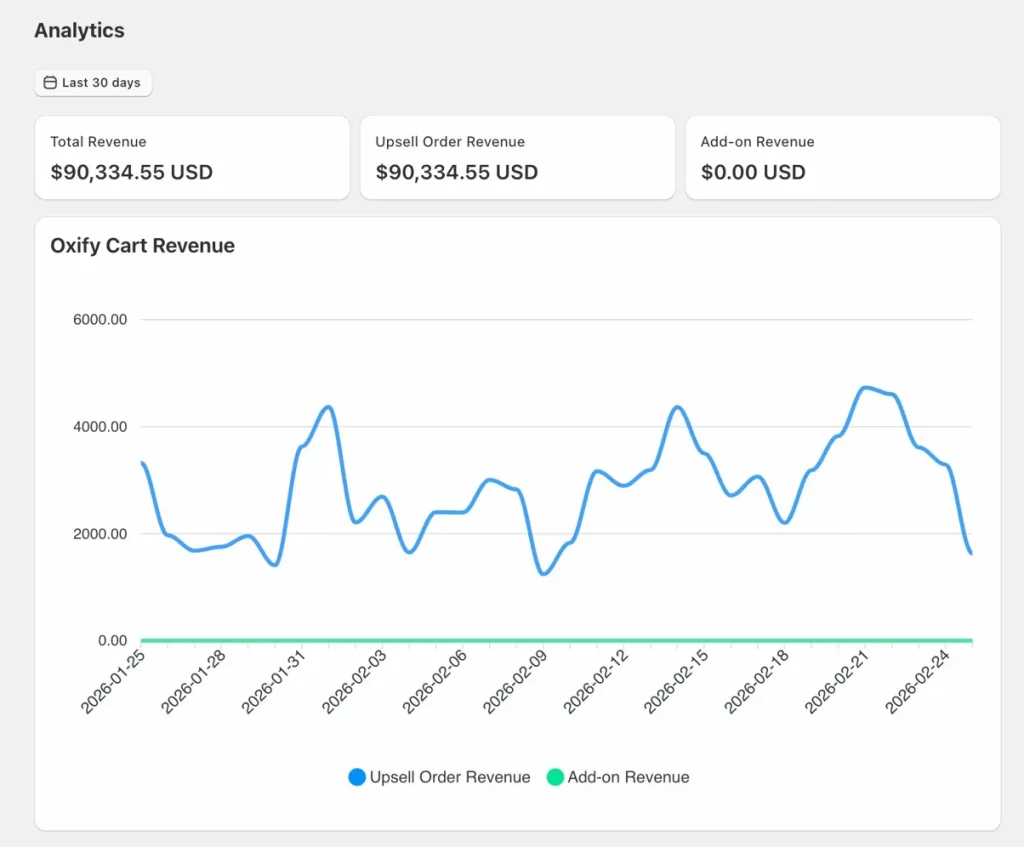
Store B (India market): Generated Rs. 23,844 in upsell revenue in 30 days. Smaller store, same result — consistent daily upsell revenue generated entirely through the cart drawer.

These are two individual merchants, not an average, and results depend heavily on traffic, AOV and catalog. The revenue charts show consistent daily upsell income rather than a one-time spike. For a fully documented example with a placement-by-placement split, see the Replenhair case study.
The takeaway: A cart drawer by itself does not make you money. An optimized cart drawer with the right upsell features does. That is the difference between Shopify's default drawer and Oxify.
Here is what Oxify does and why each feature matters:
Multi-Tiered Progress Rewards Bar
Set multiple reward thresholds that motivate customers to spend more:
- Tier 1: Spend $30 → Free shipping
- Tier 2: Spend $50 → Free gift unlocked
- Tier 3: Spend $75 → 10% off your order
The progress bar fills in real time as items are added. Customers see exactly what they unlock next. This "spend → reward" feedback loop is the most reliable AOV lever in the cart.
The iCart vendor report cited above also ranked the progress bar as the top-performing cart feature (a reported 260% revenue increase; vendor data, methodology unpublished).
Smart Cart Upsells and Cross-Sells
Inline product suggestions appear inside the drawer right when purchase intent is highest — before checkout.
- One tap adds the item (variants and subscriptions supported)
- No page reload
- Use proven recipes: "Bundle & Save," "Premium Add-on," "Starter + Refill"
On our own merchants the drawer is the largest upsell placement: in our Replenhair case study, 57% of app-attributed revenue (£8,742 of £15,451) came from the cart drawer.
Free Gifts with Purchase
Set up automatic free gifts that unlock when cart value hits a threshold.
Two modes:
- Auto-add: The gift appears automatically when the customer qualifies
- Customer picks: Let shoppers choose from a selection of gifts (this outperforms auto-add because it feels like a reward they earned)
Works globally with multi-currency and Shopify Markets.
Real-Time Discount Code Field
Customers type a promo code. Oxify validates it instantly against Shopify's backend. The total updates on the spot:
- Old price shows strikethrough
- New discounted total displayed
- Savings amount highlighted in green
Auto-apply from email links: If a customer clicks a link like yourstore.com/discount/SUMMER20, Oxify detects the code and shows it in the drawer automatically. No typing. No confusion. No coupon extensions hijacking your attribution.
This became possible thanks to Shopify Editions '25 adding native discount support to the cart/update.js endpoint (works on ALL plans, not just Plus).
Read More: Shopify Cart Drawer with Discount Code
One-Click Add-Ons
Gift wrapping. Shipping protection. Extended warranties. Priority handling. These appear as simple toggle buttons inside the drawer. One click adds them. These small extras quietly lift your revenue per order without feeling pushy.
In-Cart Subscription Upgrades
Let shoppers pick "Subscribe & Save" directly inside the drawer. They choose their delivery schedule and lock in savings without extra pages or popups. Oxify Cart Drawer & Upsells works with the Shopify subscription app you already use.
- Converts one-off orders into recurring revenue
- Pair with a free gift to make the first subscription irresistible
- Higher customer lifetime value, lower churn
Countdown Timers
Add urgency with timers on upsell offers, free gift deadlines, or flash promotions. Timers create a "buy now or lose it" feeling that speeds up decisions.
Sticky Cart Button
A floating cart button stays visible on every page. Customers can open their cart from anywhere with one tap. Extremely valuable on mobile where the header cart icon can be tiny and hard to reach.
Payment Trust Badges and Split Payments
Show Visa, Mastercard, PayPal, Shop Pay, Apple Pay icons inside the drawer. Display split payment options like Shop Pay Installments. These small signals reduce last-second "is this safe?" hesitation.
Announcement Bar
Share important messages inside the cart: holiday shipping cutoffs, flash sales, new product drops. Keeps customers informed without popups or extra emails.
Real-Time Analytics Dashboard
Track what is actually working:
- Click-through rates per upsell widget
- Conversion rates per feature
- AOV impact over time
- Revenue generated by each element
You cannot optimize what you cannot measure. Oxify gives you the data to make every decision confidently.
Built for Speed (This Matters More Than You Think)
Cart drawer code loads on every page of your site. A bloated app slows down your entire store — hurting your Core Web Vitals, Google rankings, and conversions.
Oxify is built lightweight. It avoids render-blocking scripts and respects CWV scores. Your product and collection pages stay fast.
Works With Your Existing Stack
- All Online Store 2.0 themes (Dawn, Horizon, Impulse, and premium themes)
- PageFly and GemPages page builders
- Judge.me product reviews
- Subscription apps
- Oxify Quantity Breaks (our bundle and volume-discount app)
- 8 languages: English, Spanish, French, German, Italian, Japanese, Portuguese, Danish
- Multi-currency and Shopify Markets support
- Shopify checkout integration
How Much Does Oxify Cart Drawer & Upsells Cost?
Oxify Cart Drawer & Upsells (our app) is priced by monthly store orders. The Shopify App Store listing shows the first four tiers (checked 11 Oct 2026); higher tiers apply automatically as order volume grows:
| Monthly Orders | Price |
|---|---|
| 0–100 | $9.99/month |
| 101–200 | $19.99/month |
| 201–500 | $29.99/month |
| 501–1,000 | $49.99/month |
| 1,001–2,000 | $79.99/month |
| 2,001–3,000 | $99.99/month |
| 3,001+ | $149.99/month |
| Enterprise (optional) | $299/month |
Every plan includes ALL features. No feature gating. No "upgrade to unlock upsells."
Every plan includes a 14-day free trial. Test it on your live store risk-free.
Shopify App Store rating: ⭐ 4.9 from 40 reviews (checked 11 Oct 2026)
Built for Shopify badge (shown on the listing, checked 11 Oct 2026) — meets Shopify's highest standards for performance, design, and integration.
What Real Merchants Say
"Our conversion rate has increased after using this cart app plus they have done the integration with bundle app." — Go Ayurveda Dhanvantri (7 months using the app)
"Best cart drawer. Amazing features like free shipping bar and manual gift selection and lots of customization." — Nutty Village
"The support team really work good and make issues clear." — FreshLuxe
→ Start Your Free 14-Day Trial of Oxify Cart Drawer & Upsells
Other Shopify Cart Apps Worth Knowing
We want to be upfront: Oxify Cart Drawer & Upsells is our app. To help you decide, here is how it compares with other well-known cart drawer apps on the same attributes. Ratings, badges and prices were checked on each Shopify App Store listing on 11 Oct 2026.
| Cart drawer app | Rating (reviews) | Built for Shopify | Free plan | Price at ~400 orders/mo | Avoid if |
|---|---|---|---|---|---|
| Oxify Cart Drawer & Upsells (our app) | 4.9 (40) | Yes | No (14-day trial) | $29.99/mo | You want an app with a long review history, or need headless (Hydrogen) support, which its listing does not document |
| Kaching CartDrawer Cart Upsell | 5.0 (1,484) | Yes | Development stores only | $24.99/mo (up to 499 orders) | You want post-purchase upsells in the same app (its listing covers cart drawer features only) |
| iCart Cart Drawer Cart Upsell | 4.7 (451) | No | No ongoing free plan; first 100 orders free (lifetime) | $29/mo (201–500 orders) | A Built for Shopify badge is a requirement for you |
| Rebuy Personalization Engine | 4.7 (853) | No | Development stores; free Rebuy Monetize (thank-you page offers) | Not listed (from $25/mo, scales with orders) | You are a small store; AI personalization is aimed at larger brands |
What about UpCart? Upcart—Cart Drawer Cart Upsell, long one of the most-reviewed cart drawer apps, now shows "This app is not currently available on the Shopify App Store" on its listing, and directs support questions to Rokt (checked 11 Oct 2026). If you are replacing it, see our UpCart alternatives guide.
For the full field of 15 apps with verified ratings and pricing, see our best Shopify cart drawer apps roundup.
Where Oxify stands apart: all features on every plan (no gating), a 4.9 rating, a Built for Shopify badge, lightweight code that respects Core Web Vitals, and features such as auto-applied discount links and shopper-chosen free gifts. Who should look elsewhere: stores that weigh review volume heavily (Kaching and iCart have far more reviews) and headless (Hydrogen) storefronts, since the listing does not document headless support.
5 Features Every Shopify Cart Needs in 2026
Whether you use a drawer, a page, or both — make sure these are in place:
1. Free Shipping Progress Bar The top-ranked feature in iCart's vendor benchmark, and it answers Baymard's #1 abandonment reason (extra costs). A common rule of thumb is to set the threshold 20-30% above your current AOV. Show customers exactly how close they are (setup steps in our guide to the free shipping bar in the Shopify cart drawer).
2. 3-5 Targeted Product Upsells Keep it simple. One-click "Add" buttons. Relevant suggestions only. Do not overwhelm with 20 options.
3. Discount Code Input Inside the cart, not just at checkout. Real-time validation. Visual price update. Kills the coupon-hunting abandonment loop.
4. Sticky Checkout Button Always visible, especially on mobile, so a long cart never pushes checkout below the fold.
5. Trust Signals Payment icons, return policy snippet, and security badge. Even a single line like "Free Returns • Secure Checkout" helps.
Oxify Cart Drawer & Upsells (our app) includes all five out of the box on every plan.
Common Cart Optimization Mistakes
Overloading the drawer. You have limited space. Pick 3-4 elements max. A cluttered drawer converts worse than a bare one.
Ignoring mobile. On most stores the majority of traffic is mobile. If your cart drawer's checkout button gets pushed below the fold on a phone, you are losing sales. Always test on real devices.
Installing bloated apps. Cart drawer code loads on EVERY page. Heavy apps hurt your entire site's speed. Check your PageSpeed Insights score before and after installing any app.
Not A/B testing. Never assume. Run drawer vs page for 7-14 days. Track add-to-cart rate, cart-to-checkout rate, AOV, and mobile vs desktop separately. Shopify's built-in experiments make this easy.
Forgetting accessibility. Cart drawers are modal dialogs. They need role="dialog", aria-modal="true", focus trapping, and proper keyboard navigation. Shopify's Dawn theme handles this natively. Check third-party apps carefully.
How to Track if Your Cart Is Actually Working
Set up these metrics in Shopify Analytics or GA4:
- Add-to-cart rate → What percentage of visitors add items?
- View cart rate → How many open the cart drawer or visit /cart?
- Cart-to-checkout rate → Of cart viewers, how many start checkout?
- Checkout completion rate → Of checkout starters, how many finish?
- Average Order Value → Is AOV trending up after cart changes?
- Mobile vs Desktop split → Track separately. They behave differently.
Pro tip: the built-in analytics dashboard in Oxify Cart Drawer & Upsells (our app) tracks upsell CTR, conversion per widget, and AOV impact automatically. No GA4 event configuration needed.
Your own pre-change numbers are the benchmark that matters most, because conversion and add-to-cart rates vary widely by niche, price point and traffic source. Two published reference points:
- Average cart abandonment: 70.22% (Baymard Institute, list updated September 2025)
- Cart-to-checkout rate: 5.66% (iCart vendor benchmark, 10,000+ iCart merchants, 2025 data)
Our Honest Recommendation
For most Shopify stores: Start with a cart drawer. The published evidence leans its way, though none of it is a controlled test. It works well on mobile, and the room it gives for upsells and free gifts is worth testing against your own numbers.
For high-ticket: Keep the full cart page as your primary experience. Your customers need that space.
For maximum revenue (what we actually recommend): Use the hybrid approach. Drawer for quick "Add to Cart" confirmations and impulse upsells. Full cart page accessible via the cart icon for detailed reviews. This setup captures every type of buyer.
Your Next Steps
- Check your current cart type in Theme Settings → Cart
- If you sell standard consumer products and are still on "Page," switch to "Drawer"
- Install Oxify Cart Drawer & Upsells (our app) or another cart drawer app, and activate the free trial
- Enable the free shipping progress bar + 3-5 targeted upsells + discount code field
- Track your numbers for 14 days
Measure add-to-cart rate, cart-to-checkout rate and AOV before and after the switch. The 10K+ store vendor benchmark and the psychology both point toward the drawer, and a free trial lets you test it on your own store before paying.
→ Try Oxify Cart Drawer & Upsells Free for 14 Days