 Oxify
OxifyWhat Is a Cart Drawer in Shopify? Examples, How to Enable or Create One
Short answer: A cart drawer in Shopify is the cart panel that slides in from the side of the screen when a shopper adds a product or taps the cart icon. It lists the items, subtotal and checkout button without loading the /cart page. Most Shopify themes include one: set Theme settings → Cart → Type to Drawer.
The Shopify cart drawer is also called a slide cart, slide-out cart, side cart or ajax cart; outside Shopify, designers call the same pattern an off-canvas cart. Dawn and its free siblings default to a popup notification, so you switch Type to Drawer yourself, while Horizon ships with Drawer already selected. The default Dawn and Horizon drawers only display the cart; a free-shipping bar, upsells, a free gift or a sticky cart need theme code, a cart drawer app, or a paid theme that builds some of them in.
Key Facts (checked 11 October 2026)
- Dawn 16.0.0 (released 10 August 2026) offers three cart types under Theme settings → Cart → Type: Drawer, Page and Popup notification. A fresh install defaults to Popup notification, not Drawer (Dawn settings_schema.json on GitHub).
- Horizon (version 4.2.0 in the public repo) has two cart types, Page and Drawer. The schema fallback is Page, but the settings file the theme ships with selects Drawer, so a fresh install opens a drawer. It also has a separate checkbox, "Add to cart" auto-opens drawer, which is off by default (Horizon settings_schema.json and settings_data.json).
- Dawn's drawer has no free-shipping bar, no discount-code field and no upsell block; the snippet renders line items, an optional order note, applied discounts, the estimated total and the checkout button (snippets/cart-drawer.liquid). Horizon adds a discount-code field, "Allow discounts in cart", on by default.
- Baymard Institute (2026) puts average cart abandonment at 70.22% (average of 50 studies), with extra costs such as shipping, tax and fees the top reason at 40% (baymard.com).
- Oxify Cart Drawer & Upsells (our app) is rated 4.9 from 40 reviews, carries the Built for Shopify badge, and starts at $9.99/month for up to 100 orders with a 14-day free trial (App Store listing, checked 11 October 2026). Disclosure: Oxify publishes this blog.
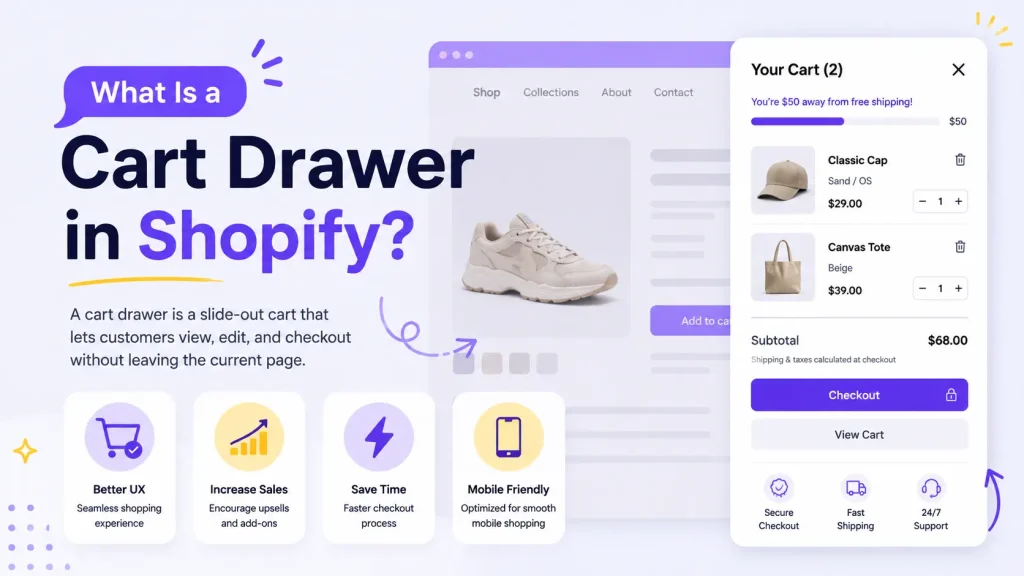
How to Add a Cart Drawer Instead of the Cart Page (Quick Steps)
If Add to cart currently sends shoppers to /cart, or only shows a small "Item added" popup, you can change the cart page to a drawer with one theme setting. No code or app is needed on any current free Shopify theme.
- In Shopify admin, go to Online Store → Themes and click Customize next to your live theme.
- In the editor's left panel, open Theme settings and click Cart.
- Under Type (Impulse calls it Cart type), select Drawer instead of Page or Popup notification.
- On Horizon and the themes built on it, also tick "Add to cart" auto-opens drawer; otherwise the drawer only opens from the cart icon.
- Click Save, open the storefront and add a product. The panel should slide in without a page reload, and the cart icon should open the same panel.
If that did not work, it is usually one of three things:
- There is no Drawer option under Type. Dawn only gained its cart drawer in version 6.0.0, released in June 2022 (Dawn 6.0.0 release notes), which is the exact problem in the best-known Shopify Community thread on this question: the merchant was on Dawn 5. The version number is shown under the theme name in Online Store → Themes. Update the theme, or add the latest version from the Theme Store and move your customisations across. Vintage themes with no cart type at all need one of the three routes in the "create a cart drawer" section below.
- Drawer is selected but add to cart still loads /cart. A page-builder or custom button is bypassing the theme's script, or a "skip cart" setting is on. The checklist under "Why isn't my cart drawer opening?" covers each cause.
- The drawer opens, but it is plain. That is expected: a theme drawer lists the items and the total, nothing more. To restyle it, follow how to customise the Shopify cart drawer. To add a free-shipping bar, upsells or a free gift without code, see our comparison of the 15 best Shopify cart drawer and slide cart apps.
The rest of this guide explains what the drawer is, how it works, the theme-by-theme settings, and how to design one well.
Cart Drawer vs Mini Cart vs Cart Page vs Cart Notification Popup
Four different things get called "the cart" in Shopify, and they behave differently.
| Feature | Cart drawer | Mini cart | Cart page | Cart notification popup |
|---|---|---|---|---|
| What it is | Full-height panel that slides in from the side of the screen | Small dropdown or hover preview under the cart icon | Separate page at /cart | Small toast confirming the item was added |
| Page reload | No | No | Yes | No |
| Edit quantities and remove items | Yes | Sometimes | Yes | No, it links to the cart instead |
| Opens automatically after add to cart | Usually (Horizon needs its auto-open checkbox) | Rarely | Not applicable | Yes, then it is dismissed |
| Room for a shipping bar, upsells or a discount field | Yes, with theme code or an app | Very little | Yes | None |
The line that matters is the page reload: a cart page loads a new page, the other three keep the shopper where they were. The finer difference between a dropdown mini cart and a full drawer is covered in slide cart vs mini cart, and the drawer-or-page decision in cart drawer vs cart page.
Dawn's popup notification is what a new Dawn store gets out of the box: a small "Item added to your cart" toast with "View cart", "Check out" and "Continue shopping" links. It cannot edit quantities and it disappears on its own, which is why many merchants searching "why isn't my cart drawer opening" simply have the popup selected.
How a Cart Drawer Works Under the Hood
1. Add to cart is a background request, not a page load
When a shopper clicks Add to cart, the theme's JavaScript submits the product form to Shopify's Ajax Cart API endpoint, POST /cart/add.js, instead of letting the browser navigate to /cart. Quantity changes go through /cart/change.js, and notes, attributes and discount codes through /cart/update.js (Ajax Cart API reference).
2. The drawer is a theme section that Shopify re-renders for you
In Dawn the drawer lives in sections/cart-drawer.liquid, which renders snippets/cart-drawer.liquid. In Horizon it is sections/cart-drawer-section.liquid, described in the source as the "SRA target for /cart endpoints". When Dawn's product-form.js posts to /cart/add.js it appends a sections parameter naming the sections it wants back, cart-drawer and cart-icon-bubble. Shopify returns fresh HTML for both in the same response, a feature called bundled section rendering, and the script swaps that HTML into the page before opening the drawer. One request can return up to five sections (Section Rendering API).
3. Opening, closing and accessibility are plain JavaScript and CSS
Dawn's cart-drawer.js adds an active class to the <cart-drawer> element to slide it in, locks page scrolling, traps keyboard focus inside the panel, and closes on the Escape key. That is why a theme drawer usually passes accessibility checks and a hastily coded one often does not.
Two consequences follow. A cart drawer app hooks the same /cart endpoints, so it can replace the theme drawer without touching checkout. And a custom add-to-cart button that posts to the cart without the theme's script updates the cart but never triggers the re-render, the classic "item is in the cart but the drawer did not open" bug.
Which Shopify Themes Have a Cart Drawer Built In (and Where the Setting Is)
Every free theme Shopify publishes ships a drawer, and most paid themes do too; the setting name and extras vary. Each row was checked against the theme's source, docs or Theme Store listing in September 2026, except Broadcast, which was checked on 11 October 2026.
| Theme | Cart drawer built in? | Where the setting lives | What the default drawer includes |
|---|---|---|---|
| Dawn 16.0 (free) | Yes, but the default is Popup notification | Theme settings → Cart → Type → Drawer | Line items, optional cart note, applied discounts, estimated total, checkout button, optional collection shown when the cart is empty |
| Dawn-based free themes: Sense, Craft, Refresh, Ride, Studio, Crave, Taste, Colorblock, Publisher, Spotlight, Origin, Trade | Yes | Same Theme settings → Cart → Type control (Refresh example) | Same as Dawn with different styling |
| Horizon 4.x (free, 2025) | Yes, selected by default | Theme settings → Cart → Type (Page or Drawer), plus the "Add to cart" auto-opens drawer checkbox | Everything Dawn has, plus a discount-code field, installments messaging, accelerated checkout buttons and an empty-cart button link |
| Horizon-based free themes: Atelier, Dwell, Fabric, Heritage, Pitch, Ritual, Savor, Tinker, Vessel | Yes | Same controls as Horizon | Same as Horizon |
| Impulse (Archetype, $500) | Yes | Theme settings → Cart → Cart type → Drawer or Page (Archetype docs) | Order notes, terms-and-conditions checkbox, accelerated checkout buttons, choice of cart icon |
| Prestige (Maestrooo, $400) | Yes | Theme settings in the editor; Maestrooo publishes developer events such as cart:refresh rather than a cart-type article | Theme Store lists slide-out cart, sticky cart and cart notes |
| Impact (Maestrooo, $400) | Yes | Theme settings in the editor, same as Prestige | Theme Store lists slide-out cart, sticky cart and cart notes |
| Broadcast (Presidio, $420) | Yes | Theme settings → Cart → Cart type → Drawer or Page (Presidio docs); the drawer's contents are blocks added to the Cart drawer section | Theme Store lists slide-out cart, sticky cart and cart notes; the docs add blocks for a free-shipping message, upsell products, bundle products, a discount code, a shipping estimate and order or gift notes (cart drawer docs) |
| Be Yours (RoarTheme, $350) | Yes | Theme settings → Cart drawer → Enable cart drawer (RoarTheme docs) | Cart recommendations toggle, gift wrapping, cart notes, sticky cart |
Broadcast is a reminder that "what the default drawer includes" depends on the theme: its documentation lists a free-shipping message, upsell products and a discount code as drawer blocks, none of which Dawn's drawer has.
How to enable the cart drawer in Dawn (and its free siblings)
- In Shopify admin go to Online Store → Themes and click Customize on your live theme.
- Open Theme settings in the editor's left panel and click Cart.
- Under Type, switch from Popup notification (the default) to Drawer.
- Optional: tick Cart note and Vendor, pick a Collection to show when the drawer is empty, and choose a colour scheme.
- Click Save, then add a product on the storefront. The drawer should slide in from the right without a reload.
How to enable the cart drawer in Horizon
- Follow the same route to Theme settings → Cart.
- Check that Type is set to Drawer. A fresh Horizon install already is; older installs may have been switched to Page.
- Tick "Add to cart" auto-opens drawer if you want the panel to open after every add. It is off by default; out of the box Horizon only animates the item into the cart icon.
- Under Cart features, decide on Allow note to seller, Allow discounts in cart (on by default), Installments and Accelerated checkout buttons, and set the Empty cart button link.
- Click Save and test on the storefront.
How to Create a Cart Drawer in Shopify When Your Theme Has None
If Theme settings → Cart shows no Type control, the theme predates the drawer (most vintage themes) or a developer removed it. You have three ways to create one.
| Route | Effort | What you get | Main risk |
|---|---|---|---|
| Switch to a theme with a drawer | Hours to days of re-theming | A maintained, accessible drawer that Shopify or the theme developer updates | Rebuilding customisations from the old theme |
| Install a cart drawer app | Minutes, no code | A slide cart injected through an app embed, usually with a shipping bar, upsells and a visual editor | Monthly cost and one more script; check it against the speed test below |
| Code it into the theme | Developer time | Exactly the drawer you specify | You own accessibility, cart syncing and every future theme update |
If you take the code route, a working ajax cart drawer needs five parts. This is the same structure Dawn uses, so its open-source files are the best reference (cart-drawer.liquid, cart-drawer.js).
- A snippet for the markup, wrapped by a section. Put the drawer HTML in
snippets/cart-drawer.liquid: loop overcart.items, output the total, and place the checkout button inside a form that posts to{{ routes.cart_url }}. Then createsections/cart-drawer.liquidcontaining only{% render 'cart-drawer' %}. The section exists so Shopify can re-render the drawer on request. - Render it on every page. Add
{% render 'cart-drawer' %}tolayout/theme.liquid; Dawn does exactly this when the cart type is Drawer. - Intercept add to cart. In JavaScript, stop the product form's default submit,
POSTthe form data to/cart/add.jsand appendsections=cart-drawerso the response includes fresh drawer HTML. - Swap and open. Replace the drawer's inner HTML with the returned section, update the cart-count bubble, then add an "open" class that slides the panel in with a CSS transform.
- Handle edits and accessibility. Send quantity changes to
/cart/change.jswith the samesectionsparameter. Trap focus inside the panel, close on Escape and on overlay click, return focus to the trigger, and lock body scroll while it is open.
Two limits to plan for: /cart/change.js changes quantity, properties or selling plan of a line but cannot swap it to another variant, so a variant switcher in the drawer means adding the new variant and setting the old line to zero; and one request returns at most five sections (Section Rendering API). Many older tutorials use jQuery and {% include %}; include is deprecated in favour of render, and no library is needed. The switch-theme, app and code routes are compared in more depth in replacing the Shopify cart page with a slide cart drawer.
How to Edit the Cart Drawer
"How do I edit the cart drawer" has three answers.
- Theme settings (no code). Dawn exposes the cart note, vendor name, empty-cart collection and colour scheme; Horizon adds the discount field, installments and accelerated checkout buttons; paid themes add toggles such as Impulse's terms checkbox or Be Yours' cart recommendations.
- CSS and Liquid (some code). Width, fonts and button colours take a few lines of CSS; how to customise the Shopify cart drawer walks through it and cart drawer custom CSS has copy-paste snippets. New behaviour such as a shipping bar means editing
snippets/cart-drawer.liquidand its JavaScript, and a theme update can overwrite the change. - A cart drawer app (no code, more features). Apps replace or extend the theme drawer with a drag-and-drop editor, so the shipping bar, upsells and free gift become settings rather than code.
Why Isn't My Cart Drawer Opening?
Work through these in order. The first two fix most cases.
- The cart type is Page or Popup notification. Open Theme settings → Cart → Type and pick Drawer. On Dawn-based themes the popup is the default.
- Horizon's auto-open box is unticked. Horizon keeps the drawer closed after add to cart unless "Add to cart" auto-opens drawer is enabled. The cart icon still opens it.
- Two drawers are fighting. With a cart drawer app installed, the theme drawer and the app drawer can both try to open, or neither does. Set the theme type to Page and let the app own the drawer, or remove the app. Also check Theme editor → App embeds: an embed toggled off during a theme change means no drawer at all.
- A custom add-to-cart button skips the theme's script. Page-builder buttons (GemPages, PageFly and similar) and hand-coded buttons often post to /cart/add without the
sectionsparameter, so the cart updates but nothing re-renders. Set the builder's add-to-cart action to "open cart drawer" instead of a redirect, or use the theme's product form. - The button is Buy it now, not Add to cart. Shopify's accelerated checkout buttons are designed so the customer "skip[s] the cart and go[es] to the Shopify Checkout" (Shopify Help Center). Some themes and apps also have a "skip cart" toggle; turn it off if you want the drawer.
- Another app throws a JavaScript error. Open the browser console, add a product and look for red errors. Then duplicate the theme and switch off app embeds one at a time in the copy until the drawer works. Apps that pasted code into the theme instead of using an app embed can leave it behind after you uninstall them; if the console names a script from a cart app you removed, look for its leftover snippet in
layout/theme.liquid.
What the Default Theme Drawer Can and Cannot Do
The built-in drawer can:
- Show line items with image, variant, quantity controls and a remove button
- Show discounts that are already applied, the estimated total and a tax/shipping note
- Take an order note (Dawn, Horizon, Impulse) and a discount code (Horizon only)
- Show accelerated checkout buttons such as Shop Pay (Horizon, Impulse)
- Match your theme's colour scheme and fonts
The built-in drawer cannot (Dawn and its siblings, checked against the source):
- Show a free-shipping progress bar; the Dawn snippet and its locale file contain no such string. See how to add a free shipping bar to the cart drawer.
- Recommend products or run "frequently bought together" inside the panel. See how to add upsells to the Shopify cart drawer.
- Accept a discount code in Dawn and its siblings (Horizon can). See adding a discount code field to the cart drawer.
- Add a free gift automatically, run BOGO or quantity-break pricing, or let the shopper pick a gift
- Show trust badges, a countdown, or a sticky cart button that follows the shopper
- Report which offers in the drawer produced revenue
The default drawer is a display tool: it shows the cart, it does not grow it. That is fine if you only want to spare shoppers a page load. But the drawer is the last screen before checkout, which is why stores that want to lift order value upgrade it with theme code or one of the best Shopify cart drawer apps.
Cart Drawer Design: Anatomy and Best Practices
A well-designed slide cart drawer reads top to bottom in the order the shopper decides. The layout below is the one Dawn and Horizon follow, with the optional rows that apps or custom code add.
| Area | What goes there | Design rule |
|---|---|---|
| Header | Title ("Your cart"), item count, close button | Large close button (about 44 px is the common touch-target guideline); Escape and overlay click also close |
| Incentive bar (optional) | Free-shipping or rewards progress | One bar only, with the exact amount remaining |
| Line items (scrolls) | Image, title, variant, price, quantity stepper, remove | Show discounted and original price together; never hide the remove control |
| Offers (optional) | One to three upsell cards or add-on checkboxes | Below the items, never between the shopper and the checkout button |
| Footer (pinned) | Discounts applied, estimated total, tax and shipping note, checkout button, express buttons | Always visible without scrolling, including on a phone with the keyboard closed |
- Width. Dawn sets the panel to
40remwith amax-widthofcalc(100vw - 3rem), so on a phone a strip of the page stays visible as a tap target to close (component-cart-drawer.css). Copy that idea: a drawer that covers the full mobile screen feels like a page the shopper cannot leave. - Only the item list scrolls. Header and footer stay fixed so the total and checkout button never move.
- Design the empty state. Dawn can show a collection and Horizon a button link when the cart is empty; a blank panel is a dead end. See empty cart design for Shopify.
- Be honest about totals. Label the figure "Estimated total" or "Subtotal" and say that taxes and shipping are calculated at checkout, as both Shopify themes do.
- Build it as a dialog. Horizon wraps its drawer in a native
<dialog>element; Dawn traps focus by script. Either way, keyboard and screen-reader users must be able to open, use and close it. - Keep motion short and respect
prefers-reduced-motion.
Colours, fonts and layout tweaks are covered step by step in how to customise the Shopify cart drawer, and the cart drawer best practices checklist turns these rules into a pre-launch check.
What a Good Cart Drawer Looks Like: Three Examples
These three are illustrative layouts we wrote to show the patterns, not screenshots of real stores; the products and prices are made up.
Example 1: Apparel store, one hoodie in the cart
A bar at the top reads "Add $10.00 more for free shipping" with a progress line at 80%. Under the hoodie, one row titled "Goes well with" shows a $14 beanie with a one-tap Add button. Adding it fills the bar, the message flips to "You've unlocked free shipping", and the subtotal updates without a reload.
Example 2: Skincare store, a consumable product
Beside the serum is a toggle: "Subscribe and save 15%, delivered every 60 days." Below the items sit a collapsed "Have a discount code?" field and a note box, and three quiet badges under the checkout button: free returns, dermatologist tested, ships in 24 hours.
Example 3: Home goods, a $180 order
A tiered rewards bar reads "Free shipping unlocked. Spend $20 more for a free tote." Under the items, gift wrap ($5) and shipping protection ($2.90) are checkboxes rather than product cards, and a sticky cart button on the collection pages brought the shopper here in one tap.
The common thread: one incentive bar, one to three offers, a discount field, and a checkout button that is never covered.
Does a Cart Drawer Increase Conversion?
Honest answer: no public, controlled study isolates "drawer versus cart page" across many stores, and vendor case studies are not that. What is documented is why carts are abandoned. Baymard's running average is 70.22% of carts, and the top reason, cited by 40% of shoppers in its most recent survey, is extra costs such as shipping, tax and fees (Baymard Institute).
A drawer addresses that mechanically: it shows the running total and shipping threshold on the page the shopper is already on, so the surprise comes earlier and cheaper than at checkout, and it removes one page load on mobile. Whether that becomes more orders is something to measure, not assume: compare cart-to-checkout rate for two weeks before and after the switch, and read cart abandonment fixes for the drawer and do upsells hurt conversion rate before you load the panel with offers.
When a Cart Page Is Still the Better Choice
A drawer is not always the answer. Keep the full /cart page as the primary cart when:
- You sell B2B or wholesale. Buyers add dozens of lines, edit quantities in bulk and need per-line totals and company pricing; a narrow panel fights that.
- Products are configured, not picked. Custom furniture, engraved goods and bundles with many options carry line-item properties that need room to be reviewed before payment.
- Carts are long or high-ticket. Buyers comparing warranties, financing or delivery windows want a page they can read slowly, print or share.
- Your team cannot maintain two carts. Every offer in the drawer must exist on /cart too, or shoppers who click "View cart" see different prices.
Many stores run both: the drawer for quick adds, the page for the full review; /cart stays live in every theme even with the drawer on. The trade-offs are in cart drawer vs cart page.
How to Add or Upgrade a Cart Drawer
Three routes, from simplest to most technical.
1. Turn on the theme's drawer. Free, two minutes, using the Dawn or Horizon steps above. You get the display features and nothing else; do it first so you know the baseline.
2. Install a cart drawer app. This is how you get the shipping bar, upsells, free gift and sticky cart without editing Liquid. In Oxify Cart Drawer & Upsells (our app) those are four toggles in the drawer editor: Free shipping bar (single or multi-tier rewards), Cart upsells (AI or hand-picked, one to three cards), Free gift (auto-add or pick-a-gift with the discount applied automatically) and Sticky cart. Every plan includes every feature; pricing is by order volume from $9.99/month for up to 100 orders, with a 14-day free trial. The app is Built for Shopify and rated 4.9 from 40 reviews on its App Store listing. If you need enterprise-scale AI merchandising across the whole site, Rebuy Personalization Engine is the stronger fit; the full comparison is in best Shopify cart drawer apps.
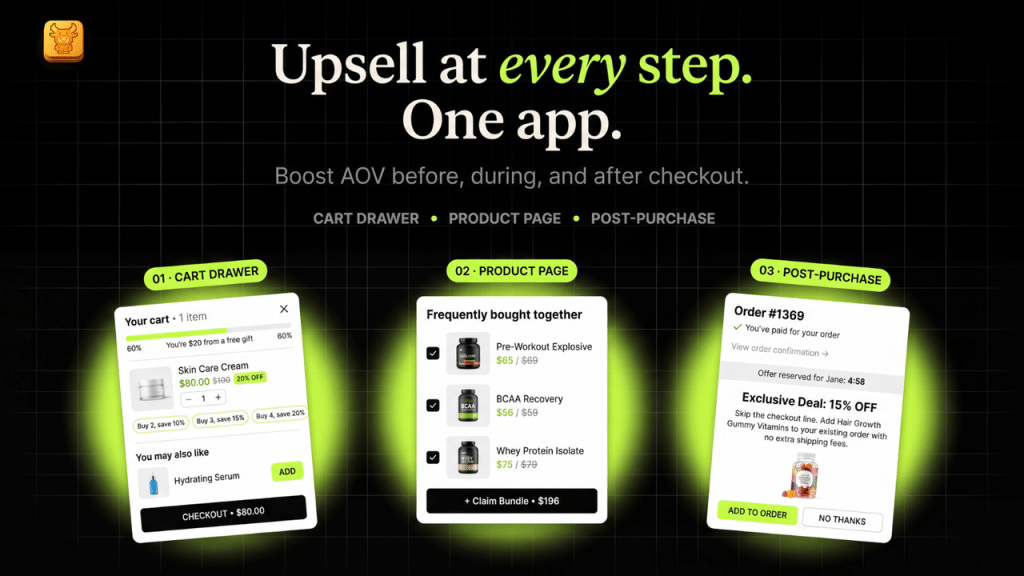
3. Custom code. Full control, but you need a developer and a theme update can overwrite the work. Sensible for one visual change; expensive for a shipping bar plus offers plus analytics.
Which cart drawer app should you use?
Five widely used Shopify cart drawer apps, ordered by App Store review count. Ratings, plans and the Built for Shopify badge were checked on each listing on 11 October 2026. Oxify publishes this blog; the full side-by-side of 15 apps is in best Shopify cart drawer apps.
| Cart drawer app | Rating (reviews) | Built for Shopify | Free plan | Paid from | Best for | Avoid if |
|---|---|---|---|---|---|---|
| Kaching CartDrawer Cart Upsell | 5.0 (1,484) | Yes | Development stores only | $9.99/month up to 99 orders | A heavily reviewed drawer with a shipping bar, upsells and trust badges at a low entry price | You want a free plan on a live store |
| Essent Cart Drawer (often searched as Essential Cart Drawer) | 5.0 (1,081) | Yes | Yes, every feature up to 30 orders a month | $8.99/month up to 99 orders | New stores and stores selling in several markets, currencies and languages | You expect it to stay free past 30 orders a month |
| Rebuy Personalization Engine | 4.7 (853) | No | Development stores, plus the free Rebuy Monetize thank-you-page offers | $25/month, scaling with orders | Large stores that want AI merchandising across cart, checkout, search and post-purchase | You only need a cart drawer and do not want to pay for a platform |
| Qikify Slide Cart Drawer | 4.9 (420) | No | Yes, basic slide cart, sticky add to cart and announcement bar | $14.99/month (Premium) | A free, simple slide cart with a sticky cart button | You want product upsells or a reward bar for free; both need Premium |
| Oxify Cart Drawer & Upsells (our app) | 4.9 (40) | Yes | No, 14-day free trial | $9.99/month up to 100 orders, every feature on every plan | Shipping bar, upsells, free gift, subscription upgrades and post-purchase offers from one app | You need a free plan, or want an app with a long review history |
If your theme already has a drawer and you only want to spare shoppers a page load, you do not need any of these. Pick an app when you want the drawer to do something the theme cannot, from the list in "What the Default Theme Drawer Can and Cannot Do" above.
A note on speed
The theme drawer adds almost nothing, because its HTML comes back in the same response as the add-to-cart call. An app adds its own script and usually one extra request for recommendations. Hold any app to the Built for Shopify bar: no more than a 10-point drop in Lighthouse performance, and admin pages within Core Web Vitals (LCP 2.5 s, CLS 0.1, INP 200 ms at p75). Measure before and after with this cart drawer speed test guide.
Ready to upgrade the drawer your theme already has? Oxify Cart Drawer & Upsells (our app) replaces the default panel with a free-shipping bar, in-cart upsells, free gift with purchase, a discount-code field and a sticky cart from a drag-and-drop editor (Built for Shopify, 4.9 from 40 reviews). Install it from the Shopify App Store or see the full feature list on the Oxify Cart Drawer & Upsells page. Plans start at $9.99/month with a 14-day free trial.
Frequently Asked Questions
What is a cart drawer?
Does Shopify have a cart drawer built in?
How do I edit the cart drawer in Shopify?
Is a slide cart or mini cart the same as a cart drawer?
Does a cart drawer increase conversion?
Can I add upsells to the cart drawer?
Which cart drawer app should I use on Shopify?
How do I create a cart drawer in Shopify?
How do I change the cart page to a drawer in Shopify?
How do I turn off the cart drawer in Shopify?
Can you show me an example of a cart drawer?
Why is my Shopify cart drawer not opening?
The Bottom Line
A Shopify cart drawer is the slide-in panel that replaces the trip to /cart. Your theme almost certainly has one: switch Type to Drawer in Dawn, or tick auto-open in Horizon, and you are done in two minutes. The better question is what the drawer does for you: a default drawer shows the cart, while an upgraded one shows the shipping target, a relevant add-on and a discount field on the last screen before checkout.