
Do Upsells Hurt Conversion Rate? How to Upsell Without Annoying Customers
Upsells do not hurt conversion rate by default; badly placed ones can. Relevant, skippable offers kept out of the checkout path carry the least risk, and a small conversion dip still pays if average order value (AOV) rises past your break-even point. The public data we found measures take rates, not conversion cost, so test your own store.
The rest of this guide covers the break-even formula, the dated take-rate and offer-fatigue data we could source, and a five-step plan to upsell without annoying anyone.
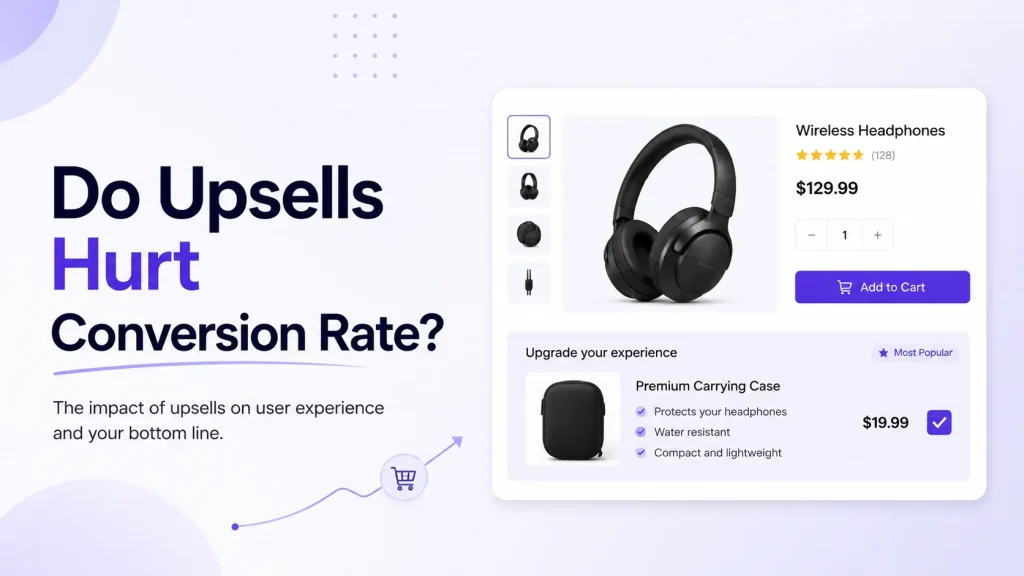
Quick Answer (For Skim Readers)
- Do upsells reduce conversion rate? Not by default. Placement is the main lever: a post-purchase offer cannot touch the first sale, while an offer that blocks checkout can.
- The real risk isn't conversion — it's net revenue. A tiny conversion dip is fine if your average order value (AOV) climbs more than enough to cover it. The break-even test below shows the exact bar.
- When upsells help: relevant offers, good timing, low extra cost, easy to skip.
- When upsells hurt: pop-up after pop-up, pricey suggestions, the wrong product, anything that blocks checkout.
- The golden rule: the upsell should feel like help, not a sales pitch.
Want to know if upsells will hurt your numbers? Skip to the break-even test.
What Do the Upsell Benchmarks Actually Show?
Each figure below has a named source, a date and a sample size, and its limits are stated:
| Metric | Figure | Source and limits |
|---|---|---|
| Average offer acceptance (share of offers shown that shoppers take), by placement | Cart drawer 12%, checkout 9%, product page 7%, post-purchase 6% | Growth Suite (an upsell app vendor's own data), January to June 2026, 250 Shopify stores; checkout is 28 Shopify Plus stores, post-purchase 200 stores. Stores ranged from under 2% to over 20% at the same placement. |
| Acceptance by offer number within one session | 1st offer 5%, 2nd 8%, 3rd 6%, 4th 1% | Growth Suite, 20 million sessions across the same 250 stores. |
| Consumers who left a website and bought elsewhere because they were overwhelmed by too many options | 39% | Accenture Interactive Personalization Pulse Check, October 2016, more than 1,500 consumers aged 18 to 60 in the US and UK. A general finding, not specific to upsells. |
| Consumers more likely to buy when a retailer recommends options based on their past purchases or preferences | 58% | Same Accenture survey, October 2016. |
What the table cannot tell you: acceptance is not lift. Growth Suite measures how often shoppers take an offer, and says it does not yet have enough holdout data to publish a lift number. None of these figures is the conversion cost of an upsell, which is why this guide builds a break-even test instead of quoting one.
Figures we removed. Earlier versions of this page quoted take-rate ranges by placement (product page 8-15%, in-cart 5-12%, post-purchase 3-8%), a claim that 94% of customers report no negative impact from post-purchase upsells, a 30-50% take rate with virtually no conversion change, and an Accenture "91%" figure. In October 2026 we found the placement ranges and the 94% claim in EasyApps' Shopify upsell benchmarks guide (last updated March 2026), which names no study for them. We could not trace the 30-50% figure, and the 91% is not in Accenture's own 2016 release, which reports the 58% above. If you see these numbers elsewhere, treat them as unsourced.
What Is an Upsell, Really?
You see upsells every day. You just don't always notice them.
- Get an oil change → "Want new wiper blades too?"
- Order a burger → "Make it a combo?"
- Buy a phone → "Add a screen protector?"
Online, an upsell is the same idea. You suggest something extra: a bigger size, a matching item, or a small add-on. Two close cousins:
- Upsell — a better or bigger version of what they want.
- Cross-sell — a related item that pairs well (batteries with a toy, a case with a phone).
For this article, we'll use "upsell" to cover both — because shoppers don't care about the label. They care if the offer is useful.
The Big Question: Do Upsells Hurt Conversion?
Here's the honest truth. It's not a clean yes or no.
An upsell can pull your numbers in two directions at the same time:
- It can slightly lower conversion rate — a few shoppers get distracted or annoyed.
- It can raise average order value — the people who do buy spend more.
So the real question isn't "did conversion drop?" It's "did total revenue go up or down?" That's the number that pays your bills.
The evidence we could verify splits in two. On the take-rate side it is solid: Growth Suite measured average acceptance of 6% to 12% by placement across 250 stores (table above). On the conversion-cost side we found no public dataset, and that same vendor says it cannot yet quote a lift. So the honest position is a mechanism plus a check: a skippable, relevant offer asks little of the shopper, but a blocking or repeated one can cost sales, and only your own numbers tell you which you have.
Repetition is where the data is clearest. In the same 250-store dataset, acceptance was 5% on a shopper's first offer in a session, 8% on the second, 6% on the third and 1% on the fourth. If you push the price or the number of offers too hard, you can lower conversion enough to actually hurt revenue.
Bottom line: upsells don't automatically hurt you. They hurt you when they're done badly — and there's a simple way to check which side you're on.
Will Upsells Hurt Your Store? The Break-Even Test
This is the part most articles skip. Don't guess — do the math. It takes two minutes.
The formula (quotable, standalone)
Break-even AOV lift % = (old conversion rate − new conversion rate) ÷ new conversion rate. If your average order value rises by more than that percentage, your upsell increased net revenue — even though conversion dipped.
A worked example
Say your store does this each month before adding upsells:
- 10,000 visitors
- 3% conversion → 300 orders
- $100 average order value
- Revenue: $30,000
Now you add an in-cart upsell. Conversion slips a little — from 3% to 2.9%. Scary, right? Let's check.
- New orders: 10,000 × 2.9% = 290 orders
- Break-even AOV lift = (3.0 − 2.9) ÷ 2.9 = 3.45%
- So AOV has to rise from $100 to at least $103.45 to break even.
Can the offer deliver that? AOV lift = share of orders that take the add-on × the add-on's price. Suppose 12% of orders take a $25 add-on (a quarter of the cart, the ceiling of the price rule below; 12% is also Growth Suite's average cart-drawer acceptance, but that counts offers shown, so your share of orders will differ).
- AOV lift: 12% × $25 = $3.00, so AOV rises to $103.00 — just under break-even.
- 290 orders × $103.00 = $29,870, about $130 less than before.
Same offer, smaller dip: conversion slips only from 3.0% to 2.95%. Break-even AOV is now $100 × 3.0 ÷ 2.95 = $101.69, and $103.00 clears it.
- 295 orders × $103.00 = $30,385 — about $385 more than before.
Under these assumptions the offer covers a conversion dip of up to about 0.09 points on a 3% base (300 ÷ 103 = 2.91%). A dip of a few hundredths of a point pays; a dip of a tenth of a point does not. At that take rate the room is thin, so measure the dip instead of assuming it is small.
The red-flag version
Upsells do hurt when the conversion drop is big and the AOV lift is small. Example (illustrative numbers, not a benchmark): a pushy pop-up cuts conversion from 3% to 2.4%, but AOV only nudges to $104.
- 240 orders × $104 = $24,960 — you lost $5,040.
The takeaway: a small conversion dip can be covered; a big one cannot. Your job is to keep the dip tiny and to measure it — and the rest of this guide shows you how.
When Upsells HELP Your Store
Upsells work in your favor when they check these boxes:
- The timing is right. A great moment is after checkout. A post-purchase offer lets the shopper add an item without touching their original order — so it carries near-zero conversion risk (what post-purchase offers do and do not affect).
- The offer is relevant. A phone case for a phone. A second pair of socks. Things that genuinely make sense.
- The price fits the placement. Small in the cart, more flexible post-purchase (exact numbers below).
- It's a one-click yes. A one-click post-purchase offer doesn't make the customer re-enter payment info. Check which payment methods your app supports.
When all four line up, upsells become a quiet revenue machine — extra revenue from customers you already won, with no added ad spend.
When Upsells HURT Your Store
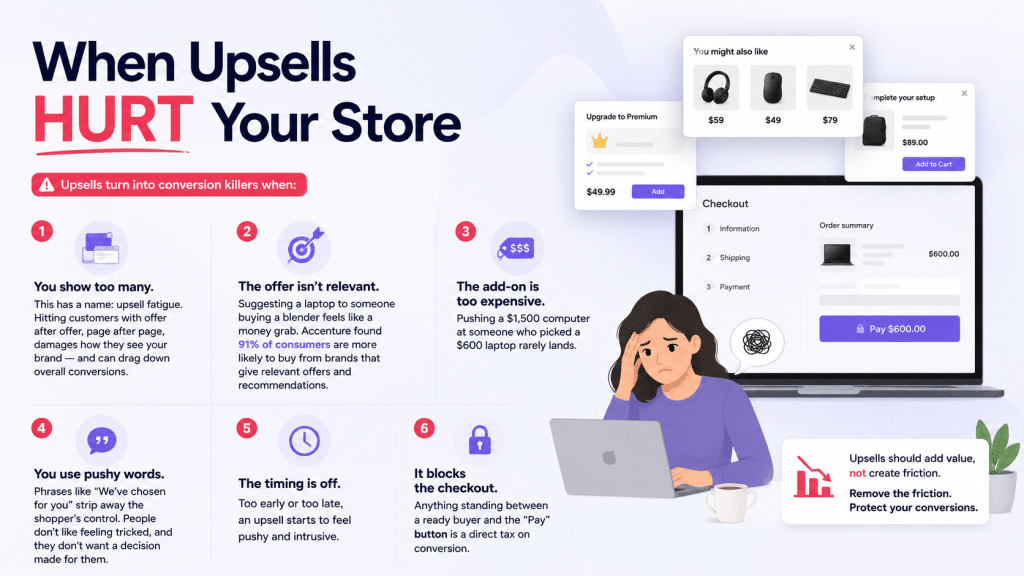
Now the flip side. Upsells turn into conversion killers when:
- You show too many. This has a name: upsell fatigue. Hitting customers with offer after offer, page after page, damages how they see your brand — and can drag down overall conversions. In Growth Suite's session data, acceptance fell from 8% on the second offer to 1% on the fourth, and 39% of consumers in Accenture Interactive's 2016 survey had left a website because they were overwhelmed by too many options (a general finding, not about upsells).
- The offer isn't relevant. Suggesting a laptop to someone buying a blender feels like a money grab. Accenture Interactive's 2016 survey of more than 1,500 US and UK consumers found 58% were more likely to buy when a retailer recommended options based on their past purchases or preferences.
- The add-on is too expensive. Pushing a $1,500 computer at someone who picked a $600 laptop rarely lands.
- You use pushy words. Phrases like "We've chosen for you" strip away the shopper's control. People don't like feeling tricked, and they don't want a decision made for them.
- The timing is off. Too early or too late, an upsell starts to feel pushy and intrusive.
- It blocks the checkout. Anything standing between a ready buyer and the "Pay" button is a direct tax on conversion.
The pattern is clear: shoppers don't hate upsells. They hate feeling pressured, ignored, or interrupted.
Are Upsells Annoying? What Shoppers Actually Feel
Let's be honest about the emotion behind this question.
A shopper is not annoyed because you offered something. They're annoyed because:
- The pop-up blocked what they were trying to do.
- They had to hunt for a tiny "X" to close it.
- The offer had nothing to do with their order.
- It was the third upsell in a row.
Think of a good waiter. They mention the dessert special once, with a smile, then move on. They don't follow you to your car asking again. A good upsell is that one polite mention — easy to enjoy, easy to wave off.
Here's the test: if your customer can ignore the offer in under one second and keep shopping, it's not annoying. It's just an option.
We could not find independent data on how shoppers feel about upsells specifically, so we don't quote a satisfaction figure. The closest verified signal is the Accenture survey above: shoppers reward offers that match what they bought before, and leave when they are overwhelmed. The annoyance is usually the bad upsell, not the upsell itself.
Upsell Placement Cheat Sheet
Not all upsell spots carry the same risk. The acceptance column is Growth Suite's vendor data (January to June 2026); the risk and price columns are rules of thumb, not measured results.
| Placement | Average offer acceptance | Conversion risk | Price rule of thumb (vs. order value) | Best for |
|---|---|---|---|---|
| Product page | 7% | Low–Medium | Keep small | Simple "you may also like" picks |
| Cart / cart drawer | 12% | Low (if non-blocking) | Up to ~25% | Complementary add-ons, "frequently bought together" |
| Checkout | 9% (28 Shopify Plus stores only) | Medium — the offer sits between a ready buyer and the Pay button | Keep small | Quick, highly relevant add-ons only |
| Post-purchase (after checkout) | 6% | Very low — first sale is locked in | 40–60% | One-click upgrades, BOGO, bundles, accessories |
The smart play: focus on the cart drawer and post-purchase spots. The cart drawer catches shoppers while they're reviewing their order and had the highest average acceptance in the data above, and post-purchase offers literally cannot hurt your original conversion — the sale is already done. Be most careful at checkout, where a poorly placed offer interrupts a ready buyer (see what a checkout upsell needs, with and without Plus).
The Non-Intrusive Upsell Framework (Shopify-Ready)
Here's a simple, copy-paste plan you can use today. Five rules.
1. Match the price to the placement
- In-cart upsells: keep the add-on at or below 25% of cart value. If the order is $100, suggest add-ons under $25.
- Post-purchase upsells: you can go bigger — 40–60% of order value — because the first sale is already secured.
Cheap, well-matched add-ons feel like a "why not." Oversized ones feel like a brand-new decision. These ratios are rules of thumb, not measured results, so test your own price points.
2. Upsell where it's natural — not everywhere
Pick one or two spots, never all of them. Strong, low-risk choices:
- In the cart drawer — "Customers also added…" while they review items.
- After checkout — a one-click post-purchase offer that can't touch the first sale.
Skip the upsell that pops up over the checkout button. That's the one that quietly costs you sales.
3. Use relevance, not random picks
Base offers on real buying data, not guesses. If people who buy running shoes also buy shoe spray, that's your upsell. Look at your historical sales for product pairings — those patterns are upsell gold.
4. Make it skippable in one tap
Every upsell needs an obvious exit: a clear "No thanks," a big close button, no dark patterns. Control is what keeps shoppers calm — and calm shoppers convert.
5. Test, then refine — using the right two numbers
Don't set it and forget it. Run a holdout: show the offer to most visitors, hold it back from a random share, and compare the two groups for at least two weeks. A before-and-after comparison can't separate the upsell from seasonality and campaigns. How many orders you need depends on the lift you want to detect; our guide to measuring cart upsells has the sample-size math and three holdout designs. Watch these together:
- Conversion rate — did it hold steady, or only dip slightly?
- Average order value — did it climb past your break-even number?
If conversion holds and AOV rises above break-even, you're winning. If conversion crashes, your offer is too pushy or off-target — fix it and retest.
A Simple Before-and-After Illustration (Not Measured Data)
Store A — the pushy way: A pop-up appears on the product page. Another in the cart. Then a pricey "upgrade" blocks checkout. Shoppers feel chased. Some leave. Result: conversion drops hard, and the upsells barely sell. Net revenue falls.
Store B — the helpful way: One soft suggestion inside the cart drawer ("Goes great with this"). One easy one-click offer after checkout. Both skippable. Result: conversion holds steady, AOV climbs past break-even, and shoppers don't even feel "sold."
Same products. Same prices. Completely different outcome. The delivery did all the work.
How Oxify Cart Drawer & Upsells (Our App) Helps You Get This Right
Hitting the right timing, placement, and price by hand is hard. This is where the right tool does the heavy lifting.
Oxify Cart Drawer & Upsells is built around the exact non-intrusive approach in this guide. It lets you:
- Add in-cart upsells, cross-sells, and "frequently bought together" offers inside a smooth slide cart drawer — so suggestions appear at a natural moment, not as a checkout-blocking pop-up.
- Use AI-powered recommendations so every offer stays relevant to what's actually in the cart.
- Run one-click post-purchase upsells that add to an order without risking the first sale — the lowest-risk placement there is.
- Layer in free gifts, BOGO, volume discounts, and a free shipping bar to lift AOV gently, without pressure.
- Keep everything easy to skip and on-brand, so shoppers feel helped — not hounded.
On the Shopify App Store it is rated 4.9★ from 40 reviews and carries the Built for Shopify badge (checked October 2026). The plan cards list the same features on every plan, from $9.99 a month for up to 100 monthly orders, with a 14-day free trial. Skip it if you need a free plan: there is no free tier. If you want to raise revenue while protecting your conversion rate, it is a clean place to start; the Shopify cart drawer upsell page shows how the placements work.
Frequently Asked Questions
Do upsells lower conversion rate?
How do I know if an upsell is hurting my store?
Where is the safest place to upsell?
How many upsells should I show?
How expensive can my upsell be?
Are upsells annoying to customers?
Should I add upsells if my conversion rate is already low?
Can shoppers skip a cart drawer upsell?
The Bottom Line
Upsells don't hurt conversion rate by default. Careless upsells can.
A small conversion dip can be covered — as long as your AOV climbs past the break-even line — but at realistic take rates the room is thin, so measure it. Treat every offer like a friendly suggestion from a good waiter: relevant, well-timed, easy to wave off. Keep it cheap, keep it skippable, and watch both conversion and order value against a holdout.
Your next step: pick one upsell spot — the cart drawer or post-purchase — run the break-even test, and test a single relevant offer against a holdout for at least two weeks. If your AOV beats break-even, you've found free revenue hiding in plain sight.
Ready to set it up the right way? Try Oxify Cart Drawer & Upsells (our app) on Shopify and start upselling without the annoyance.