
Shopify Post-Purchase Page vs Thank You Page: What Each Does (2026)
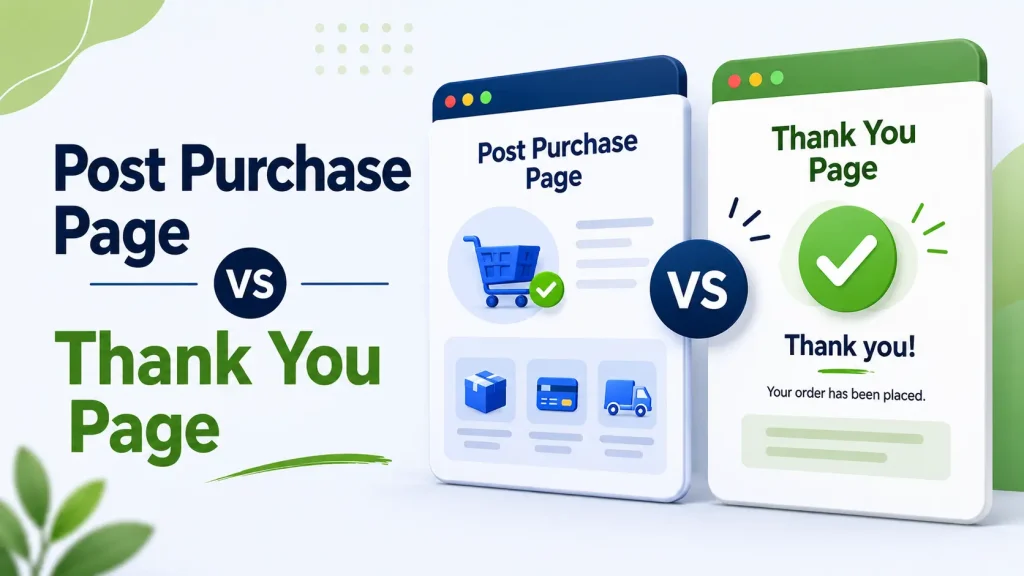
Short answer: the Shopify post-purchase page is an optional offer screen that appears after the customer pays and before the order confirmation. One checkout app runs it, and an accepted offer is added to the order just paid for, with no card re-entry. The thank you page is the order confirmation that follows, shown once.
Shopify skips the post-purchase page for wallet and installment payments (Apple Pay, Google Pay, Amazon Pay, Klarna, Affirm, Afterpay), gift cards and other non-card payments, so a store that wants an offer in front of every buyer runs both. Shop Pay checkouts are not on that skip list. Every later visit to the confirmation shows the separate order status page.
Most merchants who ask us about "thank you page upsells" actually mean one of these two pages, and they work differently. Here is one store's post-purchase funnel, as shown in its Oxify dashboard for March 31 to April 30, 2026:
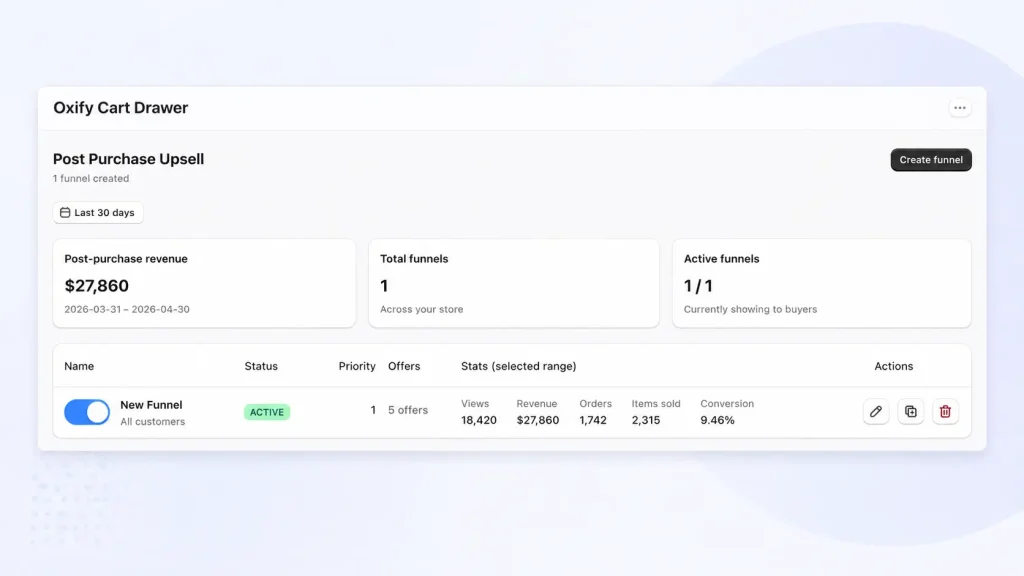
That funnel (five offers, upsells plus downsells) was shown 18,420 times in the window and accepted on 1,742 orders, which is the 9.46% conversion rate on the card. It is one store and one month, not a benchmark, but it shows the mechanism this guide is about: the post-purchase page and the thank you page are not the same thing, and they do different jobs.
Key facts (re-checked against Shopify's docs on 11 October 2026)
- Order of pages: Pay → post-purchase page (optional, one app) → thank you page (shown once) → order status page (every revisit).
- Post-purchase page limits: only one app can occupy it, a customer can accept at most three offers per checkout, the order must be $0.50 or more, and it only runs on the Online Store channel (shopify.dev). It is available on all plans except Shopify Starter, and Shopify still labels post-purchase checkout extensions "beta" (plan availability).
- Who never sees it: buyers paying with an installment or wallet service (Shopify's examples: Klarna, Affirm, Afterpay, Apple Pay, Amazon Pay, Google Pay), a gift card or any non-credit-card method, plus local-delivery orders and orders with duties and multiple currencies. Shop Pay is not on the skip list; Shopify does not name Shop Pay Installments, so test it.
- Thank you page: edited in the checkout and accounts editor on all plans except Shopify Starter. The order is not yet created when a thank you page extension renders, and extensions there cannot change it directly, so app blocks can show content and offers but cannot edit the order (shopify.dev).
- 2026 change (now done): August 26, 2026 was the non-Plus deadline to upgrade the thank you and order status pages; stores that had not upgraded were upgraded automatically, and Additional scripts have been view-only since August 28, 2025 (Shopify Help Center).
Why Most Shopify Owners Confuse These Two Pages
I run a Shopify app company (Oxify) and talk to dozens of merchants every week. The same question keeps coming up:
"I already have a thank you page upsell. Why do I need a Shopify post purchase page too?"
The answer is simple: they show at different moments, work with different payment methods, and unlock different kinds of revenue.
Skip one and a slice of your buyers never sees an offer at all. This guide breaks down the difference in plain English, lists the limits Shopify publishes for each page, and gives you a simple plan to set up both. If you only want the editing steps for the confirmation screen, our guide on how to find and edit the Shopify thank you page covers them.
The Checkout Flow: Where Each Page Actually Lives
Here's the full path a Shopify shopper takes:
- They open your cart drawer and review their items.
- They go to checkout and enter shipping + payment info.
- They hit "Pay Now."
- ⚡ The post-purchase page loads (if an app is selected for it and the payment method qualifies). They see an offer. One click to add or skip.
- ✅ The thank you page loads. Order confirmed. Shopify also calls it the order confirmation page.
- 📦 Later, from the confirmation email, SMS, Shop app or their account, they land on the order status page to check tracking. Same order, different page, edited separately.
If your store skips step 4, your customer goes from "Pay Now" straight to "Thanks!" and the one moment when adding an item needs no card re-entry is gone.
What Is a Shopify Post Purchase Page?
A Shopify post-purchase page is an offer screen that appears the moment after the customer pays, before the order confirmation. Shopify's own wording: it shows after payment "but before they're presented with their order confirmation page."
Their card has been authorized and their address is saved, so accepting the offer is one click: no second checkout, no re-typing. Shopify's developer docs describe these as order-modifying offers that add products to the customer's initial order, so an app built on the post-purchase extension adds to the order just paid for rather than creating a second one.
How to turn on the Shopify post-purchase page
There is no native post-purchase offer; you need a checkout app that includes a post-purchase extension. Install one, build the offer inside the app, then go to Settings → Checkout → Post-purchase page and select that app. Only one app can occupy the slot, so if you install a second post-purchase app, you have to choose which one runs (Shopify Help Center). Our roundup of post-purchase upsell apps compares the options, and how one-click post-purchase upsells work covers the mechanics.
What conversion rate to expect
You will see "3 to 8%" and "10 to 15%" quoted everywhere; we could not trace either to a published dataset, so we do not repeat them. Two numbers we can point to. Growth Suite, a vendor that sells upsell software, reports a 6% acceptance rate for post-purchase offers, from about 1 million impressions on 200 stores within a larger January to June 2026 dataset of 66 million impressions on 250 stores (Growth Suite; vendor data, and its definition of acceptance may not match the dashboard above). And the store above: 9.46% of funnel views converted over 30 days with a five-offer upsell and downsell sequence. Treat your own first 100 orders as the baseline and test from there. We found no verifiable published figure for thank you page offers, so we do not claim they convert higher or lower; what we can say is that the mechanics differ, as the comparison table below shows.
What the buyer sees on the post-purchase page
Shopify's UX guidelines for post-purchase offers fix most of this page, and a merchant cannot edit the parts below (shopify.dev, read on 11 October 2026):
- Header: confirms payment of the initial order and carries a View order confirmation button, so a buyer can skip every offer and go straight to the confirmation. The order is already paid either way.
- Accept button: labelled "Pay now" plus the product total (or "Add now" for a free item), and it charges the saved payment method immediately. Merchants cannot change the button text.
- Decline button: sits under the accept button, less prominent but still easy to see, and reads "Decline upsell offer".
- Product and price: the title and price must match your store, with the original price struck out when the offer is discounted, and a price breakdown (subtotal, shipping, taxes) sits under the variant and quantity pickers.
- Footer: links to your privacy policy, terms of service and refund policy. Shopify also tells apps to show at most three consecutive offers.
Offers that suit a one-click format: a bigger size or refill of what they just bought, a matching accessory, a discounted bundle, a subscription upgrade, or a cheaper downsell if they decline the first offer.
One Critical Limitation Most Guides Skip
Shopify's post-purchase page does not appear for every order. Per Shopify's developer docs (read on 11 October 2026), it is skipped when:
- The customer checks out with an installment service or a wallet service. Shopify's examples are Klarna, Affirm, Afterpay, Apple Pay, Amazon Pay and Google Pay
- The initial purchase used a gift card or any payment method other than a credit card (PayPal falls here)
- The order is for local delivery, is under $0.50, has duties and multiple currencies, or was not placed through the Online Store sales channel
- The payment provider retains the card's CVN/CVV, which is not supported (the docs name Braintree, Payflow Pro, PayPal Payments Pro and Eway as examples)
- Shopify briefly delays creating the order under extreme load, such as a flash sale
Shop Pay is not on that list, and the docs describe a Shop Pay-specific storage limitation for the page, so Shop Pay buyers can get it; many guides wrongly list it as blocked. The docs do not name Shop Pay Installments: it is an installment service, so assume it is skipped and test it with a real order. What share of your orders is excluded depends entirely on your payment mix, so check it in your Shopify finance reports (payments broken down by gateway) for the last 30 days. Our breakdown of which payment methods support post-purchase upsells goes gateway by gateway.
That is why stores with a lot of wallet, PayPal or multi-currency traffic set up both a post-purchase offer and a thank you page offer: the second catches the buyers the first can never reach.
What the post-purchase flow changes in your orders and reporting
- Fulfillment hold: Shopify places a hold on fulfillment for every order in a post-purchase flow. It is released when the customer visits the order status page, or one hour after checkout if they never finish the flow. If a 3PL or auto-fulfillment rule picks orders the moment they are paid, expect up to an hour's delay on these orders.
- Analytics: third-party analytics that use Shopify's Pixel API (Google Analytics, Facebook, Pinterest and Snap are Shopify's examples) report only the purchase event and value of the initial purchase, so an accepted post-purchase offer will not show in their revenue. Compare the app's dashboard with your analytics before trusting either.
- One page: a store gets a single post-purchase page, but the extension is a single-page app, so an app can paginate it into several steps. That is how an upsell and downsell funnel fits into one page.
Example: One Store's Post-Purchase Funnel, 30 Days
Here is the funnel from the dashboard screenshot at the top, in more detail. The store is a direct-to-consumer skincare brand; it had a thank you page offer running already and added a post-purchase funnel in Oxify.
The funnel structure (five offers):
- Upsell 1: A complementary skincare bundle at 15% off
- Downsell 1 (if they declined): A travel-size version at a lower price
- Upsell 2 (if Upsell 1 accepted): A subscription option for repeat delivery
- Downsell 2: A one-time add-on like a face cloth
The payment was already authorized, so each accepted offer was added to the original order with a single click. Shopify caps a checkout at three accepted post-purchase offers, so the sequence branches: on any path through the builder layout shown further down, a buyer sees three offers at most. (The fifth offer in that layout, Upsell 3, follows an accepted Upsell 2.)
What the dashboard showed (March 31 to April 30, 2026)
| Metric | Result |
|---|---|
| Post-purchase revenue | $27,860 |
| Funnel views | 18,420 |
| Orders with an offer accepted | 1,742 |
| Items sold via the funnel | 2,315 |
| Conversion (orders ÷ views) | 9.46% |
What to take from it (and what not to)
- Downsells catch the "no" votes. A buyer who declines the bundle sees a smaller, cheaper version instead of leaving the funnel.
- Relevance was the design rule. The first offer was a set built around what the customer had just bought, at a real discount. We have not split these results by offer, so this shows the design, not which offer earned the most.
- Items per accepted order were above one. 2,315 items on 1,742 orders is about 1.33 per order. The dashboard does not say whether that comes from multi-item bundles or from buyers accepting more than one offer.
- It is attributed revenue, not proven lift. The dashboard counts what buyers accepted on the post-purchase page. It does not tell you how many of those buyers would have bought the item later anyway, so do not multiply it by twelve and call it incremental. Compare AOV and 60-day repeat rate before and after if you want the honest number.
What Is the Shopify Thank You Page?
The thank you page is the order confirmation screen at the end of checkout: order number, items, totals and delivery details. A customer sees it once. Shopify's developer docs say that if a customer returns to it or checks their order later, "they're shown the Order status page instead" (shopify.dev).
So there are really two post-checkout pages to plan for, and the checkout and accounts editor lists them separately:
- Thank you page: one view, peak attention. Best for one-time asks: a survey, a next-order code, a referral prompt, a fallback offer.
- Order status page: revisited from the confirmation email, SMS, Shop app or account while the parcel is in transit. Best for tracking, delivery estimates and support. Full walkthrough in our Shopify order status page guide.
What a thank you page extension can and cannot do
Shopify's developer docs (read on 11 October 2026) are specific about the limits of thank you page extensions:
- The order is not yet created when a thank you page extension displays, but the order id is available, so an app can fetch the order's details once creation completes.
- Extensions there cannot call APIs that directly mutate an order. For offers that change the order being created, Shopify points developers to the post-purchase extension.
- Shopify's listed examples for the thank you page are survey requests, social sharing and download links. Its example of an upsell added "through order editing" is listed for the order status page only.
So a thank you page offer is an app block that can show a product, a code or a link. How an accepted item then reaches the order (a new checkout, a cart add or an order edit made by the app's own server, for example) depends on the app, and none of it is the one-click add to the paid order that a post-purchase offer gives you.
What a Modern Thank You Page Should Do
The basics (do these first, always):
- ✅ Confirm the order at the top in plain language
- 📦 Show the order number, items, address, and expected delivery
- 🔍 Give a clear tracking link
- 💬 Show your support contact in case anything goes wrong
The smart additions (this is where money is made):
- 📱 SMS opt-in for shipping updates (turns one sale into a future channel)
- ⭐ Referral program ("Give $20, Get $20")
- 📝 "How did you hear about us?" survey (kills attribution problems)
- 🎥 Welcome video from your founder
- 🛒 Soft cross-sell with a discount code for next order
- 🎁 Loyalty program signup
For 20 concrete ideas sorted by page and goal, see Shopify thank you page ideas.
What NOT to Put on Your Thank You Page
- ❌ A wall of policy text (link the returns page on the order status page instead, where people look for it)
- ❌ Aggressive upsells with hard sells (feels pushy)
- ❌ Redirects or auto-opening pop-ups
- ❌ Too many widgets stacked together; two or three asks is plenty
Post Purchase Upsell vs Thank You Page Upsell: The Real Difference
This is the question most merchants ask, so let's settle it:
| Factor | Post Purchase Upsell | Thank You Page Upsell |
|---|---|---|
| Where it shows | Between payment & the thank you page | On the confirmation page; the order is not yet created (its id is available) |
| One-click add to the paid order? | ✅ Yes (no card re-entry) | ❌ No (the extension cannot change the order; how an item is added depends on the app) |
| Published benchmark | 6% acceptance (Growth Suite, vendor data, Jan to Jun 2026) | None we could verify |
| Wallets, installments, PayPal, gift cards? | ❌ Not shown | ✅ Shows for every order |
| How many apps? | One app only (selected in Settings → Checkout) | Several app blocks can share the page |
| Risk to original order | None (already paid) | None |
| Best offer type | One-click bundles, upgrades, subscriptions | Discount codes, soft cross-sells, referrals, surveys |
| Plan needed | All plans except Shopify Starter (beta) | All plans except Shopify Starter |
The takeaway: A post purchase upsell is the only one of the two that adds to the paid order in one click. A thank you page upsell reaches the customers a post purchase upsell can't. If you want an offer in front of every buyer, you need both.
Do You Need Both Pages? How to Work It Out for Your Store
Instead of borrowed benchmarks, use your own numbers. You need three inputs: monthly orders, the share of orders paid with a wallet, installment plan, PayPal or gift card, or placed as local-delivery or multi-currency orders with duties (your "excluded" share), and your offer price.
- Post-purchase revenue ≈ orders × (1 − excluded share) × your post-purchase conversion × offer price
- Thank you page fallback revenue ≈ orders × excluded share × your thank you page conversion × offer price
Worked example with made-up inputs, only to show the arithmetic: 1,000 orders, 30% excluded, a $30 offer, 5% post-purchase conversion and 2% on the thank you page. That is 700 × 5% × $30 = $1,050 from the post-purchase page, plus 300 × 2% × $30 = $180 from the fallback. The bigger your excluded share, the more the thank you page offer matters. Swap in your real conversion rates after two to four weeks of data.
The Two Jobs You Cannot Mix
Here's the deeper reason both pages matter, and why you can't just pick one:
The post purchase page does one job: maximize revenue from each transaction. The customer has just paid and their card is vaulted, so one click completes the add. Asking them anything other than "do you want to add one more thing?" is a wasted moment.
The thank you page does a different job: turn this transaction into many future transactions. The customer is no longer buying — they're confirming. They want reassurance, tracking, and a reason to come back. Trying to hard-sell here breaks trust.
If you mix the two jobs (heavy upsell on thank you page, branding fluff on post purchase page), both fail.
What Changed on August 26, 2026 (and What to Check Now)
"August 26, 2026 was the deadline to upgrade and replace your Thank you and Order status pages," and "stores that weren't upgraded by that date were upgraded automatically" (Shopify Help Center). Plus stores went through the same change a year earlier, on August 28, 2025. Shopify's developer docs give the component dates: checkout.liquid and Additional scripts were sunset for these pages on August 28, 2025, and script tags were sunset on August 28, 2025 for Plus stores and on August 26, 2026 for non-Plus stores (shopify.dev, checked 11 October 2026).
If your thank you page was ever customized with:
- Additional scripts (view-only since August 28, 2025)
checkout.liquid(Plus only)- Script-tag apps that never moved to checkout UI extensions
…those customizations were sunset, so they have to be rebuilt as app blocks and web pixels. Advice you still find online to "paste the code into Additional scripts" no longer works on any plan.
The post-upgrade check (10 minutes)
- Place a test order and confirm your conversion tracking still fires. Tracking now runs as web pixels under Settings → Customer events (an app's own pixel, or a custom pixel subscribed to
checkout_completed). - Open Settings → Checkout → Edit, switch the page selector to Thank you, then Order status, and confirm the app blocks you expect are there.
- Check Settings → Checkout → Post-purchase page: the app you want is selected.
- Compare last month's attributed upsell revenue with the month before; a sudden zero usually means a block or pixel was dropped in the upgrade.
Our Shopify thank you page guide has the full editing steps and the timeline of what Shopify removed.
How Oxify Covers Both Pages (In One App)
Disclosure: Oxify is our app. Many stores end up with separate apps for cart upsells, post-purchase offers and thank you page widgets, which means several sets of product rules and several dashboards that disagree about which app earned an order.
Oxify Cart Drawer & Upsell lists "Post purchase & thank you page upsell" on each of its four published plan cards on its App Store listing (checked 11 October 2026), so one install covers the cart, the post-purchase page and the thank you page. Who should look elsewhere: stores on Shopify Starter, where Shopify does not offer post-purchase extensions, and stores that only want a post-purchase page and already like their cart drawer. A specialist app is a fine choice there; the best Shopify thank you page apps roundup compares them.
The Funnel Structure in Oxify's Builder
Here's the branching layout in Oxify's funnel builder. This screenshot is of a funnel with no traffic yet, so every stat reads 0; the example store's dashboard also lists five offers:
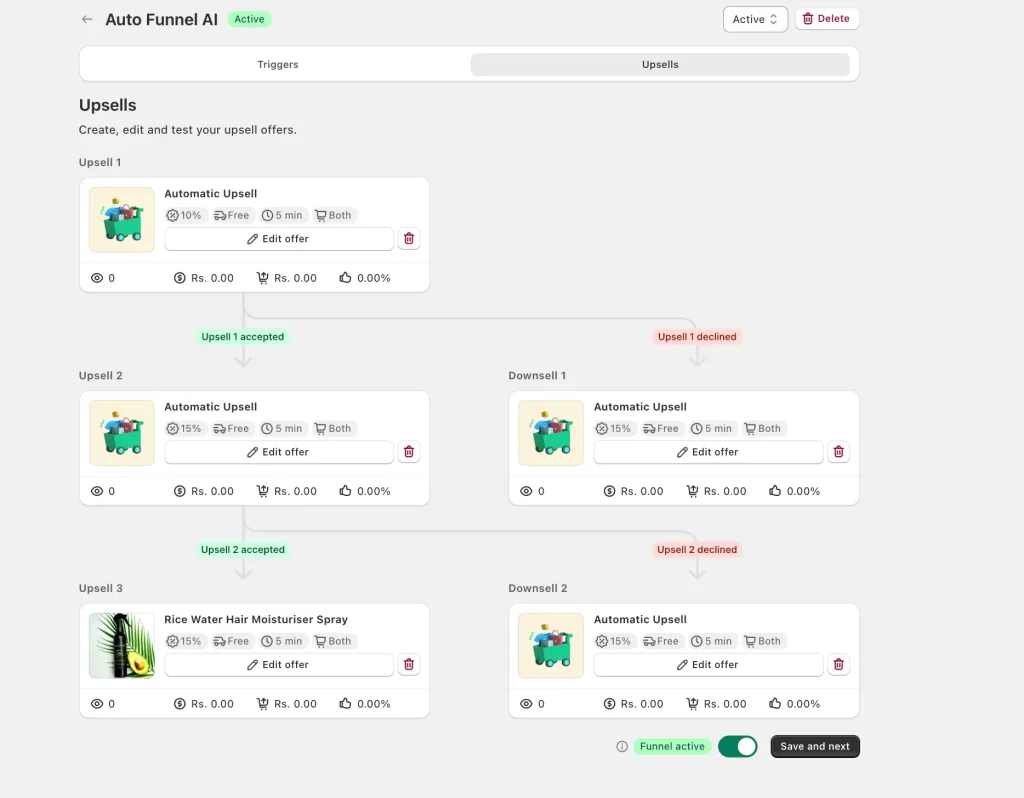
This is how the branching works:
- Upsell 1 shows after the customer pays
- If they accept → they see Upsell 2 (a related upgrade)
- If they decline → they see Downsell 1 (a cheaper or smaller offer)
- The funnel keeps going to Upsell 3 / Downsell 2, so each response leads to a next step
With a multi-step funnel, a customer who says "no" to the first offer still sees a second, smaller one. Remember Shopify's cap: at most three accepted offers per checkout. For a deeper build guide see the post-purchase upsell and downsell funnel.
What Oxify Does in the Cart (Before Checkout)
- 🛒 Slide cart drawer with cart upsells
- 🎁 Free gifts when carts cross a value threshold
- 🚚 Free shipping bar progress nudges
- 💸 Volume discounts and BOGO offers
- 🤖 Product recommendations and Frequently Bought Together
- ⏰ Countdown timer for urgency
- ✅ Trust badges to boost confidence
What Oxify Does on the Post Purchase Page
- One-click upsells with zero re-entry of payment info
- Multi-step upsell + downsell funnels (see screenshot above)
- Product matching based on what was just bought
- Clear Accept / Decline buttons (no dark patterns)
- Runs on Shopify's post-purchase checkout extension, so it works after the 2026 upgrade
What Oxify Does on the Thank You Page
- A thank you page upsell block that shows for every payment method, including the wallet, installment and PayPal orders the post-purchase page skips
- Cross-sell offers for the next order
- Added as an app block in the checkout and accounts editor; no scripts
Why Stores Consolidate to One Full-Funnel App
- 💰 One subscription instead of several
- 🛠️ One set of product rules and one support team
- 📊 One dashboard for cart, post-purchase and thank you page revenue, so orders are not double-counted by two apps
📌 See Oxify Cart Drawer & Upsell on the Shopify App Store: 4.9 rating from 40 reviews, Built for Shopify badge (checked 11 October 2026).
The 5 Biggest Mistakes Shopify Stores Make
The same problems keep showing up when we look at merchants' setups:
- No post-purchase page at all. No app is selected under Settings → Checkout → Post-purchase page, so the one-click moment is never used.
- Single offer with no downsell. If they say no, you're done. A branching funnel gives a second, smaller offer.
- Same offer for every customer. A $200 jacket buyer should never see the same upsell as a $15 phone case buyer.
- Thank you page left as a bare order summary. It is seen by every buyer, including the ones the post-purchase page skips.
- Not re-checking after the August 2026 auto-upgrade. Old scripts were sunset; if tracking or an offer vanished, nothing on the storefront tells you.
Step-by-Step Setup Plan (Do This in Order)
Step 1: Audit Your Current Flow
Place a test order on your store. Check:
- Does a post purchase page show? Or does it skip straight to thank you?
- Is your thank you page just an order summary?
- What happens if you pay with Apple Pay or PayPal?
- Does the thank you page switch to the order status page when you refresh it? (Shopify's developer docs say adding
?prevent_order_redirect=trueto the URL keeps you on the thank you page through a refresh.)
Step 2: Confirm the 2026 Upgrade Didn't Break Anything
Every store is on the new thank you and order status pages now. Run the 10-minute post-upgrade check above: pixels firing, app blocks present, the right app selected for the post-purchase page.
Step 3: Build a Multi-Step Post Purchase Funnel (Not Just One Offer)
Use the same branching structure as the builder layout above, and keep every path inside Shopify's cap of three accepted offers:
- Upsell 1: A discounted bundle of what they just bought
- Downsell 1 (if Upsell 1 is declined): A smaller, cheaper version
- Upsell 2 (if Upsell 1 is accepted): A complementary item or subscription
- Upsell 3 / Downsell 2 (after Upsell 2): A further add-on if accepted, a cheaper one-time item if declined
Step 4: Upgrade Your Thank You Page
Add elements in this priority order (pick two or three, not all five):
- A fallback offer block for the orders the post-purchase page skips
- "How did you hear about us?" one-question survey
- Referral program widget
- Next-order discount code with an expiry
- SMS opt-in for shipping updates
Put tracking, the delivery estimate and support contact on the order status page instead, since that is the page customers come back to.
Step 5: Track These KPIs Every Week
For your post purchase page:
- Take rate per step in the funnel (Upsell 1, Downsell 1, etc.)
- Revenue per upsell offer
- AOV (compare to last month)
For your thank you page:
- SMS opt-in rate
- Referral clicks
- Survey completion %
- 30-day repeat purchase rate
Step 6: A/B Test One Thing per Month
Don't change everything at once. Test:
- Month 1: post purchase Upsell 1 (Product A vs Product B)
- Month 2: discount type (% off vs $ off)
- Month 3: thank you page widget order
Frequently Asked Questions
What is a Shopify post purchase page?
What is the difference between a post purchase upsell and a thank you page upsell?
Are the post purchase page and thank you page the same thing, and can I have both?
Does the Shopify post-purchase page work with Shop Pay?
Why doesn't my post purchase page show for some customers?
How do I turn on the post-purchase page in Shopify?
Do thank-you page offers work after checkout?
How do I find the thank you page in Shopify, and how can I view it?
?prevent_order_redirect=true, as Shopify's developer docs describe. Full steps are in our thank you page guide.Do I need different apps for the post purchase page and the thank you page?
What changed for thank you pages in 2026?
checkout.liquid and Additional scripts were sunset for these pages on August 28, 2025, and script tags on August 26, 2026 for non-Plus stores. Tracking now runs as web pixels under Settings → Customer events and visible content as app blocks.How many post purchase offers should I show?
How much extra revenue can a post purchase page realistically add?
Final Word: Stop Treating These as One Page
Here's the simple truth:
- Post purchase page = where you make extra money (today)
- Thank you page = where you make extra customers (long term)
If you only optimize one, part of your buyers never sees an offer. If you set up both, and re-check them after Shopify's August 2026 upgrade, every order gets exactly one well-placed ask: a one-click offer for card payers, a fallback offer for everyone else, and a clean order status page for the weeks after.
You don't need a developer for any of it. Both pages are configured with apps and the checkout editor, no code.
Get Started With Oxify
If you want one app that handles your cart drawer, post-purchase upsell funnels and thank you page offers, try Oxify Cart Drawer & Upsell.
- ⭐ 4.9 rating from 40 reviews (Shopify App Store, October 11, 2026)
- ✅ Built for Shopify badge
- 🎁 14-day free trial, plans from $9.99/month by order volume
- ⚡ Runs on checkout extensions, so it works on the upgraded 2026 pages
- 🔁 Multi-step upsell and downsell funnels built in
Your checkout works hard. Make every page after it work harder too.