 Oxify
OxifyPost-Purchase Upsell vs Downsell Funnel: Shopify Guide
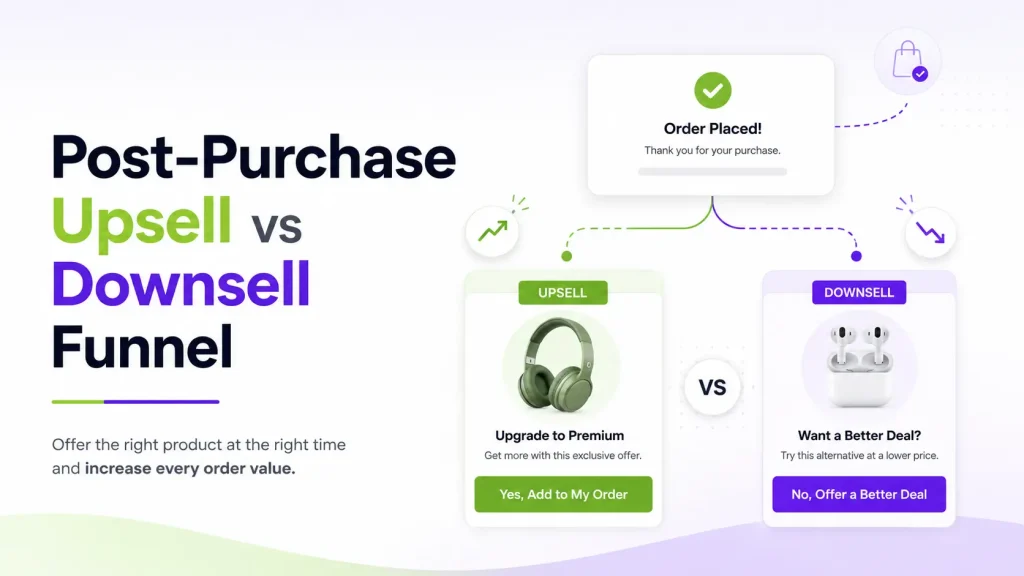
Quick answer: In a post-purchase upsell vs downsell funnel, an upsell asks the buyer to add or upgrade, and a downsell is a smaller, cheaper offer shown only if they decline the upsell. Both appear after payment and before the thank-you page: the upsell grows the order and the downsell rescues a sale you almost missed.
The order is already paid, so nothing you show now can interrupt the payment. That makes the post-purchase page the safest place on a Shopify store to test an extra offer, and it is why the order of offers (upsell first, downsell second) matters.
This guide covers how the funnel branches, how to build one, and what Shopify's own rules allow. We read Shopify's post-purchase rules and the apps' App Store listings on 11 October 2026, so the limits and prices below are dated.
Key takeaways
- A post-purchase offer appears after payment, so it cannot get in the way of the original checkout.
- An upsell asks for more money. A downsell asks for less. You want both.
- Show the upsell first. If the buyer says no, show one downsell, then send them to the thank-you page.
- A funnel is not one offer. It branches based on whether the buyer accepts or declines.
- Keep every offer tied to what they just bought. Relevance is the biggest driver of a yes.
- Shopify shows the post-purchase page for card payments only. Wallets (Apple Pay, Google Pay, Amazon Pay), installments, gift-card and other non-card payments skip it, so use a thank-you page offer for those buyers.
- A buyer can accept at most three post-purchase offers per checkout, and only one app can run the post-purchase page.
- On the live listings we checked on 11 October 2026, entry plans ran from free (ReConvert, up to 50 orders) to $9.99 a month, and rise with order volume or upsell revenue.
What is a post-purchase funnel?
A post-purchase funnel is a short set of offers a buyer sees after they pay but before they reach the thank-you page.
The flow looks like this:
- The customer checks out and pays. The first sale is locked in.
- An offer page appears with one product.
- They accept or decline in one tap.
- If they decline, a smaller offer can appear.
- They land on the thank-you page.
Here is why this timing is the safe one. Shopify shows the post-purchase page after the order is confirmed and before the thank-you page, so the offer cannot interrupt the payment. An offer shown before payment, like an order bump at the payment step, sits between the buyer and the pay button. On Shopify, those checkout-step offers need Shopify Plus, while post-purchase offers work on every plan except Starter (Shopify's checkout technologies page, read 11 October 2026).
Want the deeper split on where these offers live? Read our guide on the post-purchase page vs the thank-you page.
What is a one-click upsell?
A one-click upsell is an offer that lets the buyer add a product to their order with a single tap. No second checkout. No re-entering a card. Because payment is already on file, they just tap "Yes, add it" and the item joins their order.
An upsell aims a little higher than what they just bought.
Quick note on wording. People often say "upsell" to mean any post-purchase offer. To be exact:
- An upsell is more or better of what they bought (a bigger size, an upgrade, a second unit, a subscription).
- A cross-sell is a different but related product (an add-on or accessory).
Both work after checkout, and both count as post-purchase offers. This guide uses "upsell" in the everyday way to cover the main offer.
Good upsell (and cross-sell) examples:
- Buy the bigger size. They bought the 8oz bottle. Offer the 16oz at a small saving.
- Grab a second one. They bought one candle. Offer a second at 15% off.
- Upgrade to a subscription. They bought a one-time order. Offer the same product monthly at a lower price.
- Add a matching item. They bought a phone case. Offer the screen protector.
Want the full playbook on this offer type? See our post on the one-click post-purchase upsell.
What is a downsell?
A downsell is the offer you show when the buyer says no to the upsell.
Instead of giving up, you make a smaller ask. The downsell is easier to accept because it costs less, asks for less, or feels lower risk.
Good downsell examples:
- Drop the quantity. The upsell was a 3-pack. The downsell is a single unit.
- Shrink the commitment. The upsell was a yearly plan. The downsell is one month.
- Swap in a cheaper add-on. The upsell was a $40 premium item. The downsell is a $12 accessory.
- Add a sweetener. Same product, but now with free shipping or a small gift.
The key idea: a "no" is not the end. It usually means the price or the ask was too big. The downsell answers that with something lighter.
Upsell vs downsell: the real difference
The two offers do different jobs, and you need both to catch the full range of buyers.
| One-Click Upsell | Downsell | |
|---|---|---|
| When it shows | First, right after checkout | Only after the buyer declines the upsell |
| The ask | Spend a bit more | Spend a bit less |
| Goal | Grow the order value | Save the sale you almost lost |
| Best for | Buyers ready to add more | Buyers who hesitated on price |
| Typical offer | Bigger size, bundle, upgrade | Single unit, lower tier, cheaper add-on |
| Feeling it uses | Momentum ("while I am here") | Relief ("that is more my speed") |
Think of it like a good salesperson. First they suggest the premium option. If you pass, they do not walk away. They point to something that fits your budget. You often say yes to that one.
What a real upsell and downsell funnel looks like
A funnel is not one offer. It branches based on what the buyer does. Here is a simple flow you can copy:
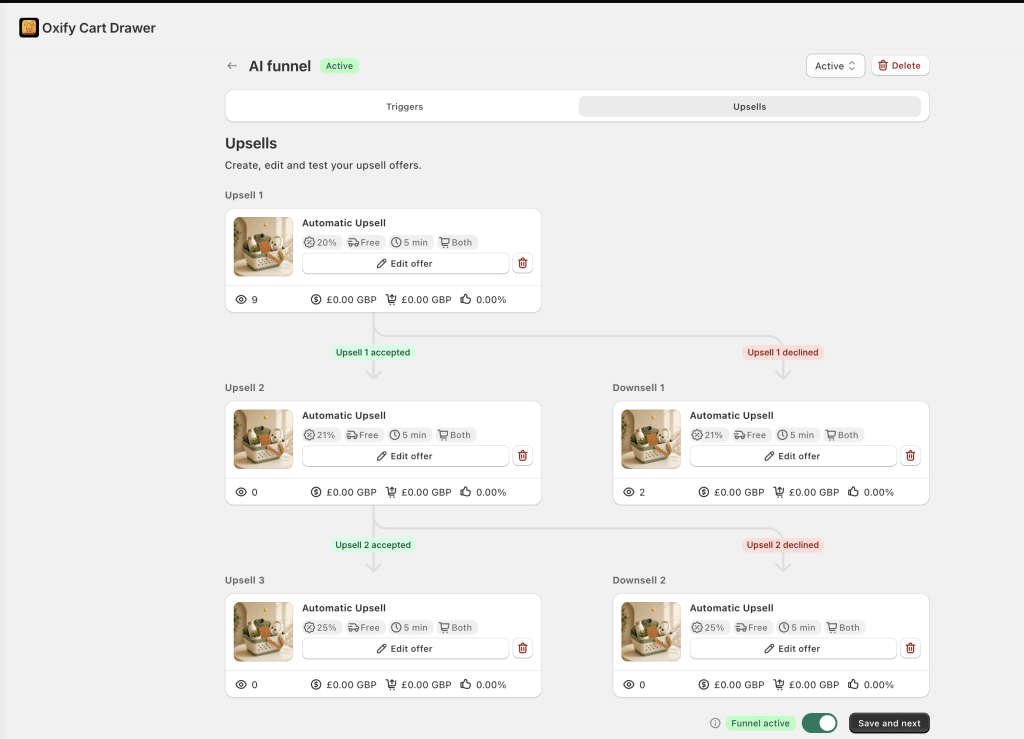
- Upsell 1 shows first. If the buyer accepts, they see Upsell 2. If they accept that, they can see Upsell 3. Each step can add a little more to the order.
- If the buyer declines Upsell 1, they see Downsell 1 instead, which is smaller and cheaper.
- If they decline again later, a second downsell can still catch them.
- Either way, they finish on the thank-you page.
That accept-or-decline branching is what turns a single offer into a real funnel. You do not build it by hand: Oxify Cart Drawer & Upsells (our app) lets you set automatic upsell and downsell steps, each with its own discount and timer, and moves the buyer down the right path on its own. The other apps in the table below do the same, with no code.
Shopify puts a ceiling on the funnel: a buyer can accept at most three post-purchase offers per checkout, and the post-purchase page is a single page that an app splits into steps. Plan Upsell 2 and Upsell 3 with that in mind. An app can set a lower cap of its own, so check its help page.
Why do downsells work?
The first price makes the second look small. This is called anchoring. After the buyer sees a $40 offer, a $12 offer feels like a bargain. That same $12 offer, shown cold, might not land at all.
A smaller ask is a smaller risk. Less money or commitment on the line makes the tap easy, even for a careful shopper. It also draws on a mild form of loss aversion: the buyer already pictured a deal, and the downsell lets them keep part of it.
Put simply: the upsell captures buyers who are ready. The downsell captures buyers who almost said yes. Skip the downsell and you throw that second group away.
When to use an upsell vs a downsell
You do not have to guess. Use this simple map.
| If the buyer... | Show this |
|---|---|
| Placed a healthy order and seems keen | An upsell (bigger size, upgrade, or add a second) |
| Bought a single or starter item | An upsell to the bundle or multi-pack |
| Just said no to your upsell | One downsell (cheaper unit, lower tier, small add-on) |
| Paid with COD, Buy Now Pay Later, a gift card, or a wallet such as Apple Pay or Google Pay | A thank-you page offer instead of a one-click offer |
More on that last row in the limits section below. It trips up a lot of stores.
How to build your post-purchase funnel (4 steps)
You do not need a huge system to start. A strong funnel is just one upsell and one downsell, aimed at the right buyer. Here is the framework.
Step 1: Set the trigger
The trigger decides who sees the offer and what they see. Start with your best-selling product or category. Go where the volume is.
Three simple trigger types:
- By product: "If the order has Running Shoes, show Performance Socks." This is the most relevant trigger. Start here.
- By cart value: "If the order is over $50, show the premium bundle." Bigger spenders often accept bigger offers.
- By item count: "If the order has 3 or more items, show the bundle add-on." Multi-item buyers are already in a buying mood.
The golden rule: match the offer to what they bought. Relevance beats everything.
Step 2: Choose the upsell
Pick one product that fits the item they just bought. Aim a little higher in price, but keep it fair. A good rule of thumb is to keep the upsell at or below the value of the order they placed. A huge jump feels pushy.
A small discount helps. Something like 10% to 15% off is a common starting point — our breakdown of 10% vs 20% vs free shipping shows exactly when to go deeper.
Lead with the win for the buyer, not for you. "Add the matching serum and save 20%" beats "Buy more." Make the "yes" button stand out and keep the decline as a plain link. For help writing the offer itself, see how to write post-purchase upsell offers that convert.
Step 3: Add the downsell
This is the step most stores skip. Do not.
When the buyer taps "No thanks" on the upsell, show one smaller offer. Make it clearly easier:
- A single unit instead of a pack.
- A cheaper product in the same family, often around half the upsell price.
- The same offer with a sweetener, like free shipping.
Keep it to one downsell. A wall of offers wears people out and lowers your yes rate.
Step 4: Send them to the thank-you page
After they accept or decline, they land on the thank-you page. You can keep selling here too, gently, with a recommended product or a discount for next time. Learn more in our guide to the Shopify thank-you page upsell.
What makes a good downsell offer
The downsell is not just a cheaper copy of the upsell. It has its own rules.
- Make it feel different. Change the size, the quantity, or the product so it reads as a fresh choice.
- Lower the risk. Less money, less commitment, or a money-back angle.
- Give real value. A tiny discount on a tiny item is not worth the screen.
- Match the reason they said no. If price scared them, cut the price. If commitment scared them, shrink it.
- Keep it fast. Still one tap. Still no re-entering payment.
The one-click catch: when Shopify will not show the offer
One-click offers work by charging the card the buyer just used, so Shopify renders the post-purchase page only when an order meets its rules. We read Shopify's post-purchase limitations table on shopify.dev on 11 October 2026. Miss these rules and you can build a good funnel that many of your buyers never see.
Shopify does not show the post-purchase page when:
- The buyer paid with a wallet or an installment service. Shopify names Klarna, Affirm, Afterpay, Apple Pay, Amazon Pay, and Google Pay.
- The order was paid with a gift card, or with any method other than a credit card. That rules out Cash on Delivery. PayPal is not a credit card either, and app vendors describe PayPal workarounds with strict conditions, so test it with a real PayPal order before you rely on it.
- The payment provider needs the buyer's CVV kept on file, such as Braintree, Payflow Pro, PayPal Payments Pro, or Eway.
- The order has duties and multiple currencies, or is for local delivery.
- The order total is under $0.50.
- The order was not placed through the Online Store sales channel.
- Shopify is under extreme load, such as a flash sale, and briefly delays order creation.
Card payments, including Shop Pay checkouts, are the supported route.
Rules that shape the funnel itself:
- A buyer can accept at most three post-purchase offers per checkout.
- There is one post-purchase page. An app can split it into several steps.
- Only one app can run post-purchase offers. If you have two installed, you choose which one in your Shopify admin checkout settings.
- On orders with no shipping address (digital-only or local pickup), a subscription cannot be added through post-purchase.
- You do not need Shopify Plus. Post-purchase extensions are available on every plan except Starter, and Shopify still labels them beta.
What it does to your order and your data. Shopify holds fulfillment on an order while the buyer is in the post-purchase flow. The hold lifts when they reach the order status page, or one hour after checkout if they close the page. Pixel-based analytics such as Google Analytics, Facebook, Pinterest, and Snap report only the first purchase and its value, so accepted offers will not show up there. Read them in your upsell app's own report.
Do wallets and installments affect who sees the post-purchase page? Yes. Shopify's exclusion list names Apple Pay, Google Pay, Amazon Pay, Klarna, Affirm and Afterpay (it does not name Shop Pay), so some buyers may never reach the post-purchase page, whichever app you pick. Post-purchase pages run inside checkout, where you cannot see them from the storefront. Export a month of your orders and count them by payment method before you size your funnel.
The fix: use a thank-you page offer. It shows on the thank-you page, so it still reaches buyers who paid by wallet, installments, or COD. If your store gets a lot of those orders, this is how you still lift revenue. Our guide on post-purchase upsell payment methods breaks down every case.
Best apps for one-click upsell and downsell funnels
Two rules decide the shortlist: the app runs one-click upsell and downsell flows, and the plans most stores need cost under $200 a month. Five apps fit.
On 11 October 2026 we read each live App Store listing for its rating, review count, Built for Shopify badge, and pricing. The table gives each entry price at a stated order volume so the plans compare like for like. Plans scale with order volume or upsell revenue, so a very high-volume store may pay more. Zipify's price, for example, steps up with upsell revenue to $149 a month above $2,500 and is capped at $999. Check the listing before you install.
| App | Rating (reviews) | Entry price (checked 11 Oct 2026) | Free plan | What stands out |
|---|---|---|---|---|
| Oxify Cart Drawer & Upsells (our app) | 4.9 (40), Built for Shopify | $9.99/mo up to 100 orders; $19.99 up to 200; $29.99 up to 500 | No (14-day free trial) | Upsell and downsell funnel plus cart drawer, thank-you page offers, free gifts, and bundles in one app. Post-purchase offers are included on every plan. |
| AfterSell (by Rokt) | Not shown (see note below) | From $34.99/mo (figure from the last live listing we read) | No (free trial) | Post-purchase upsell, downsell, and cross-sell steps with A/B testing. |
| Zipify OCU | 4.6 (569), Built for Shopify | $9.95/mo up to $200 of monthly upsell revenue; $25 to $99 up to $2,500; $149 above that | No (30-day free trial; free on development stores) | Offers at every placement: product page, cart, pre- and post-purchase, thank-you page, and Shopify Plus checkout. Billed on upsell revenue, not order volume. |
| ReConvert (Upsell.com) | 4.8 (3,108), no Built for Shopify badge | Free up to 50 orders or $50 upsell revenue; $9.99/mo for 51 to 100; $19.99 for 101 to 200 | Yes | Post-purchase and thank-you page upsell funnels with a drag-and-drop editor and A/B testing. The most reviews of the four live listings. |
| Kaching Post Purchase Upsell | 5.0 (385), Built for Shopify | $4.99/mo up to 99 orders; $7.99 up to 199; $19.99 up to 499 | No (14-day free trial; free on development stores) | Post-purchase only, with unlimited upsell and downsell funnels, segmentation, and analytics on every plan listed. |
On 11 October 2026 the AfterSell listing showed "not currently available"; check the listing before installing. If you are weighing a switch, we compare the options in our AfterSell alternatives, ReConvert alternatives, and Zipify OneClickUpsell alternatives guides.
How to choose:
- Want one app for the whole cart and funnel? Start with Oxify Cart Drawer & Upsells (our app). The cart drawer, in-cart upsells, post-purchase upsells, downsells, and thank-you page offers share one plan, so you are not paying for three tools. Skip it if you only want a standalone post-purchase tool and already like your cart drawer.
- Want the biggest review base and a free start? ReConvert has 3,108 reviews and is free up to 50 orders or $50 of upsell revenue. Skip it if you want the Built for Shopify badge as a quality filter, because its listing does not show one.
- On Shopify Plus and want offers inside checkout too? Zipify OCU lists in-checkout upsells for Shopify Plus. Skip it if you want one flat monthly fee, because its price steps up as your upsell revenue grows.
- On a tight budget and only need post-purchase? Kaching Post Purchase Upsell starts at $4.99 a month. Skip it if you also want cart or product-page offers from the same app, because it is post-purchase only.
For the full breakdown with ratings and a scoring checklist, see our guide to the best Shopify post-purchase upsell apps. For the wider view across cart, checkout, and bundles, see the best Shopify upsell apps.
The revenue math (use your own numbers)
You need three numbers from your own store to size the opportunity. Plug them in.
- Monthly orders
- The share of buyers who accept the offer (your acceptance rate)
- The average dollar value of each accepted offer
For a benchmark, upsell-app vendor Growth Suite measured an average post-purchase acceptance rate of 6% across 200 stores and about 1 million offer impressions between January and June 2026. In the same data, cart drawer offers were accepted 12% of the time and product page offers 7%. That is one vendor's customer base, not a Shopify-wide figure. Results vary a lot by store and offer, and relevance and a fair discount push the number up.
For a first-party example, the Oxify dashboard of UK hair-care brand Replenhair (read 31 July 2026, since install) shows £2,573 of its £15,451 in app-attributed revenue, about 17%, came from one-click post-purchase offers. That is attributed revenue, not a controlled test; the screenshot is in the Replenhair case study.
Here is a worked example. Swap in your real figures.
- Say you get 300 orders a month.
- Say 5 out of every 100 buyers accept an offer. That is 15 orders.
- Say each accepted offer adds $20.
- That is $300 a month in extra revenue, or $3,600 a year, from sales that were already happening.
Now add a downsell. Even if only a few of the buyers who declined take the smaller offer, that number climbs. This is extra revenue on top of orders you already earned, with no extra ad spend.
Want to model this fast? Try our free AOV calculator to see how a small lift changes your yearly numbers.
Common mistakes to avoid
- Skipping the downsell. You lose every buyer who almost said yes.
- Showing too many offers. More offers means more decisions and more people who just close the page. In Growth Suite's January to June 2026 data (20 million sessions, 250 stores, all placements, not only post-purchase), acceptance was 5% for the first offer a shopper saw, 8% for the second, 6% for the third, and 1% for the fourth. That is one more reason to keep the funnel to one upsell and one downsell.
- Offering random products. If the offer does not fit the purchase, the yes rate drops fast.
- Making the downsell worse, not lighter. A downsell should feel like a fair, smaller choice, not a booby prize.
- Discounting too hard. Deep cuts on every offer train buyers to expect discounts and eat your margin.
- Forgetting payment limits. If many orders use COD, Buy Now Pay Later, or wallets, lean on thank-you page offers.
- Ignoring your data. Check your acceptance rate in your upsell app's report. Test new offers. Drop what does not work.
Worried an offer might hurt your store? We cover that fear head-on in do upsells hurt conversion rate.
Quick-start checklist
- Pick your best-selling product to build around.
- Count a month of orders by payment method, so you know how many buyers can see the page.
- Choose your one post-purchase app in Shopify's checkout settings.
- Set a trigger so the right buyers see the offer.
- Create one clear upsell with a real saving, then one downsell for buyers who decline.
- Set up a thank-you page offer for the orders that skip the post-purchase page.
- Place a test order by card to confirm the offer appears.
- Read acceptance in your app's report, not in pixel-based analytics, and change one thing every couple of weeks.
Build your funnel with Oxify Cart Drawer & Upsells
You do not need code or a second checkout to run this. Oxify Cart Drawer & Upsells (our app) builds the whole flow for you.
- Automatic upsell and downsell funnels. Set Upsell 1, Upsell 2, and Upsell 3, plus downsells for buyers who decline, within Shopify's cap of three accepted offers. The app sends each buyer down the right path.
- One tap to buy. Offers add to the order with no payment re-entry.
- Thank-you page offers so you keep selling even on COD and Buy Now Pay Later orders.
- In-cart, FBT, and product-page upsells so you catch buyers earlier too.
- Funnel analytics to track views, revenue, and your acceptance rate in one place.
Oxify Cart Drawer & Upsells is Built for Shopify, holds a 4.9 rating across 40 reviews on its App Store listing (read 11 October 2026), and comes with a 14-day free trial, so you can start without risk.
Add Oxify Cart Drawer & Upsells to your store and start building your post-purchase funnel today.