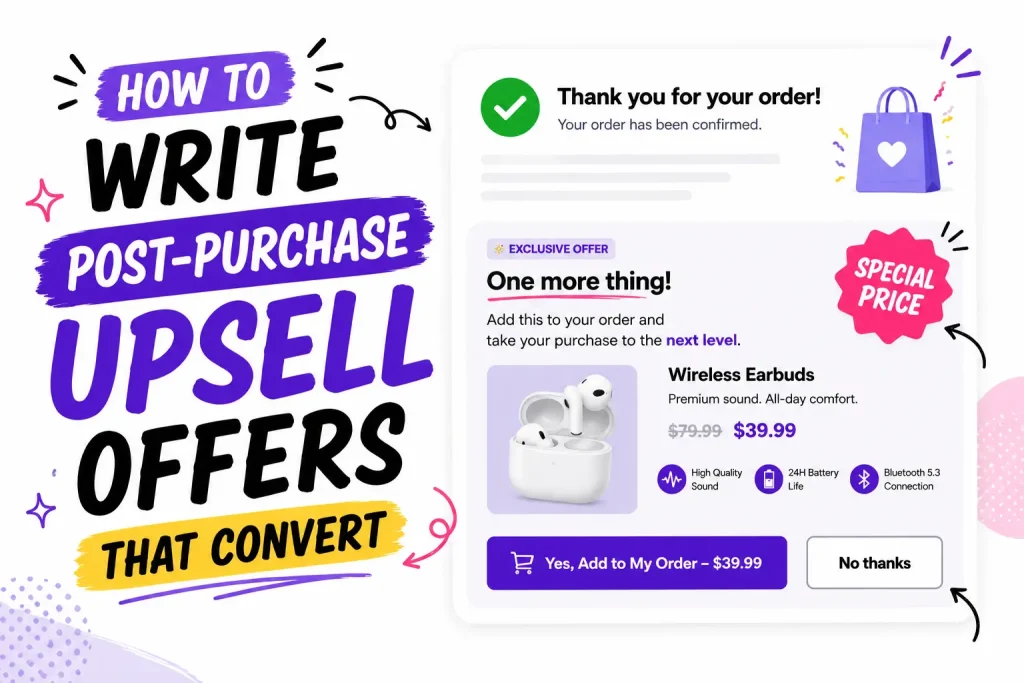
How to Write Post-Purchase Upsell Offers That Convert: Copy Templates, Examples and Benchmarks
June 23, 2026· 24 min read· Aditya Singh
Quick answer: A post-purchase upsell offer converts when it leads with the buyer, ties to what they just bought, shows a clear saving, and adds in one tap. Keep it to one offer, price it at about 25% or less of the order, write it for mobile, then test the headline, discount, and button. Well-matched one-click offers are typically accepted by 5% to 15% of buyers, at no extra ad cost.
The short version:
Lead with the buyer, not the product.
One relevant offer beats five.
One click, mobile-first, then test what wins.
Your customer just clicked "Pay." Their card is on file. They feel good about the buy. This is the warmest moment your store will ever get, and most stores waste it with a blank thank you page.
A post-purchase upsell offer fixes that. It shows one more thing to add, in a single click, right after checkout. But the offer only works if the words work. This guide shows you how to write post-purchase upsell offers that convert, with a 7-step writing process, 30+ copy-paste templates (offers, downsells, subscriptions, email and SMS), copy for eight store types, button wording, a sample A/B test plan, honest benchmarks, a fix-it table, and a checklist you can run before you publish.
What is a post-purchase upsell offer?
A post-purchase upsell offer is a one-click deal shown right after a shopper pays, but before the final order confirmation. They tap once to add it, with no new card and no second checkout. If they decline, the first order stays exactly as it was.
In plain words: the sale is already done, so you are simply asking, "Want to add one more?"
That makes it the lowest-risk offer in your whole store. And here is the catch most stores miss: the offer is only as good as the words on it. Same product, same price, two different write-ups, and one can convert two or three times better than the other.
Why the words decide whether it converts
The words matter more here than anywhere else because the buyer already said yes. Your job is not to sell from scratch. It is to make adding one more thing feel easy, fast, and worth it.
Here is the mindset shift that should guide every word:
Before checkout the shopper asks one big question: "Should I buy this at all?"
After checkout that question is gone. Now they ask something easier: "What else would make this better?"
So drop the hard-sell tone. You are nudging a happy buyer toward one easy yes. Short, warm, and clear beats clever every time.
The psychology behind a post-purchase yes
Six well-known buying triggers do most of the work after checkout. Each one maps to a line of copy you can write today.
Trigger
Why it works after checkout
Line that uses it
Buying momentum
A person who just said yes is more likely to say yes again to a small, consistent request
"Add one more thing to your order?"
Completion
People dislike leaving a set or routine unfinished
"You're one step from the full routine."
Social proof
Buyers copy what similar buyers did
"Most customers who bought this add the [X]."
Loss aversion
Missing a deal hurts more than gaining one feels good
"This price is only on this page."
Convenience
Same box, same shipping, no new checkout removes effort
"Ships with your order, one tap."
Anchoring
The add-on looks small next to the order they just paid for
"Add it for just $9."
Pick one trigger per offer. Stacking all six in one headline reads as pushy and slows the decision.
Does it work? The proof and the benchmarks
Yes, and the numbers back it up. Well-matched one-click offers are typically accepted by 5% to 15% of buyers, and the extra revenue costs you nothing in ads because you are selling to someone who already trusts you.
Real, sourced numbers:
BombTech Golf, a golf gear brand, used post-purchase upsells to lift conversion by 45%, cut its abandoned cart rate by 10%, and raise average order value by more than $60, as reported by Shopify.
Kettle & Fire, a bone broth brand, saw 41% higher revenue per visitor and a 10% higher average order value after adding post-purchase offers, according to The Good.
The platform-wide average is lower than most blogs admit.Upsell.com (formerly ReConvert) reports an average 5.6% lift in order value across its merchants, with top-performing offers converting at close to 30%. Other guides citing the same dataset put the average take rate near 4.7%. The gap between average and top is mostly relevance and copy, which is the part you control.
The same data shows buyers view the thank you page about 2.2 times per order, so your offer copy gets more than one look.
Across the wider market, upsell and cross-sell offers have been shown to lift revenue and average order value by 10% to 30% on average.
Industry analyses also put post-purchase conversion higher than pre-purchase offers, because the buying decision is already made and there is no risk of losing the sale.
So what should you aim for? Treat under 4% as a copy or relevance problem, 5% to 10% as healthy, and 10% to 15% or more as a well-matched offer. The table below shows where each level usually comes from.
Take rate
What it usually means
What to fix first
Under 4%
Generic offer, same product for every order
Relevance: match the offer to the item bought
4% to 8%
Relevant product, flat copy
Headline and the "why it fits" line
8% to 15%
Relevant, clear saving, one click
Test discount level and trust line
15% and up
Consumable refills, digital add-ons, tight product pairs
Protect margin, add a downsell
Here is the math on one offer (an example, your numbers will vary): a store with 300 orders a month, an 8% take rate, and a $12 average add-on earns about $2,880 in extra revenue a year from a single post-purchase offer, with zero extra ad spend.
Across the Shopify stores we work with, one pattern holds true: the offers that win are almost always the simplest and most relevant, not the flashiest. A small take rate adds up fast when every order grows and you spend nothing extra to earn it.
The 5 parts of an offer that converts
A high-converting post-purchase offer has five parts: a buyer-first headline, one line on why it fits, a clear deal, a reason to act now, and a button that names the action. Use this as your checklist.
A headline that rewards them. Open with the buyer, not the product. "Add this to your order in one tap" beats "Special offer."
One line on why it fits. Tie it to what they just bought. "Pairs perfectly with your [product]."
A clear deal. Show the real price, the discount, and what they save. Make the math obvious.
A reason to act now. A short timer or "this won't be offered again" gives a gentle push.
A button that says what happens. "Add to my order" is clear. "Submit" is not.
Hit all five and you remove the small doubts that make people scroll past.
Bonus: borrow a little trust. Add a short star rating or a one-line review right next to the offer. When a buyer sees that someone like them already loved it, hesitation drops. Example: "★★★★★ I always order this with my main buy. So glad I did."
How to write your offer in 7 steps
Follow these steps in order. The whole thing takes about 20 minutes per offer.
Pick the trigger product. Start with your best seller. It has the most orders, so the offer gets seen the most and your test finishes sooner.
Pick the add-on. Look at what buyers of that product order next or alongside it. Choose one item priced at about 25% or less of the typical order.
Write the "why it fits" line first. Finish this sentence: "People who buy [product] add [add-on] because ___." If you cannot finish it, pick a different add-on.
Write the headline from that reason. Turn the reason into eight words or fewer that speak to the buyer. "Keep your [product] like new" beats "Care kit offer."
State the deal in numbers. Show the old price, the new price, and the saving in dollars. Dollars read faster than percentages on small items.
Name the button. Say what happens when they tap: "Add to my order, save $6."
Read it on your phone, out loud. If it takes longer than five seconds or sounds like an ad, cut words until it does not.
Copy templates you can steal
Use these fill-in-the-blank templates. Each one leads with the buyer, ties to the last purchase, and ends with a button that names the action.
The perfect match (cross-sell)
Add a [related product] to your order? It pairs perfectly with your [product they bought]. Add it now for [X]% off, only on this page. [Add to my order, save $X]
The upgrade (bigger or better)
Want the [bigger size or pro version]? Upgrade your [product] for just $[small difference] more. Same shipping, one click. [Yes, upgrade my order]
The stock-up (for things people use up)
Running low fast? Add a second [product]. Most customers grab two so they don't run out. Get your second one for [X]% off today. [Add another, save $X]
The complete-the-set
You're one item away from the full set. Add the [missing item] and finish your [kit or collection]. One tap, [X]% off. [Complete my set]
Quick reference: which offer to use
Offer type
Best for
Example line
Cross-sell (perfect match)
Add a related item
"Add the [X] that pairs with your [product], 15% off, here only."
Upgrade
A bigger or better version
"Upgrade to the [pro version] for just $[X] more."
Stock-up or subscribe
Things people use up
"Add a second [X], or subscribe and save 15% on every order."
Complete the set
Kits and collections
"You're one item from the full set. Add the [X], 15% off."
Keep the headline under about eight words and the whole offer under about 30 words. Keep it easy to skim on a phone.
Offer copy by industry: 8 examples you can adapt
The best offer depends on what you sell. Here is one proven pairing and a ready-to-use line for eight common store types.
Store type
They bought
Offer this
Copy to use
Skincare and beauty
Cleanser
Matching moisturizer or travel size
"Finish your routine. Add the moisturizer made for your cleanser, 15% off, this page only."
Supplements
One bottle
Second bottle or subscription
"One bottle lasts 30 days. Add a second now at 20% off and skip the reorder."
Apparel
Shirt
Matching piece
"Finish the look. The [piece] was designed to go with your shirt. 15% off, ships in the same box."
Coffee, tea and food
One bag
Second bag or sampler
"Most customers add a second bag. Yours is 15% off and ships free with this order."
Electronics
Device
Case, cable or protection plan
"Protect your new [device]. Add the fitted case for $[X], only on this page."
Pet
Food
Treats or a refill
"[Pet type]s love these with their [food]. Add a bag of treats for 15% off."
Home and kitchen
Main item
Care kit or refill
"Keep it like new. Add the care kit made for your [product], 15% off today."
Digital products
Course or template
Pro version or bonus pack
"Get instant access to the [bonus pack] for $[X]. One click, delivered with your order."
Notice the pattern: every line names what they bought, says why the add-on fits, and states the deal. None of them says "special offer."
10 ready-to-use headlines and body lines (apparel cross-sell example)
Want options to test? Here are 10 ready-to-use headline and body variations for a $49 apparel cross-sell, where a buyer just bought a shirt and you offer the matching piece. Each one uses a different angle.
One honest note: no tool can reliably predict which exact wording will win, so treat these as a test menu, not a ranking. The format itself tends to land between 5% and 15% acceptance, and an A/B test (see the plan below) tells you which angle your buyers prefer.
Completion. Finish the look. / Your shirt was made to pair with the [matching piece]. Add it for 15% off, only here. / [Add and save 15%]
Social proof. Most buyers add this too. / Shoppers who bought your shirt usually grab the [matching piece]. Add yours for 15% off. / [Add to my order]
Plain saving. Save $5 on the matching piece. / Add the [matching piece] to today's order and save $5. One tap, no new checkout. / [Add and save $5]
One-time urgency. This price won't show again. / Get the [matching piece] for 15% off, only on this page, only right now. / [Grab it now]
Free shipping. It ships free with your order. / Add the [matching piece] now and it ships in the same box, free. / [Add it, free shipping]
Scarcity. Going fast in your size. / The [matching piece] is selling quickly in your size. Add it for 15% off before it's gone. / [Add my size]
Aspiration. Built to go together. / The [matching piece] was designed to wear with your shirt. Complete the outfit for 15% off. / [Complete the outfit]
Risk reversal. Add it, return it free if it's not right. / Try the [matching piece] with your shirt. Free returns, so adding it is risk-free. 15% off today. / [Add risk-free]
Bundle. Buy the set, save more. / Get your shirt and the [matching piece] together and save 15% on the pair. / [Get the set]
Curiosity. Forgot something? / Your outfit is one piece away. Add the [matching piece] for 15% off before your order ships. / [Yes, add it]
Subscription and seasonal offer copy
Two offer types need their own wording: turning a one-time buyer into a subscriber, and offers that run during sale periods.
Subscription upgrade
Never run out of [product]. Get it delivered every [30 days] and save [X]% on this order and every one after. Skip or cancel anytime. [Subscribe and save $X]
The words "skip or cancel anytime" matter most here. Fear of being locked in is the main reason buyers say no to a subscription.
Black Friday and sale periods
Your Black Friday deal isn't over. Add the [add-on] at the same sale price, only on this page. [Add it at the sale price]
During a sale the buyer already got a discount, so you rarely need a deeper one. Extend the sale price to the add-on and lean on "same box, same shipping."
Gift season
Buying this as a gift? Add a second one for yourself at [X]% off, or add gift wrap for $[X]. [Add to my order]
First-time vs returning buyers. If your app lets you target by customer type, change the angle. First-time buyers respond to low-risk add-ons and trust lines ("free returns"). Returning buyers already trust you, so offer the bigger size, the bundle, or the subscription.
Before and after: weak copy vs strong copy
The fastest way to lift a take rate is to rewrite product-focused copy into buyer-focused copy. Here is the same offer, weak and strong.
Weak
Special Offer Buy our travel-size serum now. Limited time only. Click here.
Why it flops: it talks about the product, not the buyer. "Click here" says nothing. "Special offer" is noise people ignore.
Strong
Toss this in your bag for trips Your serum now comes in a travel size. Add it to today's order for 20% off, just this once. [Add the travel size, save $6]
Why it wins: it pictures the buyer using it, ties to what they bought, shows the saving, and the button names the action.
Small wording changes like this are often the gap between a 3% take rate and a 12% one.
Words and lines that quietly kill offers
Some words quietly cost you sales. Cut these from every offer.
"Submit," "Continue," or "Click here" on the button. Name the action instead.
"Buy more and save" with no real reason. Say why it fits them.
Long paragraphs. People skim. One or two short lines max.
Five offers at once. A page crammed with choices freezes people. One clear offer usually wins.
Fake urgency that never ends. Shoppers spot it, and it costs you trust.
Button copy: 12 options to test
The button is the last thing read before the decision. The pattern that works is a verb, "my," and the saving.
Offer type
Accept button
Decline link
Cross-sell
Add to my order, save $6
No thanks, I'm all set
Cross-sell
Yes, add it for $12
Skip this offer
Upgrade
Yes, upgrade my order
Keep my order as is
Stock-up
Add another, save 20%
One is enough for now
Set
Complete my set
No thanks
Subscription
Subscribe and save $8
Just this one order
Keep the decline link plain and polite. Guilt lines like "No, I don't like saving money" may win a few clicks, but they sour a buyer who was happy ten seconds ago.
Match the offer to what they bought
Relevance lifts conversions more than any clever line. Offer something that fits the order, and set up a cheaper backup if they say no.
Bought a camera? Offer the memory card, not socks.
Bought skincare? Offer the matching serum or a refill.
Bought a kit? Offer the one piece that finishes it.
A few quick rules from the field:
Follow the 25% rule. Keep the add-on priced at about 25% or less of the order value. A small yes is far easier than a second big purchase.
Skip products with high return rates. A post-checkout impulse buy is the wrong moment for a "do I really need this?" item.
For things people use up, offer a refill or a second unit. Those convert again and again.
Set up a downsell too. If they say no to the first offer, show a cheaper backup, like a smaller size or a single unit. A softer second offer catches buyers who liked the idea but not the price.
A downsell shows only after a buyer declines the first offer. The copy should acknowledge the no, then make a smaller ask. Never repeat the first offer with a bigger discount, because that teaches buyers to decline every time.
The smaller size
Not ready for the full size? Try the travel size for just $[X]. [Add the travel size]
The single unit
Three too many? Add just one [product] for $[X]. Still ships in the same box. [Add one to my order]
The low-cost add-on
One last thing: protect your order with [shipping protection or gift wrap] for $[X]. [Yes, add it]
Not every yes happens on the page. A post-purchase email gives the offer a second chance, using the same copy rules.
Keep it warm. Thank them first, then suggest one item that fits the order. Shopify's own guide on post-purchase emails is a solid starting point.
Same rules apply: one clear offer, a reason it fits, and a button that names the action.
Email template (send 1 to 3 days after the order)
Subject: One thing that goes with your [product] Hi [first name], thanks again for your order. Customers who bought the [product] usually add the [add-on], because [one-line reason]. It's [X]% off for the next 48 hours. [Add it for $X]
SMS template (only for buyers who opted in)
[Brand]: Your [product] is on its way. Want the [add-on] that goes with it? [X]% off until tomorrow: [link]. Reply STOP to opt out.
Thank you page template (for buyers who skipped the one-click offer)
Still thinking about the [add-on]? Add it before your order ships and it rides in the same box. [Add to my order]
Test, then let the data lead
You will not nail the perfect offer on day one. Test one change at a time, and keep most discounts around 10% to 15% so you protect your margin.
A 10% to 15% discount feels real to the buyer and still keeps your profit. Going much deeper can eat the money you just earned. For the full math on when 20% or free shipping beats it, see our guide on how to price the post-purchase discount.
A sample A/B test plan
Run one test at a time, about two weeks each or until you have enough orders, and keep the winner before starting the next test:
Test 1, the angle. Completion headline vs plain-saving headline.
Test 2, the discount. 10% off vs 15% off.
Test 3, trust. With a star rating vs without.
Test 4, urgency. With a short timer vs without.
Test 5, the safety net. Single offer vs offer plus a cheaper downsell.
Track two numbers for each: your take rate (how many accept) and your AOV lift (how much each order grows).
Writing offers for digital products
For digital products there is no shipping and almost no cost per extra sale, so you can be bolder. Test instant-access upgrades (a pro version or an extra license), a bonus pack add-on, or an upgrade to an annual plan. Digital and info-product offers often accept at the higher end of the range because delivery is instant and friction is near zero. The same copy rules apply: one offer, a clear saving, and a button that names the action.
Shopify rules that shape what you can write
Shopify's post-purchase page has a few hard limits. Know them before you write, because they decide how many offers you get and who sees them.
You get a small number of screens. Plan for one main offer and one downsell. That is why every word has to earn its place. See how to sequence them in our upsell and downsell funnel guide.
Not every buyer sees the offer. One-click offers need a stored card, so they show for card and Shop Pay orders but not for Apple Pay, Google Pay, most buy-now-pay-later, or cash on delivery. Full list in our payment methods guide. Use the thank you page and email templates above to reach everyone else.
Only one app can own the post-purchase page. Pick one and build all your offers there.
Old thank-you-page scripts are gone. Shopify's deadline for non-Plus stores to move to the new checkout system was August 26, 2026, and Shopify Scripts stopped on June 30, 2026 (see Shopify's official upgrade guide). If an old offer quietly stopped showing, this is likely why. Use an app built on the new system.
What tool do you need to do this?
Post-purchase offers run through a checkout or thank-you-page app, so you do not need to touch code. The category leaders are Oxify Cart Drawer (which covers the product page, cart, one-click post-purchase offer, and thank you page in one app) plus post-purchase specialists like ReConvert and AfterSell. Here is a quick comparison.
When a post-purchase offer underperforms, the cause is almost always one of these five. Work down the list in order.
Symptom
Likely cause
Fix
Take rate under 4%
Same offer shown on every order
Set rules so the offer matches the product bought
Lots of views, few accepts
Headline talks about the product, not the buyer
Rewrite with the "why it fits" line first
Good take rate, thin profit
Discount too deep
Drop to 10% to 15%, or swap the discount for free shipping
Good take rate, more returns
Impulse item buyers regret
Switch to a refill, accessory, or lower-priced add-on
Offer rarely shows
Most orders use wallets or BNPL
Move the offer to the thank you page and email
Watch returns on upsold items, not only the take rate. An offer that converts well but comes back in the mail is costing you money.
Pre-publish checklist
Run this checklist before any post-purchase offer goes live:
[ ] The headline speaks to the buyer, not the product.
[ ] One line explains why the offer fits what they bought.
[ ] The price, discount, and saving are clear at a glance.
[ ] There is one offer, not five (a single downsell backup is fine).
[ ] The button names the action ("Add to my order").
[ ] It accepts in one click, with no card re-entry.
[ ] It looks clean and tappable on a phone.
[ ] The discount sits around 10% to 15%.
[ ] The add-on costs about 25% or less of the original order.
[ ] You are tracking take rate and AOV lift to test it.
Put it all together
Writing offers that convert is not about being clever. It is about being clear and kind to a buyer who already trusts you.
Lead with the buyer, not the product.
Tie the offer to what they just bought.
Show the real saving, priced at about 25% or less of the order.
Keep it to one offer, one click, on mobile.
Test, then keep what wins.
Do that, and you turn a blank thank you page into steady extra revenue, with no extra ad spend.
Want one app for every upsell moment?
Oxify Cart Drawer runs your upsells in all the spots that make money: the product page, the slide cart, the one-click post-purchase offer, and the thank you page. It is Built for Shopify, runs on the new checkout system, and starts at $9.99/mo with a 14-day free trial.
FAQ
What is a good conversion rate for a post-purchase upsell?
Well-matched one-click offers are typically accepted by 5% to 15% of buyers. Relevance and a single, clear offer push you toward the higher end.
Do post-purchase upsells hurt my checkout conversion rate?
No. The first sale is already complete before the offer shows, so a yes or a no on the upsell does not change your checkout conversion rate.
Should I offer a discount on the upsell?
Usually yes. A 10% to 15% discount tends to lift take rates by making the offer feel exclusive, and it keeps your margin safe. Test a few levels to find your sweet spot.
What is the 25% rule for post-purchase upsells?
Keep the upsell priced at about 25% or less of the original order value. A small add-on is an easier yes than a second large purchase.
How do I A/B test a post-purchase offer?
Change one thing at a time (the headline, discount, button, or timer), run each test about two weeks or until you have enough orders, and keep the winner. Track take rate and AOV lift.
How many offers should I show after checkout?
One strong, relevant offer. A page crammed with choices slows people down and lowers your take rate. Add a single cheaper downsell only as a backup if they say no.
What is the difference between an upsell and a cross-sell?
An upsell offers a bigger or better version of what they bought. A cross-sell offers a related add-on. After checkout, both work the same way and follow the same copy rules.
What products work best as post-purchase upsells?
Items that match the order: refills, add-ons, upgrades, or the piece that completes a set. Avoid high-return items and anything pricier than the first order.
Where do post-purchase offers show up on Shopify?
Right after payment (the one-click page), on the thank you page, and in follow-up emails. The one-click page has the least friction.
How long should post-purchase upsell copy be?
Short. Aim for a headline under eight words and about 30 words in total: one line on why it fits, the deal, and a button that names the action. Buyers decide in a few seconds, mostly on a phone.
What is the average post-purchase upsell take rate?
Platform-wide averages sit around 4% to 5%, while well-matched offers reach 5% to 15% and the top few percent approach 30%. Relevance and clear copy explain most of the gap.
Why do some customers never see my post-purchase offer?
One-click offers need a stored card, so orders paid with Apple Pay, Google Pay, most buy-now-pay-later options, or cash on delivery skip the offer page. Reach those buyers on the thank you page and by email instead.
What is an example of a post-purchase upsell?
A shopper buys a face cleanser and pays. Before the confirmation page, they see "Finish your routine: add the matching moisturizer for 15% off, this page only" with an "Add to my order" button. One tap adds it to the same order with no new checkout.
What should a post-purchase upsell message say?
Four things in about 30 words: a headline aimed at the buyer, one line on why the item fits what they bought, the price with the saving, and a button that names the action.
Should I use a countdown timer on a post-purchase offer?
A short, honest timer can help because the offer really does disappear when the page closes. Test it against no timer, and never use a timer that resets, since buyers notice and trust drops.
What is the difference between an upsell and a downsell?
The upsell is your first offer after checkout. The downsell is a cheaper backup shown only if the buyer declines, such as a smaller size or a single unit.