 Oxify App
Post-Purchase Upsell Conversion Impact: Do They Hurt?
Quick answer: No. A post-purchase upsell appears after payment is captured, so its conversion impact on the sale is nil: a shopper who says no still gets their order. The limits are reach and eligibility. Shopify skips the offer for wallet, installment and gift-card payments, and only shoppers who finish checkout ever see it.
New to this? See what is a post-purchase upsell for how the page works.
Now here is the part most guides skip. Post-purchase upsells are safe for the sale, but they are not magic. They reach fewer orders than you might expect, and most benchmarks online are vendor numbers. This article separates three things: what Shopify documents, what a vendor measured, and what we can show from two Oxify dashboards.
We build Oxify Cart Drawer & Upsells (our app), so treat our dashboards as examples, not independent proof. The Shopify rules below were read from Shopify's developer documentation in October 2026.
Do post-purchase upsells hurt checkout?
- No. The payment is captured before the offer appears, so the original order is already done.
- The worst a shopper can do is decline the offer. Their first order still ships.
- What can still cost you is the experience around the sale, not the sale itself. Shopify holds fulfillment while the offer is open, and a pushy or repeated offer can annoy someone who has just paid. Both are covered below.
(Average order value, or AOV, just means the average amount each order is worth.)
The one thing most people get wrong
People lump all upsells together. That is the mistake. Timing changes everything.
Pre-purchase upsell (some risk)
- Shows before payment, on the product page or in the cart.
- Push too hard and a shopper can hesitate and leave.
- This is the type that can lower checkout conversion if you overdo it.
Post-purchase upsell (no risk to the sale)
- Shows after payment, right before the thank-you page.
- The first order is already locked in.
- Say no, and the shopper just sees their confirmation.
Here is a simple way to think about it. The customer already paid. You are not asking them to buy again to keep the first sale. You are just asking, "Want to add one more thing?"
What the customer actually sees
A post-purchase upsell is an offer shown after the order is confirmed and before the thank-you page. Accepting it adds products to the order the shopper just paid for. Here is the sequence in Shopify's guidelines for post-purchase offers:
- They click "Pay now" and the order goes through.
- Shopify's post-purchase page opens. Its header confirms the first payment, and a "View order confirmation" button lets the shopper skip the offer.
- They accept with one click. Shopify's accept button reads "Pay now" plus the price and charges the saved card at once, so there are no card details to type again.
- The item joins their existing order.
- If they decline, they land on the thank-you page like normal.
The original sale never moves.
What post-purchase upsells do NOT do (the honest part)
Most articles only sell you the upside. Here is the truth that helps you build a smart strategy.
- They do not reach everyone. Only shoppers who finish checkout see the offer, so anyone who abandons their cart never does. Post-purchase cannot be your only way to lift AOV.
- They do not show on every order. Shopify lists the cases where the post-purchase page is skipped. The table below has them.
- They are not your highest-converting placement. In Growth Suite's vendor data, post-purchase averaged 6% acceptance against 12% for the cart drawer (table further down). Post-purchase wins on safety, not on raw acceptance.
- Acceptance varies a lot. Your number depends on your product, your offer, and your price. Treat every benchmark, ours included, as a starting point.
When does Shopify skip the post-purchase page?
| Order type | What Shopify's documentation says |
|---|---|
| Paid with an installment service or a wallet | The page is not shown. Klarna, Affirm, Afterpay, Apple Pay, Amazon Pay and Google Pay are named. |
| Paid with a gift card or any non-credit-card method | The page is not shown when the first purchase used a gift card or any method other than a credit card. |
| Payment providers that retain the card's CVV | Not supported. Braintree, Payflow Pro, PayPal Payments Pro and Eway are given as examples. |
| Orders with duties and multiple currencies | The offer is not shown. |
| Local delivery orders | The offer is not shown. |
| Orders under $0.50 | Orders need to be $0.50 or more to qualify. |
| Orders outside the Online Store channel | Only Online Store orders can show post-purchase offers. |
| Flash sales under extreme load | Shopify may briefly delay creating the order, and then the page is not shown. |
Two more rules apply when the page does show: only one app can run the post-purchase page at a time, and a customer can accept at most three offers per checkout. Shopify also holds fulfillment on orders in the flow until the shopper reaches the order status page, or one hour after checkout if they never finish. Source: the limitations table in Shopify's product offers documentation, read October 2026. Shop Pay is not named in that list. Our payment-method guide covers Shop Pay, PayPal and individual gateways one by one.
The complete funnel (why smart stores use both)
The best stores do not choose pre or post. They use both, at different moments.
- Before checkout: a slide cart drawer with upsells and a free shipping bar. This reaches every shopper who opens the cart, even the ones who never buy. (Here is how to add upsells to your cart drawer.)
- After checkout: a one-click post-purchase offer plus a thank-you page offer. This catches buyers once the sale is locked in.
Together they cover the whole journey, which is the heart of a strong Shopify upselling strategy. Shopify lets only one app run the post-purchase page at a time (you pick it in your checkout settings), so one app that covers the cart and post-purchase is simpler than stitching several together. More on that below.
What post-purchase revenue looks like in two Oxify dashboards
These are the revenue figures our dashboard attributes to each placement, read straight off the screen, from stores that installed our app. Neither is a controlled test.
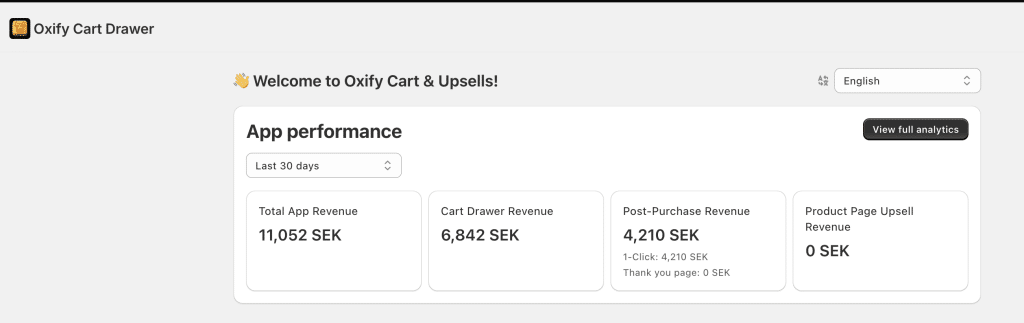
Store 1: a Swedish store, last 30 days. The revenue shows in kronor (SEK).
| Placement | Revenue (last 30 days) | Share of total |
|---|---|---|
| Cart drawer (before checkout) | 6,842 SEK | 61.9% |
| One-click post-purchase | 4,210 SEK | 38.1% |
| Thank-you page offer | 0 SEK | 0% |
| Product page upsell | 0 SEK | 0% |
| Total app revenue | 11,052 SEK | 100% |
Post-purchase brought in 4,210 SEK, all from one-click offers on orders the store was already getting. The thank-you page offer and the product page upsell both read 0 SEK. The dashboard shows revenue, not whether a placement was switched on, so a zero can mean "off" or "no accepted offers". Check both in your own account.
Store 2: Replenhair, a UK haircare brand, since install. In our Replenhair case study, the dashboard read £15,451 of app-attributed revenue on 31 July 2026. Of that, £8,742 came from the cart drawer, £4,136 from product page upsells and £2,573 from one-click post-purchase offers (16.7%). The thank-you page read £0.
Side by side, post-purchase was 38.1% of one store's last 30 days and 16.7% of another's total since install. Those are different windows from two stores and one vendor's own data, so read them as evidence that the placement can carry real revenue, not as a benchmark. Revenue attributed to an offer is also not the same as extra revenue, because some shoppers might have bought the add-on anyway.
What does each placement convert at?
Growth Suite, which sells a competing upsell app, published averages from its own customers in its guide to the best Shopify upsell apps (updated 21 September 2026). The data covers 66 million offer impressions across 250 Shopify stores, January to June 2026. It counts acceptance as how many of every 100 offers shown the customer takes.
| Placement | Average acceptance rate | Stores | Offer impressions |
|---|---|---|---|
| Product page | 7% | 250 | 50 million |
| Cart drawer | 12% | 250 | 15 million |
| Checkout (Shopify Plus) | 9% | 28 | 500 thousand |
| Post-purchase | 6% | 200 | 1 million |
Two things stand out. Post-purchase is the lowest of the four, which is the price of its safety, and it rests on the second-smallest sample. And offers wear out: Growth Suite found the 2nd offer a shopper sees in a session converts best at 8%, and by the 4th offer acceptance falls to 1%. That is one vendor's data from its own stores, so use it for direction, not as a promise.
For scale, take 1,000 eligible orders a month, a 6% acceptance rate and an $18 add-on. That comes to about $1,080 a month. It is an illustration, not a forecast, and "eligible" matters because the order types in the table above never see the offer.
Why buyers say yes, and when they get annoyed
Right after paying, the shopper has just said yes once, and the add-on joins an order they already placed. That makes a small, relevant offer easy to accept. The word that matters is relevant. A random product feels like spam, while a relevant one can even improve the post-purchase experience.
Annoyance is the real risk to manage, and the sources agree on the rules:
- Shopify's guidelines for post-purchase offers tell app developers to show at most three consecutive offers, to make accepting or refusing clear without pressure, to avoid exclamation-point urgency and any wording that makes the shopper doubt their order went through, and to show each product at the same title and price as your store.
- Shopify's guide to cross-selling and upselling warns that pushing offers page after page can damage how customers see your brand and may even hurt overall conversions.
- Growth Suite's fatigue figures above (8% for the 2nd offer, 1% for the 4th) say the same thing from data.
We found no data that measures how many customers actually find post-purchase offers annoying, so this section rests on guidelines and fatigue figures, not on a survey.
The one catch nobody tells you (payment types)
A one-click post-purchase offer charges a card Shopify has already saved during checkout. Shopify's documentation says the offer only renders when the customer's card has been vaulted. That is why the wallet, installment, gift-card and other non-card payments in the table above skip it.
The fix is a thank-you page offer as a backup. The thank-you page is shown after every checkout, so it does not depend on a saved card the way the post-purchase page does. Shopify's thank-you page extensions cannot change an order directly, so the app has to handle the add on its own, and the shopper may need an extra tap instead of a true one-click. Shopify's documentation lists thank-you page and post-purchase extensions as available on all plans except Shopify Starter.
Bonus tip: the order of pages is payment, then the post-purchase page, then the thank-you page, then the order status page buyers return to for tracking. Good apps let you place offers on both the thank-you and order status pages. (We break down the difference in post-purchase page vs thank-you page.) If an older app still injects offers with script tags, Shopify ended script tags on those two pages for non-Plus stores on 26 August 2026.
How post-purchase upsells grow AOV and lifetime value
Bigger orders today (AOV). Every accepted offer raises that order's value, and the traffic is already paid for.
More value over time (LTV). LTV means how much a customer is worth across all their orders. A matching add-on gives a buyer more use from your brand, which may give them a reason to come back. None of the data on this page measures repeat purchases, so compare repeat-purchase rates for buyers who accepted and buyers who declined before you count LTV as a win.
Your 5-step setup framework
You can launch your first offer today. Follow these steps.
- Pick one hero offer. Choose a product that pairs with a top seller. (Shoes? Offer socks. Coffee maker? Offer beans.)
- Keep the price small. A common rule of thumb, not a measured threshold: keep the upsell at 25% or less of the order value. An $80 order should see a $20 offer, not a $60 one. Our guide to pricing a post-purchase offer goes deeper.
- Add a downsell. A downsell is a cheaper backup shown if they say no. You get a second shot. (See the upsell and downsell funnel.)
- Match the offer to the order. Show it based on what they bought. Relevant beats random every time, and the wording does the rest: our guide to writing post-purchase upsell offers has templates for each offer type.
- Add a thank-you page offer too. This catches the shoppers who paid with a wallet or installment service and skip the post-purchase page.
Then measure it properly. Accepted offers add products to the original order, so your Shopify orders show the larger total. Tools that read Shopify's pixel events report only the purchase event and value for the initial purchase, and tools that rely on script tags or additional scripts can have incomplete conversion data because they fire only on the order status page (Shopify's documentation, October 2026). Judge the offer in your app dashboard and Shopify orders, not in your ad platform. Compare average order value and revenue per visitor with the offer on and off over comparable weeks, then keep what works and swap what does not.
Best Shopify post-purchase upsell apps (and pricing)
You need an app for this. Shopify supplies the post-purchase page and the extension framework, and its documentation lists post-purchase checkout extensions as available on all plans except Shopify Starter. Shopify still labels them beta for app developers (October 2026). Only one app can run the post-purchase page at a time, chosen in your checkout settings. Here are strong options, ranked. For a deeper breakdown, see our full guide to the best Shopify post-purchase upsell apps.
Ratings, review counts, prices and Built for Shopify badges below were read from the live App Store listings in October 2026, except AfterSell and Selleasy, which were read on 1 November 2026.
| Rank | App | Post-purchase offers | Pricing | Rating (reviews) | Built for Shopify |
|---|---|---|---|---|---|
| 1 | Oxify Cart Drawer & Upsells (our app) | One-click + thank-you page | $9.99 to $149.99/mo (flat by orders), 14-day trial, no revenue cut | 4.9 (40) | Yes |
| 2 | AfterSell | One-click + thank-you + checkout (Plus) | From $34.99/mo, 30-day trial | 4.9 (1,112) | No |
| 3 | ReConvert | One-click + thank-you page | Free up to 50 orders or $50 upsell revenue, then from $9.99/mo | 4.8 (3,108) | No |
| 4 | Zipify OCU | One-click upsell + downsell | From $9.95/mo, stepping up with the upsell revenue it earns | 4.6 (569) | Yes |
| 5 | Selleasy | Post-purchase + cross-sell | Free plan with no order limit (5 campaigns), then $9/mo | 4.9 (2,764) | No |
Other names you will see include Kaching Post Purchase Upsell (from $4.99/mo for up to 99 orders, 5.0 stars from 385 reviews), AOV.ai Post Purchase Upsell (free up to $200 of upsell revenue per 30 days, then $19, $29 or $59/mo depending on your Shopify plan, 4.9 stars from 164 reviews) and Honeycomb Upsell & Cross Sell (a free plan with 100 monthly funnel views, then from $54.99/mo, 4.6 stars from 158 reviews).
1. Oxify Cart Drawer & Upsells (our app)
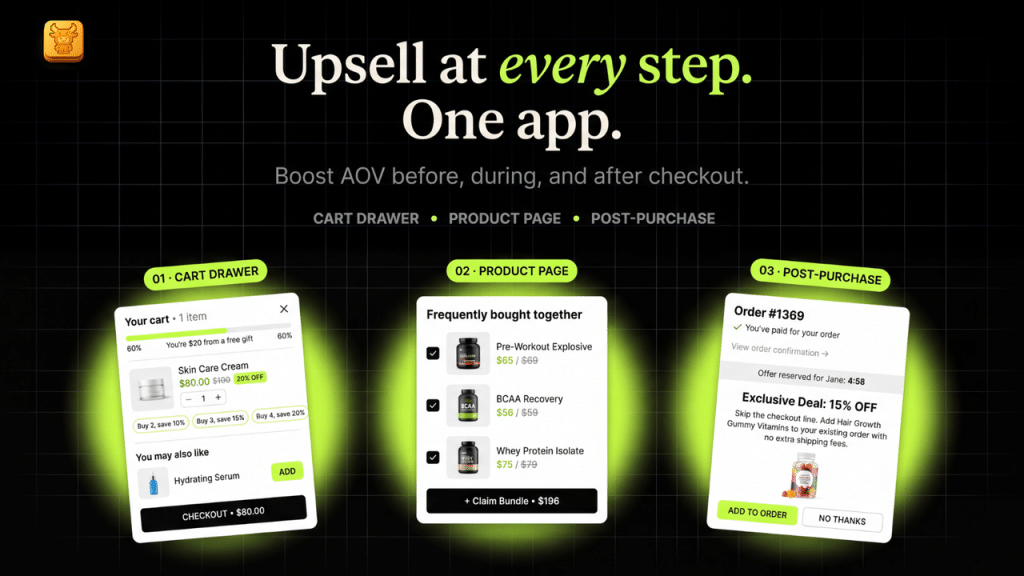
Oxify Cart Drawer & Upsells covers the slide cart drawer, the product page and post-purchase in one install. You get one-click post-purchase offers, thank-you page offers, free gifts and frequently bought together bundles. It is Built for Shopify with a 4.9 star rating from 40 reviews, and pricing is flat by order volume with no cut of your sales.
- Pricing: $9.99 to $149.99 per month by order volume, plus a $299 Enterprise plan. 14-day free trial on every plan. Full pricing on our pricing page.
- Best for: stores that want cart, product page, and post-purchase offers in one app instead of several.
- Skip it if: you only want a standalone post-purchase funnel tool with no cart drawer, or you weigh review volume heavily. The Oxify listing has 44 reviews, against 2,764 for Selleasy and 3,108 for ReConvert.
2. AfterSell
A checkout and post-purchase specialist with A/B testing.
- Pricing: the Post-Purchase plan is $34.99 per month and covers 500 orders a month, then $0.05 per extra order, with a 30-day free trial. The free plan is for development stores only.
3. ReConvert
A thank-you page specialist with lots of widgets like surveys and reorder buttons.
- Pricing: free up to 50 orders or $50 of upsell revenue, then $9.99 per month for 51 to 100 orders, $19.99 for 101 to 200 and $39.99 for 201 to 500, with a 14-day trial on paid plans.
4. Zipify OneClickUpsell (OCU)
A full upsell-to-downsell funnel with pricing that follows the upsell revenue it earns. Built for Shopify.
- Pricing: $9.95 per month while you earn up to $200 a month in upsell revenue, $25 per month from $200 to $2,500, then $149 per month above that (the listing says it never goes past $999). 30-day free trial.
5. Selleasy
A budget-friendly cross-sell and post-purchase tool.
- Pricing: a free plan with unlimited orders and up to 5 campaigns, then $9 per month (unlimited campaigns), $29 (Pro) and $59 (Max), with a 30-day trial on the $9 plan.
Pricing models differ. Oxify prices by order volume, Selleasy by campaigns and AI features, Zipify OCU by the upsell revenue it earns, and ReConvert by orders or upsell revenue. Work out which model fits how your store will grow before you compare monthly prices.
Mistakes that DO hurt you
Post-purchase is safe, but bad offers waste it. Avoid these.
- Too many offers. Stick to one or two. Shopify's guidelines cap it at three in a row, and Growth Suite's data shows acceptance falling to 1% by the 4th offer.
- Random products. An offer that does not fit feels spammy and hurts trust.
- Pricey add-ons. A huge offer after a small order rarely lands.
- No backup. Skipping the thank-you page offer means you miss every shopper who paid with a wallet or installment service.
- Judging it in your ad platform. Pixel-based tools see only the first purchase, so the add-on revenue looks missing.
- Using post-purchase as your only AOV tool. Pair it with a cart drawer so you reach the shoppers who never finish checkout.
Related Guides
- Best Shopify upsell apps, ranked by where the offer appears
- 16 checkout upsell apps compared: Plus or not, prices and free-plan limits
- AfterSell alternatives: 7 apps compared, with the bill at 500, 1,000 and 2,000 orders
FAQ
Do post-purchase upsells hurt my conversion rate?
Are post-purchase upsells better than checkout order bumps?
Do I need Shopify Plus for post-purchase upsells?
Which payment methods skip post-purchase upsells?
Will an upsell app slow down my checkout?
What is a good post-purchase acceptance rate?
Is a post-purchase upsell still worth it in 2026, or has customer fatigue hurt it?
Do customers find post-purchase offers annoying?
Why do customers complain about discount offers right after paying full price?
Can post-purchase upsells raise lifetime value?
Start growing every order today
You already do the hard part. You bring in the traffic. You earn the sale. A post-purchase offer simply makes each of those sales worth more, with no risk to the sale itself.
Oxify Cart Drawer & Upsells (our app) gives you one-click post-purchase offers, thank-you page offers, and full cart upsells in one app. It is Built for Shopify, rated 4.9 stars from 40 reviews, and starts at $9.99 a month with a 14-day free trial.