 Oxify
What Is a Post-Purchase Upsell? How It Works on Shopify (+ Examples)
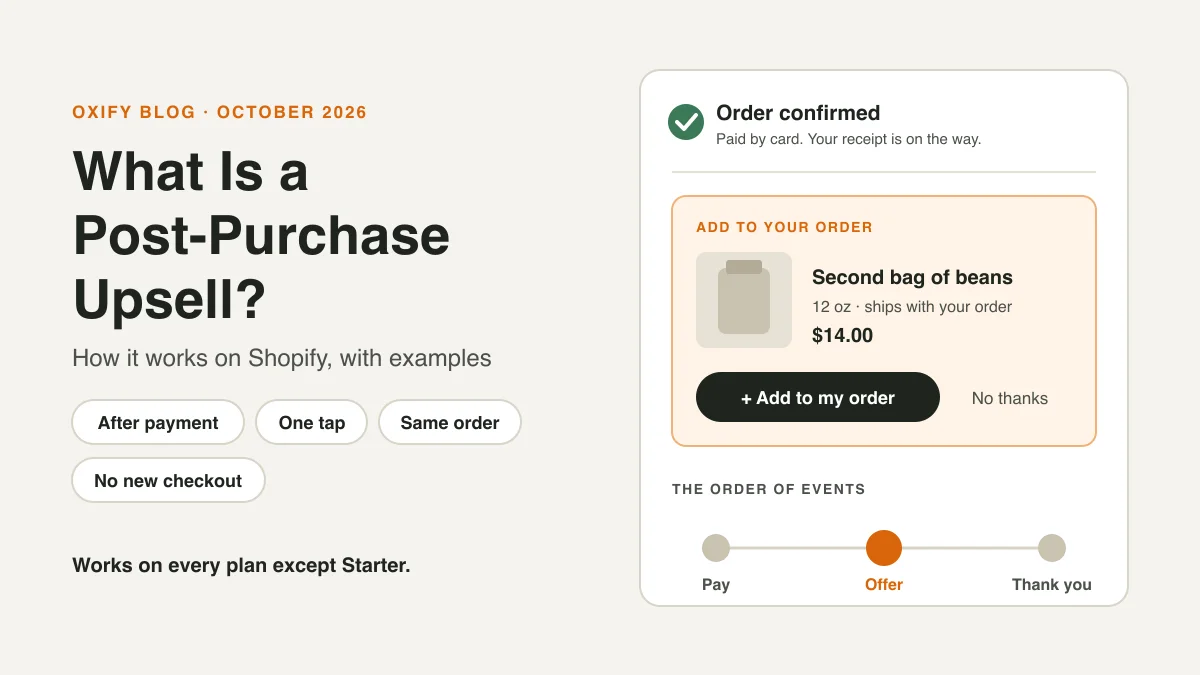
You tap "Pay now." Before the thank-you page, a small card pops up: "Add a second bag of beans for $14? It ships with your order." One tap and it's done.
That card is a post-purchase upsell. It is a one-click offer shown after a customer pays and before the thank-you page. If they say yes, the item joins the same order and is charged to the same card. No new checkout. No card to type again.
Some apps also use the name for thank-you page offers or follow-up emails. In this guide, it means the one-click offer that comes before the thank-you page.
This guide shows how it works on Shopify, what happens to the order and the money, the rules your offer page must follow, and what it can't do.
Jump to: how it works · the order and the money · Shopify's rules · examples · limits · numbers · how to start · FAQ
Quick Answer (For Skim Readers)
- What it is: a one-click offer after payment, before the thank-you page.
- What happens on "yes": the item is added to the same paid order, and the buyer pays the difference.
- Who can use it: every Shopify plan except Starter. You need an app that supports it.
- Why stores use it: it can raise average order value (AOV) without risking the sale. The shopper has already paid.
- Typical take rate: 6% on average in Growth Suite's 2026 data. Across all spots, stores ranged from under 2% to over 20%.
- Biggest limit: some shoppers never see it, like those who pay with Apple Pay or Google Pay.
A note from me. I'm Aditya, co-founder of Oxify. Our app runs one-click post-purchase offers, so I read these numbers in real store dashboards.
At a Swedish store, this spot brought in 4,210 SEK in 30 days, 38% of what our app earned there. At Replenhair, a UK hair care brand, it brought £2,573, about 17%.
So I see it as a strong second earner, not usually the first. My advice: turn it on once your cart offer is working.
How a Post-Purchase Upsell Works, Step by Step
Here is the path a shopper takes, based on Shopify's developer docs:
- The shopper pays. While they fill in checkout, Shopify asks your app if an offer can show. One rule: they must pay by credit card, which Shopify stores securely so it can be charged again.
- The order is confirmed. It is a real order now.
- The offer page opens. It shows a product, a price, and two buttons: yes and no thanks.
- If they tap yes, the item is added to the same order and charged to the same card.
- If they tap no, or close the page, nothing changes.
- They move on to the confirmation screen. Shopify's docs call it the order status page.
It takes a few seconds. There is no second cart and no second checkout.
What Happens to the Order and the Money?
This is the question merchants ask most, and most guides skip it. Shopify's post-purchase API docs are clear on the main points:
- It stays one order. Shopify applies the accepted offer to the initial purchase. The item is added to the order the shopper already placed.
- The buyer pays the difference. Shopify charges the extra amount straight away. There is no second confirm step, so Shopify's UX guide asks apps to say "you'll be charged right away" under the button.
- Tax and shipping come first. The offer page shows a subtotal, shipping and taxes for the added item before the shopper taps.
- Up to three offers. A shopper can accept up to three offers per checkout.
- Fulfillment waits a little. Shopify holds fulfillment while the offer is open. The hold ends when the shopper moves on to the order status page. If they close the browser instead, it ends one hour after checkout.
What Shopify's docs don't cover: how refunds work for the added item, or what happens if the second charge is declined. Ask your app. We list four questions in the "how to start" section below. Also check that your warehouse, accounting or invoice tools pick up the added item, since it joins the existing order.
What Shopify's Rules Say the Offer Page Must Do
Shopify publishes UX rules for post-purchase offers (we read them on October 29, 2026). They are written for app makers, but they help you judge any app and write better copy.
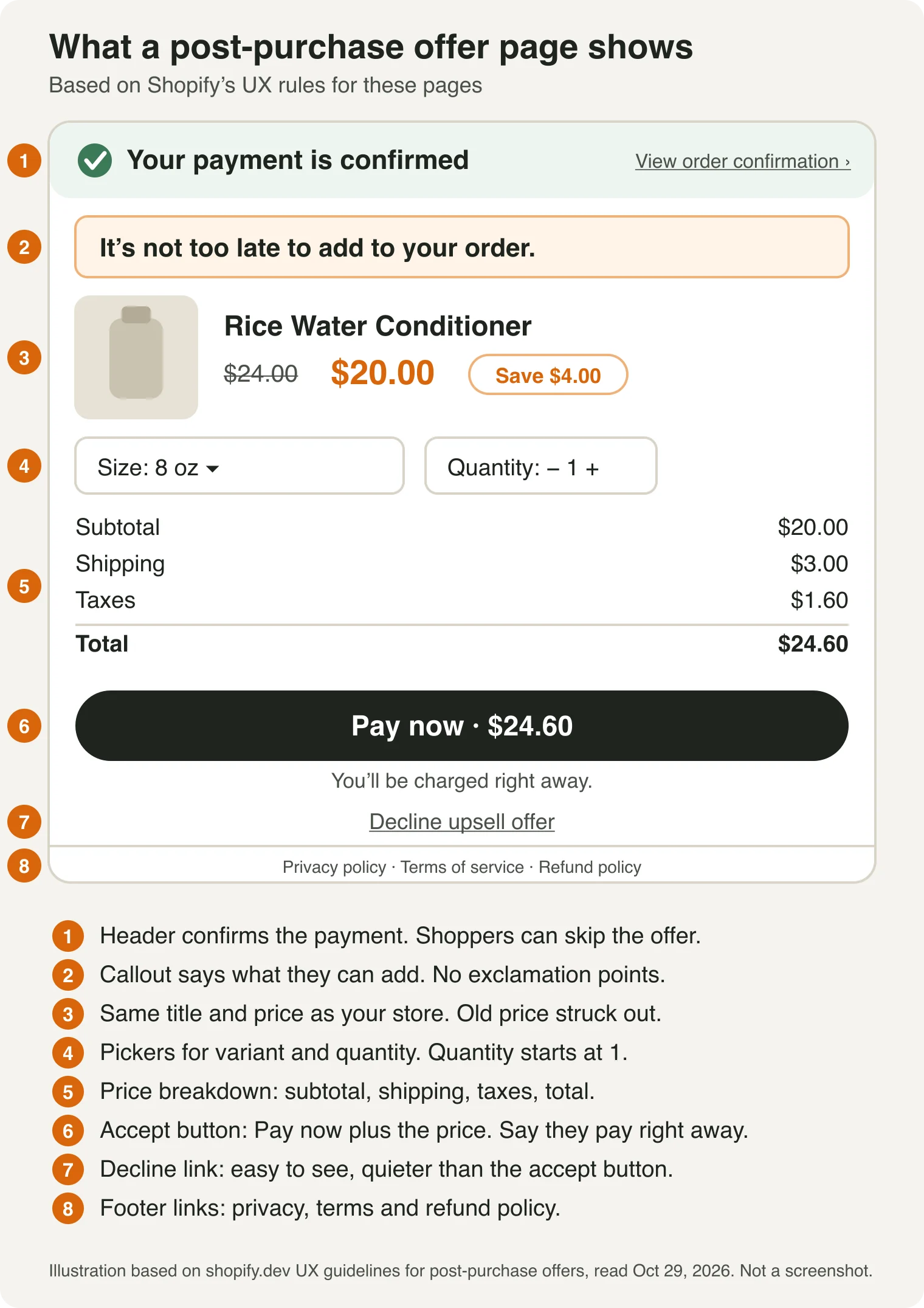
Do:
- Lead with what the shopper can add to the order they placed. Shopify's example: "It's not too late to add to your order."
- Name the product and the discount.
- Keep the title and price the same as on your store. Strike out the old price and show the new one next to it.
- Show the subtotal, shipping, taxes and total. Update them when the shopper changes the size or quantity.
- Show no more than three offers in a row.
Don't:
- Use exclamation points. Shopify's example of what not to write: "Wait! Before time runs out!"
- Use words that make the offer feel required, or that make the shopper doubt their order went through.
- Add a countdown that isn't real. Shopify asks for offers without pressure, and in the UK, falsely saying an offer ends soon is banned.
Set by Shopify, so you can't change it: the header that confirms the payment, the "View order confirmation" link that lets shoppers skip the offer, the "Pay now" button text, the "Decline upsell offer" button text, and the footer links to your privacy, terms and refund pages.
If an app's default copy breaks these rules, rewrite it.
Post-Purchase Upsell vs Other Offers
People mix these up all the time. The key is when the shopper sees the offer.
| Offer | Seen when | Paid yet? | Plus only? |
|---|---|---|---|
| Product-page upsell | While browsing | No | No |
| Cart upsell | In the cart | No | No |
| Checkout upsell | Inside the checkout steps | No | Yes |
| Post-purchase upsell | After paying, before the thank-you page | Yes | No (not Starter) |
| Thank-you page offer | On the thank-you page | Yes | No (not Starter) |
| Follow-up email offer | In their inbox, later | Yes | No |
Plan details come from Shopify's checkout technologies page (we read it in October 2026). Shopify still labels post-purchase extensions "beta," and app makers must ask Shopify for access. That is their job, not yours.
One difference matters most. A post-purchase upsell adds an item to the paid order in one click. A thank-you page offer can't edit the order by itself. An app has to add the item through order editing, which is not the same one-tap flow.
A follow-up email means a new checkout, or an order edit with a payment link, so the shopper pays again. We explain the page difference in post-purchase page vs thank-you page.
Want to compare all the spots by results? See pre-purchase vs in-cart vs post-purchase upsells.
Post-Purchase Upsell Examples
Seven offer types that work after payment, each shown with a made-up store. The prices are examples, not data.
- A matching item (coffee): a $38 starter kit, then a 12 oz bag of beans for $14. The kit needs beans.
- The next step in a routine (skincare): a $42 serum, then a matching moisturizer at 15% off. A routine has more than one step.
- A bigger pack (pet food): one $29 bag, then a 3-bag pack that saves 12%. Same item, better deal.
- A small accessory (clothing): a $55 hoodie, then a matching beanie for $12. Small and easy to say yes to.
- A second one at a discount (stationery): a $12 notebook, then a second one at half price. Easy to understand.
- An add-on that protects it (phone gear): a $24 case, then a 2-pack of screen protectors for $8. Small and expected.
- A subscription (supplements): one $34 bottle, then "subscribe and save 15%." It turns one sale into repeat sales.
The subscribe offer only works if your subscription app supports post-purchase offers, so ask before you plan it.
Here is copy that follows Shopify's rules for the coffee offer:
- Callout: "It's not too late to add to your order. A second 12 oz bag of beans, $14."
- Price: $16.00 struck out, $14.00 shown next to it.
- Button: "Pay now · $14.00." The shopper sees the tax and shipping lines above it.
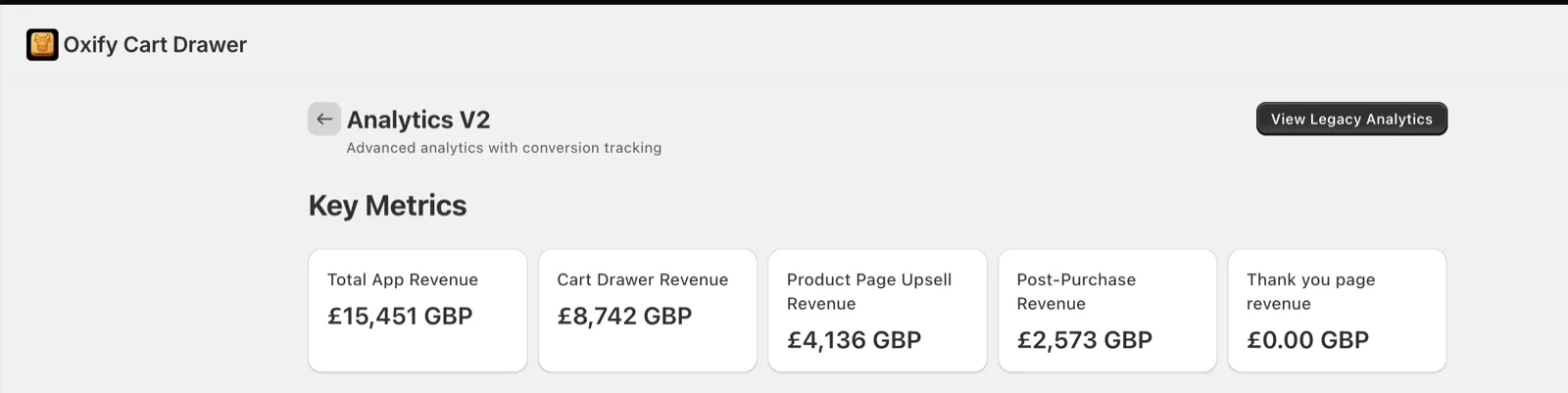
A real one: Replenhair, a UK haircare brand, added a one-click post-purchase offer on top of its cart drawer and product page offers. It brought in £2,573, about 17% of its £15,451 total.
What Makes a Good Offer?
- Match the order. Offer something that goes with what they just bought. Shopify's UX guide asks for relevant products too.
- Keep it small. A rule of thumb is a price of about 25% of the order or less. On an $80 order, think $20. That rule comes from upsell practice, not from Shopify. Our guide on how to price the discount goes deeper.
- Make the deal clear. Show the price, the saving and the total. Say what happens: "We'll charge the card you just used, and it ships with your order."
- Remind them the order is placed. A new buyer should never wonder if their payment worked.
- Start with one offer. You can add a cheaper second offer for people who say no. See the upsell and downsell funnel.
Want help with the words on the page? Read how to write offers that convert.
Why Stores Use It, and When to Skip It
Why stores use it:
- It can raise average order value (AOV). Each yes adds to an order you already won.
- It needs no extra traffic. It reaches shoppers who already bought.
- It is one tap. The card they just used covers it.
- It can't cost you the sale. The order is already paid.
When to skip it, or wait:
- Most of your shoppers pay with a wallet. Apple Pay and Google Pay shoppers never see the offer. Check your payment mix in your Shopify reports first.
- You get very few orders. At a 6% take rate, 100 orders gives you about 6 yeses.
- Your orders are mostly local delivery, or have duties and several currencies. Shopify skips the page for those.
What a Post-Purchase Upsell Can't Do
This is the part many guides skip. These limits are from Shopify's own docs.
Who won't see the offer:
- Shoppers who pay with Apple Pay, Google Pay, Amazon Pay, Klarna, Affirm or Afterpay.
- Shoppers who pay with a gift card or any non-card method.
- Shoppers on local delivery, or on orders with duties and several currencies.
- Stores that use payment providers like Braintree, Payflow Pro, PayPal Payments Pro or Eway.
- Orders under $0.50, and orders outside the Online Store channel.
Shop Pay is not on Shopify's list of exceptions. Installment plans are, so ask your app about Shop Pay Installments. Our post on post-purchase upsells and payment methods has more.
What the page can't do:
- Only one app can run it at a time.
- A shopper can accept up to three offers per checkout.
- Buy X get Y discounts made in the Shopify admin don't apply on this page. Offer discounts come from the app instead.
- During huge flash sales, Shopify may skip the page to keep orders moving.
What to watch in your reports:
- Ad and analytics tools that use Shopify's pixels count only the first purchase. Your ad dashboard may not show the extra revenue. Check your Shopify orders instead.
What Results Look Like
- Take rate vs conversion rate: take rate is offers accepted ÷ offers shown. It is not your store's conversion rate, which counts visitors who buy.
- Typical take rate: Growth Suite measured 6% on average for post-purchase offers (1 million offers, 200 stores, January to June 2026). It is the lowest of the four spots it tracked. It also reached far fewer shoppers than the cart or product page, because only paid orders can see it.
- Share of app revenue: at a Swedish store using Oxify, one-click post-purchase offers earned 4,210 SEK, or 38.1% of the last 30 days. At Replenhair it was 16.7% since install.
- A quick sum: say 500 orders a month can see the offer, 6% say yes, and the offer costs $15. That is 30 yeses and about $450 a month.
That $450 is revenue, not profit. Here is the same example with made-up costs:
| Line | Math | Amount |
|---|---|---|
| Revenue | 30 yeses × $15 | $450 |
| Product cost | 30 × $6 | -$180 |
| Extra packing and shipping | 30 × $3 | -$90 |
| Left before app fee | $180 |
Subtract your app fee, and any discount you gave, to see what you keep. Our post on post-purchase conversion impact shows more math and the two dashboards.
These numbers come from vendors, including us. They show the idea can work. They don't promise it will for you.
What About Offers by Email or Text Days Later?
That is a different tool. A follow-up message needs a new checkout, or an order edit with a payment link, so it has none of the one-tap magic. It often suits refills and repeat buys, because the shopper has had time to try the product. Our guide on the post-purchase customer experience covers those messages.
Myths and Facts
| Myth | Fact |
|---|---|
| "You need Shopify Plus." | No. It works on every plan except Starter. Offers inside the checkout steps are the Plus-only ones. |
| "It's the same as a thank-you page offer." | No. A thank-you page offer can't edit the order by itself, so it isn't the same one-tap add. |
| "It converts better than other upsells (5% to 15% vs 2% to 5%)." | You'll see this claim often. In Growth Suite's 2026 data, the average take rate after payment was 6%, against 12% in the cart and 7% on product pages. Tools count rates differently, so test your own store. |
| "It's risk free." | The sale is safe, because the shopper has already paid. But Shopify holds fulfillment while the offer is open, and a pushy offer can hurt trust. |
How to Start
- Check your plan. Anything but Starter works.
- Install an upsell app that offers post-purchase upsells.
- Pick it as your post-purchase app. In your Shopify admin, go to Settings, then Checkout. In the Post-purchase page section, select your app. The section appears only after you set up the app.
- Build one offer. One product that goes with your best seller, priced near 25% of the order.
- Place a test order. Then watch the take rate and revenue for two to four weeks.
Ask any app these four questions before you install:
- What happens if the second charge fails?
- How do refunds work for the added item?
- Can I see revenue from these offers on their own?
- Which payment methods and checkout setups does it support?
The full walk-through is in our one-click post-purchase upsell setup guide. Want to see which apps do this? Compare them in best Shopify post-purchase upsell apps.
New to upselling? Read upselling vs cross-selling first, then see how to upsell on Shopify in every spot.
Related Guides
- 19 Shopify upsell apps compared, with prices at your order volume
- Shopify checkout upsell guide: do you need Plus?
Frequently Asked Questions
What is a post-purchase upsell?
Do I need Shopify Plus for post-purchase upsells?
Does a post-purchase upsell create a second order?
Does a post-purchase upsell slow down checkout or delay shipping?
Is a post-purchase upsell the same as a thank-you page upsell?
Can I add a post-purchase upsell without an app?
Is a post-purchase upsell worth it?
Are post-purchase upsells annoying?
About This Guide
- Who: published by Oxify, which makes Shopify upsell apps. We say so wherever our own data appears.
- How we checked it: we read Shopify's product-offer, post-purchase API, UX and checkout technologies docs on October 29, 2026. Take rates come from Growth Suite. Store figures come from Oxify dashboards. A separate fact-check compared the numbers with their sources.
- Why we wrote it: merchants kept asking what actually happens to the order and the money, and most guides don't say.
Add a Post-Purchase Offer to Your Store
Start with one offer that fits your best seller. Oxify Cart Drawer & Upsells includes one-click post-purchase offers, along with cart and product page offers, so you can add the next spot when you're ready.
Start a 14-day free trial on the Shopify App Store and set up your first offer.
My promise: put Oxify Cart Drawer live with at least one offer for 30 days. If your average order value hasn't gone up, email us and we'll refund 100% of what you paid. See pricing.