 Oxify
Pre-Purchase vs In-Cart vs Post-Purchase Upsells: Which Converts Best?
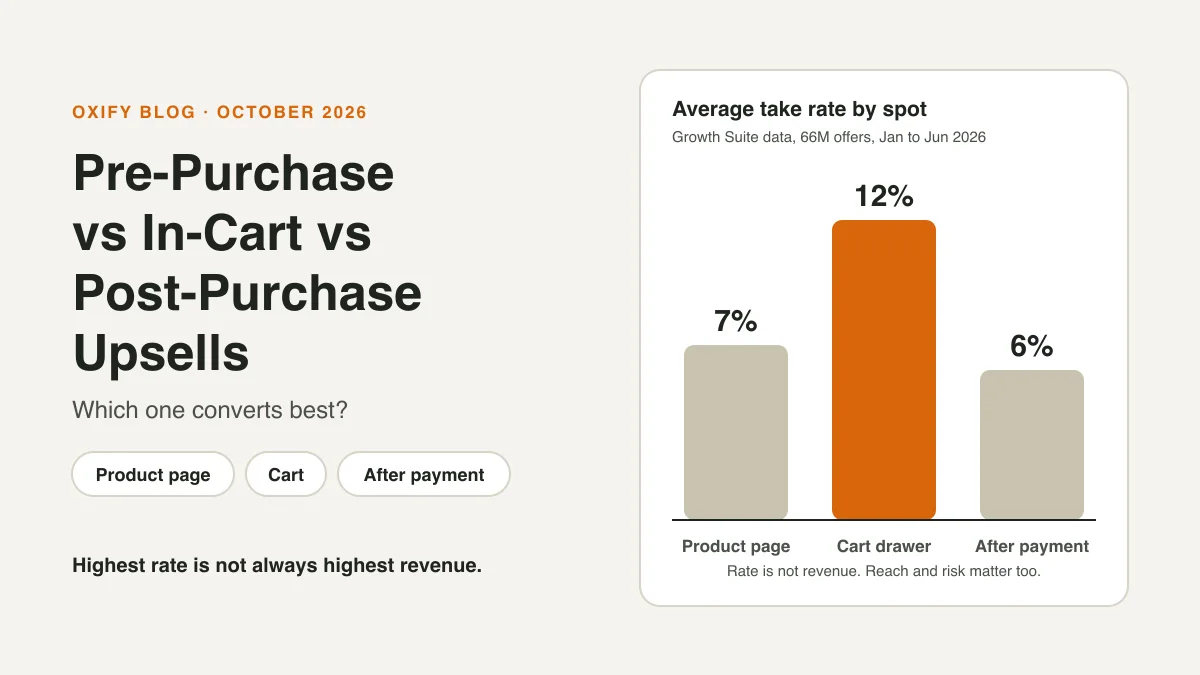
Short answer: if "pre-purchase" means everything before payment, the product page and the cart, then pre-purchase wins on both rate and volume. In the biggest public data set we could find, cart offers got a yes 12% of the time and product-page offers 7%, against 6% after payment. They also reached far more shoppers.
Post-purchase wins on one thing: it can't cost you the first order. And in our own store dashboards, the spot that earned the most changed from store to store.
This guide shows what each spot does, who it suits, which to build first, and when post-purchase is worth the effort.
Jump to: the scoreboard · three answers · our store data · what to build first · FAQ
Quick Answer (For Skim Readers)
- Highest take rate: in-cart, at 12% on average.
- Most yeses overall: the product page. It showed 50 million offers, so even at 7% it got the most yeses.
- Safest for the sale: post-purchase. The shopper has already paid, so the offer can't cost you the order.
- Smallest reach: post-purchase. Only people who just bought can see it.
- My pick for most stores: start with one small offer in the cart, then a pair on your best product pages. Add a post-purchase offer once you have a few hundred orders a month.
What Do "Pre-Purchase," "In-Cart" and "Post-Purchase" Mean?
Each name is about when the shopper sees the offer. Think of three moments:
- Pre-purchase (product page): the shopper is still looking. They have not added anything yet.
- In-cart (cart drawer or cart page): the shopper has picked something and is getting ready to pay.
- Post-purchase (after payment): the shopper has paid. One tap adds an item to the same order, before the thank-you page.
Most people say "pre-purchase" for everything before payment, cart included. Shopify's own docs use it for offers inside the checkout steps. In this guide we split it into the product page and the cart, so you can compare all three. A fourth spot, the checkout itself, needs Shopify Plus. We cover it below.
The Three Spots at a Glance
| Factor | Product page | Cart | After payment |
|---|---|---|---|
| Mood | Still picking | Ready to pay | Just paid |
| Take rate | 7% | 12% | 6% |
| Reach | Most | Middle | Least |
| Risk to the first order | Some | Some | None |
| Best offer | Packs, sets | Small add-ons | Related item |
| Plus only? | No | No | No (not Starter) |
Take rates and reach come from the Growth Suite data below.
The Scoreboard: What 66 Million Offers Showed
Growth Suite, a company that sells an upsell app, shared numbers from its own customers. The data covers 250 Shopify stores and 66 million offers shown, from January to June 2026.
"Take rate" means this: out of every 100 offers shown, how many shoppers said yes?
| Where | Take rate | Stores | Offers shown |
|---|---|---|---|
| Cart drawer | 12% | 250 | 15 million |
| Checkout (Plus only) | 9% | 28 | 0.5 million |
| Product page | 7% | 250 | 50 million |
| Post-purchase | 6% | 200 | 1 million |
Read these numbers with care:
- It is one vendor's data, from its own customers. It is not an outside study.
- Stores vary a lot. Growth Suite saw stores from under 2% to over 20% at the same spot. Your products, prices and offer quality move your number too.
- The checkout number is thin. It comes from only 28 Plus stores.
- It counts yeses, not extra sales. Growth Suite says it does not yet have enough holdout tests to prove lift.
"Converts Best" Has Three Answers
Think of a real shop:
- The aisle (product page): everyone walks through, but few stop for a "buy 2, save 10%" sign.
- The checkout counter (cart): fewer people get there, and more of them say yes.
- After you pay (post-purchase): the clerk offers a second one, 10% off, added to your bag. Only paying customers hear it, and nobody can walk out on the sale.
Each spot wins at something different:
- Best rate: the cart. Shoppers there say yes most often.
- Most yeses in total: the product page. So many people see it that a lower rate still adds up.
- Safest: post-purchase. It can't hurt the order, because the order is already paid.
Here is the math on the Growth Suite numbers. Offers shown × take rate = yeses.
| Where | Offers shown | Take rate | Yeses (about) |
|---|---|---|---|
| Product page | 50 million | 7% | 3.5 million |
| Cart drawer | 15 million | 12% | 1.8 million |
| Checkout (Plus) | 0.5 million | 9% | 45,000 |
| Post-purchase | 1 million | 6% | 60,000 |
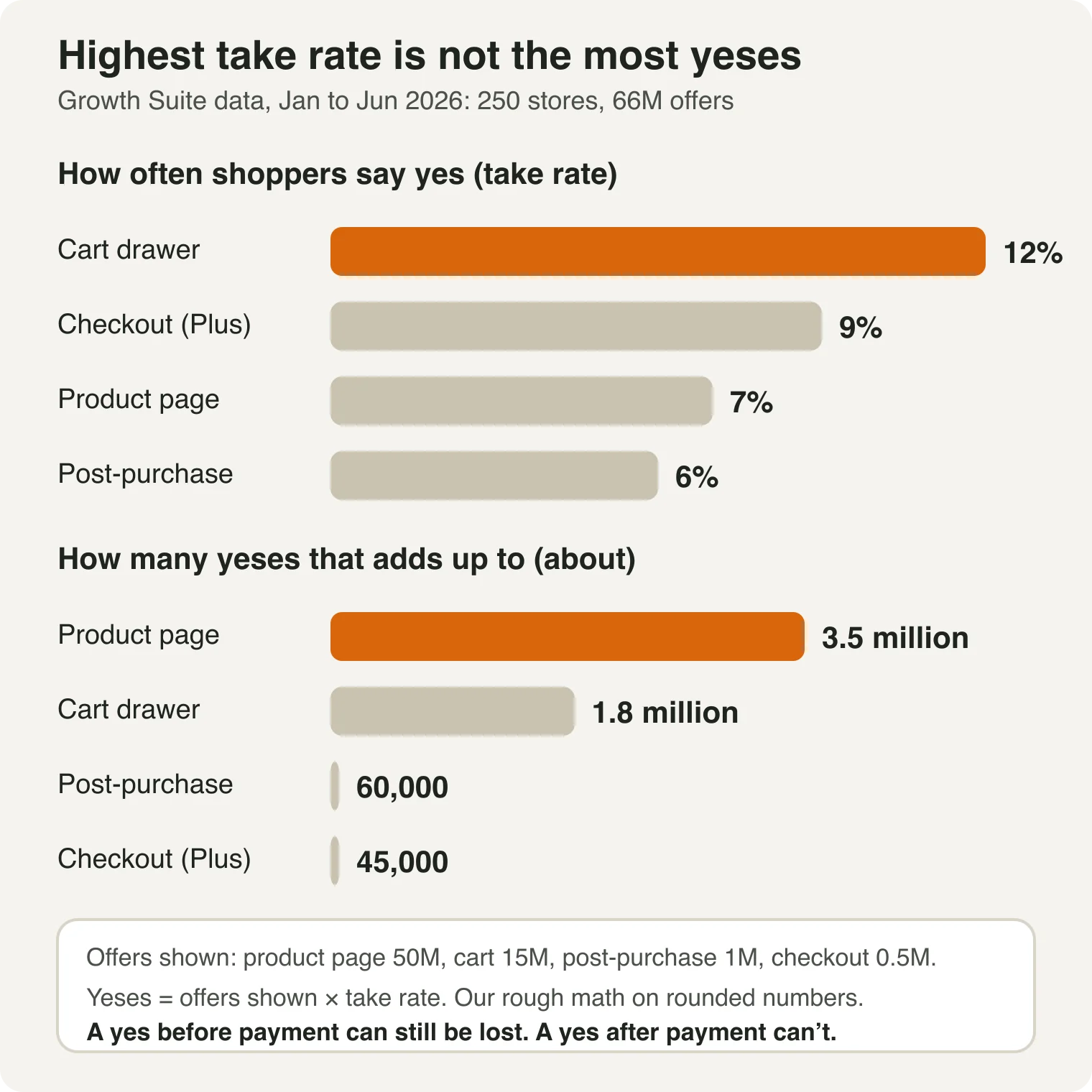
That is our rough math on their rounded numbers, so treat it as a sketch. It still shows two things:
- The product page made about twice as many yeses as the cart, even at a lower rate.
- Post-purchase made about 1 in every 100 yeses. Only paid orders can see it, so it gets few chances.
One catch. A yes before payment is not money yet. The shopper can still leave before paying. A yes after payment is already part of a paid order.
You may have read that post-purchase converts best. An earlier Growth Suite guide (February 2026) says so, at 3% to 8%, but it shows no sample size. The newer data above does show its sample, and it ranks post-purchase last.
Pre-Purchase Upsells (Product Page)
The shopper is still looking. They have not added anything yet.
- Offers that fit: bundles ("buy the set, save 10%"), "bought together" add-ons, bigger packs.
- Why it works: it has the biggest audience. In the Growth Suite data it showed 50 million offers, more than all the other spots put together.
- Watch out: the offer sits next to the Add to Cart button. A crowded page can slow the choice or pull the shopper away from the product they came for.
- Best for: stores where products have clear partners, like shampoo and conditioner.
Our full guide: how to upsell on Shopify product pages.
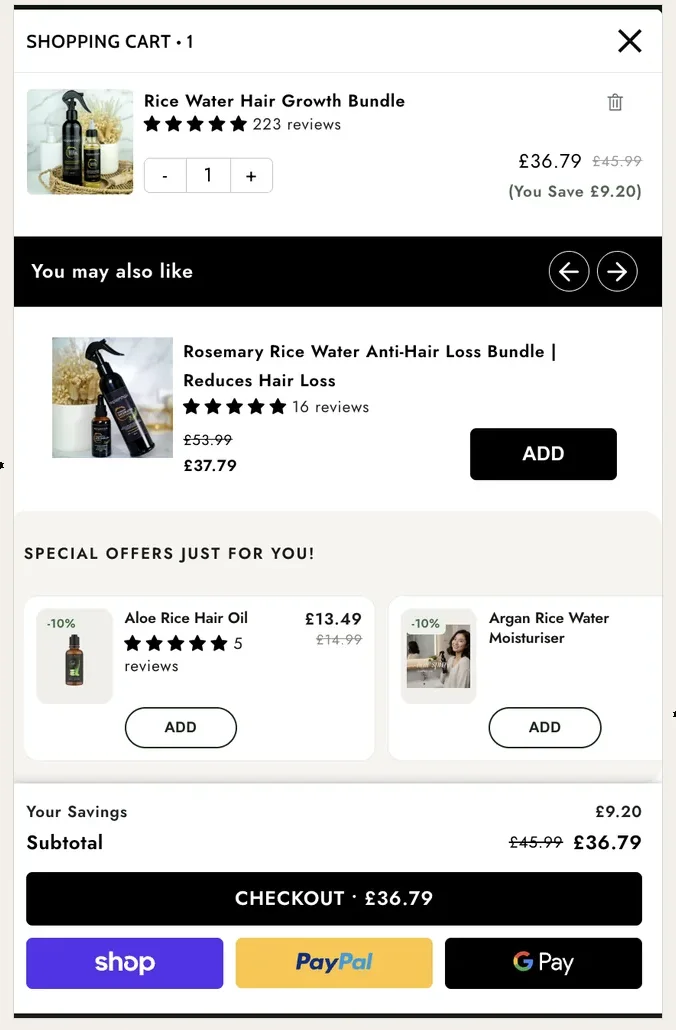
In-Cart Upsells (Cart Drawer or Cart Page)
The shopper has picked something and is getting ready to pay.
- Offers that fit: small add-ons, a "spend $6 more for free shipping" nudge, a free gift at a set total.
- Why it works: they already decided to buy, so a small extra item is an easy yes. This spot had the top take rate, 12%.
- Watch out: don't push the checkout button down the screen, and don't stack four offers. Our guide on why in-cart upsells fail has the fixes.
- Best for: almost every store. If you have a slide-out cart, start here.
Post-Purchase Upsells (After Payment)
The shopper has paid. A one-click offer shows before the thank-you page. One tap adds the item to the same order. There is no second checkout.
- Offers that fit: a bigger size, a matching item, a gift set at a small discount.
- Why it works: the order is already paid, so the offer can't cost you that sale.
- Watch out: fewer shoppers can see it. Shopify's docs list the gaps. No offer shows when the shopper pays with Apple Pay, Google Pay, Amazon Pay, Klarna, Affirm or Afterpay. It also skips gift-card and other non-card payments, local delivery, orders with duties and several currencies, orders under $0.50, and orders placed outside the Online Store.
- Also: only one app can run post-purchase offers at a time. Shopify lets a shopper accept up to three offers, but I'd start with one. A pushy page can annoy a new buyer.
- Best for: stores that want extra revenue with no risk to checkout.
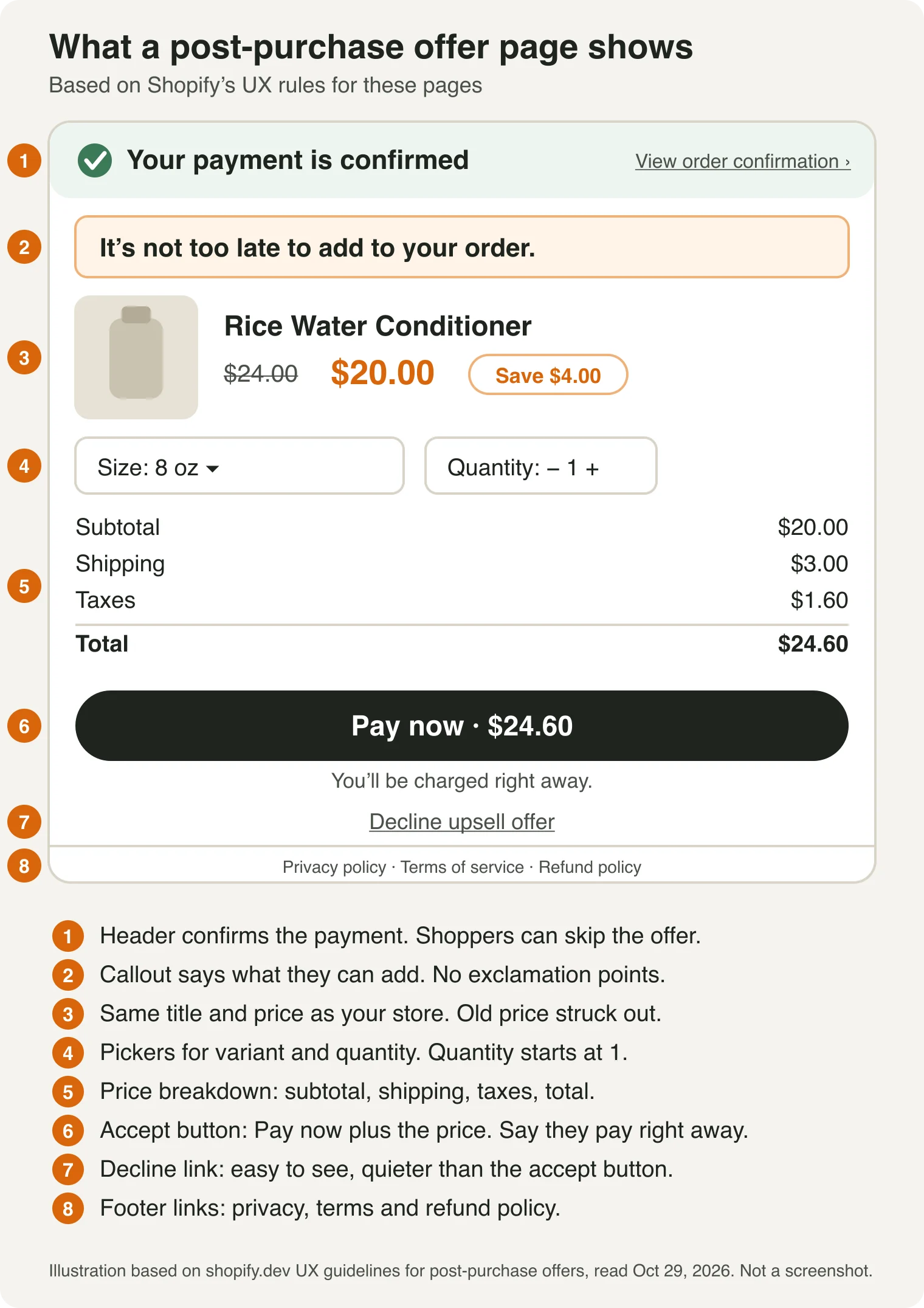
What happens to the order: the item joins the same paid order. Shopify holds fulfillment while the offer is open, for up to an hour. For the full how-it-works, including what happens to the order and the charge, read what is a post-purchase upsell.
After Payment: Now or Days Later?
"Post-purchase" can mean two different moments:
- Right now: the one-click page between payment and the thank-you page. The card they just used covers it, so a yes is one tap. The offer should fit what they just bought.
- Days later: an email or text. It needs a new checkout, or an order edit with a payment link. It suits refills and repeat buys, because the shopper has had time to use the product.
Start with the first one. It is the easier yes. The second is a different tool, covered in our guide to the post-purchase customer experience.
What About Checkout Upsells?
Offers inside the checkout steps need Shopify Plus. Shopify's technologies page says so (we read it in October 2026). Growth Suite saw a 9% take rate there, but from only 28 Plus stores. Treat it as a hint, not a rule.
On Plus? See our guide to Shopify checkout upsells, or the best Shopify checkout upsell apps.
What About the Thank-You Page?
The thank-you page comes right after the post-purchase page. Apps can show offers there on every plan except Starter, per Shopify's technologies page. But a thank-you page offer can't edit the order by itself. The app has to use order editing or a new checkout, so it isn't the same one-tap add.
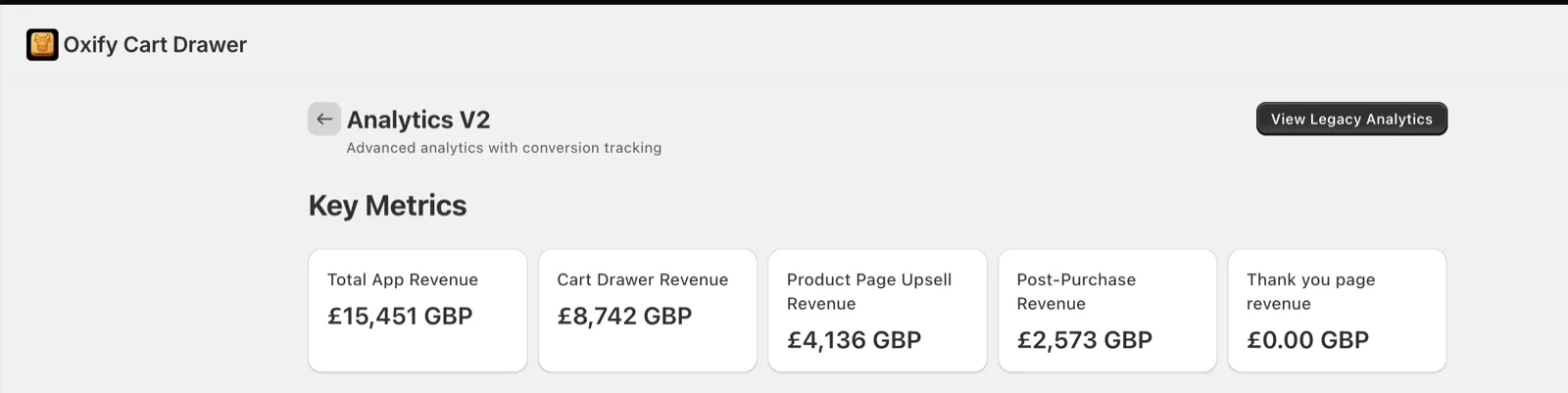
Treat it as a fifth spot: low pressure, low reach. That is why Oxify dashboards show a thank-you page tile. It read £0 at Replenhair, where it wasn't switched on.
Our Store Data: Different Stores, Different Mixes
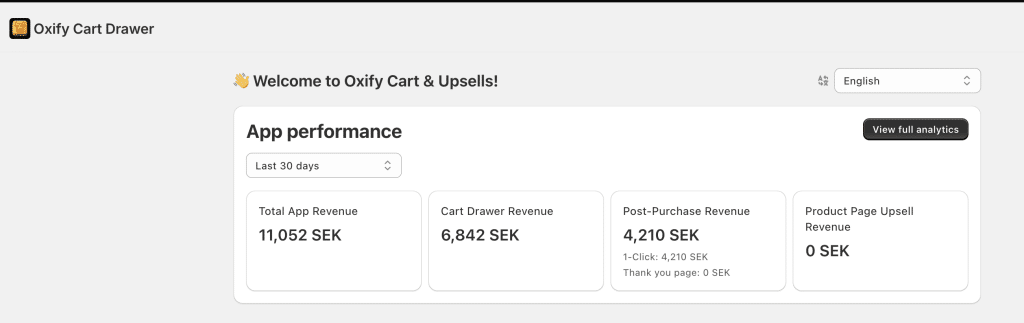
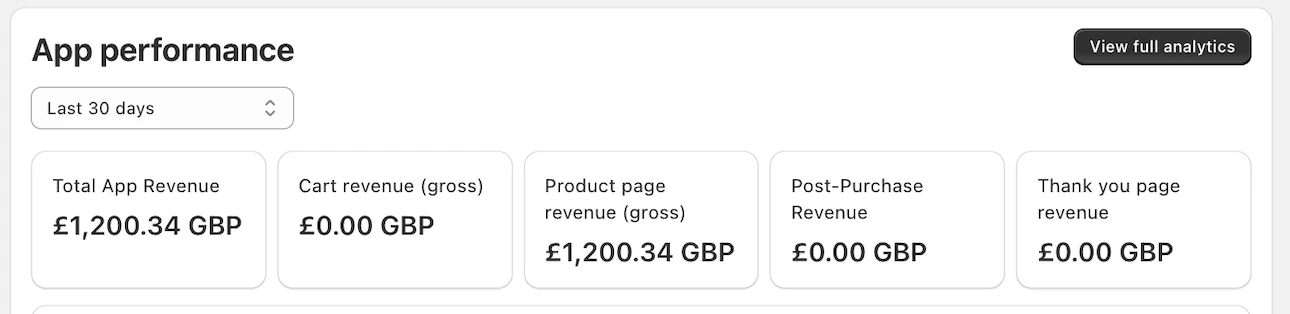
I co-founded Oxify, an upsell app, so I can see how real stores earn by spot. These figures are what our dashboard credits to each spot. They are not tests.
A £0 tile can mean "switched off" or "no sales," and the dashboard can't tell us which. Treat them as examples.
| Store | Revenue by spot (share of total) |
|---|---|
| Replenhair (UK haircare), since install | Cart drawer: £8,742 (56.6%) Product page: £4,136 (26.8%) Post-purchase: £2,573 (16.7%) |
| Swedish store, last 30 days | Cart drawer: 6,842 SEK (61.9%) Product page: 0 SEK Post-purchase: 4,210 SEK (38.1%) |
| UK store, last 30 days | Cart drawer: £0.00 Product page: £1,200.34 (100%) Post-purchase: £0.00 |
| Crossword Bookstores (India), since install | Cart drawer: ₹340,639 (100%) Product page: ₹0 Post-purchase: ₹0 |
What I take from it:
- In the two stores that ran several spots and earned from the cart, the cart drawer led.
- Post-purchase made up 17% to 38% of the total in the two stores where it earned.
- One store earned only from the product page.
- Same app, different winners. That is why you test your own store.
My advice. Pick one spot, tune it for a month, then add the next. Benchmarks like Growth Suite's tell you where to start. Your own dashboard tells you what to keep.
Which Should You Build First?
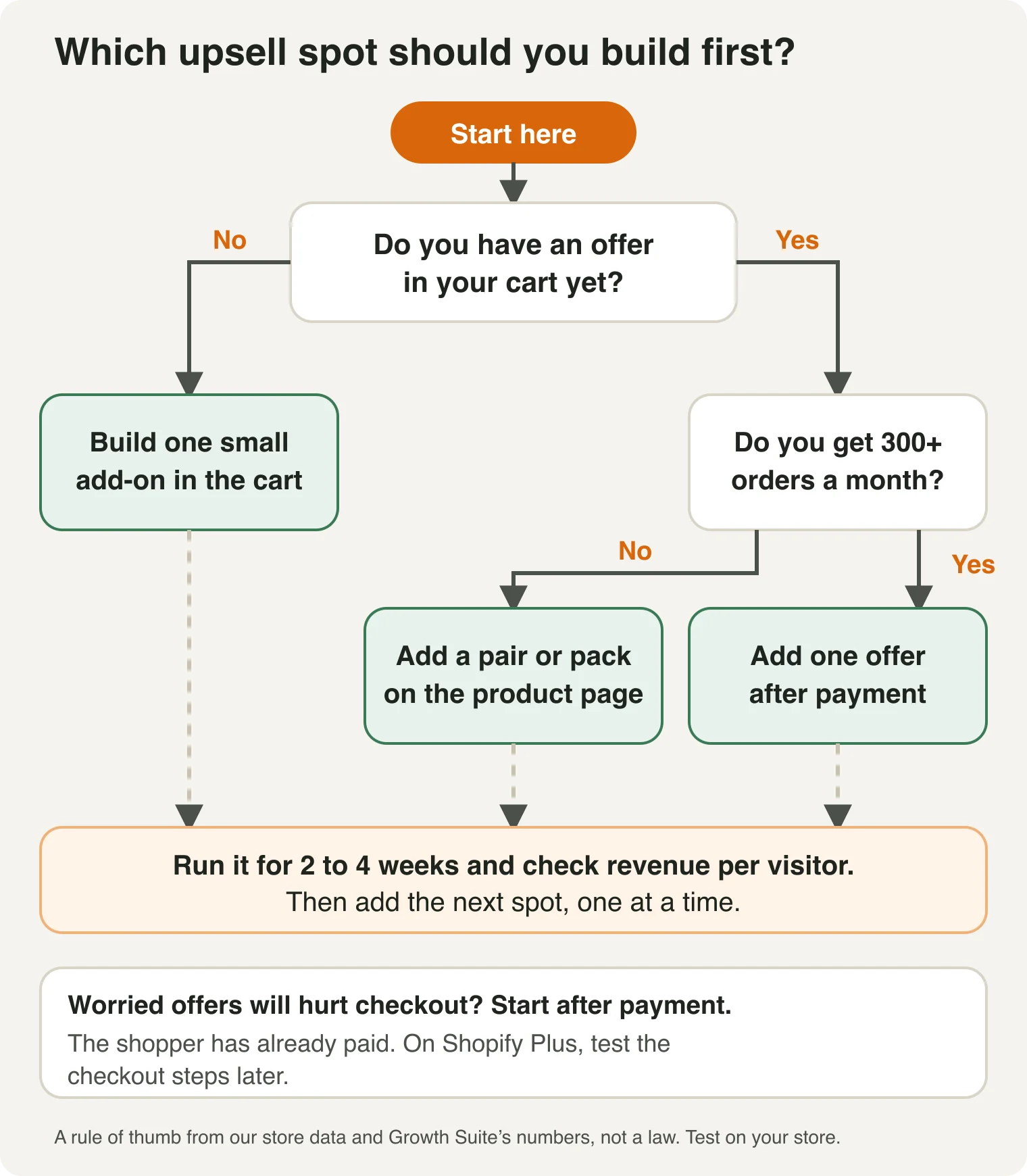
Find the row that sounds like your store:
| If your store... | Start with | Why |
|---|---|---|
| Has a slide-out cart with no offers in it | In-cart | Top take rate. One small add-on is a quick win. |
| Sells products with clear partners | Product page | Show the pair before they add to cart. |
| Gets fewer than about 300 orders a month | In-cart or product page | Post-purchase only reaches buyers. At 6%, 100 orders gives you 6 yeses, about $90 at $15. |
| Worries offers will hurt checkout | Post-purchase | The shopper has already paid. |
| Already has a cart offer | Post-purchase | It adds on top and doesn't compete with the cart offer. |
| Is on Shopify Plus | Add checkout later | Plus only, and the data is thin. |
When is post-purchase worth the effort?
It depends on how many orders can see the offer. Here is the math at Growth Suite's 6% average and a $15 offer:
| Orders a month | Yeses at 6% | Revenue at $15 |
|---|---|---|
| 100 | 6 | $90 |
| 500 | 30 | $450 |
| 2,000 | 120 | $1,800 |
That is revenue, not profit, and only orders that can see the offer count. If your shoppers mostly pay with wallets, the real numbers are lower. Check your payment mix first.
The order I suggest:
- One small offer in the cart.
- A pair or bundle on your best-selling product pages.
- One offer after payment, once you have a few hundred orders a month.
Why the cart first? It has the best odds per shopper, and it was the top earner at three of the four stores above. The product page gets the most yeses overall, so it comes next.
Run each for two to four weeks. Change one thing at a time, so you know what worked. Our guide to measuring upsell performance shows how.
Rules That Hold Everywhere
- Keep it to a few offers, not four. Shopify's guidance for post-purchase pages caps it at three in a row. In Growth Suite's session data, the 4th offer a shopper saw got only 1%.
- Keep it small and on topic. Add-ons that match the cart win. Big jumps in price lose.
- Don't repeat an offer. If the cart offers a conditioner, don't offer the same conditioner again after payment.
- Judge by revenue per visitor, not take rate alone. A high rate on tiny add-ons can earn less than a lower rate on a better offer.
- Test on and off. Hide the offer from some visitors for two weeks and compare. Yeses don't prove the sale was extra.
- Don't run three upsell apps. They can't see each other, so one shopper can get four offers in a row. More on that in do upsells hurt conversion rate?
New to the basics? Start with upselling vs cross-selling, or follow our step-by-step guide on how to upsell on Shopify. Ready to pick an app? See best Shopify upsell apps.
Related Guides
Frequently Asked Questions
Which upsell placement converts best on Shopify?
Is a post-purchase upsell better than an in-cart upsell?
Do post-purchase upsells convert better than pre-purchase ones?
When should I focus on post-purchase upsells?
Do I need Shopify Plus for a post-purchase upsell?
What is a pre-purchase upsell?
How many upsell offers should I show?
How do I know which spot works best for my store?
About This Guide
- Who: published by Oxify, which makes Shopify upsell apps. We say so wherever our own data appears.
- How we checked it: take rates and session data come from Growth Suite's published 2026 numbers. Plan rules come from Shopify's docs, read on October 29, 2026. Store figures come from Oxify dashboards. A separate fact-check compared the numbers with their sources.
- Why we wrote it: most guides say one spot "wins" without showing reach, risk or a sample size.
Run All Three Spots From One App
Offers work best when you can see them side by side. Oxify Cart Drawer & Upsells covers the cart drawer, the product page and post-purchase offers in one app, with one dashboard that shows revenue by spot.
Start a 14-day free trial on the Shopify App Store, then put one small offer in the cart.
My promise: put Oxify Cart Drawer live with at least one offer for 30 days. If your average order value hasn't gone up, email us and we'll refund 100% of what you paid. See pricing.