 Oxify
OxifyWhy Your In-Cart Upsell Isn't Converting (and How to Fix It)
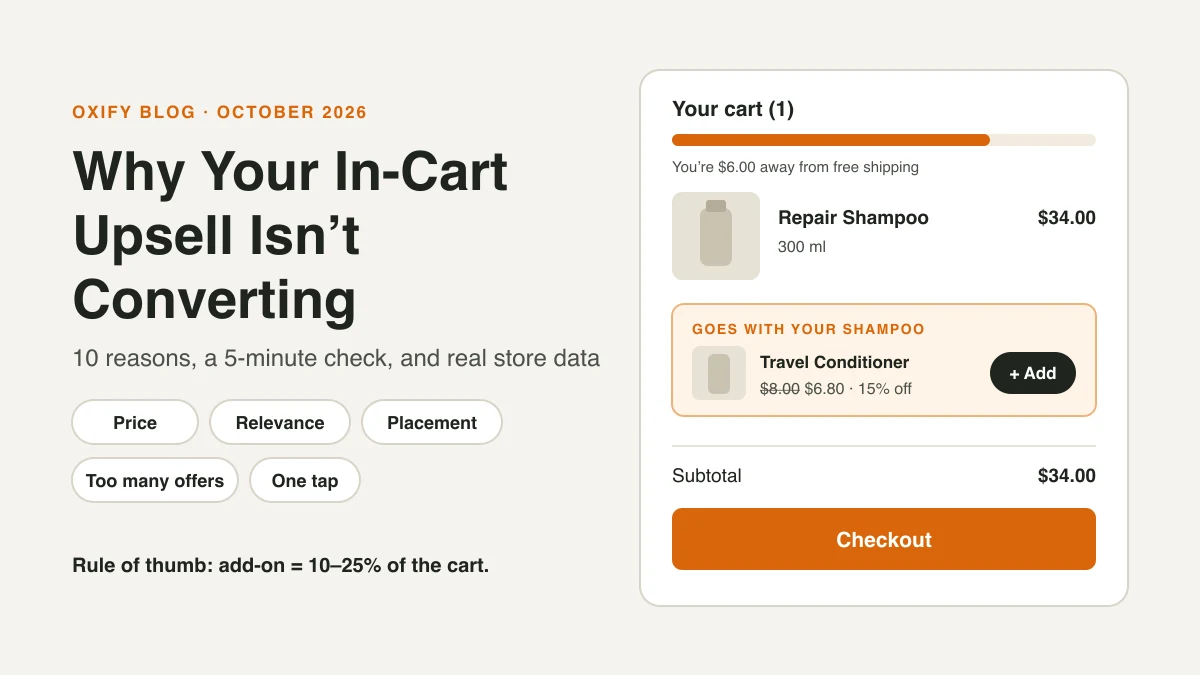
You set up an upsell in your cart. Weeks later, almost nobody has clicked "Add."
Most in-cart upsells fail for boring reasons, not mysterious ones. The offer costs too much, it doesn't match what's in the cart, or shoppers never even see it. Fix those three and most stores see more takers fast.
This guide shows you how to find out which reason is yours in five minutes, then how to fix it.
Quick Answer (For Skim Readers)
- Price too high: keep the add-on small next to the cart total. A $5 add-on on a $40 cart is an easy "yes."
- Wrong product: show something that goes with what's in the cart, not your bestseller.
- Not seen: the offer sits below the checkout button, or below the fold on phones.
- Too many offers: one good offer beats four. In Growth Suite's 2026 data (an upsell app vendor, 250 stores), acceptance fell to 1% by the fourth offer in a session.
- Too much work: if adding it takes more than one tap, many shoppers skip it.
- Not showing at all: a theme or app conflict can hide the offer. Check your live cart in a private window.
First, What Does "Not Converting" Mean?
Be clear on the number before you panic. The one that matters is the take rate: how many shoppers who saw the offer added it.
Take rate = upsell adds ÷ carts that showed the offer
For a rough benchmark, Growth Suite reports an average 12% acceptance for cart drawer offers across 250 Shopify stores (January to June 2026). That's an app vendor's own data, and stores ranged from under 2% to over 20%. So:
- Under 2%: something is wrong. Read on.
- 2% to 8%: working, with room to grow.
- Over 10%: it's working. Test a slightly bigger offer next.
Low take rate isn't the only way to fail. If the upsell gets added but your checkout rate drops, the offer may be getting in the way. Our upsell measurement guide shows how to check both.
The 5-Minute Diagnosis
Grab your phone. Add your top-selling product to the cart, like a shopper would. Then ask:
- Can I see the offer without scrolling? If no → Reason 3.
- Does the offer make sense with this product? If no → Reason 2.
- Is the add-on less than a quarter of my cart total? If no → Reason 1.
- Can I add it in one tap? If no → Reason 5.
- Is there more than one offer or pop-up? If yes → Reason 4.
- Is the offered item in stock, and not already in the cart? If no → Reason 9.
- When did I last change the offer? If you can't remember → Reason 10.
Most stores fail at least one of these. Some fail all seven.
10 Reasons Your In-Cart Upsell Isn't Converting
1. The Price Is Too Big a Jump
Picture this. Someone buys a $25 phone case. Your cart offers a $60 charger. That's more than double what they planned to spend. They say no without thinking.
The cart is a "small yes" moment. Shoppers already decided on the big purchase. They'll add a little more, not a lot more.
Fix it:
- Keep add-ons small next to the cart. A good starting point is 10% to 25% of the cart value.
- Save big upgrades for the product page, where shoppers are still choosing.
- Try a small add-on: a cleaning kit, gift wrap, a sample size, a refill.
Use this as a quick price guide (it's the 10% to 25% rule, worked out):
| Cart total | Add-on price to try | Example add-on |
|---|---|---|
| $20 | $2 to $5 | Sample size, sticker pack, gift note |
| $40 | $4 to $10 | Refill, cleaning kit, travel size |
| $80 | $8 to $20 | Matching accessory, care product |
| $150 | $15 to $35 | Protection plan, premium accessory |
2. The Product Doesn't Match the Cart
Showing your bestseller to everyone feels smart. It isn't. A shopper buying dog food doesn't want your cat toy.
Fix it:
- Set offers by product or collection. Coffee beans → filters. Shampoo → conditioner.
- Ask: "What would a store clerk hand them?" That's your offer.
- Use your order data. Look at what people already buy together, and offer that. Our guide to in-cart recommendations shows how.
- Use Shopify's free Search & Discovery app to set "complementary products" by hand for your best sellers. Many cart apps, including ours, can read those pairings.
- Hide the offer if the item is already in the cart. Nothing looks lazier.
3. Shoppers Never See It
An offer nobody sees can't convert. On phones, the cart screen is small. If the offer sits under three cart items and a note box, it's gone.
Sometimes the offer doesn't show at all. Your theme, or a second cart app, can break the widget. For example, Vitals' help docs say its cart suggestions won't appear if the theme's cart line items don't link to the product. Open your cart in a private window and check that the offer is really there.
Fix it:
- Run only one cart or upsell app. Two apps fighting over the same cart is a common cause of missing or flickering offers.
- Place the offer right below the cart items, above the checkout button.
- Use a product photo. Text-only offers blend into the page.
- Check it on a small phone, not just your laptop.
4. Too Many Offers at Once
A carousel of six products, a pop-up, and a "you may also like" row. The shopper's brain says: "too much, just check out." Or worse, they leave.
Growth Suite's data shows the drop clearly. Across 20 million sessions, the first offer was taken 5% of the time, the second 8%, the third 6%, and the fourth just 1%. More offers stop paying fast.
Cutting can even raise sales. The Commerce Lab (June 2025) reported a wellness brand that removed a subscription upgrade and three "You May Also Like" items from its cart drawer. Conversion rate went up 5.2%. No sample size was given, so test it on your own store.
Fix it: show one strong offer, maybe two. Cut the rest.
5. It Takes Too Many Taps
If tapping the offer opens a product page, asks for a size, then sends them back to the cart, most people quit halfway.
Fix it:
- Use a one-tap "Add" button right in the cart.
- Pick a default variant, or show a small size picker inline.
- Keep the shopper in the cart the whole time.
6. There's No Reason to Say Yes Now
"You might also like" is weak. It gives the shopper no reason to act.
Fix it: give a real reason.
- Save money: "Add a second one for 15% off."
- Save shipping: "Add this $6 item and get free shipping." Pair it with a free shipping bar.
- Solve a problem: "Most people buy a filter with this. You'll need one in 30 days."
Keep it honest. A fake discount or a fake timer can win one sale and lose a customer.
7. The Copy Is Vague
"Complete your look!" doesn't tell the shopper anything. Clear beats clever.
Before: "Don't miss out!"
After: "Add the travel case – keeps your headphones safe. $12."
Fix it: name the product, say one benefit, show the price. That's it.
8. The Offer Breaks Trust (or the Cart)
Sometimes the upsell technically works but something feels off:
- The add-on gets added automatically, and the shopper has to remove it.
- The price changes when it hits checkout.
- The cart slows down or flickers when the offer loads.
Fix it: never pre-add items. Make sure the price in the cart matches checkout. Test speed on mobile data. If the cart feels slow, see does a cart drawer app slow down your store.
9. The Offer Is Out of Stock, Already Owned, or on Repeat
Some offers are dead on arrival:
- The add-on sold out last month, but it still shows (or worse, it shows and fails to add).
- The offer is a product the shopper already has in the cart, or bought last week.
- Returning customers see the same offer on every visit. After the third time, they stop looking.
Fix it: pick add-ons you always keep in stock. Hide offers for items already in the cart. If your app can, show returning customers a different offer than first-time buyers.
10. You Set It and Forgot It
Most upsells get set up once, on launch day, and never touched again. But your catalog changes. Seasons change. Your best seller changes.
Fix it:
- Put a monthly 15-minute "offer check" on your calendar. Look at take rate per offer and swap the weakest one.
- Match the season: gift wrap and gift notes in November and December, travel sizes before summer.
- When you launch a new product, ask: "What should we offer next to this in the cart?"
What Oxify's Own Store Data Shows
Here's what we saw in a real store that fixed most of the reasons above.
Replenhair is a UK hair care brand selling products from £14.99 to £49.99. Before Oxify, their cart was just a receipt: no offer, no bundle, no reason to look at a second product. When related products did show up elsewhere on the store, they were at full price, right next to 20–50% sitewide sales.
We set up their cart drawer to fix exactly that:
- Relevance (Reason 2): rule-based offers showing the matching conditioner, scalp treatment or set for whatever was in the cart.
- A reason to say yes (Reason 6): a "Special offers just for you" row with its own 10% saving, shown against the struck-through price, plus a free shipping progress bar.
- One tap (Reason 5): add-ons go straight into the cart with no page load.
Here's where the money came from, read straight off the store's Oxify dashboard:
| Placement | Revenue | Share |
|---|---|---|
| Cart drawer | £8,742 | 57% |
| Product page upsell | £4,136 | 27% |
| Post-purchase offer | £2,573 | 17% |
| Thank you page | £0 (not switched on yet) | 0% |
| Total | £15,451 | 100% |
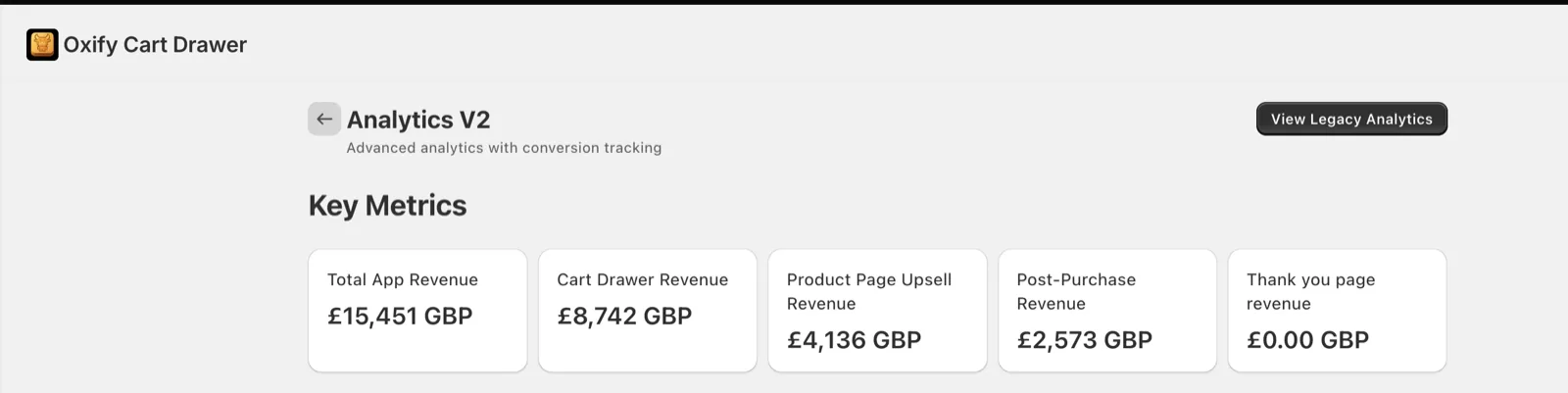
Why this matters for you: the cart was the biggest earner here, not a side placement. Compare that with Zipify, whose main product is a post-purchase upsell app: in its 2025 numbers, cart drawer offers were only a small slice of its tracked upsell revenue, and post-purchase was most of it. The lesson isn't "one placement always wins." It's that a cart upsell that's relevant, discounted and one tap away can carry a store. A weak one barely shows up in the numbers at all.
Shown honestly: these are app-tracked numbers from one store, not a controlled test. Read the full Replenhair case study for the setup, or see how Crossword Bookstores used a three-step reward bar in the cart instead.
How to Test Your Fix
Don't change everything at once. Do it in this order, one change per week:
- Move the offer above the checkout button. (Free, fast.)
- Swap the product to a matching, cheaper add-on.
- Cut to one offer.
- Rewrite the copy: product, benefit, price.
- Add a reason: a small bundle discount or free shipping goal.
- Refresh it monthly. Swap your weakest offer.
After each change, check three numbers:
- Take rate: should go up.
- Checkout rate (sessions that reached checkout ÷ sessions with cart additions): should stay flat.
- Revenue per session: the final judge. If it goes up, keep the change.
Why watch checkout rate so closely? One merchant's App Store review of an upsell app said their checkout conversion fell from about 70% to 59% over three weeks with the app on. They admitted it wasn't a proper A/B test, but it shows how a bad upsell can cost more than it earns. If the checkout rate falls, roll it back. Our post on whether upsells hurt conversion rate has a simple break-even test for this.
Frequently Asked Questions
What is a good take rate for a cart upsell?
How much should an in-cart upsell cost?
How many upsell offers should I show in the cart?
Can a cart upsell lower my conversion rate?
Why is my cart upsell not showing on Shopify?
Should I use AI or manual product recommendations in the cart?
Get an Upsell That Shoppers Actually Use
A good cart upsell feels like a helpful clerk, not a pushy one: one matching item, a fair price, one tap.
Oxify Cart Drawer & Upsells lets you set offers by product or collection, add them in one tap, and pair them with a free shipping bar, no code needed. Install it free on the Shopify App Store and run the 5-minute diagnosis again next week.