
Shopify Checkout Upsell: What Works With and Without Plus (October 2026)
Quick answer: A Shopify checkout upsell, or upsell at checkout, is an offer shown before the shopper pays (a pre-purchase offer or order bump). Apps can place one on the information, shipping and payment steps only on Shopify Plus. Basic, Grow and Advanced stores can sell it in the cart drawer, on the product page, after payment and on the thank-you page.
You are on the payment step. The card is out. A $7 cover line sits under the order summary. One tap adds it. No new page.
That is a checkout upsell, or an upsell at checkout. A cart drawer offer, a post-purchase page and a thank-you offer are different placements with different plan rules, set out in the table below.
This guide is for merchants choosing between a checkout upsell app, a cart upsell and a post-checkout offer. We build all of those placements in Oxify Cart Drawer & Upsell, so we say plainly where our own app stops and where Shopify's rules start.
Facts checked October 9, 2026 against Shopify.dev and live Shopify App Store listings. Storefront figures come from our October 11, 2026 check of 475 live Shopify stores.
In this guide: The five places to upsell · Do you need Plus? · What the data says · Is Plus worth it for this? · If you are not on Plus · If you are on Plus · App comparison · How to measure · Why it is not showing · FAQ
Key Takeaways
- In-checkout upsell = Shopify Plus. Shopify's docs: checkout UI extensions on the information, shipping and payment steps are "available only to stores on a Shopify Plus plan."
- Thank-you and order-status extensions work on every plan except Starter. Post-purchase extensions follow the same plan rule.
- The cart drawer works with every payment method. Post-purchase skips wallets, installments and gift cards. In the one public placement data set we found (Growth Suite, vendor data), the cart drawer was also accepted more often than checkout: 12% across 250 stores against 9% across 28 Plus stores.
- A Plus upgrade rarely pays for itself on checkout upsells alone. The break-even table below shows roughly 3,400 to 13,000 orders a month, depending on the offer.
- One small offer, one SKU, one seat. Never sell the same product in the cart and again at payment.
- The old script routes are gone. Script tags on non-Plus thank-you and order-status pages stopped on August 26, 2026.
The Five Places to Upsell (and What Each One Needs)
"Checkout upsell" is used for every one of these. They are not interchangeable.
| Seat | When the shopper sees it | Plan gate | The catch |
|---|---|---|---|
| In-checkout (pre-purchase, order bump) | On the information, shipping or payment step, before paying | Shopify Plus only | On mobile the order summary is collapsed by default, so a block placed there is hidden until the shopper opens it |
| Post-purchase | After payment, before the thank-you page | All plans except Starter | Only after eligible card payments. Shopify still labels the extension "beta" |
| Thank-you / order status | After the order is confirmed | All plans except Starter | The order is already paid, so offers here are a second order, not an add-on |
| Cart drawer | Before checkout starts | No checkout gate (theme-based) | Shoppers who skip the cart (Buy it now, some wallet buttons) never see it |
| Product page | Before the item is in the cart | No checkout gate (theme-based) | Best for bundles and variants, worse for small impulse add-ons |
Related reading on each seat: cart drawer upsells, product page upsells, one-click post-purchase upsells and thank-you page offers.
Do You Need Shopify Plus for a Checkout Upsell?
For the payment step, yes. Shopify's product offers guide says checkout UI extensions "that render on the information and shipping and payment steps in checkout are available only to stores on a Shopify Plus plan." Its checkout technologies page adds that thank-you and order-status extensions are available to all plans except Shopify Starter.
App listings say the same thing in their own words. UpsellPlus's plan card, for example, lists "Checkout Upsells (Plus only)" next to the product, cart and post-purchase offers it runs on any plan. A Shopify Community thread on this exact question shows the confusion: one reply (August 2026) says no app can place an offer inside checkout without Plus and points to post-purchase and thank-you offers instead, while another, from an app promoter, claims otherwise. Shopify's docs side with the first.
Some app promotions still imply a checkout widget works on any plan. If a page does not name the plan, check Shopify's documentation, not the promotion.
The dates that break old setups
- August 13, 2024:
checkout.liquidstopped working on the information, shipping and payment steps (Shopify changelog). - August 28, 2025:
checkout.liquid, additional scripts and script tags stopped on thank-you and order-status pages for Plus stores. - August 26, 2026: script tags stopped on the order-status page for all other stores (Shopify.dev). If a legacy thank-you "upsell" or tracking snippet went quiet in late August, this is why. The replacement is a customer-account UI extension or a web pixel.
Shopify Scripts (the Ruby discount tool) ran on a different clock and stopped on June 30, 2026. Do not confuse it with any of the above.
What the Data Says About Where Upsells Earn
Before paying for the one seat Shopify gates, it helps to know how well each seat actually performs. The only public placement comparison we found is from Growth Suite, a Shopify upsell app. It covers January to June 2026 and is the vendor's own data, so treat it as indicative.
| Placement | Average acceptance | Stores in sample | Offers shown |
|---|---|---|---|
| Cart drawer | 12% | 250 | 15 million |
| Checkout (Plus only) | 9% | 28 | 500 thousand |
| Product page | 7% | 250 | 50 million |
| Post-purchase | 6% | 200 | 1 million |
Source: Growth Suite upsell benchmarks. The checkout row rests on 28 Plus stores. Growth Suite also notes that individual stores range from under 2% to over 20% at the same touchpoint, so your own number can land far from any average.
The takeaway is not that checkout is bad. It is that the seat Shopify restricts is not the strongest seat in this data, so a store without Plus is not missing the best one.
Our own dashboards tell the same story
Oxify's analytics split revenue by placement. Three stores show the pattern.
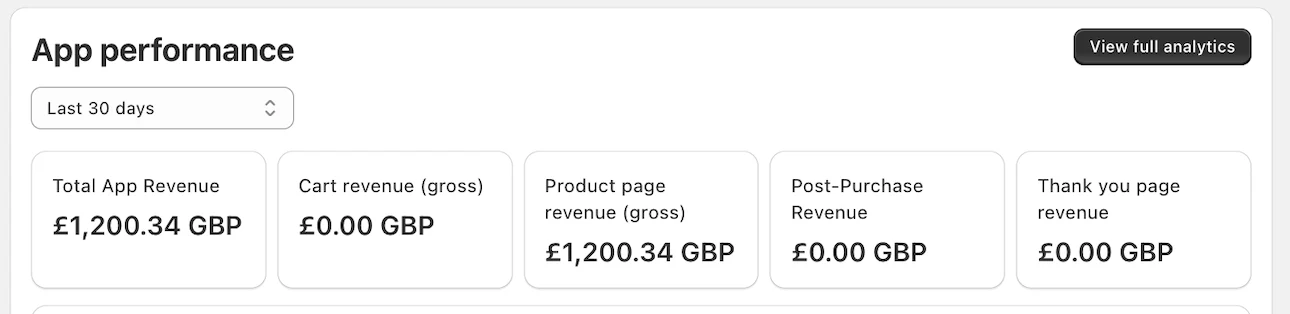
This merchant earned £1,200.34 in 30 days from a single seat, and it was not checkout. That figure is app-attributed gross revenue, so it is not proof that every pound was extra. It does show that one well-chosen placement can pay without any checkout seat at all. The other three tiles reading £0.00 means those placements were either off or did not convert in that window; the panel does not say which.
- Replenhair (UK hair care): £15,451 app-attributed revenue split across three seats: £8,742 cart drawer, £4,136 product page, £2,573 post-purchase. Read from the dashboard since install, July 31, 2026. Case study.
- Crossword Bookstores (India): ₹340,639 of cart-drawer revenue with the product-page, post-purchase and thank-you placements still off. Crossword itself reports a 20% lift in additional revenue against its pre-Oxify baseline. Case study.
None of these three stores relied on an in-checkout block. Replenhair spread offers across three seats instead of stacking one product everywhere; the other two earned from a single seat each.
What 475 live storefronts show, and what they cannot
On October 11, 2026 we read the homepage and first product page of 475 hand-picked, well-known direct-to-consumer Shopify brands (our October 2026 check of 475 live Shopify stores). The sample skews to larger brands, so these figures describe those stores only. Native cart-drawer markup or a drawer setting was detected on 243 of them (51.2%). So about half of that sample already has a cart drawer in the theme, the seat with the highest average acceptance in the vendor table above. Whether those drawers carry an upsell, or how well one would do, the check cannot tell.
The check cannot see checkout. In-checkout blocks and post-purchase pages run inside Shopify's checkout, so they leave no trace in the storefront pages we read. We therefore have no count of how many of those stores run a checkout upsell, and none of the app counts in that study says anything about checkout offers.
Is Shopify Plus Worth It Just for a Checkout Upsell?
Almost never. According to 2026 pricing guides, Plus starts at about $2,300 a month on a three-year term and $2,500 on a one-year term. Shopify's own UK pricing page, read in October 2026, lists Plus from £1,800 a month on a three-year term and £1,950 on a one-year term. Shopify quotes in local currency and sets variable fees by contract, so confirm with Shopify. Here is how many orders a month it takes for a checkout offer alone to cover that base fee, assuming the offer carries a 50% gross margin and ignoring any app fee:
| Offer | Attach rate | Gross profit per order | Orders a month to cover $2,300 |
|---|---|---|---|
| $7 cover or gift wrap | 5% | $0.18 | about 13,100 |
| $7 cover or gift wrap | 9% | $0.32 | about 7,300 |
| $15 add-on | 5% | $0.38 | about 6,100 |
| $15 add-on | 9% | $0.68 | about 3,400 |
This is arithmetic, not a forecast: orders needed = $2,300 ÷ (attach rate × offer price × margin). It is also generous, because the shoppers who accept a checkout offer overlap with those who would have accepted the same add-on in the cart. Plus makes sense for other reasons, such as checkout branding, Functions and multi-store setups. If you are already on Plus, the checkout seat costs nothing extra and the rest of this guide's Plus section applies. If you are not, do not upgrade for this alone.
If You Are Not on Plus: The Four-Seat Stack
You cannot put a widget on the payment step, but you can still run a checkout strategy. Build it in this order:
- Cart drawer first. It is the seat every shopper and every payment method walks through. Put the small, impulse add-on here: protection, gift wrap, a sample, the missing cable. See the cart drawer apps compared and shipping protection add-ons.
- Product page second. Bundles, quantity breaks and "complete the set" offers.
- Post-purchase third. A bigger extra on the card already on file.
- Thank-you page last. A low-pressure third product or a review ask.
The 4-seat rule: one SKU, one seat
The money leak is showing the same product twice. Never sell the same SKU in two adjacent seats.
- If the drawer already offered the travel bottle, checkout stays quiet on it.
- If checkout offered protection, post-purchase offers a product, not another protection SKU.
- If the product page already bundled the pair, the cart pushes a gift or a free-shipping threshold.
What decides whether post-purchase works for you
Post-purchase is the most useful non-Plus seat and the most conditional. Shopify's limitations table says the page is not shown when:
- the buyer pays by installment or wallet service (Klarna, Affirm, Afterpay, Apple Pay, Amazon Pay, Google Pay), with a gift card, or with anything other than a credit card;
- the order has duties and multiple currencies, is a local-delivery order, or is under $0.50;
- the order did not come through the Online Store sales channel;
- the provider retains the card's CVV (Braintree, Payflow Pro, PayPal Payments Pro, Eway are the named examples).
Also: only one app can own the post-purchase page, a buyer can accept at most three offers per checkout, and Shopify holds fulfilment while the flow runs (released after the buyer reaches the order-status page, or one hour after checkout if they leave). Shopify's docs still label post-purchase extensions beta.
Practical effect: judge post-purchase attach against eligible orders, not all orders. Our full gateway table is in which payment methods support post-purchase upsells.
If You Are on Plus: How to Add an In-Checkout Offer
- Confirm Plus under Settings → Plan.
- Install an app that ships a Checkout UI extension. Oxify's listing names checkout upsell alongside the cart, product-page, post-purchase and thank-you placements.
- Open Settings → Checkout → Customize and add the app block. Shopify's own pre-purchase guide recommends the order-summary target and lets you stack up to three extensions on one block target.
- Pick one offer. Exclude that SKU from the cart drawer and from post-purchase, and write the exclusion down.
- Preview on a phone. Shopify's UX guide notes the order summary is collapsed by default on mobile, so a block placed there is not seen until the shopper opens it. If it is hidden, try a different placement.
- Check the button style. Shopify's guide says to use secondary buttons for offers, because primary buttons are reserved for steps like Pay now and Next.
- Judge after about 200 checkout sessions that saw the offer. Track checkout conversion, not only offer clicks. Method: how to measure cart upsell performance.
What belongs in the block
Checkout is for things that feel like a receipt line: shipping protection or a cover toggle, gift wrap, rush handling, a small donation, a $3 to $15 sample. As a rule of thumb (ours, not Shopify's), keep the add-on below roughly 15% of the order value. A $49 offer on a $52 cart is a new buying decision, not a bump.
Use: "Add 2-year cover, $7. We replace faults. Accidents not included." Skip: "DON'T MISS THIS!!!" and a four-card "Customers also bought" grid next to Pay. Verb, price, one benefit, a way out.
Express wallets and Shop Pay
Shoppers who tap Apple Pay, Google Pay or Shop Pay from the cart can reach payment without browsing the steps where your block lives. On product pages the same shortcut exists: in the October 2026 check above, a Shopify dynamic checkout button element, the express-payment button that can skip the cart, was in the saved HTML of 83 of 451 stores' first product pages (18.4%). That shows the theme includes the button, not that every shopper sees it. Shopify does not promise a block is shown on every wallet path, so preview each one and count attach per order, not per session. Keep the cart-drawer offer on as well; turning it off "because checkout will sell it" leaves wallet shoppers with a silent cart. See express checkout buttons in the cart drawer.
Checkout Upsell Apps Compared
Seven apps that cover at least one upsell seat, from live Shopify App Store listings on October 9, 2026. Oxify is our app and is listed first; the order is not a ranking. We have not installed the others for this article, so this table reports listing data and does not review how each performs. Every app's in-checkout block still follows Shopify's Plus rule, whatever its marketing says. On October 11, 2026 the AfterSell listing showed "not currently available"; its row below is from October 9, so check the listing before installing.
| App | Rating (reviews) | Built for Shopify | Offers shown at | Free plan? | Paid from |
|---|---|---|---|---|---|
| Oxify Cart Drawer & Upsell (ours) | 4.9 (40) | Yes | Cart drawer, product page, post-purchase, thank-you, checkout (Plus) | 14-day trial | $9.99/mo for up to 100 orders |
| UpsellPlus Checkout Upsell | 5.0 (145) | Yes | Product, cart, post-purchase, checkout (Plus only), customer accounts, POS | Yes: 1 offer, up to $500 upsell revenue | $49/mo |
| Selleasy | 4.9 (2,744) | Yes | Cart, checkout upsell, post-purchase, product recommendations | Yes, up to 50 orders/mo | $9/mo for up to 500 orders |
| AfterSell | 4.9 (1,101) | Yes | Post-purchase, thank-you, checkout upsells | Dev stores only (30-day trial) | $34.99/mo post-purchase; $59.99/mo pre-purchase |
| ReConvert | 4.8 (3,105) | No | Product, cart, checkout, post-purchase | Yes: up to 50 orders or $50 upsell revenue | $9.99/mo for 51–100 orders |
| Bold AI Upsell & Cross-Sell | 4.4 (595) | Yes | Cart, post-purchase, checkout, subscription offers | 7-day trial | $4.99/mo (Basic plan); $24.99 (Grow) |
| Candy Rack | 4.9 (264) | Yes | Product page to post-purchase, with a built-in cart drawer | 8-day trial | $29.99/mo for up to 50 orders |
How to choose, in order: (1) does it cover the seats your plan can show, (2) does one app own the adjacent seats so a SKU is not sold twice, (3) does it report revenue per seat, (4) price at your order volume. A payment-step-only app on a Grow plan fails the first test before you read a feature.
If you need AI recommendations across the whole journey and have a Rebuy-sized budget, see our Rebuy alternative comparison. For a wider, ranked list across all seats, use the best Shopify upsell apps. For the after-payment seat only, see the post-purchase app list.
How to Measure a Checkout Upsell
Two numbers, both per seat:
- Attach rate: orders that took the offer divided by orders that saw it. For scale, Growth Suite's Plus checkout average was 9%, with stores ranging from under 2% to over 20%. Zero after about 200 sessions means the wrong offer or the wrong price.
- Checkout conversion: before versus after the block went live. If attach is 8% but conversion fell two points, the offer costs more than it earns.
AOV alone misleads: a promotion week moves it without any upsell. For post-purchase, divide by eligible orders (see the limitations above). Full method in measure cart upsell performance. If you worry that offers hurt conversion, read do upsells hurt conversion rate?.
Why Your Checkout Upsell Is Not Showing
- The store is not on Plus. Payment-step blocks do not render on other plans.
- The block was never placed. Check Settings → Checkout → Customize and confirm it is in a section, not just installed.
- It is hidden on mobile. The order summary is collapsed by default; a block inside it appears only after the shopper expands it.
- The product is already in the cart. Shopify's own pre-purchase tutorial filters out items already in the cart, and good apps do the same.
- The offered product is out of stock. Shopify's tutorial returns an error and swaps in another offer.
- It is a post-purchase problem, not a checkout one. Check the payment method first; see our payment-method guide.
- It is an old script. Anything built on
checkout.liquidor a thank-you script tag stopped on the dates above.
Sources and Method
Plan rules and limits come from Shopify's own pages: About product offers, checkout technologies, UX for pre-purchase offers and the order-status script-tag timeline. App data is from listings read on the date above. Placement benchmarks are Growth Suite's published figures (vendor data, sample sizes shown). Oxify numbers are read from the app's own dashboard. Storefront figures are from our October 2026 check of 475 live Shopify stores, which cannot see checkout. The US-dollar Plus pricing is from third-party 2026 guides, not Shopify's quote; Shopify's UK pricing page lists the same one-year and three-year terms in pounds. Where we give a rule of thumb, we label it as ours.
Frequently Asked Questions
Do I need Shopify Plus for a checkout upsell?
What can I use instead of a checkout upsell if I am not on Plus?
Is a checkout upsell the same as a post-purchase upsell?
What is a Shopify order bump?
Does Oxify do checkout upsells?
Is it worth upgrading to Plus for checkout upsells?
Why is my checkout upsell not showing?
checkout.liquid or script-tag setup will not run at all any more.Why is my post-purchase upsell not showing?
Can I still use checkout.liquid for upsells?
Can I add a checkout upsell without an app?
How many products should I show at checkout?
What is a good checkout upsell attach rate?
What to Do Next
On Plus: one small checkout offer, the same SKU removed from the cart, previewed on a phone and on each wallet path.
Not on Plus: stop looking for a payment-step widget your plan cannot show. Put the bump in the cart drawer, the bigger extra after payment, and a third product on the thank-you page.
If you want those seats in one app, Oxify Cart Drawer & Upsell covers the cart, product page, post-purchase and thank-you placements on every paid plan, and the checkout block on Plus. $9.99/month to start, 14-day free trial, Built for Shopify.