
Shopify One Click Post Purchase Upsell: Setup Guide
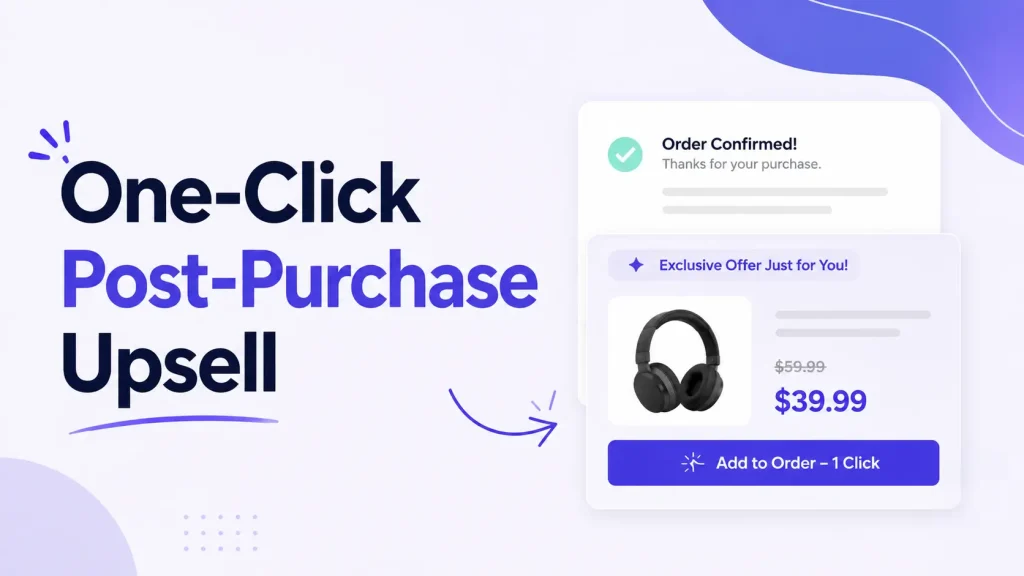
Quick answer: A one-click post-purchase upsell is an offer shown after the customer has paid and before the thank-you page. One tap adds the item to the order they just placed and charges the card Shopify saved, so there is no second checkout. It works on every Shopify plan except Starter; you need an app.
One Oxify merchant added an extra $9,000 in revenue from post-purchase upsells alone — at a 12% acceptance rate. No extra ad spend. Just one offer shown at the right moment.
This guide walks you through the whole setup, screen by screen, using a real funnel builder. You'll see exactly what to click, what numbers to use, and the Shopify limits that decide whether the offer appears at all. The Shopify rules below come from its developer documentation, which we re-read in October 2026.
What is a one-click post-purchase upsell?
It's an offer shown on a page between checkout and the thank-you page. Shopify calls it the post-purchase page; many guides call the page that follows it the order confirmation page.
The customer finishes paying. Before the confirmation screen, they see one product. They tap one button to add it. Done.
The key part: there is no second checkout.
- No re-entering card details
- No re-typing the shipping address
- The product is added to the order they just placed
- Their saved payment method is charged for the added item immediately
That last point matters for trust. Shopify's UX guidelines for post-purchase apps say the accept button should show the price (the pattern is "Pay now • price") and that the page should say the buyer is charged straight away, because shoppers don't expect a "buy" button to take payment without another confirmation step.
People also call this a Shopify one-click upsell, a one-click upsell setup, or a post-purchase one-click upsell. Same thing.
Quick example: A shopper buys a yoga mat. Right after checkout, they see a grip towel for 15% off. One tap — it ships with the mat.
Why post-purchase upsells convert so well
Pre-purchase upsells are risky. Push too hard before payment and the customer leaves with nothing. The post-purchase moment removes that risk: the original order is already paid, so a declined offer costs you nothing.
Three forces work in your favor:
- Buying momentum. They just bought, and the decision is still fresh.
- Trust. They have already trusted you with their card.
- Zero friction. One tap instead of a second checkout form.
What acceptance rate should you expect?
Public benchmarks are thin, and many guides quote a range without a source. The largest dataset we could find is from Growth Suite, a vendor that sells its own upsell app. Across 200 stores and about 1 million post-purchase offer impressions between January and June 2026, Growth Suite reports a 6% average acceptance rate for post-purchase offers, against 12% for cart drawer offers and 7% for product page offers. Individual stores ranged from under 2% to over 20% at the same touchpoint, so read 6% as a midpoint, not a promise.
The 12% quoted at the top of this guide is one Oxify merchant's result, twice that 6% average.
What a real dashboard shows: Replenhair
Replenhair is a UK haircare brand that runs Oxify's cart drawer, product-page offers and a one-click post-purchase offer. Here is its Oxify dashboard:
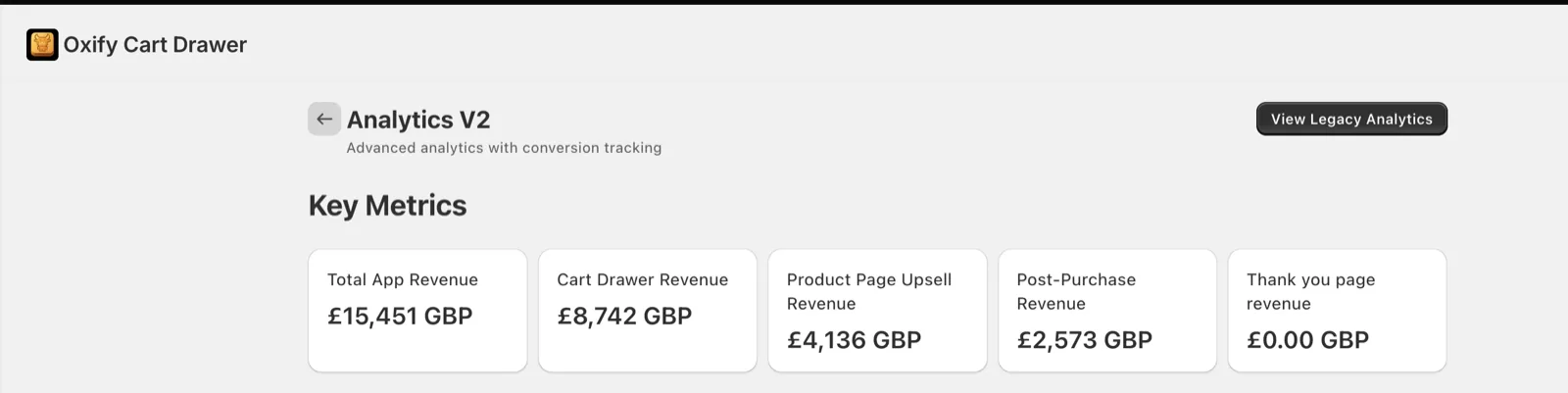
The one-click post-purchase offer accounts for £2,573, about 17% of the store's £15,451 in app-attributed revenue (the cart drawer made £8,742 and product page upsells £4,136). It is one store, not an average. "App-attributed" means orders where a shopper took one of the app's offers, and some of those might have happened anyway. The dashboard shows revenue, not acceptance rate, so it can't tell you how often the offer was taken. Read the full Replenhair case study.
What you need before you start
- An active Shopify store on any plan except Starter — you do NOT need Shopify Plus. (More on this myth below.)
- A post-purchase upsell app
- One or two products to offer as add-ons
- Customers who pay by card — wallet, installment and gift-card orders don't see the page (see "When Shopify won't show the offer" below)
- About 10 minutes
That's the whole list.
Do you need Shopify Plus? No — here's the truth
There's a common myth that one-click post-purchase upsells are a Shopify Plus feature. They are not. The seat that does need Plus is the payment step itself; see our guide to a Shopify checkout upsell with and without Plus.
- Post-purchase page upsells — the page shown between payment and the thank-you page — are available on every Shopify plan except Starter, according to Shopify's checkout technologies page (read October 2026).
- In-checkout upsells — offers placed inside the checkout steps themselves — are Plus-only.
So if your goal is the one-click post-purchase offer (and for most stores it should be), your current plan already supports it unless you're on Starter. Shopify still labels post-purchase checkout extensions "beta", and app developers must request access before using them on a live store, so as a merchant you only need an app that offers them.
Step 1: Install an upsell app
Shopify has no built-in post-purchase upsell builder — you need an app.
This guide uses Oxify Cart Drawer & Upsells (our app). It's a Built for Shopify app rated 4.9 from 40 reviews, and it handles the whole funnel — cart drawer, product-page upsells, and post-purchase one-click upsells — from one dashboard. Its App Store listing (read October 2026) shows post-purchase and thank-you page upsells in the feature list of the $9.99/month plan for up to 100 monthly orders, with a 14-day free trial.
Who should skip it: if you want a post-purchase page and nothing else, a specialist may fit better — see our comparison of the best Shopify post-purchase upsell apps. And if most of your orders are paid by wallet or cash on delivery, the one-click page won't show on those orders whichever app you choose.
Install it and open the app from your Shopify admin.
Step 2: Set it as your post-purchase extension (don't skip this)
This is the step that quietly breaks most setups. Shopify only lets one app own the post-purchase page, and per Shopify's UX guidelines the selector only appears once a post-purchase app is installed.
In your Shopify admin:
- Go to Settings → Checkout
- In the search bar, type "Post-purchase page"
- Find the option "Use an app to add features at checkout after payment"
- Select your upsell app from the list
- Save
If you skip this, your offer page will never appear — no matter how perfectly you build the funnel. An app you trialled months ago can still be holding the slot. Do this first.
Step 3: Create a funnel and set your triggers
Inside the app, create a New Funnel. You'll see two tabs at the top: Triggers and Upsells.
Start with Triggers — this decides who sees the offer. You can show it to:
- Everyone, or
- Only buyers of a specific product, or
- Only orders above a certain value
Triggers keep offers relevant. A phone-case buyer should see a screen protector — not random clearance stock.
Step 4: Build your offers in the Upsells tab
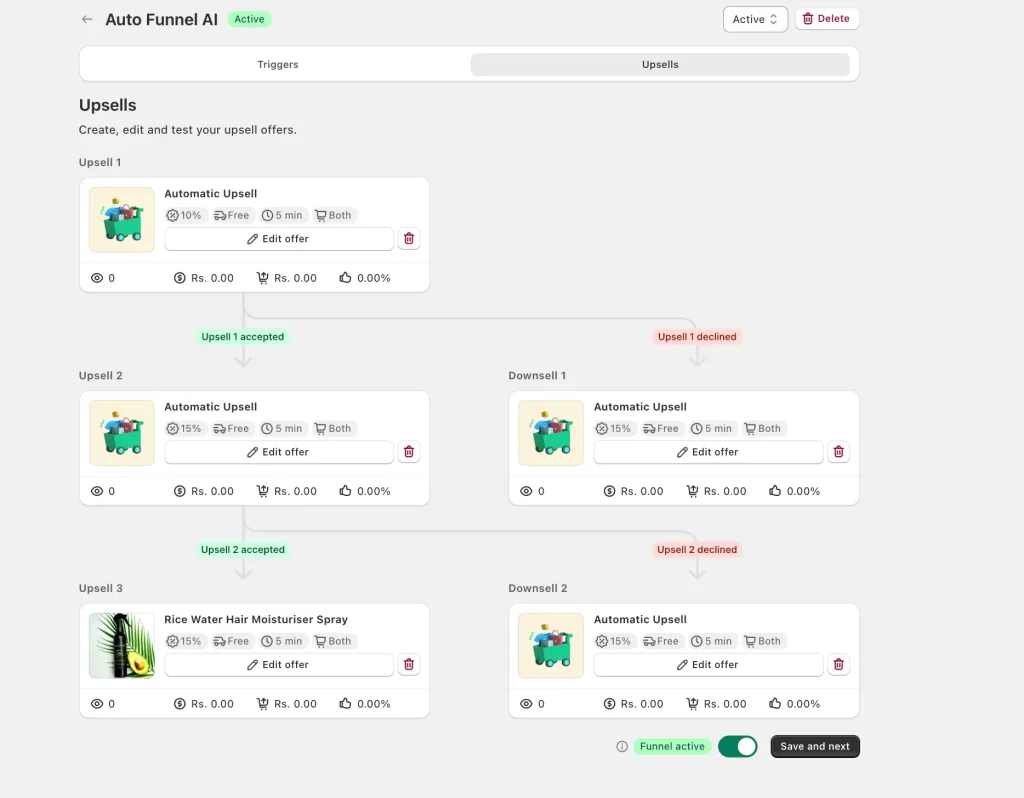
Click the Upsells tab. This is where the funnel comes alive.
You're not building one offer — you're building a decision tree:
              UPSELL 1
              /      \
        accepted    declined
           |            |
       UPSELL 2     DOWNSELL 1
        /     \
   accepted  declined
      |          |
  UPSELL 3   DOWNSELL 2
The logic:
- Customer accepts Upsell 1 → they see Upsell 2 (keep the momentum)
- Customer declines Upsell 1 → they see Downsell 1 (a cheaper, easier offer to win them back)
- The accept/decline branch repeats down to Upsell 3 and Downsell 2
A single "no" never ends the funnel: the downsell gives you a second, cheaper chance. The words on each screen matter as much as the tree. See how to write post-purchase upsell offers that convert for headline, downsell, and button templates.
One Shopify rule to know: the 3-accept limit
Shopify's limits table for post-purchase extensions says a customer can accept a maximum of three post-purchase offers for each checkout, and its UX guidelines say to show at most three consecutive upsell offers. That is why the tree above stops at Upsell 3. Put your highest-margin offer first, then smaller, easier wins after it.
More offers isn't better. In Growth Suite's session data (20 million sessions across 250 stores, January to June 2026), the second offer a shopper saw was accepted 8% of the time and the fourth just 1%. Two or three well-chosen offers beat a long chain.
Editing a single offer
Click Edit offer on any card. For each upsell you can set:
- The product — your add-on
- Discount — e.g. 15% off, shown as a strikethrough price
- Free shipping — toggle on to sweeten the deal
- Countdown timer — e.g. 5 minutes of urgency
- Device targeting — desktop, mobile, or Both
- Automatic Upsell — let the app auto-pick the best-fit product, or choose manually
A solid starting recipe for each offer: 15% discount + free shipping + 5-minute timer + Both devices. Tune from there. One caution on the timer: Shopify's UX guidelines ask for offers that don't pressure customers and list exclamation-point urgency copy as something to avoid, so use a timer only if the deadline is real.
Step 5: Turn the funnel on and test
At the bottom, flip the Funnel active toggle on and hit Save and next.
Then place a real test order on your own store. Shopify only shows the offer page when the order:
- Goes through the Online Store checkout (not a draft order or another sales channel)
- Is in your store's main currency, with no duties
- Is $0.50 or more
- Is paid with a supported credit card (or a test charge)
Walk through checkout and confirm three things:
- The offer page shows up after payment, before "Thank you"
- The Add button works in one tap
- The item lands on the final order
Then run it a second time and decline, to check the downsell page. Each branch of the tree is a separate page, and a correct first page doesn't prove the others work. If it works, you're live.
The 25% pricing rule: keep the upsell small
The classic mistake: a store sells an $80 product, then offers a $70 upsell. Nobody takes it — it feels like a second purchase decision.
The rule of thumb: price your upsell at 25% or less of the original order value. It comes from upsell practice, not from Shopify or from Oxify data.
- $80 order → offer something around $20
- $40 order → offer something around $10
At that price, the offer feels like a small bonus, not a commitment. It's an easy "yes." If you must offer a pricier item, use a deeper discount and make the savings huge and obvious. (Not sure how deep to go? Here's how to price the post-purchase discount — 10% vs 20% vs free shipping.)
What you can and can't change on the offer page
The post-purchase window is short, and most of the page is built from Shopify's own components, so the layout and mobile behavior are handled for you. What you control is the product, the message, and the price:
- The callout banner at the top. This is where your message goes. Shopify's own example tells the customer they can still add to the order they've placed, and its guidelines say to avoid exclamation points and copy that makes the offer feel compulsory.
- One clean product photo and a short description. Shopify's guidelines say long descriptions push the price breakdown and buttons off screen.
- The price, shown honestly. The title and price must match your store, with the original price struck through next to the discounted one.
- The price breakdown. Subtotal, shipping and taxes are shown under the pickers, so buyers see the exact charge.
- The buttons — but not their wording. Shopify's guidelines set the accept button as "Pay now • price" ("Add now • Free" for a free item) and the decline button as "Decline upsell offer", and tell app makers not to let merchants change the button text. Put your "ships with your order" framing in the banner instead.
How much extra revenue can you expect? (worked example)
This is arithmetic, not a forecast. Take a store doing 1,000 orders a month, with a $20 average upsell:
- At a 3% acceptance rate → $600/month extra
- At a 6% acceptance rate (Growth Suite's 2026 average) → $1,200/month extra
- At a 12% acceptance rate (the rate one Oxify merchant reports) → $2,400/month extra
That's $14,400 a year at 6% and $28,800 at 12%, from traffic you already paid for. Remember that wallet, installment and gift-card orders never see the page, so apply the rate to your card-paid orders only.
Does a post-purchase upsell disrupt checkout or fulfillment?
Not the checkout. The offer appears only after payment is confirmed, so your checkout steps are unchanged. The page header confirms the payment and carries a View order confirmation button, which lets a customer skip every offer page.
Fulfillment is protected by Shopify itself. Shopify places a hold on fulfillment for orders going through a post-purchase flow. The hold is released when the customer reaches the Order status page, or one hour after checkout if they never finish the flow. The caveat: Shopify says holds are only supported through the FulfillmentOrder resource, so if a warehouse or 3PL integration still reads older fulfillment data, test it with a real order. An accepted item is added to the original order, so your warehouse still sees one order.
The part most stores miss is tracking. Shopify says analytics services that use the Shopify Pixel API (Google Analytics, Facebook, Pinterest and Snap) report only the purchase event and value of the initial purchase. Tools that rely on ScriptTags or "additional scripts" fire only on the Order status page and can show incomplete conversions. Your upsell revenue shows up in Shopify orders, not in your ad platform's purchase value.
When Shopify won't show the offer
If your offer isn't appearing, check this table first. It is Shopify's limits table for post-purchase extensions (read October 2026), condensed:
| Situation | Offer shown? |
|---|---|
| Customer paid with Apple Pay, Google Pay, Amazon Pay, or an installment service such as Klarna, Affirm or Afterpay | No |
| Paid with a gift card or any method other than a credit card | No |
| Gateway that must keep the card security code (Braintree, Payflow Pro, PayPal Payments Pro, Eway) | No |
| Order with duties and multiple currencies, or an order for local delivery | No |
| Order under $0.50, or placed outside the Online Store channel | No |
| Flash-sale load that delays order creation | Can be skipped |
| More than one post-purchase app installed | Only the app you selected in Step 2 |
Shop Pay, PayPal and cash on delivery behave differently from each other; our guide to which payment methods support post-purchase upsells covers them gateway by gateway.
One-click upsell vs. thank-you page upsell
These two get confused constantly:
- One-click post-purchase upsell — shown on a dedicated page between payment and the thank-you page. One tap, no card re-entry, added to the order just placed. The lowest-friction option, but only for the payment methods in the table above.
- Thank-you page upsell — shown on the confirmation or order-status page. Shopify's documentation says UI extensions there can't change the order directly and points order-changing offers to the post-purchase extension, so how the item is added and paid for depends on the app. The payment-method limits in the table above are listed for the post-purchase page, not for thank-you page extensions, so ask your app how it handles wallet and cash-on-delivery orders and test one.
For frictionless conversion, prioritize the post-purchase page offer, and use the thank-you page for the orders it can't reach. We compare the two in post-purchase page vs thank-you page.
Where the post-purchase upsell fits in your funnel
A post-purchase offer is one stage of a bigger picture. Stores that win stack offers across the journey:
| Stage | Offer type |
|---|---|
| Product page | Frequently bought together, volume discounts |
| Cart drawer | In-cart upsells, free shipping bar, free gifts |
| Checkout | Order bumps (Shopify Plus) |
| Post-purchase | One-click upsell funnel |
| Thank-you page | Cross-sells, reorder offers |
Start with the cart drawer and the post-purchase funnel, then add the rest as you measure. Growth Suite's figures above put cart drawer offers (12%) ahead of post-purchase (6%) on acceptance, so post-purchase works best as an addition to cart offers, not a replacement. A single funnel app is simpler than juggling five tools. Oxify Cart Drawer & Upsells (our app) runs the cart drawer, product-page upsells, frequently bought together, free gifts, and post-purchase one-click upsells from one dashboard.
Common mistakes to avoid
- Only building one offer. Build the accept/decline tree. A single "no" shouldn't end the funnel.
- Forgetting Step 2. If the post-purchase extension isn't selected in Settings, your offer never shows.
- Assuming every order sees it. Wallet, installment and gift-card orders skip the page, so check your payment mix.
- Irrelevant products. Use triggers so the offer complements what they bought.
- Walls of text. One line, one price, one button.
- Pricing the upsell too high. Stay at or under 25% of order value.
- Never testing. Always place a test order, and test the decline path too.
Frequently Asked Questions
Do I need Shopify Plus for one-click post-purchase upsells?
What conversion rate is realistic for a post-purchase upsell?
Does a post-purchase upsell disrupt the checkout flow?
Why is my post-purchase offer not showing?
What's the difference between an upsell and a downsell?
How many offers can I show?
Can the upsell be a free gift instead of a paid product?
Start earning more from orders you already have
A one-click post-purchase upsell is one of the lowest-risk ways to grow Shopify revenue: the order is already paid, so you're earning more from buyers who already trust you, not spending more on ads.
The essentials: install an app, set it as your post-purchase extension, build the accept/decline funnel (three accepted offers at most), follow the 25% pricing rule, keep each page simple, and test both the accept and decline paths before launch.
Ready to set yours up? Install Oxify Cart Drawer & Upsells (our app) — a Built for Shopify app with a full post-purchase upsell funnel builder, cart-drawer upsells, and frequently bought together in one tool. Start the 14-day free trial and put your checkout to work.
Sources, all read in October 2026: Shopify's product offers guide (limitations, fulfillment holds, analytics), its UX guidelines for post-purchase offers and its checkout technologies page (plans); the Oxify Cart Drawer & Upsells App Store listing (rating, price, trial); Growth Suite's upsell acceptance data (vendor-published, January to June 2026); and the Replenhair dashboard read on July 31, 2026.