
Extended Warranty on Shopify: Cart Add-On vs Partner App
Quick answer: An extended warranty on Shopify is a paid extra, sold in the cart or at checkout, that covers repairs or replacement beyond a product's free warranty. Fund it yourself with a cart add-on, sell a partner's plan through a warranty app such as Extend or Mulberry, or add an offer at Plus checkout. Keep the box unticked.
In the US it is usually a service contract, not insurance, and it is not shipping protection. We start self-funded cover near 8% of the item in Oxify Cart Drawer & Upsells (our app). That is our pricing rule, not a study.
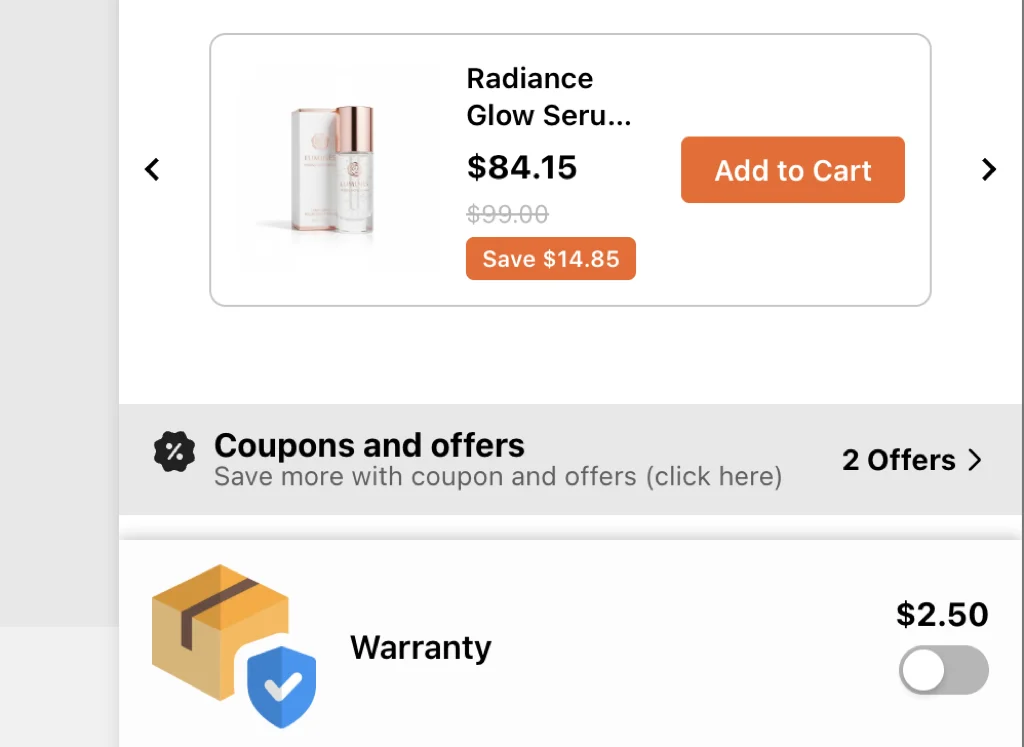
A $189 blender sits in the drawer. Under it: a $15 line. "2-year extra cover. We replace faults. Accidents not included." Off by default. One tap. Total becomes $204. Checkout is still one click.
That is a cart warranty upsell. It is not shipping insurance. It is not the free warranty the law already gave them.
Written from building add-on modules in Oxify Cart Drawer & Upsells (our app). The App Store listings, fees and policy pages below were last checked on October 11, 2026.
Key Takeaways
- Three methods: self-funded cart toggle, licensed warranty partner, Plus checkout widget. Pick one job per seat.
- Off by default. Pre-checked protection is a consent and trust problem.
- Name the cover. Faults vs accidents vs battery. Vague "protection" is how chargebacks start.
- Not insurance. US extra-pay cover is usually a service contract. See the FTC Businessperson's Guide to Federal Warranty Law.
- Check your payments setup. Stripe's US list names "extended warranties" and Shopify's Managed Markets restricts warranties. Get written confirmation from Shopify before cover becomes real revenue.
- Start near 8% of item price on self-funded add-ons. We use that inside Oxify. It is not a universal attach-rate law.
What a Cart Warranty Upsell Is (and Is Not)
It is a paid extra attached to a cart line: extended cover, accidental-damage cover, or a replacement promise you actually honor.
It is not:
- The shipping protection add-on (lost or damaged in transit)
- The free written warranty some products already include (US: Magnuson-Moss)
- A checkout-only widget if you are not on Plus (see Shopify checkout upsell)
If you cannot describe the claim in one sentence, do not sell the add-on.
Three Ways Merchants Add Cover on Shopify
Who pays claims decides the price, the copy, the legal duties and the app you install, so start there.
| Method | Who pays claims | Best if | Watch-out |
|---|---|---|---|
| Self-funded cart add-on | You | You already replace faults. You want the toggle next to the product, on any plan | You must honor the copy. Price the risk |
| Licensed partner | The partner | High-ticket electronics, you do not want claims in-house | Revenue share. Their legal copy. Their checkout or cart widget |
| Plus checkout extension | You or partner | You are Plus and want the line next to Pay | Plus only for the payment step. Test it inside Shop Pay checkout too. Keep a cart version for shoppers who add from the drawer |
Oxify Cart Drawer & Upsells (our app) is method one: an add-on in the cart drawer (same family as gift wrap and donation). We are not a licensed insurer, so skip our add-on if you will not fund claims yourself. If you need a partner to underwrite claims, use a warranty app and keep Oxify for gifts and upsells — do not run two protection checkboxes.
The Economics: Who Keeps the Warranty Money
Three models. The cut you keep depends on which one you pick:
| Model | Your cut of the warranty price | Who handles claims |
|---|---|---|
| Partner-run | Set by the partner. Listings describe a variable commission, a commission per policy, a per-plan fee, or contracts billed to you Net 30. None prints the percentage | The partner. Their portal, their claims team, their legal copy |
| In-house program tools | The warranty price minus the app's monthly fee and any revenue share (see the table below) | You. Their software tracks plans and claims |
| Plain cart add-on product (a $0-inventory SKU in Oxify Cart Drawer & Upsells, our app) | About 100% minus card fees | You, through normal support |
The trade is simple: with a partner you take a share and none of the claims risk. Self-funded, you take the money and the risk. If your fault rate is low and your items are not $2,000 TVs, self-funded usually wins on margin. If one bad batch could sink a month, buy the partner.
Which Shopify Warranty Apps Are There, and What Do They Charge?
On 11 October 2026 we opened the public App Store listing of eight warranty apps and copied the rating, review count and pricing as shown that day. We did not install any of them, so this is what each listing says, not a test. Apps are grouped by who handles claims, because that decides the economics more than the stars do.
| Warranty app | Model, per the listing | Rating (reviews) | Pricing on the listing |
|---|---|---|---|
| Extend Shopper Operations | Partner-run. Mentions product and shipping protection and automated claims | 4.8 (21) | Shown as free. No plan terms on the listing |
| Mulberry Product Protection | Partner-run. Mulberry handles claims filed by customers | 4.7 (29) | Free to install. Variable commission per warranty |
| SureBright Warranty & Shipping | Partner-run. SureBright takes the financial risk and the claims | 4.8 (54) | Free to install. Merchant gets a commission on each policy sold |
| CPS Extended Warranty Upsell | Partner-run. CPS handles claims, support and administration | 5.0 (6) | Free to install. CPS bills you Net 30 for contracts sold |
| Anycover Extended Warranty | Partner-run. Plans backed by insurers | 5.0 (12) | Free to install. Small service fee per plan sold |
| Umbrella: In-house Warranties | In-house plans sold under your brand, claims managed in the app | 5.0 (11) | Free plan. Growth $249 a month plus 7% of warranty add-on revenue. Scale $999 a month plus 4% |
| Navidium Product Warranty | Warranty kept in-house instead of sent to an outside provider | 5.0 (1) | $9.99 a month plus 3% of warranty sales. 7-day trial |
| Warranty Registration & Claims (Dyrect) | Registrations, claims and customer portal. Not described as selling cover | 4.9 (25) | Free Forever plan. Paid tiers at $19, $49 and $149 a month |
| Oxify Cart Drawer & Upsells (our app) | Cart add-on line. You fund and handle claims | 4.9 (40) | From $9.99 a month up to 100 monthly orders. 14-day trial |
Read the review counts before the stars. Of the eight third-party listings, four have 20 or more reviews (SureBright 54, Mulberry 29, Dyrect 25, Extend 21) and Navidium Product Warranty has one. Pricing changes, so re-check the listing before you install.
How Do You Manage Warranty Claims on Shopify?
Decide this before the toggle goes live, not at the first cracked lid:
- Intake: one email address or form. Ask for order number and a photo. Nothing else on message one.
- Decision rule: written down. Fault within cover period = replace. Accident when you only sold fault cover = decline, politely, with the policy link.
- Fulfilment: ship the replacement as a $0 draft order tagged
warranty-claimso the cost is visible in reports. - Ledger: track warranty revenue vs claim cost quarterly. If claims eat more than ~half the revenue, raise the price or hand it to a partner.
If claims outgrow one inbox, a management tool such as Warranty Registration & Claims (Dyrect) adds registrations and a customer portal. Its listing describes registrations and claims, not selling the cover.
When This Offer Makes Sense
It fits when:
- The item costs enough that a $8–$25 extra does not look silly (often $80+)
- You already replace faults. The add-on is a paid extra year or accident cover, not a fake promise
- You can answer claims without a 40-page PDF
Skip it on $12 consumables. Skip it if you will ghost the first cracked lid.
Price, Copy, and the 8% Starting Rule
The only dated attach figure we could trace to a named source comes from a vendor. In an October 2020 PYMNTS interview, Extend's CEO said online warranty offers traditionally convert at about 4–5% and that Extend's merchants typically reach 12–14%. That is one vendor's claim from 2020, not a benchmark for your store.
Inside Oxify we start cover near 8% of the item:
- $120 item → about $9–$10
- $250 item → about $18–$20
- Cap self-funded add-ons around $25 unless the SKU is $400+
If nobody ticks it after two weeks, the price is high or the copy is mush. If half of carts tick it, you are either a hero or you hid the cost. Read the refunds.
Copy that works:
- "Add 2-year extra cover — $9. We replace manufacturing faults. Drops and water not included."
- "Add accidental-damage cover — $14. One replacement if you crack the screen. Theft not included."
Copy to kill: "Protect your order!!!" "Full coverage." "Insurance." (Unless a licensed partner's lawyers wrote that word.)
Does Shopify Payments Allow Extended Warranties?
For cover attached to your own physical products, many stores sell it. But two of Shopify's own rule sets name warranties, so confirm before it becomes real revenue. On 11 October 2026 we read both sources:
- Shopify Payments in the US. Shopify's Payment Processor List names Stripe, Inc. as the US processor and links Stripe's Prohibited and Restricted Businesses list (page last updated 22 September 2026). That page names "extended warranties" for the United States under its jurisdiction-specific prohibited businesses. It does not say how it treats a store that sells cover next to its own products, and Shopify's terms say these lists are representative, not exhaustive, and can change without notice.
- Managed Markets. Shopify's prohibited and restricted items page says non-tangible goods such as warranties, service plans, contracts and guarantees are restricted. A warranty SKU can be blocked on international orders even when the blender ships fine. Test an international checkout before launch.
What that means in practice:
- A store whose business is selling warranties — standalone cover, cover for products you did not sell — is the case these lists aim at. Do not build that store on Shopify Payments without written clearance.
- A cover add-on attached to your own physical product is how the partner apps in the table above work. It is the shape most likely to be tolerated, but tolerance is Shopify's call, not yours.
- If cover becomes a meaningful revenue line, ask Shopify support to confirm your setup in writing. A frozen payout account costs more than the email.
Rules That Keep You Out of Trouble
This is YMYL-adjacent. We are not your lawyer. US merchants should read the FTC guide linked above; we read its "Offering Service Contracts" section on 11 October 2026.
- Never pre-check. Off unless they tap. Pre-ticked extras are how people feel robbed at the bank.
- Do not call it insurance unless it is. Under US law a paid promise to repair or replace your own product is a service contract (Magnuson-Moss territory, FTC-supervised). Insurance is regulated state by state, so keep the word out of your cart copy unless a licensed partner's lawyers wrote it. Some states also license or register service-contract sellers, with exemptions that differ. Check yours before you sell accident cover.
- Know which side of the FTC line you are on. The FTC's guide says a seller that makes service contracts on its own products cannot disclaim or limit implied warranties on them. A seller that only sells another company's contracts as an agent, and gives no written warranty of its own, can. Self-funded cover and partner cover therefore do not carry the same duties. Either way, list every term conspicuously, in plain language.
- Do not hide the free warranty. If the product already has a 1-year manufacturer warranty, say the add-on is extra years or extra perils.
- One protection offer per seat. Cart warranty or shipping protection, not both stacked as "protect this order." Shoppers cannot tell them apart. Split jobs: shipping = transit. Warranty = after it arrives.
- Link the real policy. One tap to the page that lists what you will not cover.
How to Add It in the Cart Drawer
- Write the claim in one sentence. If legal will not sign it, stop.
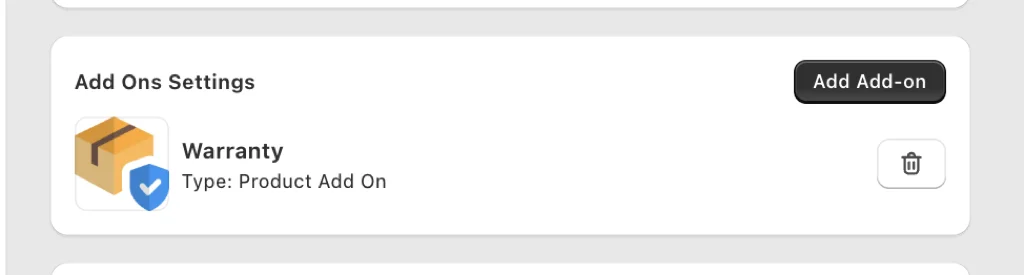
- Create a $0-inventory add-on product or use the app's add-on module so the line is a real order line (not a note).
- In Oxify, attach it to collections that need cover. Exclude $20 impulse SKUs.
- Set default off. Show price. Show what is out.
- Turn the same SKU off in checkout and post-purchase. Adjacent seats, one protection product. See the 4-seat rule.
- After ~200 carts that saw the toggle, read attach rate, refund rate on orders with cover, and checkout conversion. Method: measure cart upsell performance.
Who a cart line cannot reach. Shopify's help center says a customer who clicks an unbranded "Buy it now" accelerated checkout button skips the cart and goes to checkout. In our October 2026 check of 475 live Shopify stores, 83 of the 451 first product pages we fetched (18.4%) had a Shopify accelerated (dynamic) checkout button element in their HTML. That shows the button is in the theme, not that every shopper sees it. None of the 30 apps the check tracks is a warranty app, so it cannot say how many stores sell cover. The practical read: a cart-only warranty misses shoppers who never open the cart. Offer the same cover on the product page (see product page upsells) or, on Plus, in checkout.
On Plus you can place cover in the checkout editor. Shopify's docs describe testing checkout extensions inside Shop Pay, so check your offer there instead of assuming it is skipped. Keep the cart version for everyone who adds from the drawer.
Frequently Asked Questions
Is a Shopify warranty upsell legal?
Does Shopify allow selling extended warranties?
Should the warranty box be pre-checked?
Warranty vs shipping protection — which one?
Do I need Shopify Plus?
How much should cover cost?
How much do warranty apps take?
What is a good warranty attach rate?
Which Shopify warranty app should I use?
Do I need an extended warranty Shopify app?
What to Do Next
Write one honest sentence. Price near 8%. Default off. Exclude cheap SKUs. Kill the duplicate in checkout.
If you already replace faults and want the toggle in the bag, use a cart add-on. Oxify Cart Drawer & Upsells (our app) is that module (same family as wrap and donation), from $9.99/mo with a 14-day trial (listing checked October 11, 2026). If a partner must underwrite claims, install their warranty app from the table above and turn Oxify's cover off so you do not show two checkboxes.