
Translate Your Shopify Cart Drawer (Not Just the Theme)
Quick answer: To translate a Shopify cart drawer, translate three layers: storefront language (Markets), theme strings (Translate & Adapt or | t keys) and the drawer app's own text. Translate & Adapt cannot reach text hardcoded in an app's JavaScript, so a Spanish theme can still show an English drawer.
The homepage is in Spanish. The cart still says "You are $12 away from free shipping." Checkout feels like a different shop. That is the bug this article is for.
Last checked 11 October 2026: Shopify's help pages, the Translate & Adapt listing and the drawer apps' own documentation. Oxify Cart Drawer & Upsells (our app) ships its drawer text in eight languages: English, Spanish, French, German, Italian, Japanese, Portuguese (Brazil), Danish. Why bother: CSA Research (2020) found 76% of consumers prefer products with information in their own language and 40% will not buy otherwise. That is a 2020 survey, not Oxify data. Currency is a separate guide: Shopify multi-currency cart drawer.
Key Takeaways
- Three layers: storefront locale (Markets + Translate & Adapt), theme strings (
| t), app drawer strings (the app must ship locales or document where its strings live). - Translate & Adapt will not save you if the drawer app hardcodes English.
- Keep the locale on cart URLs. Shopify tells custom themes to use the
routesLiquid object (routes.cart_url) instead of a hardcoded/cart. Test the drawer and a raw cart link in every language. - Language without currency is half a job. Show the market's money in the same drawer.
- Auto-translate limits depend on where your store is located: up to 2 languages, or up to 8 in 12 listed countries. A store can sell in up to 20 languages (30 on Plus). Checked 11 October 2026.
What Shoppers Need in the Drawer
They picked a language. They expect:
- Checkout, Remove, Empty cart
- Reward bar ("$12 more for free shipping")
- Upsell titles you wrote
- Errors ("Enter a valid discount code")
- Gift wrap, terms checkbox, donation line — if you turned those on
If any of those stay English, trust drops at the last step. That is when they have the card out.
The 3-Layer Setup (Theme Apps Skip Layer 3)
| Layer | Who owns it | What breaks if you skip it |
|---|---|---|
| 1. Locale + market | Shopify Markets, domains or subfolders, language picker | Shopper never enters /fr. Everything "works" in English |
| 2. Theme strings | Locale JSON, Translate & Adapt, | t filters | Dawn cart page is French; some labels still English |
| 3. App chrome | The cart-drawer app's translation files | Theme is French; slide-out is English. This is the usual ticket |
Which layer is your drawer in? It depends on whose drawer it is. In our October 2026 check of 475 live Shopify stores, 243 (51.2%) had native theme cart-drawer markup or a cart-type setting in their page HTML. 48 (10.1%) had at least one of the five cart-drawer entries we tracked detected (four apps plus Rebuy Smart Cart theme code), and 15 had both. A theme's own drawer usually takes its labels from the theme's locale files (layer 2). A drawer app brings its own text (layer 3). The check shows which drawer a store loads, not whether anyone translated it, and the sample is hand-picked, skews to larger brands and gives lower-bound app counts.
You can classify your own store the way we classified theirs: search the page source for cart-drawer. A theme drawer shows up as a <cart-drawer> element or a section id containing it, and its labels usually come from the locale files. If the drawer only appears when an app embed is switched on, it is layer 3.
Layer 1 — Shopify: Settings → Languages → Add language, turn on the domain it belongs to, then open the menu beside it and choose Publish. Settings → Markets is where you add the country. Use subfolders (/es, /de) unless you have a real reason for separate domains, and put a language switcher in the header. Plan limits (Shopify Help Center, checked 11 October 2026): up to 20 languages on Basic, Grow, Shopify and Advanced, up to 30 on Shopify Plus. Shopify's checkout is pre-translated into 33 languages, so layer 1 often fixes checkout before it touches your drawer.
Layer 2 — Theme: Hardcoded "Checkout" in a Liquid file will never switch. Wrap storefront copy in translation filters and fill locale files. Translate & Adapt can fill those. Themes built by Shopify ship default text professionally translated into those same 33 languages, so stock labels usually work. The labels that break are the ones someone hardcoded. Preview each language in the theme editor before you publish it.
Layer 3 — App: Ask the drawer app which locales it ships. If the answer is "use Translate & Adapt," ask where its strings live: a few apps keep them in shop metafields that translation apps can list, but the app's docs should say so. Otherwise the chrome is in the app's JavaScript and no theme tool reaches it. Oxify ships eight locales for drawer UI, all among the 33 languages Shopify lists for translated checkout and theme defaults. Dutch, Polish and Korean are on Shopify's list but not Oxify's, so whichever drawer you use, ask what it shows for a locale it does not ship. Your custom upsell titles still need you to type Spanish. The button chrome should not.
Translate & Adapt Walkthrough (Free, Shopify-Native)
- Install Translate & Adapt from the App Store (Shopify's own app, free). Know its ceilings before you plan markets around it. Per Shopify's automatic-translation page, auto-translation covers up to 2 languages beyond your default in most countries, and up to 8 (with weekly Auto-sync) if your store is located in Austria, Belgium, Denmark, France, Germany, Ireland, Italy, the Netherlands, Spain, Sweden, Switzerland or the United Kingdom, or if the app shows Translate now for your store. Removing a language does not reset that limit. Beyond it you enter translations manually, import them, or use a third-party app. A store can sell in up to 20 languages in total (30 on Plus). Checked 11 October 2026.
- Settings → Languages → Add language, turn on each domain it should appear on, then Publish it. A language that is not published is invisible to shoppers.
- Open Translate & Adapt → choose the language → work through Theme content. This is where cart strings live — "Your cart," "Checkout," "Subtotal."
- Auto-translate the batch, then manually fix the short UI strings (next section on why). Shopify's help page also says to review automatic translations for accuracy before you publish them. Leave app-owned entries alone: do not bulk-translate Shop & Metafield entries named after a drawer app unless its docs say to. One translation app's help article describes a cart-drawer app whose drawer stuck open after its metafields were translated.
- Preview the storefront under the locale prefix (
/es) and open the cart. Theme cart translated, drawer still English? That is layer 3 — the app, not Translate & Adapt.
Theme Locale Files (Where "Checkout" Actually Lives)
Dawn-style themes render cart labels through translation filters:
{{ 'sections.cart.title' | t }}
{{ 'sections.cart.checkout' | t }}
The values come from locales/en.default.json, locales/es.json, and so on. Edit them at Online Store → Themes → Edit code → Locales, or through Translate & Adapt's theme-content tab. If a label in your theme is a raw string instead of a | t filter — common after a freelancer "quick fix" — no translation app can switch it. Wrap it and add the key to each locale file.
How a Drawer App Knows Which Language You Speak
Worth understanding, because it explains most "why is it still English" tickets. A locale-aware drawer reads the storefront's active locale — Shopify exposes it to JavaScript (Shopify.locale and the theme's localization object) and in the URL prefix (/es, /fr). The app then loads its own shipped strings for that code. Three failure modes follow directly:
- The shopper never entered the locale. No
/esprefix, no Spanish drawer. That is a Markets/language-picker gap (layer 1), not the app. - The app matches exact codes only. A shopper on
pt-PTmay fall back to English if the app only shipspt-BR. Shopify lists Portuguese (Brazil) and Portuguese (Portugal) as separate languages, so this fork is real. Ask the app how fallbacks work. - The app caches the first locale it saw. Shopper switches language mid-session, drawer keeps the old one until reload. Test the switch with items already in the bag.
Third-Party Cart Apps: Two Models, Often Combined
Ask your cart app one question: "How do your drawer strings translate?" There are two honest answers, and a good app gives both.
- Text fields per language: the app gives you editable text boxes and you type the Spanish yourself. You maintain every string in every language. UpCart's help docs describe this model: add the languages in Shopify's language settings, then use the Translate button in Manage all carts (read 11 October 2026). On 11 October 2026 the UpCart listing showed "not currently available"; check the listing before installing. See UpCart alternatives if you are choosing again.
- Shipped locales: the app reads the storefront locale and swaps in its own translations of the built-in labels. Zero maintenance for chrome strings. Oxify does this for eight languages.
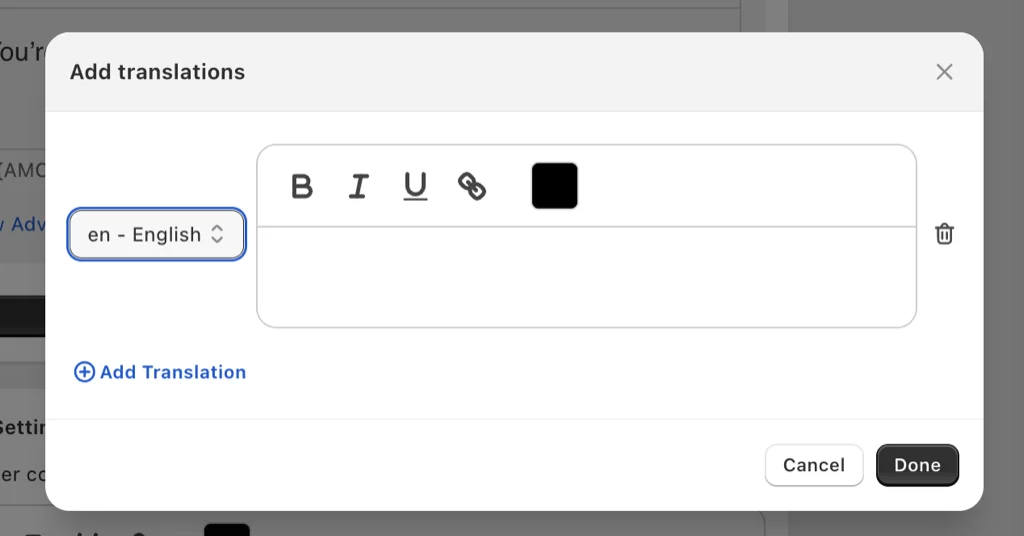
Oxify uses both: shipped locales for the built-in labels, plus an Add translations link on every text field in the drawer that opens a per-language editor — pick the locale code, type the string, done. The drawer then serves the version matching the shopper's active locale instead of one hardcoded sentence for everyone.
A third answer — "just use Translate & Adapt" — is only right if the app documents that its strings appear there. Otherwise it usually means hardcoded English you cannot fix from Shopify's side.
Translate These Five Strings First
If you translate nothing else in the drawer, translate the strings shoppers read with a card in hand:
- Add to cart (the button that starts everything)
- Checkout
- The free-shipping bar ("You are €12 away from free shipping" — number and currency must localize too)
- Remove / quantity controls
- Discount-code errors ("Enter a valid discount code" — an English error on a Spanish store reads as a scam signal)
Auto-translation (DeepL, AI, Translate & Adapt's built-in) is fine for product descriptions. For these five, check by hand: short UI strings have the least context and the worst machine output. "Checkout" auto-translated as a noun instead of a verb is a classic. Two minutes per language.
The free-shipping bar carries a number and a currency as well as words. In our check, 191 of 475 stores (40.2%) tied free shipping to a money amount in the top of the homepage (announcement bar, header or menus), printed in USD on 165 of them, GBP on 16, AUD on 5, CAD on 3 and INR on 2. We requested each store's US market; 438 of 475 rendered it. These are homepage messages, not drawer reward bars or shipping policies, but the sentence has three moving parts in every market: the words, the amount and the currency symbol. Our free-shipping bar guide covers building the bar itself.
Cart Page vs Cart Drawer (Locale Drop)
Shopify's help center says custom themes must use the routes Liquid object for internal links instead of paths like /cart, and the routes documentation says using it instead of hardcoded URLs helps a theme support multiple languages. A hardcoded /cart is how a Spanish shopper can land on an English cart while collection pages stay translated. A slide-out drawer often inherits the current page locale, so it looks "fixed" until someone opens a raw cart link.
<a href="{{ routes.cart_url }}">{{ 'sections.cart.title' | t }}</a>Test this matrix per language:
- Open the drawer on a collection page
- Open
/es/cart(or your locale prefix) if you still use a cart page - Open a cart permalink you sent from admin
- Switch language with items already in the bag
If permalinks dump the locale, add the prefix in the link. Shopify's cart permalink documentation has an optional step for exactly this: put the buyer's locale before /cart, as in /fr/cart/70881412:1,70881382:1 (variant IDs and quantities), so they land in a localized checkout.
Copy Rules That Survive Translation
- Do not put the shipping threshold only in a screenshot of English. Drive the number from Markets / the rewards app so "12 €" is not a leftover " $12 ".
- Keep upsell titles short. Long English puns die in German, and translated labels are often longer than the English ones in a narrow drawer. Check wrapping on a phone; the cart drawer custom CSS guide shows how to adjust drawer styles.
- Match the announcement bar to the same locale. A French drawer under an English site-wide bar is the same bug in two places.
- Terms checkbox labels must be translated too. A Spanish store with an English legal tick is worse than no tick. See terms in the cart drawer.
When Translate & Adapt Is "Not Working"
That query is usually the drawer's JavaScript, not Markets.
- Theme cart page is Spanish. Slide-out still says Checkout / Remove / Empty cart in English.
- Reward bar still has "$12 away from free shipping."
- Your custom upsell title is translated (you typed it). The button chrome is not.
Fix: pick a cart drawer app that ships locales or documents how its strings reach Translate & Adapt. Oxify's App Store description lists multi-language support ("Multi-language & multi-currency," read 11 October 2026).
If you pay for a page-scanning translator such as Weglot, still open the drawer in each language with items in the bag. A translator is an external script, and a drawer rendered in a shadow DOM hides its internals from external scripts. UpCart's help page for its "Render cart in shadow DOM" setting says the setting hides the drawer's internal structure from external scripts and suggests clearing it to test integration problems. It does not mention translation apps, so treat this as a mechanism to test, not confirmed Weglot behavior.
Frequently Asked Questions
Why is Translate & Adapt not working on my cart drawer?
How many languages can Translate & Adapt translate for free?
How many languages does Oxify's cart drawer support?
Why is my cart page English when the shop is Spanish?
How do I translate UpCart or another cart app's text?
Does Weglot translate a Shopify cart drawer?
Is the 76% "won't buy in a foreign language" stat from Shopify?
Do I need a different cart app per country?
Should I translate upsell products too?
What to Do Next
Turn on the market. Translate theme strings. Open the drawer in every language. The leftover English list is your spec.
If that leftover is app chrome, Oxify Cart Drawer & Upsells (our app; rated 4.9 from 40 App Store reviews on 11 October 2026) includes those eight locales in the bag, plus the rest of the cart funnel, from $9.99/mo with a 14-day free trial. Skip it if your market needs a language outside those eight and you would rather not type those strings yourself. Then finish money in the multi-currency guide.