
Shopify Cart Drawer Wrong Currency? Multi-Currency Fixes
Short answer: A Shopify cart drawer shows local currency automatically when three things are true: you sell in that currency through Shopify Markets, your theme prints money with Liquid's money filters, and every AJAX cart update re-renders the drawer through the Section Rendering API instead of patching prices in JavaScript. A drawer that "flips back to USD" after add-to-cart is almost always the third — or a currency-converter app rewriting the DOM.
Key Facts (Verified October 2026)
- Local currency pricing lives in Shopify Markets, and Shopify's docs state that only stores on Shopify Payments with one-page checkout can use all functionality of the feature.
- The Ajax Cart API returns all monetary properties in the customer's presentment currency, as unformatted integers, with a
currencyfield naming it. The JSON carries no symbol, separator or money format — that is Liquid's job. cart.currencyreturns the customer's presentment currency when the store uses multi-currency — per the cart object reference — andcart.total_priceis in that currency's subunit.- The Section Rendering API renders up to five sections per request. Dawn passes a
sectionsarray on every/cart/change.jscall, which is why its drawer keeps the right currency. - Dawn ships the country picker as
snippets/country-localization.liquidinside a{%- form 'localization' -%}block; Horizon consolidates both pickers intosnippets/localization-form.liquid. - Since May 2026, Shopify discounts — including Buy X Get Y — can be assigned to specific markets natively (Shopify's changelog entry is dated May 8, 2026). Fixed-amount discounts are still created only in the store's default currency.
- The US $800 de minimis exemption ended August 29, 2025; duties now apply to all US imports regardless of value. The EU still waives duty under €150.
How Shopify Actually Sells in Local Currencies
Everything downstream — the drawer, the shipping bar, the upsell price — reads from one source: the active market. Get that layer wrong and no amount of theme editing will fix the drawer.
Markets is the control panel
In Shopify admin → Markets (Markets is now its own item in the admin sidebar; older guides that say Settings → Markets predate the restructure), each market is a set of countries plus the currency, catalog and pricing rules that apply to them. Selling in local currency is a per-market choice, not a store-wide switch. Shopify converts your base prices at the current market exchange rate, and you can set rates manually per currency if you would rather not float.
Rounding makes converted prices look deliberate
Raw conversion produces prices like €54.27. Shopify's price rounding setting fixes the ending so prices stay stable while the exchange rate moves underneath. Set it at Markets → [your market] → click the currency in the Currency selector → Price rounding → Done. Shopify rounds to the most common denominator for each currency, and its docs are explicit that you cannot customise those defaults; rounding is applied after conversion and any price adjustment, does not apply to gift cards, and is only available with Shopify Payments. Turn it on before you tune anything in the drawer — a bar reading "Add €5.73 for free shipping" is usually a rounding problem, not a drawer problem.
Price adjustments let you stop being a currency converter
Each market's Pricing settings take a percentage adjustment — up 10% where a market costs more to serve, down where you need to compete — and you can override individual product prices with a market-specific price list. Your upsell economics change with it: a gift-wrap add-on that is a comfortable $5 in the US is a badly-priced €4.63 in the EU unless adjustment and rounding are deliberate.
What happens without Shopify Payments
Shopify's wording is that "only stores using Shopify Payments with access to one-page checkout can use all functionalities" of local currency pricing, and it also asks for a country selector so shoppers can pick their region. On a third-party gateway you lose parts of the feature, and the safe assumption is that the customer is charged in your base currency even if the storefront showed something else.
A shopper who sees €48.00 in the drawer and a USD charge on their statement files a dispute. If you cannot use Shopify Payments, sell that market in one clearly-labelled currency rather than displaying a converted price you cannot honour at checkout.
How the Storefront Decides Which Currency to Show
Shopify resolves the active market before your theme renders anything. Three inputs decide it:
- Domain or subfolder. A market's own domain (
yourstore.de) or subfolder (yourstore.com/de-de) is the market — the strongest signal, and the one search engines index. - Geolocation. Shopify's geolocation app recommends a market to first-time visitors by IP, usually as a dismissible banner rather than a forced redirect.
- Explicit selection. The shopper picks a country in the localization form; that choice is stored and wins on later visits.
Inside Liquid, the result is the localization object, which exposes exactly five properties: available_countries, available_languages, country, language and market. The country object it returns carries continent, iso_code, name, currency, market, available_languages, unit_system and popular? — so localization.country.currency.iso_code is the canonical "what currency is this shopper seeing" value, with no JavaScript required.
To change it, a theme submits a {% form 'localization' %} with a hidden country_code input. Dawn's snippet ends with exactly that line:
<input type="hidden" name="country_code" value="{{ localization.country.iso_code }}">Every country button rewrites that hidden value and submits the form. There is no client-side conversion anywhere in the flow — the page reloads in the new market, which is why a correctly built selector never desyncs.
How the Cart Drawer Renders Money
Shopify stores prices as integers in the currency's subunit. A cart.total_price of 1000 is ten dollars, euros or pounds depending on the presentment currency — the integer alone tells you nothing. The Liquid money filters do the formatting.
| Filter | Output for 1000 | Use it when |
|---|---|---|
money | $10.00 | Line items and subtotals in a single-currency store, or anywhere the currency is unambiguous from context. |
money_with_currency | $10.00 CAD | Any store where two markets share a symbol — USD/CAD/AUD all print "$". This is the drawer default for international stores. |
money_without_currency | 10.00 | Feeding a number into JavaScript, a progress-bar calculation, or a data attribute. |
money_without_trailing_zeros | $10 | Compact badges and upsell chips where decimals add noise. |
Outputs per Shopify's filter reference. Note what these filters do not do: they never convert. They format whatever integer Shopify already resolved for the active market. If the number is wrong, the market is wrong — changing the filter only changes the symbol printed beside a wrong amount.
Practical rules for a drawer:
- Print
cart.total_price | money_with_currencyin the drawer footer if you sell into more than one dollar-symbol market. Ambiguous "$" totals cause disputes. - Never hardcode a symbol in a theme string or app setting — let the filter emit it.
- For progress bars, keep the maths in subunits and format only at the last step. Parsing "€1.234,56" back into a float is where decimal bugs are born.
- Branch on currency with
localization.country.currency.iso_code, server-side, in Liquid.
What Currency Does /cart.js Return — and How Do You Format Money in JavaScript?
A common misreading is that the Ajax cart returns store-currency prices. It does not. Shopify's Cart API reference says all monetary properties are returned in the customer's presentment currency, and that you check which one through the currency field of the response. What the JSON lacks is formatting: a German shopper's cart comes back roughly like this.
{
  "currency": "EUR",
  "total_price": 5400,
  "items": [{ "final_price": 2700, "final_line_price": 5400, "quantity": 2 }]
}
So the amount is already right; the bug is always in the step that turns 5400 into text. Code that writes '$' + (total / 100).toFixed(2), or reuses a money format string captured for the home market, prints "$54.00" to someone who owes €54,00. The undocumented Shopify.currency.active and Shopify.currency.rate globals are a related trap: rate exists for converting store-currency numbers, so multiplying an already-converted cart value by it converts twice. Shopify does not document either property, so do not build on them.
The preferred fix is to not format in JavaScript at all (see cause 1 below). When you genuinely must — an app block, a progress bar label — use Intl.NumberFormat with the currency from the cart response, and let it work out the decimals:
function formatCartMoney(minorUnits, currency, locale) {
  const formatter = new Intl.NumberFormat(locale || document.documentElement.lang || 'en', {
    style: 'currency',
    currency: currency,
  });
  // Correct for two-decimal currencies (USD, EUR, GBP, CHF, CAD, AUD...).
  // Verify the divisor yourself before using this for JPY, KRW or KWD.
  return formatter.format(minorUnits / 100);
}

fetch(window.Shopify.routes.root + 'cart.js')
  .then((response) => response.json())
  .then((cart) => {
    document.querySelector('[data-cart-total]').textContent =
      formatCartMoney(cart.total_price, cart.currency);
  });
Two honest caveats. Intl.NumberFormat follows the locale's conventions, not your store's custom money format, so its output can differ slightly from what Liquid prints beside it ("54,00 €" versus "€54,00"). And whether / 100 is the right divisor depends on the currency. Shopify's cart object reference says that for currencies without subunits, such as JPY and KRW, the integer still carries two extra digits (1000 yen is output as 100000), so dividing by 100 and letting Intl.NumberFormat choose the decimals works there. It says nothing comparable for three-decimal currencies such as KWD and BHD, and the cart.js reference does not spell out the unit for any of them. Horizon's own assets/money-formatting.js keeps a per-currency precision table (0 for JPY and KRW, 3 for KWD and BHD), and its header comment says server-side output from the Section Rendering API is preferred. If you sell in a zero- or three-decimal currency, log a real cart.js response in that market and confirm the unit before shipping. Both caveats are reasons to prefer server-rendered HTML.
Putting a Currency Selector Inside the Cart Drawer
Most themes put the country picker in the footer — exactly where nobody looks after adding to cart. Dawn renders it from snippets/country-localization.liquid, wrapped in a <localization-form> custom element and a {%- form 'localization' -%} tag. Horizon does the same job with a single snippets/localization-form.liquid taking show_country and show_language parameters. Either way the snippet already exists — you are relocating it, not writing it.
In Dawn, the drawer markup lives in snippets/cart-drawer.liquid (sections/cart-drawer.liquid is a one-line wrapper that renders it). Add this inside the snippet, in the drawer__footer area after the .totals block:
{%- if localization.available_countries.size > 1 -%}
  <localization-form class="cart-drawer__localization">
    {%- form 'localization', id: 'CartDrawerCountryForm', class: 'localization-form' -%}
      <h2 class="visually-hidden" id="CartDrawerCountryLabel">
        {{ 'localization.country_label' | t }}
      </h2>
      {%- render 'country-localization', localPosition: 'CartDrawerCountry' -%}
    {%- endform -%}
  </localization-form>
{%- endif -%}
Horizon's equivalent is one line inside snippets/cart-drawer.liquid:
{% render 'localization-form',
  show_country: true,
  show_language: false,
  form_id: 'cart-drawer-localization',
  localization_style: 'dropdown'
%}
Horizon's own header passes form_id: section.id, and the cart drawer is rendered inside that same header section — so reuse section.id here and you duplicate the header picker's IDs. Pass a literal string instead.
Two caveats. The localPosition / form_id value must be unique — Dawn builds element IDs from it, and reusing the footer's value gives you duplicate IDs and a picker that opens the wrong panel. And submitting the form reloads the page, so the drawer closes; that is correct, because the cart is re-costed in the new market.
On placement, the rules in our guide to customising the Shopify cart drawer apply: the selector belongs below the subtotal, above the checkout button, and should never compete with the primary CTA.
Cart Drawer Showing the Wrong Currency: Five Causes and Fixes
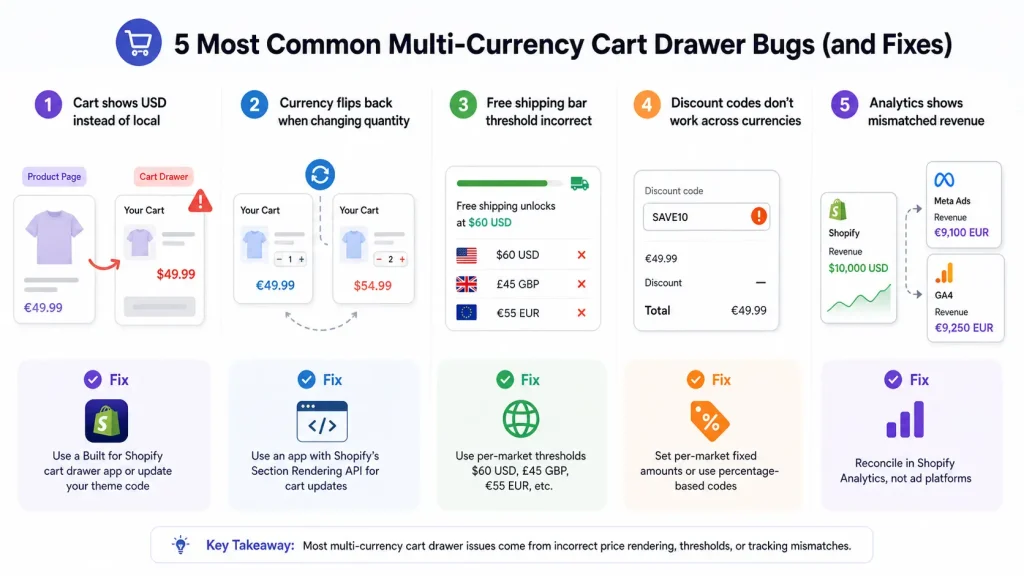
Match what you see to a cause first; each row links to the numbered fix below.
| Symptom | Most likely cause | Fix |
|---|---|---|
| Product page in €, drawer (mini cart / slide cart) opens in $ after add-to-cart | Drawer repainted from raw cart JSON with a hardcoded symbol or home-market money format | Re-render with sections + sections_url (cause 1) |
| Right amount, wrong symbol ("$54.00" for a €54.00 cart) | Money formatted in JavaScript instead of Liquid | Cause 1, or Intl.NumberFormat with cart.currency |
Drawer correct on the root domain, wrong under /de-de or /en-ch | Hardcoded /cart URLs | window.Shopify.routes.root and routes.* (cause 2) |
| Price flickers, or is right on open and wrong after a quantity change | Currency-converter app rewriting the DOM | Remove the converter; use Markets (cause 3) |
| Amount converted twice (far too high or too low) | Converter app or Shopify.currency.rate applied to an already-converted price | Causes 1 and 3 |
| "Add €12.43 for free shipping" | One store-currency threshold shown against a local-currency cart | Per-market thresholds (cause 4) |
| Totals 100× or 1000× off in Germany, Austria, France | parseFloat on a comma-decimal string | Keep integers in data attributes (cause 5) |
| Drawer in CHF, checkout in EUR (or the reverse) | Shipping address belongs to a different market, or local currency is not enabled without Shopify Payments | Expected behaviour or Markets setup — see the DACH section |
| Every shopper sees store currency everywhere | Local currency not enabled for that market | Markets → [market] → Currency |
1. The drawer reverts to store currency after an AJAX add
The classic: the product page is correct, you add to cart, and the drawer opens in USD.
Cause: the drawer is repainted from a raw /cart/add.js or /cart/change.js JSON response. Those give you integers and line-item data, not your theme's formatted, market-aware HTML. Any code that takes item.final_price and prepends a symbol from a JavaScript constant prints the wrong currency the moment the shopper leaves your home market.
Fix: re-render server-side. Dawn's cart JavaScript builds its request body as { line, quantity, sections: sectionsToRender.map(s => s.section), sections_url: window.location.pathname } — the sections parameter is what makes the response include fully rendered drawer HTML in the active market. Swap your innerHTML for parsedState.sections[sectionId] and the problem disappears, because Liquid did the formatting.
Shopify calls this bundled section rendering, and it works on /cart/add, /cart/change, /cart/update and /cart/clear. sections accepts an array or a comma-separated list; the rendered HTML arrives under the sections key of the JSON. Dawn's drawer asks for two section IDs, cart-drawer and cart-icon-bubble (see getSectionsToRender() in assets/cart-drawer.js). Horizon does the same in assets/component-cart-items.js, posting to Theme.routes.cart_change_url and morphing the returned section HTML into place. A minimal version for a custom drawer:
fetch(window.Shopify.routes.root + 'cart/change.js', {
  method: 'POST',
  headers: { 'Content-Type': 'application/json' },
  body: JSON.stringify({
    line: 1,
    quantity: 2,
    sections: 'cart-drawer,cart-icon-bubble',
    sections_url: window.location.pathname,
  }),
})
  .then((response) => response.json())
  .then((cart) => {
    const html = new DOMParser().parseFromString(cart.sections['cart-drawer'], 'text/html');
    document.querySelector('#CartDrawer').innerHTML = html.querySelector('#CartDrawer').innerHTML;
  });
The section IDs and #CartDrawer selector are Dawn's; substitute your theme's.
Two constraints. The Section Rendering API renders at most five sections per request — a drawer, header count, shipping bar, upsell block and footer note is already your whole budget, so consolidate before you hit the ceiling. And sections_url must be window.location.pathname, not a hardcoded /, or sections render in the market that owns the root path rather than the shopper's. Per the docs it must begin with /; omit it and Shopify falls back to the page in the HTTP Referer header.
2. Hardcoded /cart and /checkout paths
Cause: subfolder markets live under a prefix like /de-de. A fetch to a literal /cart/add.js hits the root market, resolves in your base currency, and can silently split the shopper's cart.
Fix: use the routes object everywhere — routes.cart_url and routes.cart_add_url in Liquid, window.Shopify.routes.root + 'cart.js' in JavaScript. Both carry the market prefix. Shopify's theme guidance for Markets warns that a hardcoded /cart in a link or Ajax request forces visitors "back to the domain defaults". Dawn exposes the same values as window.routes in layout/theme.liquid; Horizon as Theme.routes in snippets/scripts.liquid. Grep your theme for "/cart and "/checkout; a single hit breaks the flow.
3. A currency-converter app fighting the drawer
Cause: converter apps scan the DOM for price nodes and rewrite their text; your drawer re-renders through the Section Rendering API. The two run on different clocks, so you get whichever finished last — often correct on first paint and wrong after a quantity change, or the reverse.
Fix: on Shopify Payments and Markets you do not need a converter at all — Markets prices in local currency and, unlike a display-only converter, carries that price to checkout. Uninstall it, confirm no leftover script tag, retest. If you truly cannot use Shopify Payments, label converted prices as approximate and never let the converter rewrite the drawer subtotal.
4. Free-shipping thresholds set in store currency
Cause: the bar is configured with one number — 6000 subunits meaning $60 — then displayed against a converted cart total. The German shopper sees "Add €12.43 for free shipping" against a threshold matching no shipping rate you actually configured.
Fix: two halves, both required.
- The shipping rate is per zone in Settings → Shipping and delivery. Shopify lets you set fixed (flat) rates in the market's local currency, and that choice covers both the price and the cart-price condition — so you can configure a genuine "free over €55" rather than a converted $60. Rates left in store currency are converted automatically and drift with the exchange rate. Local-currency rates are not available for carrier-calculated rates.
- The bar in the drawer needs the same per-market numbers. A single global threshold disagrees with your actual rates in every market but one.
If the bar is powered by a fixed-amount free-shipping discount rather than a shipping rate, remember its minimum is converted from store currency at checkout, so the bar needs the converted figure, not a hand-picked one. The same applies to gift thresholds by country. The mechanics and copy are covered in the Shopify cart drawer free shipping bar guide; the multi-currency addition is that every number in it needs a per-market variant.
5. Decimal and separator mangling
Cause: JavaScript that parses a formatted string back into a number. parseFloat("1.234,56") returns 1.234. That is the bug behind prices 100× too small after a quantity change, and it only appears in comma-decimal markets — which is why it survives testing from a US desk.
Fix: never round-trip through a formatted string. Keep subunit integers in data attributes (data-cart-total="5427"), do the arithmetic on those, format once with a money filter. Currencies without subunits, such as JPY and KRW, are the other half of the trap: a hardcoded "show two decimals" routine prints ¥1000.00 for a currency that has no decimals, whatever divisor sits in front of it. Let a money filter or Intl.NumberFormat choose the decimals, and check those markets explicitly.
Discounts, BOGO and Free Gifts Across Markets
Percentage discounts scale by definition — 20% off is 20% off in every currency. Fixed-amount discounts do not. Per Shopify's discounts and gift cards in Markets page, fixed amounts are created in your store's default currency and converted at checkout at the current exchange rate — its example is $10 becoming €9.20 at 0.92. Minimum purchase requirements, including the minimum on a free-shipping discount, convert the same way. So a drawer that advertises "€10 off" or "free shipping over €50" against a USD-denominated discount will be a few cents wrong, and wrong by a different amount next week.
Since May 2026, Shopify lets you assign a discount to specific markets natively, including Buy X Get Y. That changes the recommended pattern, but not the currency rule: the same Shopify page says a fixed-amount discount can only be created in your store's default currency, never in a market's own, so you cannot type €10 into a German-market discount.
- Fixed-amount: avoid it where a round local number matters. Restricting one to a market, at Shopify admin → Discounts → Create discount → Amount off products, lets you choose a different store-currency amount for that market, but the local figure still moves with the exchange rate.
- Percentage: one discount, all markets, and "15% off" reads the same in every currency. No duplication.
- Buy X Get Y: quantity-based, so it travels across currencies cleanly. Assign per market only when the gift product differs by region — usually a shipping restriction rather than a pricing decision.
Market assignment works for country/region, B2B and retail markets, not for channel markets, and applies to both codes and automatic discounts; by default a discount is valid in every market. Gift cards are the exception to all of this — they are always denominated in the store's default currency and converted at redemption.
Two limits. Shopify caps active automatic discounts at 25 per store, including Functions — duplicate every offer across eight markets and you hit that ceiling fast. And discounts combine across the product, order and shipping classes only when combinations are enabled on each.
Free gifts with purchase need the same treatment: a gift unlocked at "$100" needs a per-market threshold, and the gift may be un-shippable to some destinations. Our guide to a Shopify free gift by country covers targeting; the cart drawer discount code guide has the in-drawer validation flow.
Shopify Multi-Currency for DACH: EUR for Germany and Austria, CHF for Switzerland
DACH (Deutschland, Austria, Confoederatio Helvetica) looks like one German-speaking region and behaves like two currency zones and three tax regimes. It is the most common place a cart drawer shows a currency the shopper did not expect.
| Area | Germany | Austria | Switzerland |
|---|---|---|---|
| Currency | EUR | EUR | CHF |
| Customs territory | EU | EU | Outside the EU — every order is an export |
| Standard VAT rate | 19% | 20% | 8.1% |
| Number format | 1.234,56 € | € 1.234,56 | CHF 1’234.56 (decimal point, apostrophe grouping) |
| Sensible Markets setup | One EUR market, or part of a wider EU market | Its own market with CHF enabled | |
VAT rates per the European Commission and the Swiss Federal Tax Administration. Four things follow for the drawer:
- Give Switzerland its own market. Lump it into a "Europe" market priced in EUR and Swiss shoppers see euros in the drawer, which is a configuration choice, not a bug. In Markets → Switzerland → Currency, enable CHF and turn on price rounding. Shopify's rounding values are fixed defaults per currency, so check the CHF result on a real product; Swiss cash prices conventionally end in 0 or 5 Rappen, and a price list override is the fallback if the default does not suit you.
- Decide VAT display per market. German and Austrian shoppers expect consumer prices to include VAT. Dynamic tax-inclusive pricing is set at Markets → [market] → Taxes and duties → Tax display → Dynamic tax display. Note Shopify's caveats: fixed international prices are not adjusted per region, tax overrides are ignored, and shipping rates do not change. Because Germany is 19% and Austria 20%, a dynamically priced item can differ by a few cents between the two even though both pay in euros — the drawer is right, the VAT is different.
- Tell Swiss shoppers about import charges. Shopify's customs fees page lists Switzerland's duty and tax de minimis at 5 CHF each, so most orders attract import VAT. Say in the drawer whether it is collected at checkout or on delivery.
- Test the separators. Germany and Austria use a decimal comma (cause 5); Switzerland uses a decimal point. A drawer that survives
de-DEcan still break onde-CHif your JavaScript assumes "German means comma".money_with_currencyis rarely needed here, since € and CHF are unambiguous.
The "drawer in CHF, checkout in EUR" report usually has a mundane cause: a shopper browsing the Swiss market entered a German delivery address. Shopify states that the shipping address determines the final experience, so checkout re-prices to the market that owns the address. Language is a separate axis — Switzerland also needs French and Italian — covered in the multi-language cart drawer guide.
Duties, Import Taxes and What the Drawer Should Say
The rules changed materially and a lot of published advice is now stale. Per Shopify's customs fees documentation, the US de minimis exemption ended on August 29, 2025 — duties and import taxes now apply to all US imports regardless of value. The EU still waives duty on goods under €150, with low-value VAT handled separately.
Shopify can calculate and collect duties at checkout, but that requires HS codes and country of origin on your products, and DDP labels are supported only through specific carriers. Collected duties are money you hold to pay the carrier invoice later.
For the drawer: duties depend on the shipping address, so they are calculated at checkout, not in the cart. The right pattern is a one-line note near the checkout button — shown only to shoppers outside your fulfilment region — saying whether duties are collected at checkout or billed on delivery. Silence produces refused deliveries; a fabricated estimate produces disputes.
Theme Drawer vs App Drawer for International Stores
| Area | Theme drawer (Dawn/Horizon) | Cart drawer app |
|---|---|---|
| Line items and subtotal in local currency | Yes — Liquid money filters, nothing to configure | Yes, if the app re-renders sections rather than patching the DOM |
| Currency selector in the drawer | Move the existing snippet (code edit) | Usually a toggle, no theme edit |
| Free shipping bar and per-market thresholds | You build it, with custom Liquid branching | Included, but per-market support varies — ask before installing |
| Upsell and free-gift pricing | Not included | Included; prices come from the market's price list |
| Ongoing maintenance | You own every theme update | Vendor owns the code; you own the performance cost |
The theme column describes a drawer that ships with the theme, and such drawers turned up often in our data. In our October 2026 check of 475 live Shopify stores, 243 (51.2%) showed native theme cart-drawer markup or a drawer setting, 48 (10.1%) had a tracked cart-drawer app or Rebuy Smart Cart theme code detected, and 15 had both. Dawn was the most common theme name (47 stores) and Horizon came next with 18, level with Prestige; Dawn and Horizon are the two themes whose code this guide quotes. It was a hand-picked sample that skews to larger, app-heavy brands, and it shows what each store loads on 11 October 2026, not which drawer converts better.
The honest split: if you sell in two or three markets and only need correct line items, Dawn's drawer plus a relocated country selector is enough and costs nothing. The moment you want market-aware shipping bars, gift thresholds or upsells, you are either writing that Liquid yourself or installing an app.
What can be said about apps from public documentation is limited, so treat it as a checklist rather than a verdict. Three questions separate a Markets-safe drawer app from a risky one: does it render prices from Shopify's presentment-currency cart data (or re-rendered sections) rather than converting in the browser; does it call the cart through locale-aware URLs; and can each threshold — shipping bar, gift unlock, tiered reward — hold a separate value per market or currency? App Store listings rarely answer the third, so ask support in writing before you install.
Disclosure: Oxify is our app. Oxify Cart Drawer & Upsell lists multi-currency and multi-language in its description (checked October 11, 2026), and the app ships its interface in eight languages (English, Spanish, French, German, Italian, Japanese, Brazilian Portuguese and Danish). Reward goals such as the free shipping and free gift thresholds can be set per market, so a German shopper and a Swiss shopper each see a goal in their own currency. As with any app here, confirm the behaviour on a development store before launch. Our roundup of the best Shopify cart drawer apps covers the field, and whether a cart drawer app slows your store covers the performance trade-off a second currency script makes worse.
Testing Checklist Before You Ship
Desk-testing from one country will not catch these bugs. Work through this list per market.
- Switch markets with the selector, not a VPN. The localization form is the deterministic path; geolocation is not. Confirm the page reloads and header prices change.
- Use Shopify's market preview. The documented path is Markets → [market] → More actions → View online store, which opens the storefront in that market's context.
- Use a
?country=deep link for a single country. Shopify documentsexample.com?country=DE(two-letter ISO 3166 code) for landing visitors in a specific country — useful when several countries share one market and one URL, as Germany and Austria often do. Test in a private window so an earlier selection does not linger. A deep link is a first test, not proof. In the same October 2026 check we requested each homepage with?country=USfrom a non-US connection: 438 of the 475 stores rendered the US market (read from the page's ownShopify.countryvalue), and the other 37 did not (GB 19, AU 7, IN 4, CA 3, and 4 that stated no market). The check cannot say why. You can read the same values in the browser console:Shopify.countryandShopify.currency.activeprint the market country and currency the page was rendered for. They are undocumented globals, so use them to diagnose, not in code you ship. - Treat a VPN as a last check, not the first. Shopify notes that VPNs, corporate networks and some mobile carriers can be geolocated wrongly, so a VPN tests geolocation rather than your drawer.
- Add to cart and open the drawer. Line items, subtotal and shipping bar should all be in local currency with the correct symbol and separator.
- Change quantity twice. This is where DOM-patching drawers break. Watch the subtotal, not just the line item.
- Inspect the network response. In DevTools, the
/cart/change.jsresponse should show the localcurrencyand asectionskey, and the request URL should carry the market prefix if you use subfolders. - Check a comma-decimal market (Germany, Austria, France) for 100× errors, and a zero-decimal currency (JPY) for phantom decimals.
- Apply a discount code. Confirm it is valid in that market and the reduction is a sensible local amount.
- Cross the free-shipping threshold. The bar should complete at the same number your shipping rate actually uses.
- Proceed to checkout. The checkout currency must match the drawer exactly. Any mismatch is a stop-ship.
- Place a test order. Enable Shopify's test payment gateway under Settings → Payments (Shopify Payments test mode, or the Bogus Gateway for third-party setups), order in a non-home market, and confirm the order record shows the presentment and payout currencies correctly.
Run this for at least three markets — one dollar-symbol, one comma-decimal, one you actually get volume from.
Currency Is Half the Job — Language Is the Other Half
A German shopper who sees €54.00 next to an English "Add 1 more for free shipping" still reads the drawer as half-finished. Market and language are separate axes — one market can offer several languages via localization.available_languages — so set them independently. The multi-language cart drawer guide covers translation; if you are new to the component, start with what a Shopify cart drawer is.
Running a Global Drawer Without Building It Yourself
If you would rather configure market-aware offers than maintain Liquid branching through every theme update, Oxify Cart Drawer & Upsell is a Built for Shopify app rated 4.9 from 40 reviews (checked October 11, 2026) and made by us, with multi-currency, multi-language and per-market reward thresholds.
Pricing starts at $9.99/month and scales by monthly order volume rather than by feature, so nothing is gated behind a higher tier. The 14-day free trial is long enough to run the testing checklist above across your real markets first. Details on the cart drawer upsell page.
Frequently Asked Questions
Does the Shopify cart drawer support multiple currencies?
cart.currency returns the customer's presentment currency when the store sells in multiple currencies, and Liquid's money filters format it. A wrong currency is a re-render bug, not a missing feature.Why is my cart drawer showing the wrong currency?
/cart/add.js JSON instead of re-rendered sections; hardcoded /cart paths bypass the market's subfolder; a currency-converter app rewrites prices after the drawer redraws; thresholds are stored in base currency; or JavaScript mangles comma decimals. Fix the re-render first — it resolves most cases.What currency does Shopify's cart.js return?
currency field tells you which one. Values are unformatted integers in minor units, so 5400 with "currency": "EUR" is €54.00. The JSON contains no symbol or separator, which is why drawers built from it so often print the wrong one.How do I format Shopify money in JavaScript?
money filters format the price. When client-side formatting is unavoidable, use Intl.NumberFormat with style: 'currency' and the currency value from the cart response, never a hardcoded symbol. Dividing by 100 matches Shopify's integers for two-decimal currencies, and its Liquid cart reference says JPY and KRW carry the same two extra digits. Confirm any other zero- or three-decimal market against a real cart.js response before relying on it.Should I use a currency converter app or Shopify Markets?
How do I set up Shopify multi-currency for Germany, Austria and Switzerland (DACH)?
Why does the cart drawer show one currency and checkout another?
Do I need Shopify Payments for multi-currency?
Can I put a currency selector inside the cart drawer?
snippets/country-localization.liquid inside a {% form 'localization' %} block; Horizon ships snippets/localization-form.liquid. Render it inside your cart drawer section with a unique localPosition or form_id. Submitting reloads the page in the new market, so the drawer closes — correct, because the cart is re-costed.Do discounts work across currencies?
How do I set free shipping thresholds per country?
What about duties and import taxes?
The Short Version
Get the market layer right first: Shopify Payments, local currency per market, rounding on. Make sure the drawer never formats money in JavaScript — re-render sections and let Liquid do it. Then give every threshold, gift unlock and fixed-amount discount a per-market value, and finish with a real test order. Currency bugs are cheap to fix and expensive to leave: they surface at the exact moment a shopper is deciding to trust you.