
Share a Shopify Cart: Permalinks vs a Drawer Button

Quick answer: To share a Shopify cart, a shopper needs a share button in the cart drawer; Shopify's Dawn and Horizon themes don't include one. To send a cart yourself, build a Shopify cart permalink: yourstore.com/cart/{variant_id}:{quantity}. Add ?storefront=true to open the cart page instead of checkout. Permalinks can't carry selling plans or bypass a storefront password.
In Oxify Cart Drawer & Upsells (our app) the shopper-side share is one toggle: Enable Share Cart Button. Save cart for later is a wishlist, a different feature.
Support wants to send the exact SKUs a shopper abandoned. A couple wants to finish one bag on two phones. They are different jobs, and Shopify ships a tool for only one of them: the merchant-built permalink.
Checked October 11, 2026: Shopify's permalink docs (Help Center, Shopify.dev), requests to two live Shopify storefronts, the cart files of Dawn 16.0.0 and Horizon on GitHub, and eight App Store listings.
Key Takeaways
?storefront=truekeeps people on the cart page instead of sending them straight toward checkout. On October 11, 2026 a bare link on two live stores redirected to a hosted checkout; with the parameter it redirected to/cart.- Customer share = a share button in the drawer (Oxify, our app) or a dedicated save-share app. Neither Dawn 16.0.0 nor Horizon has one in its cart files. This is the "share with anyone" feature people actually search for.
- Native permalinks = merchant-built links. Format:
/cart/{variant_id}:{quantity}, comma-separated lines. - A bad variant id is dropped, not rejected. We got a redirect to an empty cart, not a 404, so audit old ad links.
- Selling plans / subscriptions: permalinks cannot add them. Password-protected stores: the link will not skip the password gate.
The 4 Jobs People Call "Cart Sharing"
| Job | Who starts it | Use |
|---|---|---|
| 1. Recover / support | You | Native permalink in an email or chat |
| 2. Ads / SMS / influencers | You | Permalink + optional ?discount= |
| 3. Send my bag | Shopper | Share button in the cart drawer |
| 4. Save for later | Shopper | Wishlist / save-cart app. Not a permalink. Permalinks are snapshots, not accounts |
Job 3 — "send my bag to someone" — is what most people searching share Shopify cart mean, so it comes first below. Jobs 1 and 2 are merchant links; you may not need an app for those.
Method 1: A Share Button in the Cart Drawer (Share With Anyone)
The shopper already built the bag. They need a link or a share sheet now. They will not open Shopify admin.
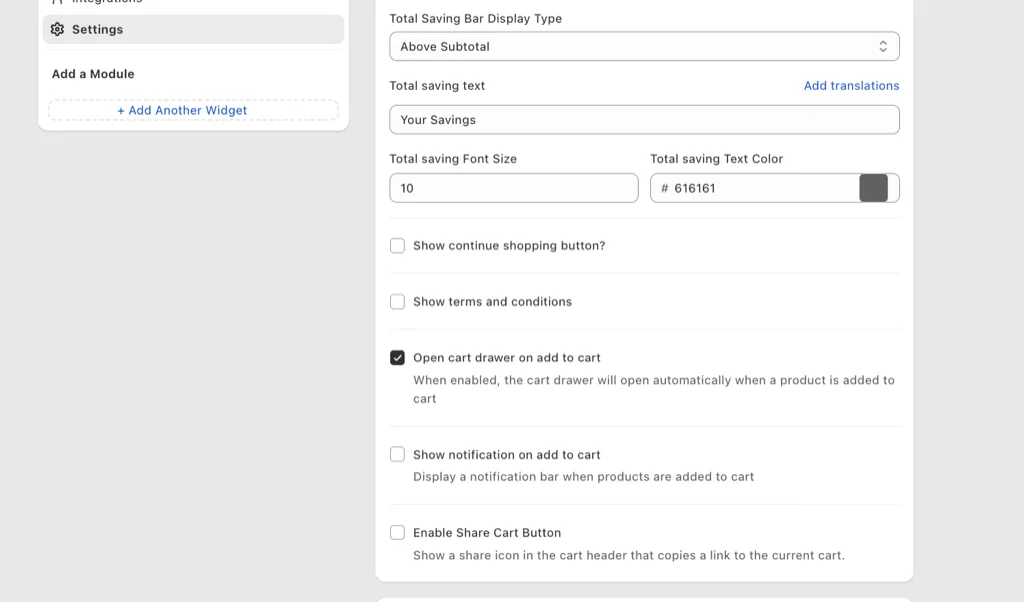
In Oxify Cart Drawer & Upsells (our app) it is one switch: Enable Share Cart Button under Settings. A share icon appears in the cart header and copies a link to the current cart — no permalink assembly, no variant ID hunting. The shopper does the sharing, which is the whole point.
Whatever app you install, check three things before you trust a share button:
- Same lines on another device. Open the link logged out, then in a second browser. If it only works on the same phone, you built a bookmark, not a share.
- Plan limits on shared carts. On the listings we read on October 11, 2026, Share Cart: Link, Social, Chat caps its $4.50/mo plan at 12 items per shared cart with links that work for 1 month, and MeroxIO's free plan caps a shared cart at 2 products. The table under Method 3 has the rest.
- One primary action. Copy link, or the device share sheet (iOS / Android). Not a row of social icons that turns the drawer into a social app.
Do not confuse this with a wishlist. A wishlist needs an account (or a cookie plus email). A share link is a snapshot. Say which one you shipped in the button label: "Share cart" vs "Save for later."
Method 2: Native Shopify Cart Permalinks (Merchant-Built Links)
Documented in Shopify Help and Shopify.dev; syntax below checked October 11, 2026.
Build the path:
- Find each variant id (three ways, next section).
- Join them as
variant_id:quantity, comma between lines. - Example:
https://{shop}/cart/40565639626752:3,40565639659520:1 - Optional query params Shopify documents:
?storefront=true— online store cart, not an immediate checkout push?discount=SUMMER20— apply a code. Stack multiple with commas (?discount=SUMMER20,FREESHIP) if your store allows combining. A code that itself contains a comma can't be passed this way. More on discount codes in the cart drawer?note=August%20SMS%20drop— a tracking note that shows in the order's notes (see order notes in the cart drawer)?attributes[source]=newsletter— cart attributes for tracking; they land on the order too?ref=influencer-jane— a referral code that appears in the conversion summary?payment=shop_pay— Shop Pay when you do want checkout- Locale prefix:
/fr/cart/...so language stays put
What Happened When We Requested Cart Permalinks on Two Live Stores
On October 11, 2026 we sent plain GET requests with no login to two live Shopify storefronts, using variant ids from each store's public product data and a fresh cookie jar per test, then read the cart back from /cart.js. We completed no checkout. Both stores gave the results below. They are not our stores, so we have not named them. In the table, {a} and {b} are two in-stock variants.
| Link we requested | What came back (same on both stores) |
|---|---|
/cart/{a}:2,{b}:1 | A 302 redirect to a hosted checkout URL on shop.app, not to the store's /cart page. |
…?storefront=true | A 302 redirect to /cart, which loaded normally. /cart.js showed 3 items: {a} ×2 and {b} ×1, with {b} listed first. |
…?storefront=true¬e=sms-drop-test&attributes[source]=newsletter&ref=jane&discount=TESTCODE | The note and source: newsletter were set on the cart (read back from /cart.js). ref and discount were not on the cart; they stayed on the redirect URL. We used a made-up code, so we did not check that a discount applied. |
…?storefront=true&properties= + Base64-URL JSON | The properties appeared on the first variant in the link only. The second line had none. |
…?storefront=true&utm_source=sms&utm_medium=text&utm_campaign=oct-drop | All three UTM parameters stayed on the redirect URL. Without storefront=true they also stayed on the checkout redirect. |
/cart/1:1?storefront=true (a variant id the store does not have) | A 302 redirect to /cart and an empty cart. No 404. |
/cart/{a}:1,1:1?storefront=true (one real line, one that does not exist) | Shopify redirected to a rewritten link without the bad line (/cart/{a}:1?storefront=true). After following it, the cart held the real line. |
- The first redirect decides everything. On both stores a bare link did not load the cart page, so nothing running there (cart-page upsells, a free-shipping bar) gets a chance. Add
?storefront=truewhen you want it to. - Shopify added a
cart_link_idparameter of its own to the redirects that landed on/cartor checkout, with a different value on each request even for the identical link. It is not in Shopify's permalink docs, so exclude it if you report landing pages by full URL. - Two stores on one day is a spot check, not a guarantee. Checkout redirects can differ with a store's checkout and Shop Pay settings. Request your own link once before it goes into a campaign, on your primary domain:
curl -sI 'https://yourstore.com/cart/VARIANT_ID:1'shows the first redirect in thelocationheader. To see the cart Shopify builds:curl -sL -c jar -b jar -o /dev/null 'https://yourstore.com/cart/VARIANT_ID:2?storefront=true' && curl -s -b jar https://yourstore.com/cart.js
Prefill the checkout too. When the link goes to checkout (no storefront=true), you can pre-populate fields with checkout[...] params. Shopify.dev lists nine: checkout[email] and eight checkout[shipping_address][...] fields — first_name, last_name, address1, address2, city, province, country and zip. For example: ?checkout[email]=jane@example.com&checkout[shipping_address][first_name]=Jane&checkout[shipping_address][city]=Austin. Useful in one-to-one support emails where you already know the customer. Never put someone's email or address in a public or forwarded link — treat prefilled links as containing personal data, because they do.
UTM the link. Permalinks accept normal UTM params alongside the cart params (&utm_source=sms&utm_campaign=oct-drop), and as the table shows they survived the redirect on both stores. Without them, an SMS click usually has no referrer and is filed as direct traffic.
Line item properties can be passed too: Shopify.dev documents a ?properties= parameter carrying Base64-URL-encoded JSON (for example an engraving text), applied to the first product in the link, max 25 properties. On both stores they landed on the first variant only. Use that for gift notes you already support. Do not stuff secrets into the URL — everything in a permalink is readable by anyone who holds it.
Finding Variant IDs (3 Ways)
- Storefront URL: pick the variant on the product page — in most themes the URL grows
?variant=40565639626752. That number is the id. - Product JSON: open
/products/your-handle.jsonand readvariants[].id. Fastest for grabbing every variant at once. On both stores the ids it returned matched the ones our links used. - Admin: product → variant → the id is at the end of the admin URL, as Shopify Help shows.
Or skip the hand-building: admin can generate links for you, three ways. On a product page, More actions → Create checkout link copies a permalink shaped like /cart/{variant_id}:1?channel=buy_button — one variant, quantity 1 — and needs the Buy Button sales channel installed. A draft order sends an invoice with a secure checkout link, the tool when you need specific prices, discounts, or a B2B quote. And a customer's abandoned checkout can be emailed to them from admin with a link back to that checkout (Online Store and Buy Button channels only). Between those three you may not need an app at all.
What permalinks cannot do:
- Add a selling plan (subscriptions / some preorders)
- Bypass a storefront password
- Warn you about a dead line. A variant id the store does not have is dropped without an error, so re-test old ad links after you delete or replace products
- Act as a logged-in wishlist. The same link is reusable and gives each visitor a new checkout (Shopify Help), so anyone with the link can open that snapshot
Use permalinks when: support is rebuilding a cart, you are seeding an SMS drop, or you want a landing link with two SKUs already in the bag.
Method 3: Dedicated Save & Share Apps
Dedicated apps earn their place when you need email-the-cart, saved carts tied to a customer account, or sharing without running a full drawer app. Prices, ratings and plan limits below are as listed on October 11, 2026; verify before installing.
| App | Price on listing | Rating | What the listing says it does, and its limits |
|---|---|---|---|
| Share-A-Cart for Your Store | Free | 4.6 (2 reviews) | A free add-on that lets shoppers share a loaded cart with whoever will buy it |
| Share Cart: Link, Social, Chat | $4.50/mo Essentials, $7/mo Standard; 7-day trial | 5.0 (5 reviews); Built for Shopify | Essentials: 1,000 shared links a month, up to 12 items per shared cart, links work for 1 month. Standard: 10,000 a month, unlimited items, links work for 1 year, UTM parameters |
| BuddyCart | $3.99/mo; 3-day trial | No reviews yet (launched April 2026) | A unique share link; the recipient restores the items. Tracks opens, restorations and location |
| RedChamps: Share Cart | $20/mo Basic; 2-day trial | 3.1 (2 reviews) | Share by link or email; shared carts and conversions visible in admin, shared carts visible in the customer account |
| Oxify Cart Drawer & Upsells (our app) | From $9.99/mo for 0–100 orders (whole drawer suite); 14-day trial | 4.9 (40 reviews); Built for Shopify | Share button in the drawer, alongside upsells and free gifts |
| CSS: Cart Save and Share | $4.99/mo; 7-day trial | 5.0 (6 reviews) | Customers save carts for later and share them with others to pay |
| Uncap Save & Share Carts | $19.99/mo; 7-day trial | 5.0 (1 review) | Unlimited saved carts, unique share links, one-click restore of a shared cart |
| MeroxIO Share your Cart | Free plan; Premium $4.99/mo | No reviews yet | Free plan: up to 2 products per shared cart; Premium: unlimited. Store-branded share URL; shares line-item properties |
None of the seven dedicated share apps has more than six reviews, so treat their ratings as anecdotes and choose on the limits column: item caps and link lifetime decide whether a shared cart still works when the recipient opens it.
Skip Oxify for this job alone if all you want is a share button. It is a whole drawer suite, while Share Cart: Link, Social, Chat starts at $4.50/mo and MeroxIO has a free plan. Oxify makes sense when you already want the drawer, upsells and free gifts, and sharing comes with them.
Who Shares, and Why (Match the Tool to the Person)
- Merchant jobs: abandoned-cart emails with the exact bag rebuilt, SMS drops with a discount baked in, support rebuilding a cart in chat, B2B reps sending a reorder link. All permalinks. Free.
- Shopper jobs: "ask my spouse to pay for this," gift lists sent to family, group buys splitting one order, a B2B buyer forwarding the cart to whoever holds the card. All need a share control the shopper can tap — that is the drawer button, not admin.
The "send this to whoever pays" job is the quiet one: the person building the cart is often not the person with the card. A drawer share button is the shortest path between them.
A shopper on a store with no share button is not stuck: the permalink format needs no login, so they can build one from the variant numbers in the product page URLs. If you already run Oxify Cart Drawer & Upsells (our app) for gifts and upsells, add a second share app only for a job Oxify does not cover (account-saved carts). Two share buttons is a mess.
Privacy and Support Hygiene
- Treat share links like gift cards: anyone with the URL can see the SKUs. Do not put medical or "discreet" bundles on a public link without a warning.
- Shopify's own recovery links work the same way. Per Shopify Help, anyone who opens an abandoned checkout link can continue that checkout, and you can't disable or expire the link after you send it. Send it only to the customer.
- Support should paste permalinks in tickets, not passwords.
- Rotate discount codes on old ad permalinks. A 2024
?discount=in a Facebook comment will still work if the code still exists.
Frequently Asked Questions
How do I share a Shopify cart with someone?
How do I share my cart on Shopify if the store has no share button?
Why does my permalink go straight to checkout?
Can I put a discount code in a cart link?
How do I find a Shopify variant ID for a cart link?
Can I prefill the checkout email or address in the link?
Do UTM parameters work on a cart permalink?
What happens if a variant ID in a cart link does not exist?
Do cart permalinks work with subscriptions?
Is cart sharing the same as a wishlist?
Does Oxify replace permalinks?
What to Do Next
Jobs 1–2 (ads, support): one permalink, add storefront=true if you want the cart page, add UTMs, then request it once with the curl line above before it goes live. Save it in helpdesk macros. Free. Already in Shopify.
Job 3 (shopper taps Share): turn on cart sharing in the drawer. Send it to a second phone. If the lines match, you are done.
Oxify Cart Drawer & Upsells (our app) includes that shopper share control next to the rest of the bag, from $9.99/mo. Keep native permalinks either way.