 Oxify
OxifyShopify Subscribe & Save in Cart: Upsell One-Time Buyers
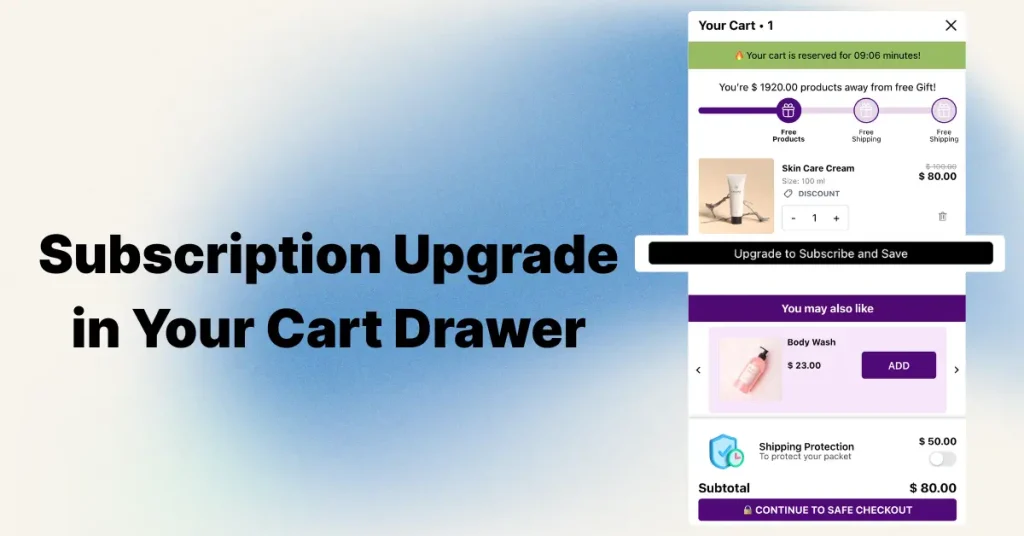
Short answer: To offer subscribe & save in a Shopify cart or cart drawer, the product needs a selling plan from a subscription app. An upgrade button on the cart line then posts the line number, quantity and selling_plan ID to /cart/change.js, and Shopify converts the line in place. Sending selling_plan: null switches it back to a one-time purchase.
Selling supplements or other refills? Your payment gateway decides whether subscription apps work at all. See the best Shopify apps for supplement brands for the gateway list and the full stack.
Key facts (re-checked October 11, 2026)
/cart/change.jsacceptsselling_plan. Shopify's Ajax Cart API reference says the endpoint changes the "quantity, properties, and selling_plan" of a line item that is already in the cart.- You must identify the line with
line, notid. The same reference states that when you sendselling_planonly the 1-basedlineindex works, and that a missingquantity"is assumed to be 1". nullor an empty string removes the plan. That is the documented way to turn a subscription line back into a one-time purchase.- A subscription line carries a
selling_plan_allocation. It appears in the cart JSON and in Liquid asline_item.selling_plan_allocation, with the plan name, the discounted price and the compare-at price. - Mixed carts are allowed. Shopify's subscription considerations confirm subscriptions can be bought together with one-time products, and that Shop Pay, Apple Pay, Google Pay and PayPal can buy subscriptions on Shopify Payments.
- Not every subscription app has a cart widget. Seal Subscriptions' own documentation says its widget cannot be shown on the cart page "without a custom API solution" (source).
Disclosure: Oxify makes a cart drawer app that includes this feature. It is covered below alongside competitors, using only what each App Store listing or vendor help page states.
What is an in-cart subscription upsell, and how is it different from a product page widget?
A product page subscription widget asks the question before the add to cart: one-time or subscribe & save. An in-cart subscription upsell asks again after the add, on the cart line itself: "Upgrade to subscribe & save 10%". The shopper taps once, the line's price drops to the subscription price, and checkout creates a subscription contract instead of a one-off order.
The Shopify App Store labels this feature "Subscription upgrade" in its cart-customization feature taxonomy. Vendors use other names: Recharge documents a "cart upsell overlay" for converting one-time buyers, and Appstle calls its version a "Cart Widget". They all do the same thing underneath: change the selling plan on an existing cart line.
It is a different job from swapping a size or pack in the cart, which changes the variant, not the purchase option. That is covered in our guide to a variant upgrade in the cart drawer. For the wider playbook of cart offers, see the cart upsell strategy guide.
What has to be true before a cart line can become a subscription?
- A subscription app is installed and has created a selling plan group. Selling plans are created by apps, not by theme code. Shopify Subscriptions is the free first-party option; choosing between engines is covered in our Shopify subscription apps comparison.
- The exact variant in the cart belongs to that group. A plan attached to the 250 g bag does nothing for the 1 kg bag. In Liquid, check
item.variant.selling_plan_allocations: if it is empty, do not render the button. - The product is not subscription-only. If
product.requires_selling_planis true there is no one-time line to upgrade, and you must never offer a downgrade. - Your payment setup can bill recurring orders. Shopify lists Shopify Payments, PayPal Express, Authorize.net, Adyen and Stripe as supported, subject to region, and warns that local, manual or non-card methods might not be available (source).
Can /cart/change.js convert an existing line item to a selling plan?
Yes. This is the part most answers get vague about, so here is exactly what Shopify documents for POST /cart/change.js:
| Parameter | What Shopify documents | What it means in practice |
|---|---|---|
selling_plan: 183638 | "To set a specific selling plan for the line item." | Converts a one-time line to a subscription, or switches frequency (30-day plan to 60-day plan). |
selling_plan: null or '' | "To remove any selling plan from the line item." | Downgrades a subscription line to a one-time purchase. |
line | With selling_plan, "you can use only the line property for identifying the line item." | Do not send id with a variant ID or line item key. Use the 1-based position. |
quantity | "If the quantity isn't specified, then it's assumed to be 1." | Always resend the current quantity, or a line of 3 silently becomes 1. |
Do not confuse this with variants. /cart/change.js cannot change a line's variant; a variant swap needs a remove plus an add. The selling plan is the one product-level attribute the endpoint can rewrite in place. The plan can also be set at add time by passing selling_plan in the /cart/add.js items array, which is what product page widgets do.
How does selling_plan_allocation appear in the cart JSON and in Liquid?
After the change, /cart.js returns the line with a selling_plan_allocation object. This trimmed example follows the structure in Shopify's reference (prices are in cents):
"selling_plan_allocation": {
  "price": 900,
  "compare_at_price": 1000,
  "per_delivery_price": 900,
  "selling_plan": {
    "id": 610435137,
    "name": "Delivery every 1 Week",
    "recurring_deliveries": true,
    "price_adjustments": [
      { "value_type": "percentage", "value": 10 }
    ]
  }
}
A one-time line has no selling_plan_allocation key, so if (item.selling_plan_allocation) is a reliable subscription test in JavaScript. In a theme, the equivalent objects are:
item.selling_plan_allocation: nil on one-time lines; otherwise gives.selling_plan.name,.priceand.compare_at_price.item.variant.selling_plan_allocations: every plan this variant can be sold on, each with its own price. This is the list to build the upgrade control from.item.product.selling_plan_groups: the groups ("Subscribe & save") and their plans ("Every 30 days"), useful for a frequency dropdown.
Shopify's subscription UX guidelines ask themes to show selling_plan.name on the cart line because the same text is used at checkout, and say the cart price should match what the product page shows.
How do I add a subscribe & save upgrade button to my cart with code?
The snippet below is written against the documented API and standard Liquid objects. We have not run it on your theme: every theme re-renders its cart drawer differently, so test on a duplicate theme first. Place the Liquid inside the cart line loop of your cart drawer or cart template (in Dawn-family themes that is the for item in cart.items loop).
{%- liquid
  assign allocations = item.variant.selling_plan_allocations
  assign first_alloc = allocations | first
-%}
{%- if item.selling_plan_allocation == nil and allocations.size > 0 -%}
  <button type="button" class="js-sub-upgrade"
    data-line="{{ forloop.index }}"
    data-quantity="{{ item.quantity }}"
    data-plan="{{ first_alloc.selling_plan.id }}">
    Upgrade to {{ first_alloc.selling_plan.name }} for {{ first_alloc.price | money }}
  </button>
{%- elsif item.selling_plan_allocation and item.product.requires_selling_plan == false -%}
  <button type="button" class="js-sub-upgrade"
    data-line="{{ forloop.index }}"
    data-quantity="{{ item.quantity }}"
    data-plan="">
    Switch to one-time purchase
  </button>
{%- endif -%}
document.addEventListener('click', async (event) => {
const btn = event.target.closest('.js-sub-upgrade');
if (!btn) return;
btn.disabled = true;
const root = window.Shopify?.routes?.root || '/';
const res = await fetch(root + 'cart/change.js', {
method: 'POST',
headers: { 'Content-Type': 'application/json' },
body: JSON.stringify({
line: Number(btn.dataset.line), // 1-based; "id" is not allowed here
quantity: Number(btn.dataset.quantity), // omit it and Shopify assumes 1
selling_plan: btn.dataset.plan ? Number(btn.dataset.plan) : null
})
});
if (!res.ok) { btn.disabled = false; return; }
const cart = await res.json(); // full cart JSON
// Re-render the drawer from this response or via your theme's own refresh.
// Do not reuse old line numbers or line item keys after this point.
document.dispatchEvent(new CustomEvent('cart:subscription-changed', { detail: cart }));
});Shopify's reference adds that /cart/change.js changes one line item at a time and does not add an item that is not already in the cart; it returns a 400 error instead, which is why the snippet checks res.ok. The last step is theme-specific. Many themes re-render the drawer through the Section Rendering API by adding a sections parameter to the same request; check how your theme handles its own quantity buttons and copy that path. If editing Liquid is not for you, an app does the same call behind a settings toggle, covered below. For general drawer edits, see how to customize the Shopify cart drawer.
Worked example: what the shopper sees
Cart: 2 bags of coffee at $30.00, one-time. The variant is on a "Deliver every 30 days" plan with a 10% price adjustment.
| Step | Request | Line total |
|---|---|---|
| Before | none | 2 × $30.00 = $60.00 |
| Correct upgrade | { line: 1, quantity: 2, selling_plan: 183638 } | 2 × $27.00 = $54.00, compare-at $60.00 |
Upgrade with quantity forgotten | { line: 1, selling_plan: 183638 } | 1 × $27.00 = $27.00 (a bag vanished) |
| Downgrade | { line: 1, quantity: 2, selling_plan: null } | 2 × $30.00 = $60.00 |
Note the side effect on thresholds: the upgrade took $6.00 off the subtotal. If your free shipping bar was already full at $60, the upgrade just un-filled it. Decide whether subscription lines should qualify for free shipping on their own, and say so next to the button.
What breaks when a cart line switches to a subscription?
| Area | What happens | What to do |
|---|---|---|
| Line identity | Shopify only accepts the line index for this call, and carts can hold several lines with the same variant (different properties, discounts or plans). After the change, positions you cached may be wrong. | Re-read the cart from the response every time. Never queue two changes against stored line numbers or keys. |
| Duplicate lines | If the cart already holds the same variant on the same plan, you now have two lines describing the same purchase. Shopify's reference does not document whether they merge. | Test it on your store, and render whatever the response returns rather than assuming. |
| Quantity | Omitted quantity defaults to 1. | Always send the current quantity. |
| Quantity breaks and automatic discounts | Shopify says automatic discounts "can be applied to subscription orders", so a volume discount can land on top of the plan's 10%. | Set each discount's purchase type deliberately (next section). Background: quantity breaks vs regular discounts. |
| Discount codes | A code limited to one-time purchases stops applying to the upgraded line, so the total can go up after the shopper clicks "save". | Show the new line price before the click, and re-render the discount summary after it. |
| Free shipping bar, gift thresholds | The subtotal falls by the plan discount. | Recalculate progress from the new cart JSON. |
| Express buttons in the drawer | Shopify states Shop Pay, Apple Pay, Google Pay and PayPal can buy subscriptions on Shopify Payments, but "Apple Pay support for subscriptions is limited to Visa and Mastercard" and customers can use only Shop Pay on some stores. With Authorize.net, "PayPal is the only wallet option available to customers". | Place a test order with each wallet you show. See express checkout buttons in the cart drawer. |
| Prepaid plans | A prepaid plan charges several deliveries up front, so the line price jumps instead of dropping. In the cart JSON, per_delivery_price differs from price. | Do not offer prepaid plans behind a "save" button. Offer pay-per-delivery plans, or label the full charge. |
| Bundles | Shopify's help center states "Bundles aren't compatible with the Shopify Subscriptions app." | Hide the button on bundle lines unless your subscription app documents support. |
| Old Scripts logic | Shopify Scripts stopped executing on June 30, 2026, so any Script that used to block codes on subscription carts no longer runs. | Move that rule to discount settings or a Shopify Function. |
Sources for the quoted rows: Shopify's considerations for subscription products and the Ajax Cart API reference.
How does Shopify handle a cart with both one-time and subscription items?
Shopify allows mixed carts and mixed orders. The customer picks one shipping method for the first delivery, and it covers the subscription and one-time items together. Recurring shipments then "revert to the default shipping method for subscriptions", and checkout shows the delivery frequency under each subscription line.
- Shipping rate. Per Shopify's considerations page, if your subscription shipping profiles are set up in the Shopify admin, a single rate applies to the entire order. If they live in your subscription app, the app's rate is added to the rate the customer picks for the one-time items. After an upgrade, re-check the shipping line in a test order.
- Payments. Gift cards used to pay for subscriptions apply only to the first payment, and automatic discounts you create in the Discounts section can be applied to subscription orders.
- Checkout. Shopify adds a purchase option agreement for the customer to confirm.
- Cart labels. Label each line "One-time" or with the plan name, so the shopper can see which items will renew.
Can a discount code stack on top of the subscribe & save discount?
Yes, unless you stop it. The subscription discount is a price adjustment inside the selling plan; discount codes and automatic discounts are a separate layer. Shopify's subscription discounts page documents two controls:
- Purchase type. When you create a discount, choose whether it applies to subscription purchases, one-time purchases or both. Setting your welcome code to one-time only is the cleanest way to stop 10% subscribe & save plus 15% WELCOME15 on the same line.
- Recurring payments for subscriptions. Under usage limits, this caps how many billing cycles a code keeps applying. Shopify calls it "the only way to automatically limit how many billing cycles a discount applies to". Leave it unlimited and a 15% code can ride on every renewal, because a snapshot of the discount is saved to the subscription contract.
In a mixed order the purchase type decides which lines a discount touches: a code limited to one-time purchases skips the subscription lines. One related rule from the same page: in a buy X get Y discount, the free "get Y" item must be a one-time purchase, so a free gift cannot itself be a subscription. For how classes of discounts combine in general, and for the code field itself, see our guide to the discount code box in the cart drawer.
Which cart drawer apps offer an in-cart subscription upgrade?
We checked each live App Store listing on October 11, 2026. "Lists the feature" means the listing itself shows "Subscription upgrade" in its feature list or names subscription upsells in a plan. It does not tell you which subscription engines each one supports; confirm that with the vendor before installing.
| App | Rating (reviews) | Built for Shopify | What the listing says |
|---|---|---|---|
| Oxify Cart Drawer & Upsells (ours) | 4.9 (40) | Yes | "In-cart subscription upgrades" named in the plan features; "Subscription upgrade" in the feature list. |
| Upcart | Not shown | Not shown | On October 11, 2026 the Upcart listing showed "not currently available"; check the listing before installing. On September 19, 2026 it showed 4.7 (943) and "Subscription upgrade" in the feature list. |
| Amp Slide Cart Upsell Drawer | 5.0 (773) | Yes | "Subscription Upsells" named in plan features; "Subscription upgrade" in the feature list. |
| Kaching CartDrawer Cart Upsell | 5.0 (1,484) | Yes | "Subscription upgrade" in the feature list. |
| Rebuy Personalization Engine | 4.7 (853) | No | "Subscription upgrade" in the feature list. |
Every listing that was open on October 11, 2026 shows it, so the feature alone will not decide between them. Price, drawer design and the rest of the upsell toolkit will; that comparison lives in our best Shopify cart drawer apps roundup, with head-to-heads in the Upcart alternative and Rebuy alternative posts.
Do subscription apps like Recharge, Appstle or Seal have their own cart widget?
Ratings below are from the live App Store listings on October 11, 2026.
| Subscription app | Rating (reviews) | In-cart upgrade, per vendor sources |
|---|---|---|
| Appstle Subscriptions | 5.0 (8,982), Built for Shopify | Yes. Its Cart Widget help article describes a Subscribe option on eligible cart products, but says it "needs to be manually added to your theme's code" via Appstle support. |
| Recharge Subscriptions | 4.8 (3,133) | Yes, as a "cart upsell overlay" that prompts one-time buyers to switch, documented in Recharge's help center. We could not open the full article to confirm plan or theme requirements. |
| Seal Subscriptions | 4.9 (3,135), Built for Shopify | No native cart widget. Seal's FAQ says it cannot be displayed on the cart page "without a custom API solution". |
| Bold Subscriptions | 4.0 (381) | Listing shows "Subscription upgrade" in its feature list; it does not say whether that is in the cart. |
| Skio (listed as "Skio, a Recharge Company") | 5.0 (243) | Skio documents an "Upgrade & Save" checkout extension for Shopify Plus. That is at checkout, not in the cart. |
| Loop Subscriptions | 5.0 (781) | Not stated on the listing. Ask the vendor. |
| Shopify Subscriptions | 3.7 (852) | Not stated on the listing. It creates the selling plans; the cart control comes from your theme code or a cart app. |
Because every Shopify subscription app stores its plans as native selling plans, the /cart/change.js method above works regardless of which engine created the plan. That is also why a cart drawer app can sit on top of a subscription app it has never heard of, in principle. In practice, test the pair before you rely on it.
How do I set it up without code in Oxify Cart Drawer & Upsells?
This part is first-party: it is our app, and the screenshot is our settings screen.
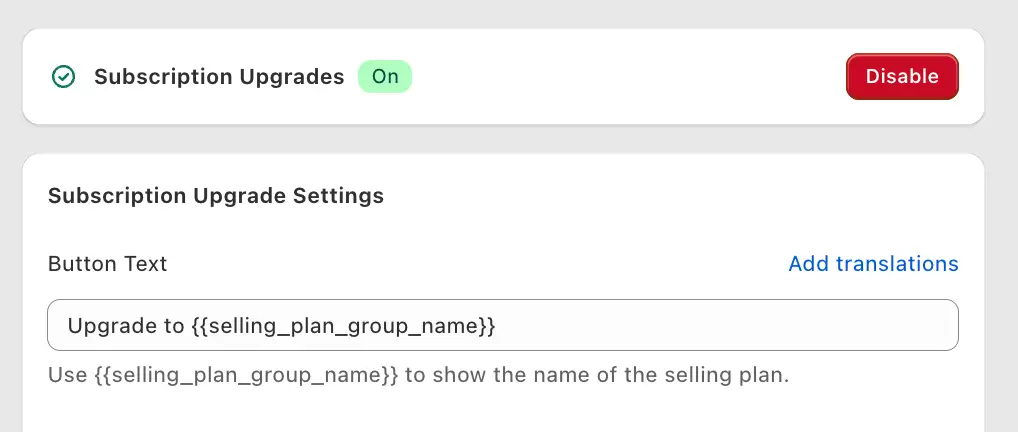
- Create the selling plan first in your subscription app and attach it to the specific variants you want upgradable.
- Open the Subscription Upgrades settings in the slide cart editor and switch the toggle on.
- Set the button text. The default is
Upgrade to {{selling_plan_group_name}}; the variable fills in each product's own plan group name, so a coffee line and a filter line can show different offers. - Decide on "Prevent Downgrades". When ticked, shoppers cannot switch a subscription line back to one-time inside the drawer. It suits subscription-first product pages. The setting carries a caution in the app for a reason: removing a choice at the last step can cost you the order, so watch checkout starts after enabling it.
- Style the button to be secondary to the checkout button, then place a test order and confirm the order shows the selling plan.
"In-cart subscription upgrades" is named in the plan features on the App Store listing, where pricing starts at $9.99/month; details are on the Oxify cart drawer page. Oxify reads the selling plans already attached to the product, so it works with every Shopify subscription app, including Recharge, Appstle, Seal, Loop, Skio and Shopify Subscriptions. We have not published app-by-app test results, so still place one test order with your own plans before going live.
Should I build it with code, a subscription app widget, or a cart drawer app?
| Scenario | Best route | Why |
|---|---|---|
| You use the theme's own drawer and have a developer | Theme code with /cart/change.js | No extra app, full control. You own the re-render and edge cases above. |
| You are on Appstle or Recharge and only want this one feature | The subscription app's own cart widget or overlay | One vendor, plans and widget always in sync. Appstle's needs a support-led theme install. |
| You are on Seal or Shopify Subscriptions | Cart drawer app or theme code | Neither documents a native in-cart control. |
| You already want a drawer with a shipping bar, gifts and upsells | Cart drawer app | The upgrade button is one toggle among features you are paying for anyway. |
| Products are subscription-only | Nothing | There is no one-time line to upgrade. |
Where should the upgrade button go, and what should it say?
These are our opinions, not measured results. We have no sourced conversion-lift figure for this feature and you should be wary of anyone quoting one.
- On the line, not in a banner. The offer is about one product, so it belongs under that product's title, where the plan name will later appear.
- State the new price and the cadence. "Subscribe & save 10%: $27.00 every 30 days" beats "Upgrade". Add "skip or cancel anytime" only if your customer portal really allows it.
- Offer it only on replenishable products. Coffee, supplements, pet food, skincare refills. A subscribe button on a sweater is noise.
- Keep the drawer uncluttered. One subscription offer competes with every other widget; see adding upsells to the cart drawer and in-cart recommendations for how many offers a drawer can carry, and the cart drawer best practices checklist.
- Measure two numbers, not one. Upgrade rate (upgraded lines ÷ eligible lines shown) and cancellations before the second order. A high first number with a high second number means the button is selling a discount, not a subscription.
Related: Timing the upgrade to how fast products run out? See the best Shopify apps for coffee and tea brands, best Shopify apps for pet stores and best Shopify apps for beauty and skincare brands.
FAQ
How do I add subscribe and save to the Shopify cart?
Does /cart/change.js accept a selling_plan parameter?
Why did my cart quantity drop to 1 after switching to a subscription?
How do I switch a subscription item back to a one-time purchase in the cart?
How can I tell in Liquid whether a cart item is a subscription?
Can a cart contain both subscription and one-time products?
Can customers use a discount code on top of subscribe and save?
Do Shop Pay and Apple Pay work with subscription items in the cart?
Does Seal Subscriptions have a cart page widget?
Does Recharge offer a subscription upsell in the cart?
What does "Prevent Downgrades" do in Oxify Cart Drawer & Upsells?
Do I need Shopify Plus to offer subscriptions in the cart drawer?
The bottom line
Shopify already supports the whole flow: one documented call, /cart/change.js with line, quantity and selling_plan, converts a one-time item to subscribe & save and back. The work is in the edges: resend the quantity, re-render from the response, set discount purchase types, avoid prepaid plans behind a "save" label, and test every express button.
If you would rather switch it on than build it, Oxify Cart Drawer & Upsells (our app; 4.9 from 40 reviews, Built for Shopify, 14-day free trial, verified October 11, 2026) includes in-cart subscription upgrades, as do the other open listings in the table above.