 Oxify
OxifyQuantity Breaks vs Regular Discounts: The Break-Even Math and a Decision Table
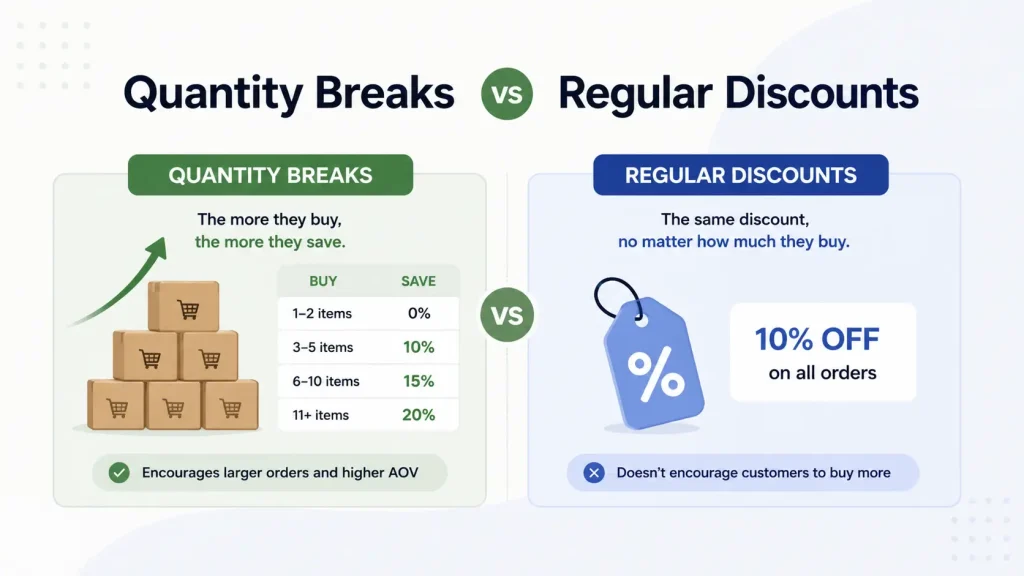
Short answer: A quantity break lowers the unit price only when a shopper buys more units, so single-unit orders keep full price. A regular discount (flat % off, a code, a sale) cuts every order. In our example (60% margin), 10% off needs 36% more orders to match undiscounted profit; a 10%/15% quantity break needs one order in ten to trade up.
Key facts (verified October 2026)
- Shopify has no native object called a "quantity break". The closest thing is an Amount off products discount with a "Minimum quantity of items" requirement, available as a code or an automatic discount. When the discount targets a product or collection, only those items count toward the minimum (Shopify Help: Amount off discounts).
- Several tiers no longer "collide". When discounts cannot combine, Shopify applies "the best discount or combination of discounts" for the cart, so a three-rung ladder built from three automatic discounts resolves to the highest rung the shopper qualifies for. Two product discounts on the same line item combine only on Shopify Plus (Shopify Help: Combining discounts).
- Limits: 25 active automatic discounts per store, app-created ones included, and at most 5 product or order codes plus 1 shipping code per order (Shopify Help: Automatic discounts, same combinations page).
- The only native tier table is B2B. Volume pricing in B2B catalogs allows up to 10 price breaks per product (Shopify Help: Quantity rules and volume pricing), and free Shopify themes display it from version 11.0.0, for B2B catalogs only (Shopify Help: Displaying volume pricing). Retail shoppers never see it.
- Every profit figure in this article is arithmetic on stated assumptions, not a test result. We have not run an A/B test for this post and we cite no "average AOV lift", because we could not find one with a traceable source.
What is a quantity break, and what counts as a "regular" discount?
A quantity break is the point on a price list where the unit price steps down: 1 for $20, 2 or more for $18 each, 3 or more for $17 each. The condition is the number of units. A regular discount is any price cut whose condition is something else: nothing at all (a sitewide sale), a code, a date, a cart subtotal, or a customer segment. This page compares quantity breaks with the four regular discounts Shopify merchants actually run:
- Flat percentage or fixed amount off, sitewide or on a collection, usually automatic.
- Discount codes: welcome codes, influencer codes, win-back codes.
- BOGO / Buy X get Y: "buy 2, get 1 free".
- Free-shipping thresholds: "free shipping over $50".
For the full definition, the three tier models and setup steps, read the guide to quantity breaks and price breaks. This page only answers one question: which of these should you run?
Are quantity breaks, volume discounts, tiered pricing and bulk pricing the same thing?
Mostly, but not entirely, and the differences change the math. Apps and blogs use these words loosely, so check what a tool actually does before trusting its label.
| Term | What it normally means | Same as a quantity break? |
|---|---|---|
| Quantity break / price break / quantity price break | A lower unit price once the quantity of one product (or one collection) reaches a threshold | Yes. "Quantity price breaks" is also the label Shopify uses in its B2B plan-features list |
| Volume discount / volume pricing | The same ladder. In billing software, "volume" specifically means the lower price applies to all units once the threshold is reached | Yes in ecommerce usage |
| Tiered pricing | Any ladder with rungs. The rungs may be unit counts or cart spend ($75 → 10%, $150 → 15%) | Only when the rungs are unit counts |
| Graduated pricing | Each band of units is charged at its own price: units 1–2 at $20, units 3–5 at $17. Earlier units keep the higher price | No. Different arithmetic, see below |
| Bulk pricing / bulk discount / wholesale pricing | A quantity break at large quantities (cases, pallets), often behind a B2B login | Same mechanism, different buyer |
| Buy more, save more | The shopper-facing slogan for any of the above | Marketing name |
| Multi-buy / "3 for $50" | A fixed price for a fixed quantity | A quantity break written as a total instead of a unit price |
App vendors mix the labels too. On 11 October 2026 the App Store page title of Kaching Bundles named "quantity breaks", and AOV.ai Bundles Quantity Breaks put "quantity breaks" in its name and "volume discounts" in its tagline. Neither title says whether the tiers are all-units, graduated or spend-based, so read the app's documentation for the tier model, not its label.
All-units vs graduated: the one distinction that changes your margin
Stripe's billing docs separate the two cleanly: in tiered pricing the unit cost changes "with quantity (volume-based pricing) or usage (graduated pricing)" (Stripe: pricing models). Operations textbooks call the same pair "all-units" and "incremental" quantity discounts.
Buy 3 units on a "3+ at $17" ladder. All-units pricing charges 3 × $17 = $51. Graduated pricing charges 2 × $20 + 1 × $17 = $57. A Shopify Amount off products discount takes its percentage off every qualifying item, so native Shopify quantity breaks, and nearly every quantity-break app, are all-units. That matters for the comparison below: the claim that a quantity break "only discounts the extra units" is wrong on Shopify. It discounts all the units in an order that reaches the threshold. What it does not discount is the single-unit order.
What is "staffelkorting" in English?
The Dutch staffelkorting translates as volume discount or quantity discount; dictionaries such as Linguee and Reverso also give "graduated discount". Staffelprijs (German: Staffelpreis) is a tiered price, price break or quantity break price, and a staffel is the tier table itself. One warning when you translate for a Shopify app or a price list: in English billing jargon "graduated" implies the band-by-band arithmetic above, while a typical staffelkorting in a webshop is all-units. "Volume discount" or "quantity breaks" is the safer English label.
Which makes more money: the unit economics on one example
Two formulas do all the work. Revenue per visitor tells you what a tactic does to the top line; contribution margin per visitor tells you whether it paid.
Revenue per visitor (RPV) = conversion rate × average order value
Contribution margin per order = net revenue × (1 − payment fee %) − units × unit cost − per-order costs
One store is used for every number from here on. These are assumptions for illustration; swap in your own.
- Price $20, unit cost (COGS) $8, so gross margin is 60%.
- Per-order costs of $5: pick and pack, the fixed part of the payment fee, and the share of shipping the store absorbs.
- Payment fee of 3% of revenue.
- 10,000 visitors a month, 2.5% conversion rate, so 250 orders.
- Today 80% of orders contain 1 unit, 15% contain 2 and 5% contain 3: 1.25 units per order, $25.00 AOV.
- The quantity break is 2+ units at 10% off and 3+ units at 15% off, all-units. The regular discount is 10% off everything.
Contribution margin per order under each tactic
| Order | Shopper pays | Contribution margin | How it is calculated |
|---|---|---|---|
| 1 unit, full price | $20.00 | $6.40 | 20 × 0.97 − 8 − 5 |
| 1 unit, 10% off | $18.00 | $4.46 | 18 × 0.97 − 8 − 5 |
| 2 units, full price | $40.00 | $17.80 | 40 × 0.97 − 16 − 5 |
| 2 units, 10% quantity break | $36.00 | $13.92 | 36 × 0.97 − 16 − 5 |
| 3 units, full price | $60.00 | $29.20 | 60 × 0.97 − 24 − 5 |
| 3 units, 15% quantity break | $51.00 | $20.47 | 51 × 0.97 − 24 − 5 |
| 3 units, "buy 2 get 1 free" | $40.00 | $9.80 | 40 × 0.97 − 24 − 5 |
| 3 units, full price, free shipping over $50 (store absorbs a further $6) | $60.00 | $23.20 | 29.20 − 6 |
Three things fall out of this table. A 10% discount removes 30% of the profit on a single-unit order ($6.40 to $4.46), because the per-order costs do not shrink with the price. A shopper who trades up from 1 unit to 2 at 10% off more than doubles the order's profit ($6.40 to $13.92), even after the discount. And "buy 2 get 1 free" is a 33% discount in disguise: it earns less than half of what the 15% tier earns on the same three units.
The same month, five ways
| Scenario | Orders | Units / order | AOV | RPV | Margin / order | Monthly revenue | Monthly contribution |
|---|---|---|---|---|---|---|---|
| No discount (baseline) | 250 | 1.25 | $25.00 | $0.625 | $9.25 | $6,250 | $2,312.50 |
| 10% off, conversion unchanged | 250 | 1.25 | $22.50 | $0.563 | $6.83 | $5,625 | $1,706.25 |
| 10% off, conversion rises to 2.9% (assumed) | 290 | 1.25 | $22.50 | $0.653 | $6.83 | $6,525 | $1,979.25 |
| Quantity break, nobody changes behaviour | 250 | 1.25 | $23.95 | $0.599 | $8.23 | $5,987.50 | $2,057.88 |
| Quantity break, 20% of all orders trade up from 1 unit (assumed) | 250 | 1.53 | $28.35 | $0.709 | $10.26 | $7,087.50 | $2,564.88 |
Row three is the trap. A 10% sale that lifts conversion by 16% raises revenue by 4.4% and RPV from $0.625 to $0.653, and a revenue dashboard calls it a win. Contribution falls 14.4%, from $2,312.50 to $1,979.25. Row four is the honest downside of a quantity break: if nobody buys more, you have handed a discount to the 20% of customers who already bought two or three, and contribution drops 11%. A quantity break is not free. It is just cheaper to be wrong about.
How much uplift does each discount need to break even?
Flat X% off: the conversion lift you need
Order mix does not change, so the only lever is more orders. Setting contribution after the discount equal to contribution before it:
Required conversion lift = (margin per order before ÷ margin per order after) − 1
Here that is 9.25 ÷ 6.825 − 1 = 35.5%. Conversion has to go from 2.5% to 3.39% (about 339 orders and $7,624 of revenue) just to earn the same $2,312.50 you earned with no discount. The common shortcut, discount ÷ (gross margin % − discount), gives 0.10 ÷ (0.60 − 0.10) = 20%. It understates the real figure because it ignores per-order costs and payment fees, which a discount does not reduce.
Quantity break: the trade-up rate and units per order you need
A quantity break has a cost and a payoff, and break-even is one divided by the other.
- Giveaway (G): margin handed to shoppers who already bought 2+ units. Per average order: 15% of orders × ($17.80 − $13.92) + 5% × ($29.20 − $20.47) = $0.582 + $0.437 = $1.02.
- Gain per trade-up (U): extra margin when a 1-unit shopper moves up. Assume 60% of those who move go to 2 units and 40% go to 3: 0.6 × ($13.92 − $6.40) + 0.4 × ($20.47 − $6.40) = $4.51 + $5.63 = $10.14.
Break-even trade-up rate = G ÷ U = 1.0185 ÷ 10.14 = 10.0% of all orders, which is one in eight of today's single-unit buyers. Each percentage point of trade-up adds 0.014 units per order, so break-even is 1.25 + 0.14 = 1.39 units per order, an 11% rise, with no conversion lift required at all. Above that line every extra trade-up is profit; at 20% you are $252 a month ahead of no discount and $586 ahead of the 10% sale at 2.9% conversion.
Against the flat discount specifically, the quantity break in this example wins even at zero trade-up ($2,057.88 vs $1,979.25). The sale only overtakes a do-nothing quantity break if conversion climbs past 3.02% (2,057.88 ÷ 6.825 = 301.5 orders), a lift of more than 20%.
How the break-even moves with your gross margin
Same store, same tiers, same $5 per-order cost and 3% fee; only unit cost changes.
| Gross margin | Conversion lift 10% off needs to break even | Trade-up rate the quantity break needs | Break-even units per order (from 1.25) |
|---|---|---|---|
| 30% | Never: every discounted order loses $0.68 on average | 58.5% | 2.07 |
| 40% | +133% | 22.4% | 1.56 |
| 50% | +56% | 13.9% | 1.44 |
| 60% | +36% | 10.0% | 1.39 |
| 70% | +26% | 7.9% | 1.36 |
| 80% | +21% | 6.5% | 1.34 |
Below roughly 40% gross margin, neither discount is attractive at these depths: shrink the tiers (5% and 8%) or use a free-shipping threshold, which costs a fixed dollar amount per order instead of a percentage of revenue. The gap between the two columns is the real argument for quantity breaks. It is not that they lift AOV by some magic percentage; it is that the behaviour change they need is small and measurable. Tier depth and spacing are their own topic, covered in how many quantity break tiers to use.
Quantity breaks vs discount codes, BOGO and free shipping: which should you use?
| Discount type | What the shopper must do | Who receives it | What it costs you | Main risk |
|---|---|---|---|---|
| Quantity break | Buy 2+ of the same product or collection | Multi-unit orders only | A % of multi-unit revenue, including orders that were already multi-unit | Pulls future purchases forward on products with fixed consumption |
| Flat % off (automatic) | Nothing | Every order | A % of all revenue | Revenue rises while contribution falls; shoppers learn to wait for the next sale |
| Discount code | Find and enter a code | Whoever has the code | A % of those orders, plus leakage to coupon sites | Codes spread beyond the intended audience; see discount codes in the cart drawer |
| BOGO / Buy X get Y | Add the exact qualifying quantity | Orders that hit the pattern | The full unit cost of each free item (33% off at "buy 2 get 1") | Deepest discount of the five; natively the free item is not auto-added |
| Free-shipping threshold | Reach a cart subtotal | Orders above the threshold | A fixed dollar amount per qualifying order | Threshold set below current AOV gives shipping away for nothing |
Free-shipping threshold example. For the example store, the average order is $25, so a $50 threshold is twice today's basket, and its 3-unit rung (3 × $20 less 15%) comes to $51.
Decision table by product type, margin and repeat-purchase pattern
| Your situation | Use | Why |
|---|---|---|
| Consumable that people use faster when they own more, or share (snacks, coffee, candles, socks, pet treats) | Quantity break | Extra units are genuinely extra demand, and the break-even trade-up rate is low |
| Consumable with fixed consumption (a 30-day supplement, contact lenses) | Quantity break with shallow tiers, or a subscription | Three bottles today means no order for 90 days. You gain cash flow and lower shipping cost per unit, not three times the demand |
| Giftable or multi-recipient item (mugs, prints, kids' clothing) | Quantity break | A reason to buy more than one already exists |
| One-per-customer durable (mattress, espresso machine, e-bike) | Free-shipping threshold or a bundle with accessories | Nobody needs three. See bundle pricing strategy |
| Wide catalog where shoppers buy different items together | Spend tiers, mix-and-match or frequently bought together | A per-product unit ladder never triggers when every cart line is quantity 1 |
| Gross margin under 40% | Free-shipping threshold, or tiers of 5–8% | The table above: 10% off cannot break even at 30%, and needs +133% conversion at 40% |
| Gross margin above 60% and a genuine conversion problem on cold traffic | A one-time welcome code, limited to one use per customer | Targets the people who need the push instead of every order |
| Clearing dead or seasonal stock by a date | Flat % off on that collection, time-boxed | The goal is cash and shelf space, not margin |
| Premium or luxury positioning | Neither; a gift with purchase or a quiet "set of 3" price | Loud percentage messaging works against the positioning (our opinion, not a measured effect) |
| Wholesale and trade buyers | Shopify B2B volume pricing | Native, up to 10 price breaks per product, visible only to logged-in company buyers |
When should you NOT use quantity breaks?
- Most of your orders are already multi-unit. The giveaway term G grows with every order that already qualifies. If 60% of orders contain 2+ units today, move the first rung above your typical quantity or you are discounting your baseline.
- Consumption is fixed and the customer would have reordered at full price. The "extra" units are next quarter's order, sold today at 15% off. Compare 90-day contribution per customer, not per order.
- Margin is too thin. At 30% gross margin in our example the 10%/15% ladder needs units per order to go from 1.25 to 2.07 to break even.
- Stock is limited. On a limited drop, a quantity break sells the same units to fewer customers for less money.
- Returns are high. In apparel, shoppers can buy three sizes to unlock the tier and send two back. Check how your app and refund policy treat a partial return that drops the order below the threshold.
- Variants are separate products. If each colour or scent is its own product, a per-product ladder will not count them together. Scope the discount to a collection instead.
- The offer cannot be seen before the cart. Native Shopify applies a minimum-quantity discount in the cart and at checkout, not as a tier table on the retail product page. A shopper who never sees the ladder cannot trade up, which puts you on row four of the scenario table.
Can native Shopify run quantity breaks, or do you need an app?
Native Shopify handles the pricing logic: one automatic Amount off products discount per rung, each with a Minimum quantity of items, and Shopify applies the best one. What it does not provide for retail shoppers is a tier table on the product page; the native volume-pricing table is for B2B catalogs on free themes 11.0.0 and later. Exact click paths for every method are in how to set up tiered pricing on Shopify.
If you want the ladder visible on the product page, that is an app's job. Disclosure: Oxify is our company. Oxify Quantity Breaks & BYOB (4.9 from 13 reviews, Built for Shopify, checked October 11, 2026) adds the tier table to product pages (see the quantity breaks and bundles app page), and the separate Oxify Cart Drawer & Upsells (4.9 from 40 reviews, same check) shows progress toward the next tier and a free-shipping bar inside the cart. Skip both if native automatic discounts already cover your pricing and you do not need a visible tier table. For an independent shortlist, compare the best Shopify quantity breaks apps and the volume discount apps we tested; for the in-cart placement, see quantity breaks in the cart drawer.
Can you run quantity breaks and regular discounts together?
Yes, and most stores do: a quantity break as part of the everyday price list, plus codes and sales in short bursts. A quantity break is a product discount and a welcome code is usually an order discount, so they combine only if you tick the matching Combinations boxes on both. Combined, a 15% tier plus a 10% code is 23.5% off, because the order discount applies to the already-reduced subtotal. On the 3-unit order above that leaves $45.90 of revenue and $15.52 of contribution, still more than double a full-price single unit. The full combination matrix and conflict rules are in stacking buy-more-save-more with other Shopify discounts.
How do you check the decision on your own store?
- Export 90 days of orders and count the share with 1, 2 and 3+ units of the product you want to discount. That is your baseline mix and it sets G.
- Compute contribution margin per order for each quantity, with and without the discount, using your own unit cost, fee rate and per-order costs.
- Calculate the break-even: G ÷ U for the quantity break, margin before ÷ margin after − 1 for the flat discount.
- Ask whether that break-even is plausible for your product. A 10% trade-up rate on candles is a reasonable bet. A 58% trade-up rate on anything is not.
- Run one change at a time for at least two full weeks and compare contribution per visitor, not revenue. For tactics once the ladder is live, see quantity break strategies for AOV.
A note on psychology. Articles on this topic, including the earlier version of this one, lean on anchoring, the idea that a first number biases later judgments (Tversky & Kahneman, 1974, Science, 185(4157), 1124–1131). That is laboratory research on numerical estimates, not a measurement of Shopify tier tables, so we do not attach a percentage to it. The arithmetic above holds whatever the psychology turns out to be.