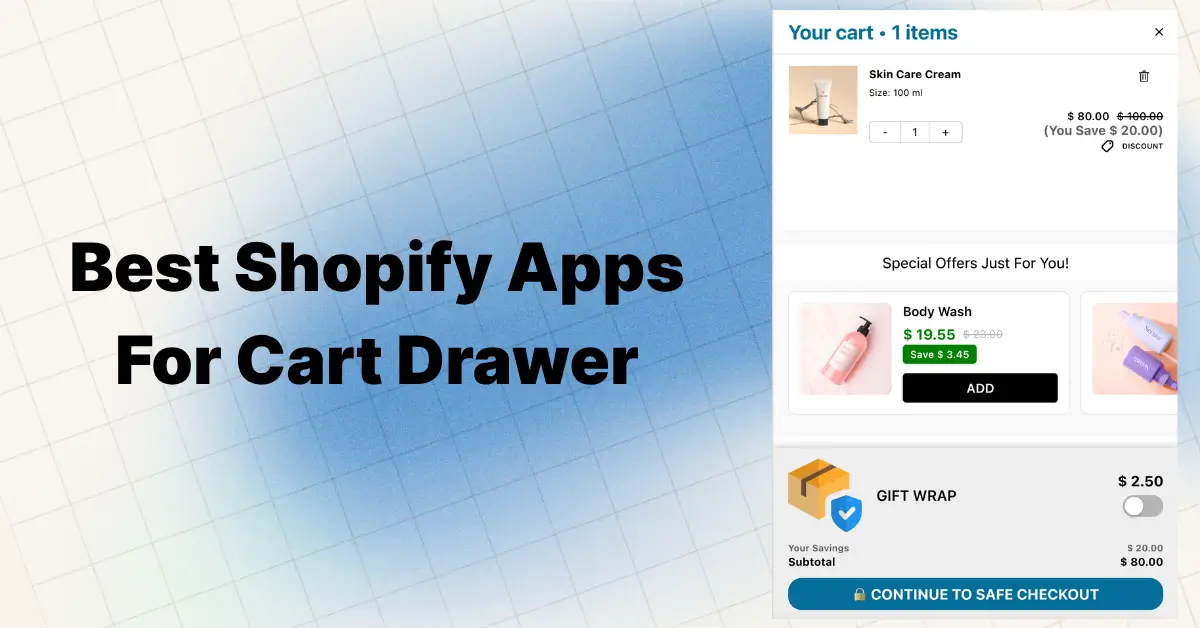
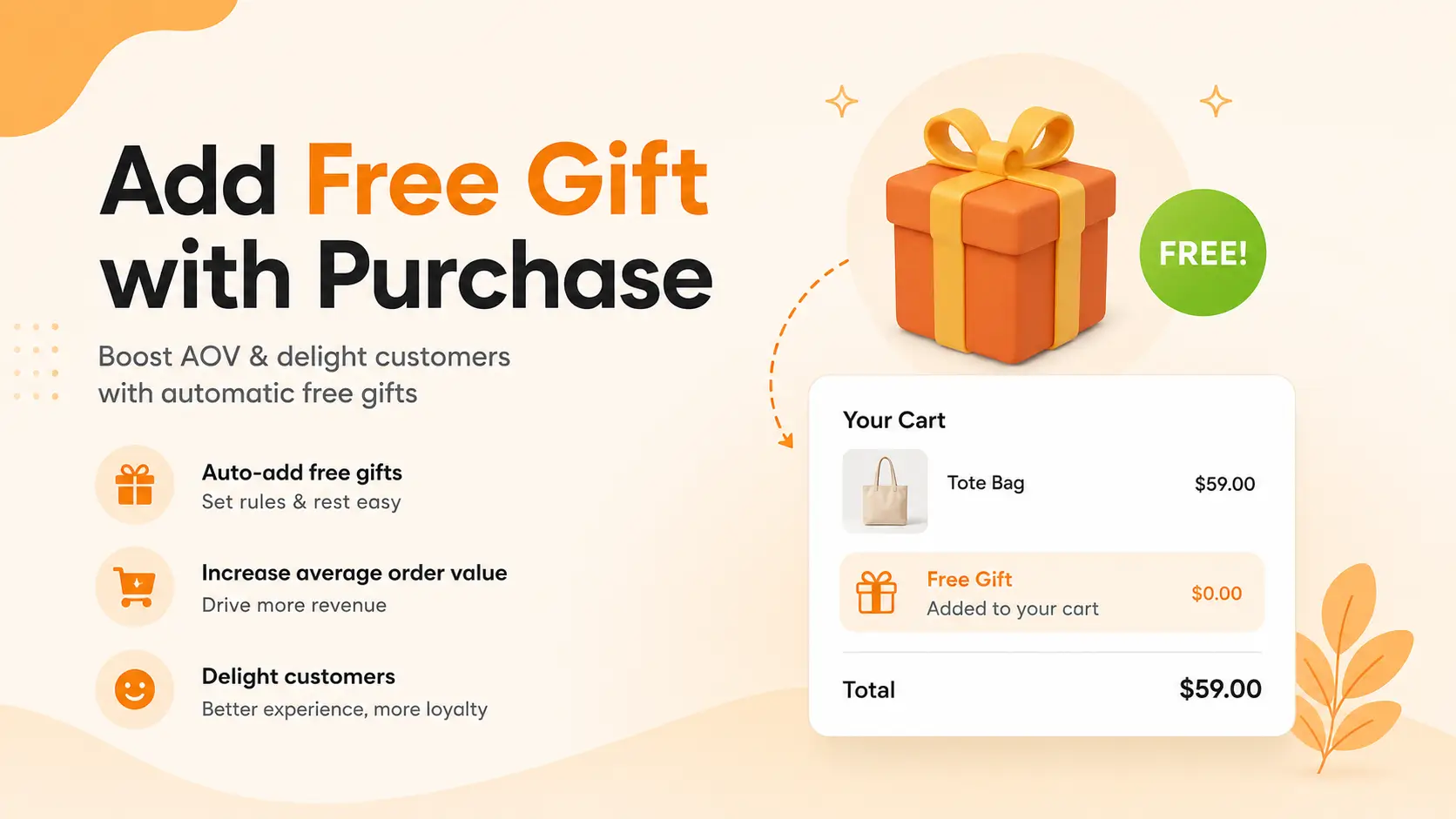
Quick answer: Shopify has no native way to auto-add a free gift to the cart when a customer hits a spending threshold. The fastest, no-code method is to use a cart drawer app that has gift rewards built in — like Oxify Cart Drawer & Upsells — which adds the gift automatically, removes it if the cart drops below the minimum, and shows a progress bar like “Spend $7 more for a FREE gift!” right inside the slide cart. Setup takes under 15 minutes. No theme editing. No code.
You know that moment when a customer adds $43 worth of stuff to their cart… and then just leaves?
That happens a lot. Like, a LOT.
Nearly 70% of online shopping carts get abandoned. On mobile, around 78%.
But here’s something wild. When you show that same customer a message like “Spend $7 more and get a FREE hair mask!” right inside the cart drawer — they don’t leave. They go find something else to add. They want that gift. And your average order value goes up.
This guide shows you exactly how to set this up — with a progress bar, auto-add logic, multi-tier rewards, and the gift selection interface — using Oxify Cart Drawer & Upsells, which has the entire free gift system built in.
We’ll also cover:
- Why Shopify’s native Buy X Get Y discount can’t do this
- The exact step-by-step setup (with screenshots from the admin panel)
- How to set thresholds that actually move your AOV
- Why standalone gift apps cause conflicts with cart drawer apps
- The custom code option (for stores that prefer DIY over apps)
Let’s get into it.
Quick Comparison: 3 Ways to Add a Free Gift in Shopify Cart Drawer
| Method | Auto-Adds Gift | Shows in Cart Drawer | Progress Bar | Multi-Tier | Setup Time |
|---|---|---|---|---|---|
| Shopify Buy X Get Y (native) | No | No | No | No | 5 min |
| Custom Liquid + JS code | Yes (basic) | Yes (manual button) | No | No | 4-6 hours |
| Oxify Cart Drawer & Upsells | Yes | Yes | Yes | Yes | 15 min |
| Standalone gift app + cart app | Yes | Maybe (conflicts) | Yes | Yes | 30-60 min |
The cleanest path for 95% of stores is a single cart drawer app with gifts built in. That’s what most of this guide covers.
Why Free Gifts in the Cart Drawer Beat Discounts
Most Shopify store owners default to discounts when they want to push sales.
“Take 15% off!” or “Use code SAVE20!” feels like the obvious move. But discounts have a hidden cost beyond the margin hit.
They train customers to wait. If you run a 20% off sale this month, shoppers learn to hold off until the next one. You’re building a customer base that only buys when things are cheap. That’s a race to the bottom.
Free gifts flip the script. Instead of making your products feel worth less, you make the order feel worth more. The customer pays full price for everything in their cart. They just get something extra. Perceived value goes up without your product value going down.
The data backs this up hard:
- Free gift with purchase campaigns increase Average Order Value (AOV) by 15-30% across Shopify stores
- Conversion rate lifts of 10-25% are common when gift offers display inside the slide cart drawer
- Repeat purchase rates improve by roughly 20% — customers associate your brand with generosity, not discounts
- A Journal of Marketing study found sales of hand lotion jumped 73% when offered as a bonus pack vs a price discount
- 58% of online shoppers add extra items to their cart specifically to qualify for a threshold reward
- 90% of customers who receive a free gift say they’re more likely to buy again
- Global ecommerce AOV averages around $145, but the average Shopify store AOV is closer to $72 — meaning there’s massive room to push cart values up with the right incentive
The psychology is called the “reciprocity effect.” Someone gives you something unexpected, you feel compelled to give back. In ecommerce, that means better reviews, faster repeat purchases, and a stronger brand association. Gift with purchase outperforms coupons, percentage-off deals, and BOGO on long-term customer lifetime value.
Why Shopify’s Native Discount Can’t Do This
Before you spend time on apps, you might wonder: can’t I just use Shopify’s built-in Buy X Get Y discount?
Short answer: no. Not for cart drawer free gifts. Not even close. Here’s why.
The gift doesn’t auto-add to the cart
Shopify’s Buy X Get Y discount only makes the “Y” product free at checkout. It does not add the product to the cart. The customer has to manually search for the gift product, navigate to its page, and add it themselves.
Most customers won’t do that. They don’t know which product is the gift. They don’t want to leave the checkout flow to go hunting. The result: your free gift promotion exists, but almost nobody redeems it.
This is confirmed by Shopify’s own Social Care team in the official Shopify Community forums — the only way to automatically add a free gift to the cart is through an app.
The discount is invisible inside cart drawers
Every third-party cart drawer reads data from Shopify’s cart.js API. That API does not include automatic discounts. Shopify processes those discounts at the checkout level, not the cart level.
What this means in practice: the gift product shows up at full price inside your slide cart. The customer sees “$12.99 — Hair Mask.” They don’t see “FREE.” Then at checkout it suddenly becomes $0. That’s confusing. It looks like a glitch. It breaks trust.
No progress bar, no tiered rewards, no “choose your gift”
Shopify’s native discount has no visual component:
- No “You’re $12 away from a free gift!” message
- No progress bar widget
- No way to let customers pick between gift options
- No analytics on campaign performance
- No way to run multiple Buy X Get Y discounts on overlapping products reliably
If you want a free gift to appear automatically inside a Shopify cart drawer with a progress bar, FREE badge, auto-add and auto-remove logic, and multi-tier reward support, Shopify’s native tools simply aren’t built for it.
Why the Cart Drawer Is the Best Place for Free Gifts
You could display free gift promotions on product pages, your homepage, or in a popup. But the cart drawer is the single highest-converting placement.
Highest purchase intent. When someone opens the cart drawer, they’re already thinking about buying. They’ve added products. They’re reviewing their order. A “spend $8 more for a free gift” message has the most psychological impact at this exact moment.
Zero page navigation. The gift offer, the progress bar, and the cart items all live in the same visible area. No clicking away to a different page.
Mobile dominance. Over 70% of Shopify store traffic comes from mobile. On phones, cart drawers are the default shopping experience — tap the cart icon, drawer slides out, review and checkout. A free gift inside this native flow converts dramatically better than a popup.
Real-time feedback. With a progress bar inside the drawer, the customer sees exactly how much more they need to spend. Every add or remove updates the bar instantly. This creates a game-like “almost there” feeling that pushes them to add one more product.
Stacks with discount codes. In Oxify’s cart drawer, customers can apply a promo code AND still qualify for the free gift. They get both. No conflict.
How Oxify’s Built-In Free Gift System Works
Oxify Cart Drawer & Upsells isn’t just a cart drawer — it’s a cart drawer with a complete rewards engine baked in. This matters because there’s no second app to install, no compatibility conflicts, no two apps fighting for control of the cart.
It holds a 5.0-star rating on the Shopify App Store and is “Built for Shopify” certified, which is Shopify’s highest integration standard.
Here’s what’s included.
Two trigger types
Rewards unlock based on either:
- Cart Total — the gift unlocks when the cart value reaches a specific dollar amount (e.g., $50, $100, $150)
- Item Count — the gift unlocks when the customer has a certain number of items in the cart (e.g., 3 items, 5 items)
Cart Total is most common because it directly ties to AOV. Item Count works better for stores selling low-price, high-quantity products where you want to incentivize volume.
Two gift delivery modes
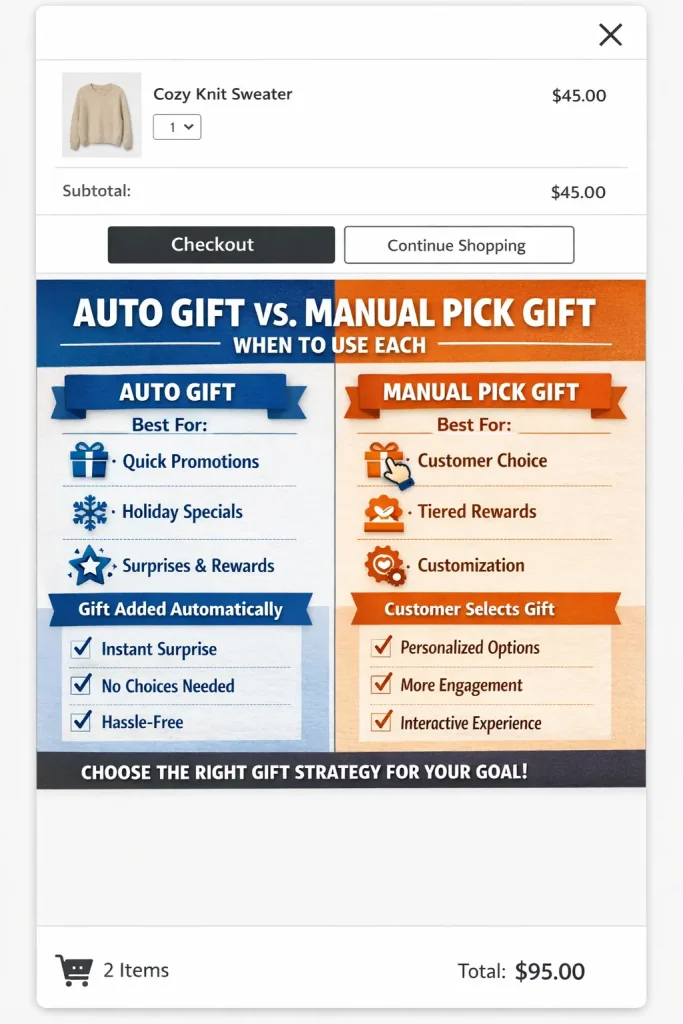
Mode 1: Auto Gift (Free Gift Automatic)
When the customer’s cart crosses your threshold, the gift product appears automatically with a “FREE” badge. No button to click. No popup. If they remove items and drop below the threshold, the gift auto-removes.
This is the highest-converting mode. Zero friction. The customer feels like they “earned” something, and the dopamine hit of seeing a free product appear in their cart pushes them to checkout.
Mode 2: Pick Gift (Free Gift Manual)
Instead of auto-adding one product, this mode shows a gift selection interface inside the cart drawer. The customer sees icons labeled “GIFT 1” and “GIFT 2” (or however many you set up). They tap the one they want, and a product card appears.
This works best when:
- You offer gifts in multiple variants (colors, scents, sizes)
- You want customers to feel in control of their reward
- You have multiple gift-worthy products and want data on preferences
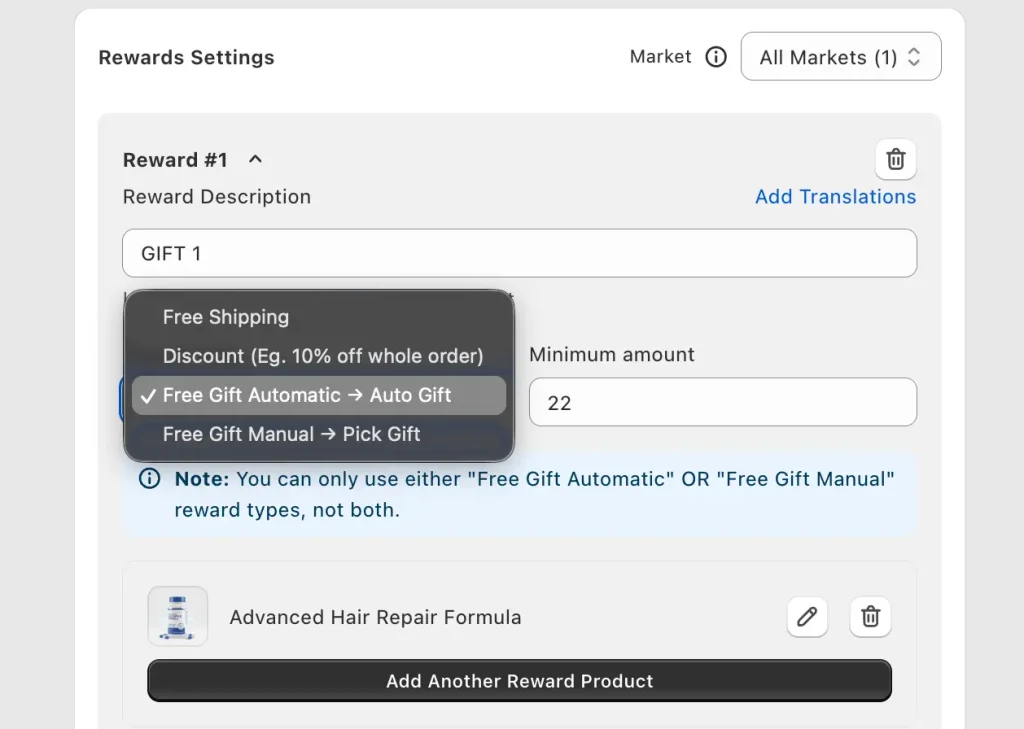
Note: within a single reward tier, you can only use Auto OR Manual — not both. But you can stack tiers and use a different mode in each.
Multi-tier rewards with a progress bar
This is where Oxify gets really powerful for AOV. You aren’t limited to a single threshold. You can stack tiers:
- Tier 1 ($50): Free sample sachet (auto-added)
- Tier 2 ($100): Free full-size product (pick your gift)
- Tier 3 ($150): Free premium bundle (auto-added)
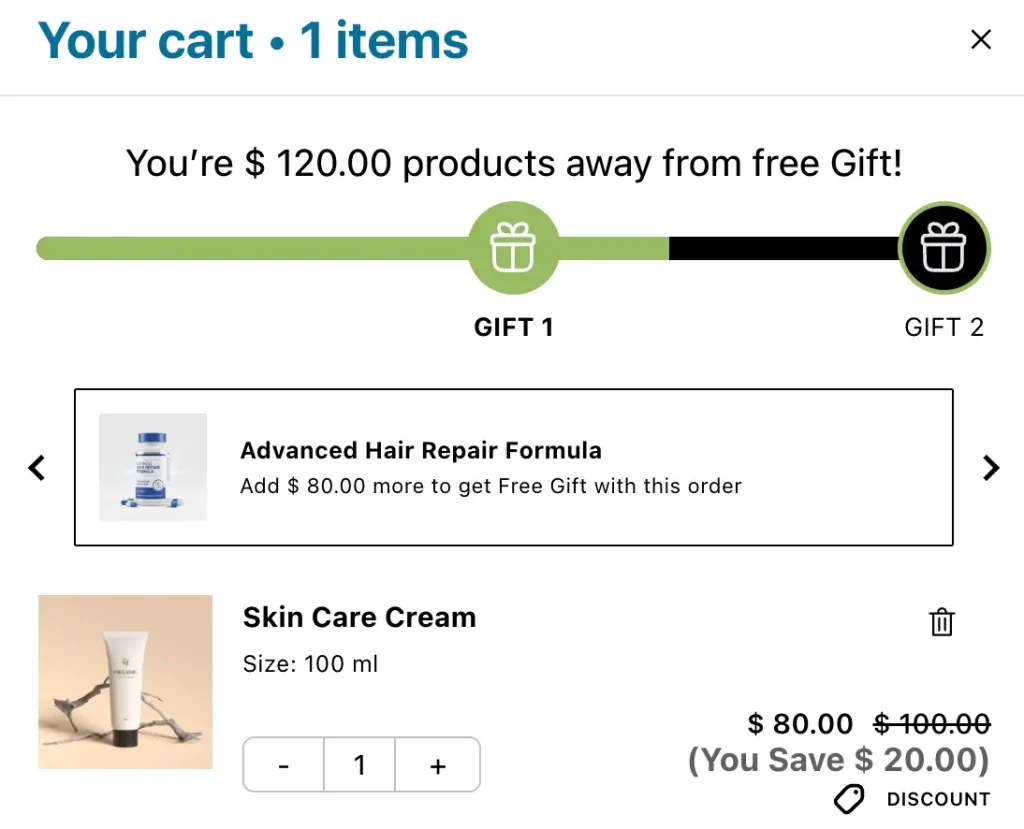
Each tier appears as an icon in the progress bar inside the cart drawer. As the customer adds items, the bar fills up and icons light up as each reward unlocks. Classic gamification — customers actively try to reach the next tier.
The progress bar sits at the top of the cart drawer, above all cart items. Text dynamically updates: “You’re $120.00 away from a free Gift!” becomes “You’re $20.00 away from a free Gift!” as they add items.
Multi-currency and Shopify Markets
Sell internationally? Oxify adjusts gift thresholds automatically for different currencies. A $50 threshold in USD translates correctly for a UK customer seeing GBP. Gift campaigns work globally without manual per-market configuration.
Stacks with discount codes
The discount code field and the gift system are part of the same app. They’re designed to work together. A customer can type “SUMMER15” for 15% off AND still unlock a free gift at the $50 threshold. These stack. No conflict.
Auto Gift vs Pick Gift — When to Use Each
Use Auto Gift when:
- You have one clear gift product (a bestselling sample, a branded accessory)
- Your goal is maximum simplicity and minimum friction
- Your customer base is mobile-heavy (less tapping = better)
- You’re running a time-limited promotion where speed matters
- The gift product has no variants
Use Pick Gift when:
- You offer multiple gift options (different scents, colors, products)
- You want engagement data on which gifts customers prefer
- Your store sells premium products where choice feels luxurious
- You want to showcase new products as gift options to build awareness
- The gift selection itself is part of the brand experience
For most stores starting with free gifts, start with Auto Gift. Simpler to set up, fewer moving parts, cleaner baseline to measure AOV impact. Once you have data, test Pick Gift to see if engagement improves.
Step-by-Step: Set Up a Free Gift in Oxify Cart Drawer
No coding required. Live on your store in under 15 minutes.
Step 1: Install Oxify
Go to the Shopify App Store and install Oxify Cart Drawer & Upsells. 14-day free trial, so you can test everything before committing.
Step 2: Create your gift product
Before configuring anything in Oxify, the gift product needs to exist in your Shopify catalog.
Go to Shopify Admin → Products → Add product.
Set the price to a real value (like $9.99 or $14.99) — NOT $0. This is important. When the gift shows up in the cart drawer as “FREE” but has a visible retail value, the customer perceives more value. “$14.99 → FREE” feels much better than “$0.00 → FREE.”
Set inventory to either keep plenty of stock OR “Continue selling when out of stock” so the gift is always available. You can hide this product from your online store search and collections — it only needs to be selectable inside Oxify.
Step 3: Open the Rewards section
Open the Oxify app from your Shopify admin sidebar. Navigate to the Rewards section. You’ll see a toggle at the top — flip it ON.
Step 4: Choose your reward basis
Under General Settings, pick:
- Cart Total — gift triggers based on dollar value of the cart
- Item Count — gift triggers based on number of items in the cart
For most stores, select Cart Total. This directly drives AOV growth.
Step 5: Pick your template style
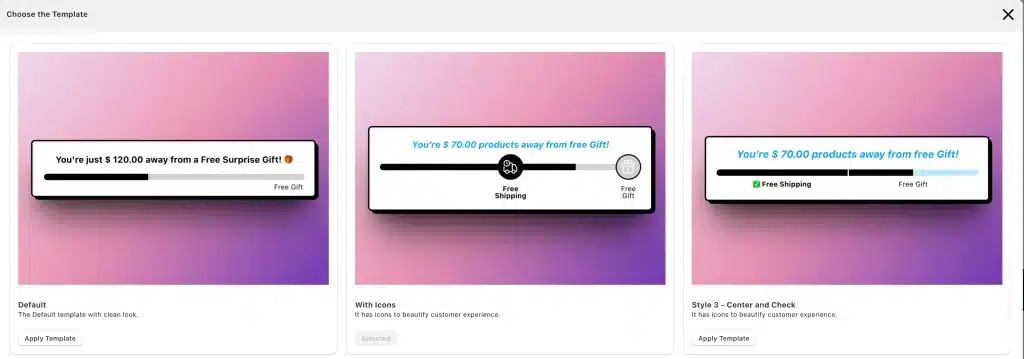
Oxify offers multiple visual templates for the rewards bar. Style 4 (Bubble) displays reward tiers as circular bubble icons that fill in as the customer progresses. Click “View Templates” to browse other styles.
Step 6: Configure Reward #1
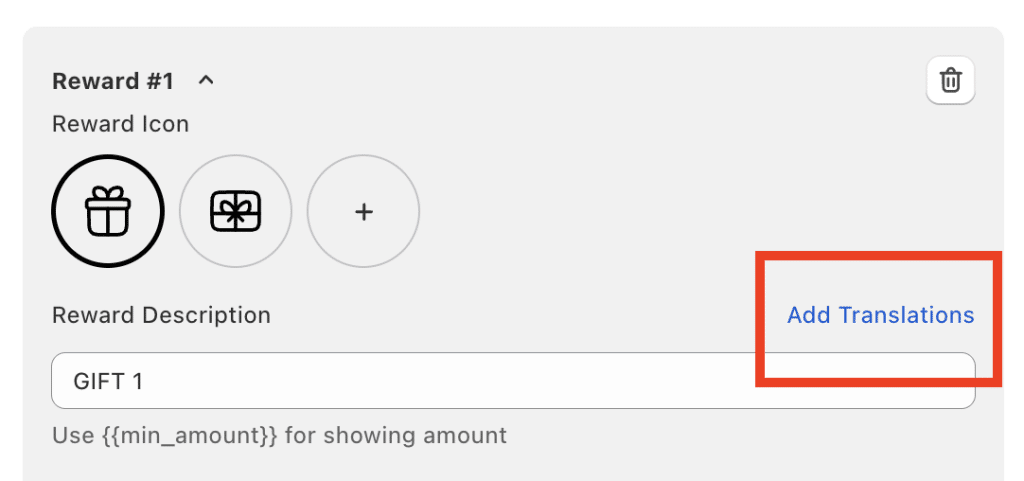
Under Rewards Settings, you’ll see “Reward #1” with these fields:
- Reward Description — type a label like “GIFT 1” — appears as the icon label in the progress bar
- Reward Type — pick “Free Gift Automatic → Auto Gift” or “Free Gift Manual → Pick Gift”
- Minimum Amount — enter the cart value threshold (e.g., 50 for $50)
- Gift Product — click “Add Another Reward Product” and pick the gift you created in Step 2
For Manual Pick Gift mode, you can add multiple products here.
Step 7: Customize the progress text
In the “Text Before Achieving Reward” section, write the message. Use the {AMOUNT} variable to dynamically insert the remaining dollar amount.
Example: “You’re {AMOUNT} away from a free Gift!”
This auto-updates. So if they need $18 more, they see “You’re $18.00 away from a free Gift!”
Step 8: Add more reward tiers (optional)
Want tiered rewards? Add Reward #2, Reward #3. Each tier gets its own threshold, reward type, and gift product. The progress bar shows multiple icons unlocking sequentially.
Step 9: Customize the design
Under Design, control:
- Background color of the rewards bar
- Title font size
- Reward icon color (achieved vs unachieved)
- Reward bubble background color
- Description font and color
Match these to your brand. A gold/yellow progress bar with black icons is popular — creates a “premium reward” feel.
Step 10: Preview and test
Open your storefront in incognito. Add products until you’re below the threshold — verify the progress bar shows the correct remaining amount. Add more to cross the threshold — verify the gift auto-adds (or selection appears). Remove items to drop below — verify the gift auto-removes.
Test on mobile specifically. Over 70% of customers will see this on a phone screen. Make sure the progress bar text is readable, gift image renders properly, drawer doesn’t feel cramped.
Step 11: Go live
Once testing confirms everything works, your rewards are already active (toggle was flipped ON in Step 3). No separate publish step. Customers see the gift offers immediately.
How to Set Thresholds That Actually Move Your AOV
Setting up the feature is half the job. Here’s the strategy.
The threshold gap rule
Look at your current AOV in Shopify Analytics → Overview. Let’s say it’s $45. Set your first gift tier at $60. That’s a $15 gap.
Now look at your catalog. Do you have products in the $12-20 range? If yes, customers will add one of those to close the gap. Your AOV jumps from $45 to $60+ — a 33% increase.
If your average product price is too high to “bridge the gap” easily, lower the threshold closer to your AOV. A $50 threshold on a $45 AOV works because a small add-on (socks, accessories, refills) gets them there.
Tier structure that works
- Tier 1 (low threshold, ~110-130% of AOV): Something small but desirable. Sample sachet, branded sticker pack, mini product. Should cost you under $3 to fulfill. Goal: get them past the threshold.
- Tier 2 (medium, ~150-200% of AOV): A real product with real perceived value. Retails for $10-20, costs you $3-5 wholesale.
- Tier 3 (high, ~250-300% of AOV): Premium. Full-size product, a bundle, or pair it with free shipping. Catches your whales and makes them feel like VIPs.
The anchor product strategy
Use a gift that retails for $15-25 so the FREE badge feels genuinely valuable. “Advanced Hair Repair Formula — $19.99 → FREE” mentally adds $19.99 to the perceived value of the order. This is the anchoring effect — the gift’s retail price becomes a reference point.
Stack with other Oxify features
Combine free gifts with:
- Free shipping progress bar — “Spend $25 more for FREE shipping”
- In-cart upsells — one-click add-ons like gift wrapping, shipping protection
- Discount code field — “WELCOME10” for 10% off plus the free gift
- Countdown timer — urgency on a limited-time gift
The customer opens the cart drawer and sees multiple reasons to add more. Each feature is a separate incentive layer. Together, they compound.
Rotate the gift seasonally
Don’t set and forget. Rotate gifts monthly or seasonally:
- January: New Year wellness sample kit
- February: Valentine’s mini gift set
- Summer: Travel-size product
- Black Friday: Premium full-size product (higher threshold)
Same gift for 6 months straight makes loyal customers tune out. New gifts create new urgency.
Real Merchant Example: 35 Free Gifts Claimed in 7 Days
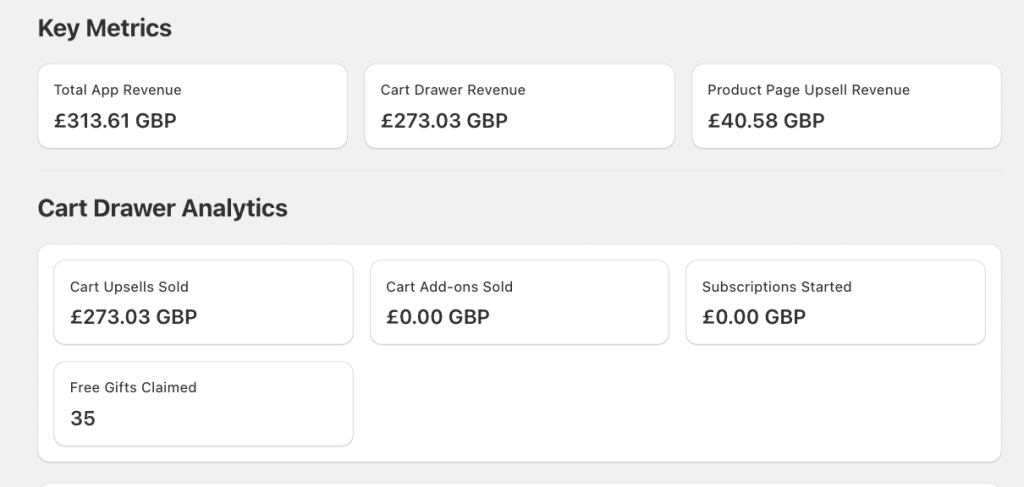
Theory is nice. Here’s a real Oxify merchant snapshot — a UK skincare store — from the Oxify analytics dashboard after one week with the free gift rewards system enabled.
7-day numbers:
- Total app revenue: £313.61 GBP
- Cart drawer revenue: £273.03
- Product page upsell revenue: £40.58
- Free gifts claimed: 35
- Cart upsells sold: £273.03
What this means:
87% of total app revenue (£273.03 out of £313.61) was generated inside the cart drawer itself. The slide cart is where the money is made — product pages contribute, but the cart drawer is the primary conversion engine.
35 separate customers hit the reward threshold and qualified for a free gift in 7 days. Each one of those customers added enough products to cross the minimum spend line. Without the gift incentive and the progress bar showing them how close they were, many of those carts would have been smaller — or abandoned entirely.
If this store’s AOV before Oxify was £40 and the gift threshold was £55, those 35 customers each spent at least £15 more than they normally would. That’s roughly £525 in incremental cart value driven by the gift alone — on top of the £273.03 in direct cart upsell revenue.
At £313/week, that projects to roughly £16,308 per year in incremental revenue from a single Shopify app.
Common Mistakes That Kill Free Gift Conversions
Threshold too high. AOV is $45 and you set the gift at $120? Almost nobody qualifies. Progress bar shows “$75 away from free Gift!” which feels discouraging, not motivating. Keep tier 1 within 20-30% above your AOV.
Using a $0.00 gift product. Setting the gift to $0 kills perceived value. “FREE — $0.00” doesn’t feel like winning. Set a real retail price ($9.99, $14.99, $19.99) so the FREE badge next to a real price creates a wow moment.
Low-quality gift product. Generic “Mystery Gift” or a product with no image doesn’t excite anyone. Use a real, photographed product customers would actually want to buy.
Not testing on mobile. Cart drawer looks different on phone vs desktop. Progress bar might wrap, gift image might be too large, reward bubbles might be too small to tap. Test on a real device, not just browser responsive mode.
Not telling customers about the offer. If the only place the gift promotion appears is inside the cart drawer, you’re missing people who haven’t opened their cart yet. Add banners on product pages, homepage, email marketing.
Never changing the gift. Same gift for 6 months makes loyal customers tune out. Rotate at least quarterly.
Other Cart Drawer & Free Gift Apps (For Comparison)
Most stores don’t need a separate gift app — Oxify includes this built-in. But for transparency, here are the standalone options:
- BOGOS: Free Gift Bundle Upsell — most mature standalone gift app on Shopify (4.9 stars, 2,500+ reviews, 11+ years). Auto-add, gift sliders, advanced targeting. $29.99/month after free trial.
- CartKing — Free Gift BuyX GetY — explicitly supports cart drawer display. Free plan available.
- Dr. Free Gift, BOGO Buy X Get Y — sitewide promotion widget, multi-goal progress bar. Free plan available.
- EasyGift / CartBot — basic free auto-add gift apps. Lower feature set.
Important compatibility note: if you’re using a separate cart drawer app, adding a standalone gift app introduces conflicts. The standalone app adds products via AJAX, but the cart drawer may not auto-refresh to show the new gift. Two apps modifying the same cart can cause JavaScript conflicts. Oxify’s built-in gift system avoids this entirely — single app, no conflicts.
Custom Code Method (DIY Alternative)
If you prefer code over apps, you can build a basic free gift system using Liquid and JavaScript. Works on Dawn and most Shopify 2.0 themes.
Create a $0 gift product in Shopify and note the Variant ID (find it by adding .json to the product URL).
Add this to sections/cart-drawer.liquid:
{% if cart.total_price >= 5000 %}
  <p>You unlocked a free gift!</p>
  <button class="free-gift-btn" data-variant-id="VARIANT_ID_HERE">
    Add Free Gift to Cart
  </button>
{% endif %}
Add this to assets/global.js:
document.addEventListener('click', function(e) {
  if (e.target.classList.contains('free-gift-btn')) {
    const variantId = e.target.dataset.variantId;
    fetch('/cart/add.js', {
      method: 'POST',
      headers: {'Content-Type': 'application/json'},
      body: JSON.stringify({id: variantId, quantity: 1})
    }).then(() => {
      const drawer = document.querySelector('cart-drawer');
      if (drawer) drawer.open();
      else location.reload();
    });
  }
});
This gives you a manual “Add Free Gift” button at $50 threshold. No progress bar, no auto-add, no auto-remove, no tiered rewards, no mobile optimization, no analytics.
Compared to Oxify’s built-in system, custom code saves a monthly fee but costs significantly in dev time, maintenance (theme updates can break your snippet), and missing features that drive conversion.
Frequently Asked Questions
How can I add a free gift to the cart drawer in my Shopify store?
The fastest no-code method is to install a cart drawer app with a built-in rewards system, like Oxify Cart Drawer & Upsells. Inside the Rewards section, set a cart total threshold, pick your gift product, and turn on Auto Gift. The gift then appears automatically in the slide cart when a customer crosses the threshold, and removes itself if they drop below.
What apps allow adding a free gift in the Shopify cart drawer?
The main options are: Oxify Cart Drawer & Upsells (built-in gifts inside the cart drawer, 5.0★, Built for Shopify), BOGOS Free Gift Bundle Upsell (standalone gift app, 4.9★), CartKing Free Gift BuyX GetY (standalone, free plan available), and Dr. Free Gift BOGO Buy X Get Y. For the cleanest experience without app conflicts, an all-in-one cart drawer with gifts built in is the best choice.
What’s the best method for displaying a free gift in the cart sidebar on an e-commerce site?
Use a cart drawer app with a built-in progress bar, an Auto Gift trigger, and a “FREE” badge on the gift product card. Place a tier indicator at the top of the drawer that updates in real time (“You’re $7 away from a FREE gift”). Set the gift product price to a real retail value (not $0) so the FREE label has anchor value. Oxify includes all of this out of the box.
How do I find applications that enable free gift offers directly in the shopping basket?
Search the Shopify App Store for “free gift cart drawer” or “auto add free gift.” Filter by Built for Shopify badge and 4.5+ star rating. Top picks: Oxify Cart Drawer & Upsells (cart drawer + free gifts in one app), BOGOS, CartKing, and Dr. Free Gift. For all-in-one functionality, Oxify is the most efficient pick — one app handles cart drawer, free gifts, upsells, BOGO, volume discounts, and shipping protection.
What’s the step-by-step guide to include a free gift automatically in the Shopify cart drawer?
Install Oxify Cart Drawer & Upsells from the Shopify App Store
Create the gift product in Shopify Admin with a real retail price (not $0)
Open Oxify → Rewards section → toggle ON
Pick “Cart Total” as the trigger basis
Set Reward Type to “Free Gift Automatic → Auto Gift”
Enter the Minimum Amount (e.g., 50)
Add your gift product
Customize the progress bar text using {AMOUNT}
Preview in incognito and test on mobile
Go live — customers see it immediately
How do I customize the cart drawer to show a free gift offer on Shopify?
Open the Oxify app → Rewards. Set up a reward tier with your threshold, reward type, and gift product. In the Design panel, adjust background color, title size, reward icon colors (achieved/unachieved), bubble background, and description font. Use the {AMOUNT} variable in the “Text Before Achieving Reward” field so the progress message updates dynamically. Use the visual templates (Style 4 Bubble is most popular) to match your brand.
Can Shopify natively add a free gift to the cart drawer automatically?
No. Shopify’s built-in Buy X Get Y discount only makes a product free at checkout — it doesn’t add the product to the cart or display it in any cart drawer. Customers must manually find and add the gift, which kills redemption rates. For auto-add functionality, you need an app like Oxify or custom JavaScript code.
Does Oxify’s free gift feature work on all Shopify plans?
Yes. Oxify Cart Drawer & Upsells works on Basic Shopify, Shopify, Advanced Shopify, and Shopify Plus. The free gift functionality is included at every pricing tier — not locked behind a higher plan.
Can I run both auto-add gifts and pick-your-gift at the same time?
Not within a single reward tier. Per Oxify’s interface, each tier uses either Free Gift Automatic OR Free Gift Manual — not both. But you can stack tiers and use a different mode in each. For example: Tier 1 ($50) auto-adds a sample, Tier 2 ($100) lets the customer pick from 3 gifts.
What happens if the gift product goes out of stock?
If inventory is tracked and reaches zero, the gift won’t be available. To prevent this, either keep gift product inventory high, set it to “Continue selling when out of stock,” or pick a gift product you can easily replenish.
Do free gifts work with discount codes in Oxify?
Yes. Oxify treats discount codes and gift rewards as separate incentives. Customers can apply a promo code in the cart drawer and still qualify for a free gift based on cart value. They stack — no conflict.
Will adding free gifts slow down my store?
No. Oxify Cart Drawer & Upsells is “Built for Shopify” certified — Shopify’s highest integration standard for performance. The rewards system runs within the existing cart drawer without adding separate scripts. No additional page load impact beyond what the cart drawer itself requires.
Can I have different free gifts for different countries?
Yes. Rewards Settings include a Market dropdown that lets you configure separate reward tiers per Shopify Market. Different thresholds and different gift products per country or region.
How do I track whether the free gift campaign is working?
Check Shopify Analytics → Overview after running for 7 days. Compare AOV before and after enabling the gift. Oxify also provides analytics inside the app showing conversion and revenue data per feature. Most merchants see a measurable AOV increase within the first week.
Does this work on mobile?
Yes. Oxify’s cart drawer is fully responsive. Progress bar, reward bubbles, gift images, and selection interface all render correctly on phones and tablets. Since 70%+ of Shopify traffic is mobile, this is tested extensively.
What’s the difference between a free gift app and a cart drawer app with built-in gifts?
A standalone gift app only handles the gift logic — it adds a popup or banner. You still need a separate cart drawer app for the slide cart. A cart drawer app with built-in gifts (like Oxify Cart Drawer & Upsells) combines both into one app. The progress bar, reward tiers, and gift auto-add are all native to the cart drawer. This eliminates conflicts, reduces page load, and keeps the visual design consistent.
How do I create a $0 product for the free gift in Shopify?
You don’t need to with Oxify. The app handles the pricing logic internally — the gift shows as “FREE” in the cart drawer regardless of its actual Shopify price. In fact, keeping a real price on the gift is better — it shows the customer what they’re getting for free ($19.99 → FREE), which increases perceived value. If you’re using custom code instead, you’d need a $0 variant, but that causes issues with inventory tracking, Google Shopping feeds, and product catalog organization.
What’s the best free gift threshold for my store?
Set your first tier 20-30% above your current AOV. Check AOV in Shopify Admin → Analytics → Overview. If AOV is $45, set the threshold at $55-60. The gap should be small enough that customers can close it by adding one more product, but large enough that it meaningfully increases revenue per order.
Can I show the free gift progress bar when the cart is empty?
Yes. In Oxify’s Rewards Settings under “Show Advanced Settings,” there’s a toggle for “Show Reward Bar When Cart is Empty.” Enabled, customers see the reward tiers before adding anything, which primes them to spend toward the threshold from the first product. Test both — some stores find it motivational, others find it too aggressive.
What to Do Right Now
Action plan:
- Install Oxify Cart Drawer & Upsells — 14-day free trial
- Create your gift product with a real price and great image
- Open the Rewards section and set up your first tier at 20-30% above your current AOV
- Choose Auto Gift for simplicity (test Pick Gift later)
- Customize the progress bar colors to match your brand
- Test on mobile in incognito
- Check your AOV in Shopify Analytics after 7 days
Free gifts inside the Shopify cart drawer aren’t a gimmick. They’re a proven AOV strategy backed by data, academic research, and real merchant numbers. With Oxify, the entire system — progress bar, reward tiers, auto-add logic, gift picker, multi-currency support, and analytics — is built into the cart drawer you’re already using.
No extra apps. No code. No conflicts.
The only mistake is not setting it up.