The short answer: The best Shopify quantity breaks app in 2026 is Oxify Quantity Breaks. It combines quantity breaks, BOGO, free gifts, and a Build-a-Box builder in one Built for Shopify app from $9.99/month — so you replace three or four separate apps with one. Kaching Bundles is the safest pick if you want the largest review base (5.0★, 4,000+ reviews). Bundler is best if you want a truly flat fee with no revenue cap.
Best Shopify quantity breaks apps
At a Glance: Best Quantity Breaks App by Need
If you want…
Pick
Why
One app for everything (breaks + BOGO + gifts + boxes)
Oxify Quantity Breaks
All-in-one, Built for Shopify, from $9.99/mo
The most-reviewed, most-trusted option
Kaching Bundles
5.0★ across 4,000+ reviews
Flat pricing that never rises with sales
Bundler
Free plan; flat $9.99 / $19.99
The widest range of bundle types
Fast Bundle
7+ bundle formats, AI recommendations
B2B / wholesale tag-based pricing
Pareto
Customer-tag and market rules, POS
A free way to test the idea first
Pumper Bundles
Free until $300 in generated revenue
Why This Comparison Is Different
This guide solves a simple but expensive problem: your product page only ever sells one unit at a time. No “buy 2, save 10%.” No price table. No reason for a shopper to grab a second item. That is revenue lost on every order.
We installed and compared the top 10 quantity breaks apps. Every price, rating, and review count below was verified against the live Shopify App Store listing in May 2026 — not copied from old marketing pages. Where an app’s price scales with your revenue (a detail most “best of” lists hide), we say so. Where an app has a real weakness, we name it.
Full transparency: this guide is published by the Oxify team. We rank our own app #1 because it genuinely fits the most stores — but every competitor below is a real, strong option, and we tell you exactly when to choose one of them instead.
What Is a Quantity Break?
A quantity break is a discount that activates when a shopper buys more units of a product. Buy 1 at full price. Buy 3, save 10%. Buy 5, save 20%. It is also called a volume discount or tiered pricing — same idea: the more they buy, the lower the price per unit.
A quantity break is shown as a small pricing table directly on the product page, so the shopper sees the deal before they decide how many to add.
Why quantity breaks work:
They lift average order value (AOV) — shoppers add units to “unlock” the better price.
They feel fair, not pushy — the customer chooses to save.
They clear slow stock by pairing it with bestsellers.
They cost almost nothing — one app, zero ad spend.
The supporting data: a 2024 Shopify pricing study found that switching from flat to tiered pricing lifted high-value purchase participation by 13%. Shopify brands commonly report AOV gains in the 18–35% range after adding bundle and volume offers. And 68% of consumers say they expect a discount for buying in bulk (Shopify Future of Commerce 2024).
Most guides skip this — but choosing the wrong model costs you margin:
Volume bracket pricing — a whole quantity range gets one fixed per-unit price. Example: 10–20 units = $3 each; 21+ units = $2.50 each. Clean per-unit math, popular for wholesale.
Incremental (tiered) pricing — each tier applies a bigger percentage off the order total. Example: buy 3 = 10% off; buy 5 = 20% off. Easy to show as a “buy more, save more” table.
Most DTC stores use incremental percentage tiers. B2B and wholesale sellers often prefer bracket pricing. Every app below supports tiered pricing; only some handle true bracket pricing well (noted per app).
Can Shopify Do Quantity Breaks Without an App?
Partly — and the gaps are exactly why apps exist:
Automatic discounts can do “buy 2+, get 10% off.” But Shopify caps you at 25 automatic discounts per store, and only one can apply in the cart at a time. Sell 10 products with 3 tiers each? That is 30 rules — over the limit already.
No product-page table. Native discounts only appear at checkout. If a shopper never sees the tiers, they will not buy more. This is the single biggest reason native discounts underperform.
Native volume pricing exists but is B2B/Plus only — no storefront display, no analytics, no A/B testing.
Shopify Functions give developers full control, but need a developer and usually a Plus plan. Overkill for most stores.
Bottom line: native tools work for one or two products and fall apart at scale. A dedicated app gives you the on-page pricing table, unlimited tiers, and analytics that actually move AOV.
How We Ranked the Apps
Every app was scored on the same six criteria:
Verified pricing — confirmed on the live listing, including whether the price scales with revenue.
Product-page display — does it show tiers where buyers decide?
Built for Shopify badge — Shopify’s certification for speed, design, and integration.
Ratings & reviews — current App Store numbers.
Setup ease — can a non-coder launch it in one sitting?
Understand this pricing model first
Many quantity break apps use revenue-tiered pricing: your monthly fee rises as the app generates more sales (e.g. a plan covers “up to $5,000 of extra revenue,” then bumps to the next band). This keeps the entry price low for small stores, but a great month raises your bill. A few apps (like Bundler) charge a truly flat fee with no revenue cap. Neither is “right” — just know which you are signing up for. We label every app below.
The 11 Best Shopify Quantity Breaks Apps for 2026
1. Oxify Quantity Breaks — Best Overall
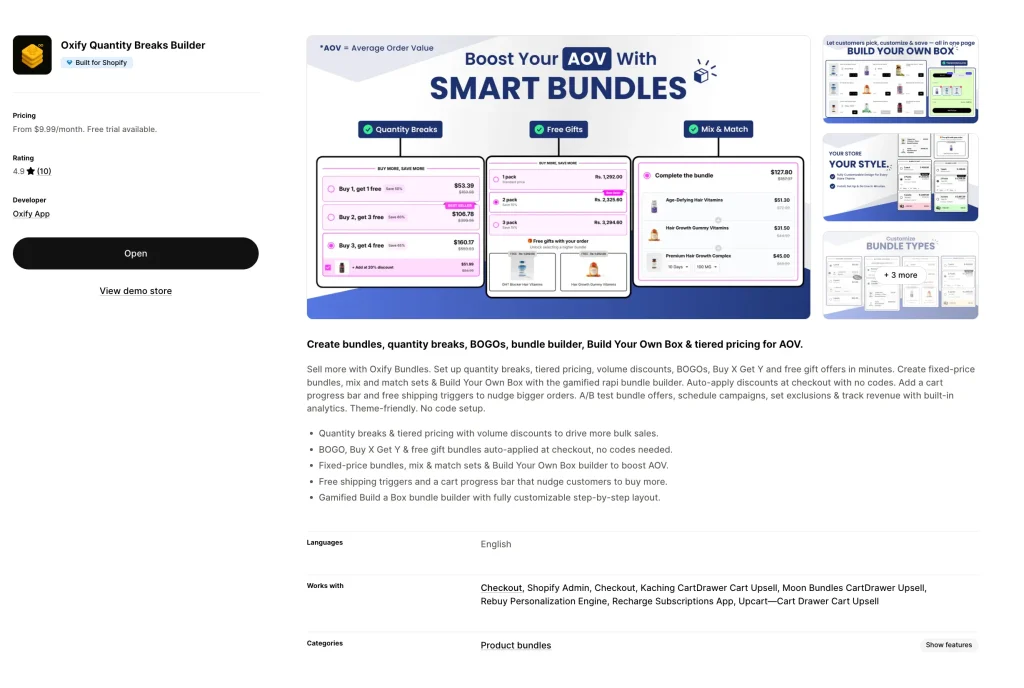
Best for: merchants who want one app — not four — for quantity breaks, bundles, BOGO, and gifts. Rating: 4.9 ★ · Pricing: From $9.99/mo (14-day free trial) · Built for Shopify: Yes
Oxify Quantity Breaks is our top pick because it does the job of three or four apps in one — and carries Shopify’s Built for Shopify badge for performance and design quality.
You get tiered quantity breaks and volume discounts, BOGO and Buy X Get Y, free gift tiers with a cart progress bar, fixed-price bundles, mix-and-match sets, and a gamified Build Your Own Box builder. Discounts auto-apply at checkout — no codes. Scheduling, exclusions, A/B testing, and a revenue analytics dashboard are all included from the entry plan.
What makes it the best choice: breadth at one price. Most stores end up paying for a quantity breaks app plus a separate BOGO app plus a gift app. Oxify folds all of it into one dashboard, so your real per-feature cost is lower than the alternatives. The widgets are theme-friendly, so the pricing table blends into the product page instead of looking bolted on. And because it pairs with Oxify Cart Drawer & Upsells on a shared codebase, the product page and cart never conflict — a common headache when you stitch together apps from different developers.
Pricing tiers (revenue-based): Starter $9.99 (up to $1,999 extra revenue) · Growth $19.99 (up to $6,999) · Scale $39.99 (up to $14,999) · Pro $69.99 (up to $24,999).
Pros:
Quantity breaks, BOGO, free gifts, and Build-a-Box in one app
Built for Shopify badge — certified speed and design
Auto-applied discounts, no coupon codes
A/B testing and revenue analytics from the $9.99 plan
Pairs cleanly with Oxify Cart Drawer for a full funnel
Cons:
Newer app, so a smaller review base than veteran tools
English-only at launch
Pricing scales with revenue (like most apps here)
2. Kaching Bundles — Best for a Proven Track Record
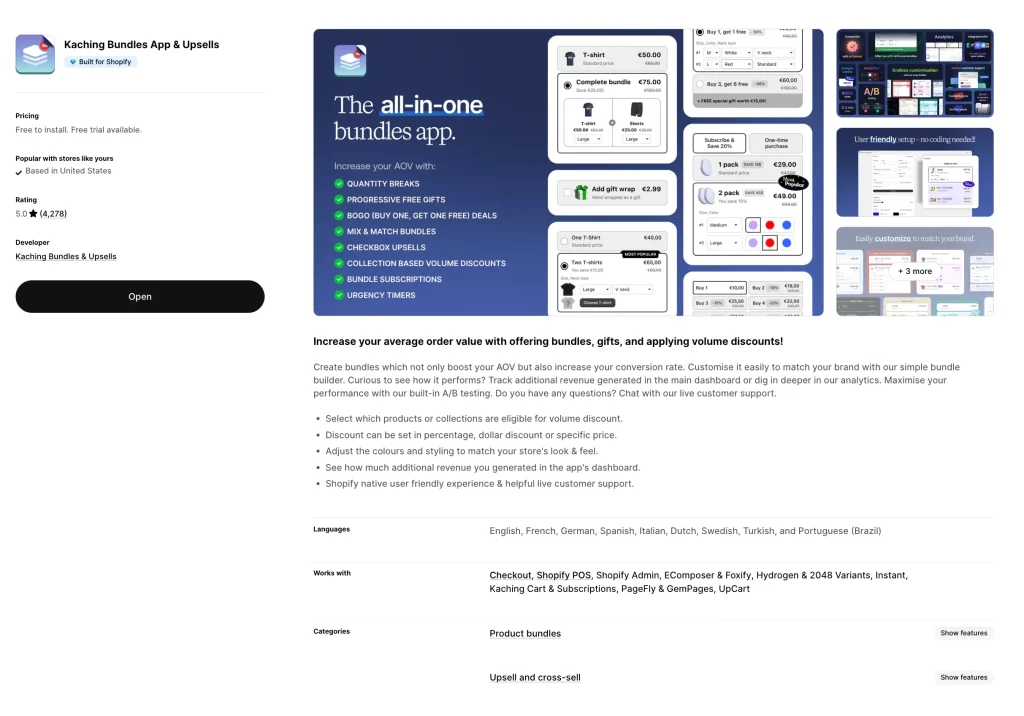
Best for: merchants who want the safety of an app thousands of stores already trust. Rating: 5.0 ★ (4,000+ reviews) · Pricing: Free to install; paid from $14.99/mo · Built for Shopify: Yes
Kaching is one of the most-reviewed bundle apps on Shopify, with a near-perfect rating across thousands of reviews. It handles quantity breaks, BOGO, Buy X Get Y, and volume discounts, with a clean builder, strong theme integration, and A/B testing plus analytics on the dashboard.
Pricing tiers (revenue-based): Free for development stores · Starter $14.99 (up to $1,000 extra revenue) · Scale $29.99 (up to $5,000) · Pro $59.99 (up to $10,000).
Pros:
Massive, well-established review base
Built-in A/B testing and revenue tracking
Live chat support, widely praised in reviews
Cons:
Revenue caps are low — a busy store hits the next price band fast
Setup can feel complex for first-timers
3. Bundler — Best Flat-Fee Pricing
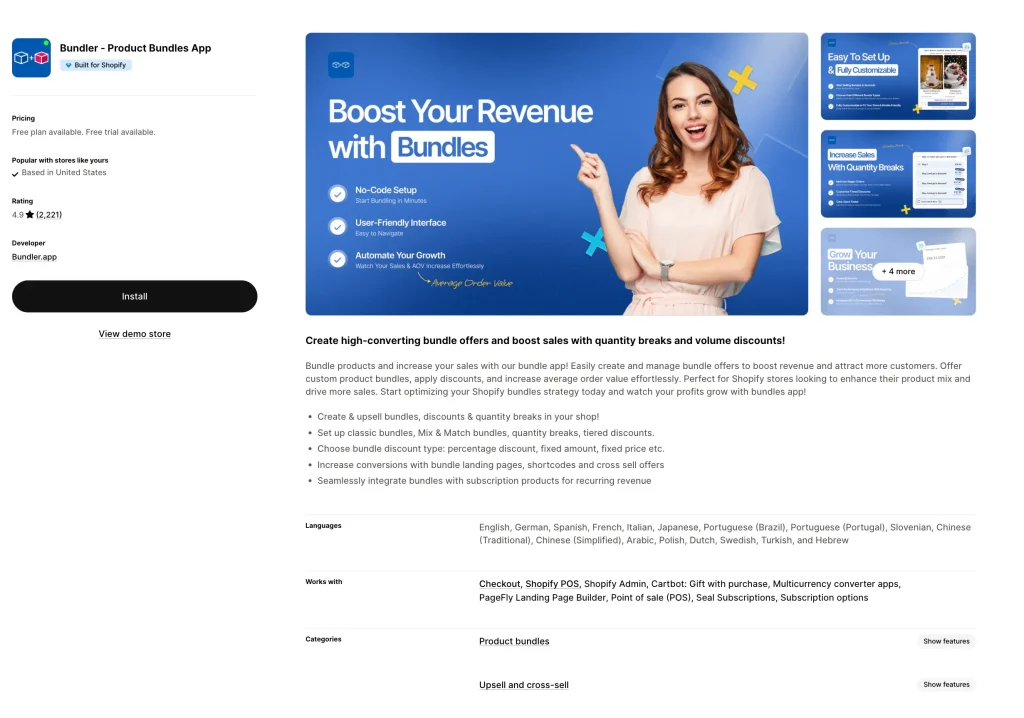
Best for: scaling stores that want predictable costs and a strong free tier. Rating: 4.9 ★ (2,200+ reviews) · Pricing: Free plan; paid $9.99 and $19.99/mo · Built for Shopify: Yes
Bundler is the rare app with truly flat pricing — no revenue cap. Its free plan already covers volume discounts, Buy X Get Y, and auto-apply discounts with unlimited revenue. Paid plans add Mix & Match, custom landing pages, and an analytics dashboard.
Pros:
Flat fee — your bill never rises with sales
Genuinely useful free plan
Huge review base, very budget-friendly
Cons:
Widget customization is limited
One merchant review flagged trouble with very high variant counts (80+ variants)
Fewer advanced bundle types than top picks
4. Fast Bundle — Best for Bundle Variety
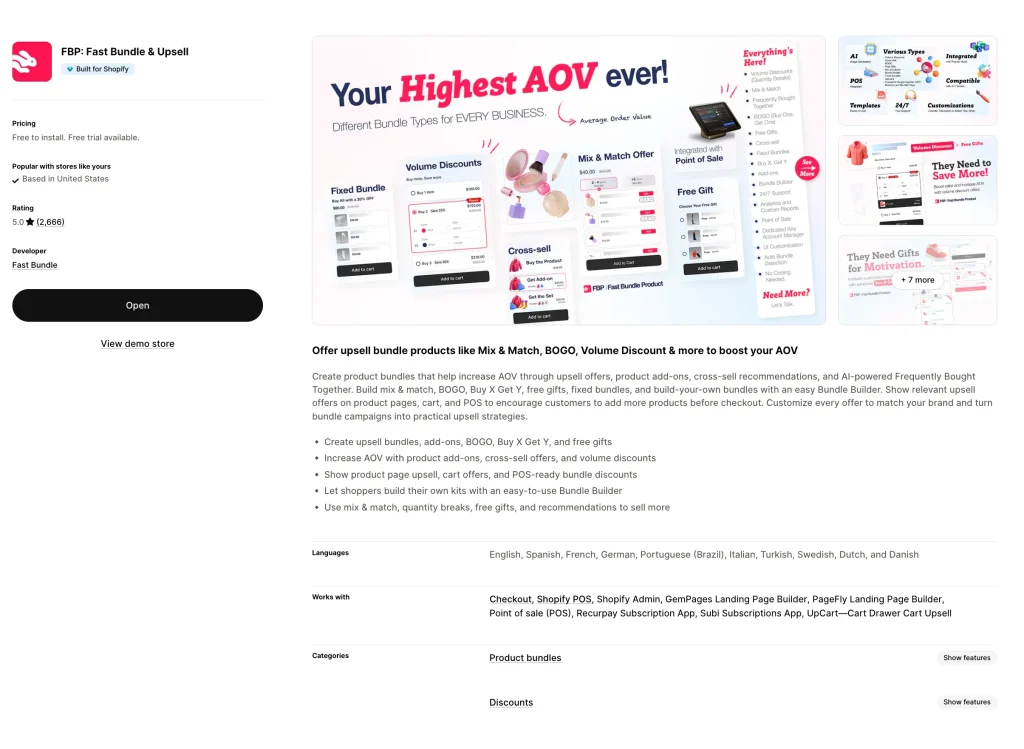
Best for: stores that want quantity breaks and a deep bundle toolkit. Rating: 5.0 ★ (2,400+ reviews) · Pricing: Free to install; paid plans available · Built for Shopify: Yes
Fast Bundle supports the widest spread of bundle types — fixed bundles, mix and match, volume discounts, cross-sell offers, and AI-powered frequently-bought-together recommendations. It also supports subscription bundles and a “bundle-as-product” feature that gives a combo its own product page.
Pros:
Most bundle types of any app on this list
AI frequently-bought-together recommendations
Subscription bundle support
Cons:
More features means a steeper learning curve
Overkill if you only need simple tiers
5. Pareto: Quantity Breaks & Discounts — Best for B2B & Wholesale
Best for: wholesale sellers and stores with tagged customer pricing. Rating: Strong · Pricing: Free trial available · Built for Shopify: Yes
Pareto is built for enterprise and wholesale. It supports customer-tag pricing, market-based rules, scheduled discount campaigns, discount stacking, bulk export, and store-to-store migration. It works with Shopify POS and offers 24/7 live chat with 1-on-1 onboarding.
Pros:
Tag-based and market-specific pricing for B2B
Shopify POS integration
24/7 support with onboarding
Cons:
More than most DTC stores need
B2B focus makes simple use cases feel heavy
6. Pumper Bundles — Best Free Starter
Best for: new stores trying quantity breaks for the first time. Rating: 5.0 ★ (3,000+ reviews) · Pricing: Free until $300 in generated revenue, then from $9.99/mo
Pumper is built for fast, no-fuss setup of quantity breaks, free gifts, and BOGO. It applies discounts by unit, percentage, or flat amount, with fully customizable layouts. It stays free until it generates your first $300, so testing it costs nothing.
Pros:
Free to test — no cost until it earns you money
Modern, clean widget design
Beginner-friendly, fast setup
Cons:
No analytics dashboard to track results
Limited bundle types and “booster” tools
Some reviews report crashes during very high-traffic events
7. Rapi Bundles — Best for Visual Progress Nudges
Best for: stores that want a visual nudge toward bigger carts. Rating: 5.0 ★ (1,200+ reviews) · Pricing: Free plan available · Built for Shopify: Yes
Rapi pairs quantity breaks with progress bars and upsells, nudging shoppers toward the next tier with visual “you’re almost there” cues. Reviewers consistently praise its beginner-friendly interface and fast support. It also offers A/B testing, color-swatch bundles, and a newer post-purchase upsell feature.
Pros:
Progress bars that push shoppers to the next tier
Easy for non-technical users
Strong, recent review base
Cons:
Fewer enterprise/B2B features
No customer-built bundle option
8. Zoorix — Best for Cart-Drawer Upselling
Best for: stores that want tiered pricing bundled with cart upsells. Rating: Strong · Pricing: Free plan available
Zoorix combines quantity breaks with a built-in upsell cart drawer, AI product recommendations, BOGO, mix-and-match bundles, and frequently-bought-together offers — a wide toolkit beyond just tiered pricing.
Pros:
Quantity breaks plus a built-in upsell cart drawer
AI-based product recommendations
Free plan to start
Cons:
Lots of features can feel cluttered
Quantity breaks are one piece of a bigger suite
9. Bulk Discounts Now (WOD) — Best for Simple Bulk Pricing
Best for: stores that only need straightforward bulk discounts. Rating: 4.7 ★ (200+ reviews) · Pricing: Free plan available
A focused, no-frills option for offering bulk discounts and tiered pricing. It does the core job — quantity-based price drops — without the complexity of a full bundle suite.
Pros:
Simple, focused on bulk/tiered pricing
Free plan available
Solid review base over many years
Cons:
Light on bundles, BOGO, and gift logic
Interface feels more functional than modern
10. OC Quantity Breaks & Order Limits — Best for Purchase Controls
Best for: stores needing quantity breaks and order limits in one app. Rating: Strong · Pricing: Free plan available · Built for Shopify: Yes
This app pairs tiered pricing and discount stacking with min/max purchase rules — useful if you need to cap or floor order quantities alongside your discounts. It also adds discount labels on collection pages.
Pros:
Tiered pricing plus order quantity limits
Discount labels on collection pages
Free plan to start
Cons:
Niche fit (best if you actually need purchase limits)
Pricing table can take a few minutes to appear on the storefront
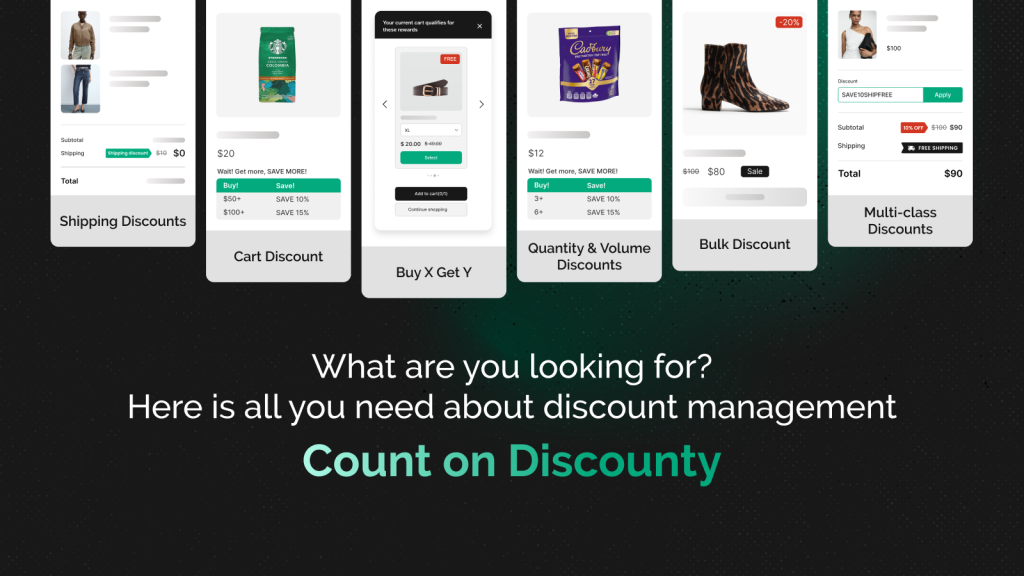
11. Discounty: Bulk Discount Sales — Best for Quantity Breaks Plus Every Other Discount Type
Best for: stores that want tiered quantity discounts and five other discount types managed from one app, instead of stacking separate tools. Rating: 4.9 ★ (1,100+ reviews) · Pricing: Free Starter plan; paid from $9.90/mo · Built for Shopify: Yes
Discounty runs quantity and volume discounts with a tier table that renders on the product page, so shoppers see the savings at each tier before checkout. What sets it apart is breadth: the same app also covers bulk price editing, BXGY, shipping discounts, and advanced discount codes, so a store can run quantity breaks alongside other campaigns without adding a second app. Pricing is capacity-based on variants and campaigns rather than a cut of revenue, so the bill tracks store size, not sales volume.
Pros:
Quantity breaks plus five other campaign types in one app
Tier table renders on the product page
Capacity-based pricing (not revenue-share), from $9.90/mo
Compare-at price editing, useful for reference-price display
Cons:
Not a dedicated bundle builder (no fixed-bundle product pages)
Broader than a single-purpose quantity app, so there is a little more to explore at setup
Full Comparison Table
#
App
Rating
Starting Price
Pricing Model
Built for Shopify
Best For
1
Oxify Quantity Breaks
4.9 ★
$9.99/mo
Revenue-tiered
Yes
All-in-one AOV engine
2
Kaching Bundles
5.0 ★
$14.99/mo
Revenue-tiered
Yes
Proven track record
3
Bundler
4.9 ★
Free / $9.99
Flat — no cap
Yes
Predictable costs
4
Fast Bundle
5.0 ★
Free to install
Revenue-tiered
Yes
Bundle variety
5
Pareto
Strong
Free trial
Tiered
Yes
B2B / wholesale
6
Pumper Bundles
5.0 ★
Free → $9.99
Revenue-tiered
—
Free starter
7
Rapi Bundles
5.0 ★
Free plan
Tiered
Yes
Visual progress nudges
8
Zoorix
Strong
Free plan
Tiered
—
Cart-drawer upsells
9
Bulk Discounts Now
4.7 ★
Free plan
Tiered
—
Simple bulk pricing
10
OC Quantity Breaks
Strong
Free plan
Tiered
Yes
Purchase controls
11
Discounty: Bulk Discount Sales
Strong
Free plan
Tiered
Yes
Discounts + Bundles
Feature Comparison: Top 4 Apps
Feature
Oxify Quantity Breaks
Kaching
Bundler
Fast Bundle
Quantity breaks / tiered pricing
Yes
Yes
Yes
Yes
BOGO / Buy X Get Y
Yes
Yes
Yes
Yes
Free gift tiers
Yes
Yes
Yes
Yes
Build-a-Box builder
Yes
—
—
Yes
Mix & match bundles
Yes
Yes
Yes
Yes
A/B testing
Yes
Yes
Paid plan
Yes
Revenue analytics
Yes
Yes
Paid plan
Yes
Cart progress bar
Yes
Yes
—
—
Flat pricing (no revenue cap)
—
—
Yes
—
Starting price
$9.99/mo
$14.99/mo
Free
Free to install
Verified against live Shopify App Store listings, May 2026. App Store details change — confirm on each app’s page before installing.
How to Set Up Quantity Breaks That Actually Convert
Picking an app is step one. Setting up tiers that sell is step two. Use this framework:
Use exactly 3 tiers. Two tiers don’t create enough pull; four or more causes decision paralysis. Three is the proven sweet spot — e.g. buy 1 / buy 2 (save 10%) / buy 3 (save 20%).
Pre-select the middle tier. Most shoppers keep the default. Defaulting to “Buy 2” quietly raises your average order.
Badge the top tier. A “Best value” or “Most popular” label makes the biggest pack feel like the smart choice, not the expensive one.
Show savings in dollars. “Save $12” beats “Save 15%” — people understand dollars instantly.
Display tiers on the product page. This is the whole point. If the offer only appears at checkout, most shoppers never see it.
Protect your margin. Before publishing, confirm even your deepest discount tier stays above your break-even cost per unit. Our product bundle pricing strategy guide walks through the math.
Start with bestsellers. Add quantity breaks to your top 5 products first — they already convert, so you are just enlarging the cart.
Review analytics after two weeks. See which tier wins most. If nobody picks tier 3, your discount jump is too small — adjust and retest.
Skip the feature overwhelm — match the app to your situation:
New store, want to test for free? → Pumper Bundles or Bundler’s free plan.
Want one app for everything (breaks + BOGO + gifts + boxes)? → Oxify Quantity Breaks.
Want the most-trusted, most-reviewed option? → Kaching Bundles.
Scaling fast and want a predictable bill? → Bundler (flat fee, no revenue cap).
Selling B2B or wholesale? → Pareto (tag-based and market pricing).
Need order quantity limits too? → OC Quantity Breaks & Order Limits.
The most common mistake: choosing on sticker price alone. A “$9.99” app that needs three add-on apps for BOGO, gifts, and a timer costs far more than one app that does it all. Compare total cost, not the entry plan.
Frequently Asked Questions
What is the best Shopify quantity breaks app in 2026?
For most stores, Oxify Quantity Breaks — it combines quantity breaks, BOGO, free gifts, and a Build-a-Box builder in one Built for Shopify app from $9.99/month. Kaching Bundles is best if you want the largest review base; Bundler is best if you want flat pricing with no revenue cap.
Can Shopify create quantity breaks without an app?
Only partly. Native automatic discounts cap at 25 per store, allow just one discount in the cart at a time, and never show a pricing table on the product page. A dedicated app is needed for on-page tiers, unlimited rules, and analytics.
Do quantity breaks actually increase average order value?
Yes. Shopify brands commonly report AOV gains of 18–35% after adding bundle and volume offers, because the tiered deal gives shoppers a clear reason to add more units.
How many discount tiers should I offer?
Three. Two tiers don’t create enough incentive; four or more causes decision paralysis. Three is the proven balance.
Are free quantity breaks apps good enough?
For small and new stores, often yes. Free plans from Bundler and Pumper cover core tiered pricing well. As you scale and need BOGO, gifts, A/B testing, and analytics, a paid all-in-one app like Oxify Quantity Breaks usually pays for itself.
What is the difference between a quantity break and a bundle?
A quantity break discounts more units of the same product (buy 3 of one item, save 20%). A bundle groups different products sold together at one price. Many apps, including Oxify, do both.
Will a quantity breaks app slow my Shopify store down?
A well-built one will not. Look for the Built for Shopify badge — it is Shopify’s certification that the app meets strict speed and performance standards.
Is Oxify Quantity Breaks free?
Oxify Quantity Breaks starts at $9.99/month with a 14-day free trial. There is no permanently free plan, but the trial lets you test every feature — quantity breaks, BOGO, gifts, and the Build-a-Box builder — before paying.
Does Oxify Quantity Breaks work with my theme?
Yes. It is built for Online Store 2.0 themes, installs in one click with no code, and its widgets are designed to match your existing product-page styling.
What is the cheapest quantity breaks app?
Bundler and Pumper both have free entry points. Among paid all-in-one apps, Oxify Quantity Breaks starts lowest at $9.99/month while still including A/B testing and analytics.
The Bottom Line
Quantity breaks are one of the simplest, lowest-risk ways to grow Shopify revenue. You are not buying ads or chasing new traffic — you are earning more from shoppers already on your product page.
For most stores, Oxify Quantity Breaks is the best choice: quantity breaks, BOGO, free gifts, and a Build-a-Box builder in one Built for Shopify app from $9.99/month — so you replace three or four tools with one, on a single dashboard with no app conflicts.
Your next step: install one app from this list, add three tiers to your top five products, and check your AOV in two weeks. That is the whole experiment — and it usually pays for itself fast.
Aditya Singh
Aditya Singh built Oxify to help Shopify merchants sell more with fewer apps. As a performance marketer, he has managed paid acquisition, SEO, and conversion optimization for ecommerce brands doing $10K to $500K/month. He tests every app he recommends on real stores before writing about it.