Picture this. A customer spends 8 minutes on your store. Reads reviews.
Compares sizes. Clicks “Add to Cart.”
The cart drawer slides open.
For about 5 to 15 seconds, they stare at a plain list of items and a checkout button. No reassurance. No safety cues. Nothing that says “you’re making a good decision.”
They close the drawer. Gone.
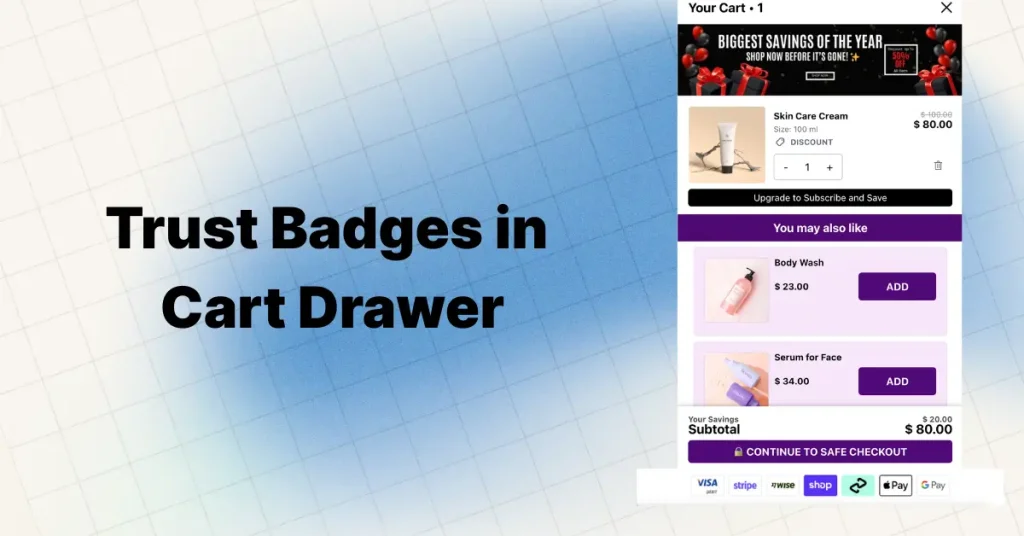
That moment — that tiny sliding panel — is the most overlooked conversion opportunity in ecommerce right now. And almost nobody is putting Shopify cart drawer trust badges to work here.
70%+ That’s the average cart abandonment rate across dozens of ecommerce studies. About 7 out of every 10 shoppers who add items to their cart never complete the purchase. On mobile, it’s even worse — closer to 78%.
Here’s the kicker. Nearly 1 in 5 shoppers abandon their purchase because they don’t trust the site with their credit card info. Another 25% leave over general security concerns during checkout.
Secure checkout badges placed strategically have been shown to increase conversions by up to 32% and reduce cart abandonment by as much as 20%. But most stores only place those badges on product pages or at final checkout.
The slide cart drawer?
It sits empty. Doing zero trust-building work during the highest-intent micro-moment on your entire site.
This guide breaks down exactly why that matters, which trust signals work best inside the cart drawer, 7 apps that make it simple (including one that lets you add multiple trust badges through HTML blocks built right into the drawer), and the placement rules backed by real store data.
Why the Cart Drawer Is Your Biggest Trust Gap
Think about where most stores put trust badges right now. The homepage footer. Under the “Add to Cart” button on product pages. On the checkout page next to the credit card form.
Those placements make sense. But they miss a critical stage.
The cart drawer (https://oxify.app/blog/slide-cart-vs-mini-cart) sits between “I want this” and “I’ll pay for this.” It’s the decision stage. The commitment stage. And for a lot of shoppers — especially on mobile — it’s the objection stage.
Here’s why that matters so much in 2026:
- Mobile is 60%+ of all ecommerce traffic. Mobile cart abandonment sits around 78% compared to about 66% on desktop.
- The cart drawer is open for 5-15 seconds on mobile. One flicker of doubt and they swipe it shut.
- 19% of shoppers abandoned a purchase in the last 3 months specifically because they didn’t trust the site with their credit card info.
- Closing the drawer takes one tap. Zero commitment required. Doubt hits hardest here because leaving is effortless.
Yet this is also the moment where the endowment effect kicks in. The shopper sees their items in the cart. Those products feel like “theirs” already. A small bit of reassurance right here can push them from browsing to buying.
Key Insight
Product page badges help shoppers evaluate. Checkout page badges help shoppers commit. Cart drawer badges do something different — they prevent the doubt that kills momentum between evaluation and commitment. That’s a gap almost no one fills.
The Psychology Behind Cart Drawer Hesitation
When someone clicks “Add to Cart,” a little rush of excitement fires. They made a decision. They picked something they want.
Then the cart drawer slides open. The adrenaline settles. And the rational brain kicks in.
This is the “pause moment.” And during that pause, 4 specific doubts flood in:
The 4 Doubts That Hit Inside the Cart Drawer
“Is this site legit?” — Especially for first-time visitors from Meta or Google Shopping ads. They’ve never heard of your brand. The cart drawer is their gut-check moment.
“Is my payment safe?” — Users judge security based on gut feeling and visual cues. If the cart drawer looks bare, it feels unsafe.
“Can I return this?” — Post-purchase anxiety starts before the purchase. Shoppers want to know the escape hatch exists before they commit.
“Will this actually arrive?” — Shipping speed and reliability concerns spike when the total is visible and the checkout button is staring back at them.
Trust badges inside the cart drawer directly answer each doubt. Not with paragraphs of text. With quick visual cues the brain can process in under 2 seconds.
Ecommerce sites can gain up to a 35% increase in conversion rate through better checkout design and trust elements. The cart drawer is part of that checkout flow — even if most people don’t treat it that way.
Why This Matters More for Cold Traffic
If most of your traffic comes from Meta ads, Google Shopping, or TikTok, your visitors have zero brand familiarity. They landed on your store 30 seconds ago. They don’t know you.
For these cold traffic visitors, the cart drawer is often where the purchase dies. One row of payment icons and a short guarantee line can answer the “should I trust this store?” question before it fully forms.
That’s why stores running heavy paid traffic see the biggest lifts from cart drawer optimization — trust badges combined with urgency timers and free shipping bars create a conversion stack that works.
5 Types of Trust Badges That Actually Work in Cart Drawers
Not every trust badge belongs in the cart drawer. Space is limited — especially on mobile. You need badges that answer objections fast without creating visual noise.
Secure Payment Icons
This is the single most effective badge type for cart drawers. Shoppers instinctively scan for payment logos they recognize — Visa, Mastercard, PayPal, Shop Pay, Apple Pay, Google Pay.
Seeing their preferred payment method right above or below the checkout button instantly answers the “is my payment safe?” question. Studies show featuring recognizable payment logos can increase purchase likelihood by up to 81%.
Best Practice
Show only the payment methods you actually accept. Displaying logos for methods you don’t support creates confusion. Stick to 4-6 recognizable icons in a clean horizontal row.
Example message: “Secure checkout · 256-bit SSL encryption”
Money-Back Guarantee Badge
This is your objection killer for post-purchase anxiety. When a shopper sees their subtotal in the cart drawer, buyer’s remorse starts before they’ve even bought anything.
A guarantee badge reduces perceived risk at exactly the right moment. It’s especially effective after a shopper has just unlocked a free gift or added an upsell.
Example message: “30-day hassle-free returns · No questions asked”
Fast Shipping Badge
Delivery concerns are a top reason for cart abandonment. About 23% of shoppers leave because delivery was too slow. A shipping badge in the cart drawer works even better when paired with a free shipping progress bar.
Make it dynamic if you can. Instead of “Fast Shipping,” say “Ships within 24 hours” or “Arrives by Friday.” Specific beats vague every time.
Example message: “Free shipping · Ships today, arrives by Friday”
Social Proof Micro-Badge
This is the most underused badge type inside cart drawers. Almost nobody does it. And that’s exactly why it works when you add it.
A small line like “Trusted by 25,000+ customers” or “Rated 4.9/5 from 12,000+ reviews” adds social validation at the decision point.
Important
Use real numbers. Pull from your actual review count and rating. Static fake numbers on a brand-new store feel dishonest and damage trust. If you’re newer, skip this badge type until your numbers are credible.
Example message: “Join 47,892 happy customers · Rated 4.8/5”
The 2026 Shift: Dynamic Social Proof as a Trust Badge
Here is where most trust badge guides are stuck in 2022. Static badge images — a generic “Trusted Store” icon or a stock security seal — are losing their punch. Shoppers have seen them on every dropshipping store and scam site on the internet. They have become background noise.
The shift happening in 2026 is toward dynamic social proof as the new trust badge. Instead of a static image, you show live data: real review counts, real star ratings, real customer numbers — pulled directly from your review platform.
The data backs this up. Research shows that shoppers who interact with reviews and trust signals are up to 161% more likely to convert than those who do not. That is not a marginal lift. That is a fundamentally different conversion rate for the same traffic.
This is where Oxify Slide Cart Drawer has a real advantage. It integrates with Judge.me — one of the most popular Shopify review apps — so you can pull verified review data directly into your cart drawer. Combined with Oxify’s Custom HTML blocks, you can create a dynamic trust badge that shows something like:
Example: “★ 4.8/5 from 12,847 verified reviews on Judge.me”
That is not a static PNG image. That is a live trust signal backed by real customer data. And it sits right inside the cart drawer where hesitation happens.
Why Dynamic Beats Static
A static “100% Secure” badge tells shoppers you claim to be trustworthy. A dynamic review badge showing “4.8/5 from 12,847 verified reviews” tells shoppers that thousands of real people already trusted you and were happy. The difference in persuasion is enormous — especially for cold traffic from paid ads who have never heard of your brand. Use Oxify’s cart drawer (https://oxify.app/blog/shopify-upselling-strategies-increase-average-order-value) to combine both: static payment icons for security + dynamic review data for social proof.
This layered approach — static payment badges plus dynamic social proof — is the 2026 trust stack that most stores are not running yet. If you are reading this, you are ahead of 95% of Shopify merchants who are still using a single row of payment icons and calling it done.
Custom Policy Badge (COD, Warranty, Authenticity)
This one is market-specific but powerful. If you sell in COD-heavy markets like India or the Middle East, a “Cash on Delivery Available” badge in the cart drawer removes a massive friction point.
For high-ticket products like electronics or jewelry, an “Authenticity Guaranteed” or “2-Year Warranty” badge works better than generic security seals.
Example message: “COD Available · 100% Authentic Products”
Which Trust Badges Do Consumers Trust Most?
Not all secure checkout badges carry equal weight. Multiple consumer surveys have asked online shoppers which trust seals give them the most confidence when buying online. The pattern is consistent:
- Norton (Symantec) — Regularly ranked as the most trusted seal. Seen over 100 million times a day across 170+ countries. Roughly 9 in 10 customers say they are more likely to continue a purchase after seeing it.
- Google Trusted Store / Google Customer Reviews — Second most recognized. Shoppers associate it with Google’s credibility.
- BBB Accredited Business — Strong in the US market. Signals third-party verification.
- McAfee Secure / TRUSTe — Recognized especially by security-conscious shoppers.
- Payment brand logos (Visa, PayPal, Shop Pay) — Not technically “seals” but consistently rank highest for purchase confidence in cart and checkout contexts.
Here is the takeaway: in a cart drawer, you have extremely limited space. You don’t need a massive Norton seal. Payment brand logos (Visa, Mastercard, PayPal) paired with a short guarantee text line outperform complex security seals in the cart drawer context because they are visually compact and instantly recognizable.
Cart Drawer Badge Priority Stack
Tier 1 (Must-have): Payment method icons — Visa, Mastercard, PayPal, Shop Pay
Tier 2 (High-impact): Money-back guarantee or free returns text
Tier 3 (Bonus): Social proof line or fast shipping badge
Use Oxify Custom HTML blocks to place Tier 1 below checkout, Tier 2 above subtotal, and Tier 3 below the progress bar — all simultaneously.
Shopify Plus: Checkout Extensibility for Trust Badges
If you are on Shopify Plus, you get access to Checkout Extensibility — which lets you add trust badges directly to the checkout page, thank-you page, and order status page. Non-Plus stores cannot customize checkout this way.
But here is what most guides miss: the checkout page is too late for many shoppers. They already abandoned at the cart drawer stage. That is why combining Oxify cart drawer badges (https://apps.shopify.com/ia-cart-drawer-free-gifts) (available on ALL Shopify plans) with Checkout Extensibility badges (Plus only) gives you a full-funnel trust stack — from cart drawer all the way through post-purchase.
6 Best Apps to Add Trust Badges to Your Cart Drawer
You don’t need to touch code to add trust badges to your Shopify cart drawer. These 6 apps each handle it differently — from drag-and-drop simplicity to full cart drawer rebuilds with badges baked in.
I dug into each app’s features, pricing, real merchant reviews, and specifically how they handle trust badges inside the cart drawer — not just on product pages.
Oxify Cart Drawer Cart Upsell
From $19.99/mo · 14-day free trial
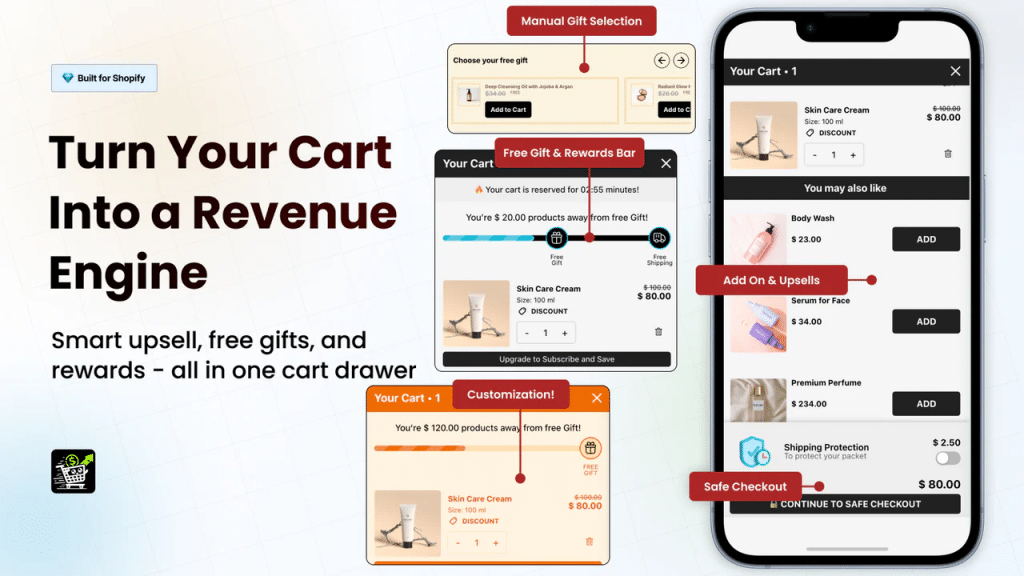
Oxify is the standout here for one specific reason: it has Custom HTML blocks built directly into the cart drawer. That means you can add multiple trust badges anywhere inside the drawer using your own HTML code — not just a single uploaded image.
Most cart drawer apps give you either a pre-set payment icon row or a single image upload slot. Oxify lets you drop in a full HTML block. Want a row of payment icons above the checkout button AND a guarantee text badge below the subtotal AND a social proof line near the progress bar? You can do all three. Each as a separate HTML widget inside the drawer.
Beyond trust badges, Oxify is a complete slide cart drawer solution. Cart upsells, cross-sells, free gifts with purchase, BOGO offers, tiered progress rewards bar, countdown timers, discount code fields, order notes, sticky cart button, and built-in analytics.
- Custom HTML blocks inside cart drawer — add multiple trust badges anywhere
- Custom CSS support for pixel-perfect badge styling
- Built-in payment icons and split payment display
- Cart upsells, cross-sells, and free gifts with purchase
- Multi-tier progress rewards bar (free shipping, discounts, gifts)
- Announcement bar with urgency timer
- In-cart subscription upgrades
- Add-ons module (gift wrap, shipping protection)
- Real-time cart analytics and conversion tracking
- Works with PageFly, GemPages, Judge.me
- Multi-currency and multi-language support
- Mobile-optimized responsive design
Best for: Any Shopify store serious about cart drawer trust badges. The Custom HTML block is the key differentiator — no other cart drawer app gives you this level of control over WHERE and HOW trust badges appear inside the drawer. You’re not limited to one static image. You can build a full trust stack with multiple badge rows, custom text, and styled elements. Combined with upsells, free gifts, and analytics, it’s a complete cart optimization suite.
Install Oxify Slide Cart Drawer
UpCart — Cart Drawer Cart Upsell
Free plan available · Paid from $29.99/mo
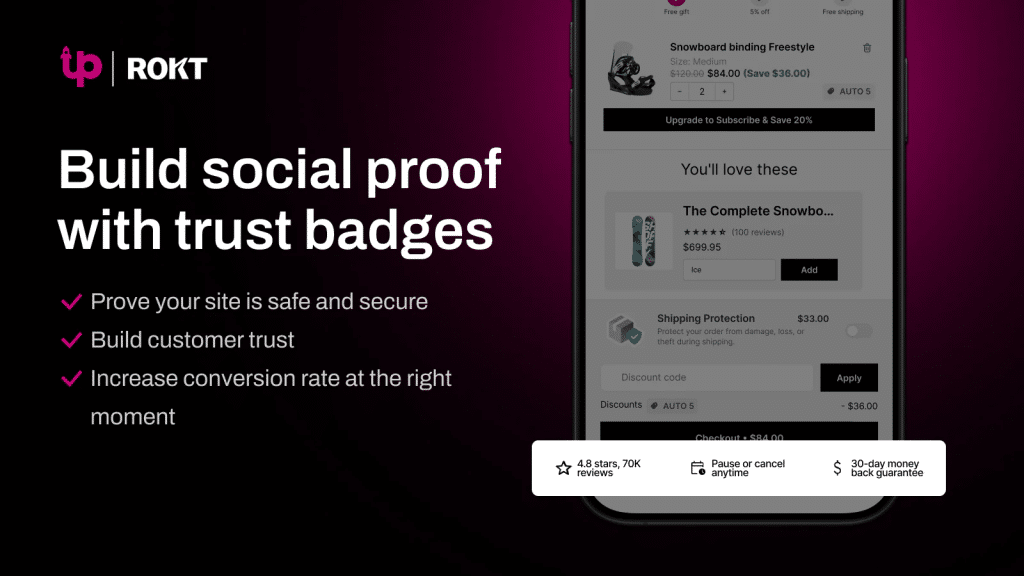
UpCart has a dedicated trust badges module. You upload a custom badge image or pick from preset payment icon options. The image auto-scales to fit the cart width.
The limitation: it’s a single image upload. You can’t add multiple independent badge elements in different positions the way you can with Oxify’s HTML blocks. But if you want a clean, simple single-row badge setup, it works well.
Dedicated trust badge module with top/bottom placement
Supports PNG, JPEG, GIF (including animated)
In-cart upsells, cross-sells, and add-ons
Free shipping rewards bar and cart announcements
Full customization with HTML, CSS, and JSX
iCart Cart Drawer Cart Upsell
Free for dev stores · From $12.99/mo
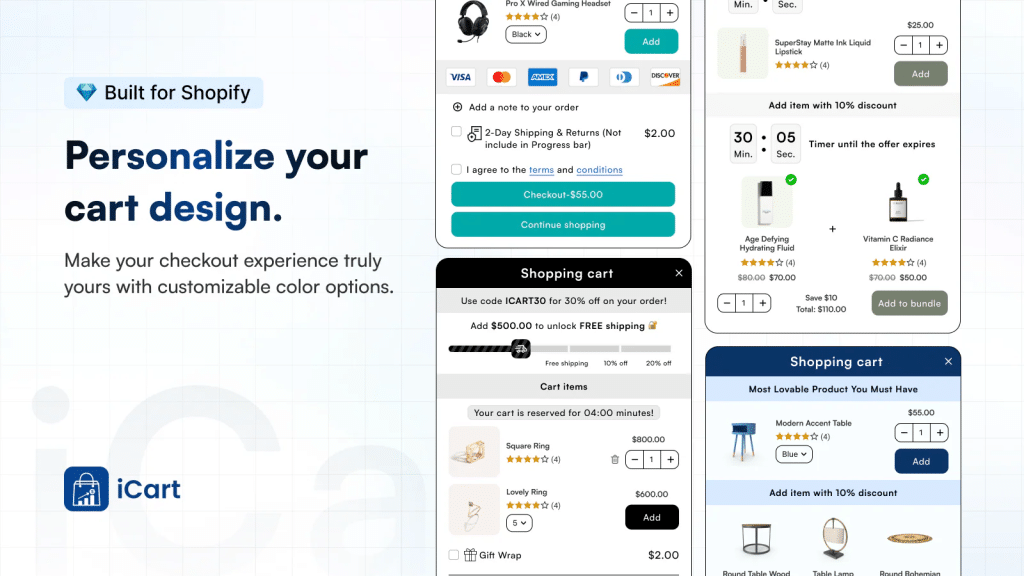
iCart offers a drag-and-drop cart editor with widget blocks — and trust elements are part of that widget library. You get a side cart drawer, popup cart, and full cart page, all customizable.
The app uses AI-powered product recommendations for upsells and lets you place trust badge blocks inside the cart layout. Good widget variety but less HTML flexibility than Oxify.
Drag-and-drop cart editor with trust badge widgets
AI-powered product recommendations for upsells
Progress bar with free shipping thresholds
Discount codes, surveys, birthday collection inside cart
Advanced analytics to track cart performance
Conversion Bear — Ultimate Trust Badges
Free to use
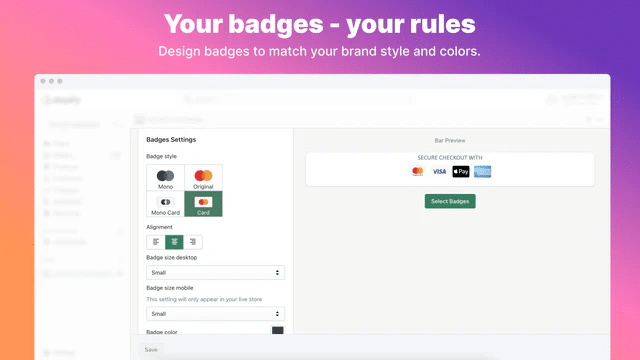
A dedicated trust badge app — not a cart drawer builder. But it works inside cart drawers because of how it lets you place badges on any page section with 1-click copy-paste.
300+ pre-made badge designs. Customize colors, alignment, size, messaging. Loads from CDN at under 30kb. No theme code added.
300+ free badge designs included
Place on any page/section including cart drawer
1-click copy-paste installation — no coding
Separate size options for desktop and mobile
Ultra-light: under 30kb CDN-based loading
Best for: Stores that already have a cart drawer (like Oxify (https://apps.shopify.com/ia-cart-drawer-free-gifts)) and just need to drop trust badges into it. Zero cost, tiny footprint.
Avada Trust Badges, Sales Pop-up
Free plan available
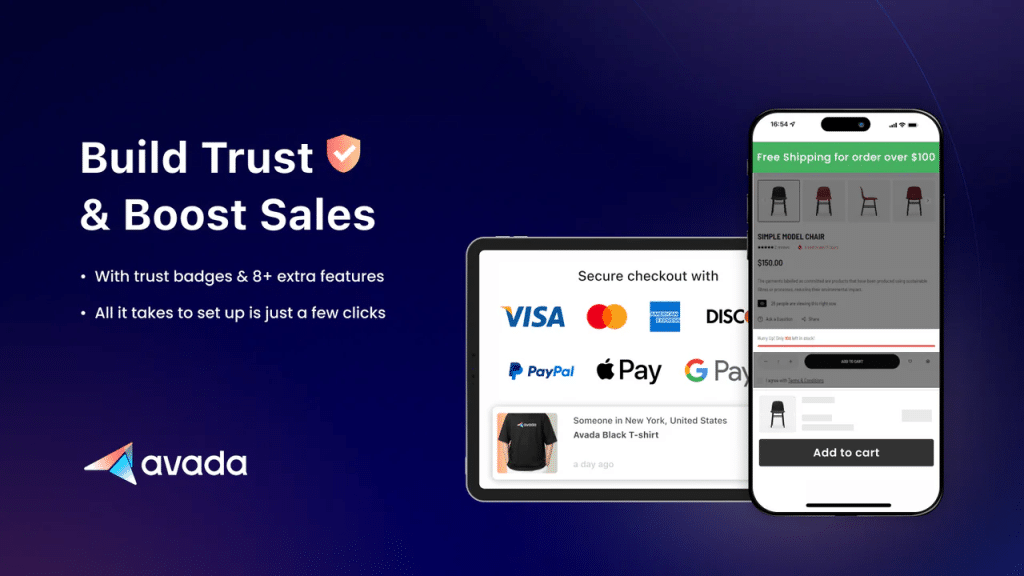
Avada bundles trust badges with urgency tools and social proof popups. The badge generator lets you create custom badge images with payment icons, guarantee seals, and custom text.
Place badges on product pages, carts, and footers. Also shows real-time purchase notifications which pair with cart drawer trust badges for a layered trust approach.
Trust badge generator with custom icons and text
Real-time purchase notifications (social proof popup)
Countdown timer for urgency
Place badges on product, cart, footer sections
9+ free Shopify theme support
Best for: Newer stores or dropshipping brands needing trust badges plus urgency and social proof in one free package.
ShopClimb — Trust Badges
Free plan available · From $5.99/mo
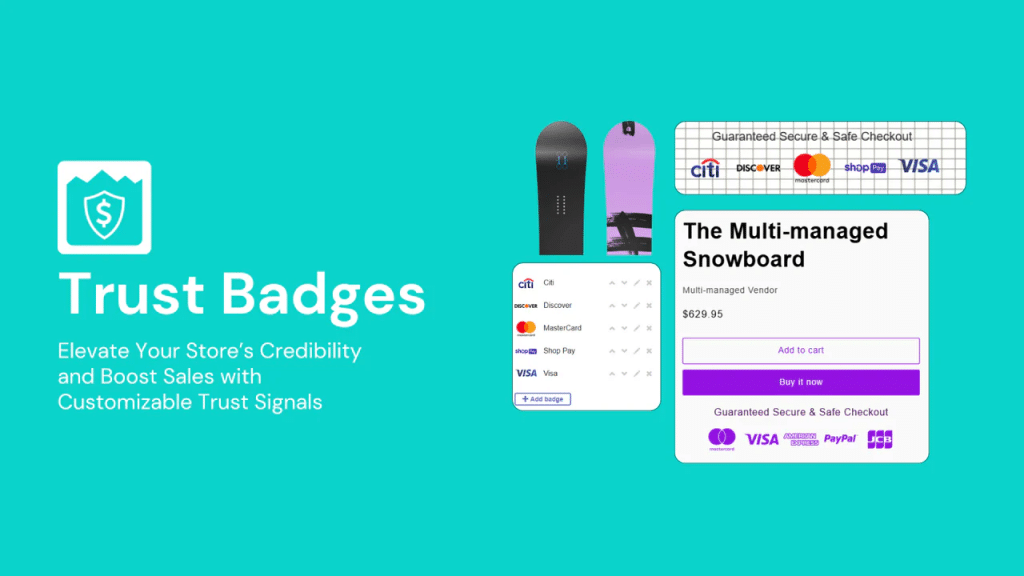
ShopClimb’s standout feature: geolocation-aware badges. The app automatically shows payment icons relevant to the visitor’s country. A German shopper sees local payment methods. A US shopper sees Visa and PayPal.
670+ premium badge designs. Checkout page badges available for Shopify Plus stores. Drag-and-drop placement across all pages.
- Geolocation-aware badges (shows local payment methods)
- Checkout page badges (Shopify Plus only)
- 670+ premium badge designs
- Multiple design styles: full-color, dual-color, circle
- Drag-and-drop zero-code installation
Best for: International stores selling across multiple countries. The geolocation feature automatically tailors trust badges to each visitor’s region
Quick Comparison: All 6 Apps at a Glance
| App | Rating | Price | Cart Drawer Built-in | Trust Badge Flexibility |
|---|---|---|---|---|
| Oxify ⭐ | 5.0/5 | From $19.99/mo | Yes | Custom HTML — multiple badges anywhere |
| UpCart | 4.8/5 | Free – $54.99/mo | Yes | Single image upload, top/bottom |
| iCart | 4.8/5 | Free – $29.99/mo | Yes | Drag-and-drop widget blocks |
| Conversion Bear | 4.9/5 | Free | No (badge-only) | 300+ badges, any section |
| Avada | 4.9/5 | Free | No | Badge generator + social proof |
| ShopClimb | 4.9/5 | Free – $14.99/mo | No | Geolocation-aware badges |
Our Recommendation
If you want the most control over trust badges inside a cart drawer, Oxify Slide Cart Drawer is the clear winner. The Custom HTML block lets you add multiple badge rows, styled text, and custom trust elements at any position in the drawer — something no other cart drawer app offers. Plus you get upsells, free gifts, analytics, and discount code support all in one app.
Placement Rules That Convert (Based on Real Data)
Where you put trust badges inside the cart drawer matters as much as which badges you choose. Users perceive different parts of the same page as more or less secure based on visual layout. Same applies inside a cart drawer.
Directly below the checkout button
The prime spot. It’s the last thing shoppers see before they commit. A clean row of payment icons plus “Secure Checkout” text right here catches the eye at the exact decision moment.
Above the subtotal
Works well for guarantee and return policy badges. When shoppers see the total, anxiety spikes. A “30-Day Returns” badge right above the number calms that spike.
Below the free shipping progress bar
If your cart drawer has a “You’re $15 away from free shipping” bar (like Oxify’s multi-tier progress bar (https://oxify.app/shopify-cart-drawer-upsell)), placing a fast shipping badge underneath creates a natural reassurance flow.
As a thin footer strip
A single line like “✓ Free shipping over $50 · 30-day returns · Secure checkout” at the very bottom of the drawer. Subtle but effective.
With Oxify’s Custom HTML blocks (https://apps.shopify.com/ia-cart-drawer-free-gifts), you can place badges at ALL four of these positions simultaneously. Most other apps limit you to one or two spots.
Design Rules for Cart Drawer Badges
- Use SVGs or optimized PNGs under 10KB total. Heavy images delay rendering and feel sluggish.
- Go grayscale or muted brand colors. Loud badges compete with the checkout button. Badge should reassure, not distract.
- Stack horizontally on desktop, vertically on mobile. Horizontal icon rows work on wider screens. On mobile, a single-line text badge prevents overflow.
- Add alt text. “Secure checkout with Visa, Mastercard, and PayPal” — important for accessibility.
- No animations or pop-ups inside the drawer. Auto-play animations feel aggressive and reduce trust.
Avoid This
Never use more than 3 to 5 badges in the cart drawer. Trust overload reduces trust. One A/B test found that cluttered multi-badge layouts actually hurt conversions vs. a clean single-line “trust stack.” Less is more in this small space.
How to Add Trust Badges to Cart Drawer Without an App (Liquid Code)
If you’re comfortable with basic Shopify theme edits, you can add trust badges to your cart drawer manually. This works on Dawn and most Shopify 2.0 themes.
Manual Method: Step-by-Step
- Go to Online Store → Themes → Edit Code
- Find your cart drawer file. Usually cart-drawer.liquid or inside the sections folder.
- Add this snippet below your checkout button
- Upload your SVG icons as theme assets (Settings → Files). Keep each icon under 2KB.
<style>
  .trust-section {
    font-family: -apple-system, BlinkMacSystemFont, 'Segoe UI', sans-serif;
    padding: 16px;
  }
  .trust-badges {
    display: flex;
    align-items: stretch;
    gap: 0;
    background: #fafaf8;
    border: 1px solid #ebebeb;
    border-radius: 8px;
    padding: 18px 4px;
  }
  .trust-badge {
    flex: 1;
    display: flex;
    flex-direction: column;
    align-items: center;
    gap: 10px;
    padding: 2px 6px;
    position: relative;
  }
  .trust-badge:not(:last-child)::after {
    content: '';
    position: absolute;
    right: 0;
    top: 12%;
    height: 76%;
    width: 1px;
    background: #e5e5e5;
  }
  .trust-badge-icon svg {
    width: 22px;
    height: 22px;
    stroke: #222;
    fill: none;
    stroke-width: 1.5;
    stroke-linecap: round;
    stroke-linejoin: round;
  }
  .trust-badge-label {
    font-size: 10px;
    font-weight: 500;
    color: #555;
    text-align: center;
    line-height: 1.35;
    letter-spacing: 0.02em;
  }
</style>

<section class="trust-section">
  <div class="trust-badges">

    <!-- Free Shipping -->
    <div class="trust-badge">
      <div class="trust-badge-icon">
        <svg viewBox="0 0 24 24">
          <rect x="1" y="3" width="15" height="13" rx="1"/>
          <polyline points="16 8 20 8 22 11 22 16 16 16 16 3"/>
          <circle cx="5.5" cy="18.5" r="2.5"/>
          <circle cx="18.5" cy="18.5" r="2.5"/>
        </svg>
      </div>
      <div class="trust-badge-label">Free<br>Shipping</div>
    </div>

    <!-- Easy Returns -->
    <div class="trust-badge">
      <div class="trust-badge-icon">
        <svg viewBox="0 0 24 24">
          <polyline points="1 4 1 10 7 10"/>
          <path d="M3.51 15a9 9 0 1 0 2.13-9.36L1 10"/>
        </svg>
      </div>
      <div class="trust-badge-label">Easy<br>Returns</div>
    </div>

    <!-- Money-Back Guarantee -->
    <div class="trust-badge">
      <div class="trust-badge-icon">
        <svg viewBox="0 0 24 24">
          <path d="M12 22c5.523 0 10-4.477 10-10S17.523 2 12 2 2 6.477 2 12s4.477 10 10 10z"/>
          <path d="M9 12l2 2 4-4"/>
        </svg>
      </div>
      <div class="trust-badge-label">Money-Back<br>Guarantee</div>
    </div>

    <!-- 24/7 Support -->
    <div class="trust-badge">
      <div class="trust-badge-icon">
        <svg viewBox="0 0 24 24">
          <path d="M3 18v-6a9 9 0 0 1 18 0v6"/>
          <path d="M21 19a2 2 0 0 1-2 2h-1a2 2 0 0 1-2-2v-3a2 2 0 0 1 2-2h3v5z"/>
          <path d="M3 19a2 2 0 0 0 2 2h1a2 2 0 0 0 2-2v-3a2 2 0 0 0-2-2H3v5z"/>
        </svg>
      </div>
      <div class="trust-badge-label">24/7<br>Support</div>
    </div>

  </div>
</section>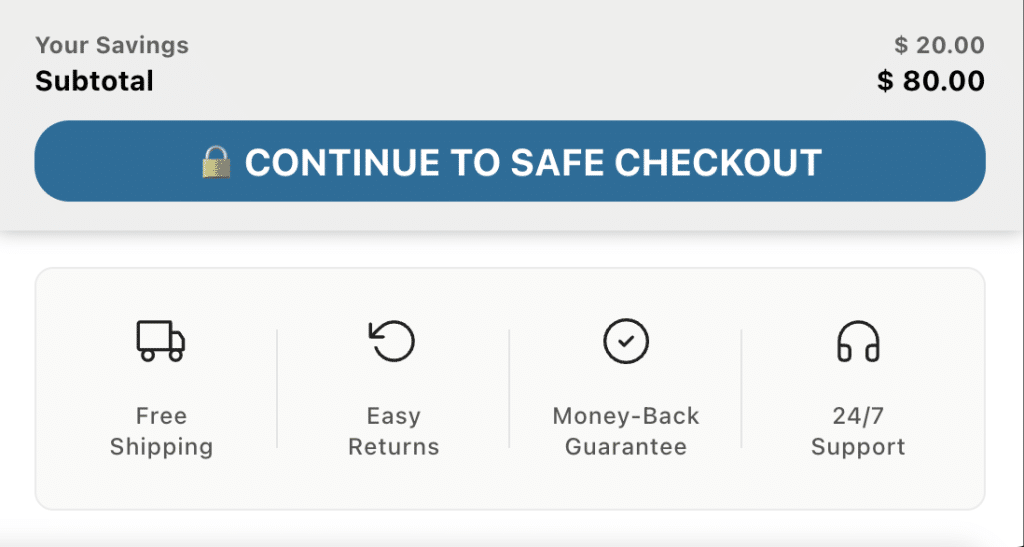
Easier Alternative
If you don’t want to edit theme files, Oxify’s cart drawer lets you paste this exact same HTML into a Custom HTML widget block inside the drawer — no theme code editing needed. You get the same result with zero risk of breaking your theme.
5 Mistakes That Kill Trust Instead of Building It
Mistake 1: Too Many Badges
When a cart drawer is covered in 8-10 different badges, it starts looking like a scam site trying too hard to prove it’s legit. One test showed a cluttered layout actually hurt conversions compared to zero badges. Stick to 3-5 max.
Mistake 2: Fake or Static Numbers
“Trusted by 100,000+ customers” on a store that launched last month fools nobody. Shoppers are savvy. Use real data or skip social proof entirely.
Mistake 3: Ignoring Mobile
Over 60% of ecommerce traffic is mobile. If your trust badges overflow or push the checkout button below the fold on mobile, they’re hurting. Always test on a real phone.
Mistake 4: Only Placing Badges on the Full Cart Page
A lot of stores put trust badges on their /cart page but forget the cart drawer — which is what 70%+ of mobile shoppers actually see. Your badges need to be in the drawer itself.
Mistake 5: No Testing
Assuming badges help without measuring is a gamble. Some audiences respond to payment icons. Some to guarantee text. You won’t know unless you test.
How to A/B Test Your Cart Drawer Badges
What to Test
- Badges vs. no badges — Run this first to confirm they help your store.
- Badge types — Payment icons only vs. payment icons + guarantee vs. guarantee + social proof.
- Placement — Below checkout button vs. above subtotal vs. drawer footer.
- Design style — Icon row vs. single-line text vs. icon + text combo.
What to Measure
- Drawer open → checkout initiated rate — Your primary metric. Oxify’s built-in analytics tracks this automatically.
- Overall session conversion rate — Did the session end in a purchase?
- Cart abandonment rate — Track in Shopify Analytics under Reports → Behavior.
Quick Win
If you can’t set up a formal A/B test, do a before/after comparison. Add badges, run for 2-4 weeks with consistent traffic, compare your drawer-to-checkout rate. Not perfect, but better than guessing.
Do trust badges in the cart drawer actually increase conversions?
Yes. Research consistently shows trust badges increase conversions — up to 32% on checkout pages and up to 42% in some studies. The cart drawer is a high-intent moment where trust concerns spike, so badges here can have outsized impact. Cold traffic from paid ads benefits most.
How many trust badges should I put in the cart drawer?
Between 3 and 5. One row of payment icons (4-6 logos) plus one short text line is the sweet spot. More than that creates clutter and can reduce trust instead of building it.
Which trust badge type works best in a cart drawer?
Secure payment icons (Visa, Mastercard, PayPal, Shop Pay) are the most universally effective. After that, a money-back guarantee or free returns badge is the next highest performer.
Can I add multiple trust badges at different positions in the cart drawer?
Most apps limit you to one badge position. Oxify Slide Cart Drawer is the exception — it offers Custom HTML blocks that let you add multiple independent trust badge elements at any position inside the drawer (below checkout, above subtotal, below progress bar, or as a footer strip).
Can I add trust badges to my Shopify cart drawer without an app?
Yes. You can edit your cart-drawer.liquid file and add an HTML snippet. But it requires manual mobile testing and risks breaking your theme. A safer option is using Oxify’s Custom HTML widget block — you paste the same HTML code into the app interface without touching theme files.
Do trust badges slow down my cart drawer?
Not if done right. Use SVG icons (under 2KB each) or optimized PNGs. Total badge payload should stay under 10KB. Lightweight apps like Conversion Bear load at under 30KB total.
Are cart drawer trust badges different from product page trust badges?
Yes. Product page badges help shoppers evaluate. Cart drawer badges prevent doubt between “I want this” and “I’ll pay for this.” They serve different psychological functions at different stages of the buying journey.
Why This Matters for Your Store
If you run paid ads (Meta, Google Shopping, TikTok), cold traffic interacts with the cart drawer before ever reaching checkout. Badges on the checkout page do not help shoppers who never get there. Oxify Slide Cart Drawer puts trust badges where cold traffic actually makes buying decisions.