 Oxify
OxifyQuantity Break Strategies That Actually Increase AOV
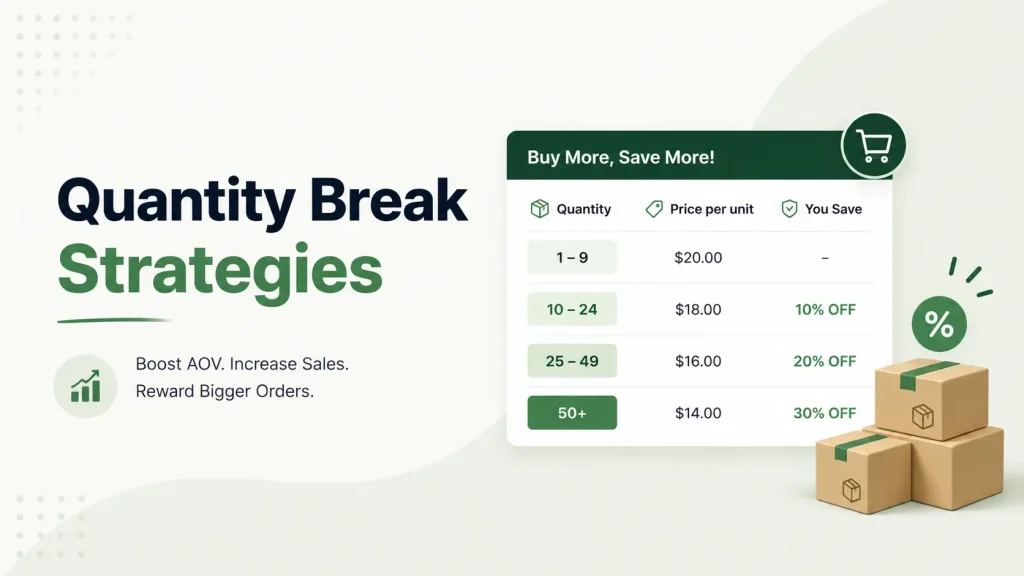
Quick answer: Quantity break strategies raise average order value (AOV) when the first tier sits one step above what shoppers already buy, a clear middle tier is the one most of them pick, and the deepest discount stays above your break-even cost. Done right, one-unit shoppers become multi-unit buyers; done wrong, margin leaks.
Most stores get quantity breaks wrong. They pick random numbers, slap a "buy more, save more" label on the page, and wonder why AOV doesn't move.
The fix isn't a bigger discount. It's a smarter structure.
Below are the exact tier setups, the margin math, and one store's real numbers. Whether you sell coffee, supplements, socks, or skincare, you'll know how to build quantity breaks that make customers happily spend more.
What Is a Quantity Break?
A quantity break is a discount that kicks in when a shopper buys more units of the same product. The more they buy, the lower the price per unit.
Simple example:
- Buy 1 → $20 each
- Buy 3 → $18 each (save 10%)
- Buy 5 → $16 each (save 20%)
The shopper feels smart for saving. Your order jumps from $20 to $80. Both sides win.
You'll also hear it called tiered pricing, a volume discount, or bulk pricing. Same idea, different label. (For a deeper breakdown, see our ultimate guide to quantity breaks.)
A quantity break rewards more units of the same product. A spend tier ("spend $100, save 10%") rewards a bigger basket of anything. Both can lift AOV; this guide covers the first.
Unlike a sitewide sale, the discount is earned: it only unlocks when the cart grows, so you reward bigger baskets instead of cutting the price on orders that would have happened anyway. (We work through the break-even numbers in quantity breaks vs. regular discounts.)
Why It Works on the Brain
People don't shop with a calculator. They shop with feelings.
A quantity break changes the question in the shopper's head. They stop asking "Should I buy this?" and start asking "How many should I get?" That shift — from whether to how many — is where the extra revenue comes from.
It also lowers decision friction. One clear choice (which tier?) is easier than two messy ones (buy or not buy, then how much).
What Quantity Breaks Have Going for Them
There are many ways to lift AOV — upsells, free shipping bars, cross-sells, bundles. Quantity breaks have a few quiet advantages next to them.
- No new products needed. You already stock the item. You're just selling more of it.
- Higher perceived value, smaller margin hit. You reward volume, not slash the base price.
- They clear slow inventory. Stock sitting in a corner moves fast with a volume offer.
- Bigger baskets mean cheaper fulfillment per order. When a cart grows from $45 to $80, your fixed $3 packaging cost drops from 6.7% of revenue to 3.8%. That gap falls straight to profit.
The 9 Quantity Break Strategies That Actually Work
Here are the strategies. Each is simple and easy to apply today, and the ones with numbers show their math so you can rerun it with your own prices.
1. Set Your First Tier Just Above Your Current AOV
This is the most ignored rule — and the most important.
Don't guess your tiers. Open your store analytics and find your average units per order. Then:
- If most people buy 1 → your first break rewards buying 2
- If most buy 2 → your first break rewards buying 3
The goal is a small, believable nudge. Asking a one-unit buyer to jump to six units feels like a leap. Asking them to grab a second feels easy.
Rule of thumb: Your first tier should feel like a step, not a jump.
2. Use Three Tiers — and Make the Middle One the Hero
Two tiers feel thin. Six tiers feel like homework. Three is a good default.
The reason is more than "less clutter." Behavioral researchers call it the compromise effect (Itamar Simonson, Journal of Consumer Research, 1989): brands tend to gain share when they become the middle alternative in a choice set.
When shoppers see three options, the cheapest can look stingy and the biggest can look like a commitment. The middle option feels like the sensible choice, so it tends to attract the most picks. The top and bottom tiers are there to frame the middle tier as the smart one. (Whether that holds for your product is something to check in your own data; see strategy 9.)
A clean three-tier setup:
- Tier 1: Buy 2 → 5% off
- Tier 2: Buy 4 → 12% off ← your hero tier
- Tier 3: Buy 6 → 20% off
Design Tier 2 to win. Give it a "Best Value" badge (save "Most Popular" for when your data shows it is). Make it visually bigger. That's the tier your AOV math should be built around.
3. Show the Savings in Money, Not Just Percent
"Save 15%" is forgettable. "Save $9" feels real.
Shoppers respond to dollar amounts they can picture. On the product page, show each tier with:
- The crossed-out original price
- The new per-unit price
- The total saved, in dollars
Compare the copy:
- ❌ Weak: "Volume discount available"
- ✅ Strong: "Buy 4, save $24 (20% off)"
Let the customer see the win before they click.
4. Match the Discount Curve to the Product Type
One tier curve does not fit all products.
- Consumables (coffee, supplements, pet food): Go bigger. People rebuy these anyway, so a 5- or 6-unit tier feels natural. Volume discounts work best here.
- Gifting items (candles, soap, accessories): Tie tiers to gift logic — "Buy 3, one for each friend."
- Apparel basics (tees, socks): "Stock up" messaging works — 3 and 5-unit tiers.
- High-ticket items: Keep tiers tight. Buy 2 or 3, max. Nobody buys five $400 jackets.
Set tiers per product or per collection — never one global rule.
5. Test "Get One Free" Against a Straight Percentage
Not every tier has to be a percentage off. A second framing worth testing is the free unit.
Compare these two offers — they are the same deal on the till, five units for the price of four:
- Offer A: Buy 5 → 20% off each
- Offer B: Buy 4 → get the 5th one free
Only the framing differs. "Free" can feel like a gift rather than a discount, and the shopper has to commit to 4 units, not 5, to see it start. Whether that wins depends on your product and audience, so treat it as a test, not a rule.
When to use each:
- Percentage off — best for higher-priced items, because you can dial the depth to 8% or 12%. A free unit is a fixed step (buy 4, get 1 free is 20% off; buy 9, get 1 free is 10%).
- Get one free — best for low-cost, high-margin consumables (socks, snacks, basics) where a 15–20% step still leaves profit.
Run both as an A/B test and compare revenue per visitor and gross profit per order, not just clicks on the offer.
6. Protect Your Margin Before You Launch
A quantity break that loses money is just a slow leak. Here's a worked example (illustrative numbers) of how it goes wrong.
Say a product costs you $12 and sells for $30 (60% margin). You set an "aggressive" top tier:
- Buy 6 → 35% off → $19.50 per unit
Looks generous. But add the true per-unit cost — product ($12) plus pick, pack, and ship (say $4.50) — and you're at $16.50 cost against $19.50 revenue. Just $3 of profit per unit. One return or one shipping surcharge wipes it out.
Before you publish a single tier:
- Write down the true cost — production + shipping + handling.
- Price your deepest tier above that number, with real room left over.
- Remember the upside: bigger orders spread your fixed per-order costs, so a 20–25% unit discount can still leave room — if your own numbers confirm it.
The "buy more" math should help you, not just the customer. (More on this in our product bundle pricing strategy guide.)
7. Stack a Free Shipping or Free Gift Nudge
Quantity breaks get stronger with a partner.
Add a small extra reward at the top tier:
- Hit Tier 3 → unlock free shipping
- Hit Tier 3 → get a free gift
Now the biggest tier has two reasons to exist: a lower unit price and an unlocked perk. A cart progress bar — "You're $12 away from free shipping" — makes that nudge visible while they shop. You can even stack buy-more-save-more discounts with a shipping threshold for a double pull.
Check the threshold against your tiers. Take a $20 product with the 2 / 4 / 6-unit ladder from strategy 2 (5%, 12% and 20% off). The three carts come to $38.00, $70.40 and $96.00. A $75 free-shipping threshold lands between the hero tier and the top tier, so free shipping becomes a reason to move up from Tier 2. A $35 threshold would be met by every tier and would nudge nobody.
Set your free-shipping threshold from your own margins and carrier costs.
8. Measure Cannibalization Instead of Guessing
A common worry: "Won't quantity breaks just give a discount to people who'd buy one anyway?"
Some of that will happen. A shopper who would have bought one at full price may take the two-unit deal instead. The question is whether the extra units from shoppers who trade up, plus the bulk-curious and almost-abandoned shoppers the tiers win over, outweigh the discount given away.
So don't judge the tiers by single-unit conversion rate. Compare units per transaction, revenue per visitor and gross profit per order before and after. Those are the numbers that show the real effect.
9. A/B Test, Then Adjust Every Quarter
Your first tier setup is a smart guess — but still a guess.
Run two versions for two to three weeks:
- Version A: Buy 3 / Buy 5 / Buy 7
- Version B: Buy 2 / Buy 4 / Buy 6
Watch which lifts AOV without hurting conversion. Then test discount depth (5/10/15% vs. 10/20/30%) and messaging.
Quantity breaks are not "set and forget." Check them every quarter, and around big seasons like BFCM and the holidays.
One Store's Data: Take Rate vs. Revenue per Visitor
Theory is nice. Numbers are better, with the caveats below.
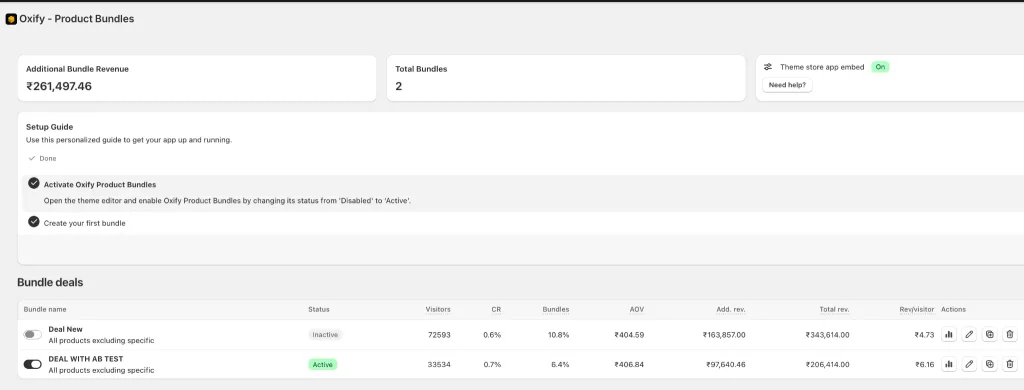
Here's data from one live Shopify store running bundle and quantity break offers through Oxify (our app). The store ran two offers side by side — one a standard bundle deal, the other the same offer structure with an A/B test applied to refine tiers and messaging.
| Offer | Visitors | Bundle take rate | Revenue per visitor |
|---|---|---|---|
| Standard deal | 72,593 | 10.8% | ~$0.057 |
| A/B-tested deal | 33,454 | 6.4% | ~$0.074 |
The standard deal had the higher raw take rate (10.8% vs. 6.4%). But the A/B-tested deal earned about 30% more revenue per visitor (~$0.074 vs. ~$0.057).
Read this as one store's observation, not a benchmark. The two offers had different visitor counts (72,593 vs. 33,454), the table doesn't show which change drove the gap, and one store's results don't predict yours.
The lesson: a higher take rate isn't the goal. Revenue per visitor is, so measure it on your own store before and after you change tiers.
Which Setup Method Should You Use?
You have four ways to add quantity breaks to a Shopify store. Here's the honest trade-off, checked against Shopify's documentation on 11 October 2026.
| Method | Best for | Limitation |
|---|---|---|
| Built-in automatic discounts (Amount off products with a "Minimum quantity of items") | One or two simple tiers on a few products | One discount per tier; percentage or amount off only; nothing appears on the product page until the discount applies in the cart |
| Shopify B2B volume pricing (catalogs) | Wholesale customers set up as companies | Price breaks are for B2B customers, not retail shoppers; Basic, Grow and Advanced can assign up to 3 active catalogs, Plus unlimited |
| Custom Shopify Function | Developers who need rules no app offers | Per shopify.dev, only Plus stores can run custom apps that contain Functions, and you build and maintain the code |
| A quantity breaks app | Most retail stores that want a tier table beside Add to Cart | Usually a monthly fee; check the listing's pricing and reviews and test a real cart before you rely on it |
Apps that contain Shopify Functions work on any plan when they are distributed through the Shopify App Store, so Plus is not required for an app (shopify.dev). For most retail merchants on Basic, Grow or Advanced, the real choice is chaining built-in discounts (no extra fee, no on-page table) or installing an app that handles tiers, badges, savings labels and analytics without code. Our comparison of the best Shopify quantity breaks apps covers the options.
Common Quantity Break Mistakes (Avoid These)
Even good stores trip over the same things.
- Discount too small. A 3% break moves nobody. It has to feel worth it.
- Discount too deep. A 50% break trains shoppers to never pay full price and crushes margin.
- Hiding the offer. If the tier table sits at the bottom of the page, most shoppers never see it. Put it right by the Add to Cart button.
- Confusing tiers. "Buy 7, save 13.5%" makes people think too hard. Keep numbers round and clean.
- Ignoring mobile. Plenty of your shoppers are on phones. A wide tier table that breaks on mobile kills the offer.
- Ignoring stock. Bulk buying empties shelves fast. Watch inventory so you don't oversell.
A bigger warning: over-incentivizing AOV can backfire. Track margin impact, not just basket size. A cart full of deep-discount units can earn you less than a smaller cart did.
How Much Can Quantity Breaks Really Lift AOV?
Honest answer: it depends on your product, margins, traffic and tier design, and there is no industry-average number we can stand behind. The only lift figure in this guide is the one-store comparison above, and it is a revenue-per-visitor result for one store, not an AOV benchmark.
What you can do is work out your own bar before you launch. Take your current AOV and units per order, decide which tier you expect most shoppers to pick, and compute the cart value and gross profit at that tier using the margin steps in strategy 6. If the expected order earns more profit than today's average order, the break is worth testing. (For other placements that lift AOV, see our guide to Shopify upselling strategies that increase AOV.)
Want trustworthy numbers? Run quantity breaks on five products for 30 days and measure your units per order, revenue per visitor and gross profit per order. That's the data that matters.
A Simple 5-Step Launch Plan
Want this live this week? Follow this.
- Pick 3 products with healthy margins and repeat-purchase appeal.
- Check your data — find the average units bought per order.
- Build 3 tiers — first tier one step above your average, hero tier in the middle.
- Show the savings in dollars, right beside the Add to Cart button.
- Track revenue-per-visitor and AOV for 14 days, then adjust the tiers.
No code, no new inventory, no big risk.
How Oxify Makes Quantity Breaks Easy
Doing all this by hand — tier math, badges, savings labels, A/B tests — is slow and messy.
Oxify Quantity Breaks (our app; the App Store listing is titled "Oxify Quantity Breaks & BYOB") handles the tier setup and display for you. See the Oxify Quantity Breaks product page for the full feature list and pricing.
It's a Built for Shopify app — Shopify's badge for top-tier performance, design, and integration — rated 4.9 stars from 13 reviews on its App Store listing (checked 11 October 2026). Here's what it does:
- Quantity breaks & tiered pricing with clean, customizable layouts
- Auto-applied discounts at checkout — no codes for customers to type
- Free shipping triggers and a cart progress bar to push shoppers toward the top tier
- BOGO, Buy X Get Y, and free gift offers to stack on your breaks
- Build Your Own Box gamified bundle builder
- Built-in analytics and A/B testing — so you can run the revenue-per-visitor comparison above on your own store
Pricing on the listing (checked 11 October 2026) is one flat plan at $14.99/month (or $129.99/year) with every feature included and a 14-day free trial, and it works with any theme — no developer needed. It runs on Shopify Functions under the hood, so discounts apply cleanly at checkout on any plan, Basic to Plus.
Who should skip it: if one or two simple tiers on a handful of products are enough, Shopify's built-in automatic discounts can do that with no app fee, and if you need price lists for wholesale customers, Shopify's B2B catalogs handle that natively.
👉 Try Oxify Quantity Breaks with a 14-day free trial and watch your average order value climb.
Related: Selling coffee or tea? See how to size quantity breaks in the best Shopify apps for coffee and tea brands.