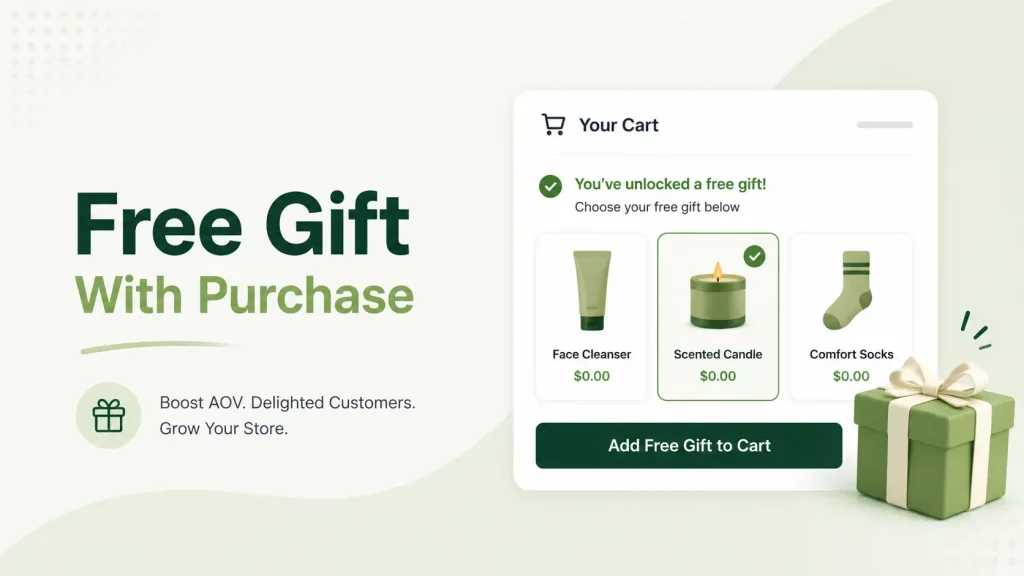
A Shopify free gift with purchase is one of the simplest ways to lift average order value — it pushes shoppers to spend more without you cutting a single price. Done right, it turns a quiet cart into an AOV driver. Done wrong, it leaks margin and converts no better than a banner nobody notices.
The difference is almost never the gift itself. It’s the setup — how the offer is triggered, where it shows up, and whether the gift adds itself to the cart automatically.
This guide covers exactly that: what a free gift with purchase is, how to run one with or without an app, how to auto-add the gift in your cart drawer, and how to set different gifts per country if you sell internationally. The numbers throughout come from real Oxify Cart Drawer merchants — 1,284 claimed gifts and counting.
What Is a Free Gift With Purchase?
A free gift with purchase (GWP) is a bonus product a shopper unlocks when they hit a condition you set — usually a spend amount or a specific item in the cart.
- Spend $75, get a free travel pouch.
- Buy any two shirts, get a free pair of socks.
- Spend $200, get a free hair repair serum.
Beauty retailers have run GWP at the counter for decades — Sephora, Ulta, and Estée Lauder do it every week. Online stores were slower to adopt it because Shopify’s native discount system won’t automatically add a gift to the cart. The right setup closes that gap.
Common Types of Free Gift Offers
A quick map before you pick a setup method:
- Free gift with every order — unconditional; the simplest option, good for product launches.
- Threshold gift — “Spend $75, get a free gift.” The most common type, and the best for lifting AOV.
- Product-trigger gift (Buy X Get Y) — “Buy any candle, get a free matchbox.” Good for pushing hero products.
- Tiered gift — bigger gifts at higher spend tiers; turns the cart into a game.
- Loyalty gift — a free gift for returning or repeat customers.
- Mystery gift — the gift is a surprise revealed on arrival; drives curiosity and impulse buys.
- Multi-market gift — a different free gift per country, tuned to local shipping and AOV (covered in depth below).
Does a Free Gift With Purchase Actually Work?
Yes — and it usually beats a discount.
A percentage discount cuts your revenue on every order and trains shoppers to wait for the next sale. A free gift keeps your price intact and adds something the shopper reads as a win. A gift that costs you $4 can carry $15–$20 of perceived value, so the shopper feels they gained more than they actually did — and your margin holds.
Across Shopify stores, a well-run GWP campaign lifts AOV by roughly 18–30%, at a promotional cost well below an equivalent percentage discount.
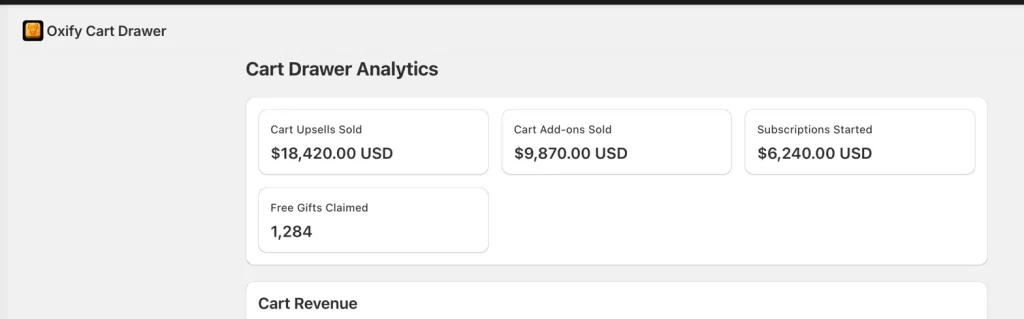
Inside Oxify Cart Drawer, the pattern is consistent. One store shows 1,284 free gifts claimed alongside $18,420 in cart upsells — the gift offer and the upsells reinforce each other rather than competing for attention. A second store claimed 186 gifts in a single 30-day window. When the gift is set up correctly, redemptions and upsell revenue climb together.
The catch is in those two words: set up correctly. Most stores get it wrong — they pick a gift that’s too expensive, set the threshold too far above their AOV, or hide the offer until checkout. The rest of this guide fixes that.
How to Set Up a Free Gift With Purchase on Shopify (3 Methods)
There are three real ways to run a GWP on Shopify. Here’s how they compare before we walk through each one.
| Without an app (Buy X Get Y) | Shopify Functions | Free gift app | |
|---|---|---|---|
| Cost | Free | Developer hours | From ~$19.99/mo |
| Auto-adds the gift | ❌ | ✅ | ✅ |
| Progress bar in the cart drawer | ❌ | ❌ | ✅ |
| Tiered gifts | ❌ | ✅ | ✅ |
| Multi-market gifts per country | ❌ | ✅ (custom build) | ✅ (with the right app) |
| Best for | A quick, free test | Shopify Plus stores with devs | Most stores |
Method 1 — How to Add a Free Gift With Purchase Without an App
You can run a basic free gift with purchase without an app, using Shopify’s built-in Buy X Get Y discount. It’s free and it works for simple offers.
- Go to Discounts in your Shopify admin.
- Click Create discount → Buy X Get Y.
- Set what the shopper must buy — a product, a collection, or a minimum spend.
- Set the gift as the “Y” item and discount it 100% off.
- Choose Automatic so no code is needed.
- Save and activate.
![SCREENSHOT NEEDED: Shopify admin “Buy X Get Y” discount creation screen — alt text: “Setting up a free gift with purchase without an app using Shopify Buy X Get Y”]
What it does well: it’s free, and the discount applies at checkout.
What it can’t do: the gift doesn’t auto-add — the shopper has to add it to the cart themselves. There’s no progress bar, no cart-drawer display, no tiered gifts, and no way to run a different gift per market. That missing auto-add is the real problem: if shoppers don’t see and receive the gift while they’re still shopping, redemption drops sharply.
Use this method if you want to test a free gift with purchase without an app and zero spend — and you’re fine with lower redemption.
Method 2 — Shopify Functions (Custom Code)
Shopify Functions let a developer build custom gift logic — auto-add, tiered rules, and edge cases like GWP combined with subscriptions or B2B pricing.
Good for: Shopify Plus stores with a dev team and genuinely complex requirements.
Bad for: everyone else. It burns developer hours rebuilding what a purpose-built app already does well.
Method 3 — A Free Gift App (Best for Most Stores)
A dedicated app fills every gap the native discount leaves:
- Auto-adds the gift the moment the threshold is hit
- Shows a live progress bar (“Spend $12 more for your free gift!”)
- Displays the offer inside the cart drawer on every page
- Runs tiered gifts and customer-choice gifts
- Lets you set a different gift for each market
This is where most Shopify stores land — because these are the exact features that turn a GWP from a quiet banner into a real AOV driver.
How to Auto-Add a Free Gift in Your Cart Drawer (Oxify Setup)
The single biggest upgrade over the no-app method is auto-add — the gift drops into the cart by itself the moment a shopper crosses the threshold, with a live progress bar pulling them toward it. Here’s the full setup inside Oxify Cart Drawer & Upsells, in under 10 minutes. For a full visual walkthrough, see our how to add a free gift in your Shopify cart drawer post.
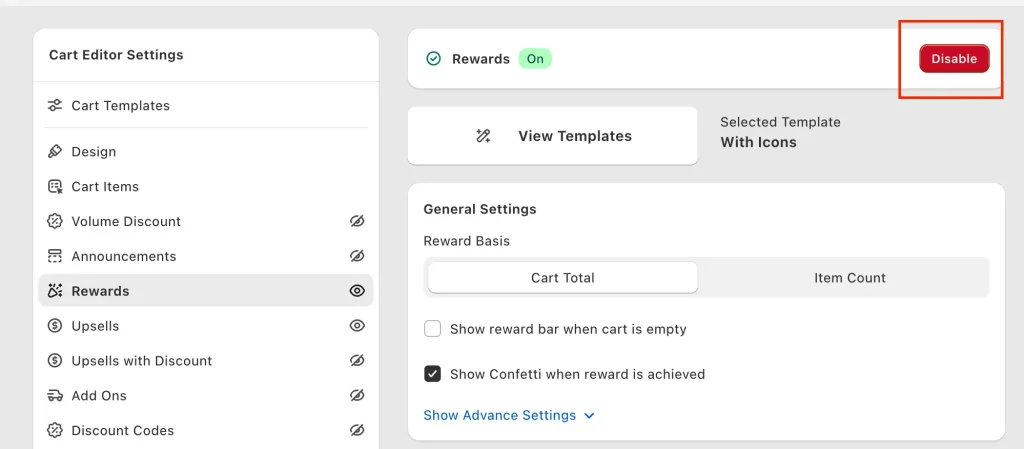
Step 1 — Open the Cart Editor and Enable Rewards
In your Oxify Cart Drawer settings, find the Rewards section in the left sidebar and toggle it on. Under Reward Basis, choose:
- Cart Total — trigger the gift by dollar amount spent (most common)
- Item Count — trigger the gift by number of items in the cart
Turn on Show Confetti when reward is achieved — the animation nudges shoppers to finish checkout instead of bouncing. Turn off Show reward bar when cart is empty to keep empty carts clean.
Step 2 — Add Your First Reward
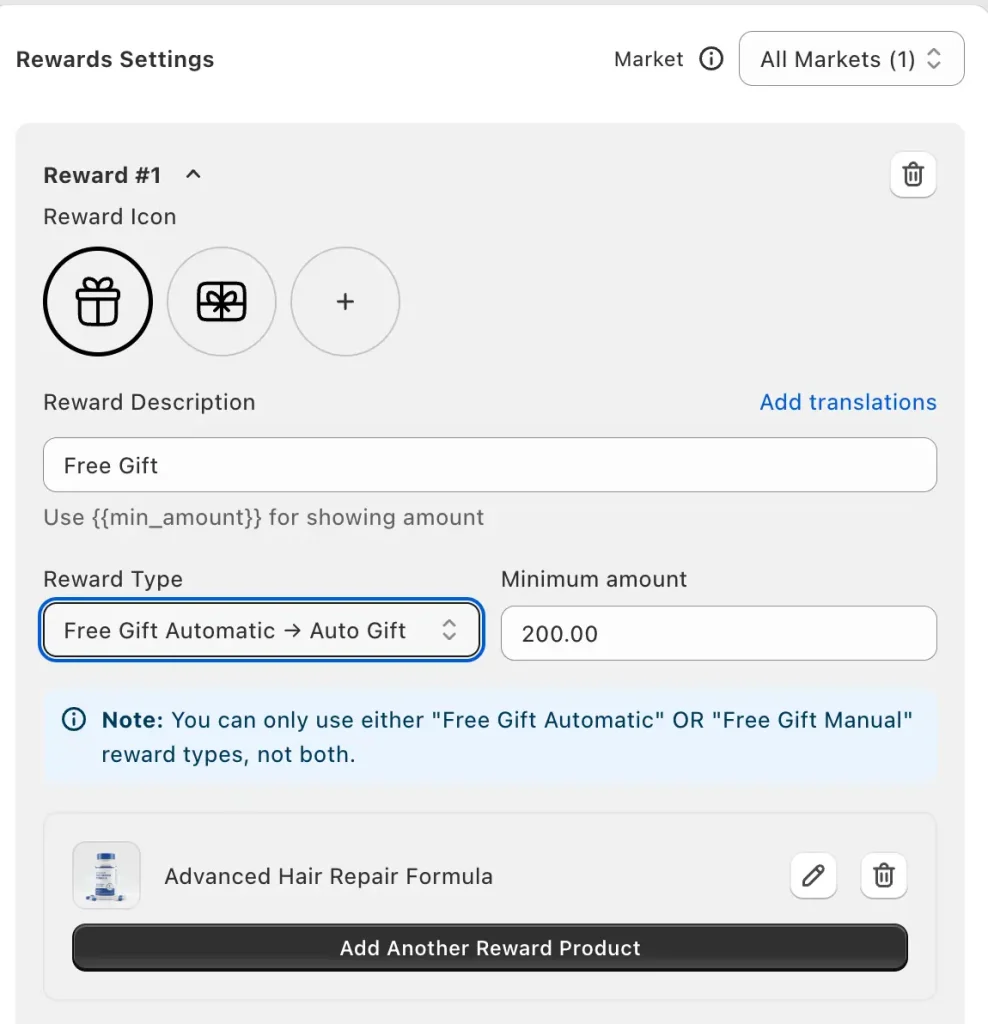
Click Add Reward. Pick a reward icon and write a reward description. Use the {{min_amount}} tag so the progress bar updates live as shoppers add items — for example: “Spend ${{min_amount}} and get a free gift!”
Step 3 — Pick the Reward Type (Auto-Add)
Choose Free Gift Automatic → Auto Gift so the gift adds itself to the cart drawer the moment the threshold is hit. This is the default for a reason — auto-add gets the highest redemption rate because it removes every click between the shopper and the gift. Use Free Gift Manual only if you have inventory constraints; see our manual gift selection on Shopify guide for that setup.
Step 4 — Set the Minimum Amount
This is your threshold. The next section covers how to pick the right number.
Step 5 — Choose the Gift Product
Click Add Another Reward Product and select from your catalog. Add one product for a straightforward auto-gift, or several to let shoppers choose.
Step 6 — Save and Test
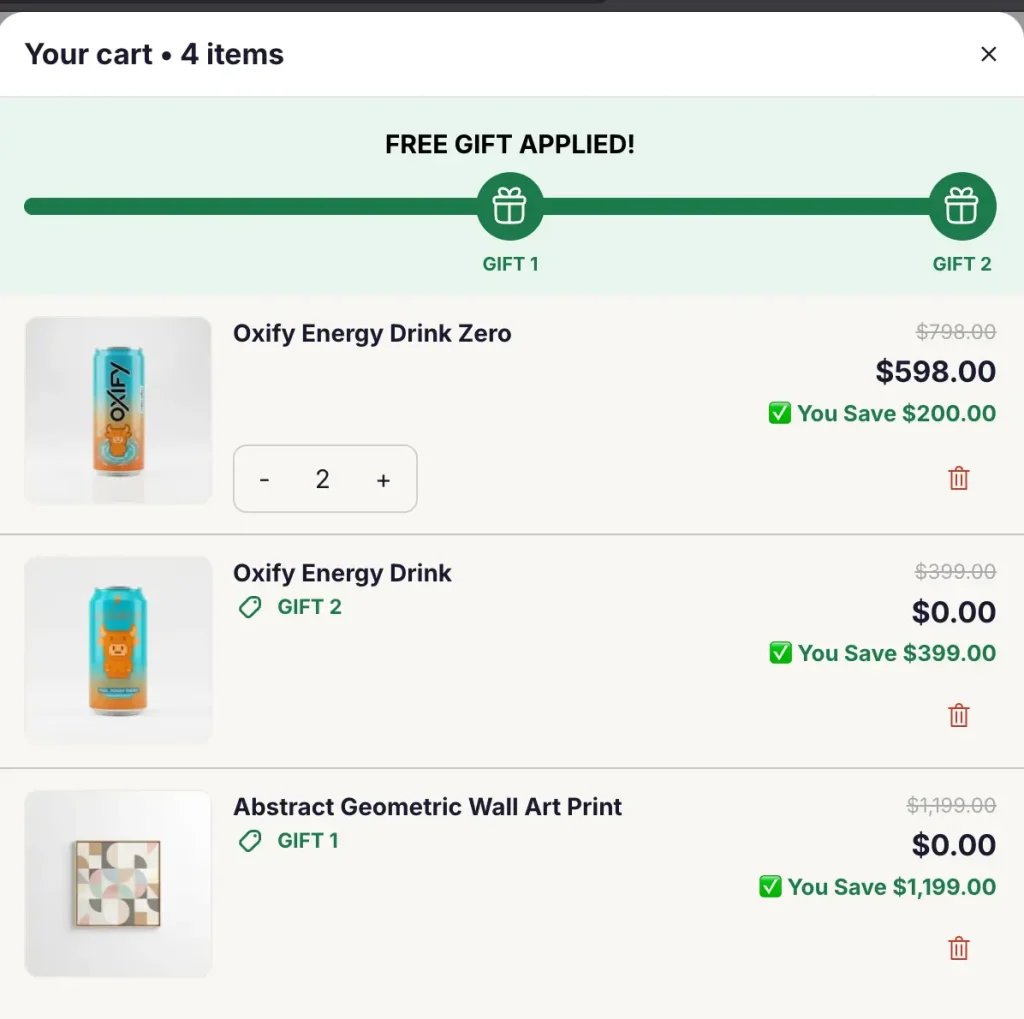
Save the reward, then test it in your storefront. Add items to the cart, watch the progress bar update, and confirm the gift auto-adds at the threshold.
Getting Your Free Gift Offer Right
The setup takes ten minutes. These are the choices that decide whether it actually moves AOV.
Set the threshold a little above your AOV. Pull your current average order value from Shopify Analytics and set the gift threshold about 30% higher. If your AOV is $58, a $75 threshold works — close enough that shoppers will add one more item, far enough that the gift feels earned. Set it 60%+ above AOV and almost nobody stretches for it.
Keep the gift cheap — 4–6% of the threshold. A $75 threshold means a $3–$5 gift. The shopper should perceive far more value than the gift costs you. A $15 gift on a $75 threshold means you’re effectively paying shoppers to buy from you.
Auto-add the gift. Forcing shoppers to click “add gift” loses a chunk of redemptions for no reason. Auto-adding the free gift in the cart drawer removes the friction — and once the gift is sitting in the cart, shoppers are reluctant to remove it.
Make it visible with a progress bar. A gift hidden until checkout barely converts. A live bar — “You’re $14 away from a free gift” — gives shoppers a clear target to close. This is the single highest-leverage part of the whole setup.
Watch your reach rate. Reach rate is the share of carts that cross the threshold. Aim for roughly 20–40%. Far below that, the threshold is too high — lower it. Far above, it’s too low and you’re handing gifts to shoppers who already qualified — raise it.
Refresh the gift every 4–6 weeks. Returning shoppers tune out a gift they’ve seen before. A small seasonal swap keeps the offer working.
Multi-Market Free Gifts: Run a Different Free Gift Per Country
If you sell across multiple countries, running the same free gift everywhere is a margin trap — and most free gift apps force exactly that.
- Shipping costs differ wildly. A $4 gift that ships free in the US can cost $12+ to land in the UK or India once weight and customs are counted. Your margin disappears.
- Local relevance varies. A “summer beach kit” lands in Australia in December and in Spain in July.
- Customs rules block some products. Certain skincare ingredients can’t ship to the EU; supplements have country-specific restrictions.
- Price perception varies by region. A $200 threshold reads as normal in the US but steep in India.
A multi-market free gift strategy fixes all four — you run the same campaign idea everywhere, but the actual gift, threshold, and message change per country.
How to Set a Different Free Gift Per Country in Shopify
In Oxify Cart Drawer, the Rewards section includes a Market dropdown. Switch it from “All Markets” to a specific Shopify Market and configure a completely separate reward — different gift, different threshold, different description — just for that country. It works alongside Shopify’s Markets feature and pairs naturally with a multi-currency cart drawer setup.
| Market | Threshold | Gift | Gift COGS |
|---|---|---|---|
| United States | $75 | Travel-size moisturizer | $4 |
| United Kingdom | £60 | Sample sachet pack (low ship weight) | £2.50 |
| India | ₹3,500 | Locally-sourced face mist | ₹180 |
Same campaign idea. Three different gifts. Each tuned to local shipping cost, customs, and AOV — so your margin holds in every region. Shopify’s native Buy X Get Y can’t do this, and most competitor apps force one gift across every market.
Best Shopify Free Gift Apps Compared (2026)
Picking the right app comes down to where the gift shows up, whether it supports multiple markets, and what else you need bundled in.
| App | Best For | Cart Drawer | Tiered Gifts | Auto-Add | Multi-Market Gifts | Starting Price |
|---|---|---|---|---|---|---|
| Oxify Cart Drawer & Upsells | Full cart funnel in one app | ✅ Native | ✅ | ✅ | ✅ | $19.99/mo |
| BOGOS by Secomapp | Pure GWP workflows | ❌ | ✅ | ✅ | ⚠️ Limited | $29.99/mo |
| Monk Free Gift & Upsell | Free gift + light upsell | Partial | ✅ | ✅ | ⚠️ Limited | $30/mo |
| Rebuy Engine | Enterprise personalization | Partial | ✅ | ✅ | ✅ | $99/mo |
| AOV.ai | AOV-focused upsells | ✅ | ✅ | ✅ | ⚠️ Limited | $40/mo |
Why Oxify Cart Drawer & Upsells works for most stores:
- Free gifts run inside the cart drawer with a live progress bar, and auto-add the moment the threshold is hit — the two things that actually drive redemption.
- Different gifts per market — set US, UK, EU, and India gifts separately from one dashboard.
- Combines GWP with FBT, post-purchase upsells, sticky cart, and a free shipping bar in a single app, so you’re not stacking 3–4 apps to get the full cart funnel.
- Built for Shopify badge, 5.0★ rating.
- Flat order-based pricing from $19.99/mo — every feature on every plan.
For deeper breakdowns, see our full best Shopify cart drawer apps comparison.
Frequently Asked Questions
How do I add a free gift with purchase on Shopify?
Three ways: use Shopify’s native Buy X Get Y discount, build custom logic with Shopify Functions, or install a free gift app like Oxify Cart Drawer & Upsells. Most stores choose the app route because it adds the things that actually drive redemption — auto-add, a progress bar, cart-drawer display, and multi-market support.
Can I offer a free gift with purchase without an app?
Yes. Go to Discounts → Create discount → Buy X Get Y, set the trigger (a spend amount or specific product), make the gift the “Y” item at 100% off, and set it to Automatic. The limitation: the gift won’t auto-add to the cart and there’s no progress bar, so redemption is lower than with an app. Most stores test a free gift with purchase without an app first, then move to an app within their first month.
How do I auto-add a free gift in the cart drawer?
You need a cart drawer app — Shopify’s native discount can’t do it. In Oxify Cart Drawer, enable Rewards, add a reward, and choose the Free Gift Automatic → Auto Gift reward type. Once a shopper’s cart crosses the threshold, the gift is auto-added to the cart drawer with a confetti animation and a live progress bar — no code and no clicks for the shopper.
Can I run multi-market free gifts on Shopify?
Yes, with the right app. A multi-market free gift setup lets you run the same campaign across countries while changing the actual gift, threshold, and message per region. Oxify Cart Drawer & Upsells handles this from one dashboard using a Market dropdown that works alongside Shopify Markets. This matters because a gift that ships cheaply at home can wreck your margin abroad.
How do I offer a different free gift per country?
In Oxify Cart Drawer, open the Rewards section and switch the Market dropdown from “All Markets” to a specific Shopify Market — US, UK, EU, India, and so on. Then configure a separate reward for that country with its own gift, threshold, and description. Repeat for each market. Shopify’s native Buy X Get Y discount applies one gift store-wide and can’t do this.
Does a free gift with purchase increase AOV?
Yes — a well-run GWP campaign lifts AOV by roughly 18–30% across Shopify stores, at a lower promotional cost than an equivalent percentage discount. It works because shoppers add items to reach the threshold, and “free” carries more emotional pull than “10% off.”
What’s the best free gift app for Shopify?
For most stores, Oxify Cart Drawer & Upsells covers GWP plus the full cart funnel — upsells, FBT, free shipping bar, sticky cart, subscriptions — in one app, with auto-add and multi-market gift support. BOGOS suits pure GWP workflows without a cart drawer. Rebuy fits 7-figure stores with complex personalization needs.
Should the gift auto-add, or should shoppers pick it?
Auto-add by default — it has the lowest friction and the highest redemption. Offer customer choice (3–5 options at the threshold) once your GWP is dialed in and you want shoppers to value the gift more by choosing it themselves. Never offer more than five options; decision fatigue slows checkout.
How much should the free gift cost?
Keep the gift cost to 4–6% of your threshold. On a $75 threshold, that’s a $3–$5 gift. Above 6–8%, the campaign starts eating the margin gains it’s supposed to create.
How do I set the right threshold?
Take your current AOV from Shopify Analytics and set the threshold about 30% higher. AOV of $58 → threshold around $75. Then check your reach rate: if far fewer than 20% of carts hit the threshold it’s too high; if far more than 40% it’s too low.
How often should I change the free gift?
Every 4–6 weeks. Returning shoppers stop reacting to a gift they’ve already seen, so a small seasonal rotation keeps the offer fresh and keeps your reach rate healthy.
Ship Your Free Gift With Purchase Today
A Shopify free gift with purchase is a proven AOV play — but the setup decides everything:
- Hidden gifts don’t convert — show the offer in the cart drawer with a progress bar.
- A threshold too far from your AOV means nobody stretches for it.
- Manual add-to-cart kills redemption — auto-add the gift.
- The same gift across every market quietly drains your international margin.
Your quick start:
- Check your current AOV in Shopify Analytics.
- Set your first threshold about 30% above it.
- Pick a gift that costs you under 6% of that threshold.
- Run it inside your cart drawer with auto-add and a progress bar.
- Watch your reach rate and aim for 20–40%.
- Refresh the gift every 4–6 weeks — and set a different free gift per country if you sell internationally.
If you want all of this in one app — cart drawer, auto-add free gift, progress bar, tiered rewards, multi-market gifts, upsells, FBT, sticky cart, free shipping bar, post-purchase upsell, and subscriptions — Oxify Cart Drawer & Upsells does it.
- 5.0★ on the Shopify App Store
- Built for Shopify badge
- Plans from $19.99/mo, free trial
- Every feature on every plan, no upsells