 Oxify App
Build-a-Box on Shopify: How to Set Up Build-Your-Own Bundles
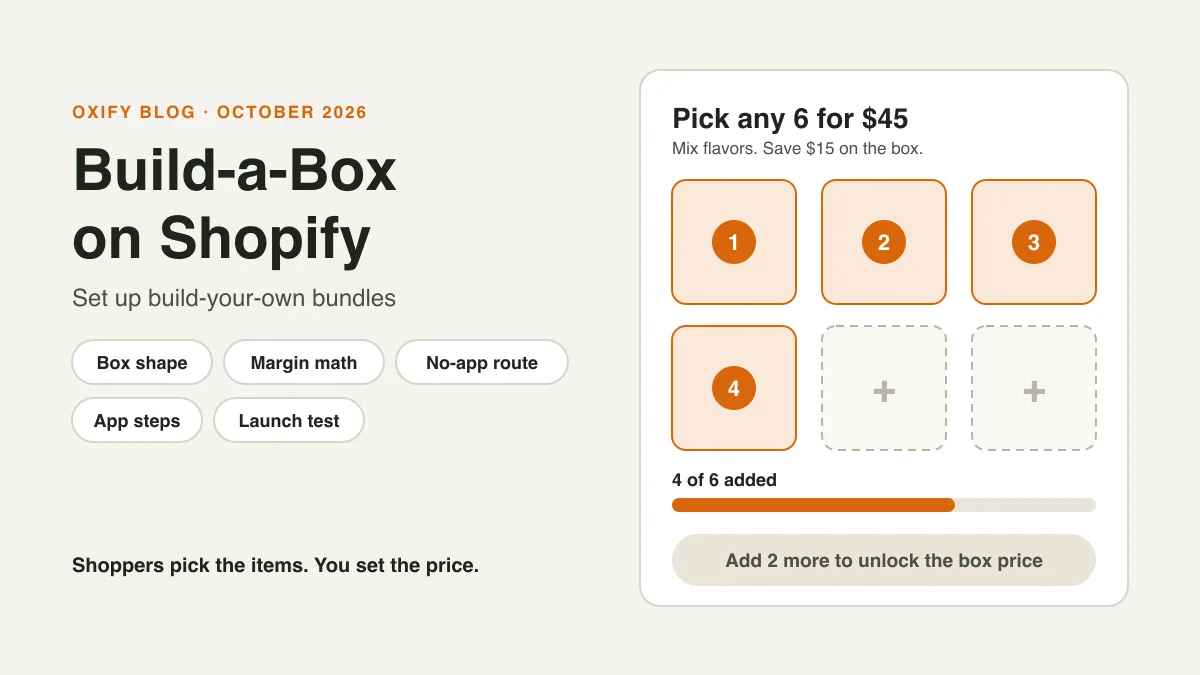
A build-a-box lets shoppers pick their own items for one box, then pay one box price. Think "pick any 6 for $45," or "the more you add, the more you save."
Shopify's free Bundles app can't build one. Shopify's help center says it doesn't support mix-and-match bundles. You can still get a box four ways: a discount on a collection, variants, custom code or a bundle-builder app. Only the last two give shoppers a real box page.
This guide compares all four. It shows how five live stores shape their boxes, then gives you the pricing math and a launch test. Black Friday is November 27, 2026, so there is time to build and test a box this week.
Jump to: 4 routes · what Shopify does alone · real stores · box shape · the math · pick items · route 1 · route 2 · route 3 · route 4 · launch test · myths · FAQ
Quick Answer (For Skim Readers)
- Does Shopify do it alone? No. The free Bundles app makes fixed bundles and multipacks only.
- No box page needed? Use a discount on a collection (route 1) or variants (route 2). Both are free.
- Box page with a progress bar? You need custom code (route 3) or a bundle-builder app (route 4).
- Shopify Plus: Shopify names it for custom builds with its Bundles APIs. The four routes here don't need it, but check each app's listing for plan limits.
- Pick the price shape by your prices. Items cost about the same: one fixed price. Prices differ a lot: a short saving ladder.
- Do the math first. A box can earn more per item than a single sale. But it only pays off if enough shoppers add items they wouldn't have bought.
- Before you launch: test on a phone and place one test order.
What I'd do first. I'm Aditya, co-founder of Oxify.
If I were adding a box to a store today, I'd pick the shape by price. Items at about the same price: one fixed-price box, like "any 6 for $45," drawn from 8 to 12 items. Mixed prices: a short ladder, like 3 items save 10% and 5 items save 15%.
Either way, I'd check my last 100 orders first. The box should be bigger than what people already buy.
The 4 Ways to Build a Box on Shopify
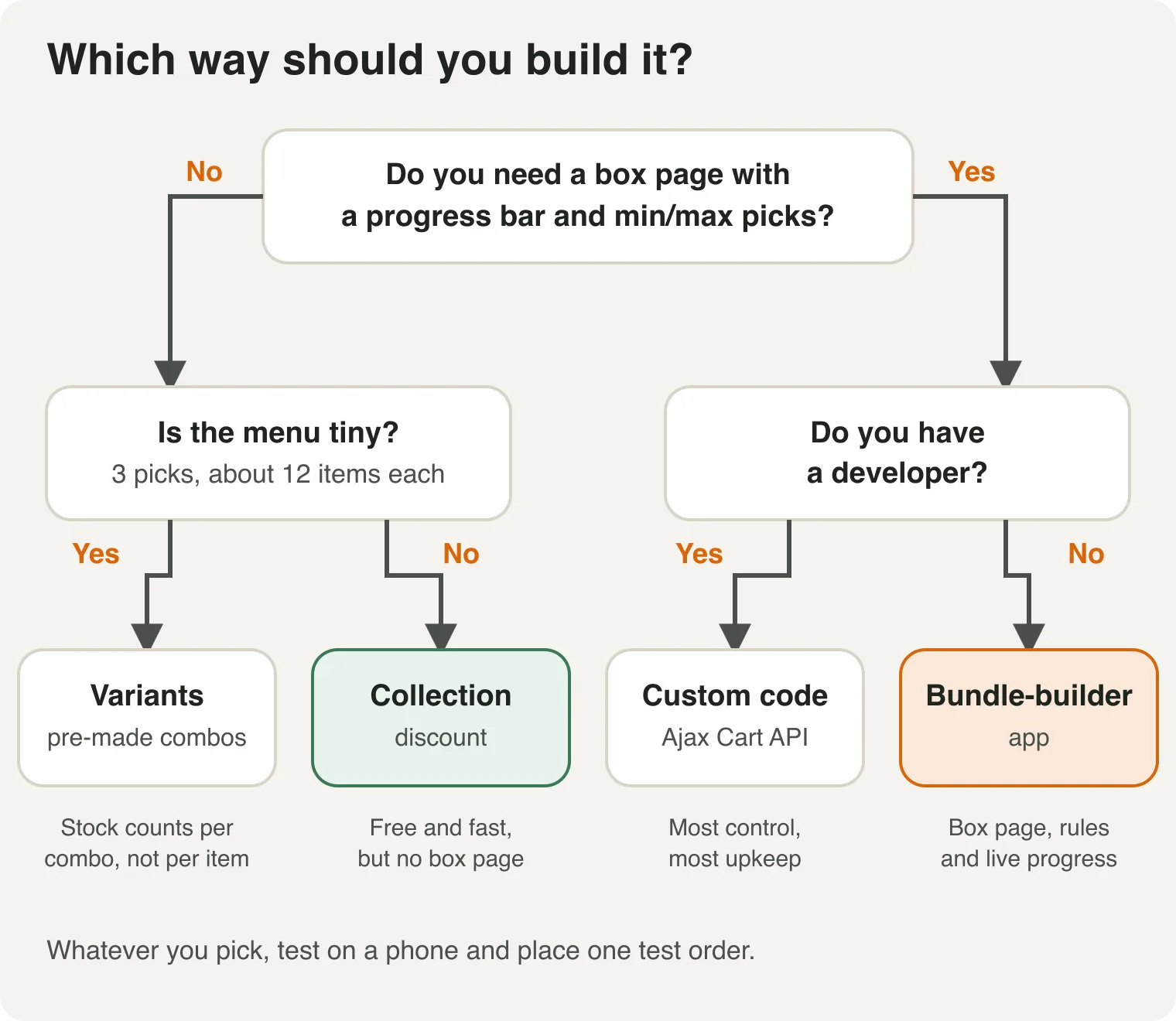
| Route | What shoppers get | The catch |
|---|---|---|
| 1. Discount on a collection | They add items from a collection page. The box price applies at the count. | No box page, no progress bar, no maximum |
| 2. Variants | One product with a dropdown for each pick | Up to 3 picks. Stock counts per combo, not per item. |
| 3. Custom code | A box page you design | Needs a developer, and the price needs a discount rule |
| 4. Bundle-builder app | A box page with min and max picks and live progress | A monthly fee. Check how it handles stock and subscriptions. |
What Is a Build-a-Box, and What Does Shopify Do Alone?
A build-a-box is also called BYOB, short for "build your own bundle." The shopper chooses the items. You set the rules: how many items, which products and what it costs.
Shopify's help center names three bundle types:
- Fixed: a set list of products. Shoppers can pick a variant, like a size.
- Multipack: more than one of the same product.
- Mix-and-match: shoppers choose from interchangeable products. This is the build-a-box.
Here is what the free tools cover:
| What you want | Free Shopify tools | What it takes |
|---|---|---|
| A fixed set or a multipack | Yes. The free Bundles app, on every plan | Nothing extra |
| "Pick any 6, save $15" on a collection | Yes, with an automatic discount | No box page, no progress bar |
| A box page with min and max picks and live progress | No | Custom code or a bundle-builder app |
| A box built your own way with Bundles APIs | Yes, on Shopify Plus | A developer |
This comes from two Shopify pages: eligibility and considerations for product bundles and Shopify Bundles, both read on October 30, 2026. For mix-and-match, Shopify points you to third-party bundle apps in its App Store. It says they include real-time stock syncing.
Why add a box at all? Shopify's bundle page lists these benefits: a higher average order value, curation, passing a discount to shoppers, clearing old stock and more visibility for products. A box also fixes a common gift-set problem. Nobody has to take the one item they don't want just to get the ones they do.
How Five Real Stores Shape Their Boxes
On October 30, 2026, we opened the live build-a-box pages of five Shopify stores. This is only what each page shows. We can't tell which app any of them uses.
- Fire Department Coffee: "Build your own 4-pack." A "Choose 4" counter fills as you add. Subscribe and save is offered on the same page.
- KraveBeauty: A saving ladder with marks at 5%, 10%, 15%, 20% and 25%. The page says, "The more you add, the more you save."
- Counter Culture Coffee: Coffee and merch in one bundle. The page says the more you bundle, the more you save, up to 25% off.
- Ouidad: Hair-care products in category tabs. Savings start when you bundle 3 or more.
- Lakanto: Two steps: "Pick your favorites," then "Save as you stock up." Subscribe and save is shown here too.
What stands out:
- Four of the five show a saving that grows, or starts, as shoppers add items. Only one sells a set count of 4.
- Two pages state a top saving of 25%. Fire Department Coffee's page advertised "up to 50%" off its 4-pack with subscribe and save, and 30% for a one-time purchase.
- Two of the five pair the box with subscribe and save: Fire Department Coffee and Lakanto. That matters, because Shopify says bundle products don't work with subscriptions. More on that in route 4.
Step 1: Pick Your Box Shape
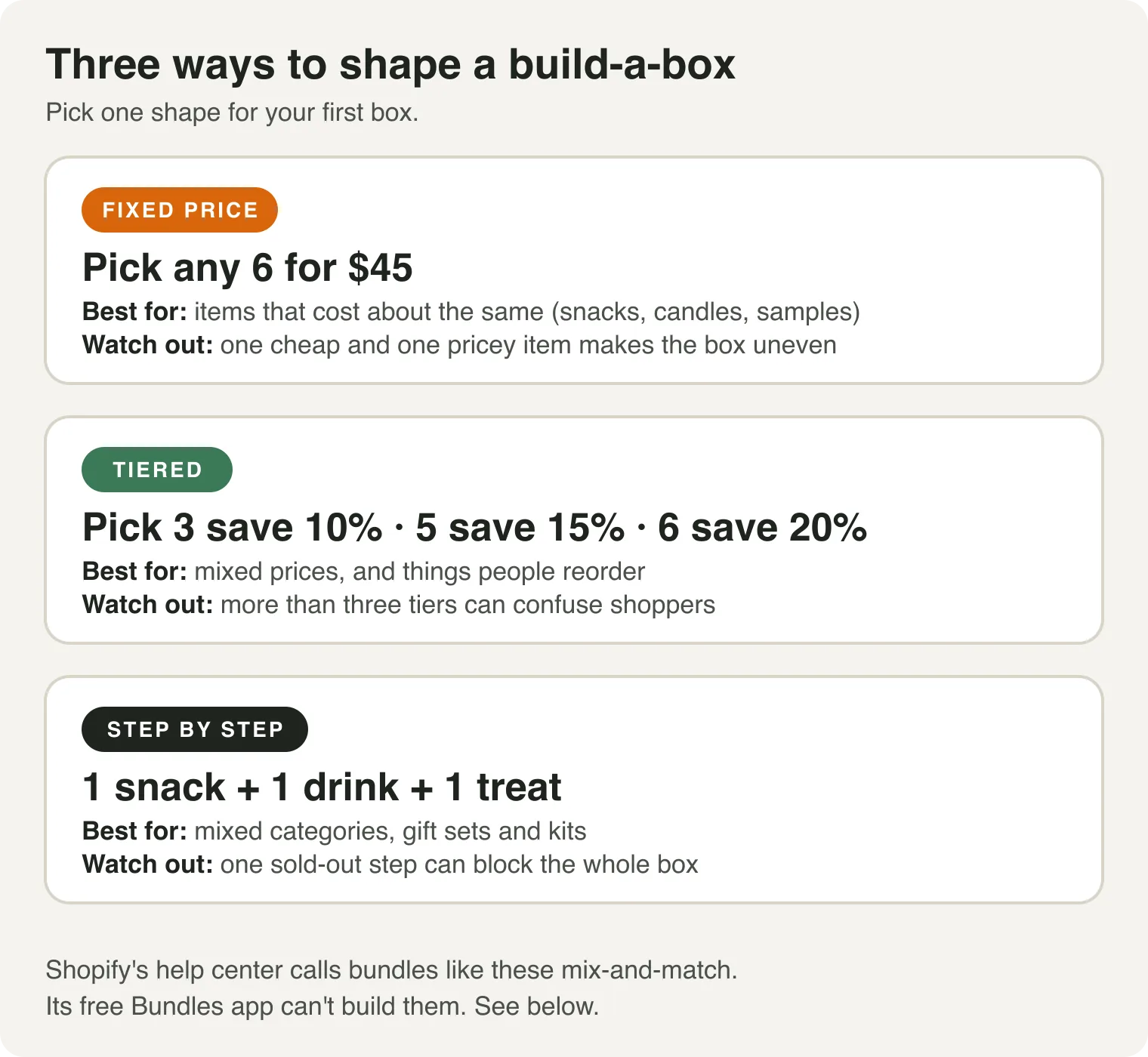
Choose by your price spread:
- Items cost about the same: a fixed price works. "Any 6 for $45" is easy to read and easy to price.
- Prices differ a lot: use a ladder. A flat price over a $10 item and a $60 item makes the box uneven. Keep it to three rungs. Our guide on how many tiers to use shows the spacing.
- Several groups: use steps, one pick from each group. This suits gift sets and kits.
How big should the box be? My rule of thumb is 3 to 6 items. This is practice, not a Shopify rule. A bigger box needs more choices, and more scrolling.
Step 2: Do the Math Before You Build
A box gives away part of your price. Make sure it pays for itself.
These are example numbers, not data. Each item sells for $20 and costs you $7. Payment fees are 3% of the order. Shipping and packing cost $8 per order. "You keep" is what is left after those costs, before ads and overhead.
| Order | You keep | Per item |
|---|---|---|
| 1 item at $20 | $4.40 | $4.40 |
| Box of 3 at $54 (10% off) | $23.38 | $7.79 |
| Box of 5 at $85 (15% off) | $39.45 | $7.89 |
| Box of 6 at $96 (20% off) | $43.12 | $7.19 |
Two things stand out:
- Boxes spread your fixed costs. Shipping and fees are paid once per order. Even the 20% box keeps more per item than a single sale.
- The discount can be wasted. It is wasted on shoppers who would have bought that many items anyway.
Here is the catch in numbers:
- A shopper who would have bought 2 items ($40) keeps you $16.80. They take the 3-item box ($54) and you keep $23.38. You gain $6.58.
- A shopper who would have bought 3 items anyway ($60) keeps you $29.20. They pay $54 and you keep $23.38. You lose $5.82.
Break-even: about 47 out of every 100 box buyers must be people who would have bought only 2 items. If fewer than that, the box costs you money. This is a simple case with two kinds of shopper. Real shoppers are mixed, so treat 47 as a rough guide.
How to guess your split: open your last 100 orders and count how many had 3 or more items. If many did, make your box bigger than that. For a ladder, run each rung through the same table. Real shipping goes up with weight, so use your own rates.
Want to try your own numbers? Use our free bundle calculator. For how deep to discount, read our bundle pricing guide.
Step 3: Choose the Items
The box is only as good as the items inside it. Make one collection just for it, like "Box picks." Then add or remove items there, not inside the offer.
- Keep prices close, if you use a fixed price.
- Keep weights close. Shipping is worked out from the items, so a heavy pick can change your costs.
- Use items you can restock. One sold-out favorite makes the whole box feel empty.
- Decide on variants. Do shoppers choose a size or flavor for each pick? If yes, check your tool can show it.
- Keep photos the same size. A uniform grid looks like one offer.
- Turn on stock tracking for every item in the pool.
Route 1: A Discount on a Collection (Free)
This route uses a native discount. Shoppers add items from your collection. Shopify gives the box price once they reach the count.
- In your admin, go to Products, then Collections. Make your "Box picks" collection.
- Go to Discounts and click Create discount. Choose Amount off products.
- Under Method, pick Automatic discount. Name it, like "Pick any 6."
- Set the value. A percentage works, like 15%. A fixed amount works too, like $15 off.
- Under Applies to, pick Specific collections and add "Box picks."
- For a fixed amount, check Only apply discount once per order. If you skip this, Shopify takes the amount off every eligible item.
- Under Minimum requirements, pick Minimum quantity of items and enter 6.
- Save. Test with 5 items, then 6.
Shopify says that when a discount applies to a collection, only items from that collection count toward the minimum. That is what makes "pick any 6 from this collection" work. It is on Shopify's amount-off discounts page.
A fixed price trick: if every item costs $10, then $15 off once per order makes any 6 cost $45.
What this route can't do
- No box page. Shoppers add items one by one from a normal collection page.
- No progress bar. Nothing says "add 2 more." You have to say it yourself, in a banner or the collection text.
- No maximum. With "once per order," a shopper who buys 12 gets the same $15 off, not $30.
- Ladders get messy. Each rung is its own discount. Test how they act together before launch. Our guide to tiered pricing on Shopify goes deeper.
- The saving shows late. Shoppers may only see it in the cart or at checkout.
This route is enough for a quick test, a small catalog or a store with items at one price.
Route 2: Variants (Free, for Tiny Menus)
Make one product, like "Build Your Own Tea Box." Give it one option for each pick: "Pick 1," "Pick 2," "Pick 3." Each option lists the flavors. Shopify makes a variant for every combination. You delete the ones you don't want and price the rest.
The limits are tight:
- Three picks at most. Shopify's help center says a product can have up to three options and up to 2,048 variants.
- About 12 choices per pick at most. Three picks with 12 choices each make 1,728 variants (12 × 12 × 12). With 13 choices you get 2,197, which is over the limit.
- Stock counts per combo. Each variant has its own stock number. Selling "Earl Grey + Mint + Chamomile" doesn't lower the stock of Earl Grey in your other combos.
- Same flavors, many variants. Shopify lists every order of the same three flavors as a separate variant, so you have to delete the repeats by hand.
- Some themes and apps stop at 100 variants. Shopify's help page warns about this, so test the dropdowns on your theme.
Use this only for a small, fixed menu. Past that, it takes more work than a discount or an app.
Route 3: Custom Code (Needs a Developer)
A developer builds a box page in your theme. Shoppers pick items, and the page adds them to the cart with Shopify's Ajax Cart API.
- The page lists your items and counts the picks.
- On "Add box to cart," it sends all picks at once to
/cart/add.js. Each one carries its variant ID, a quantity and a shared property, like_box_id. - A property name that starts with an underscore is private. Shoppers don't see it at checkout, but you see it on the order in your admin. Hiding it in the cart on your storefront takes a theme change. This is from Shopify's Ajax Cart API reference.
The catches:
- The cart shows separate lines. To merge them into one box line, Shopify's Cart Transform Function API can do it, but it runs through an app.
- It has rules. Shopify rejects those merge operations when a subscription plan is on the line. Its docs also list subscriptions, pre-orders and try-before-you-buy as unsupported. Changing a line's price, title or image is limited to development stores and Shopify Plus.
- The price needs a discount rule. Shopify's amount-off screen targets products or collections. A code-built box usually pairs with a collection discount (route 1) or a custom discount a developer builds.
- You own the upkeep. A theme update can break the page.
This route fits stores with a developer that want full control of the design.
Route 4: A Bundle-Builder App
An app gives you the box page, the rules and the live progress. The steps are close to the same in most apps:
- Pick the app. Check that build-a-box is on the plan you'll pay for, and that it has min and max picks. Look for variant choice if you need it. Also look for the Built for Shopify badge. Shopify's rule for App Store apps is that an app must not lower your storefront's Lighthouse score by more than 10 points.
- Install it and turn it on. Many apps work through an app embed in the theme editor. Oxify does. If the box doesn't show, this is the first place to look.
- Create a new offer and choose the build-your-own-box type.
- Pick the pool of items. Use your "Box picks" collection, or several collections, or a hand-picked list.
- Set the rules. Choose the min and max count. Then pick a fixed price or a ladder.
- Write what shoppers see. Name the box, write the button and write the progress message, like "Add 2 more to get the box price."
- Choose where it shows, then test it and publish.
Disclosure: Oxify makes Oxify Quantity Breaks & BYOB. Weigh our words with that in mind. Its page says the box builder can price a fixed or tiered box from any collection, with min and max counts and live progress as shoppers add. The pool can be one collection, several or a hand-picked list. For other apps, see our roundup of mix-and-match bundle apps and our buyer's guide.
Ask how the app builds the box
Apps build boxes in two ways. Some make a real Shopify bundle product. Others apply a discount to your normal products. The first kind follows Shopify's bundle rules. The second may not.
Oxify says its offers run as pricing rules over your normal products, with no duplicate items and no second stock count to keep in sync. Ask any app you try which way it works. It changes how stock, returns and subscriptions behave.
Here is what Shopify says about bundle products:
| Topic | What Shopify says | What to do |
|---|---|---|
| Stock | The item with the least stock sets how many bundles you can sell. Untracked items and "continue selling" items are ignored. | Track stock on every item. |
| Shipping | A bundle has no shipping profile of its own. Rates come from each item. | Test a full box in your cart for each zone. |
| Returns | You can't mark a bundle as final sale. Each item follows its own rule. | Set final sale on the items. |
| Subscriptions | Not compatible with subscriptions, pre-orders or try-before-you-buy. Not compatible with the Shopify Subscriptions app. | Test with your own subscription app first. |
| Exchanges | Bundles can't be used in exchanges. A bundle can't hold another bundle. | Plan to handle exchanges by hand. |
These come from the eligibility page and are about bundle products. An app that only discounts normal items may behave differently. That is why you ask.
Where to show the box
- On the product pages of the items inside it. Shoppers already like these items.
- On the collection page. A banner with the offer works well.
- In your menu, as "Build your box." This gives the offer a home beyond product pages.
- In the cart, as a nudge to reach the count.
Pick two spots, not five. Our product page checklist covers the page itself.
Test It Before You Launch
Do this on a phone, not just on your computer:
- Add one item fewer than the box needs. Check that no box price shows.
- Add the last item. Check that the box price shows.
- Change a variant inside the box.
- Try your best discount code with the box.
- Run the cart through checkout and check the shipping rate.
- Place a test order, or a small real one you refund. Check the order in your admin.
If something looks wrong, start here:
| What you see | Likely cause | Fix |
|---|---|---|
| The box price doesn't apply | An item is outside the collection, or the count is off | Check the collection and the minimum. |
| The box doesn't show on the page | The app embed is off, often after a theme change | Turn on the app embed, then test again. |
| A code and the box both apply | The discount combination settings allow it | Set the combinations on the discount, then test. |
| The shipping rate is wrong | Rates come from each item's weight and profile | Test a full box in your cart for each zone. |
| An item sells out mid-box | Stock tracking is off, or the item is still in the pool | Turn on tracking. Remove sold-out items. |
| The page feels slow | A second app or big images | Run PageSpeed Insights before and after. |
Already have an app that clashes with your theme? See our guide on bundle app and theme compatibility.
How to Tell If the Box Is Working
Compare two to four weeks before and after. Change one thing at a time. Watch these:
- Box take rate: box orders ÷ all orders.
- Items per order and average order value: they should both go up.
- Profit per order, not just sales. Use the math from Step 2.
- Revenue per visitor: total sales ÷ visitors. This is the judge. If it rises, keep the box.
- Returns on box orders. A box that comes back is not a win.
Also watch your checkout rate. If it falls after you add the box, the box may be in the way. Our guide to measuring upsell performance shows how.
5 Things You May Read That Aren't Quite Right
Guides and AI answers repeat these. Here is what Shopify's own pages say, read on October 30, 2026.
| You may read | What's true |
|---|---|
| "Shopify's free Bundles app can build mix-and-match boxes." | Shopify says it doesn't. It makes fixed bundles and multipacks. |
| "Shopify caps a product at 100 variants." | Products can have up to 2,048 variants and 3 options. The 100-variant cap is the Bundles app's limit. |
| "You can't build a box without an app." | You can, in limited ways: a collection discount, variants or custom code. A real box page needs code or an app. |
| "You need Shopify Plus." | Shopify names Plus for custom builds with Bundles APIs. Apps and the free routes don't need it, but check each app's listing. |
| "Any bundle app works with subscriptions." | Shopify says bundle products don't work with subscriptions, pre-orders or try-before-you-buy. Ask each app. |
What One Oxify Merchant Said About Setup
On the Oxify Quantity Breaks & BYOB reviews page, a US store called Snuggle and Hush wrote in August 2026 that they designed their bundle builder quickly, with help from the Oxify team.
That matches the pattern on the page. Most of the 10 reviews on its first page mention easy setup or helpful support.
One store in India wrote in September 2025 that its average order value rose 25%. It didn't say which offer caused it, and it is a self-reported number. Treat it as one data point, not a benchmark. The listing showed 4.9 stars from 13 reviews on October 30, 2026.
6 Mistakes to Skip
- A box smaller than your usual basket. You give away discount for nothing.
- Too many choices. A pool of 12 is easier than a pool of 80.
- Hiding the deal. If shoppers don't know the box exists, they can't build one.
- Stacking it with a sale. Two discounts on the same item can sink your margin. Set the combinations on purpose.
- Testing only on a laptop. Many shoppers use phones, and a builder can look cramped on a small screen.
- Launching untested in a sale. Fix the box first, then run it. Our Black Friday bundle playbook has a week-by-week calendar.
Not sure if a box beats a "bought together" block? Read frequently bought together vs bundles.
Frequently Asked Questions
What is a build-a-box on Shopify?
Does Shopify have a build-a-box feature?
Can I build a box on Shopify without an app?
How do I create my own bundle on Shopify?
What is the best bundle app for Shopify?
Do I need Shopify Plus for a build-a-box?
How many items should a box hold?
How much discount should a box give?
Will a build-a-box work with subscriptions?
How does stock work in a box?
Will a build-a-box slow down my store?
How long does setup take?
Ready to Build Your Box?
Price the box first with our free bundle calculator. Then pick your route.
If you want the box page with live progress, try Oxify Quantity Breaks & BYOB. It had a 4.9 rating from 13 reviews and the Built for Shopify badge on October 30, 2026.
See Oxify Quantity Breaks & BYOB on the Shopify App Store and check its current plan before you install.