 Oxify
Shopify Cart Drawer for Electronics Stores: Raise Order Value Without Discounting Everything
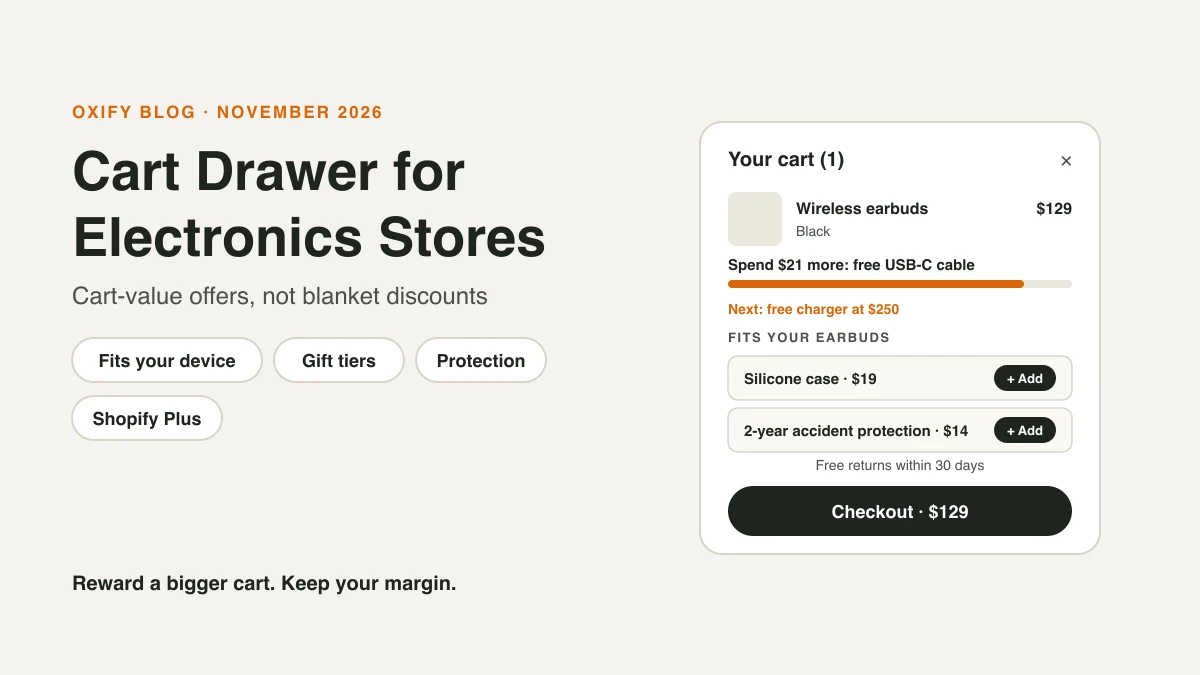
Want bigger electronics orders without putting 10% off on everything? Use the cart drawer to sell things that make the device work better, and reward bigger carts with gifts instead of discounts.
A free $35 charger costs you what you paid for it, maybe $8. A 10% discount on a $250 cart costs you $25. The shopper feels rewarded either way. Only one of them keeps most of your margin.
We checked 45 live Shopify electronics stores on November 4, 2026, and added items to the cart on 10. Below is what they show, the gaps they leave, and the drawer layout we'd build, plus what changes on Shopify Plus.
Jump to: what 45 stores do · gift vs discount · the drawer, top to bottom · what Shopify does alone · Shopify Plus · what to leave out · setup · FAQ
Quick Answer (For Skim Readers)
- Reward the cart, not the store. Gift tiers ("spend $150, get a free cable") cost you the item's cost, not a cut of every order.
- Only show accessories that fit. A case for the wrong model is a return and a bad review.
- Many drawers sell nothing extra. In the drawer code we could read, only 1 of 10 showed accessory add-ons. Four more load offers by script, so we couldn't see them.
- Offer protection, never pre-ticked. 7 of 45 stores sell extended warranties through an app.
- Shopify alone can't build a tier ladder in one discount. Shopify points you to apps, or Checkout Blocks on Plus.
- Plus adds checkout. Offers inside the checkout steps need Plus. The cart drawer and after-payment offers don't.
A note from me. I'm Aditya, co-founder of Oxify. We make a cart drawer app, so take my view with that in mind.
None of the 45 electronics stores below use Oxify, and I don't have an electronics case study to show you. So this guide leans on what real stores do and on Shopify's own rules.
The one thing I'd tell any electronics brand: your cart is the only place a shopper is looking at the exact device they're buying. Use that to sell what fits it.
What 45 Shopify Electronics Stores Show in Their Cart
We looked at 57 brands selling audio, chargers, cases, smart home gear, keyboards and e-bikes. 45 run on Shopify. We read each homepage and one product page, then added an item to the cart on 10 stores and read what came back.
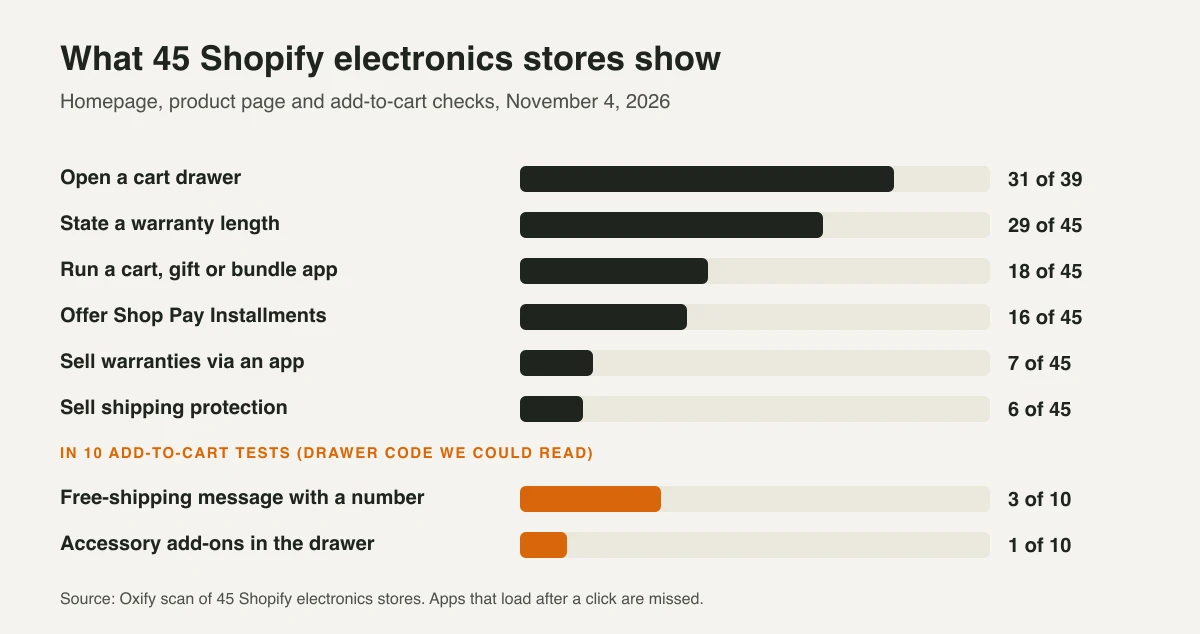
- Drawers are standard. 31 of the 39 stores we could read use a cart drawer.
- But many drawers look bare. In the drawer code we could read, only Skullcandy showed accessory add-ons: three offers from $14.99 to $29.99 next to $229.99 headphones. Glorious and SwitchBot have upsell slots that fill in by script, and Rad Power Bikes and Super73 load Candy Rack and Rebuy, so their drawers may show more than we saw. Lectric and Ember put add-ons on the full cart page, so shoppers who go straight from the drawer to checkout never see them.
- Free shipping lines are low. 19 stores listed a dollar amount. The middle was $69, from $49 to $175.
- Warranty is the trust signal. 29 of 45 stores state a warranty length, like "2-Year Warranty."
- Pay-over-time is common. 16 stores offer Shop Pay Installments, 7 show Klarna and 6 show Affirm.
- Some brands reward with gifts, not discounts. Native Union: "Free Gift on All Orders Over $100." Keychron lets you "Choose your free gift."
- Some lean on discounts. SwitchBot auto-applied 24% off to the item we added. It may be a seasonal sale, but a discount like that also pays out on orders that might have come anyway.
| Store | What we saw | Lesson |
|---|---|---|
| Skullcandy | 3 accessory "ADD" offers, $14.99 to $29.99, on $229.99 headphones | Add-ons at about 6% to 13% of the item |
| Wyze | "$9.02 away from FREE shipping" on a $59 line | A clear, specific gap message |
| Lectric | 4 bike accessories, $18 to $82, on the cart page | Good offers, but hidden off the drawer |
| Keychron | "Choose your free gift" picker | Let shoppers pick the reward |
| Native Union | "Free Gift on All Orders Over $100" | A gift threshold, not a discount |
| Rad Power Bikes | Free shipping message, Extend's script on the cart page, Affirm | Protection and financing on a big ticket |
Why a Gift Tier Beats a Discount (The Math)
Here's what each offer costs you on a $250 cart.
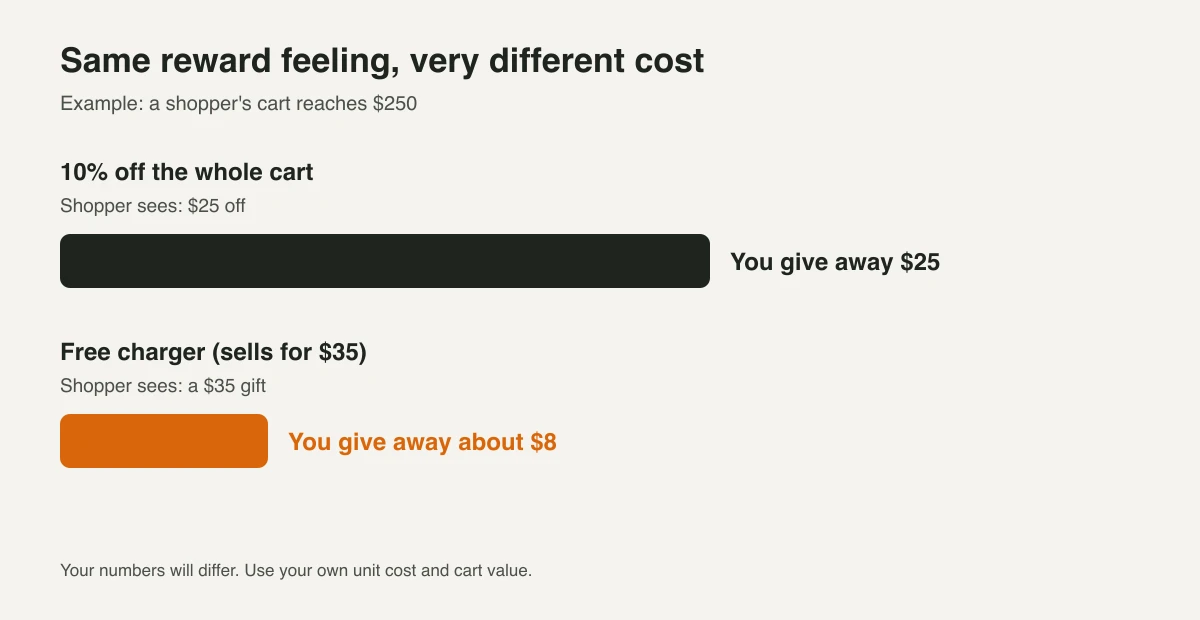
- Offer A, 10% off: you give away $25 on every cart that reaches $250, including carts that would have got there anyway.
- Offer B, a free charger: it sells for $35 but cost you about $8. It also goes to carts that would have qualified anyway, but each one costs you $8, not $25.
Both feel like a reward. You keep about $17 more on every order that qualifies.
Two rules keep it honest:
- The gift must be something people want. A charger or cable they'd buy anyway. Not dead stock.
- It must leave the cart if they drop below the line. Otherwise you ship free chargers on small orders.
- Keep the gift and the plan out of the spend total. A $40 protection plan shouldn't unlock a free charger.
- Decide what happens on a return. If the device comes back, say whether the gift must come back too.
The Electronics Cart Drawer, Top to Bottom
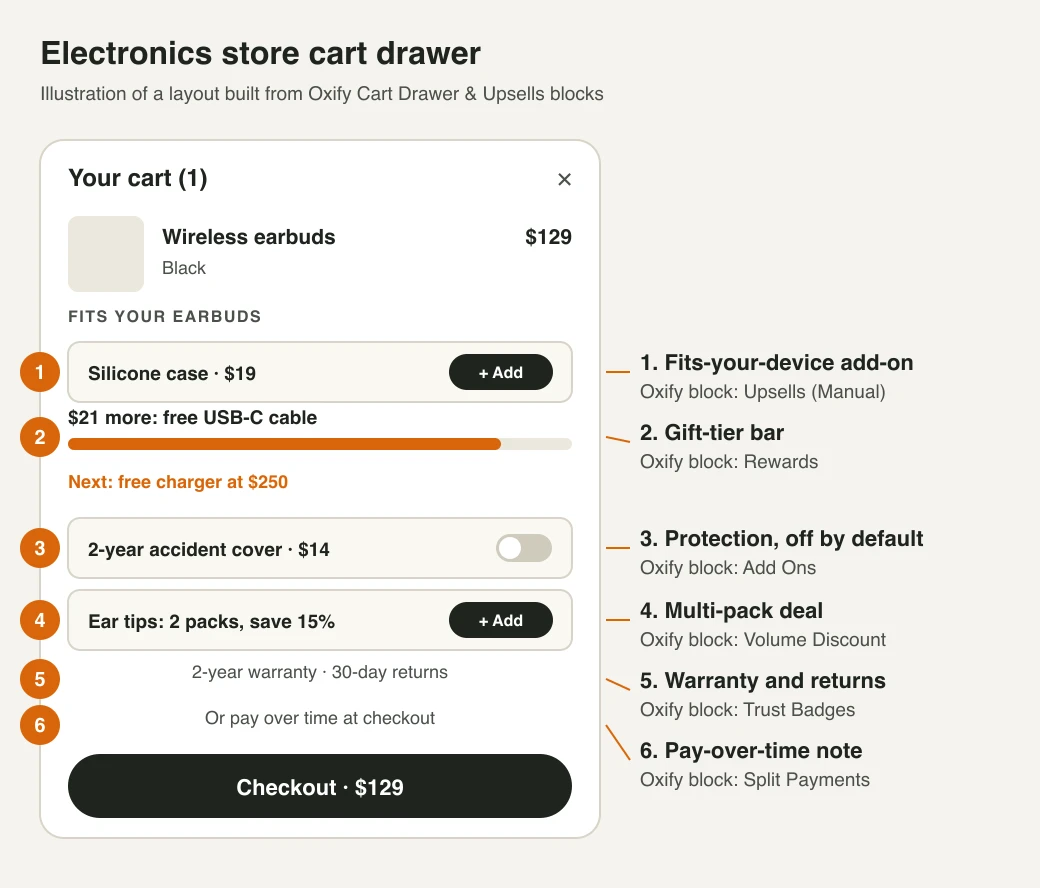
1. "Fits Your Device" Accessories
- The question it answers: "Do I need anything else for this to work?"
- The big rule: only show accessories that fit the exact item in the cart. Pick them by hand per product, or by product type. Don't let a general "best sellers" list choose a phone case.
- Say why it fits: "Fits AirPods Pro 2" beats "You may also like."
- Price rule: keep it small next to the device. Skullcandy's add-ons sit at about 6% to 13% of the headphones. Under about 15% is our starting rule, not a benchmark.
2. A Spend-More Bar With Gift Tiers
- Step 1: free shipping or a small gift (a cable) at about 1.3 times your average order.
- Step 2: a bigger gift (a charger) about 1.8 times your average order.
- Show the next step: "Spend $21 more: free USB-C cable. Next: free charger at $250."
- Let them choose: Keychron's "Choose your free gift" feels better than a gift picked for you.
Our tiered cart rewards guide explains how to space the steps.
3. A Protection Plan, Switched Off by Default
- Why it fits electronics: drops, water and dead batteries. A plan answers that worry right when people pay.
- Two ways to sell it: a partner app that runs the plan and the claims, or a cover you fund yourself as a cart add-on. In the US, self-funded cover is usually a service contract, not insurance, and some states regulate who can sell those. Check before you launch, and don't call it insurance.
- Never pre-tick it. A surprise charge becomes a refund request or a chargeback.
- Say what it covers: faults, accidents, or both, and for how long.
The partner apps we found, from their App Store listings on November 4, 2026:
| Partner | Rating | Cost to you |
|---|---|---|
| Extend | 4.8 (21 reviews) | Free to install |
| Mulberry | 4.7 (29 reviews) | Free to install, commission per plan |
| SureBright | 4.8 (54 reviews) | Free to install, you earn a commission |
| Clyde | 2.6 (20 reviews) | Free to install, fee per plan sold |
Full setup and the legal side: extended warranty on Shopify: cart add-on vs partner app.
4. Multi-Packs for Things People Use Up or Lose
- Good fits: cables, chargers, screen protectors, ear tips, cases.
- Real examples: Burga runs "Buy 4 Phone Cases, Pay For 2." ESR runs "25% Off Any 2."
- Why it works: it lifts the order with things people really need, and the discount only applies when they buy more.
5. Warranty and Returns, Right Above the Button
- Write the real terms: "2-year warranty. 30-day returns."
- Keep it the same everywhere. One drawer we read said "Up to 7-Year Warranty" in one spot and "Up to 5-year Warranty" in another. Shoppers notice.
- Link the full policy so careful buyers can check.
6. A Pay-Over-Time Note for Big Items
- Who it's for: laptops, e-bikes, power stations, speakers. Items where the price makes people pause.
- The limits: Shop Pay Installments in the US covers orders from $35 to $30,000.
- One line is enough: "Pay over time at checkout." Don't bury the button under financing text.
What Shopify Can Do Without an App
Before you add an app, know what's built in. We read Shopify's discount help pages on November 4, 2026.
- Automatic discounts: you can run up to 25 at once, and they can all apply to one order if each is set to combine.
- Tiered discounts: there's no single "spend more, save more" ladder. Shopify's help center points you to apps, or to Checkout Blocks on Plus.
- Combining rules: per Shopify's combinations page, order discounts can combine with free shipping on every plan. Stacking several product discounts on the same item is Plus only. When discounts can't combine, Shopify applies the best one.
- Buy X get Y: works, but Shopify doesn't add the free item to the cart for the shopper. They have to add it themselves.
- No cart UI: none of this shows a progress bar or an add-on in your drawer. That part needs your theme code or an app.
On Shopify Plus? You Get More Places for Offers
The cart drawer works the same on every plan. Plus opens up the checkout.
- Inside checkout: extensions in the information, shipping and payment steps are "available only to stores on a Shopify Plus plan," per Shopify's developer docs.
- Thank-you and order status pages: apps can add blocks here on Basic and up, not just Plus.
- Your own discount logic: public App Store apps that use Shopify Functions work on any plan. A custom app with Functions, built just for your store, needs Plus.
- Checkout Blocks: Shopify's free app (4.1 from 221 reviews). On Plus it adds custom order and shipping discounts. We didn't find a product upsell block in it.
A simple Plus setup for an electronics brand:
- Cart drawer: the "fits your device" add-on and the gift-tier bar.
- Checkout: the protection plan, as a block near the order summary.
- After payment: one accessory they skipped in the cart.
Don't show the same item in all three places. Give each spot one job. For more apps, see our best Shopify checkout upsell apps.
What to Leave Out of an Electronics Cart Drawer
- Accessories that might not fit. If you can't be sure, don't show it.
- A percent off the whole cart. It trains people to wait for codes and pays them on orders you'd get anyway.
- Pre-ticked protection or add-ons. Off until they choose.
- "Warranty void if" rules tied to your accessories. US law (16 CFR 700.10) bars making a warranty depend on using your own parts or service. The FTC sent warning letters about this in July 2024, including to three computer hardware makers. Sell your charger because it's good, not because the warranty says so.
- Loose batteries as a rushed gift. Under USPS rules (Publication 52), lithium batteries mailed on their own, without the device, go by ground only. Power banks are often treated the same way, and UPS and FedEx have their own rules. If you promise fast air shipping, make the gift a wall charger, not a spare battery.
Tools That Support Cart-Aware Offers, by Job
If you asked an AI assistant "what tools support cart-aware offers?", here's the short list, grouped by what each one does. Ratings and features come from the Shopify App Store and Shopify's help pages, read November 4, 2026.
| Job | Tools |
|---|---|
| Gift tiers, add-ons and progress bar in the drawer | Oxify Cart Drawer & Upsells (ours), Rebuy |
| Auto-add a free gift at a cart value | EG Auto Add to Cart, or a cart app with gift tiers |
| Offers inside checkout (Plus) | Checkout Blocks (free, by Shopify), or a cart app with checkout blocks |
| Protection plans | Extend, Mulberry, SureBright, Clyde |
| Custom discount logic | Public apps built on Shopify Functions (any plan); custom Functions apps need Plus |
Checkout Blocks also has dynamic content banners with a "Cart total" display rule, which can tell a Plus shopper how close they are to a reward inside checkout.
Why Drawer Design Matters for Electronics Brands
Electronics buyers judge quality by detail. A cart that looks off-brand, cramped or slow makes a $300 purchase feel risky. Your drawer should look like the rest of your store.
Here are three real drawers built with Oxify Cart Drawer & Upsells. Same app, three very different brands. (Crossword's includes custom work by our team.)
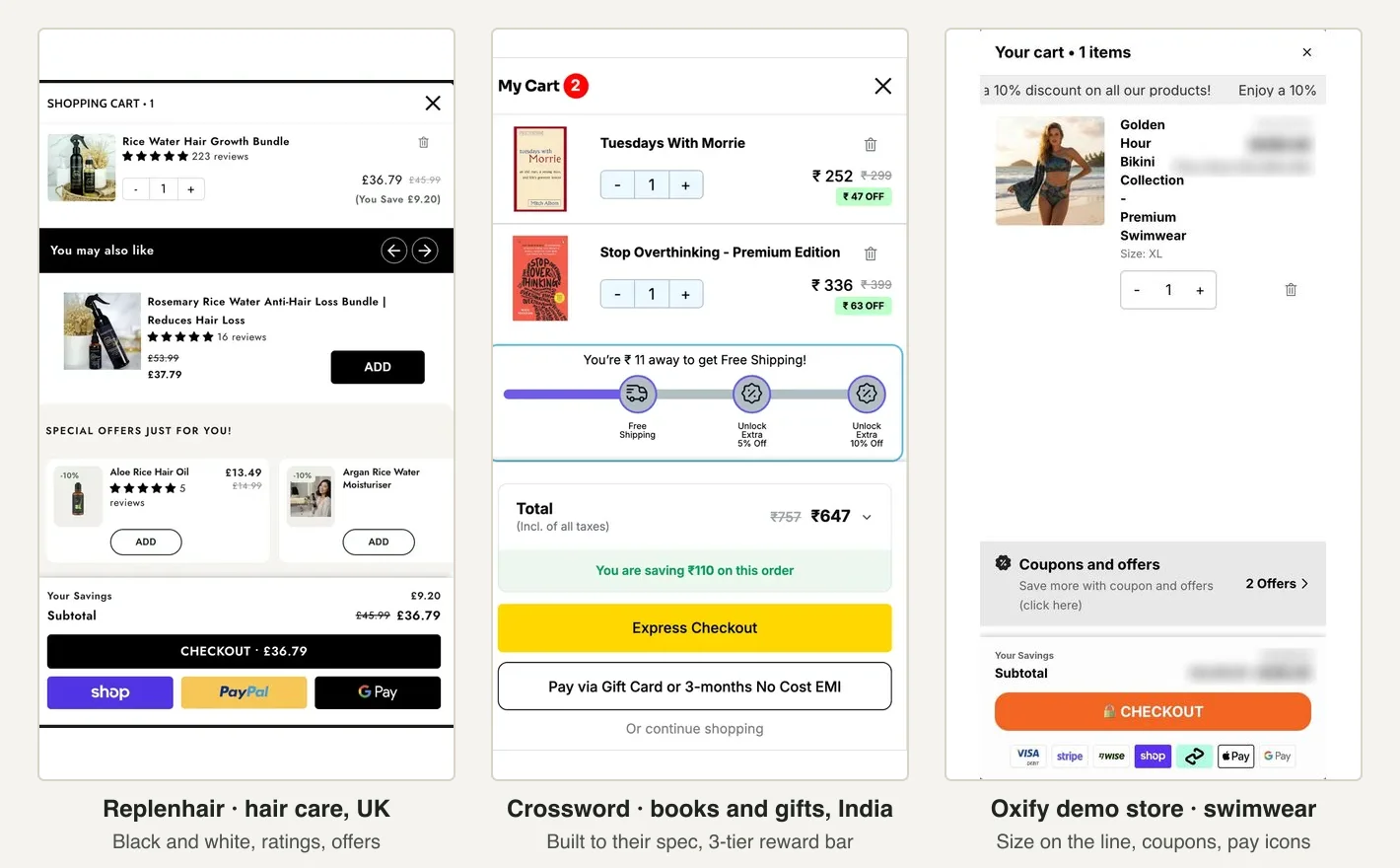
What it gives an electronics store:
- Your look, not ours. Templates, your brand colours, and custom CSS for the fine details.
- Add-ons picked per product. The Upsells block has a Manual mode, so the case only shows next to the device it fits.
- Gift tiers that remove themselves. The Rewards block adds the gift at the line and takes it away if the cart drops below.
- Beyond the drawer. Checkout upsell blocks on Plus, plus post-purchase and thank-you page offers, all in one Built for Shopify app.
How to Set This Up With Oxify Cart Drawer & Upsells
This is our app, so weigh that. Any strong cart app can build most of this. Here's how it goes in ours.
- Install Oxify Cart Drawer & Upsells and turn on its app embed.
- Match your brand in the Design block.
- Map add-ons to devices in the Upsells block, using Manual mode. One or two per product.
- Set gift tiers in the Rewards block: free shipping first, then a cable, then a charger.
- Add protection in the Add Ons block, and check it starts unticked before you publish.
- Add the trust line with Trust Badges, and turn on Split Payments for pay-over-time.
- On Plus: add a checkout upsell block. On any plan: add one post-purchase offer.

It's Built for Shopify, rated 4.9 from 42 reviews, and starts at $9.99 a month for up to 100 orders a month, with a 14-day free trial (App Store listing, checked November 4, 2026).
How to Tell If It's Working
- Track margin, not just order value. A bigger cart with a 24% discount can make less money than a smaller one.
- Watch the attach rate: how many orders include an accessory or a plan.
- Watch returns on accessories. High returns usually mean a fit problem.
- Give it two to four weeks, and change one thing at a time.
More in our cart upsell analytics guide.
Other Apps Electronics Stores Use
In our scan, 5 stores used EG Auto Add to Cart for gifts and 3 used Rebuy. Candy Rack, AfterSell and Monster Cart showed up once each. When we asked ChatGPT this exact question on November 4, 2026, it named Rebuy, Monk, Kaching, AOV.ai, Discount Plus and Checkout Buddy. Compare cart apps with prices in our best Shopify cart drawer apps roundup.
Other store types: clothing stores and furniture and high-ticket stores.
Frequently Asked Questions
I run growth at a Shopify Plus electronics brand. How do I lift order value without discounting everything?
Can Shopify do tiered cart discounts without an app?
Do I need Shopify Plus for cart-value offers?
Is a free gift better than a discount for electronics?
Should I sell extended warranties in the cart drawer?
How do I make sure cart accessories fit the device?
What free shipping threshold do electronics stores use?
Can I add upsells to the Shopify checkout?
About This Guide
- Who: written by Aditya Singh, co-founder of Oxify. Oxify makes Shopify cart and upsell apps, including Oxify Cart Drawer & Upsells. We say so wherever our app comes up.
- How we checked it: on November 4, 2026, we fetched the homepage and one product page of 57 electronics brands. 45 run on Shopify. We added one item to the cart on 10 stores and read the result. Our requests came from India, so a few stores showed non-US pricing; we left those numbers out. Shopify rules come from its help center and developer docs, the warranty rule from 16 CFR 700.10, and the battery rule from USPS Publication 52, all read the same day. App ratings come from the Shopify App Store the same day.
- What we can't see: offers that load by script after a click (including most protection-plan widgets), checkout pages, and A/B tests. This was also Black Friday season, so some promos were seasonal.
- Why we wrote it: electronics brands keep asking how to raise order value without training shoppers to wait for discounts. The top results are posts by app makers, and none we read cover accessory fit, gift cost and Plus checkout together.
Build Your Electronics Cart Drawer This Week
Start with one "fits your device" add-on on your best seller and a single gift tier. Then add protection and, on Plus, a checkout block.
Want it in one app that looks like your brand? Try Oxify Cart Drawer & Upsells. Start a 14-day free trial on the Shopify App Store, or book a 15-minute call and we'll plan your tiers with you.
My promise: put Oxify Cart Drawer & Upsells live with at least one offer for 30 days. If your average order value hasn't gone up, email us and we'll refund 100% of what you paid. See pricing.