 Oxify
Shopify Cart Drawer for Clothing Stores: What to Put In It (45 Stores Checked)
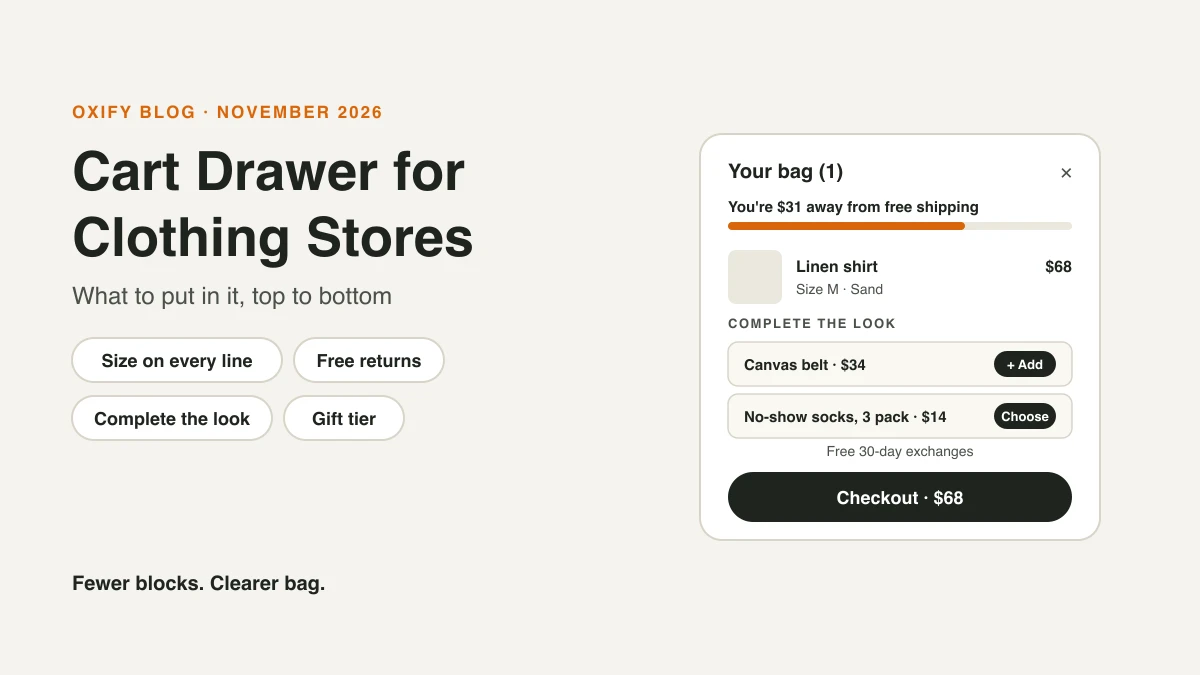
A clothing store's cart drawer has one job: get the shopper from "I like this" to "I'm paying" without a last-second worry about size, cost or returns.
So it should show five things. How far they are from free shipping. The size and colour of every item. One or two small add-ons that match. Your returns promise. And a clear checkout button. Everything else is optional.
We didn't guess at this. On November 4, 2026, we checked 45 live Shopify clothing stores and added items to the cart on 10 of them to see what their drawers really show. Here's what they do, what they miss, and the layout we'd build.
Jump to: what 45 stores do · the drawer, top to bottom · the size trap · what to leave out · low stock + offers · design · setup · FAQ
Quick Answer (For Skim Readers)
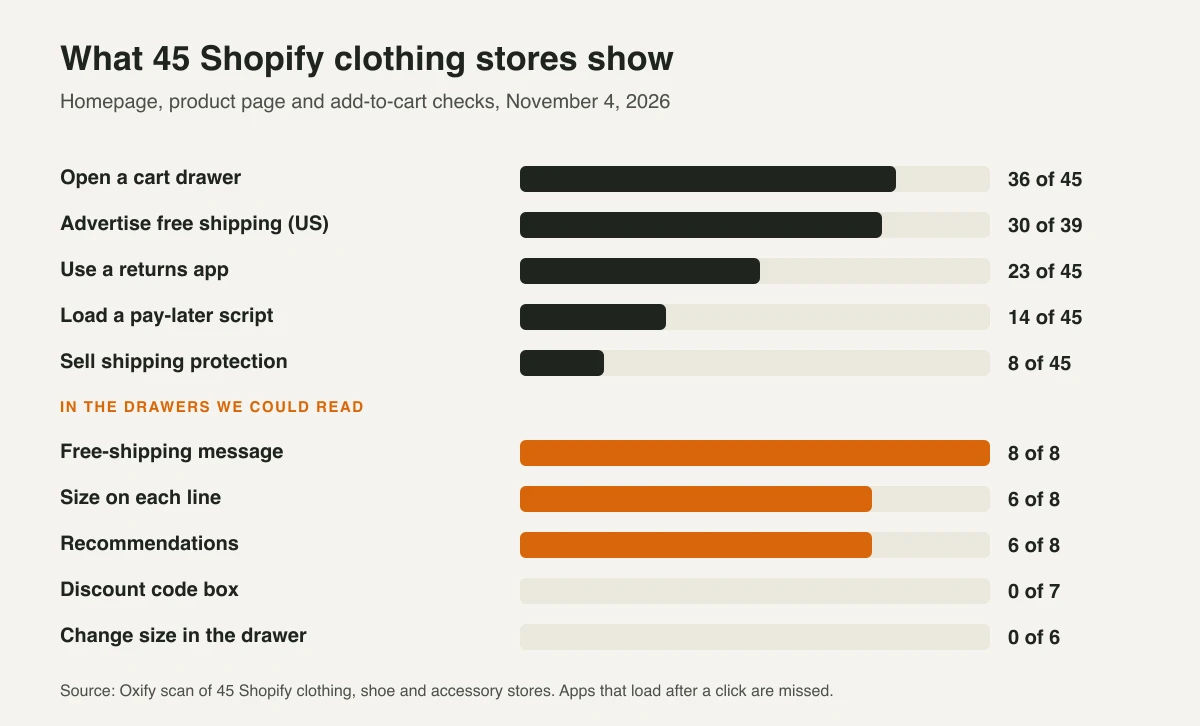
- Use a drawer. 36 of the 45 clothing stores we checked open a cart drawer. We couldn't tell what the other 9 use.
- Put a free-shipping line at the top. 30 of 39 US stores advertise free shipping. The middle threshold was $99, with most at $75, $100 or $150.
- Show size and colour on every line. 6 of the 8 drawers we read showed the size. A wrong size is a return.
- Add one or two matching add-ons. Pick one-size items (hats, jewellery, sock packs) or give sized add-ons a size picker.
- Say your returns promise above the button. The NRF estimated 19.3% of 2025 online sales would be returned. Shoppers want to know it's safe to try.
- Add the step most stores skip: a discount code box. None of the drawers we read showed one.
- Keep low-stock badges honest. The FTC lists fake "low stock" messages as a dark pattern.
A note from me. I'm Aditya, co-founder of Oxify. We make a Shopify cart drawer app, so I look at a lot of carts.
A UK menswear store, boxmenswear, left this review on our app in July 2026: "Much better than native Shopify carts and has helped increase revenue."
Below is what 45 other clothing brands do in their carts. None of them use Oxify, so this isn't a list of our customers. It's what's common. We didn't measure their sales.
What 45 Shopify Clothing Stores Put in Their Cart
We looked at 52 fashion, shoe and accessory brands. 46 run on Shopify, and 45 loaded for us. We read their homepage and one product page. Then we added one item to the cart on 10 stores with a drawer and read what the drawer showed. 8 of those drawers were readable.
What stood out:
- Drawers win. 36 of 45 stores use a cart drawer. We couldn't identify the cart type on the other 9.
- Free shipping is the top message. All 8 readable drawers showed a free-shipping line, like Kittenish's "Spend $5 more and get free shipping!"
- Returns are a big deal. 23 of 45 stores use a returns app (Redo 12, Loop 9, Happy Returns 4). Brands invest in returns because shoppers worry about fit.
- Recommendations are common. 6 of 8 drawers showed add-ons. The best ones matched the item, like Lisa Says Gah's "Complete Your Look" jewellery next to a sweater.
- Nobody lets you change size in the drawer. None of the 6 drawers we could fully read. Jenni Kayne has an "Edit" link on its full cart page instead.
- Nobody showed a discount code box in the drawer. None of the 7 we could check. Shoppers with a creator code have to wait until checkout to see it work.
- Low stock lives on product pages. 6 of 45 stores show text like "Only 6 left in stock" or "Almost Gone" there. None of the 8 drawers repeated it.
Here's what the readable drawers showed:
| Store | Free-shipping line | Other blocks in the drawer |
|---|---|---|
| Birdies | Free shipping on all orders | "Size 6" on the line, drink charms add-on ($35), "30-Day Guarantee · Complimentary Returns" |
| Kittenish | "Spend $5 more and get free shipping!" | Order note, shipping estimate |
| Lisa Says Gah | "$50 away from free shipping!" | Colour and size on the line, "Complete Your Look" earrings and necklaces ($38.50 to $65) |
| Vessi | "All offers unlocked" | 50%-off gloves with an S to XL picker, "Spend $20 more to unlock a $25 Gift Certificate", "Free 30-day exchanges" |
| Princess Polly | "$11.00 away from free US shipping" with a bar | Size and colour, $1 donation add-on, Afterpay message |
| Outdoor Voices | Free shipping over $100 | Socks ($8.99) with S/M and L/XL buttons, a one-size hat ($19.99) |
| Naadam | Free shipping over $175 | Klarna message on the cart total, "You may also like" |
| Jenni Kayne | "You qualify for free shipping!" | "Our picks for you" |
The Clothing Cart Drawer, Top to Bottom
Here's the order we'd build. Each block answers one question a shopper has right before they pay.
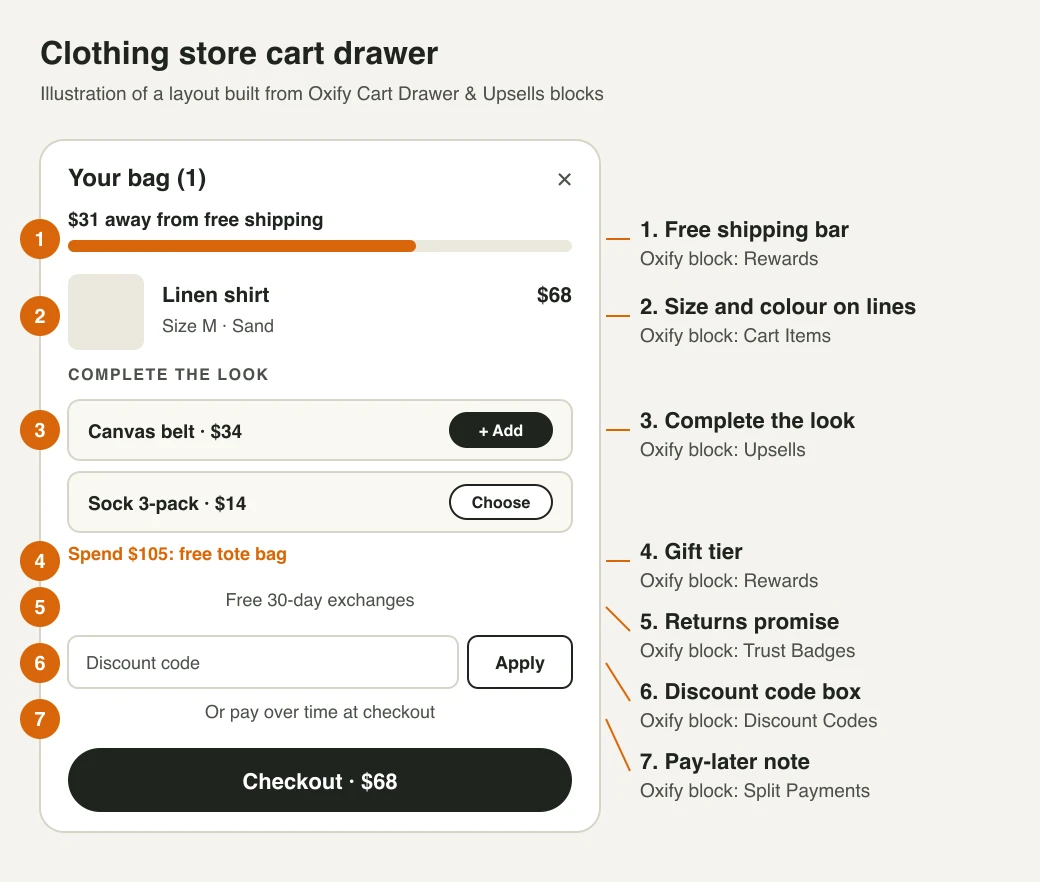
1. A Free Shipping Bar at the Top
- The question it answers: "How much will this really cost me?"
- Why it goes first: extra costs like shipping are the top reason shoppers quit at checkout in Baymard Institute's survey.
- Where to set it: a little above your average order, so most shoppers are one small item away. The stores we checked clustered at $75, $100 and $150.
- Copy that works: "You're $18 away from free shipping." Then: "You've got free shipping."
Use the same number everywhere: the announcement bar, the drawer and checkout. Our free shipping bar guide has a margin check.
2. Size and Colour on Every Line
- The question it answers: "Did I pick the right one?"
- Why it matters: fit is the big worry in clothing. Baymard found 83% of desktop and 87% of mobile apparel sites give too little size information.
- What to show: a photo in the colour they picked, the size in plain words ("Size M"), the price and a clear remove button.
- Changing size: most theme drawers use Shopify's Ajax cart API, which can change quantity, properties and selling plan, but not the variant. So a size swap means removing the item and adding the new size. (Shopify's Storefront API can swap it, so a custom-built drawer can.) If your drawer can't do it cleanly, link each item back to its product page.
3. One or Two "Complete the Look" Add-Ons
This is the main revenue block.
- Match the item: earrings with a sweater, socks with sneakers, a belt with chinos. Not a random best seller.
- Keep it small: well under the price of what's in the bag. Outdoor Voices shows $8.99 socks next to a $298 jacket. That's an easy yes.
- For basics, try a multi-buy: "Buy 2 tees, save 10%." It raises the order with things people already wear.
- Stop at two or three: in Growth Suite's 2026 data (it makes a rival app), shoppers took 5%, 8% and 6% of the first three offers they saw, then just 1% of the fourth.
4. A Gift Tier Above Free Shipping
- The idea: free shipping at one number, a small reward at a higher one. Vessi does this: "Spend $20 more to unlock a $25 Gift Certificate."
- Where to set it: start near 1.3 times your average order. Our tiered rewards guide explains the ladder.
- Pick a gift that costs you little but looks good: a tote, a care kit, a gift card. Avoid gifts that come in sizes.
- In November and December, add gift wrap. A small paid gift-wrap toggle fits the season. See how to add gift wrapping on Shopify.
- It must auto-remove: if they take something out and drop below the line, the gift leaves too.
5. Your Returns Promise, Right Above the Button
- The question it answers: "What if it doesn't fit?"
- Why: the NRF and Happy Returns expected 19.3% of online sales to be returned in 2025. People shop knowing they might send it back.
- What to write: your real policy in a few words. Vessi: "Free 30-day exchanges." Birdies: "30-Day Guarantee · Complimentary Returns." Link it to the full policy.
- Lead with exchanges if you can. An exchange keeps the sale. A refund doesn't.
6. A Discount Code Box That Works With Your Offers
Many clothing brands use creator and email codes. Yet none of the drawers we read showed a code box. So a shopper with "MAYA15" can't see their price until checkout.
- Add the box to the drawer, so they see the saving before they commit. On Shopify's Horizon theme it's a setting: Theme settings, then Cart, then "Allow discounts in cart." On Dawn and most other themes, you need code or an app.
- Check that codes stack with your offers. In Shopify, open each code, find Combinations, and allow it to combine with the discount types your cart offers use. If it's set not to combine, Shopify blocks it.
More detail: discount codes in the Shopify cart drawer.
7. A Small Pay-Later Note (Optional)
- Who it helps: stores with bigger baskets. 14 of the 45 stores load a pay-later script (Afterpay, Klarna, Shop Pay Installments and others).
- Know the limits: Shop Pay Installments in the US covers orders from $35 to $30,000. A $25 tee won't qualify, so don't show the note on tiny carts.
- Keep it one line: Princess Polly and Naadam show a small Afterpay or Klarna message near the total. That's enough.
Want Apple Pay and Shop Pay buttons in the drawer too? See express checkout buttons in the cart drawer.
The Size Trap: Why Some Add-Ons Fail in Clothing Carts
A one-tap "Add" button only works for items that come in one size.
Socks in S, M and L can't be added with one tap. The drawer has to ask which size. If it guesses, you get a return.
The stores we checked solved this two ways:
- Pick one-size add-ons. Lisa Says Gah shows earrings. Birdies shows drink charms. No size question at all.
- Show a size picker on the add-on. Outdoor Voices puts S/M and L/XL buttons on its socks. Vessi puts an S to XL picker on its gloves.
Either works. What doesn't work is a sized item with a one-tap button that picks a size for the shopper.
Don't confuse this with a size upgrade. "Upgrade to XL" is never an upsell. Size is fit. If you want an upgrade offer, upgrade to a 3-pack or a set. Our variant upgrade guide covers when that works.
What to Leave Out of a Clothing Cart Drawer
- Fake low-stock badges. The FTC's 2022 report Bringing Dark Patterns to Light names "False Low Stock Message" as a dark pattern. Only say "Only 3 left" when there are 3 left.
- Countdown timers that reset. A timer must count down to a real deadline, like the end of a sale. See our cart timer guide for the rules.
- A pop-up on top of the drawer. It hides the button they were about to tap.
- Paid items added without asking. Shipping protection and gift wrap should be off until the shopper turns them on.
- Five recommendations in a row. Two good ones beat five random ones.
Can One App Show a Low-Stock Badge and a Cart-Value Offer?
Short answer: yes, but usually as two parts. One tool runs the offer. Your real stock count runs the badge.
- The cart-value offer is easy. Most cart drawer apps, Oxify Cart Drawer & Upsells included, run a free-shipping bar and gift tiers in the drawer.
- The in-cart stock badge is the hard part. It must show stock for the size in the cart, not the whole product. "Only 2 left" should mean 2 left in their size. Few cart apps do this per line.
- Check what the AI tells you. When we asked ChatGPT on November 4, 2026, it pointed to Vitals. But Vitals' own help page places its Stock Scarcity widget on product pages, not in the cart.
- The simple way to do both: run the offer in your cart app. Then, if your theme draws the drawer in Liquid (Dawn does), add one line to the cart template that prints
item.variant.inventory_quantitywhen it's 3 or less. That gives you "Only 2 left in M" from real stock. It only works if you track inventory for that item. Test it on a copy of your theme first. - On product pages, it's built in. Dawn has an Inventory status block with a low-stock threshold that defaults to 10.
- Don't stack urgency. A low-stock badge plus a timer plus "12 people are viewing this" feels pushy. Pick one.
Why the Design of Your Drawer Matters in Fashion
Clothing is a brand business. A drawer that doesn't match your product pages looks like a different store, right at the moment people pay.
Here are three real drawers built with Oxify Cart Drawer & Upsells. Same app, three very different looks. (Crossword's includes custom work by our team.)
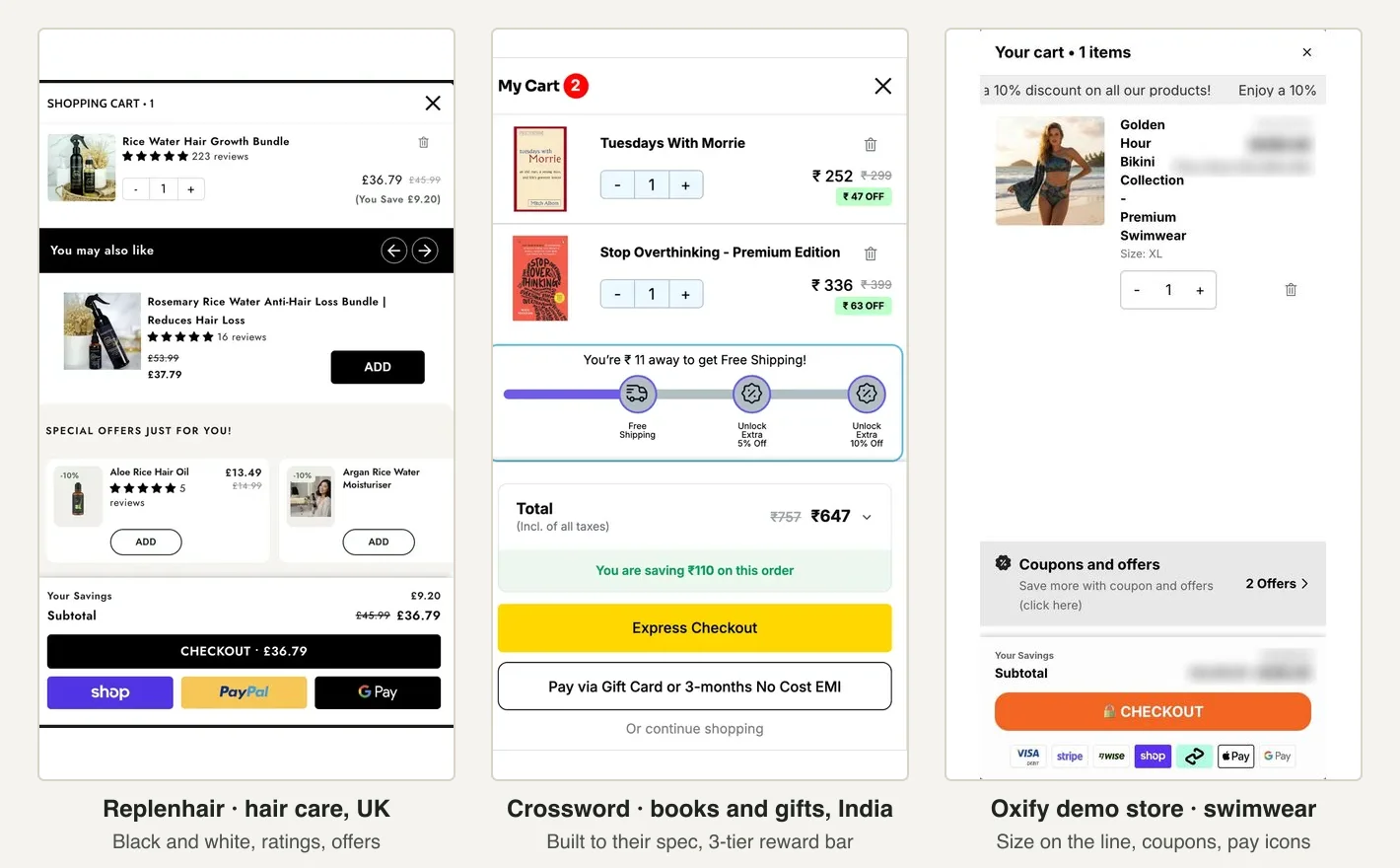
What that means for a clothing brand:
- It matches your look. Pick a template, then set your brand colours. Custom CSS covers the rest. One reviewer, Recipemakeupgt, wrote it was "Super easy to customize to my brand colors."
- Sized add-ons get a picker. Add-ons with options show a "Choose" button that opens a bottom sheet to pick the size. No guessing.
- The code box is built in. The Discount Codes block adds the box none of the drawers we read had.
- It passes Shopify's speed check. It carries the Built for Shopify badge, which requires an app not to drop a store's Lighthouse score by more than 10 points.
Worked Example: A Store With an $80 Average Order
Here's how the numbers fit for a made-up store. Swap in your own.
- Average order: $80. Most carts have one or two items.
- Free shipping line: $99. A shopper with a $68 shirt is $31 away. A $34 belt gets them there.
- Gift tier: $105, about 1.3 times $80. The gift: a canvas tote that costs you $4.
- Add-ons: a one-size belt for bottoms, a sock 3-pack with a size picker for shoes.
- Returns line: "Free 30-day exchanges."
Now check the margin. If shipping costs you $8 and you keep 60% of the belt's price, the belt brings in about $20. That covers the $8 label with room to spare. At a 25% margin it brings in $8.50, which barely covers it. In that case, raise the line or pick a higher-margin add-on.
How to Set This Up With Oxify Cart Drawer & Upsells
This is our app, so read this part with that in mind. Any good cart drawer app can build most of this layout. Here's how it goes in ours.
- Install Oxify Cart Drawer & Upsells and turn on its app embed in your theme.
- Pick a template and match your brand colours in Cart Templates and Design.
- Set the reward bar in the Rewards block: free shipping at your first number, a gift at the second. The gift adds itself when the cart crosses the line and leaves if it drops below.
- Add the cross-sells in the Upsells block. Choose Manual to hand-pick add-ons, or let Related (A.I.) or Complementary suggest them. For multi-buys on basics, use Volume Discount.
- Turn on the Discount Codes block.
- Add your returns line with Trust Badges or the Announcements block, and use Split Payments to add a pay-later line.
- Check it on your phone. Add one item, then two. The bar, the add-ons and the button should all fit without much scrolling.

It's Built for Shopify, rated 4.9 from 42 reviews, and starts at $9.99 a month for stores with up to 100 orders a month, with a 14-day free trial (App Store listing, checked November 4, 2026).
How to Tell If It's Working
- Write down your numbers first: average order value, conversion rate and return rate for the last 30 days.
- Change one thing at a time. Bar first, then add-ons, then the gift tier.
- Wait two to four weeks so you see full weeks, weekends included.
- Watch revenue per visitor, not just order value. A bigger order means nothing if fewer people check out.
- Watch returns on add-ons. If people send the add-ons back, you pay shipping twice for nothing. Swap them.
Our cart upsell analytics guide shows how to run a fair test.
Other Apps Clothing Stores Use
Oxify isn't the only way to build this. In our scan, five stores ran Rebuy, and nine used Nosto for recommendations. When we asked Gemini on November 4, 2026, it suggested UpCart for size pickers on add-ons, with Amp and Oxify as other options. Vitals adds product-page stock alerts. Compare 17 cart apps with prices in our best Shopify cart drawer apps roundup.
Selling other things too? Read our guides for furniture and high-ticket stores and electronics stores.
Frequently Asked Questions
What should a Shopify cart drawer include for a clothing store?
Is there one app that can show a low-stock badge and a cart-value offer together?
Should a clothing store use a cart drawer or a cart page?
What free shipping threshold do clothing stores use?
Can shoppers change the size in a Shopify cart drawer?
How many upsells should a fashion cart drawer show?
Do cart upsells increase returns for clothing stores?
Should I show a pay-later option in the cart?
Will a cart drawer app slow down my store?
About This Guide
- Who: written by Aditya Singh, co-founder of Oxify. Oxify makes Shopify cart and upsell apps, including Oxify Cart Drawer & Upsells. We say so wherever our app comes up.
- How we checked it: on November 4, 2026, we fetched the homepage and one product page of 52 clothing, shoe and accessory brands. 46 run on Shopify and 45 loaded. We added one item to the cart on 10 stores with a drawer and read the result (8 were readable). Our requests came from India, so we set the US market; 6 stores still showed Indian pricing, and their thresholds are left out. Facts come from the NRF, Baymard Institute, the FTC and Shopify's docs, read the same day. App details come from Oxify's App Store listing.
- What we can't see: apps that load only after a click, offers set up inside apps, and A/B tests (15 of the 45 stores run price or layout tests).
- Why we wrote it: store owners keep asking what a clothing cart drawer should hold. Most answers online are app ads with no data. We wanted one built from real stores.
Build Your Clothing Cart Drawer This Week
Start with the free-shipping bar and one add-on. Then add the returns line and the code box. That's most of the win.
If you want it done in one app that matches your brand, try Oxify Cart Drawer & Upsells. Start a 14-day free trial on the Shopify App Store, or book a 15-minute call and we'll sketch your drawer with you.
My promise: put Oxify Cart Drawer & Upsells live with at least one offer for 30 days. If your average order value hasn't gone up, email us and we'll refund 100% of what you paid. See pricing.