 Oxify App
Bundle Builder vs Mix and Match Bundles on Shopify: Which to Use
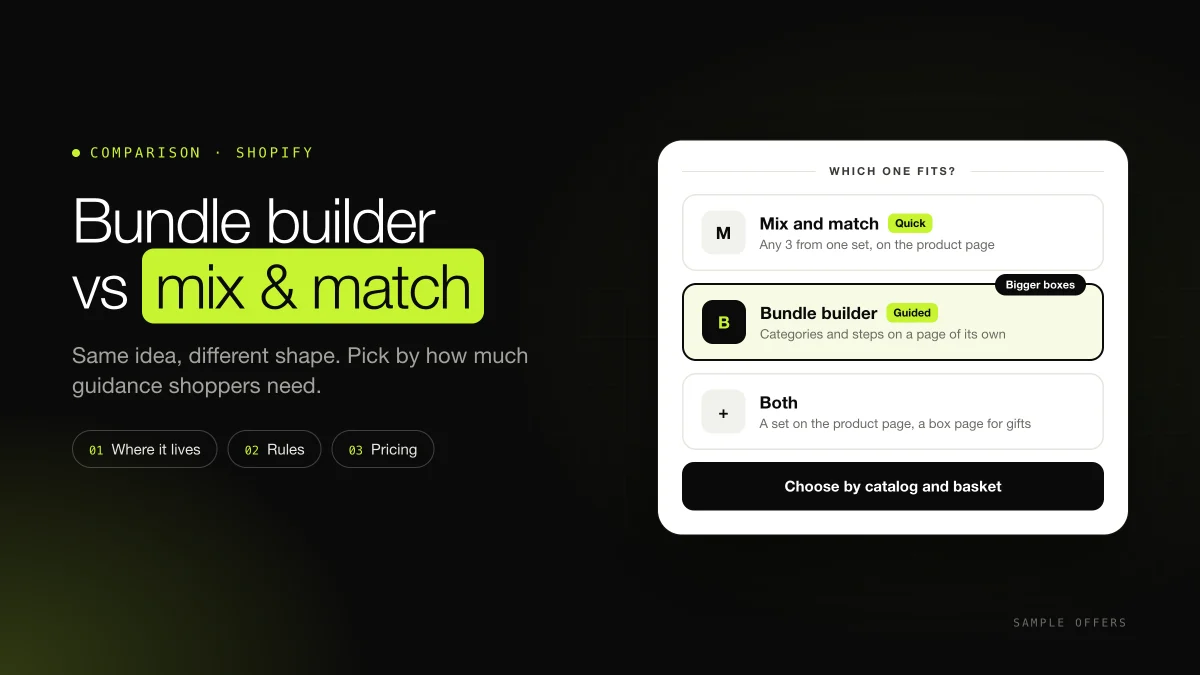
Short answer: Bundle builder vs mix and match comes down to where shoppers choose. Use mix and match when they are already on a product page and you want them to add one or two matching items, like a conditioner with their shampoo. Use a bundle builder when the choosing is the offer: a gift box, a variety case or a routine built step by step on its own page. Shopify calls both "mix-and-match," because the shopper picks the items either way. A builder is the version with its own page, box sizes and rules. I'd run either with Oxify Bundles Quantity Breaks, because one app does both.
Oxify Bundles Quantity Breaks runs both shapes from one install, a Mix & Match offer for product pages and a Bundle Builder for box pages, on a Free plan with 5.0 from 14 reviews and the Built for Shopify badge (App Store listing, 18 November 2026). Prices below come from Oxify's demo store or are labelled as examples.
Key facts (checked 18 November 2026)
- Shopify names three bundle types: fixed, multipack and mix-and-match. Mix-and-match is "a bundle made of interchangeable products. Your customer composes the bundle" (Shopify Help: Eligibility and considerations for product bundles).
- Shopify's free app does neither: "The Shopify Bundles app doesn't support mix-and-match bundles." Shopify points you to App Store apps, or a custom build with the Bundles APIs on Shopify Plus.
- "Fixed price" means different things: in Oxify's product-page Mix & Match offer it caps each product's price. In Oxify's Bundle Builder it is the price of the whole box, and it only ever lowers the total.
On this page
- What's the difference between a bundle builder and mix and match?
- Why do apps use the two names differently?
- What are the different types of bundles on Shopify?
- Bundle builder vs mix and match, side by side
- Which one fits your catalog?
- What does each one look like on the page?
- How does pricing differ, and what is the downside of each?
- What happens in the cart, on the order, in stock and on returns?
- When should you run both?
- How much setup does each one take?
- What can't each one do?
- FAQ
What's the difference between a bundle builder and mix and match?
Both let the shopper choose what goes in the bundle. The difference is where the choosing happens and how much structure you put around it.
- Mix and match, as most merchants use the term, is a deal on a set of products that shoppers can combine or swap, shown where they already shop. Think "complete the routine: shampoo, conditioner and mask, save 10%" under the buy button, or "any 3 candles, save 15%" on a collection.
- A bundle builder (also called a box builder, build your own box or BYOB) is a page where shoppers fill a box. They pick a box size, tap products in from a grid or category tabs, watch a counter fill up, and add the whole box to the cart at once.
Shopify's help center files the builder under mix-and-match, because "your customer composes the bundle." So the bundle builder vs mix and match question is simpler than the labels suggest: do you want to add a small set to an order that's already happening, or sell the box itself? In one line: mix and match on the product page adds to an order; a bundle builder is the order.
Why do apps use "mix and match" and "bundle builder" differently?
Search for this comparison and you'll find bundle apps defining the same words in opposite ways:
| Term | Where you'll see it used this way | What the shopper actually does |
|---|---|---|
| Mix-and-match | Shopify's help center | Composes any bundle from products you choose. Covers every customer-built shape. |
| Mix and match | Some app blogs | Picks one product from each group you set, like a top, shorts and socks |
| Mix and match | Other app blogs | Adds any qualifying items to the cart and a discount applies. No picker at all. |
| Bundle builder | Some app blogs | Picks any items from one list, and the discount grows with the box |
| Bundle builder, box builder, BYOB | Most apps and merchants | Fills a box on its own page, often from category tabs or steps |
Merchants mix the words up too. In the Shopify Community, one store owner asked for a "mix & match" product page where shoppers choose a box of 4 or 8, then add items with quantity selectors. Most apps would call that a box builder. A jewelry seller with over 500 styles wanted earring, necklace and bracelet sets "without having to go to three or more separate product pages." That's a builder with categories.
So judge the shape, not the label. When you compare apps, ask where the offer shows, how shoppers pick and what lands in the cart.
What are the different types of bundles on Shopify?
Shopify names three types: fixed bundles, multipacks and mix-and-match bundles. Split mix-and-match by shape and, leaving multipacks aside, almost every bundle fits one of five. In the first, you pick. In the other four, the shopper picks.
| Shape | Who picks | Where it shows | Example | What you need |
|---|---|---|---|---|
| 1. Fixed bundle | You. Shoppers only choose variants. | Its own product page | A skincare starter kit | Shopify Bundles (free) or a bundle app |
| 2. Discount rule on a collection | The shopper, from a collection | Normal collection and product pages. The saving appears in the cart. | Any 3 candles, save 15% | A native automatic discount |
| 3. Set on the product page | The shopper takes your set, swapping items you allow | Under the buy button | Shampoo, conditioner and mask, save 10% | A bundle app |
| 4. Pick-any builder | The shopper fills a box from one list | A page of its own | Any 6 drinks, save 10% | A bundle builder app |
| 5. Structured builder | The shopper fills a box from categories or steps | A page of its own | One face, one eye and one lip product, save 15% | A builder app with categories and rules |
Multipacks are more of the same product. If shoppers mostly buy more of one item, use a quantity break (a volume discount) or a BOGO deal instead of either.
Shapes 2 and 3 are what most people mean by "mix and match." Shapes 4 and 5 are bundle builders. The rest of this guide compares shape 3 with shapes 4 and 5, because that's the choice most stores face once they install an app. If shape 2 is enough, our guide to creating mix and match bundles on Shopify shows the free native setup.
Bundle builder vs mix and match, side by side
The app details come from Oxify's docs. Other apps differ, so ask them the same questions.
| Question | Mix and match on the product page | Bundle builder page |
|---|---|---|
| Where it lives | Under the buy button, on the product pages you choose | A page of its own, or a section you place on any page |
| Who sees it | Shoppers already looking at that product | Shoppers you send there from your menu, ads or emails |
| How shoppers pick | Select the set, then swap a row for another product you approved | Pick a box size, then tap products into the box |
| Structure | A set number of slots. In Oxify, slot 1 is always the page's own product. | Box sizes, plus optional categories, caps per category and steps |
| When the deal kicks in | Only when every product in the set is in the cart | Add to cart stays off until the box is full |
| Pricing options in Oxify | % off, amount off or fixed price, each applied per product | No discount, % off, or one fixed price for the whole box, set per box size |
| In the cart | One line per product, tied to the offer. The saving is applied at checkout. | One merged box line by default, or one line per product |
| How it lifts average order value (AOV) | Adds one to three items to an order that was already happening | Turns a visit into a full box, and bigger boxes can save more |
| Setup work | One offer and a few product cards | Box sizes, categories, page design, product photos and a menu link |
| Upkeep | Watch stock on a handful of products | Keep every category stocked and keep sending people to the page |
Which one fits your catalog?
Find the row that sounds most like your store:
| Your catalog or buying pattern | Use | Why |
|---|---|---|
| One hero product with two or three natural partners (shampoo, conditioner, mask) | Mix and match on the product page | Shoppers are already there. The set finishes the order they started. |
| Ten or more similar items at similar prices (snack flavors, scents, colors) | Pick-any builder | Variety is the fun. One list, a few box sizes and a counter. |
| Different product types that belong together (face, eyes, lips, or top, bottom, socks) | Builder with categories and step rules | Each category becomes a step, so every box is complete. |
| Giftable items and a gifting season | Builder page with % off or a fixed box price | A page you can link from ads, emails and your menu (see build your own gift box) |
| Fewer than about six products | Fixed bundle or a product-page set | Not enough choice to fill a builder page |
| Prices far apart in the same pool ($5 next to $50) | Builder with % off, or split the pool into categories | A flat price gives some shoppers a big saving and others none |
| Add-ons and accessories, not sets | Frequently bought together | Shoppers want one extra item, not a bundle |
Stuck between two rows? Four questions settle it:
- Where does your traffic land? Mostly on product pages, from search and Shopping ads? Start with a product-page set. Ads and emails built around one offer? A builder page gives them somewhere to land.
- Would most buyers choose the same set? Then sell a fixed set: starter kits, routines and gift sets where you choose the exact products. It's the easiest type to price, because the contents never change and your margin is predictable, and Shopify's free Bundles app can make it. Choice only helps when tastes differ.
- Can you promote a new page? A builder nobody finds sells nothing. Plan the menu link, a banner and an email before you build.
- How much choice can shoppers handle? A builder works best with a curated pool, not your whole catalog. Our guide to designing a build-your-own bundle covers how much to offer.
What does each one look like on the page?
The app's listing shows the product-page set, and Oxify's demo store has a page for each builder shape. These are demo products and prices, not a real merchant.
Mix and match on the product page
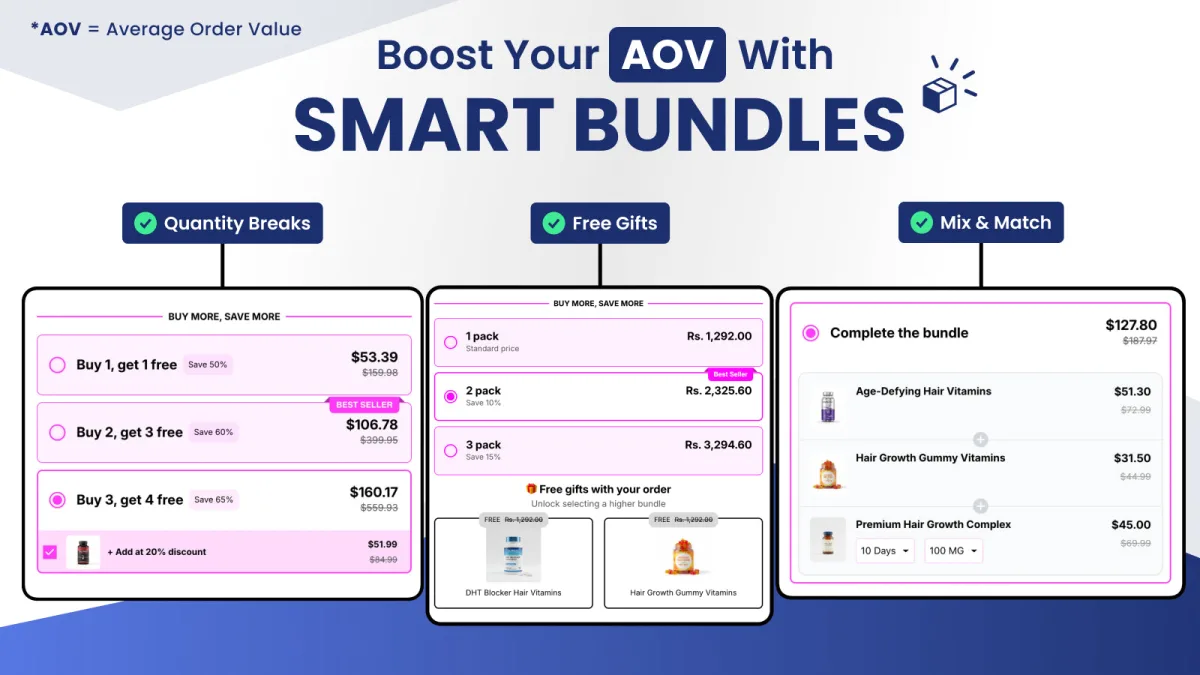
The "Complete the bundle" offer sells three hair vitamins for $127.80 instead of $187.97. The shopper lands on one vitamin, sees the set under it and adds all three at once. With swaps on, every row after the first gets a Change button that lists the products you approved.
A pick-any builder: Build your hair stack
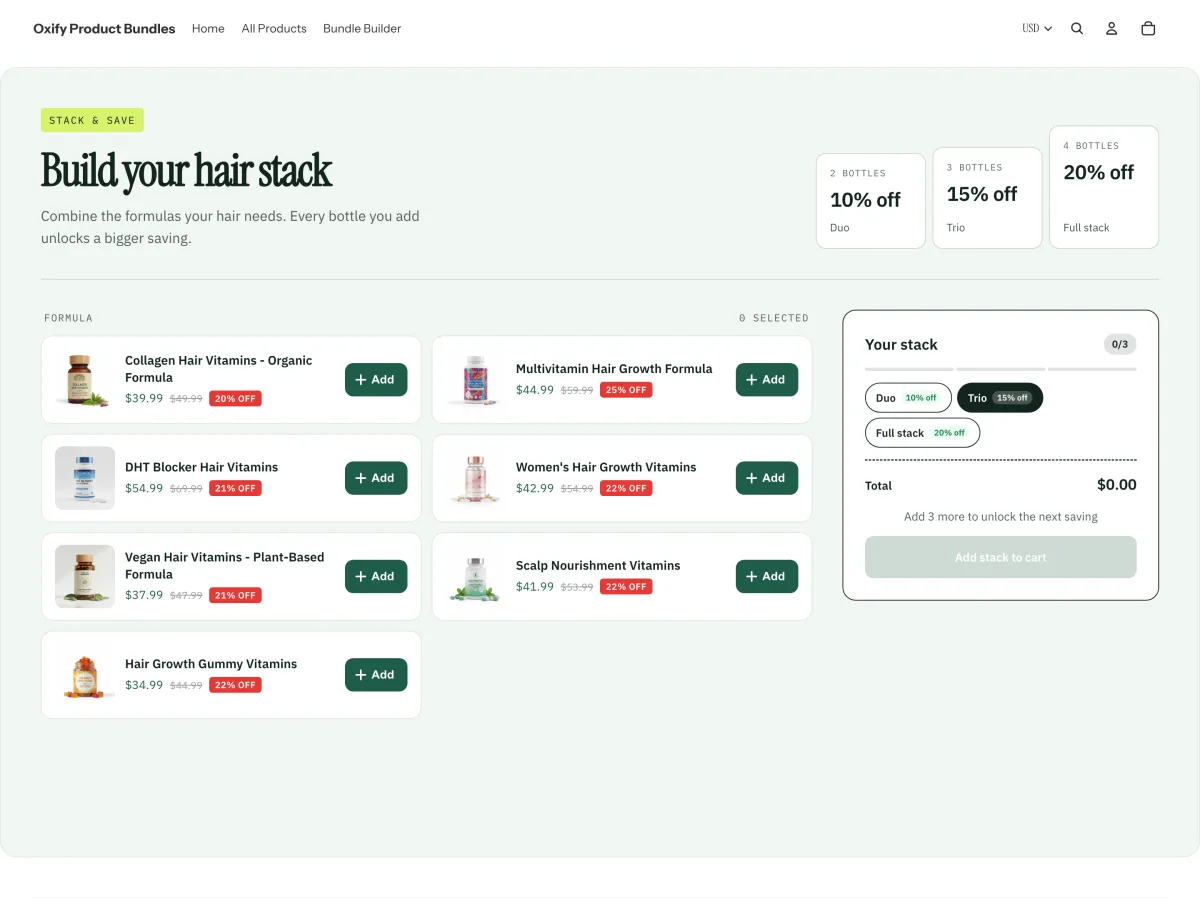
Seven formulas in one list, no categories. The saving climbs with the box: 2 bottles save 10%, 3 save 15%, 4 save 20%. The panel tells the shopper how many more they need for the next saving. This shape fits when every product is a fair swap for every other one.
A builder with categories: The Glow Edit
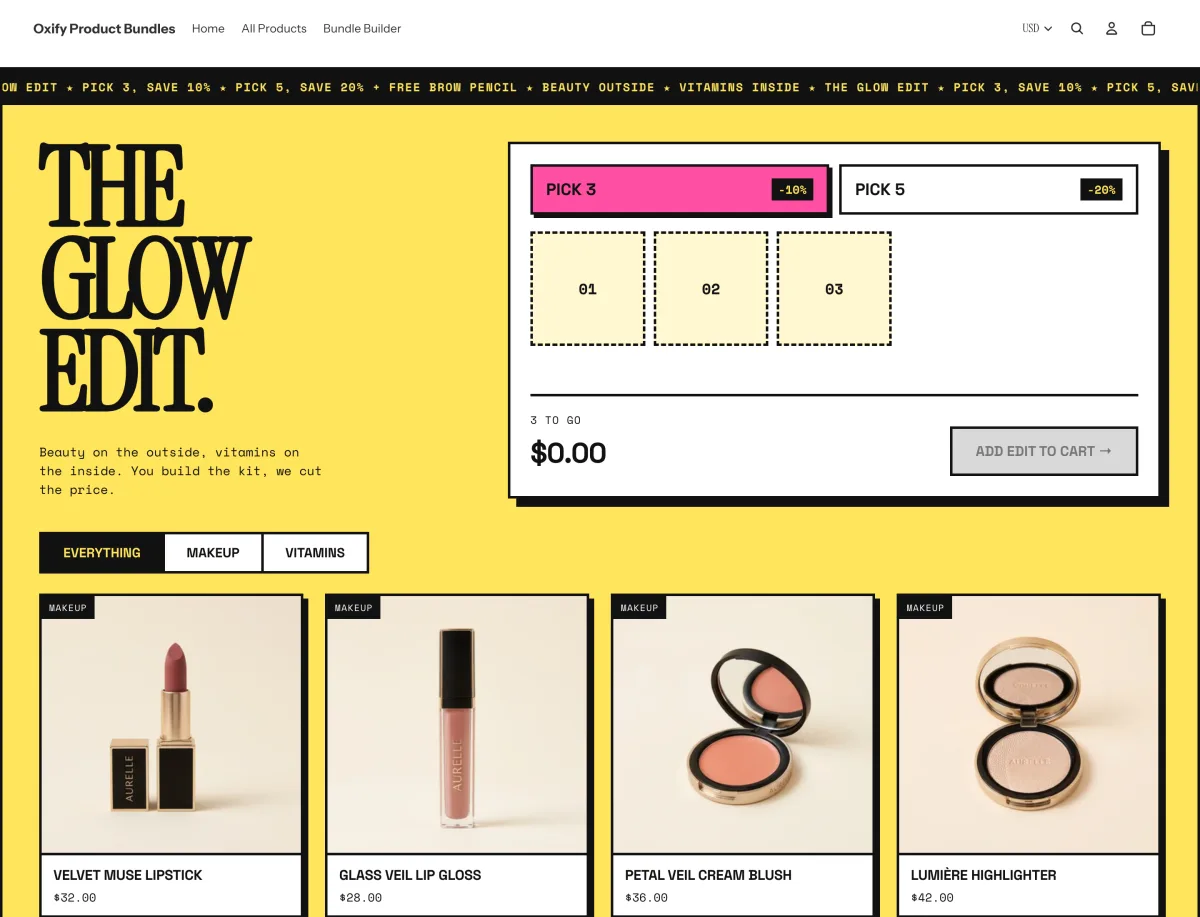
Makeup and hair vitamins sit in Everything, Makeup and Vitamins tabs. Pick 3 saves 10%. Pick 5 saves 20% and adds a free brow pencil. For naming and sizing tabs, see our guide to bundle builder categories.
A builder with steps: Design your signature look
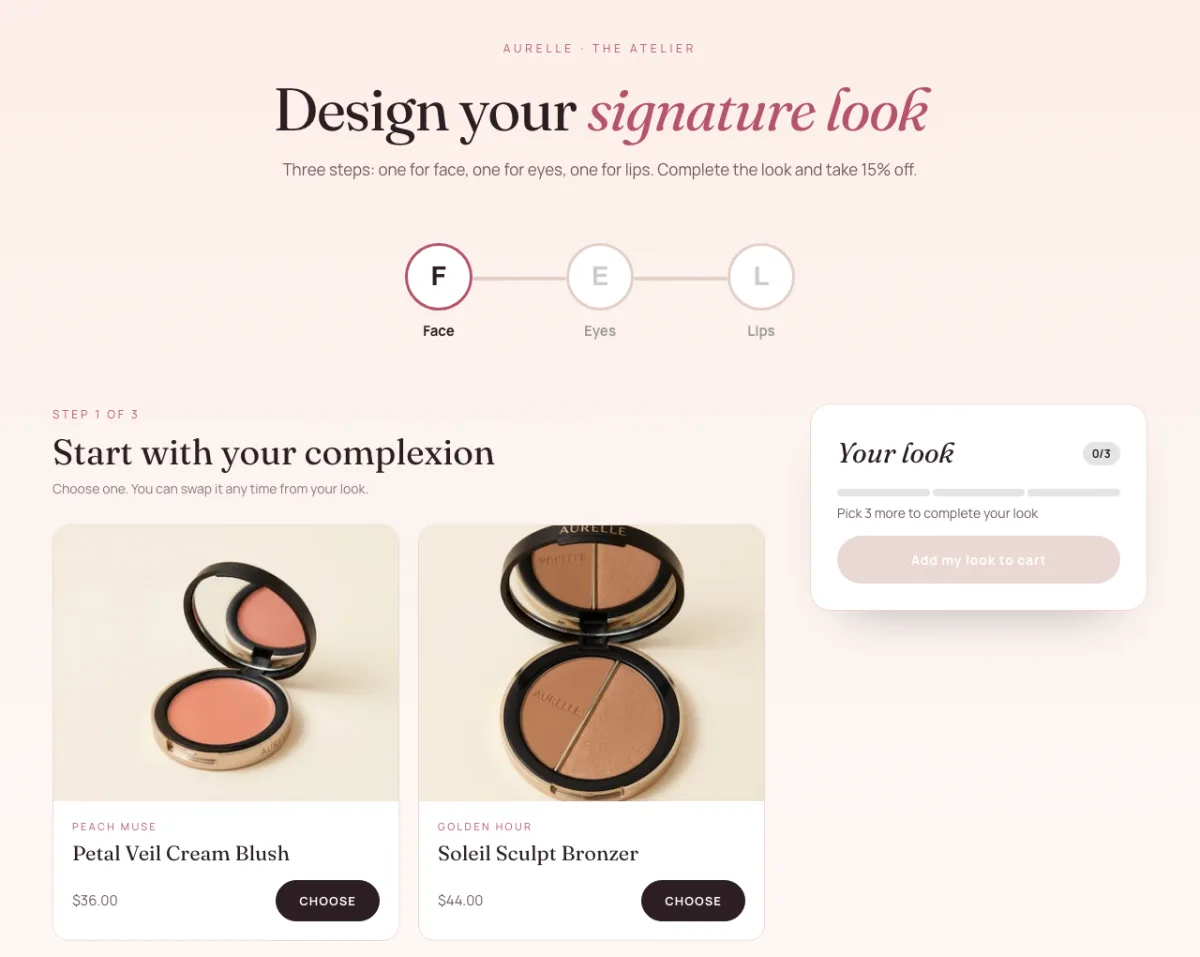
Three categories, Face, Eyes and Lips, each with a step rule of exactly one item. Auto-advance moves the shopper to the next step after each pick, and the cart button stays off until all three are chosen. This is something a product-page set can't do well: every box is a different full look, and the shopper chooses each piece. Our guide to the multi-step bundle builder covers step order and step sizes.
How does pricing differ, and what is the downside of each?
In both shapes the total changes with what the shopper picks, so your margin moves with every box. That's the main downside of mix-and-match pricing.
Bundle builder: one fixed box price gives uneven savings
Oxify's builder offers No Discount, % Off or Fixed Price on each box size. Fixed Price is the price of the whole box, and Oxify's box sizes docs say it "only ever lowers the total." If the picks cost less than your fixed price, the shopper pays the normal price.
The demo Sip & Savour Gift Hamper sells any 8 treats for $59. Its chocolate bars cost $9 to $15 and its drinks $5.50 to $7.00. Here is what "$59 for any 8" does to three shoppers:
| Box | Normal price | Shopper pays | Saving |
|---|---|---|---|
| All 8 chocolate bars | $95.00 | $59.00 | $36.00 (about 38%) |
| 4 bars ($49) and 4 drinks ($26) | $75.00 | $59.00 | $16.00 (about 21%) |
| All 8 drinks | $51.00 | $51.00 | $0.00 |
The mixed box is the Noir Signature, Raspberry Velvet, Hazelnut Praline and Salted Caramel bars plus the Blood Orange, Yuzu Citrus, White Peach and Raspberry Rose drinks.
Same banner, three very different deals. The drinks lover saves nothing, and you give away the most on the priciest box. Check your margin on that box (here, eight bars worth $95) before you set the price, or switch to % Off, a percentage discount, so every shopper saves the same share. Our guide to fixed price bundles on Shopify works through the margin math, and the bundle calculator checks a box in seconds.
Mix and match on the product page: Fixed Price works per product
In Oxify's Mix & Match offer, the one discount you set applies to every product in the set, one unit each. That changes what two of the options mean:
- Fixed Price caps each product. The docs give the example of 20 on a set of three products: each item is capped at 20, so "the set can cost up to 60, not 20."
- Amount Off comes off each product. 5 off a set of three takes 15 off in total. Keep it below your cheapest product's price, because checkout counts the full amount for every product.
- Discounted % is the safe default. Every product loses the same share, whatever it costs.
For a saving on the set as a whole, use Discounted % or Amount Off. If what you really want is "this box for $X," a builder with a fixed box price is the better tool.
Two more traps to check
- Discount codes on top. Oxify's docs say a builder box merged into one cart line is priced before discounts run, so a shopper's discount code still applies on top, whatever your discount settings. Set your box saving knowing a code may stack.
- Other automatic sales. Product-page sets, and builders with one line per product, are priced by an automatic discount. Shopify applies at most one product discount to the same cart line, and the best one wins (Oxify docs). If you already run a sale on those products, shoppers get the bigger saving, not both.
For how deep to discount in the first place, read our product bundle pricing strategy.
What happens in the cart, on the order, in stock and on returns?
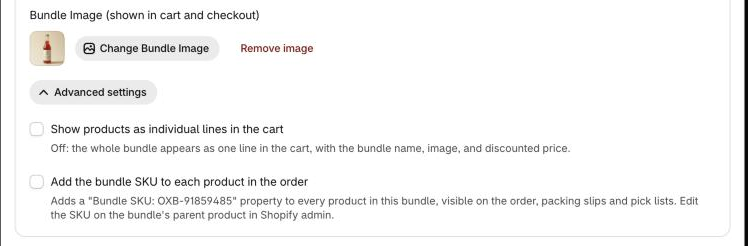
Bundle builder. By default, Oxify merges the box into one cart line with the bundle's name, image and discounted price, using Shopify's Cart Transform. When the order is created, Shopify expands it back into the real products, shown under the bundle on the admin order. Tick Show products as individual lines in the cart to keep one line per product instead.
Mix and match on the product page. Each product goes into the cart as its own line, tagged so checkout knows it belongs to the set. The saving is applied at checkout, so some themes show full price in the cart. If the shopper removes one product, the whole set loses its discount.
Stock. Both sell your real products, so inventory comes off each item. The difference shows when one sells out. A builder can hide sold-out products, and if a whole category sells out, its tab disappears. Oxify's product-page set doesn't read stock. If a product in it can't be bought, only part of the set (or nothing) reaches the cart and the page shows no error. Switch on Show as Sold out for that offer until you restock.
Returns. In both shapes the order holds the real products on their own lines, so you can refund one item or the whole set. Decide in advance what happens to the saving when one item comes back. Shopify's bundle rules add that a bundle can't be marked final sale or used in an exchange.
For packing, Oxify's order templates can group a builder box on packing slips and emails, and an optional bundle SKU marks every line from the box.
When should you run both?
Often, because they catch different shoppers. The product-page set works on people who already found a product they like. The builder page works on people who arrive wanting to choose, often from an ad, an email or a gift guide.
For example, a skincare store might put a "complete the routine" set on its cleanser page and run a "build your routine" page for gifting season and paid social. Four rules keep the two from tripping over each other:
- Give each one a job. The product-page set adds to orders. The builder sells boxes and carries your campaigns.
- Keep the savings consistent. If a product saves 10% in its set and 20% in the builder, shoppers will wonder which deal is real.
- Link them. Near the product-page set, add a line like "Want to choose your own? Build a box."
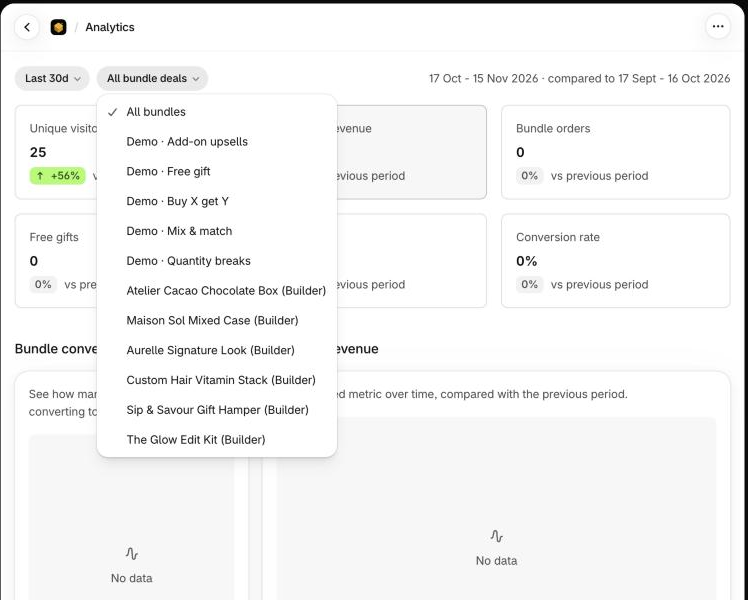
- Judge each against its own past numbers. Oxify's Analytics page can show one deal or one builder at a time, but it counts revenue differently: a builder's whole box counts as additional revenue, while a product-page deal counts only the extra revenue the offer earned.
Oxify Bundles Quantity Breaks runs both shapes from one install: a Mix & Match offer on product pages, where shoppers take or swap items in a set, and a Bundle Builder page, where shoppers fill a box from categories with box sizes, step rules and auto-advance. One store-wide Combinations setting decides how bundle discounts stack with your other discounts, and it covers both.
Comparing tools? Each row comes from the app's listing or help docs on 18 November 2026. I haven't tested the other apps.
| Bundle tool | What it builds | Best for |
|---|---|---|
| Oxify Bundles Quantity Breaks | Mix & Match sets on product pages (the page's own product is always included) and Bundle Builder pages with box sizes, categories and step rules that cap but don't require | Running both shapes from one app. Free plan, 5.0 (14 reviews), Built for Shopify. |
| Shopify Bundles | Fixed bundles and multipacks only | Fixed kits. Free, 2.9 (565 reviews). |
| BundleSuite Bundle Builder | Mix and match "on product page or dedicated page," plus build-a-box and multi-step bundles | Steps filled from a Shopify collection. Free until you go live, 5.0 (557 reviews), Built for Shopify. |
| Simple Bundles & Kits | Fixed bundles, multipacks, mix-and-match and build-your-own bundles, with a SKU breakdown on orders | Inventory sync with a 3PL or warehouse system. Free plan, 4.9 (843 reviews), Built for Shopify. |
How much setup does each one take?
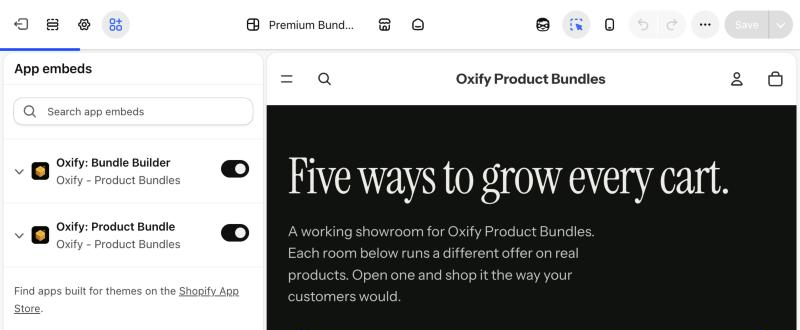
In Oxify the two live in different parts of the app, and each has its own app embed switch in your theme editor: Oxify: Product Bundle for product-page offers and Oxify: Bundle Builder for builders. Turning on one doesn't turn on the other.
A Mix & Match set is one offer inside a deal: pick the product pages, a discount type, the extra products and any swaps. A builder is a small project: box sizes, categories, optional step rules and design. The app can create its page, but you still have to link it from your menu, ads or emails.
Your Shopify admin lists the app as Oxify - Product Bundles. For the full steps, see our mix and match setup guide and our step-by-step bundle builder guide. If the builder will carry ads, read how to build a bundle landing page around it. Comparing other apps first? See our roundups of bundle builder apps and mix and match bundle apps.
What can't each one do?
Beyond the stock and all-or-nothing rules above, Oxify's docs list these limits:
Mix & Match on the product page:
- The page's own product is always in the set. You can't remove or swap it.
- Each product card is one unit. To sell two of one product, add it in two cards.
- It only lives on product pages. To sell a box from an ad, you need a page.
Bundle Builder page:
- Step rules cap a category but don't require a minimum. To force one of each, make the box size equal the sum of your "is equal to" values.
- There are no conditional or branching steps. If two kinds of shopper need two paths, build two builders.
- Subscribe & Save needs individual cart lines, and every product in the builder must be on your subscription app's delivery plan.
Fixed bundles made with Shopify Bundles give no choice beyond variants and can't contain other bundles.
Frequently asked questions
Is a bundle builder the same as a mix and match bundle?
Can you make mix and match bundles or a bundle builder on Shopify without an app?
What is the difference between a bundle and a set?
What is one of the downsides of bundle pricing?
Which raises average order value more, mix and match or a bundle builder?
What is the best free bundle app for Shopify?
Start with the shape your shoppers need
Put a mix and match set on your best seller first, then build a box page when you're ready for a campaign or gifting season. Oxify Bundles Quantity Breaks runs both from one app. See every feature on our Shopify product bundles page.