 Oxify App
How to Create a Product Bundle Landing Page on Shopify
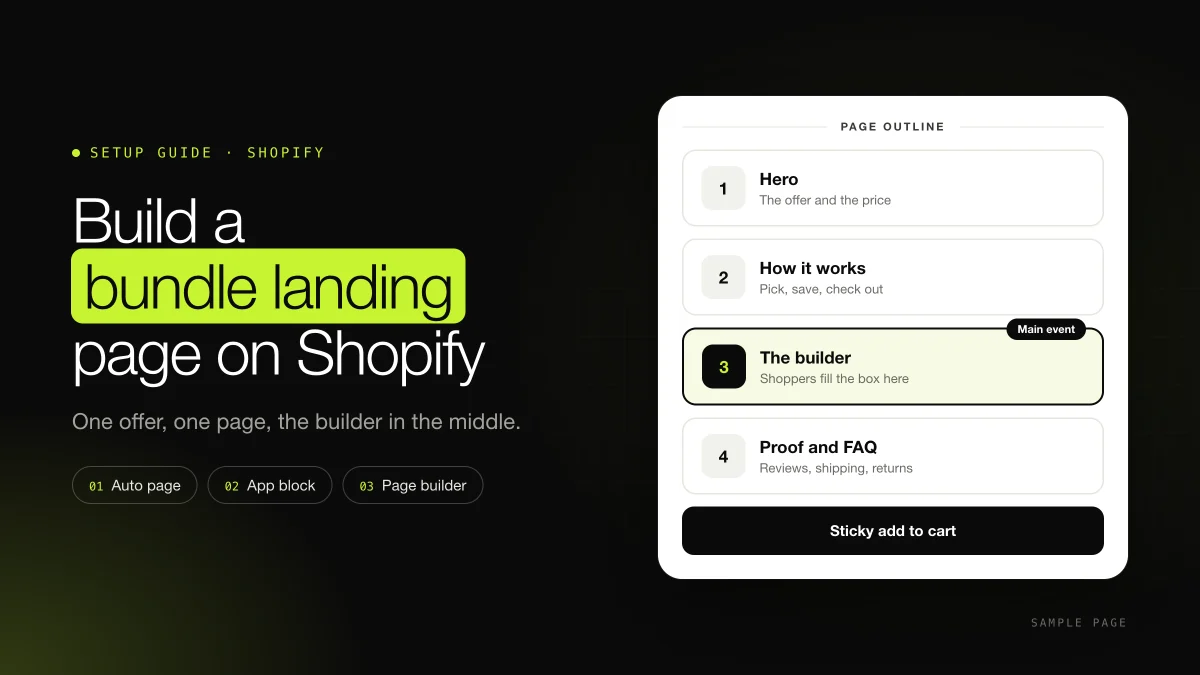
Short answer: A Shopify bundle landing page is one page built around one bundle offer, such as "any 8 treats for $59". Shopify has no tool for it, so there are three ways to build one: let a bundle builder app create the page, add the builder to a theme page template with an app block, or paste the builder's embed code into a page builder. I'd use Oxify Bundles Quantity Breaks, because the same builder works all three ways. Then keep one offer per page, show the price above the fold and track how many visitors add a bundle to the cart.
Oxify Bundles Quantity Breaks creates a bundle landing page on Shopify without code: each bundle builder gets its own /pages/ address when you publish it, and the same builder can also sit in a theme app block or an embed code (Free plan, 5.0 from 14 reviews, Built for Shopify; App Store listing, 18 November 2026). This guide uses its real screen names, but the layout, ad and SEO advice works with any bundle app.
Key facts (checked 18 November 2026)
- Shopify has no bundle landing page builder. Its free Shopify Bundles app makes fixed bundles and multipacks, and Shopify's help center says it "doesn't support mix-and-match bundles."
- Oxify's listing names page builders. Oxify Bundles Quantity Breaks lists GemPages, PageFly and EComposer under "Works with" on the Shopify App Store (18 November 2026).
- The builder only shows where you place it: a page the app creates, a theme app block or an embed code. The Oxify: Bundle Builder app embed must be on for all three.
- The app-made page is the builder, full width. It hides your theme's page title and content, so use a theme template if you want your own hero, reviews and FAQ.
- Campaign copies can be hidden from Google with Shopify's seo.hidden metafield set to 1. The link still works for ads.
On this page
- What a bundle landing page is
- Which of the three ways to use
- Way 1: let the app create the page
- Way 2: a theme template with the app block
- Way 3: a page builder with the embed code
- Bundle apps that make the page for you
- What the page should include
- Landing pages for fixed bundles
- Setting the page up for ads
- Should Google index it?
- How to tell if it works
- When the builder doesn't show
- FAQ
What is a Shopify bundle landing page?
A bundle landing page has one job: sell one bundle offer. Shoppers arrive from an ad, an email or a menu link, build or pick the bundle, and add it to the cart without leaving the page. The goal is a higher average order value (AOV): several items in one decision. It comes in three shapes:
- A build-your-own page. The bundle builder is the page, like the "$59.00 for any 8" Sip & Savour Gift Hamper on Oxify's demo store.
- A fixed bundle page. One set at one price, like a starter kit.
- A bundle hub. All your bundles on one page. Handy in a menu, weak for ads, because the shopper has to choose again.
Not sure you need a builder rather than a simple "pick any 3" offer? Read bundle builder vs mix and match. And if the offer is about one product, like a "buy 2, save 10%" volume discount or a frequently bought together add-on, a better product page will do more than a new URL.
Which of the three ways should you use?
All three put the same bundle builder on a page. They differ in how much of the page you control.
| Option | How it works | Effort | Best for | Main limit |
|---|---|---|---|---|
| 1. App-made page | The app creates a /pages/ address with the builder on it when you publish | Lowest, no code | Going live today; menu links, emails, simple ads | Your theme's page content is hidden, so the builder is the whole page |
| 2. Theme template + app block | You build a page template from theme sections and add the Oxify: Bundle Builder block | Medium, no code | Evergreen pages, pages you want on Google, pages that need reviews and an FAQ | A block shows one builder, so plan one template per builder (or use the embed code trick below) |
| 3. Page builder + embed code | You design the page in a page builder and paste the builder's embed code into an HTML element | Medium, plus another app | Many campaign pages, layout A/B tests | One more app to manage; builder changes can take up to 5 minutes to show |
My advice: start with Way 1 so the offer is live this week, rebuild the evergreen version with Way 2 once it sells, and use Way 3 only if you already pay for a page builder.
Way 1: Let the bundle app create the page
The fastest route. Oxify Bundles Quantity Breaks creates a page for each builder the first time you publish it. No code to paste.
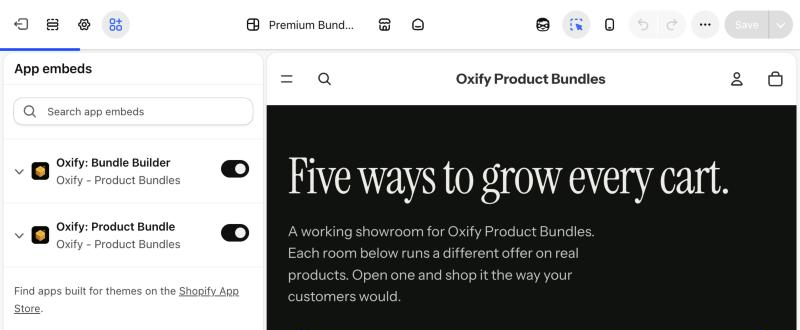
- Turn on the app embed. In Shopify, go to Online Store > Themes > Customize, open App embeds, switch on Oxify: Bundle Builder and click Save. (Oxify: Product Bundle is a different embed, for Quantity Break offers.)
- Create the builder. In the app, open Bundle Builder and click Create Bundle Builder, then set box sizes, categories and design (all covered in how to create a bundle builder on Shopify).
- Check the placement. On the Settings tab, the Bundle Builder ID card should show Create the builder as: New page, the default.
- Publish. Click Save (a new builder is already set to publish) or Publish. The app creates the page, and its address appears under Page on the same card.
- Link it. Click Add to menu in the "Help buyers find your bundle builder" banner (Shopify asks once to let the app edit menus). For ads, emails or a homepage banner button, copy the address with the clipboard icon.
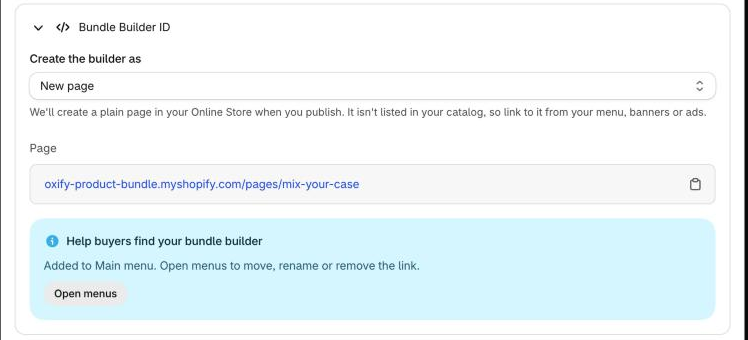
What you get, per Oxify's automatic page docs:
- A visible page named after the builder, at /pages/ plus a handle from the title, such as /pages/mix-your-case. Rename it or change the handle in Online Store > Pages; the app follows and never rewrites your edits.
- No catalog listing. Shoppers only reach the page through a link.
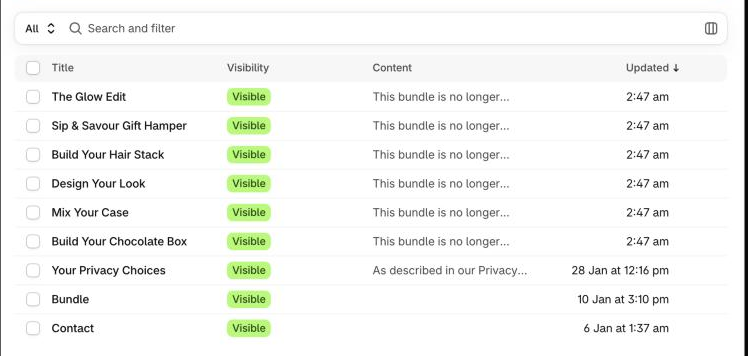
- A page that outlives the offer. Unpublish the builder and the page shows only "This bundle is no longer available." Delete the builder and its page and menu link stay. When an offer ends, redirect the address to a live page.
Make the app page sell on its own
Here the builder is the whole page, so the selling happens inside it:
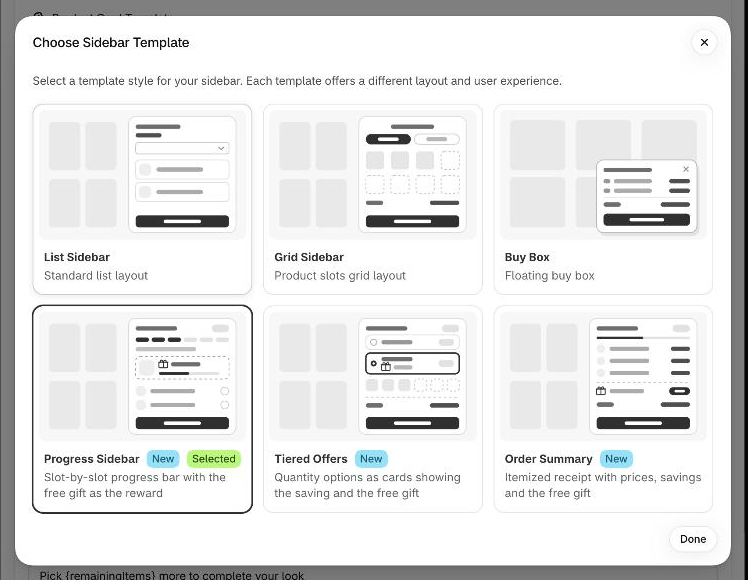
- Words that sell. In Design > Sidebar Widget, give the sidebar a title that names the offer and an instruction like "Pick {remainingItems} more to finish your hamper."
- A sidebar that sells the sizes. The Tiered Offers template shows each box size as a card, with any free gift and its discount badge, before anything is added.
- A sticky bar on phones, built in. On screens 1,024px wide or narrower, once the box has items, a bar at the bottom shows the item count and total and jumps to the box when tapped.
- Skip the cart for ad traffic. "Skip cart and go to checkout" (Sidebar Widget > Builder Settings) sends shoppers straight to checkout. Leave it off if you run cart upsells or a free-shipping bar, and place a test order after you switch it on.
Want a headline banner here? The heroes on Oxify's demo pages are built in the builder's Full layout custom template, which means writing React/JSX that Oxify's support can't debug. Way 2 is the easier path to a hero.
Way 2: A theme page template with the app block
Use this when the builder should sit under your own hero, reviews, shipping info and FAQ. It's what I'd build for an evergreen page you want found on Google, because the page can carry real text.
- Stop the app making its own page. Before you publish, set Create the builder as to Manual (app block or embed code) on the Settings tab, then click Save to publish. If the app already made a page for this builder, it stays; delete it in Online Store > Pages so you don't have two pages for one offer.
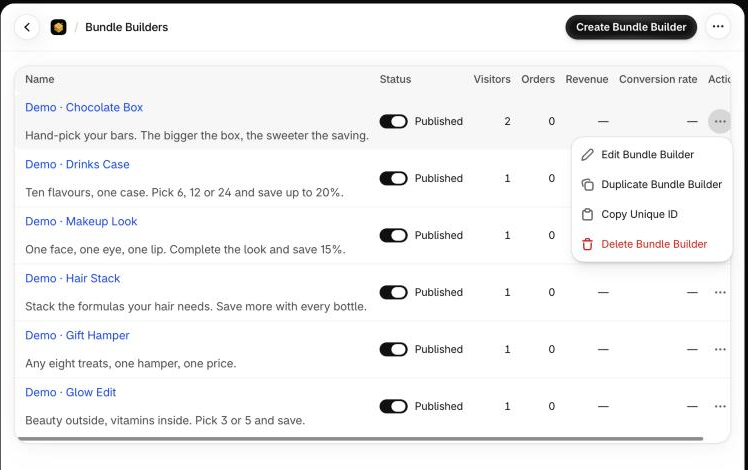
- Copy the Unique ID. On the Bundle Builders list, click ⋯ on the builder and choose Copy Unique ID.
- Create a page template. Go to Online Store > Themes > Customize. In the template menu at the top, choose Pages, then Create template. Name it, for example "bundle-landing", and base it on your default page.
- Add your sections: a hero with the offer, a three-step "how it works" row, then Add section > Apps > Oxify: Bundle Builder, then reviews, shipping and returns, and an FAQ. In Dawn-style themes that's Image banner, Multicolumn, Apps and Collapsible content.
- Point the block at your builder. Paste the Unique ID into the block's Bundle Builder Unique ID field and click Save.
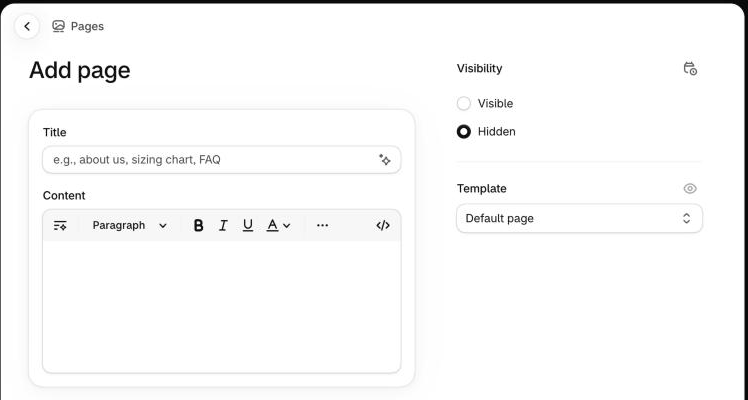
- Create the page. In Online Store > Pages, click Add page, enter a title, pick your new template in the Template menu, set Visibility to Visible (new pages start Hidden) and save.
- Link it under Content > Menus, and from the product pages of the items in the bundle.
Three things trip people up, per Oxify's app block docs:
- An empty Unique ID shows your oldest published builder, which is almost never the one you want.
- The block and the embed are separate switches. The block places the builder; the app embed loads it. The embed is per theme, so after publishing a new theme, switch it on again and re-add your blocks. See bundle app theme compatibility for other clashes.
- The block lives in the template, so every page using that template shows the same builder. For several bundle pages, make one template per builder. Or keep your theme's main page content section in the template and paste each builder's embed code into each page's Content box (HTML view). One template then serves them all, with the same hero on every page.
Way 3: A page builder with the embed code
Use this if you already design pages in a page builder or want to A/B test layouts. The page builder handles the design; the bundle app still runs the picking, price, discount and cart line.
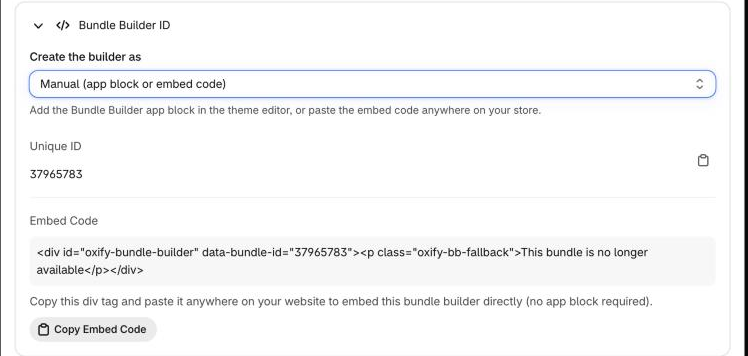
- Get the code. On the builder's Settings tab, set Create the builder as to Manual (app block or embed code) and click Save. Under Embed Code, click Copy Embed Code.
- Paste it. In your page builder, drag its custom HTML (or custom code) element to where the builder should sit and paste the code.
- Publish the page and keep the Oxify: Bundle Builder app embed switched on in your live theme.
Gotchas from Oxify's embed code docs:
- Use the Copy Embed Code button. A div without data-bundle-id shows your oldest published builder.
- Some editors strip pasted HTML. Reopen the page in code view and check the div is whole.
- An embed code in a landing page builder can be up to 5 minutes behind after you change the builder.
- Only boxes built in the embedded builder get the box discount. Items added from the page builder's own product sections are ordinary cart items.
These page builders list a custom HTML or code feature:
| Page builder | Rating (reviews) | Free plan | HTML feature listed | A/B tests | Built for Shopify |
|---|---|---|---|---|---|
| PageFly ✦ AI Page Builder | 4.9 (5,925) | Yes, 1 published page or section | Custom HTML | Yes | Yes |
| GemPages Landing Page Builder | 4.9 (4,275) | Yes, 1 published page | Custom HTML | Yes | No |
| Shogun ‑ Landing Page Builder | 4.8 (1,980) | Drafts only, no publishing | Custom HTML | In a separate Shogun app | No |
| Zipify Landing Page Builder | 4.7 (421) | Development stores only | Custom HTML | Yes | Yes |
| Replo Landing Page Builder | 4.7 (186) | Previews only | Custom code | Yes | No |
From each App Store listing, 18 November 2026. Paid prices and page limits are in our comparison of Shopify page builder apps.
Which bundle apps can make the landing page for you?
Some bundle apps host the page themselves. Here's what four listings showed on 18 November 2026 (listing facts, not test results).
| Bundle page tool | How it makes the page | Best for | Listing facts |
|---|---|---|---|
| Oxify Bundles Quantity Breaks | Creates a /pages/ page for each builder on publish; also a theme app block and an embed code. The app-made page is the builder only, with no hero or FAQ sections | Build-your-own boxes with box sizes, categories and steps | Free plan, 5.0 (14), Built for Shopify |
| Bundler » Product Bundles App | Advertises bundle landing pages; "Custom landing pages" is on its paid Premium plan | Fixed and mix and match bundles that each need a page | Free plan, 4.9 (2,797), Built for Shopify |
| Easy Bundles: Bundle Builder | "Templates for independent landing pages" on its paid Essential plan | Builders that need a ready-made page template | Free to install, 4.9 (1,563), Built for Shopify |
| Shopify Bundles | Makes the bundle a product, so its product page is the landing page. Fixed bundles and multipacks only | One fixed set at one price | Free, 2.9 (565) |
For more builders, see our bundle builder apps comparison.
What should a bundle landing page include?
Whichever way you build it, the same blocks do the selling. Here they are, with the gift hamper page from Oxify's demo store as the example.
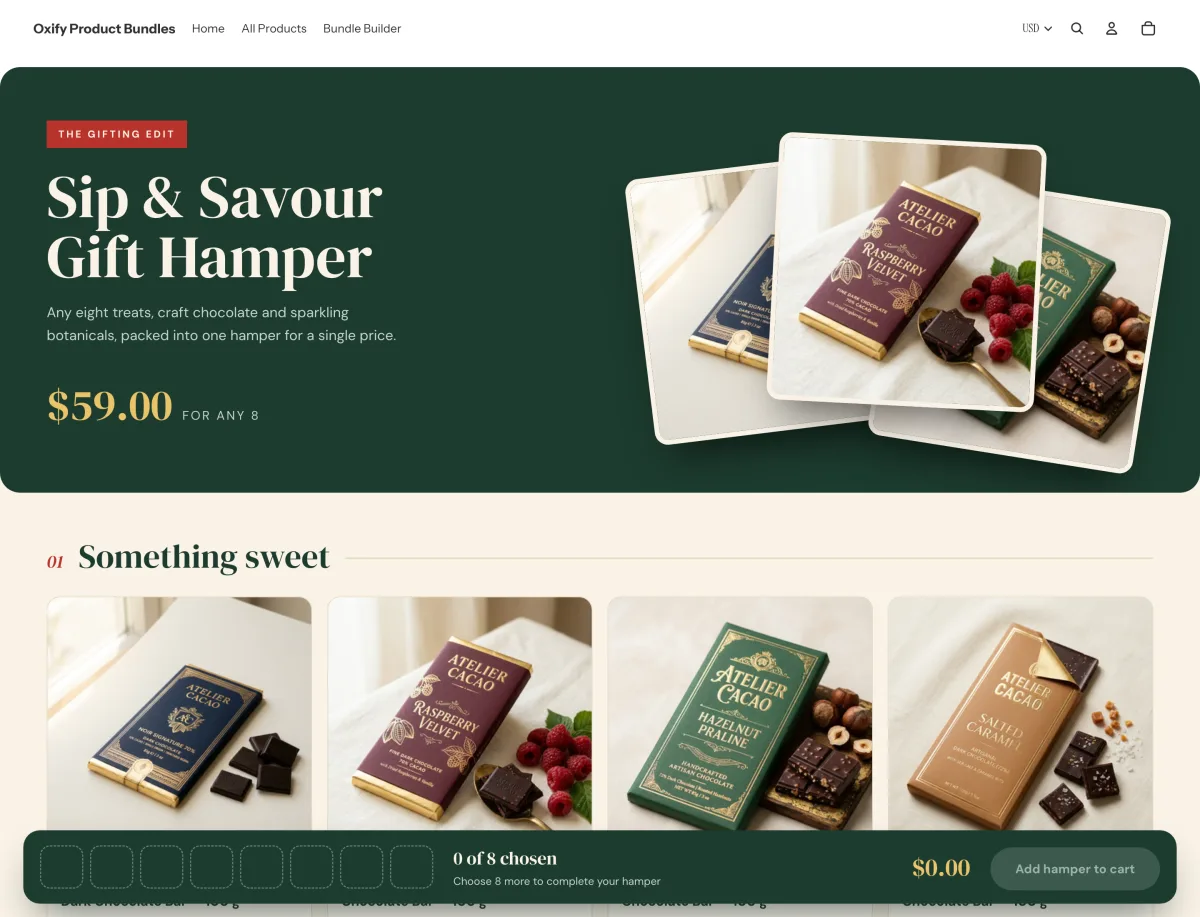
| Block | What to put there | On the demo hamper page |
|---|---|---|
| 1. Offer headline and price | What they get and what it costs, in the words your ad used | "Sip & Savour Gift Hamper" and "$59.00 for any 8" |
| 2. One-line promise | What's inside and who it's for | "Any eight treats, craft chocolate and sparkling botanicals, packed into one hamper for a single price." |
| 3. How it works | Three short steps or numbered sections | Numbered categories: "01 Something sweet", "02 Something sparkling" |
| 4. The builder | The products, grouped the way shoppers think | 8 chocolate bars and 8 sparkling drinks |
| 5. Live progress and saving | Items chosen, items left, running total | "0 of 8 chosen" and "Choose 8 more to complete your hamper" |
| 6. Proof, shipping and FAQ | Real reviews, delivery times, how bundle returns work, and four to six questions you actually get asked | None on the demo; add them as theme sections with Way 2 |
| 7. Sticky add-to-cart | A button that stays in view as shoppers scroll | The tray with "Add hamper to cart" stays pinned to the bottom of the screen |
A few rules I'd hold to:
- Show the saving in money, honestly. On the demo hamper, eight chocolate bars cost $95.00 separately, so the best box saves $36.00. Eight drinks worth $51.00 still cost $51.00, because a fixed box price only ever lowers the total. So "save up to $36" is honest; "save $36" is not. See fixed price bundles on Shopify and check the margin with the bundle calculator.
- One decision per screen. If shoppers pick a base, then add-ons, use a multi-step bundle builder rather than one long grid.
- Real proof, real deadlines. Quote reviews you actually have, and use a countdown only when the offer or shipping cut-off really ends.
- Answer gift questions on gift bundles. Our build your own gift box guide covers messages and wrap.
- Offer a subscription if the box is a refill. The same builder can show a Subscribe & Save checkbox; see custom subscription boxes.
What about a landing page for a fixed bundle?
A fixed bundle is a set you choose, sold at one price, like "cleanser, toner and moisturizer for $49" or a holiday gift set. There's nothing to build, so the page is simpler.
- With Shopify Bundles. The free Shopify Bundles app makes the set as a product, so it already has a product page. Because it's a product, you can give it an alternate product template in your theme with a "what's inside" section, reviews and an FAQ, then send ads straight there. One catch from Shopify's help center: when a component's price changes, "the bundle price doesn't update." Check the price before every campaign.
- With Oxify. The Quantity Break side of the same app puts bundle and mix and match offers on product pages. For one hero product plus add-ons, that often beats a separate page.
How do you set up a bundle landing page for ads?
An ad landing page has one test to pass: the shopper sees the ad's promise the moment the page loads.
- Match the message. If the ad says "any 8 treats for $59", the first line on the page should say "$59 for any 8". Same offer, same words, same product photos.
- One offer per page. Two or three box sizes of the same offer is fine. A hub of twelve bundles is not.
- One builder per campaign, for clean numbers. Duplicate the builder from the ⋯ menu, then open the copy and click Publish so its page and hidden parent product get created. Each builder reports its own visitors, orders, revenue and conversion rate.
- Tag every link with UTM tags (utm_source, utm_medium, utm_campaign) so your reports can tell paid, email and organic visits apart.
- Check it on a phone first. Make sure the price and the first products show without scrolling past a huge hero image.
- Keep it fast. Run PageSpeed Insights before and after you add sections. Shopify's app requirements say an app shouldn't cut Lighthouse scores by more than 10 points, but Shopify measures that on home, product and collection pages, not on your landing page. So test the landing page itself.
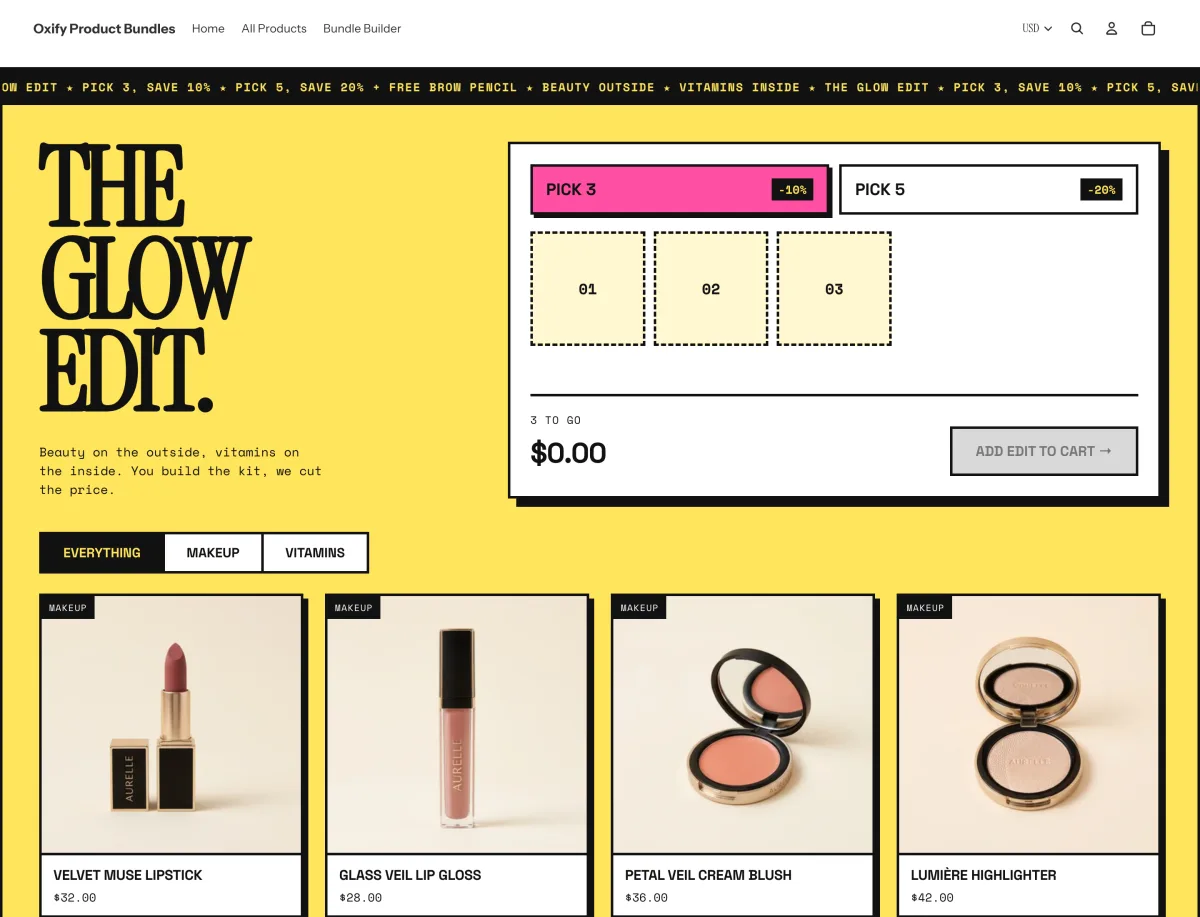
Building one for Black Friday (27 November 2026)? Publish and place a test order a few days before. Our Black Friday bundle playbook covers the offer side.
Should Google index your bundle landing page?
Evergreen pages: yes. A page like "Build your own gift hamper" can earn search traffic all year. In Online Store > Pages, fill in its Search engine listing: a title with the words people search, a meta description and a short handle such as /pages/build-your-own-hamper. Link it from your menu and product pages. Give Google text to read, too. The Way 1 page hides your theme content, so for an SEO page use Way 2 with a short intro and an FAQ.
Campaign copies: hide them. If you clone a page for each ad set, hide the copies from search. Shopify's own guide to noindexing a page uses the seo.hidden metafield:
- Go to Settings > Metafields and metaobjects, choose Pages and click Add definition.
- Name it NoIndex, set the namespace and key to seo.hidden and the type to Integer, and save.
- Open the campaign page, enter 1 in the NoIndex field and save.
The page stays live for ads but drops out of search engines, your sitemap and store search. The same guide adds two points: for A/B tests on separate URLs, Google prefers a canonical tag pointing at the original over noindex, and don't block the page in robots.txt, because Google has to crawl it to see the noindex.
How do you know if the landing page works?
Watch three numbers: how many visitors buy a bundle (conversion rate), how much each page sells (orders and revenue), and what bundle orders are worth (AOV).
Oxify tracks these per builder. The Bundle Builders list shows Visitors, Orders, Revenue and Conversion rate for each one (all time, up to a minute behind). The Analytics page adds date ranges: pick one builder, listed as its Bundle Name plus "(Builder)", to see Unique visitors, Additional revenue, Bundle orders, AOV and Conversion rate against the previous period. Details are in Oxify's analytics docs.
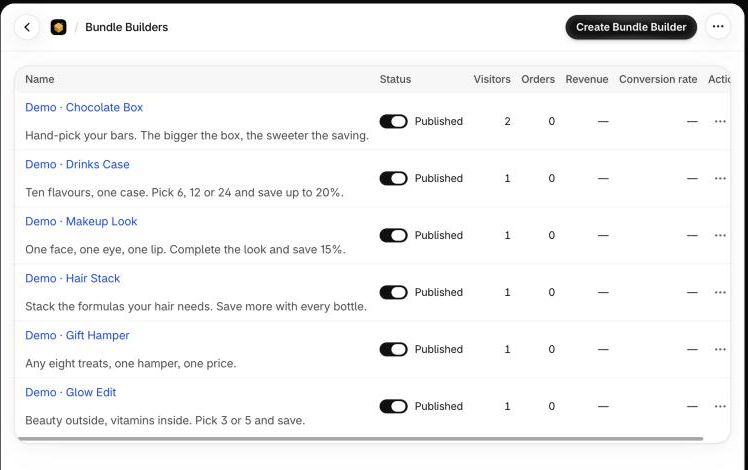
Read them with care. Visitors only count once the builder is published, placed and the app embed is on. Refunds and cancellations aren't subtracted. And small samples swing hard: one order from three visitors shows 33.3%.
Then find the weak spot. Say 1,000 people land and 20 buy, a 2% rate. If most leave without adding anything, the page doesn't match the ad, so fix the headline and first screen. If many start a box but few finish, the box is too big or the choice too wide. For paid traffic, set each page's bundle revenue against its ad spend (ROAS). Our AOV calculator shows what a lift in order value is worth.
Why isn't the bundle builder showing on my landing page?
Start with what the page shows. The full checklist is in Oxify's builder-not-showing guide.
- Only "This bundle is no longer available". The app embed is off, the builder isn't Published, or the ID doesn't match a published builder.
- Nothing at all. There's no placement, the block's ID has a typo, or a new theme doesn't have the embed switched on.
- The wrong builder, or an old version. See the Unique ID and 5-minute notes under Way 2 and Way 3.
For ideas on what to put in the builder itself, see our build-a-box guide.
Frequently asked questions
Can I use Shopify as a landing page?
Is there a free bundle app for Shopify?
What's the best app for a Shopify bundle landing page?
Can I make a bundle landing page without an app?
Should I send ads to the product page or a bundle landing page?
Will a bundle landing page slow down my store?
Put your bundle on its own page this week
Start with the quickest version: install Oxify Bundles Quantity Breaks, publish one builder, and let the app make the page. Link it from your menu, send one offer to it, and move it to a theme template once it sells. See everything the builder does on our Shopify product bundles page.