 Oxify App
How to Create a Build Your Own Gift Box on Shopify
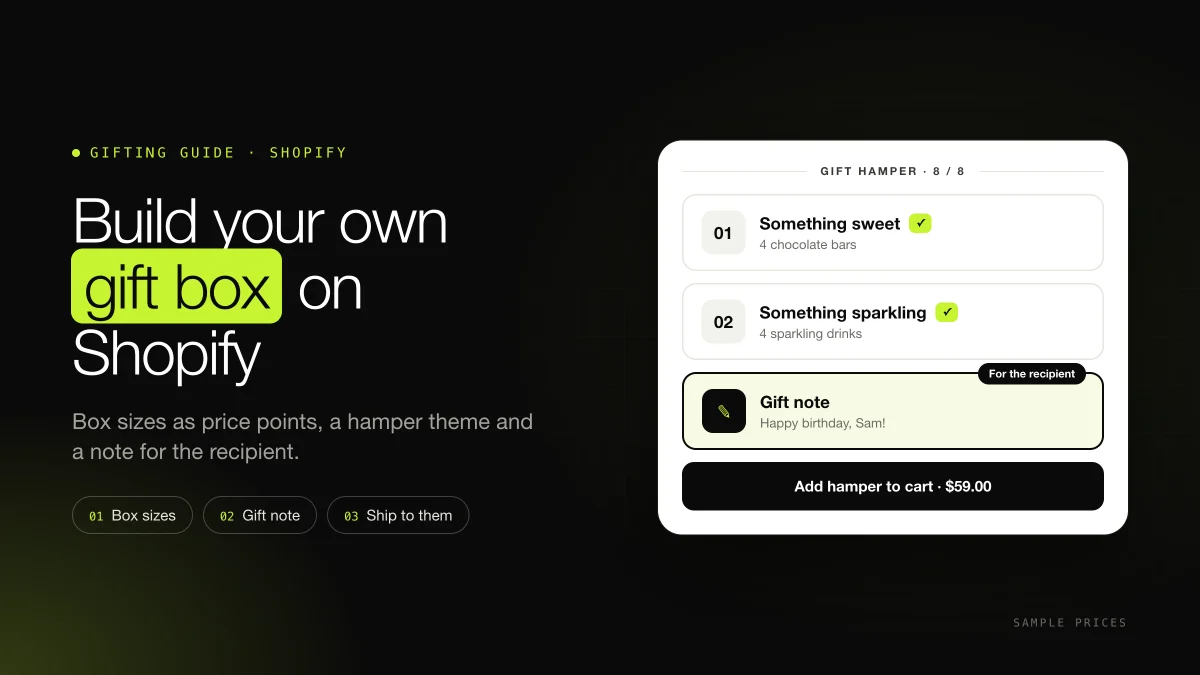
Short answer: A Shopify build your own gift box needs a bundle builder app, because Shopify's free Bundles app only sells fixed sets and multipacks. I'd use Oxify Bundles Quantity Breaks. You set a box size and a gift price ("any 8 for $59"), group products into themed categories, and add a free extra to the bigger box. The builder has no gift-message field, so collect the message with your theme's cart note or a cart drawer notes box. The buyer types the recipient's address at checkout.
Oxify Bundles Quantity Breaks builds custom gift boxes and hampers on Shopify: shoppers choose a box size at a fixed gift price, mix and match items from themed categories and unlock a free gift on the bigger box (Free plan, 5.0 from 14 reviews, Built for Shopify; App Store listing, 18 November 2026). For the general build-a-box routes, see how to build your own box on Shopify.
Key facts (checked 18 November 2026)
- Shopify's free Bundles app makes fixed bundles and multipacks. Shopify's help center says it "doesn't support mix-and-match bundles," so a box the shopper fills needs an App Store app or a Shopify Plus custom build.
- Oxify Bundles Quantity Breaks lists "Gift boxes" among its bundle types on the App Store. Its bundle builder does box sizes, a fixed box price, themed categories, per-category caps and a free gift per box size.
- In Oxify, a Fixed Price is the price of the whole box, and it only ever lowers the total. Picks worth less than your price sell at their normal price.
- A theme's cart note is saved as the order's note. There is one note per order, not one per box.
- Shopify checkout takes one shipping address per order. One order to several people needs a multi-ship app such as Giftship.
- Black Friday 2026 is 27 November. Cyber Monday is 30 November.
On this page
- What makes a gift box different
- Can you sell a gift box without an app?
- Set up a gift box with Oxify, step by step
- How to price a gift box
- How to theme a hamper
- Where the packaging goes
- How customers add a gift message
- How to add gift wrap
- A free gift inside the box
- Shipping straight to the recipient
- Keeping prices off the packing slip
- Corporate and bulk gift orders
- Holiday deadlines and stock
- Which gift box builder apps work on Shopify
- Test before you launch
- FAQ
What makes a gift box different from any other box?
In a normal build-your-own box, the buyer is also the user, and they care about the saving. A gift box has two people in it, the buyer and the recipient. So the buyer needs five things, and only the first two come from a bundle app:
| What the gift buyer needs | Where it lives on Shopify |
|---|---|
| A budget, not a discount: "about $50 for my sister" beats "save 15%" | The box price on a bundle builder page |
| A box that looks finished | Themed categories in the builder, plus packaging in the price, as a free gift or as a cart add-on |
| A message, so the recipient knows who sent it | The cart note, saved to the order, or a gifting app |
| Someone else's address, with no prices in the parcel | The shipping address at checkout (a multi-ship app for several people), and your packing slip template |
| A deadline, because a late birthday box is a failed gift | Your last order date, shown on the page and in the cart |
Can you sell a gift box on Shopify without an app?
Yes, if you choose the contents. A Shopify build your own gift box, where the shopper picks every item, needs an app. The three routes:
| Gift box type | How to build it | Where it stops |
|---|---|---|
| A ready-made gift set | Shopify's free Bundles app: a fixed bundle with its own product page | Shoppers choose variants such as scent or size, not different products |
| A few preset combinations | One product with a variant for each combination | Every variant has its own stock, so a bar used in three combinations isn't counted once |
| A custom gift box the shopper fills | A bundle builder app such as Oxify Bundles Quantity Breaks | The gift message, wrap and recipient address live in the cart and checkout, covered below |
Selling ready-made gift sets too? See product kits on Shopify for how set stock works.
How to set up a Shopify build your own gift box with Oxify
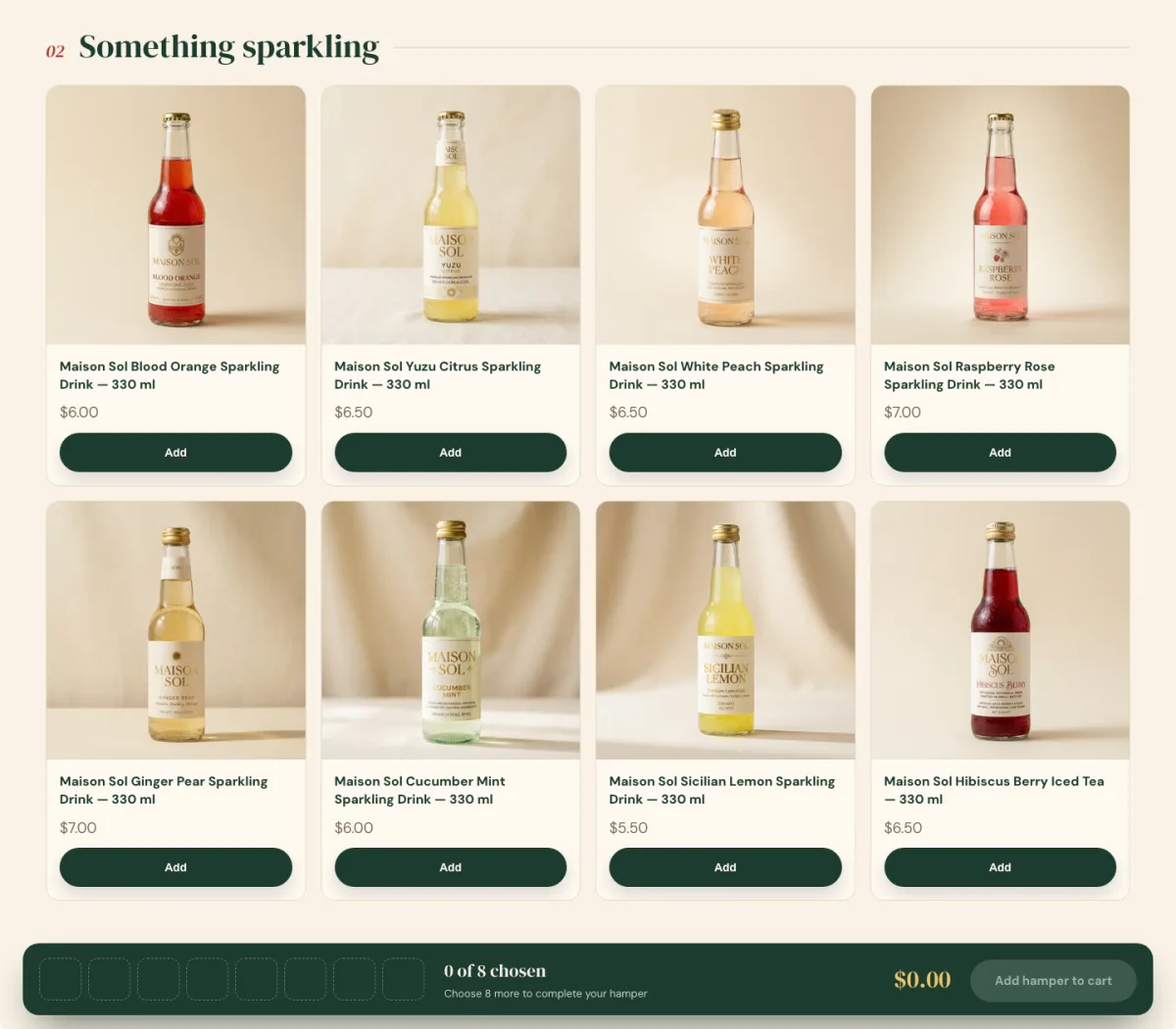
The example is the Sip & Savour Gift Hamper on Oxify's demo store, not a real merchant: any 8 treats, chocolate bars and sparkling drinks, for $59. The builder gets its own page, and a tray counts the picks until the box is full. Screen names follow Oxify's documentation, which still calls the app Oxify Quantity Breaks & BYOB.
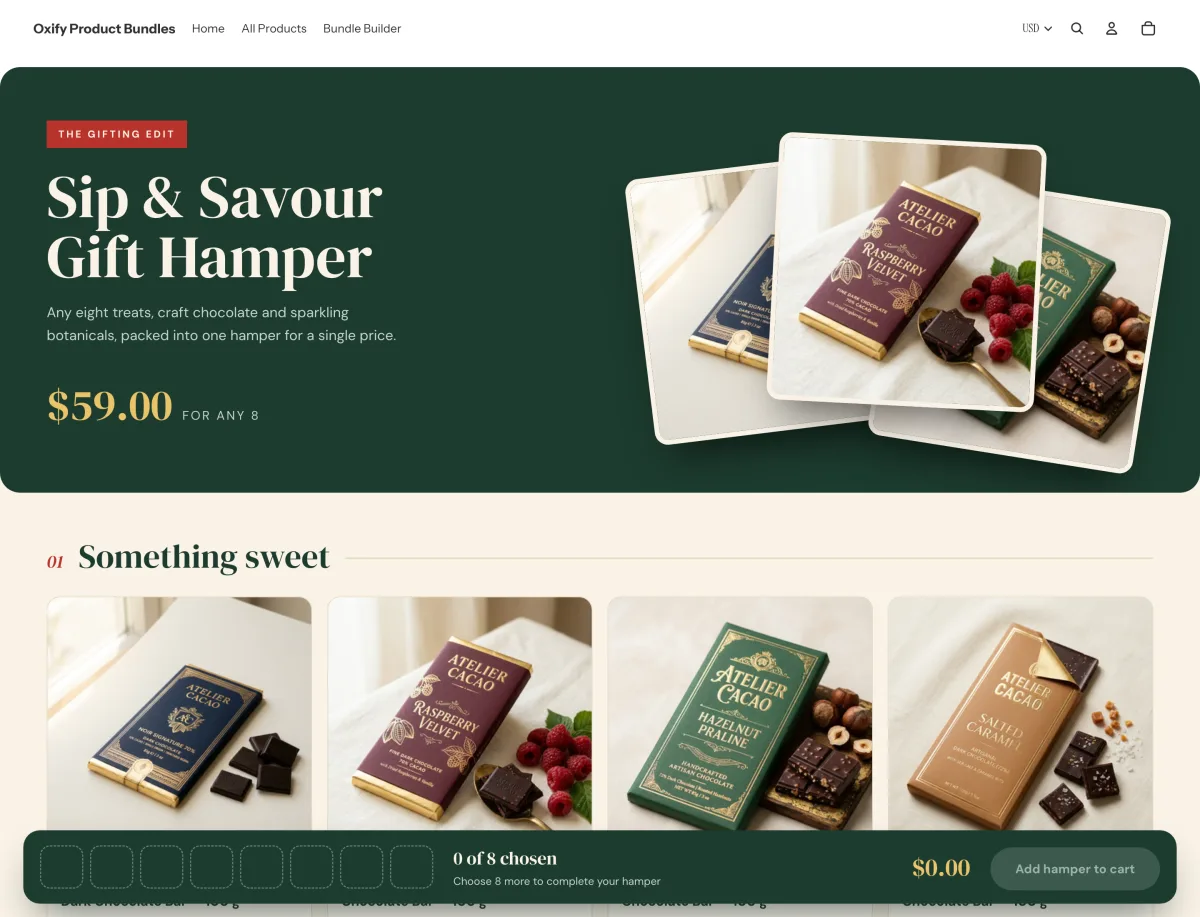
- Install the app and switch on the embed. Install Oxify Bundles Quantity Breaks. In Shopify admin, go to Online Store > Themes > Customize to open the theme editor, click App embeds, switch on Oxify: Bundle Builder and click Save.
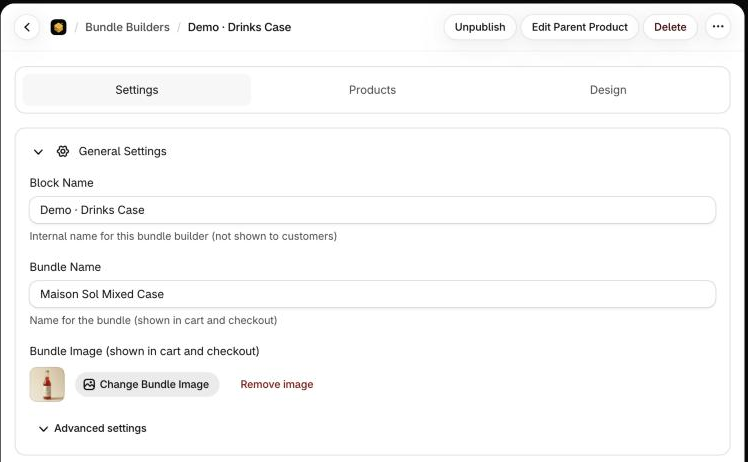
- Create the builder and name the gift. In the app, click Bundle Builder > Create Bundle Builder. On the Settings tab, set a Block Name only you see ("Christmas hamper") and a Bundle Name buyers see in the cart and checkout ("Sip & Savour Gift Hamper"). Upload a Bundle Image of the packed box: by default the hamper sits on one cart line with this picture.
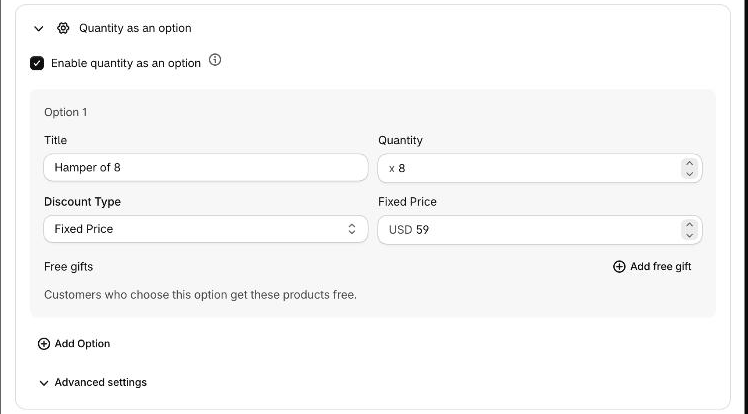
- Set the box size and gift price. Go to Products tab > Quantity as an option. In Option 1, type Title "Hamper of 8" and Quantity 8, pick Discount Type Fixed Price, then type 59. Pick the type first, because changing it resets the value to 0.
- Add themed categories. In the Products card, click Add Category, type "Something sweet," then + Add Products and tick the bars. Repeat for "Something sparkling."
- Cap the priciest category (optional). In Rules Configuration, choose Step rules and set Something sweet, Quantity, is less than or equal to, 4. Rules cap a category but don't force a pick, so an all-drinks hamper still works. The tray counts items, not space, so cap any bulky category too. For a guided, step-by-step hamper (four sweets, then four drinks), set each rule to "is equal to" and tick Auto-advance to next step. Our multi-step bundle builder guide has the details.
- Hide sold-out treats. Tick Hide out of stock and unavailable products in the Products card. Availability is checked each time the page loads.
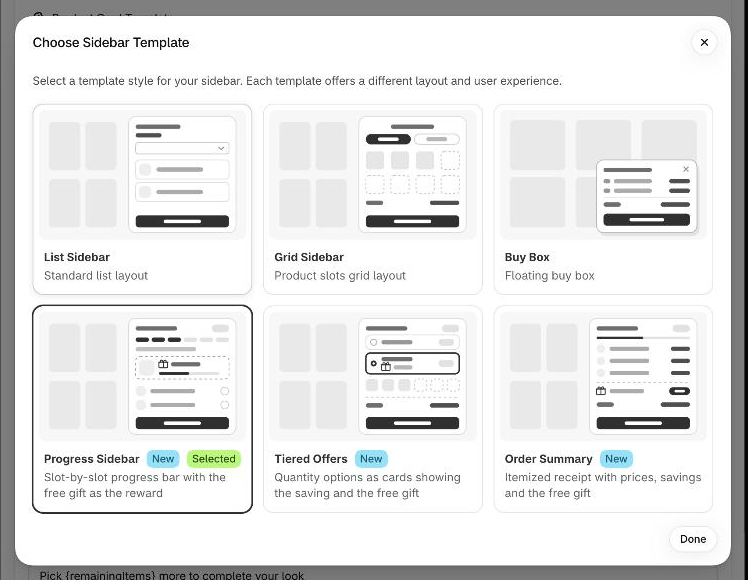
- Write gift copy. On the Design tab, open Sidebar Widget and choose a template. Progress Sidebar shows one slot per item and the free gift as a reward. Set Instruction Text to "Pick {remainingItems} more treats to finish the hamper" and Text when the bundle is complete to "Hamper complete. Add your gift message in the cart."
- Publish and link the page. Check the Mobile preview card on the Settings tab first. A new builder is already set to publish, so clicking Save makes it live and creates an Online Store page. Click Add to menu in the banner on the Settings tab, then rename the menu link to what buyers look for, such as "Build your own gift box."
The hamper uses your normal cart and checkout, where Shopify works out the box price. For every setting in order, see the full guide to creating a bundle builder on Shopify. To give the hamper a dedicated landing page with your own hero, reviews and FAQ, read how to build a bundle landing page on Shopify.
How should you price a build your own gift box?
Use box sizes as price points, because gift buyers shop by budget. For example, a Small hamper of 4 treats for $32, a Classic of 8 for $59 and a Grand of 12 for $85. Each size is also a step up in average order value (AOV), because the buyer commits to 4, 8 or 12 items at once. In Oxify, each box option gets its own Fixed Price, and a buyer who fills the Classic and adds one more treat moves up to the next size on their own.
A Fixed Price reads like a gift price ("$59 for any 8") and works best when the items cost about the same. A percentage discount (% Off) is safer when prices vary a lot, like $8 candles next to $40 diffusers.
One rule catches people out: Oxify's Fixed Price only ever lowers the total. On the demo hamper, $59 is a ceiling, not a set charge. Eight Sicilian Lemon drinks, the cheapest item, cost their normal $44, and one of each drink costs $51. At the other end, eight $15 Pistachio Creme bars, $120 of chocolate, still cost $59. So check your margin at both ends: the cheapest hamper still has to pay for the box, tissue and card. Capping Something sweet at 4 brings the priciest hamper down to $88 of goods.
If you offer free shipping over a set amount, I'd price the main box just above it. Selling in several Shopify markets? You type the Fixed Price in your store currency and Shopify converts it, and each market can have its own price.
The full math is in our guide to fixed price bundles on Shopify. Test your own price in the bundle calculator.
How do you theme a hamper so it feels like a gift?
- Name categories as moments, not product types. The demo uses "01 Something sweet" and "02 Something sparkling," not "Chocolate" and "Drinks." A coffee shop might run a slow-morning box; a candle shop, a night-in box.
- Keep it small. I'd use two to four categories with six to ten products each. Buyers know the recipient's taste less well than their own.
- One product, one category. With caps on, Oxify limits a product by the first category that contains it.
- Make seasonal copies. Duplicate the builder for Christmas, Valentine's Day or Mother's Day. Each copy gets its own page. Deleting a builder doesn't delete its page or menu link, so remove those after the season.
For how to pick, name and order categories in depth, see how to add product categories to a bundle builder. For a gift that arrives every month, see how to create a custom subscription box on Shopify.
Where does the gift box packaging go?
The box, crate or basket is part of the gift, but it isn't one of the treats. Four ways to handle it:
- Build it into the price. Your $59 covers box, tissue and card.
- Give a better box free with the bigger size. Make your premium crate a product and attach it as the free gift on your largest box option (steps below).
- Sell the upgrade in the cart. Offer something like "Wooden gift crate, +$8" as an add-on. In Oxify Cart Drawer & Upsells, an add-on is a toggle in the cart, and crate colors can be variants the buyer picks from a dropdown. The buyer has to switch it on, because Shopify doesn't let apps add paid items automatically.
- Skip a "Choose your box" category. Boxes inside the builder fight it: every item counts toward the box size, % Off discounts the packaging, and a rule can't force a pick.
Packaging is also the stock nobody counts. With 120 crates, you can ship 120 hampers, however many bars you have. Options 2 and 3 make the crate a real product with real inventory: a sold-out free gift is skipped, and a sold-out add-on is hidden in the cart.
How do customers add a gift message?
Oxify's bundle builder has no gift-message field, so collect the message in the cart. Three ways:
- Your theme's cart note (free). In Shopify's Dawn theme, go to Online Store > Themes > Customize > Theme settings > Cart and tick Cart note. Shoppers see a box labeled "Order special instructions." To rename it "Gift message," click the ⋯ menu next to Customize, choose Edit default theme content and search for that text. Other themes have a similar setting. The text is saved as the order's note.
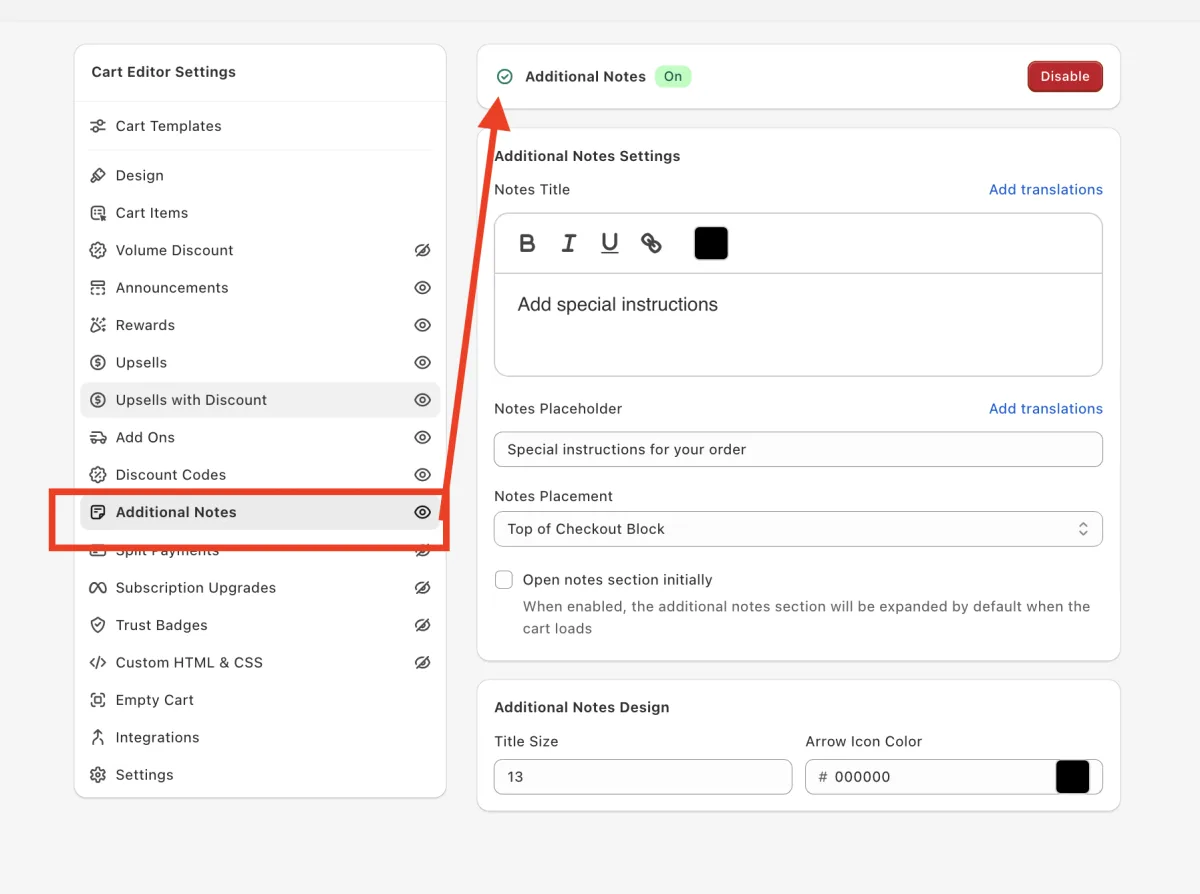
- A notes box in your cart drawer. In Oxify Cart Drawer & Upsells, open the Cart Editor, click Additional Notes and click Enable. Set Notes Title to "Gift message," add a placeholder like "We'll print this on a card," and tick Open notes section initially. The text becomes the order's note, as Oxify's order notes docs explain.
- A gifting app. Giftship and similar apps add a message per recipient, delivery dates and printed messages.
Two limits. There's one note per order, so two hampers to two people share one message. And nobody prints the note for you: someone copies it onto a card, or your packing slip prints it, so check yours on a test slip.
How do you add gift wrap to a gift box order?
Gift wrap is an optional paid extra, so it belongs in the cart, not the builder: a cart add-on toggle like the crate above, or a hidden gift wrap product. We compare the methods in how to add gift wrap to your Shopify cart. If your packaging upgrade already covers wrap, offer one, not both.
Can you put a free gift inside the box?
Yes, and it's a good nudge toward the bigger box. Pick something small and cheap to ship, like a greeting card or a mini treat. In Oxify, go to Products tab > Quantity as an option, open the box option, click Add free gift, tick the exact variant, click Select, then Save.
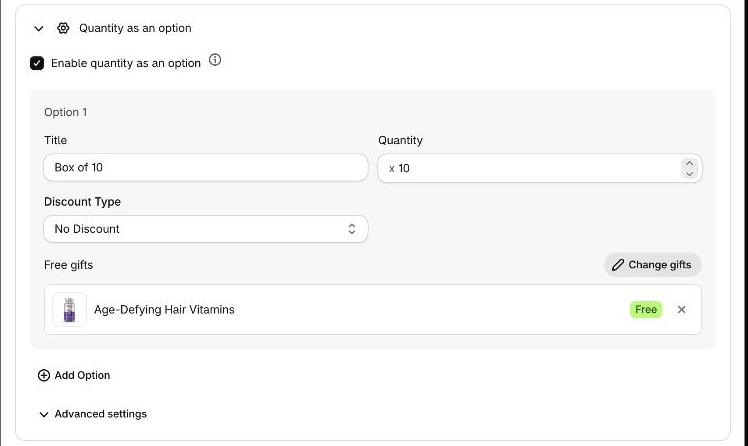
The gift doesn't fill a slot. It's one unit per box at 100% off, on top of a fixed price, and it shows locked in the sidebar until the box is full. Only the box the buyer reaches gives its gift, and a sold-out gift is skipped.
For free gifts across the whole cart, not inside one box, see how to add a free gift with purchase on Shopify.
How do you ship a gift box straight to the recipient?
One recipient. No app needed. At checkout, the buyer enters the recipient's name and address as the shipping address and keeps their own billing address. Add a line to the builder page: "Sending it as a gift? Put their address at checkout." Shipping emails go to the buyer, who passes on tracking.
Several recipients. The buyer can place one order per person, or you add a multi-ship app. Giftship's listing says shoppers can send one order to multiple addresses, and you can ship to many recipients from a spreadsheet. Multi-address shipping is on its Essential plan; the cheaper Micro plan lists it as an add-on (prices in the app table below).
Weight. Shopify bundles use their products' shipping profiles, and an Oxify hamper reaches the order as its real products. Weigh a packed hamper, crate and all, and check that your shipping rates allow for the packaging.
How do you keep prices off the packing slip?
Put a packing slip or a gift note in the box, never an invoice. Oxify's Order Printer docs mark prices as "Not shown" on Shopify's packing slip, while Order Printer templates such as invoices can print them. For Order Printer delivery notes, the docs say to delete the price column. Packing slip templates can be edited, so print a test slip from a real order.
The other job is making the hamper easy to pack. By default, the packing slip lists a box's items as separate rows, each stamped "Part of: …". Oxify's docs give Liquid code for Settings > Shipping and delivery > Packing slips > Edit packing slip template that prints one block per box: name, bundle SKU, item count and the items under it. Copy the template into a text file first, because it has no version history.
- Turn on the bundle SKU in the builder's Settings tab > General Settings > Advanced settings. The SKU comes from the hidden parent product the app creates when you publish.
- Label the free gift with the docs' one-line "Free gift" snippet.
How do you handle corporate and bulk gift orders?
- The same box for everyone. The buyer builds one hamper and raises the quantity in the cart. Oxify's docs say two of the same bundle cost twice the fixed price, so two hampers are $118.
- Different boxes in one order. Each box gets its own ID, so with the packing slip code, two hampers print as two separate groups.
- Invoiced orders. Shopify warns that draft orders might default to an older checkout that doesn't support bundles, and Oxify's docs say they don't run its discount like a real checkout. Test one before you invoice a hamper.
- Stock. 25 hampers of 8 means 200 treats plus 25 crates. Count both before you agree a delivery date.
How do you plan for holiday deadlines and stock?
Gift boxes sell in spikes, and each spike has a hard end. Christmas Day is a Friday this year.
- Set a last order date. Take your carrier's published holiday cutoff for the slowest service you offer, subtract your packing days, and show it on the builder page and in the cart: "Order by [your date] for Christmas delivery."
- Watch stock per item. Each pick takes one unit of that product, and if a whole category sells out, its tab disappears.
See the Black Friday bundle playbook for the wider sale plan.
Which gift box builder apps work on Shopify?
All six gift box builders let shoppers create their own gift box. Details are from each App Store listing on 18 November 2026, with rupee prices converted at the listing's own rate (1 INR = 0.0107 USD).
| Gift box app | Rating and badge | Price (18 Nov 2026) | Gift features on the listing | Best for |
|---|---|---|---|---|
| Oxify Bundles Quantity Breaks | 5.0 from 14 reviews, Built for Shopify | Free plan | Box sizes, fixed box price, categories, step rules, free gift per box; packing slip grouping in the docs. No gift-message field. | Hampers with set price points, plus quantity breaks on product pages in the same app |
| Giftship: Gifting & Multi-Ship | 4.8 from 274 reviews, Built for Shopify | Micro $29.99/month; Essential $59.99/month adds the box builder and multi-address shipping; per-order fees above a monthly order count | Gift notes, gift wrap, delivery dates, multi-ship, printed gift messages | Corporate gifting and orders going to many people |
| Build Your Own Bundle Builder (QeApps) | 4.9 from 57 reviews, Built for Shopify | Free until bundle sales pass $200/month, then $19/month; multi-step builder listed on the $39/month plan | Gift box builder, custom fields and personalization options | Boxes that need a typed personalization field |
| Easify Product Bundle Builder | 5.0 from 319 reviews, Built for Shopify | Free until box revenue hits $500/month; Grow $29/month | Custom fields for a gift message or gift note; single or multi-step box pages | A gift message typed inside the builder |
| Boxi: Bundle Builder & BYOB | 5.0 from 24 reviews, Built for Shopify | Basic $21/month, up to $1,000 bundle sales a month | Custom fields on the box; fields on single products are listed on a higher plan | Personalized hampers and cookie boxes |
| BundleJoy: Build a Box | 3.3 from 5 reviews | Free for 1 bundle; Pro $14.99/month | Gift messaging, a box product added automatically, mystery items | One simple candy or snack box |
I'd start with Oxify for a custom gift box with clear price points and a free extra on the bigger size. Pick Giftship instead if orders often go to several addresses, or a custom-field app like Easify if the message or a monogram must be typed inside the builder. For 19 builder apps compared, see the best Shopify bundle builder apps.
Test the gift box before you launch
Launch early, so problems surface on a quiet day. Place one real order from a phone and check that:
- The checkout total is right for both the cheapest and the priciest picks.
- The free gift shows at $0 on the right box size only.
- Each picked item's stock dropped by one.
- The gift message lands in the order's notes and prints on the packing slip.
- The packaging or gift wrap add-on switches on and off.
- Your holiday discount codes stack as you expect (Combinations sits under Products tab > Quantity as an option > Advanced settings).
- The app embed is still on after any theme change. It's set per theme.
After launch, the app's Bundle Builders list shows Visitors, Orders, Revenue and Conversion rate for each builder.
Frequently asked questions
How can I create my own gift box on Shopify?
How do I add gift wrapping in Shopify?
Is there a free build your own gift box app for Shopify?
Does a build your own gift box track inventory?
Can customers choose the box size or box style?
Will a Black Friday discount code work on a gift box?
What is the best app for a build your own gift box on Shopify?
Build your first gift hamper
Start with one box size, one gift price and two themed categories, then add a free extra on a bigger box once the first one sells. Oxify Bundles Quantity Breaks showed a Free plan on the App Store on 18 November 2026, and the demo store's Sip & Savour hamper shows the finished page. See what else the app does on our Shopify product bundles page.