 Oxify App
How to Create Custom Product Kits on Shopify
Short answer: Shopify product kits are sets of products sold as one item, like a skincare starter kit or an install kit. There are three kinds. A fixed kit you define is free with Shopify's own Bundles app. A pre-assembled kit stocked as its own product needs your warehouse or an inventory app to track the parts. A custom kit the shopper builds needs an app. For custom kits, and kit upgrades on the product page, I'd use Oxify Bundles Quantity Breaks.
Oxify Bundles Quantity Breaks builds custom product kits on Shopify: each category is one part of the kit, step rules cap each part, and every order arrives as component lines with an optional bundle SKU (Free plan, 5.0 from 14 reviews, Built for Shopify; App Store listing, 18 November 2026). Where another tool fits a kit job better, such as syncing pre-built kits with a 3PL or ERP, I say so.
Key facts (checked 18 November 2026)
- Shopify calls kits "bundles": fixed, multipack or mix-and-match. Its free Shopify Bundles app makes fixed bundles and multipacks on all plans, and "doesn't support mix-and-match bundles."
- Fixed kit limits: up to 30 components, 2,000 units per component, and 3 options and 100 variants per bundle.
- Kit stock = the lowest part. Shopify works out how many kits each component allows and takes the lowest. It counts overall stock, not stock per location.
- Orders show the parts. Shopify says "SKUs are listed for individual items in orders, not for the bundle SKU."
- Hard limits: no bundles inside bundles, no import or export, and no subscriptions or pre-orders.
- Custom kits need an app. The Oxify Bundles Quantity Breaks listing names fixed bundles, mix and match bundles, combo kits and a bundle builder.
On this page
- What is a product kit?
- Which of the three kit types do you need?
- How to create a fixed kit with Shopify Bundles
- How to offer a kit upgrade on the product page
- How to let customers build their own kit
- When should you pre-assemble kits?
- How does kit inventory work?
- What SKUs does your warehouse or 3PL see?
- How should you price a kit?
- How do returns work for kits?
- Which kit app should you use?
- Test a kit before you launch it
- FAQ
What are Shopify product kits?
A product kit is a group of products sold together as one item: a starter kit, a refill kit, an install kit, a gift set or a routine. Merchants sell kits to lift average order value (AOV), move slower stock next to best-sellers and ship several items in one parcel.
In warehouses, "kit" means something narrower. Shopify's guide to kitting calls kitting an operations job: assembling items into one ready-to-ship unit with its own SKU. Product bundling is merchandising: the items keep their individual SKUs and are picked one by one. Most merchants use the words interchangeably.
Shopify has no "kit" product type. A kit is a bundle plus two decisions:
- Who picks the contents? You (a fixed kit) or the shopper (a custom kit).
- When are the parts put together? After the order arrives (a virtual kit, or on-demand kitting) or before it's sold (a pre-assembled kit on a shelf, or pre-kitting).
Which of the three kit types do you need?
| Kit type | Who picks the parts | When it's assembled | How stock works | Tool I'd use |
|---|---|---|---|---|
| Fixed kit you define | You | When the order is packed | The lowest part sets how many kits you can sell | Shopify Bundles (free), or an Oxify Mix & Match offer on the product page |
| Pre-assembled kit | You | Before it's sold | The kit has its own stock; the parts don't count down on their own | Your 3PL or warehouse system, or Simple Bundles & Kits / Bundle Kit |
| Custom kit | The shopper | When the order is packed | Each chosen product counts down when the order is placed | The Bundle Builder in Oxify Bundles Quantity Breaks |
Rule of thumb: same kit every time, packed to order, go fixed. High volume or gift wrapped, pre-assemble. Shoppers care about the shade, flavor or size of each part, go custom. Plenty of stores run a fixed best-seller kit and a build-your-own one. Our comparison of bundle builders vs mix and match bundles goes deeper on that split. For gift sets the shopper fills, see how to create a build your own gift box.
How to create a fixed kit with Shopify Bundles
For a kit where you choose every part, Shopify's free Bundles app is the simplest start. It makes the kit its own product and ties its stock to the parts. The steps, from Shopify's help center:
- Go to Apps > Bundles, click Create bundle and add a title, for example "Skincare Starter Kit".
- Click Select products, add each part, and set its quantity and the variants shoppers can choose. Click Save and continue.
- On the kit's product page, add the price, photos, description and the kit's own SKU. New bundles start as Draft, so set the status to Active and click Save.
Three limits matter most for kits, from that page and Shopify's eligibility and considerations page:
- The kit price doesn't follow the parts. When a component's price changes, "the bundle price doesn't update." You change it by hand.
- A changed component SKU means a rebuild. You delete and recreate the whole bundle, so settle your SKUs first.
- No kits inside kits, no import, export or bulk edit, no custom products as parts, and no exchanges.
A fixed kit ships at the combined weight of its parts and uses their shipping profiles, so allow for the box in your shipping costs.
For a few kits that rarely change, those limits seldom bite. Discount rules and pricing the set are covered in our fixed price bundles guide.
How to offer a kit upgrade on the product page
A common Shopify Community question: a store sells base units and install kits, and wants the base unit's page to offer the kit as an upgrade. Shopify Bundles makes the kit a separate product with its own page; its help pages describe no way to offer it as a choice on the base product's page.
Oxify's Mix & Match offer does that. It sells the product on the page plus the other parts as one set with one discount, so the shopper can take the single product or, say, "Complete kit, save 10%". It reads like a frequently bought together block, except you fix the set and discount it as one.
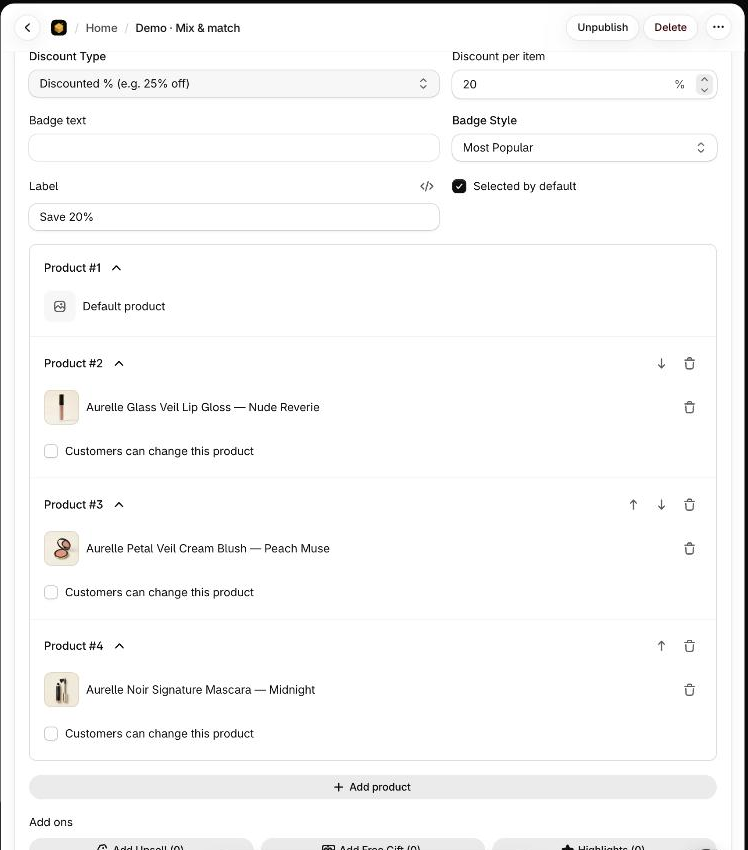
To set one up in Oxify Bundles Quantity Breaks (in your admin the app shows as Oxify - Product Bundles):
- On the app's Home page, click Add new deal, then Create Bundle on the Mix & Match card. To sit the kit next to quantity tiers you already have, use Offers > Add Offer > Mix & Match in that deal instead.
- On Bundle Settings, set the name, block title and Visibility (the product pages it shows on).
- On the Offers tab, give the offer a Title like "Complete install kit", choose Discounted % and enter the number.
- Click Add product, then Select a product, for each other part. Tick Customers can change this product if shoppers may swap a part for scents or colors you approve.
- Click Save, then add the kit from a real product page and check the checkout total.
Three limits from Oxify's Mix & Match docs:
- All or nothing. The discount applies only while every part is in the cart.
- Fixed Price works per product here, not per set. For a saving on the whole kit, use Discounted % or Amount Off.
- It doesn't read the other parts' stock. If one sells out, the page may add nothing, or only the product on the page, with no error. Switch on Show as Sold out until you restock.
The order holds one normal line per product. For other ways to sell sets on a product page, see how to create mix and match bundles on Shopify.
How to let customers build their own kit
A custom kit lets the shopper choose each part: one cleanser, one serum and one moisturizer for their skin type, say. Shopify Bundles can't do that, so you need a bundle builder app. Oxify Bundles Quantity Breaks builds custom kits with its Bundle Builder: each product category becomes a part of the kit, step rules cap how many items come from each part, and the whole kit gets one discount.
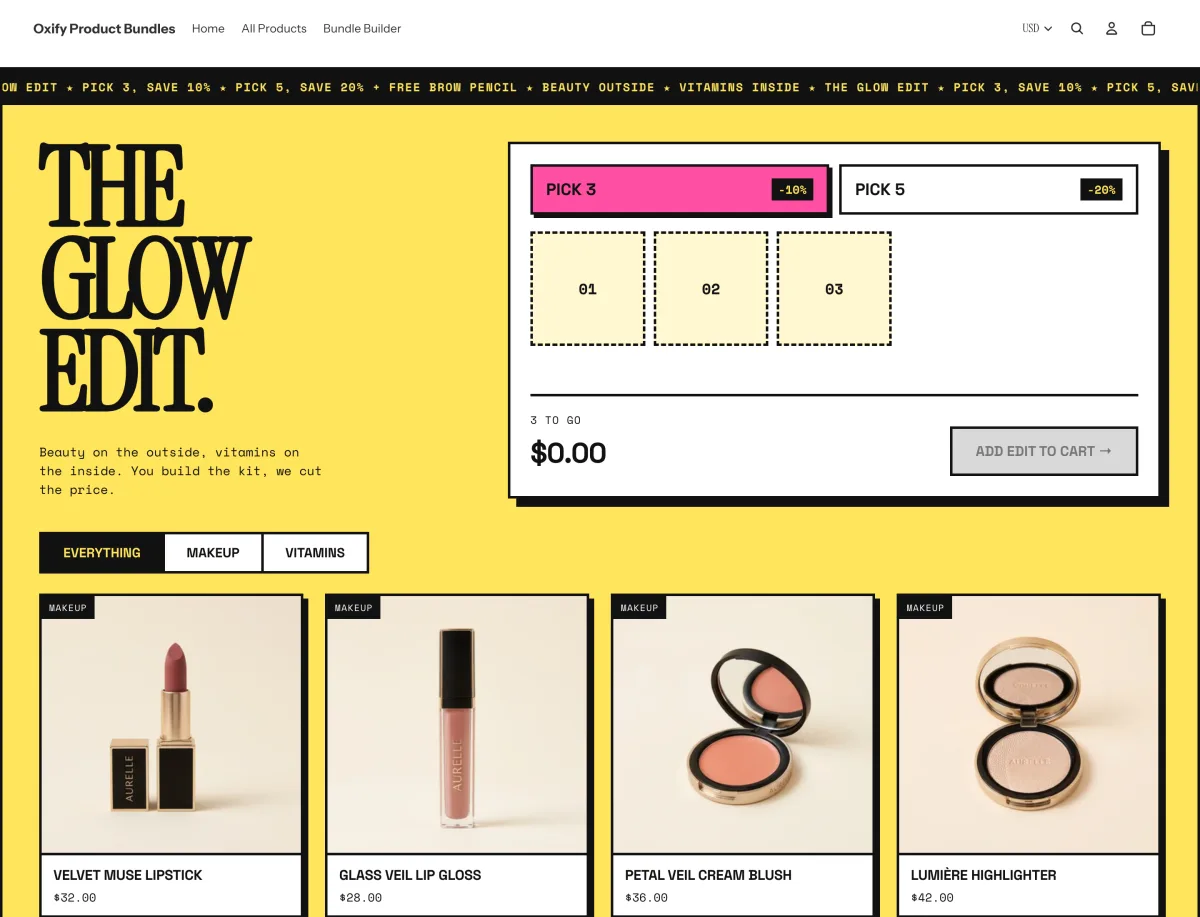
Oxify's demo store runs one called The Glow Edit: "You build the kit, we cut the price." Shoppers pick 3 items for 10% off, or 5 for 20% off plus a free brow pencil. Pick the $32 lipstick, the $36 cream blush and the $39.99 collagen hair vitamins, and the $107.99 kit drops to $97.19.
Here's how I'd set up a three-part starter kit (names and numbers are an example):
- Create the builder. Go to Apps > Oxify - Product Bundles > Bundle Builder and click Create Bundle Builder. On the Settings tab, set the Bundle Name shoppers see in the cart, such as "Skincare Starter Kit".
- Set the kit size. On the Products tab, in Quantity as an option, set Option 1 to Quantity 3, Discount Type % Off, 10.
- Add one category per part. In the Products card, click Add Category, name it "Cleanse", click Create category and select products, then + Add Products. Repeat for "Treat" and "Moisturize". See bundle builder categories for naming and order.
- Cap each part. In Rules Configuration, choose Step rules, click Add Rule until each category has one, and set each to Quantity · is equal to · 1. Tick Auto-advance to next step on the first two.
- Include the pouch or insert. In the option's Free gifts row, click Add free gift and pick your kit bag. A gift never fills a slot.
- Stamp the kit SKU. Under Settings > Advanced settings, tick Add the bundle SKU to each product in the order (more below).
- Publish. With Create the builder as set to New page, the app creates an Online Store page. Link it from your menu and from each part's product page, or build a bundle landing page around it.
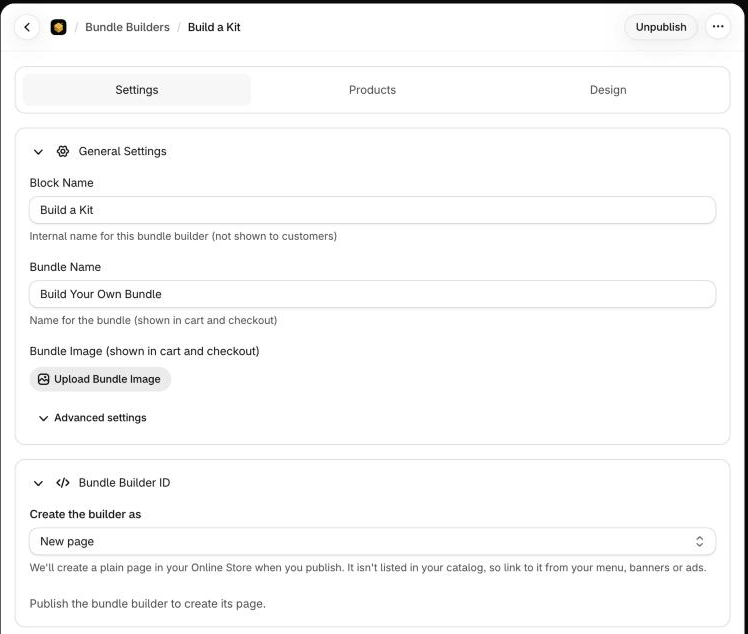
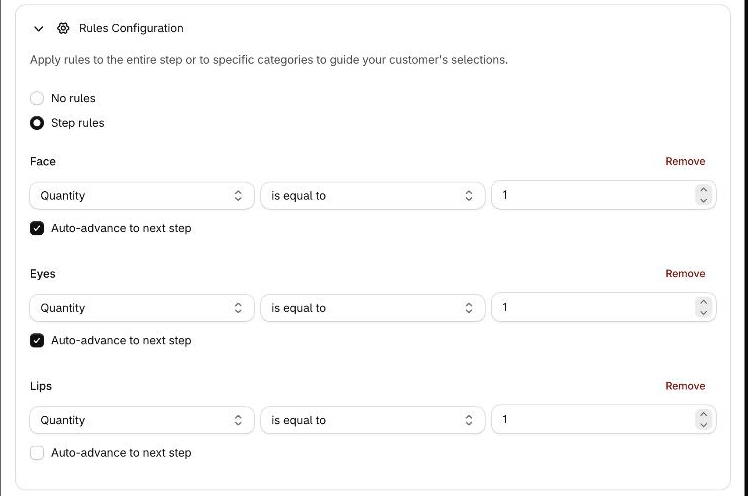
Two limits to plan around. First, step rules cap a category, they don't require it. So make the kit size equal to the sum of the caps: with three parts capped at exactly 1 and a kit of 3, the only way to fill it is one from each part. Second, there are no conditional steps, so "oily skin gets these serums" means one builder per path. See our multi-step bundle builder guide for guided flows and the full bundle builder setup guide for every setting. To sell a custom kit on repeat, see how to create a custom subscription box.
When should you pre-assemble kits and stock them as their own product?
Pre-assembled kits make sense when you sell a lot of one kit and want packers to grab one box, when the kit gets gift wrap or printed instructions, when your 3PL charges per item picked or a wholesale buyer wants one barcode per kit, or when you're building stock ahead of a peak like Black Friday (27 November 2026).
In Shopify it's a normal product, "Starter Kit", with its own SKU, barcode, price, packed weight and tracked stock. When you build 50 kits, add 50 to the kit and take each part's share off its stock.
That last step is the catch. A standalone product's stock isn't linked to any other product, so Shopify won't move the parts' counts. Adjust them by hand, let your 3PL or warehouse system run the kitting and send counts back, or use an app that keeps kit and component inventory in sync, such as Bundle Kit, whose listing says its bundles "work like regular products in your store", or Simple Bundles & Kits.
Stock also gets locked inside kits: parts sealed in kits can't sell alone. I'd pre-build only the kits that sell every day and run the rest as virtual kits.
How does kit inventory work?
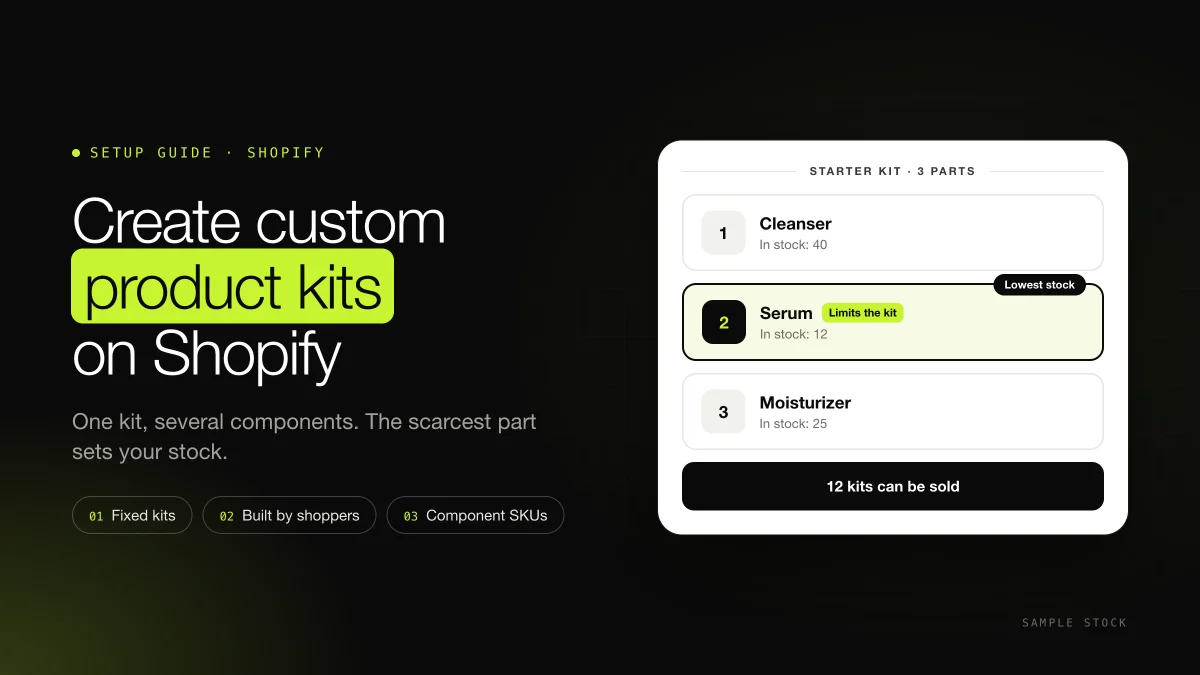
Kit inventory management comes down to one rule: a kit is only in stock when every part is. Shopify divides each part's available stock by how many the kit needs, rounds down, and takes the lowest number.
Shopify's own example, put simply: a kit needs 2 chairs and 1 desk, and you have 15 chairs and 8 desks. Chairs allow 7 kits (15 ÷ 2 = 7.5, rounded down), desks allow 8, so you can sell 7. The same math for a sample starter kit:
| Part | In stock (sample) | Needed per kit | Kits it allows |
|---|---|---|---|
| Cleanser | 40 | 1 | 40 |
| Serum | 12 | 1 | 12 |
| Moisturizer | 25 | 1 | 25 |
| Kits you can sell | 12 (the serum limits it) |
If the serum also sells on its own, each single sale lowers the kit count too, with no stock locked in pre-built kits.
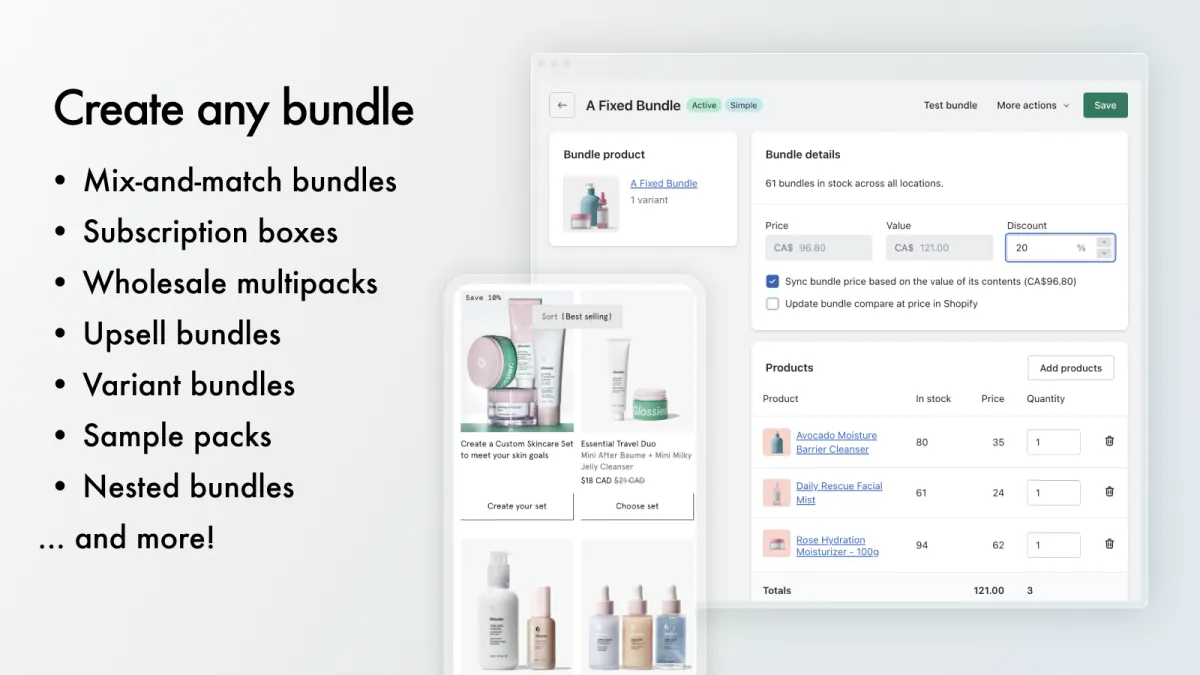
Three things trip people up:
- Locations. Shopify says "Bundles don't track inventory by location, but by overall stock." If your serums sit in one warehouse and the other parts in another, the page still says 12 kits, but no single location can pack one. Keep a kit's parts together.
- Untracked parts don't count. Shopify ignores components that aren't tracked or are set to keep selling when out of stock. If the kit box isn't tracked, running out of boxes won't stop sales.
- Custom kits have no single kit count. Each product counts down on its own. Oxify checks stock each time the builder loads and, with Hide out of stock and unavailable products ticked, drops sold-out items. If a whole part sells out, its tab disappears and nobody can finish the kit, so keep several in-stock options in every part.

What SKUs does your warehouse or 3PL see?
A kit order reaches the warehouse as one line with the kit's SKU, or one line per part with the parts' SKUs. Your 3PL needs to know which.
| Setup | What the order shows | What your 3PL needs |
|---|---|---|
| Shopify Bundles fixed kit | One line per part with its own SKU, grouped under the kit in checkout and notifications | Nothing extra to pick; the kit's own SKU isn't on the lines |
| Oxify Bundle Builder (custom kit) | One line per part, plus an optional visible "Bundle SKU" on each line | The bundle SKU setting on, and a 3PL that imports line item properties |
| Oxify Mix & Match offer | One normal line per product | Nothing extra |
| Standalone kit product | One line with the kit SKU | A kit-to-parts map in their system, or pre-built kits on the shelf |
| Simple Bundles & Kits or Bundle Kit | Both listings say they break kits into component SKUs for fulfillment | A test order to see exactly what lands |
Component lines are easier for stock, but fulfillment teams may not see that four lines form one kit. Oxify fixes that with one checkbox: Add the bundle SKU to each product in the order.
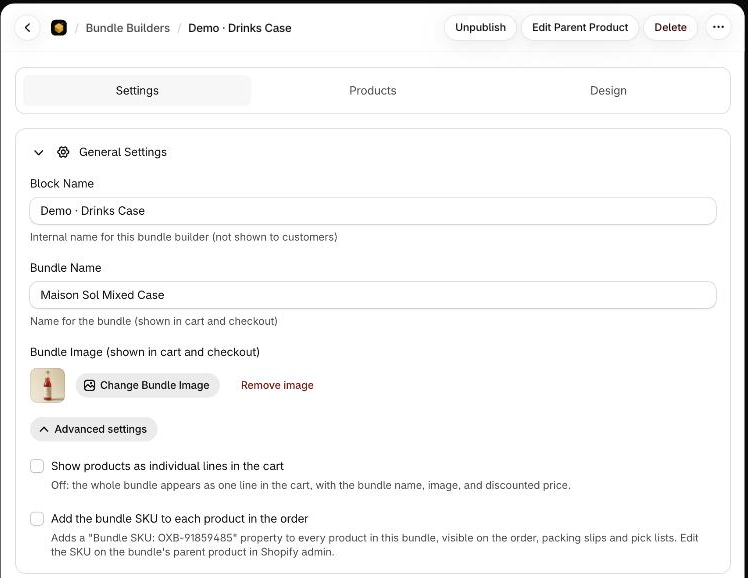
With it on, every part carries a visible line like "Bundle SKU: OXB-45821733" on the order, packing slips and pick lists. The SKU starts as OXB- plus the builder's 8-digit ID. To use your own, such as KIT-STARTER-01, click Edit Parent Product and change the SKU on the hidden parent product. Oxify's docs also give paste-ready Liquid that prints each kit as one boxed block on your Shopify packing slip, with the kit name, SKU and item count on top.
One trade-off: sales reports are built on those component lines, so they show each part sold, not the kit. For kit-level numbers, Oxify's Bundle Builders list shows Visitors, Orders, Revenue and Conversion rate for each builder.
Before launch, ask your 3PL: "What line items will you see on a kit order, and do you import line item properties?" Then place a test order. Our roundup of the best Shopify bundle apps covers 3PL sync in more depth.
How should you price a kit?
Shoppers expect a kit to cost less than the parts bought one by one:
- Show the math. Say the parts cost $24, $38 and $30, so $92 separately. At 15% off the kit is $78.20 and saves $13.80. Show both numbers.
- Check the margin on the worst kit, not the average. In a custom kit, shoppers can pick your lowest-margin parts. Run the numbers through the bundle calculator first.
- Use a percentage discount for custom kits with mixed prices. A fixed kit price works best when the parts cost about the same.
For discount sizes and tiers, see our product bundle pricing strategy guide.
How do returns work for kits?
Returns follow the parts, not the kit. Shopify says you can't define bundles as final sale, return eligibility comes from the components, and bundles can't be used in exchanges.
- Shopify Bundles: kit discounts are split across the parts by weighted price. Run one test refund to see what a single returned part pays back.
- Custom kits in Oxify: refunds, restocks and fulfillment run on the component lines, so a returned item goes back into its own stock.
- Pre-assembled kits: a sealed kit goes back on the shelf as a kit. An opened one gets broken down and the parts' counts adjusted.
Write the policy down before launch: can people return one item from a kit, and what do they get back?
Which kit app should you use on Shopify?
Four tools for Shopify product kits, from their App Store listings on 18 November 2026 (INR prices converted at each listing's rate):
| Tool | Best for | Kit types | Stock and orders | Listing (18 Nov 2026) |
|---|---|---|---|---|
| Oxify Bundles Quantity Breaks | Kits shoppers build, and kit upgrades on the product page | Custom kits (Bundle Builder), product-page kits (Mix & Match), plus quantity breaks (volume discounts) and BOGO | Real component lines; optional Bundle SKU on each line | Free plan; 5.0 from 14 reviews; Built for Shopify |
| Shopify Bundles | A few fixed kits and multipacks | Fixed kits, multipacks | Lowest part sets stock (overall, not per location); component SKUs on orders | Free; 2.9 from 565 reviews |
| Simple Bundles & Kits | Kits that must sync with a 3PL, WMS or ERP | Fixed, mix-and-match, build your own, multipacks | Bundle SKU breakdown and inventory sync; works with ShipStation and Shopify Flow | Free plan (3 bundles, 50 orders a month), Basic about $24/month; 4.9 from 843 reviews; Built for Shopify |
| Bundle Kit ‑ Inventory Sync | Kits that behave like regular products | Kits, multipacks, mix-and-match | Syncs inventory, price and weight; adds component SKUs to orders for 3PLs | From about $21/month, 14-day free trial; 4.7 from 75 reviews; Built for Shopify |
My pick: start with Oxify Bundles Quantity Breaks if shoppers build the kit or you sell it as an upgrade on the product page. Orders arrive as real component lines, and the bundle SKU keeps each kit together for packers. Shopify Bundles is enough for a few fixed kits. Pick Simple Bundles & Kits instead if pre-built kits must sync with a 3PL, WMS or ERP, or Bundle Kit if you want each kit to be a regular product with synced stock. More options: the best Shopify bundle builder apps.
Test a kit before you launch it
- Place a real test order and check which lines and SKUs it shows in your admin.
- Print the packing slip. Can a packer tell which items form one kit?
- Check each part's stock dropped by the right amount.
- Set one part to zero and reload the kit page. Does it show as sold out?
- Refund one item. Check the amount and that its stock came back.
- With several locations, put the parts in different places and see what the kit page says.
- Try a discount code on top, and check the page on a phone.
If the kit or builder doesn't show at all, check the app embed is on in your live theme, then see our notes on bundle app theme compatibility.
Frequently asked questions
Can I bundle products on Shopify?
What is the difference between a kit and a bundle?
Does Shopify track inventory for kit components?
Can I sell kits on Shopify without an app?
Can customers swap one item in a kit?
Can I sell a product kit as a subscription?
Can I sell product kits on Shopify POS and other sales channels?
What is the best app for product kits on Shopify?
Build your first kit this week
Start with one kit you already sell well as separate items, and decide who picks the parts. If it's your shoppers, or you want a kit upgrade on the product page, Oxify Bundles Quantity Breaks showed a Free plan on the App Store: set up the parts as categories, cap them with step rules and turn on the bundle SKU for your packers. See more on our Shopify product bundles page.