 Oxify App
How to Create Fixed Price Bundles on Shopify
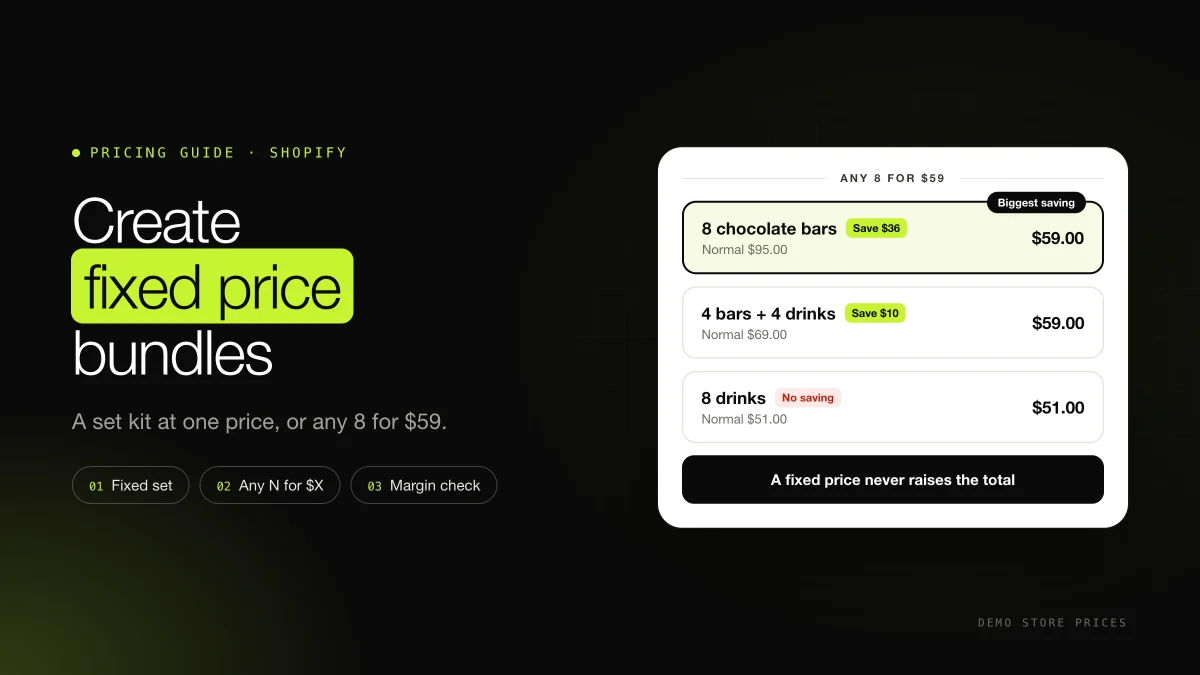
Short answer: Shopify fixed price bundles come in two kinds, and each needs a different tool. If shoppers choose the items, like "any 8 for $59," Shopify's own discounts can't hold one set total, so you need a bundle builder app. I'd use Oxify Bundles Quantity Breaks: its Bundle Builder has a Fixed Price box setting that charges one price for the whole box, and never more than the items cost on their own. If you choose the items, like a $49 tasting set, Shopify's free Bundles app is enough: build the set, then set its price on the bundle's product page.
The worked example is a $59 hamper on Oxify's demo store, with its real prices.
Key facts (checked 18 November 2026)
- Shopify's free Bundles app sells fixed sets and multipacks only. Shopify's help center says it doesn't support mix-and-match bundles, so "any 3 for $X" needs a different app.
- The app: Oxify Bundles Quantity Breaks creates fixed price bundles on Shopify in two ways: a Bundle Builder box at one Fixed Price, and Fixed Price tiers on product pages. Its App Store listing showed a Free plan, 5.0 from 14 reviews and the Built for Shopify badge on 18 November 2026.
- Shopify Bundles limits: up to 30 components in a fixed bundle, and at most 3 options and 100 variants per bundle.
- A Shopify bundle's price doesn't follow its parts. When a component's price changes, Shopify says the bundle price stays the same. You change it by hand.
- Shopify's discounts have no "set the total" option. A fixed amount off still leaves the total depending on what was picked.
- In Oxify's Bundle Builder, Fixed Price is the price of the whole box. Oxify's docs say it "only ever lowers the total."
On this page
- What a fixed price bundle is
- Can Shopify do "any 3 for $X" on its own?
- Set up "any 8 for $59" in Oxify
- What shoppers actually pay
- Pick a fixed price that keeps your margin
- Fixed price or percentage off?
- Sell a fixed set with Shopify Bundles
- "3 for $24" on a product page
- What changes the price at checkout
- Which other apps do fixed price bundles?
- Test before you launch
- FAQ
What are Shopify fixed price bundles?
A fixed price bundle (some stores say set price bundle) is a group of products sold for one price you set, instead of a percentage off. "Any 3 candles for $40" and "the starter kit for $49" are both fixed price bundles.
The word "fixed" confuses people. In Shopify's help center, a fixed bundle is a set of products you choose in advance. That's about who picks the items, not the price. So a fixed price bundle can take three shapes, and each needs a different tool:
| Bundle shape | Who picks the items | Example | Tool that fits |
|---|---|---|---|
| A fixed set at one price | You | Tasting set: 3 bars + 3 drinks for $49 | Shopify Bundles (free) |
| Pick any N for one price | The shopper, from products you allow | Any 8 treats for $59 | A bundle builder app, such as Oxify's Bundle Builder |
| N of one product for one price | The shopper picks a quantity | 3 candles for $24 | A Shopify Bundles multipack, or a quantity break offer |
The middle shape keeps coming up in Shopify Community threads ("Any 2 for 30," "Buy 2 for £20," "3 for 99"), and it's the hardest to build, so most of this guide is about it. Still choosing between a builder page and a simple pick-any deal? See bundle builder vs mix and match.
Can Shopify do "any 3 for $X" without an app?
Not exactly. Shopify's discounts take a percentage or an amount off, and none of them sets the total a customer pays. The closest native setup is an Amount off products discount on the collection that holds your bundle items, with a Fixed amount, Only apply discount once per order ticked, and a Minimum quantity of items equal to your bundle size.
With that box ticked, the amount is split across the items instead of coming off each one (Shopify's developer docs describe both modes). The customer pays the normal total minus your amount, which equals your target price only when every item costs the same. Our mix and match guide has the click-by-click setup.
Here's what happens with mixed prices. Oxify's demo hamper holds chocolate bars at $9 to $15 and drinks at $5.50 to $7.00. Say you want "any 8 for $59," so you set $10 off any 8, because one mixed hamper costs $69:
| Hamper the shopper builds | Normal total | With $10 off once |
|---|---|---|
| 8 × Sicilian Lemon drink | $44.00 | $34.00 |
| One of each drink | $51.00 | $41.00 |
| 4 bars + 4 drinks | $69.00 | $59.00 |
| One of each chocolate bar | $95.00 | $85.00 |
| 8 × Pistachio Creme bar | $120.00 | $110.00 |
Your banner says $59. Checkout charges anything from $34 to $110. There's also no maximum (16 items still get $10 off once) and no counter telling shoppers how many to add. The forum workaround, one product with a variant for every combination, breaks too: stock on the real products doesn't move, and 16 products picked 8 at a time is 12,870 combinations even without repeats.
Native is enough only when every item costs the same. If all your candles are $15, then $5 off once with a minimum of 3 gives a true "any 3 for $40." For mixed prices, you need an app.
How to set up "any 8 for $59" with Oxify's Bundle Builder
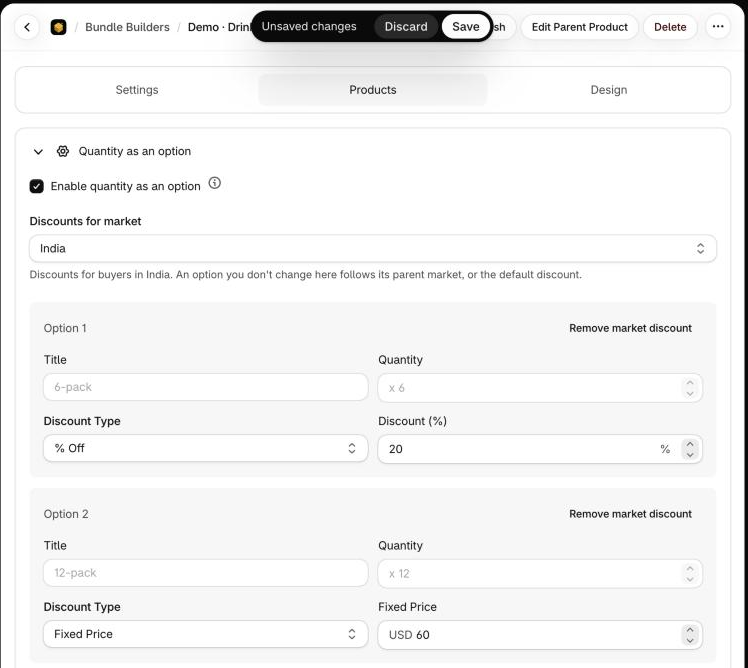
Oxify Bundles Quantity Breaks builds fixed price boxes: you set a box size and one Fixed Price, shoppers fill the box from categories you choose, and the whole box costs that price. The Sip & Savour Gift Hamper on Oxify's demo store works this way, with two categories, a box of 8 and a Fixed Price of $59.
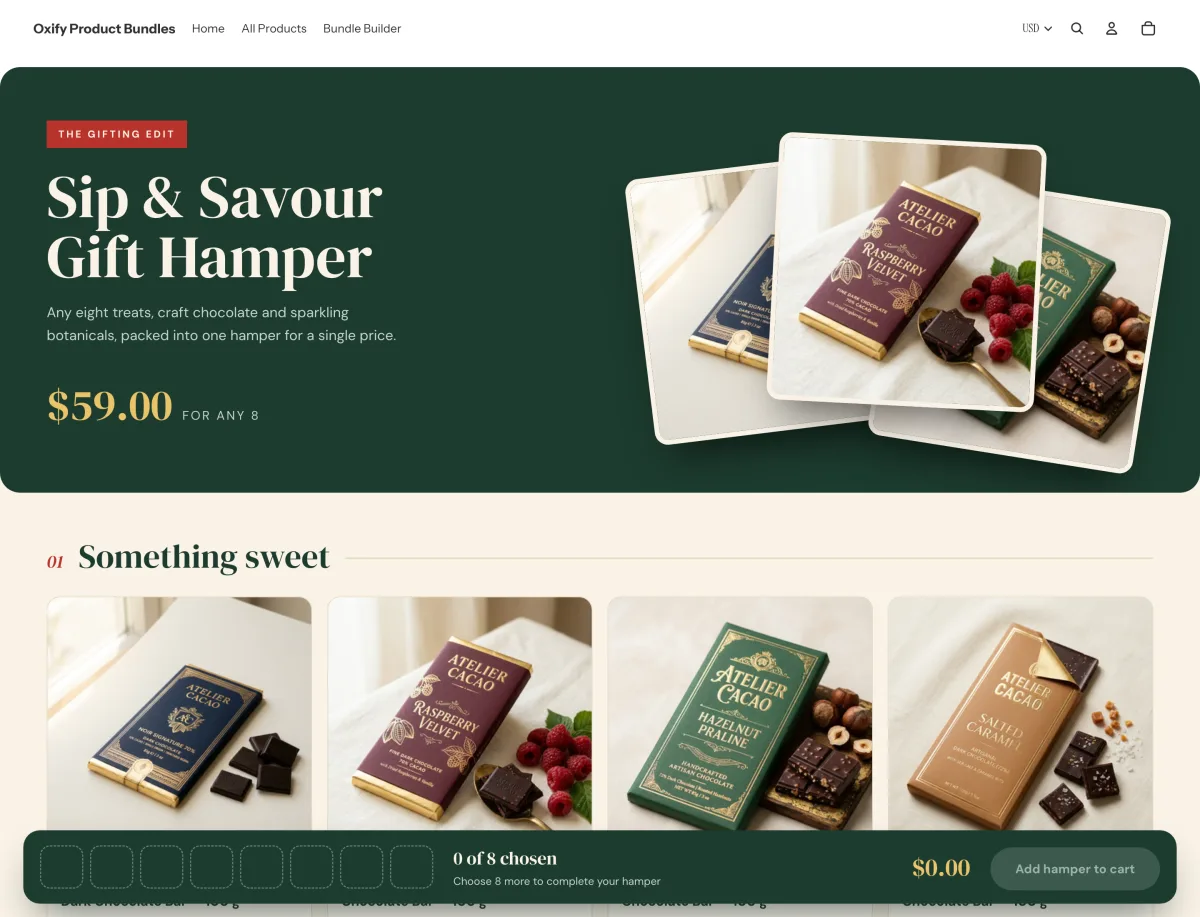
Screen names follow Oxify's docs, which still call the app Oxify Quantity Breaks & BYOB:
- Turn on the app embed. In Shopify's theme editor (Online Store → Themes → Customize), open App embeds and switch on Oxify: Bundle Builder (not Oxify: Product Bundle, which runs Quantity Break offers), then Save.
- Create the builder. In the app, click Bundle Builder, then Create Bundle Builder. On the Settings tab, set the Bundle Name shoppers see in the cart.
- Set the box and its price. On the Products tab, in the Quantity as an option card, edit Option 1: Title "Hamper of 8," Quantity 8, Discount Type Fixed Price, then type 59 in the Fixed Price field. Choose the type before you type the number, because changing the type resets the value to 0.
- Add your products as categories. In the Products card, click Add Category, name it "Something sweet," and add the bars with + Add Products. Repeat for "Something sparkling." See bundle builder categories for naming and order.
- Cap the priciest category (optional). In Rules Configuration, pick Step rules and set "Something sweet" to Quantity · is less than or equal to · 4. The margin section shows why.
- Save to publish. A new builder is already set to publish, so Save makes it live, and the default New page setting creates an Online Store page for it. Link that page from your menu, or build a bundle landing page around it.
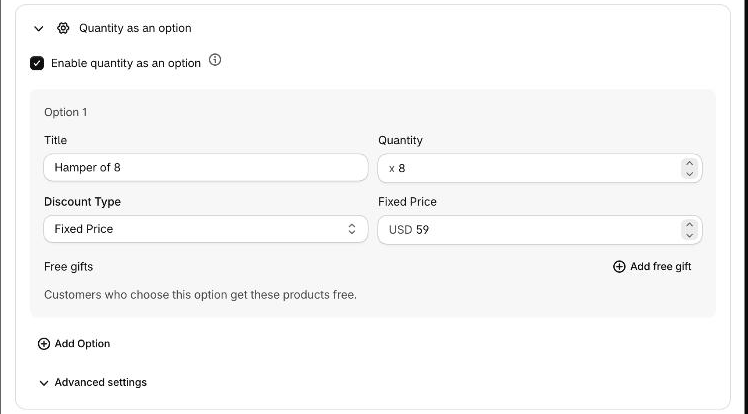
Four details matter. The price covers the whole box: Oxify's docs say a Fixed Price of 40 on a Box of 10 means "$40 for all ten items, not $40 each." Add to Cart waits for a full box, so nobody gets seven items for $59. You can run a ladder: give each size its own fixed price, say "Hamper of 4 for $34" and "Hamper of 8 for $59," so the price per item drops as the box grows and the bigger box lifts average order value (AOV). Last, the discount applies on its own at cart and checkout, with no discount code to type.
One display trap: by default, the box selector's discount badge (Design → Sidebar Widget → Discount Badge) prints a fixed price after the word SAVE, so a $59 box reads "SAVE $59.00." Write your own text, such as "Box for {{discount_amount}}," and put {{total_saving}} in the Instruction Text to show the money saved on the current box.
For the full setup, see how to create a bundle builder on Shopify. Selling it as a present? The build your own gift box guide covers packaging, gift messages and shipping to the recipient.
What does the shopper actually pay?
A fixed price is a ceiling, not a set charge. Oxify's docs say: "If the items a customer picks cost less than your fixed price, they simply pay the normal price." On the demo hamper (prices checked 18 November 2026), the eight chocolate bars cost $9 to $15, or $95 for one of each. The eight drinks cost $5.50 to $7.00, or $51 for one of each.
Oxify's docs say the same product added three times counts as three, so a shopper can fill the box with a single product. Any of these hampers is possible:
| Hamper the shopper builds | Normal total | Pays with $59 fixed price | Saves |
|---|---|---|---|
| 8 × Sicilian Lemon drink ($5.50) | $44.00 | $44.00 | $0 |
| One of each drink | $51.00 | $51.00 | $0 |
| 4 bars + 4 drinks (see below) | $69.00 | $59.00 | $10.00 (14%) |
| One of each chocolate bar | $95.00 | $59.00 | $36.00 (38%) |
| 8 × Pistachio Creme bar ($15) | $120.00 | $59.00 | $61.00 (51%) |
The mixed hamper is Velvet Milk, Vanilla Silk, Salted Caramel and Orange Noir bars ($9 + $10 + $11 + $12 = $42), plus Raspberry Rose, Ginger Pear, Yuzu Citrus and White Peach drinks ($7 + $7 + $6.50 + $6.50 = $27).
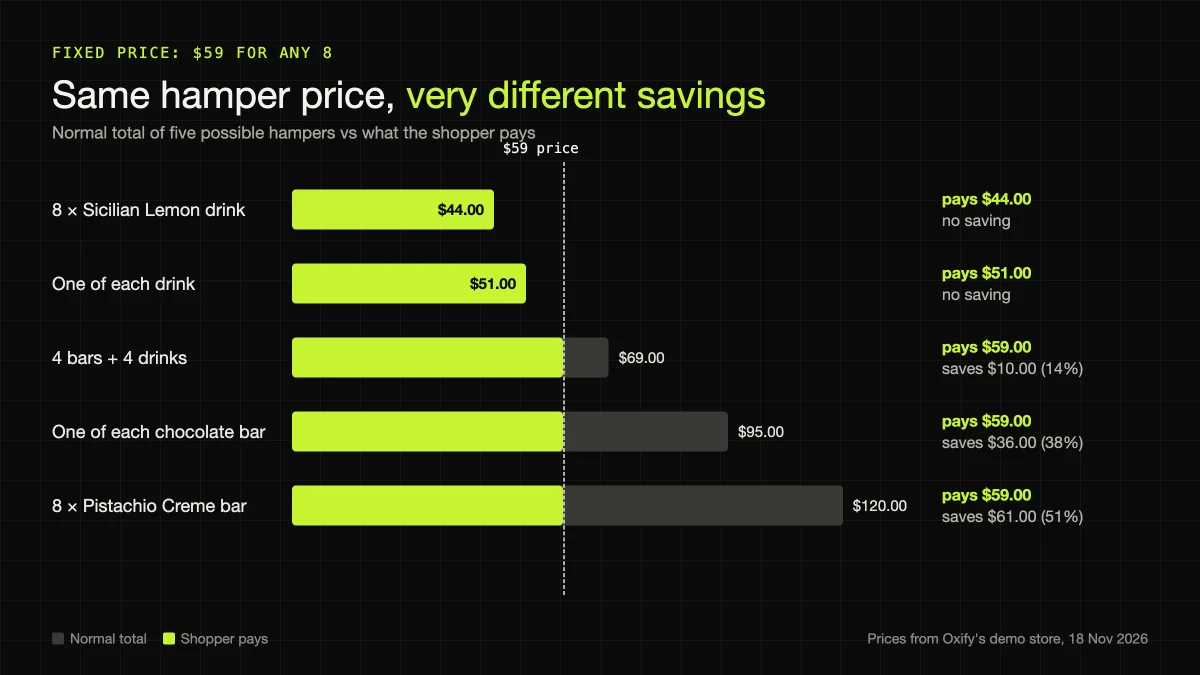
The break-even is $59 ÷ 8 = $7.375 per item. No drink costs more than $7.00, so a drinks-only hamper never saves a cent, while eight Pistachio Creme bars save 51%. Shoppers who do the math will fill the box with your priciest items. In return, you get a price that's easy to read: "$59 for any 8" fits on a banner, an ad and a gift guide.
How do you pick a fixed price that keeps your margin?
Price against the most expensive box a shopper can build, not the average one, because the worst case is where you lose money.
1. Find the worst case and cost it. With repeats allowed, it's your priciest item times the box size: 8 × $15 = $120 for the hamper. Say your product cost is 35% of retail (an example; use your own numbers). Here's what you keep at $59, before packaging, shipping and fees:
| Hamper | Product cost (35% of retail) | Shopper pays | You keep |
|---|---|---|---|
| 8 × Pistachio Creme bar | $42.00 | $59.00 | $17.00 (28.8%) |
| One of each chocolate bar | $33.25 | $59.00 | $25.75 (43.6%) |
| 4 bars + 4 drinks | $24.15 | $59.00 | $34.85 (59.1%) |
| One of each drink | $17.85 | $51.00 | $33.15 (65.0%) |
2. If the worst case is too thin, change the offer. Three levers:
- Cap the premium category. A step rule of "Something sweet is less than or equal to 4" allows at most four bars. The worst case drops to 4 × $15 + 4 × $7 = $88 at retail. At 35% cost that's $30.80, so you keep $28.20 (47.8%). Oxify's rules cap a category but don't force a minimum; the box size does that, so shoppers must add at least four drinks to fill it.
- Narrow the price band, or split the pool. Keep items within a few dollars of each other, or run a chocolate box and a drinks case as two builders with their own prices.
- Raise the price or shrink the box. A $64 hamper or a box of 6 changes the worst case fast.
3. Count what sits on top: packaging, any free gift, shipping and discount codes. Codes are the one people forget. In Oxify's default cart setting, the box is one merged cart line, and the docs say it "is priced before discounts, so a customer's discount code always applies to it." A 10% welcome code turns $59 into $53.10, and the worst-case hamper keeps just $11.10. To stop stacking, switch the builder to individual cart lines and untick the discount types under Combinations (Products tab → Quantity as an option → Advanced settings). That setting is store-wide, so it covers Quantity Break offers too. Our guide to stacking discounts explains how Shopify combines them.
Run your own numbers in the free bundle calculator, and see our bundle pricing strategy for how deep a discount can go.
Fixed price or percentage off: which should you use?
Here is the same hamper at 20% off, next to the $59 fixed price:
| Hamper | Normal total | 20% off | Fixed $59 |
|---|---|---|---|
| One of each drink | $51.00 | $40.80 | $51.00 |
| 4 bars + 4 drinks | $69.00 | $55.20 | $59.00 |
| One of each chocolate bar | $95.00 | $76.00 | $59.00 |
| 8 × Pistachio Creme bar | $120.00 | $96.00 | $59.00 |
A percentage treats every shopper the same. A fixed price is easier to sell but uneven:
| Use a fixed price when | Use a percentage when |
|---|---|
| Items cost about the same | Prices are far apart |
| The round price is the message (gift hampers, ads, price points) | The saving is the message ("save 20%"), growing with box size |
| You sell in one currency | You sell in several currencies |
| Your prices rarely change | You run frequent sales or price changes |
For this hamper, I'd keep $59, because gift buyers shop by price point. I'd add the four-bar cap to protect the worst case, and say "a mix of chocolate and sparkling drinks" in the page copy so drink fans aren't surprised by a full-price total. With prices further apart, I'd switch to tiered pricing, say 10% off a box of 4 and 20% off a box of 8.
How to sell a fixed set at one price with Shopify Bundles
When you choose the items, you don't need a builder. Shopify's free Bundles app turns the set into its own product, on every plan. Steps from Shopify's help center:
- In your admin, go to Apps → Bundles → Create bundle and add a title.
- Click Select products, then set how many of each go in the set and which variants are allowed. Click Save and continue.
- On the bundle's product page, set the price. Shopify's developer docs say the bundle's price is the parent variant's price, so it works like any product price.
- New bundles start as Draft. Change the status to Active and click Save.
For example, a tasting set of three bars ($12 + $13 + $13) and three drinks ($6 + $6.50 + $6.50) is worth $57. Price it at $49 and the shopper saves $8 (14%). To show that saving, the example on Shopify's own listing uses a struck-through compare-at price.
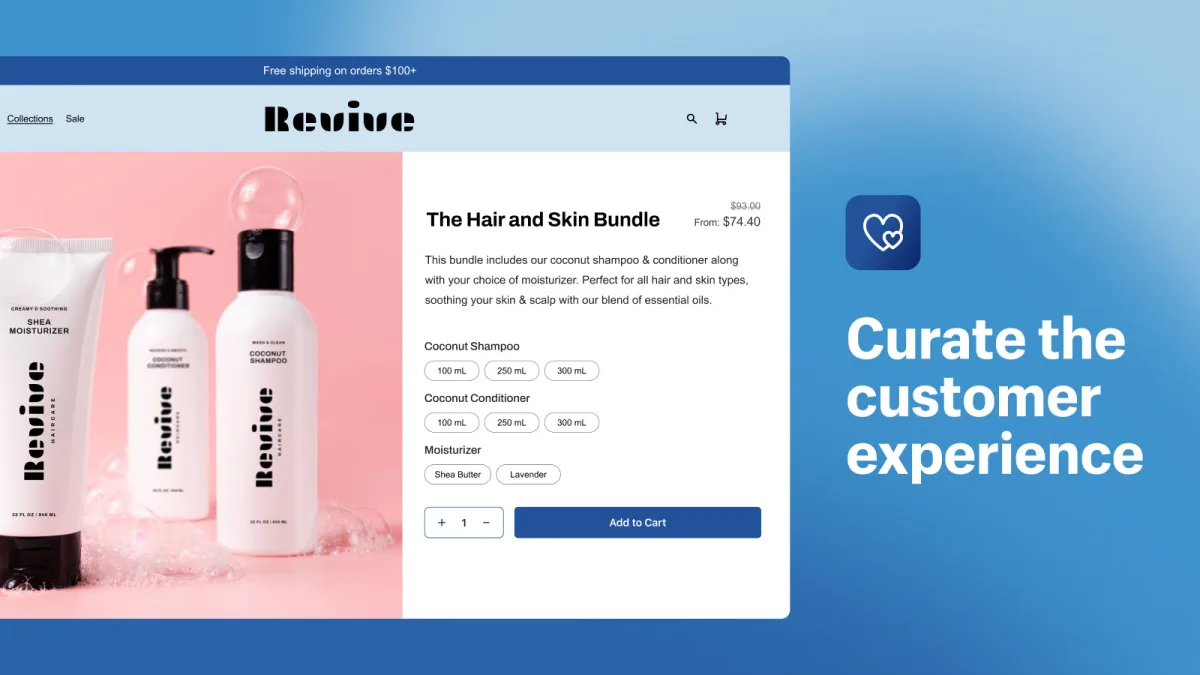
Four rules to know before you price a set, from Shopify's Shopify Bundles and bundle eligibility pages:
- The price doesn't follow the parts. If a bar goes from $13 to $14, your $49 set stays $49, and any compare-at price is now wrong. Re-check sets after every price change.
- Discounts attach to the bundle. A product or collection discount must include the parent bundle product. Shopify then spreads it across the components by price, so a product worth 80% of the bundle price takes 80% of the discount. Taxes are worked out on the components.
- Stock comes from the parts. For each component, Shopify divides its stock by the quantity the set needs, rounds down, and takes the lowest. Say a set needs 2 Salted Caramel bars and 1 drink. With 30 bars and 12 drinks in stock, you can sell 12 sets.
- It sells on most sales channels. Shopify lists Online Store, Shop and Shopify POS, plus the Google & YouTube channel for fixed bundles only.
The other limits (30 components, 3 options and 100 variants per bundle) are in our bundle pricing strategy guide. Shopify bundles also can't carry a subscription, so for a recurring box see how to create a custom subscription box. For component SKUs and warehouse kitting, see product kits on Shopify.
How do you show "3 for $24" on a product page?
For more of the same product, you don't need a bundle product. Oxify's Quantity Break offers have a Fixed Price discount type on each tier, and it "sets the price of the whole tier." On a $10 candle you could run 1 at $10, "2 for $18" and "3 for $24." On the Offers tab, pick Fixed Price (e.g. $29) in a tier's Discount Type, type 24 in Discount Value, and click Save. The tier then costs $24 in total, not $24 per candle.
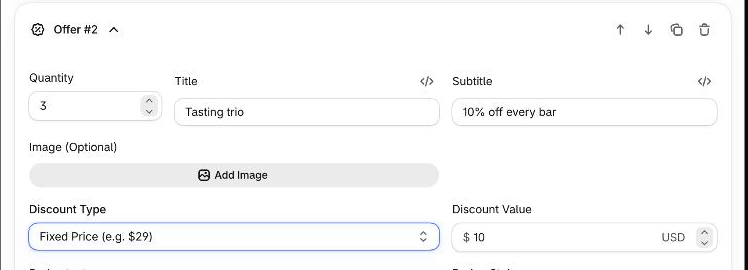
Three rules from Oxify's Quantity Break docs, starting with the discount types page:
- It never raises a price. If the product already costs less per unit than your fixed price, no discount applies.
- The quantity selector scales it per unit. With Show quantity selector on, a "2 for $100" tier costs $150 at 3 units.
- Mix & Match works differently. On a Mix & Match offer (different products sold as one set), Fixed Price is the price of each product, not the set. The docs warn that 20 on a set of three "caps each product's price at 20 — the set can cost up to 60, not 20." For a saving on a whole set there, use Discounted % or Amount Off instead.
So for one exact price on a set of different products, use a Shopify Bundles product or a builder box. For packs of one product, see our guides to 2-pack and 3-pack discounts and adding quantity breaks.
What can change a fixed price at checkout?
A fixed price box can still land on a different number. The cases, from Oxify's box discount docs:
- Sale prices. A bar on sale counts at its sale price. The hamper still costs $59 unless the picks now add up to less.
- Other currencies. You enter the Fixed Price in your store's currency, even a market's own fixed price, and shoppers abroad get it converted at Shopify's exchange rate. So $59 won't be a round number in euros. If round local prices matter, pick that market in the Discounts for market dropdown above your box options and give it a percentage instead.
- Two boxes. Two hampers cost twice the fixed price, $118.
- Individual cart lines. The fixed price is shared across the lines by price, and the total still matches it. But the docs say a fixed price is worked out for an exact item count, so if a shopper removes an item in the cart, it stops applying.
- Extra items. With "Allow customers to add more items than the selected quantity" ticked, the price grows at the box's per-item rate. The docs' example: a box of 5 for $50 becomes $60 for 6 items and $70 for 7.
Which other apps do fixed price bundles?
I'd start with Oxify when shoppers pick the items, because the Fixed Price box, categories and step rules are made for "any N for $X." All six apps below list "Fixed pricing" on their App Store listing, so each can run Shopify fixed price bundles in some shape. The shapes come from the listing or, where noted, the vendor's own post:
| Option | Fixed price shapes | Listing (18 Nov 2026) | Consider it if |
|---|---|---|---|
| Oxify Bundles Quantity Breaks | Any N for $X (Bundle Builder Fixed Price box); N of one product for $X (Quantity Break tiers). The fixed price is a ceiling, so cheaper boxes pay their normal total | Free plan, 5.0 (14), Built for Shopify | You want a builder page and product-page offers in one app |
| Shopify Bundles | A fixed set or multipack at a price you type | Free, 2.9 (565) | You only sell set kits and want Shopify's own app |
| Easify Product Bundle Builder | A "Fixed Box Price" box type (Easify's Shopify Community reply, December 2025) | Free plan available, 5.0 (319), Built for Shopify | You want a box builder with several preset box types |
| Bundler » Product Bundles App | Listing names "fixed price" as a bundle discount type | Free plan available, 4.9 (2,797), Built for Shopify | Your bundles live mainly on product pages |
| BOGOS: Free Gift Bundle Upsell | A Fixed Price discount for Classic Bundle and Mix and Match (BOGOS blog, July 2025) | Free plan available, 5.0 (4,743), Built for Shopify | Free gifts and BOGO are your main offers |
| Simple Bundles & Kits | Bundle price you set in its editor (vendor's Community reply); inventory sync with 3PL, WMS and ERP | Free plan available, 4.9 (843), Built for Shopify | Your warehouse needs component SKUs synced |
Check each listing before you install, because plans and ratings change. For a wider list, see the best Shopify bundle apps.
What should you test before you launch?
Fixed prices go wrong in the corners. Oxify's docs say previews and draft orders don't run the discount like a real checkout, so finish with a real order.
- The cheapest box. Check it charges the normal total, not your fixed price.
- The priciest box. Check it charges the fixed price, and that you're happy with the margin.
- A discount code on top. Make sure the result is what you planned.
- Another market. Look at the converted price shoppers abroad will see.
- A real order. Place it, refund it, and check the order and packing slip show every item.
After launch, the app's Analytics page shows each builder's bundle orders, conversion rate and AOV, which tells you whether the price is pitched right.
Frequently asked questions
Does Shopify allow fixed price bundles?
What is the best app for fixed price bundles on Shopify?
What happens if the items cost less than the fixed price?
Does a Shopify bundle's price update when a product's price changes?
Can customers use a discount code on a fixed price bundle?
Can I sell a fixed price bundle as a subscription?
Build your first fixed price box
Start with one box size, one fixed price and two categories, then test the cheapest and priciest box before you launch. Oxify Bundles Quantity Breaks showed a Free plan on the App Store on 18 November 2026. See everything it does on our product bundles app page.