
Best Shopify Apps for Supplement & Vitamin Brands (October 2026)
The best Shopify apps for supplement brands, in the order we would install them: Oxify Cart Drawer & Upsell to grow every order, Appstle for subscriptions, Judge.me for reviews, Klaviyo for refill emails, and RevenueHunt for a product quiz. Before any of them, check your payment gateway. Some gateways cannot run subscription apps at all.
Imagine you launch a 30-day magnesium powder. You install a subscription app, a review app, and a quiz. Then you learn your payment gateway can't run the subscription app. Every install was wasted.
That is the supplement trap. A shirt is bought once. A tub is bought every 30 days, or never again. Supplement stores need repeat orders, bigger baskets, careful health claims, and a payment setup Shopify does not always allow.
We build Shopify apps, and we have installed and tried the apps below on our own test store. We also read the public code of 42 real supplement stores to see what they run. This guide gives you that data, our picks, live prices, and the rules most app lists skip.
Short answer (checked October 5, 2026):
- Bigger orders: Oxify Cart Drawer & Upsell (our app, 4.9 stars, Built for Shopify, from $9.99 a month). Second-tub offers, a subscribe-and-save upgrade inside the cart, free-gift goals, and post-purchase offers in one app.
- Subscriptions: Appstle (5.0 stars from 8,922 reviews, free to $500 a month in subscription sales, 0% fees). Recharge or Loop if you are bigger.
- Reviews: Judge.me (free plan, 5.0 stars from 47,971 reviews). Turn on manual moderation.
- Email and SMS: Klaviyo. It showed up on 38 of 42 (90%) of the supplement stores we checked.
- Quiz: RevenueHunt (free to 100 responses a month).
- Check first: Shopify Payments bans "pseudo pharmaceuticals," and only five gateways work with third-party subscription apps. See the table.
Jump to: What real brands run · Payments check · All apps compared · Our #1 pick · Subscriptions · Reviews · Email and SMS · Quizzes · Bundles · Loyalty and support · Lot tracking and warnings · Claims rules · Refill clock · Stack by stage · FAQ
Who we are and how we picked:
- We make Oxify, so two apps on this list are ours. We rank Oxify first for one job, raising order value, and we say where other apps beat it.
- We installed the other apps on our own Shopify test store to see setup, settings, and plan limits first-hand.
- Every rating, review count, badge, and price comes from the live App Store listing, read on October 5, 2026.
Why Supplement Stores Need Different Apps
- Customers run out. A 30-day tub means a reorder in about 30 days. Subscriptions, refill emails, and multi-packs matter more here than in most stores.
- Baskets can grow. Shoppers already think in months. One tub is 30 days, three are 90. A good cart offer turns one tub into two.
- Health claims are regulated. Your app text is advertising. That includes quiz results, bundle names, upsell lines, and review widgets.
- Payments are pickier. Shopify Payments has a ban that can catch supplement stores, and your gateway decides which apps work.
What Real Supplement Brands Run on Shopify (We Checked 42 Stores)
Most app lists guess. We looked. On October 5, 2026, we loaded the homepage and one product page of 57 well-known supplement and vitamin brands. 46 run on Shopify, and we could read app data on 42. For each one we recorded the Shopify app blocks named in the page code (they look like shopify://apps/okendo/blocks/...) and the scripts loaded from each app's own domain.
| Tool found | Job | Stores | Share |
|---|---|---|---|
| Klaviyo | Email and SMS | 38 of 42 | 90% |
| Recharge | Subscriptions | 19 of 42 | 45% |
| Okendo | Reviews | 17 of 42 | 40% |
| Rebuy | Upsells | 17 of 42 | 40% |
| Gorgias | Support | 17 of 42 | 40% |
| Triple Whale | Attribution | 17 of 42 | 40% |
| Intelligems | A/B price tests | 13 of 42 | 31% |
| Consentmo, OneTrust or Pandectes | Cookie consent | 13 of 42 | 31% |
| Attentive | SMS | 9 of 42 | 21% |
| Postscript | SMS | 9 of 42 | 21% |
| Redo, SavedBy or Route | Package protection | 8 of 42 | 19% |
| Yotpo | Reviews and loyalty | 8 of 42 | 19% |
| Junip | Reviews | 6 of 42 | 14% |
| Skio | Subscriptions | 4 of 42 | 10% |
| Stay AI | Subscriptions | 4 of 42 | 10% |
| Ordergroove | Subscriptions | 3 of 42 | 7% |
| Judge.me | Reviews | 3 of 42 | 7% |
| Kaching Bundles | Bundles | 2 of 42 | 5% |
| Warnify Pro Warnings | Prop 65 warnings | 2 of 42 | 5% |
What stands out:
- Klaviyo is close to universal. 38 of 42 stores load it.
- Subscriptions are standard. 30 of 42 stores had a subscription app we could detect. Recharge led with 19. Add Skio's 4, and 23 stores (55%) now run a Recharge-owned product.
- Big brands pay for bigger orders. 17 stores run Rebuy and 2 run Kaching Bundles. Upsells are not an extra at this level. They are part of the core stack.
- Okendo is the review pick of the big names (17 stores), ahead of Yotpo (8), Junip (6), and Judge.me (3).
- Compliance shows up in the code. 13 stores run a cookie consent tool, 8 run package protection, and 2 run a Prop 65 warning app.
- These are mostly large brands. A store doing 100 orders a month does not need A/B testing or attribution tools yet. See the stack by stage.
We only looked at each store's homepage and one product page, so a few apps may hide elsewhere. Read these as "at least" numbers. For a wider snapshot of 30 tracked apps across 10 verticals, taken October 11, see our October 2026 check of 475 live Shopify stores. It is a different sample, so do not mix its numbers with the ones above.
| The 42 supplement brands we checked | ||
|---|---|---|
| Alani Nu alaninu.com | Arrae arrae.com | Beam shopbeam.com |
| Bloom Nutrition bloomnu.com | Bulletproof bulletproof.com | Codeage codeage.com |
| Create trycreate.co | Cymbiotika cymbiotika.com | Doctor's Best doctorsbest.com |
| Equip Foods equipfoods.com | Everyday Dose everydaydose.com | Four Sigmatic foursigmatic.com |
| GHOST ghostlifestyle.com | Gorilla Mind gorillamind.com | Grüns gruns.co |
| Heights yourheights.com | Hiya hiyahealth.com | Ka'Chava kachava.com |
| Lemme lemmelive.com | LMNT drinklmnt.com | Love Wellness lovewellness.com |
| MaryRuth's maryruthorganics.com | Momentous livemomentous.com | Moon Juice moonjuice.com |
| MUD\WTR mudwtr.com | Nature's Bounty naturesbounty.com | Needed thisisneeded.com |
| Nutricost nutricost.com | Nuzest nuzest.com | Obvi myobvi.com |
| OLLY olly.com | Onnit onnit.com | Organifi organifishop.com |
| Physician's Choice physicianschoice.com | Promix promixnutrition.com | Rae Wellness raewellness.co |
| RAW Nutrition getrawnutrition.com | Ritual ritual.com | RYSE rysesupps.com |
| Transparent Labs transparentlabs.com | Truvani truvani.com | Vital Proteins vitalproteins.com |
Step 1: Pick Your Payment Gateway Before Your First Subscriber
The Shopify Payments eligibility page lists "pseudo pharmaceuticals" as prohibited. It describes them as products that make health claims not verified by a regulatory body.
Whether your store counts is a question for you and Shopify. The same page says that if you are not eligible, you can add a third-party payment provider. This is the number one worry in founder threads like this Reddit post on payment providers for supplement brands, and for good reason.
If you end up on a third-party gateway, five things change:
- Subscription apps need a supported gateway. Shopify's subscription considerations page says third-party subscription apps need one of five gateways. They are in the table below.
- Failed cards can hurt more. Shopify Payments updates saved cards on its own. On other gateways, customers may have to update their card by hand.
- Moving subscribers later is slow. Shopify's payment migration page describes a "slow drip": saved cards move to a new gateway only as customers update their billing details. Moving card numbers in bulk needs the Shopify Plus or Enterprise plan.
- Post-purchase upsells can break. Shopify says post-purchase offers do not work with providers that must keep the card security code, such as Braintree, Payflow Pro, PayPal Payments Pro, and Eway. The same page (re-read October 11, 2026) says the post-purchase page is also skipped when the buyer pays with a wallet or installment service such as Apple Pay, Google Pay, Amazon Pay, Klarna, Affirm, or Afterpay, or with any method other than a credit card.
- Shop Pay is not guaranteed. Shopify's Shop Pay page says Shop Pay on a third-party gateway needs a store in Australia, France, or the US that meets the Shopify Payments requirements.
| Gateway | Works with third-party subscription apps? | Watch out |
|---|---|---|
| Shopify Payments | Yes | Updates saved cards for you. Also the one with the pseudo-pharmaceuticals ban. |
| PayPal Express | Yes | Third-party transaction fees apply if Shopify Payments is not active on your store. |
| Authorize.net | Yes | PayPal is the only wallet. Google Pay and Apple Pay are not supported. |
| Adyen | Yes | Access to the Adyen payment app is limited to organizations with an existing Adyen approval. |
| Stripe | Select merchants only | Shopify says you might use it as a wallet if your store cannot use Shopify Payments. |
| Any other gateway | Not on Shopify's list | Ask the gateway and the app in writing before you pay for either. |
Availability also depends on your region and the gateway's own terms. Local, manual, and non-credit-card payment methods might not work for subscriptions.
Ask your payment processor these four questions before you sign:
- Will you approve my exact ingredients and the claims on my product pages?
- Do you support recurring billing for Shopify subscription apps?
- Do you update expired cards on your own, or do customers have to?
- Do you work with one-click post-purchase offers, or do you keep the card security code?
All the Apps Compared (October 2026)
| App | Job | Rating | Reviews | Built for Shopify | Starts at (USD/mo) | Best for |
|---|---|---|---|---|---|---|
| Oxify Cart Drawer & Upsell (ours) | Upsells and AOV | 4.9 | 40 | Yes | 9.99 | Bigger supplement orders |
| Appstle Subscriptions | Subscriptions | 5.0 | 8,922 | Yes | Free | Most supplement stores |
| Recharge Subscriptions | Subscriptions | 4.8 | 3,124 | No | 25 | Larger stores with many tools |
| Loop Subscriptions | Subscriptions | 5.0 | 779 | No | Free | Cancel flows and win-backs |
| Seal Subscriptions | Subscriptions | 4.9 | 3,125 | Yes | Free | Lowest flat price |
| Shopify Subscriptions | Subscriptions | 3.7 | 842 | No | Free | One or two products |
| Judge.me | Reviews | 5.0 | 47,971 | Yes | Free | Free reviews, manual moderation |
| Okendo | Reviews | 4.8 | 1,427 | No | Free | What big supplement brands use |
| Junip | Reviews | 4.8 | 1,156 | Yes | Free | Unlimited orders on free plan |
| Klaviyo | Email and SMS | 4.7 | 3,352 | No | Free | Refill flows and segments |
| Postscript | SMS | 4.7 | 1,206 | No | 49 minimum spend | Text marketing |
| RevenueHunt | Quiz | 4.9 | 458 | Yes | Free | Free product quiz |
| Octane AI | Quiz | 4.7 | 207 | No | 50 | AI quiz funnels |
| Oxify Quantity Breaks & BYOB (ours) | Multi-packs | 4.9 | 13 | Yes | 14.99 | 1, 2, 3 pack ladders |
| Kaching Bundles | Bundles | 5.0 | 6,158 | Yes | 14.99 | Most-reviewed bundle app |
| Rebuy | Upsells | 4.7 | 854 | No | 25 | Large brands with data teams |
| Smile | Loyalty | 4.9 | 4,616 | Yes | Free | Points for repeat buyers |
| Gorgias | Support | 4.3 | 705 | No | 10 | Subscription support tickets |
| Freshly Batch Inventory | Lot and expiry | 4.8 | 46 | No | Free | Best-reviewed lot tracker |
| Warnify Pro Warnings | Prop 65 warnings | 4.8 | 239 | Yes | Free | State-specific warning popups |
Every rating, count, and price was read from the live App Store listing on October 5, 2026, except Freshly Batch Inventory, which we re-read on October 11, 2026. "Built for Shopify" means the badge shows at the top of the app's own listing. "Starts at" is the lowest paid plan, or Free when a free plan exists.
1. Oxify Cart Drawer & Upsell: Best for Bigger Supplement Orders (Our Pick)
4.9 stars from 40 reviews. Built for Shopify. See the listing. Yes, it is our app. Here is why we put it first for supplement stores, and where it is not the right fit.
A subscription app keeps customers coming back. It does not make each order bigger. That is the gap Oxify fills. Supplement shoppers already buy in months, so the cart is the best moment to offer a second tub, a matching product, or a cheaper subscribe-and-save price.
The four supplement offers it runs:
- Second-tub and stack upsells in the cart drawer. Show creatine next to protein, or a second month of the same tub.
- Subscribe-and-save upgrade on the cart line. One tap turns a one-time item into a subscription. It works with subscription apps such as Recharge, Appstle, Seal, and Shopify Subscriptions, on a gateway they support.
- Free-gift and free-shipping goal bar. "Add $12 more for a free shaker." Goals can be set per market.
- Offers after checkout. Post-purchase and thank-you page upsells, plus checkout upsells on Shopify Plus.
It also has product page upsells and a product list widget that can show related items, Shopify's complementary products, a hand-picked list, or recently viewed items.
What one supplement brand's dashboard shows
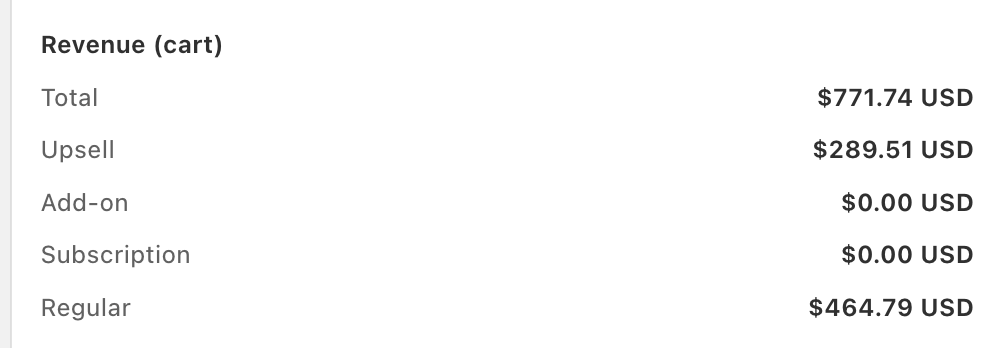
- Cart revenue in the panel: $771.74.
- From in-cart upsells: $289.51, or 37.5%.
- Add-on and subscription-upgrade revenue both read $0.00, so the upsell figure is upsells alone.
It is one store, not an average, and the panel is a snapshot without an exact date range. The two lines shown add up to $754.30, not the $771.74 total, so the panel does not show every line. App-attributed revenue can also include orders that would have happened anyway. Use it to see what is possible, not what is promised.
How we would set it up for a supplement store
- Turn on the cart drawer and a free-shipping goal set just above your most common order total.
- Add one cart upsell per best-seller: the product people most often buy with it, or a second unit.
- Switch on the subscribe-and-save upgrade for every product that has a subscription plan.
- Add a small free gift at a higher goal, like a shaker or a sample pack.
- Check average order value after two weeks, then change one offer at a time.
- Price: $9.99 (to 100 orders a month), $19.99 (200), $29.99 (500), $49.99 (1,000), with higher tiers as you grow. 14-day free trial.
- Our guarantee: a 30-day ROI guarantee. If your average order value has not increased within 30 days of going live, you get a full refund. The drawer must have been live with at least one offer. Oxify Quantity Breaks & BYOB has the 14-day trial only.
- Where others win: Kaching Bundles and Rebuy have far more reviews. Rebuy ran on 17 of the 42 supplement stores we checked, and none of them run Oxify yet. Rebuy is built and priced for large brands: its price rises with orders and its listing has no Built for Shopify badge. Oxify gives a smaller store the same cart jobs from $9.99 a month.
- Skip it if: you only want subscriptions and never plan to upsell. Post-purchase offers also follow Shopify's gateway limits from Step 1.
Best Subscription Apps for Supplements
Subscriptions are a natural fit for supplements. A buyer who subscribes does not have to remember to reorder, and you do not have to win them back each month. A supplement subscription needs five things:
- A gateway your app supports (see Step 1).
- A customer portal where people skip, swap, or pause instead of cancelling.
- Retries for failed cards.
- An easy cancel button. State auto-renewal laws expect it.
- A cycle you can match to the days in one container.
2. Appstle Subscriptions: best for most supplement stores
5.0 stars from 8,922 reviews. Built for Shopify. See the listing.
- Price: free up to $500 a month in subscription sales. Then $10 (to $5,000), $30 (to $15,000), or $100 (to $100,000) a month. The listing shows a 0% transaction fee on paid plans.
- What we noticed: the portal, product swaps, build-a-box, and payment retry are all on the plan list, not hidden behind sales calls.
- Why it fits supplements: refills repeat every month, so a flat fee gets cheaper per order as the same customers renew.
- Watch out: plans are capped by monthly subscription sales, so your bill steps up at each cap.
3. Recharge Subscriptions: larger stores with many tools
4.8 stars from 3,124 reviews. No Built for Shopify badge. See the listing.
- Price: $25 a month for your first 50 subscribers, with no transaction fees. Starter is $99 a month plus 1.49% and $0.19 per transaction. Plus is $499 a month plus 1.34% and $0.19. 60-day free trial.
- What we noticed: a no-code portal for skip, swap, and reschedule, failed-payment recovery, and ready links to Klaviyo, Shopify Flow, Attentive, and Gorgias.
- Real-world use: it was the most common subscription app in our store check (19 of 42 stores).
- News: on April 30, 2026, Recharge announced that Skio is joining it. Skio's listing now reads "Skio, a Recharge Company" (5.0 stars, 242 reviews; Scale plan $599 a month plus 1% and $0.20 per transaction).
- Watch out: the percent fee grows with every sale.
4. Loop Subscriptions: cancel flows and win-backs
5.0 stars from 779 reviews. No Built for Shopify badge. See the listing.
- Price: free for 50 active subscriptions. Starter $99 a month plus 1.0%. Pro $399 a month plus 0.75%.
- What we noticed: cancellation flows, auto retries and dunning, swaps and skips, build-a-box, and more than 35 listed integrations, including Klaviyo and Postscript.
- Why it fits supplements: some buyers just have too much at home. A skip or pause option in the cancel flow can keep them.
- Watch out: the jump from free to $99 is the steepest on this list.
5. Seal Subscriptions: lowest flat price
4.9 stars from 3,125 reviews. Built for Shopify. See the listing.
- Price: free for 50 subscriptions. Then $5.95 (to 100), $9.95 (to 250), or $24.95 (to 500) a month. Transaction fee: 0%.
- Why it fits supplements: plans are capped by subscriber count, not by sales, so a high-priced bundle does not push you up a tier.
- Watch out: the listed plans stop at 500 subscriptions. The listing says bigger plans, up to 150,000+ subscriptions, are available.
6. Shopify Subscriptions: free and basic
3.7 stars from 842 reviews. Made by Shopify. See the listing.
- Price: free. Customers can cancel, skip, or pause.
- Watch out: it is the lowest-rated app here, and Shopify's help center says bundles are not compatible with it. Ask Shopify support which gateways it supports.
What each one costs at $12,000 a month
Percent fees add up faster than people expect. Our math from the listed prices, assuming 300 subscription orders a month at $40 each. Card fees from your payment processor are extra and the same for every app. Loop's listing shows no cap on Starter, so check its pricing page.
| Subscription app | Plan used | Monthly fee | Per-sale fees | Total a month |
|---|---|---|---|---|
| Shopify Subscriptions | Free | $0 | $0 | $0 |
| Seal | Legend (to 500 subscriptions) | $24.95 | 0% | $24.95 |
| Appstle | Business (to $15,000 a month) | $30 | 0% | $30 |
| Loop | Starter | $99 | 1% = $120 | $219 |
| Recharge | Starter | $99 | 1.49% = $178.80, plus $0.19 x 300 = $57 | $334.80 |
| Skio | Scale | $599 | 1% = $120, plus $0.20 x 300 = $60 | $779 |
A bigger bill can still pay off if the app keeps more subscribers. Now you know the price of that bet. More sizes are in our subscription app fee comparison.
Best Review Apps for Supplement Brands (and How to Moderate Them)
Reviews do a lot of the selling for pills and powders. They are also a legal risk if you set them up carelessly. A review that says "this cured my arthritis," shown on your product page, can work like a claim you made yourself.
The 3-line moderation rule:
- Hide a review only for a written reason that has nothing to do with its star rating. Examples: it looks fake, it is about a different product, or it makes a disease claim.
- Apply the rule to every review, 1 star or 5 stars.
- Never hide reviews because they are negative. Under 16 CFR 465.7, you cannot present your reviews as most or all of the ones submitted when you have been hiding them based on rating or negative sentiment.
The rule names its own reasons you may withhold a review, such as fake reviews, reviews unrelated to your products, and clearly false information. Hiding disease claims is a common supplement practice, but it is not on that list, so ask your attorney how to word your policy.
When we set up Judge.me, the setting lives at Settings, Publishing and moderation, Auto-publish criteria. Choose "Manually moderate all incoming reviews" (it is on the free plan). Four things to know, all from Judge.me's help page:
- Manual mode holds new reviews as Hidden. They stay hidden until you publish them, and hidden reviews drop out of your star rating and review count. Set a weekly time to publish every review that passes your rule, including the 1-star ones.
- Hiding asks for a reason. Judge.me's list includes fake, spam, unrelated to the product, and legal reasons. Picking one each time gives you a record that matches your written rule.
- Shop app reviews skip moderation. Reviews synced from the Shop app publish automatically and cannot be hidden.
- Auto-publish by rating or sentiment (Awesome plan) sends reviews that miss your rule to Pending, and Pending reviews publish on their own after 14 days. Do not use it to keep low ratings off your page.
7. Judge.me: best free reviews
5.0 stars from 47,971 reviews. Built for Shopify. See the listing.
- Price: Forever Free, then Awesome at $15 a month (15-day trial).
- The free plan lists: unlimited product and store reviews, unlimited photo and video reviews, a review widget, and Google review rich snippets.
- Why it fits supplements: free, with the manual moderation setting above.
8. Okendo: what the big supplement brands use
4.8 stars from 1,427 reviews. No Built for Shopify badge. See the listing.
- Price: Free to 50 orders a month. Essential $19 (200 orders), Growth $119 (1,500 orders), Power $299 (3,500 orders).
- Real-world use: it was the most common review app in our store check (17 of 42 stores).
- The free plan lists: automated review requests, moderation, and a rewards engine.
- Watch out: plans are capped by monthly orders, so the price climbs fast past 200 orders.
9. Junip: unlimited orders on the free plan
4.8 stars from 1,156 reviews. Built for Shopify. See the listing.
- Price: Free (unlimited orders and review request emails). Core $29, Growth $79, Premium $299 a month.
- Watch out: requests with media and incentives are listed from Core up. Word any incentive carefully, because the FTC bars rewards tied to a positive opinion.
Best Email and SMS Apps for Supplements
Your refill email is where subscriptions and one-time buyers meet. It is also where both the claims rules and the consent rules apply.
10. Klaviyo: refill flows and segments
4.7 stars from 3,352 reviews. No Built for Shopify badge. See the listing.
- Price: free for up to 250 email contacts and 150 SMS credits. Email plans start at $20 a month for 251 to 500 contacts. An SMS plan starts at $15.
- Real-world use: 38 of 42 (90%) of the supplement stores we checked load it. Nothing else came close.
- Why it fits supplements: start a flow on a placed order, wait the days of supply minus 7, then send the refill email. See the refill clock.
- Watch out: the bill grows with your contact list, not just your orders.
11. Postscript: text marketing
4.7 stars from 1,206 reviews. No Built for Shopify badge. See the listing.
- Price: Starter has a $49 monthly minimum spend, then about 0.9 cents per text plus carrier fees, with a $100 credit in the first 30 days. Growth is $100 a month and Professional is $500 a month, with lower per-text prices.
- Why it fits supplements: a short "your tub runs out soon" text can bring back a buyer who ignores email.
- Watch out: marketing texts need written consent first. Keep text copy to the same claims as your product page.
Also seen in our store check: Attentive for SMS on 9 of 42 of stores, usually bigger brands. For email and SMS in one app at a lower price, look at Omnisend (4.7 stars, 3,183 reviews).
Best Quiz Apps for Supplement Brands
Many shoppers do not know which supplement to buy. A short quiz ("What is your goal?") points them to one product and one size. It also gives you their email and their goal, which you can use in Klaviyo.
12. RevenueHunt: best free quiz
4.9 stars from 458 reviews. Built for Shopify. See the listing.
- Price: Free for up to 100 quiz responses a month, with unlimited quizzes. Basic $39 (500 responses), Pro $99 (1,000), Premium $199 (2,500).
- Watch out: plans are capped by responses. A popular quiz can outgrow a plan fast.
13. Octane AI: deeper AI quiz funnels
4.7 stars from 207 reviews. No Built for Shopify badge. See the listing.
- Price: Basic $50 a month (2 quizzes, 400 credits). Plus $200 (unlimited quizzes, A/B testing). Enterprise $500. 14-day trial.
- Why it fits supplements: the listing says it connects to Klaviyo and Postscript, so quiz answers can feed your flows.
Two quiz rules for supplement brands: (1) End each result with "to support" language, never a diagnosis. (2) Do not ask about medical conditions unless a privacy lawyer has approved it. See the claims section.
Best Bundle and Multi-Pack Apps for Supplements
One tub lasts 30 days, three last 90. A pack ladder on the product page matches how people already buy. Pair it with the cart offers from our #1 pick.
14. Oxify Quantity Breaks & BYOB: 1, 2, 3 pack ladders (our app)
4.9 stars from 13 reviews. Built for Shopify. See the listing.
- Price: one paid plan at $14.99 a month ($129.99 a year), 14-day trial.
- What it does: quantity breaks, build-your-own-box, mix and match, buy X get Y, and tiered pricing.
- Why it fits supplements: turn "one tub" into "30, 60, or 90 days" with a tiered discount.
- Watch out: only 13 reviews so far.
15. Kaching Bundles: the most-reviewed bundle app
5.0 stars from 6,158 reviews. Built for Shopify. See the listing.
- Price: Starter $14.99 a month (up to $1,000 of added revenue), Scale $29.99 (up to $5,000), Pro $59.99 (up to $10,000). 7-day trial.
- Where it wins: far more reviews than ours. We also found it on 2 of 42 of the stores we checked.
- Watch out: plans are capped by the revenue the app adds.
16. Rebuy: upsells for large brands
4.7 stars from 854 reviews. No Built for Shopify badge. See the listing.
- Price: from $25 a month, rising with your monthly orders. 14-day trial.
- Real-world use: 17 of 42 of the stores we checked load it, more than any other upsell app.
- Watch out: the full price ladder is not on the listing, so get a quote at your order volume. Smaller stores usually do not need it.
Loyalty and Support Apps Worth Adding Later
17. Smile: points for repeat buyers
4.9 stars from 4,616 reviews. Built for Shopify. See the listing.
- Price: free to 200 orders a month. Essential $15 (500 orders), Standard $79 (1,000), Growth $199 (2,500 included).
- Why it fits supplements: points on every refill reward exactly the habit you want. Add it after subscriptions are running, not before.
18. Gorgias: support for subscription questions
4.3 stars from 705 reviews. No Built for Shopify badge. See the listing.
- Price: from $10 a month (Starter, 50 tickets).
- Why it fits supplements: "skip my next box" and "change my flavor" tickets pile up once subscriptions grow. We found Gorgias on 17 of 42 of the stores we checked.
- Watch out: the lowest rating in this list. Pricing climbs with ticket volume.
Lot Tracking and Warning Labels
Say your supplier warns you that one batch may be bad. Which customers got it? If your orders do not record lot numbers, you are guessing. And if you sell into California, some products need Prop 65 warnings. Two small apps cover this.
19. Freshly Batch Inventory: best-reviewed lot tracker
4.8 stars from 46 reviews. No Built for Shopify badge. See the listing (rating and price re-read October 11, 2026).
- Price: Essential is free (10 products, 500 orders a month, one location, batches auto-assigned). Pro at $24 a month adds batch traceability and manual assignment. Advanced $89 and Plus $199 for Shopify Advanced and Plus stores.
- What it does: lot and batch numbers, expiry dates, FEFO and FIFO stock rotation, recalls that trace customer orders to the batch, and batch details on packing slips.
- Watch out: this category is young. Newer options like Batchly (5.0 stars, 2 reviews) and LotTrack (launched July 2026, no reviews yet) have almost no track record. If a 3PL ships your orders, ask whether it already tracks lots.
20. Warnify Pro Warnings: Prop 65 and state notices
4.8 stars from 239 reviews. Built for Shopify. See the listing.
- Price: Free (1 warning, 10 products). Unlimited $9.95 a month. Premium $17.95 a month.
- What it does: shows warning popups on product pages, the cart, and checkout, targeted by product, collection, country, or US state.
- Real-world use: we found it on 2 of the 42 stores we checked, Bloom Nutrition and Nutricost.
- Watch out: the app shows a warning. It does not decide whether you need one or what it must say. That is a question for your attorney.
The Claims Rules Your Apps Must Not Break
Every app on this list puts words in front of shoppers. For a supplement brand, those words are advertising. Here are the rules that matter most, in plain English.
Rule 1: Say what it supports. Never say it treats a disease.
- OK: "Supports healthy sleep." That is a structure or function claim. FDA says it describes the role of a substance in keeping up the structure or function of the body.
- Not OK: "Treats insomnia." That is a disease claim.
- The label disclaimer: if the label makes a structure or function claim, FDA requires this line: "This statement has not been evaluated by the Food and Drug Administration. This product is not intended to diagnose, treat, cure, or prevent any disease." FDA says you may not change the wording.
- The 30-day notice: FDA also says you must tell it within 30 days of first selling a product with such a claim.
FDA's guide does not say outright whether your website text counts. Many brands repeat the disclaimer on product pages anyway.
Rule 2: Have proof before you say it.
- The FTC says health-benefit claims need "competent and reliable scientific evidence."
- It calls randomized, controlled human trials the most reliable form of evidence. Many weak studies do not add up to a strong one.
- Customer stories count as claims too. Testimonials that show results better than people usually get are likely to be deceptive.
- You also cannot hint at a benefit you could not claim out loud.
Rule 3: Never write "FDA approved."
FDA does not approve dietary supplements before they are sold. The makers and sellers are responsible for the safety and labeling of their products, and FDA acts after a product reaches the market, per the FDA dietary supplements page. So skip any trust badge or cart-drawer line that says "FDA approved."
Where claims sneak in through your apps
| Where claims show up | The risk | What to do |
|---|---|---|
| Quiz results | "Your answers show you have anxiety, so take X" | Recommend products "to support" a goal. Never name a disease. |
| Bundle and plan names | A name like "Immune Defense Stack" makes a claim | Check names the same way you check label copy. |
| Cart-drawer and upsell text | Short offer lines add new claims nobody reviewed | Reuse lines that are already approved on your product page. |
| Review widgets | A customer posts "cured my arthritis" and you display it | Moderate by what a review says, the same way for every star level. |
| Email and SMS | Subject lines make claims. Texts need consent. | Same claim rules. Get written consent before marketing texts. |
| Trust badges | "FDA approved" seals | Do not use them (Rule 3). |
| Subscription cancel flow | Hard-to-find cancel button | Make cancelling as easy as signing up. |
Reviews, subscriptions, texts, and quiz data
- Reviews. The FTC's Consumer Reviews and Testimonials Rule took effect October 21, 2024. It bans fake reviews, reviews from insiders who do not say so, and rewards tied to a positive opinion. It also bars saying your reviews show most or all of the ones submitted when you hid them for being negative. In December 2025 the FTC sent warning letters to 10 companies and said civil penalties can reach $53,088 per violation.
- Subscriptions. The federal "click-to-cancel" rule was struck down on July 8, 2025. State laws still apply. California's updated auto-renewal law, in force since July 1, 2025, requires a way to cancel through the same channel used to sign up, clear consent to renewal terms, and yearly reminders.
- Texts. The FCC requires prior express written consent for marketing texts sent with automated systems. Use the opt-in tools in your SMS app and keep the records.
- Quiz data. A quiz that asks about health conditions may collect health data. Some states regulate that. Washington's My Health My Data Act, for one, covers information that identifies a person's physical or mental health status. Ask a privacy lawyer before you ask shoppers about conditions.
The Refill Clock: Time Your Apps to the Day the Tub Runs Out
Here is a simple rule of thumb. It is ours, not a study. Remind buyers about a week before the container is empty. That leaves time to ship.
| Supply | Refill email | Multi-pack to offer | Subscription cycle |
|---|---|---|---|
| 30 days (one tub) | Day 23 | 1, 2, or 3 tubs (30, 60, or 90 days) | Every 30 days |
| 60 days | Day 53 | 1 or 2 bottles | Every 60 days |
| 90 days | Day 83 | Already a multi-pack, so lead with subscribe | Every 90 days |
To set it up:
- Write down how many days one container lasts.
- Set your subscription app's default cycle to match.
- In Klaviyo, build a flow that starts on a placed order for that product, waits (supply minus 7) days, then sends the refill email.
- Put a 1, 2, or 3 pack ladder on the product page with a quantity-break app.
- Offer a subscribe-and-save upgrade inside the cart.
Klaviyo can also predict the next order date for each customer. But its predictive analytics page says you need at least 500 customers who have ordered, 180 days of order history with orders in the last 30 days, and some customers with 3 or more orders. A new store does not qualify yet. Use the fixed timer until you do.
Your App Stack by Stage
You do not need every app at once. Add them in this order:
| Stage | Orders a month | Install | Wait on |
|---|---|---|---|
| 1. Launch | 0 to 100 | Payment check. Oxify Cart Drawer (the $9.99 plan, up to 100 orders). Shopify Subscriptions or Appstle (free). Judge.me (free). Klaviyo (free to 250 contacts). RevenueHunt (free quiz). | SMS, lot tracking, loyalty, support desk |
| 2. Growing | 100 to 1,000 | Oxify Cart Drawer and Quantity Breaks. Appstle or Seal on a paid plan. Klaviyo refill flow. A lot tracker. Smile for points. Okendo or Junip if you outgrow your review plan. | A/B testing and attribution tools |
| 3. Scaling | 1,000+ | Recharge or Loop if you need their integrations or churn tools. Postscript or Attentive for SMS. Gorgias for support. Octane AI for a deeper quiz funnel. This is where the big brands in our store check add A/B price tests and attribution tools. | Anything you cannot tie to a number |
Rule of thumb: if you cannot name the number an app should move, do not install it yet.
What to Skip
- "FDA approved" badges. See Rule 3.
- Any app that says it makes you compliant. No app can sign off on your claims. A regulatory attorney can.
- Star or sentiment filters that keep low ratings off your page. See the reviews section.
- Ten new apps in one week. Add one, check your store speed, then add the next.
- Shipping protection on day one. It is optional. Do the math first with our shipping protection guide.
Frequently Asked Questions
What are the best Shopify apps for supplement brands?
What apps do big supplement brands use on Shopify?
Which payment provider should a supplement brand use on Shopify?
Can I move my subscribers to a new payment provider later?
Can you sell supplements on Shopify, and does Shopify Payments allow them?
Which payment gateways work with Shopify subscription apps?
Which subscription app is best for supplements?
Do I need an FDA disclaimer on my Shopify product page?
How do I send refill reminders for supplements?
Are review apps safe for supplement brands?
How do I show Supplement Facts on my product page?
What is the best app for supplement bundles and multi-packs?
What to Do This Week
- Today: ask Shopify support whether your store qualifies for Shopify Payments. Write down the answer.
- This week: pick a gateway that supports subscriptions, then install one subscription app. Set its cycle to match your product's days of supply.
- Next: install Judge.me and switch on manual moderation. Install Klaviyo and build the refill flow.
- Then: add multi-packs and one cart upsell. Run it for two weeks and watch average order value.
Want the multi-pack and cart-upsell part handled? Oxify Cart Drawer & Upsell has a 14-day free trial and a 30-day ROI guarantee: if your average order value has not increased within 30 days of going live, you get a full refund. See how it works on our cart drawer upsell page.
Related Guides
- Best Shopify subscription apps (fees compared at different sizes)
- Subscribe and save inside the cart drawer
- Best Shopify quantity breaks apps
- Best Shopify upsell apps
- Best Shopify cart drawer apps
- Best Shopify review apps
- Best email marketing apps for Shopify
- Best Shopify apps for beauty and skincare brands
- Best Shopify apps for coffee and tea brands
- Best Shopify apps for pet stores
- The 26 best Shopify apps overall