 Oxify
OxifyAdd to Cart but No Sales on Shopify? 9 Causes and Fixes
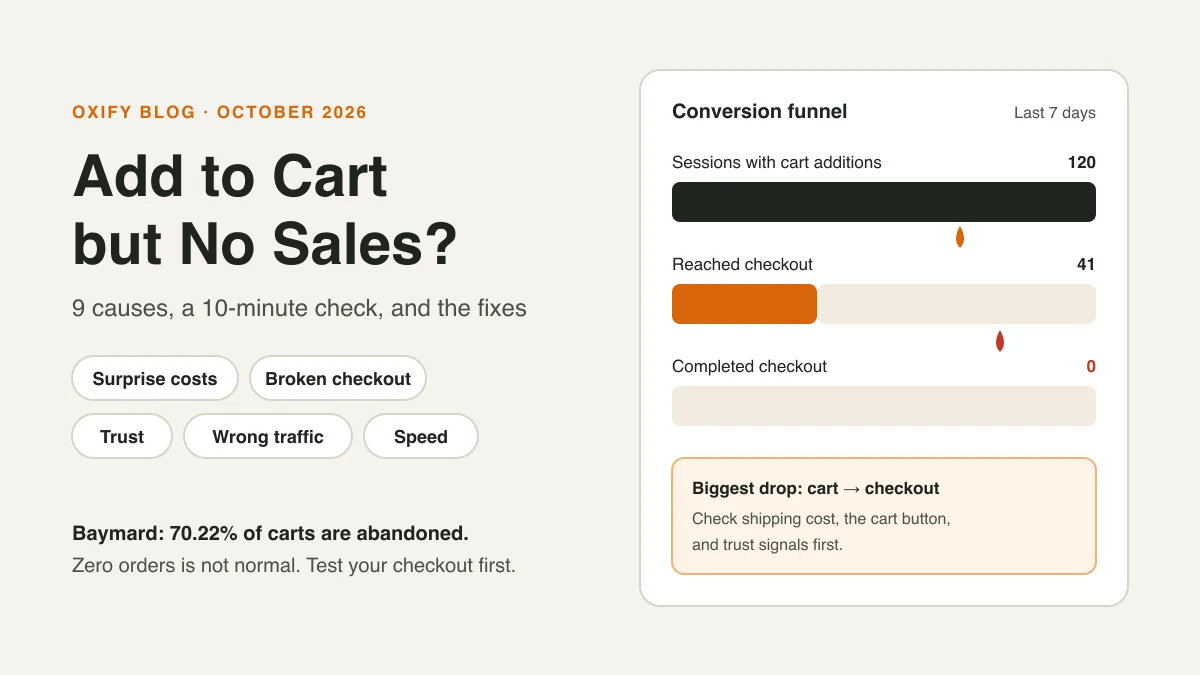
People are adding your products to the cart. Then they vanish. No order, no email, nothing.
Good news: this is fixable. When shoppers add to cart, they already want the product. Something between the cart and the "Pay now" button is stopping them. On Shopify it's usually one of nine things: surprise costs, a broken checkout, a cart that gets in the way, missing payment options, low trust, slow mobile pages, a pushy checkout, the wrong traffic, or shoppers who are just saving it for later.
Below is a 10-minute check to find your leak, then a fix for each cause.
Quick Answer (For Skim Readers)
- Some abandonment is normal. Baymard Institute puts the average documented cart abandonment rate at 70.22% (50 studies, updated September 2025). You can't get to zero.
- Most common fixable cause: extra costs like shipping, tax and fees. 40% of US shoppers who abandoned an order named this, in Baymard's survey.
- Zero sales is not normal. If you get carts but no orders at all, place a test order first. Something may be broken.
- Find the leak before you fix it. Shopify's "Conversion rate breakdown" report shows exactly where people drop.
Why Shoppers Really Leave (The Data)
Baymard asked US online shoppers who left an order during checkout why they did it. Leaving out the 42% who were "just browsing," here are the top answers:
| Reason for leaving | Share of shoppers | Cause below |
|---|---|---|
| Extra costs too high (shipping, tax, fees) | 40% | 1 |
| Delivery was too slow | 20% | 1 |
| Didn't trust the site with card details | 19% | 5 |
| Had to create an account | 18% | 7 |
| Checkout too long or complicated | 17% | 7 |
| Website errors or crashes | 17% | 2 |
| Returns policy not good enough | 13% | 5 |
| Couldn't see the total cost up front | 12% | 1 |
| Credit card was declined | 10% | 4 |
| Not enough payment methods | 9% | 4 |
Shoppers could pick more than one reason.
The big takeaway: most reasons are about money, trust and effort. Almost none are about the product itself. Your shopper already liked the product. That's why fixing the cart and checkout pays off so fast.
First: Is It "Few Sales" or "Zero Sales"?
These are two different problems.
- Zero sales, lots of carts: think "broken." A payment setting, an app conflict, a shipping zone gap, or a store still in password mode.
- A few sales, lots of carts: think "friction." Costs, trust, speed, or the wrong visitors.
Here's a story we see often. A new store owner runs ads for a week. Shopify shows 40 add-to-carts and zero orders. They rewrite the product page, change the price, swap the photos. Nothing works. Then they place a test order and find out shipping isn't set up for their biggest country. Checkout just says "no shipping available." One setting. A week of ad spend.
So always start with the cheapest test: buy from yourself.
The 10-Minute Funnel Check
Open Shopify admin → Analytics → Reports and open Conversion rate breakdown. It shows three steps: "Sessions with cart additions," "Sessions that reached checkout," and "Sessions that completed checkout."
Quick sanity check first: are your add-to-carts even real? It's one of the most common questions on the Shopify Community forums, especially from stores running Meta ads.
- If Meta or Google Ads shows far more add-to-carts than Shopify does, a pixel may be firing twice (for example, once from the Shopify channel app and once from old code in your theme).
- Ad platforms also count "modeled" or estimated events. Shopify counts real sessions.
- Trust Shopify's own report over the ad dashboard. If Shopify shows only a handful of real cart sessions, you have a traffic problem, not a checkout problem.
Next, open Orders → Abandoned checkouts. Every row is a real person who got to checkout and stopped. Look for patterns: same country? Same product? Same step? That list often tells you the answer faster than any report.
Now look at where the biggest drop is:
| Biggest drop happens… | What it usually means | Jump to |
|---|---|---|
| Cart → reached checkout | Something in the cart stops them: price shock, slow drawer, no clear button, low trust | Causes 1, 3, 5, 6 |
| Reached checkout → completed | Something inside checkout stops them: shipping cost, payment options, errors, forced account | Causes 1, 2, 4, 7 |
| Drops everywhere, from every source | Wrong traffic or a mismatch between ad and product | Cause 8 |
| Zero completed checkouts, ever | Something is broken | Cause 2 (do this first) |
Then do two more things:
- Place a real test order on your phone. Use mobile data, not Wi-Fi. Use a country you sell to. Pay with a real card and refund yourself.
- Split the funnel by device and traffic source. If desktop converts and mobile doesn't, it's a mobile bug. If Google converts and TikTok doesn't, it's a traffic problem.
The 9 Causes (and How to Fix Each One)
1. Surprise Costs (or Slow Delivery) at Checkout
The shopper sees $29 on the product page. At checkout, it's $41 after shipping and tax. That jump feels like a trick, even when it isn't. Then they see "arrives in 10–14 days" and they're gone.
Together, extra costs (40%), slow delivery (20%) and not seeing the total up front (12%) are the biggest group in Baymard's data.
Fix it:
- Show shipping cost (or "free shipping over $X") on the product page and in the cart.
- Add a free shipping progress bar in the cart so the cost is never a surprise.
- If you sell where prices include tax (UK, EU, Australia), turn on tax-inclusive pricing.
- Test a slightly higher product price with free shipping. Shoppers often hate a shipping line more than a higher price.
- Show an estimated delivery date ("Arrives by Friday") near the button. If you ship slowly, say so early and honestly.
- Selling abroad? Check Settings → Markets. Shoppers who see the wrong currency, or a price that changes at checkout, often leave.
2. Checkout Is Broken (or Half Broken)
This is the silent killer. Your store looks fine. The shopper just can't finish.
Check these:
- Shipping zones: Settings → Shipping and delivery. Is every country you advertise to covered?
- Payments: Settings → Payments. Is your payment provider active and fully verified?
- Password page: Is your store still locked (Online Store → Preferences)?
- App conflicts: Did you add a cart, discount, or checkout app recently? Turn it off and test again.
- Markets: Is the shopper's market active, with a currency and price set?
If the test order fails, that's your answer. Fix it before you touch anything else.
3. The Cart Gets in the Way
Some carts make buying harder, not easier. Signs to look for:
- The checkout button sits below the fold on phones.
- Three pop-ups fire between "Add to cart" and "Checkout."
- The cart page reloads slowly, or the drawer lags.
- Shoppers get bounced to a full cart page when a slide-out drawer would keep them moving.
Real example: The Commerce Lab (June 2025) wrote about a wellness brand that removed a subscription upgrade, three "You May Also Like" items and a "Continue Shopping" button from its cart drawer. With only the checkout button left, conversion rate rose 5.2%. The post doesn't give the sample size, so treat it as one store's result, not a rule.
Fix it: keep one big, sticky checkout button. Keep add-on offers small and easy to skip. One offer in the cart is plenty. Our cart drawer checklist walks through the layout.
What We Saw When Two Stores Fixed Their Cart (Oxify Data)
Two stores using Oxify show how much the cart itself matters.
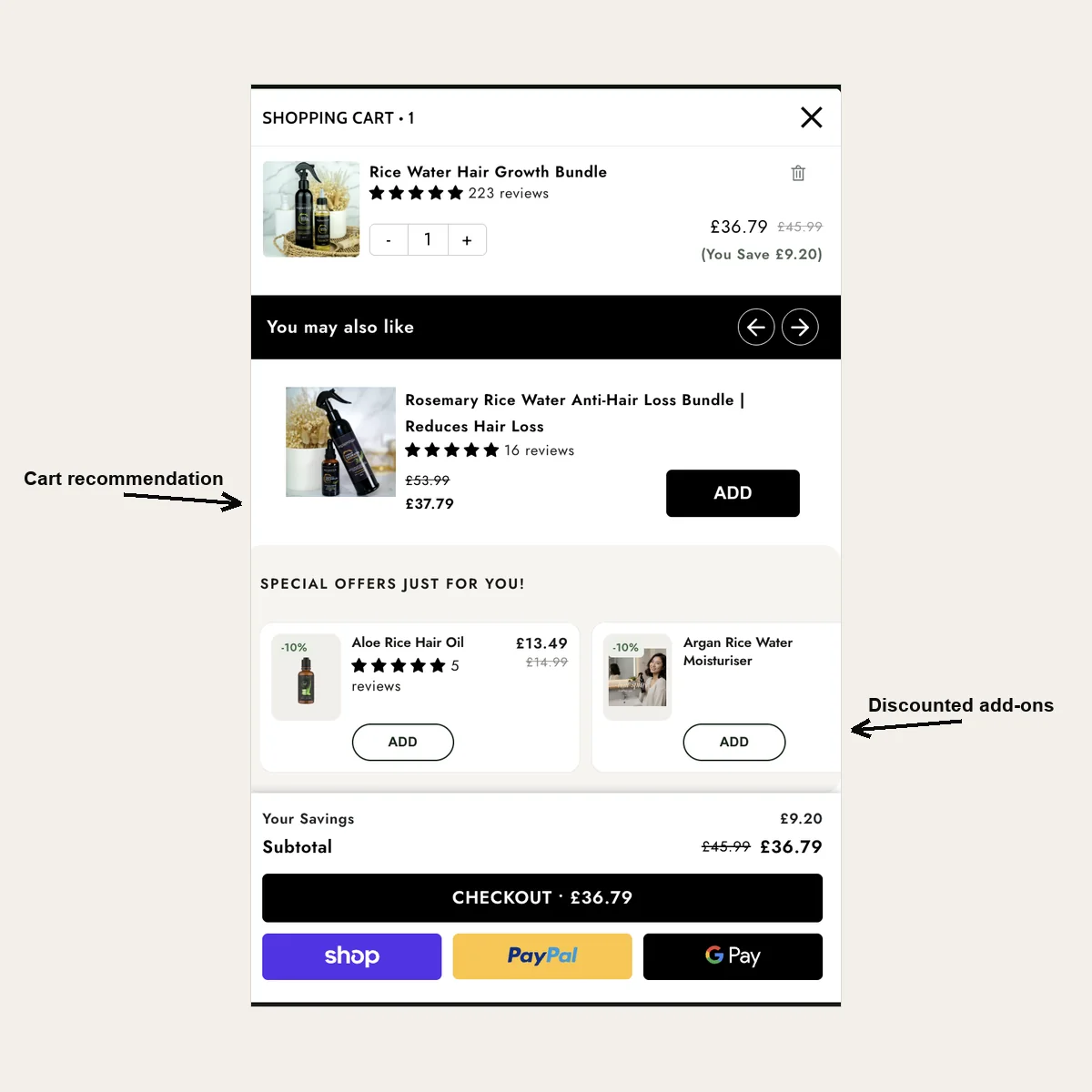
Replenhair (UK hair care). Their old Shopify cart page was a dead end. Adding a product threw shoppers onto a separate page where the only choices were "leave" or "check out." Their products cost £14.99 to £49.99, and they were already running 20–50% promotions, so cutting prices again would have only eaten margin.
Instead, we:
- Replaced the cart page with a slide-out drawer, so adding to cart no longer broke the browsing flow.
- Added a free shipping progress bar. On a basket of £14.99 items, being £6 short of free delivery is a strong reason to add one more.
- Showed one matching product, plus a small "Special offers just for you" row with its own 10% saving.
The cart drawer brought in £8,742, which was 57% of the £15,451 the app tracked across all placements. Those numbers come straight from the store's Oxify dashboard. Read the full Replenhair case study.
Crossword Bookstores (India). Crossword wanted every basket to feel "almost there." Their drawer has a three-step reward bar: free shipping first, then an extra 5% off, then an extra 10% off. The drawer alone tracked ₹340,639 in revenue, and Crossword reported a 20% lift in additional revenue against their old setup. See how the Crossword drawer works.
The honest caveat: these are app-tracked revenue numbers from two stores, not a lab test. But they match what Baymard's data says: when the cart is clear about cost and gives shoppers a reason to finish, more of them do.
4. Not Enough Payment Options
Some people won't type a card number on a phone. They want one tap. In Baymard's survey, 10% left because their card was declined and 9% because they couldn't pay the way they wanted. A second option saves both.
Fix it:
- Turn on Shop Pay, Apple Pay, Google Pay, and PayPal if they're available to you.
- Show express checkout buttons in the cart, not just at checkout.
- For pricier items, consider buy now, pay later (like Shop Pay Installments, where available).
Watch for failed payments too. A shopper who tries to pay and fails looks exactly like an abandoned checkout. Common reasons:
- The bank asks for an extra security check (3D Secure) and the shopper gives up on a phone.
- Your payment provider's fraud filter blocks real buyers, often from new countries.
- Your provider doesn't support the shopper's card type or currency.
Check your payment provider's dashboard for declined or failed payments. If you see lots of them from one country or card type, contact the provider before you change anything on your store.
5. Shoppers Don't Trust You Yet
A new store with no reviews asks a stranger to hand over card details. That's a big ask. 19% of shoppers in Baymard's survey left because they didn't trust the site with their card, and 13% because of the returns policy.
Fix it:
- Show real reviews near the price and in the cart.
- Make the return policy easy to find. Say it in plain words: "30-day returns, free."
- Add a real contact email, and an About page with a face or a story.
- Use simple trust signals near the checkout button: secure checkout, delivery time, returns.
Don't fake it. Fake reviews and fake "only 2 left!" timers make shoppers trust you less once they spot them.
6. Your Store Is Slow on Mobile
Most store visits happen on phones. A slow cart on a weak signal feels broken.
Fix it:
- Run your product page through Google PageSpeed Insights.
- Remove apps you don't use. Many leave code behind even after you uninstall them.
- Compress big images.
- Tap "Add to cart" yourself on a phone. Does the cart open in under a second?
7. Checkout Asks Too Much
Forcing shoppers to make an account is a classic sale killer: 18% of Baymard's shoppers left for that reason, and 17% because checkout felt too long. So is asking for info you don't need.
Fix it:
- Allow guest checkout. In Shopify, set customer accounts so they're optional.
- Turn off fields you don't need, like company name.
- Make sure discount code errors are clear. "Code expired" beats a blank fail.
8. The Wrong People Are Adding to Cart
Sometimes the store is fine. The traffic isn't.
- Bots and fake traffic can add to cart and never buy.
- Cheap ad clicks bring "just looking" visitors.
- An ad that promises $19 lands on a $49 product.
Fix it: split your funnel by source. If one channel has tons of carts and no sales, fix the ad's promise or its targeting. Make the ad, the product page, and the cart all tell the same story.
9. Shoppers Are "Saving It for Later"
Lots of people use the cart as a wishlist. They're comparing, waiting for payday, or asking a partner. In Baymard's survey, 42% of people who left were "just browsing." You won't win all of them, but a reminder brings some back.
Fix it:
- Set up Shopify's abandoned checkout emails (Marketing → Automations). They're built in.
- Send a reminder within a few hours, then a second one a day later.
- Use a real reason to come back, like a free gift over a spend amount. Skip fake urgency.
Note: Shopify can only email shoppers who reached checkout and typed an email. Someone who only added to cart can't be emailed unless they're already a known customer.
Tools That Fix Each Cause
You don't need ten new apps. Most fixes are settings you already have. Start with the free Shopify tools, and only add an app when a setting can't do the job.
| Cause | Tool | Type | What it does for you |
|---|---|---|---|
| Find the leak | Shopify Analytics (Conversion rate breakdown) | Built into Shopify | Shows where shoppers drop: cart, checkout start, or payment |
| Find the leak | Microsoft Clarity | Free app | Session recordings and heatmaps, so you can watch where shoppers get stuck |
| 1. Surprise costs | Shopify shipping settings + Markets | Built into Shopify | Free shipping thresholds, local currency, tax-inclusive prices |
| 1, 3. Costs and cart friction | Oxify Cart Drawer & Upsells (our app) | App | Slide-out cart with a free shipping bar, express pay buttons, trust badges, and one skippable offer |
| 4. Payment options | Shop Pay, Apple Pay, Google Pay, PayPal | Built into Shopify Payments / settings | One-tap checkout on phones |
| 5. Trust | Judge.me Product Reviews | App with a free plan | Collects and shows real customer reviews |
| 5. Trust | Shopify Inbox | Free Shopify app | Live chat, so shoppers can ask before they buy |
| 6. Speed | Google PageSpeed Insights | Free tool | Scores your mobile speed and lists what slows it down |
| 9. Save it for later | Shopify Email (abandoned checkout automation) | Built into Shopify | Sends a reminder to shoppers who left checkout |
| 9. Save it for later | Klaviyo | App with a free plan | Email and SMS reminder flows with more control than the built-in email |
A word of warning: every app you add is more code on your store. Two cart apps, or two upsell apps, fighting over the same cart is a common reason carts break. Pick one tool per job.
Your Fix-It Order (Do These in Sequence)
- Test order on your phone. Fix anything broken. (Cause 2)
- Read your funnel. Find the biggest drop. (Funnel check)
- Kill surprise costs. Show shipping early. (Cause 1)
- Clean up the cart. One button, one offer, fast. (Causes 3, 6)
- Add trust and express pay. (Causes 4, 5)
- Check traffic by source. (Cause 8)
- Turn on recovery emails. (Cause 9)
Change one thing at a time. Wait a week (or about 100 more carts). Then check the funnel again. If you change five things at once, you won't know what worked.
Frequently Asked Questions
Why do people add to cart but not buy on Shopify?
What is a normal cart abandonment rate?
How do I know if my Shopify checkout is broken?
Can a cart app hurt my sales?
Why do I have add to carts and reached checkouts but no sales?
Why does Meta show add to carts but Shopify shows no orders?
Do abandoned cart emails work on Shopify?
Make Your Cart Help, Not Hurt
Your cart is the last stop before the sale. It should be fast, clear, and honest about costs.
Oxify Cart Drawer & Upsells gives you a quick slide-out cart with a free shipping bar, express pay buttons, trust badges, and one skippable upsell, all set up without code. Try it free on the Shopify App Store, then run the funnel check above again in a week.