
9 Best Shopify Product Add-Ons & Options Apps (2026)
Quick answer: The best Shopify product add-ons app in 2026 is Oxify Cart Drawer & Upsell — 4.9 stars, Built for Shopify, from $9.99/month — because it covers product page add-ons, cart drawer upsells, free gifts, and post-purchase offers in one app with collection-level targeting and conditional discounts. The best free tier is Selleasy (4.9 stars, 2,493 reviews, free up to 50 orders/month). For pure product page add-on widgets, Essential Upsell & Cross Sell (5.0 stars, 2,210 reviews) is the strongest runner-up. For gift wrap, Wrapped; for warranties and service add-ons, Candy Rack. Need product options (checkboxes, engraving fields, file uploads) instead of extra products? Jump to the best product options apps section.
| You want… | Category | Best pick | Where |
|---|---|---|---|
| Extra products offered with the main one (warranty, case, gift wrap) | Product add-ons app | Oxify Cart Drawer & Upsell (4.9★, 37 reviews) | Ranked list below |
| Custom fields on a single product (engraving, uploads, checkboxes) | Product options app | Globo (4.9★, 4,756 reviews) or Easify (4.9★, 2,884) | Options apps section |
| "You may also like" / "Frequently bought together" widgets | Recommendation app | Oxify or Selleasy (4.9★, 2,493) | Recommendation apps section |
| Several products sold as one discounted package | Bundle app | FBP | Fast Bundle (5.0★, 3,036) | Best bundle apps guide |
| Add-ons with no app and no budget | Native Shopify | Search & Discovery (free) | Without-an-app section |
Updated August 12, 2026 — every rating, review count, and price in the ranked list and comparison tables below was checked live on the Shopify App Store on August 12, 2026. Two apps were renamed since spring (ReConvert is now "Upsell.com ‑ ReConvert Upsell"; Fast Bundle is now "FBP | Fast Bundle & Upsell App"), Bold relaunched its listing, and BOGOS' "free plan" turned out to be 30 free orders — lifetime. Details in each section.
Who's writing this and why you should double-check us: We build Oxify, one of the apps ranked below. Oxify is the newest app on this list and has the smallest review base — 4.9 stars from 37 reviews — and we rank it #1 anyway, on breadth-per-dollar: it covers more add-on placements per month of subscription than anything else here. That's a judgment call from a biased party, so we show verified numbers for every competitor and tell you exactly where each one beats us. Ranking criteria: functionality breadth, ease of use, scalability, verified merchant ratings, and the Built for Shopify badge.
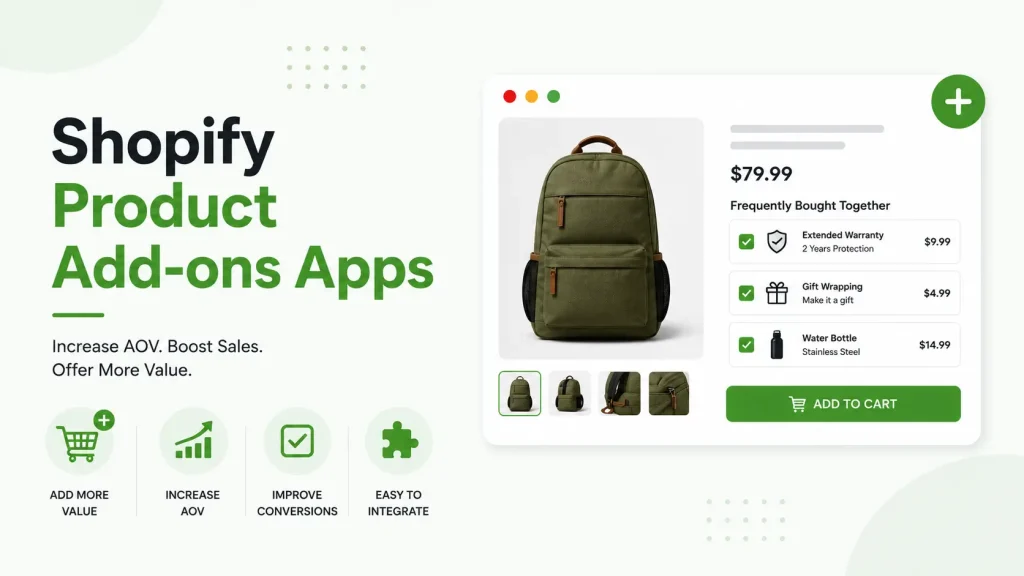
What is a Shopify product add-ons app?
Looking for upsell apps, not add-ons? Add-ons are optional extras on the product page. For offers in the cart, at checkout and after payment, see our ranked list of the best Shopify upsell apps.
A Shopify product add-ons app lets shoppers add extra products to their order alongside the main product they're buying — one click, no leaving the page. Examples:
- A phone case shown next to a phone.
- A 2-year warranty added to a laptop.
- Gift wrap or batteries on a toy product page.
- A travel-size cleanser added at the cart.
The shopper ticks a box, the add-on lands in their cart, and your average order value climbs. For the strategy side, our Shopify upselling strategies guide covers the full AOV playbook.
Product add-ons vs product options vs related products apps — which do you need?
Google lumps three different app categories under "Shopify add-ons," and installing the wrong one is the most common mistake we see in merchant tickets. The two-minute version:
- Product add-on apps sell extra products alongside the main one — a warranty with a laptop, gift wrap with a candle, a case with a phone. That's what this guide ranks.
- Product options apps (also called variant options apps) add custom fields to a single product — checkboxes, dropdowns, engraving text, file uploads — often to get past Shopify's variant limit. See the product options apps section or Oxify Product Options & Variants.
- Related products / recommendation apps show "You may also like" and "Frequently bought together" suggestions powered by sales data — see the recommendation apps section, or our full breakdown of FBT vs cross-sell vs related products.
- Bundle apps group multiple products into one discounted package. That's a separate category with its own trade-offs, ranked in our best Shopify bundle apps guide.
Plenty of stores need two of these at once — an options app for engraving plus an add-on widget for gift wrap, say. Just don't stack four overlapping widgets; pick one app per job.
The 4 jobs of a Shopify product add-ons app
Most "best of" lists rank apps by review count and recommend the same one for everyone. That misses how add-ons actually work. There are four distinct jobs, and the right app depends on which one matches your catalog.
Job 1 — Complementary product add-ons. A laptop bag next to a laptop. A memory card next to a camera. These appear on the product page or in the cart drawer as "Frequently Bought Together" or "You may also like" widgets. Best apps: Oxify, Selleasy, Essential Upsell.
Job 2 — Service add-ons. Extended warranties, protection plans, shipping protection, priority shipping, installation. Across Oxify-powered stores we've seen these convert at 20–35%, because they remove a real anxiety ("what if it breaks?"). Best apps: Candy Rack, Oxify. Setup walkthroughs: shipping protection add-on and warranty upsell in the cart.
Job 3 — Gift options. Gift wrap, gift messages, greeting cards. Acceptance spikes to 15–25% in peak gift seasons (November–December, Mother's Day, Valentine's Day) in the store data we've observed. Best apps: Wrapped, Oxify. Our gift wrap setup guide covers how to add this without an app too.
Job 4 — Free gift add-ons. "Spend $75, get a free travel-size cleanser," triggered by cart value, quantity, or specific products in cart. Best apps: BOGOS, Oxify. We have a full free gift in cart drawer guide and a manual gift selection walkthrough for the tactical side.
The strongest add-on stacks rarely involve one app for every job. Most merchants combine Oxify (jobs 1, 3, and 4) with a specialist for job 2 (Candy Rack for warranties).
Why install one at all?
- Higher AOV — across Oxify merchant stores, a well-placed add-on offer typically lifts average order value 10–30% within the first month. Individual results vary with offer relevance and traffic.
- No extra ad spend — the revenue comes from visitors you already paid to acquire.
- Better margins — accessories, warranties, and gift wrap are usually your highest-margin SKUs.
- Smarter cart fills — a $4 add-on closes the gap to your free shipping threshold (see our free shipping bar guide).
- Fewer "I forgot the cable" returns — pairing complementary products up front prevents incomplete orders.
The math: if your store does $50,000/month and you lift AOV 15%, that's an extra $7,500/month from an app that costs $10–$30. We unpacked the conversion side in Frequently Bought Together conversion rate.
Best Shopify product add-ons apps in 2026 — full comparison table
Nine apps, every row verified on the Shopify App Store on August 12, 2026. Bundle apps (Fast Bundle, Bundler, Simple Bundles) are deliberately excluded — they solve a different job, and we ranked them separately in the best Shopify bundle apps guide.
| App | Best for | Rating | Reviews | Starting price | Free option | Built for Shopify |
|---|---|---|---|---|---|---|
| Oxify Cart Drawer & Upsell | All-in-one add-on funnel | 4.9 | 37 | $9.99/mo | 14-day trial | ✅ |
| Selleasy | Free Amazon-style FBT widget | 4.9 | 2,493 | $9/mo | Free up to 50 orders/mo | ✅ |
| Essential Upsell & Cross Sell | Pure product page add-ons | 5.0 | 2,210 | $9.99/mo | Free until add-ons generate $100 | ✅ |
| BOGOS | Free gift add-ons | 5.0 | 4,057 | $29.99/mo | 30 free orders (lifetime) | ✅ |
| EPA ‑ Easy Product Addons | Checkbox add-ons under the buy button | 5.0 | 277 | $9.99/mo | 21-day trial | ✅ |
| Candy Rack • Upsell Cross‑sell | Warranty & service add-ons | 4.9 | 222 | $29.99/mo | 8-day trial | ✅ |
| Wrapped: Gift Wrap & Messages | Gift wrap & gift messages | 4.9 | 125 | $19/mo | 7-day trial | ✅ |
| Upsell.com ‑ ReConvert Upsell | Post-purchase add-ons | 4.8 | 2,803 | $4.99/mo | Free trial | ✅ |
| Bold AI Upsell & Cross‑Sell | Plus stores, AI funnels | 4.4 | 528 | Free + 3.5% of upsell revenue | Free to install | ✅ |
One niche pick that didn't make the ranked list: for digital add-on delivery (a recipe ebook sold with a kitchen gadget), BIG Digital Downloads auto-emails download links after purchase and manages licenses. It held 4.9 stars with 776 reviews and a free plan when we last tested it in May 2026 — re-check the listing before installing, since we couldn't re-verify it in August.
What do these apps actually cost at your order volume?
"Free plan" and "from $X/month" hide a lot. Here's what each app's published pricing works out to as you grow — the fine print is where the surprises live:
| Cost by app | Free tier fine print | ~100 orders/mo | ~500 orders/mo | ~2,000 orders/mo |
|---|---|---|---|---|
| Oxify | 14-day trial, then order-banded plans | $9.99 | $29.99 | $79.99 |
| Selleasy | Genuinely free up to 50 orders/mo | $9–$29 by plan tier | $9–$29 by plan tier | $9–$29 by plan tier |
| Essential Upsell | Free only until add-ons generate $100 in extra revenue | $9.99–$39.99 by plan tier | $9.99–$39.99 by plan tier | $9.99–$39.99 by plan tier |
| BOGOS | 30 free orders — lifetime, not monthly | From $29.99 | $29.99–$109.99 by tier | $49.99–$109.99 + $0.05 per order over plan |
| Upsell.com ‑ ReConvert | Free trial | From $4.99, usage-based upward | Usage-based | Usage-based |
| Bold AI Upsell | Free to install | 3.5% of upsell revenue at any volume (2.5% + $10/mo on Advanced) — e.g., $2,000/mo in upsell revenue costs $70/mo | ||
Three takeaways: BOGOS' real floor is $29.99/month once you pass 30 lifetime orders. Essential's free plan expires the moment it works (at $100 of generated revenue). And revenue-share pricing like Bold's means your app bill grows exactly as fast as your success does. Oxify and Selleasy are the only two here whose entry price holds flat and predictable for small stores.
1. Oxify Cart Drawer & Upsell — Best Overall
Oxify Cart Drawer & Upsell — 4.9 stars, 37 reviews, Built for Shopify, launched January 2024, from $9.99/month with a 14-day free trial. Yes, that's the smallest review base on this list — we're the newest app here, and we build it. It ranks #1 on one measurable thing: breadth per dollar.
Most apps on this list cover one or two placements. Oxify covers the whole add-on funnel:
- Product page add-ons — extra products as "You may also like" cards under the buy button.
- Cart drawer upsells — complementary products inside the slide cart.
- Frequently Bought Together (FBT) — recommendations from Shopify's own engine (see our FBT apps guide).
- Free gift add-ons — trigger a free product at $X cart value.
- Free shipping bar — nudge shoppers to add one more item.
- Volume discounts — quantity breaks built in (see our quantity breaks guide).
- Post-purchase upsell — last-chance add-on after checkout (we compared the best post-purchase upsell apps separately).
- Shipping protection & subscriptions — both included natively.
How the product add-on builder works
- Pick "Product add-on" as the offer type.
- Set the title (e.g., "You may also like" or "Pair this with").
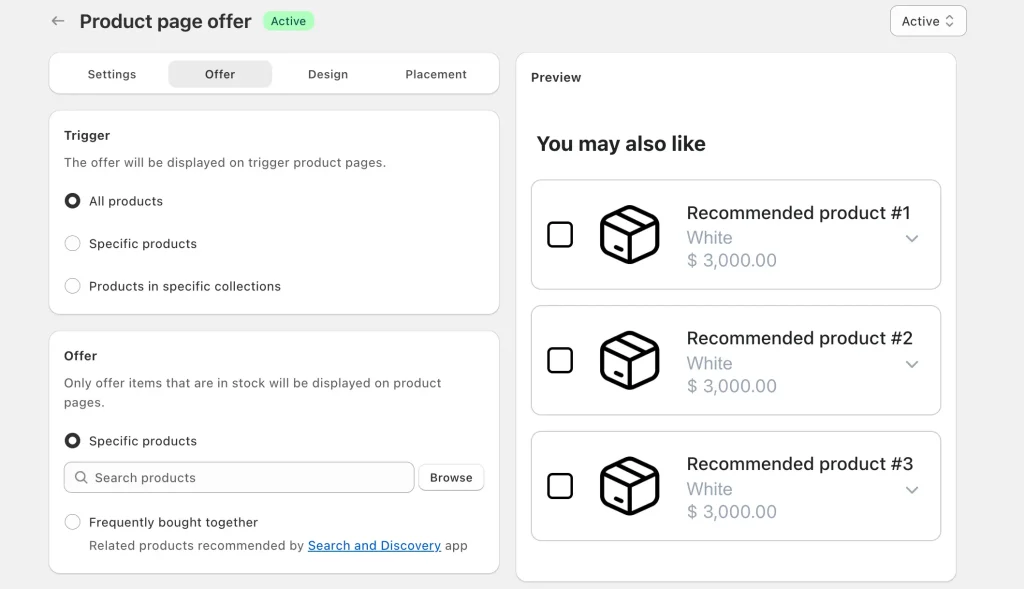
- Pick which products trigger the offer.
- Pick which products show as add-ons.
- Add an optional discount.
- Hit publish.
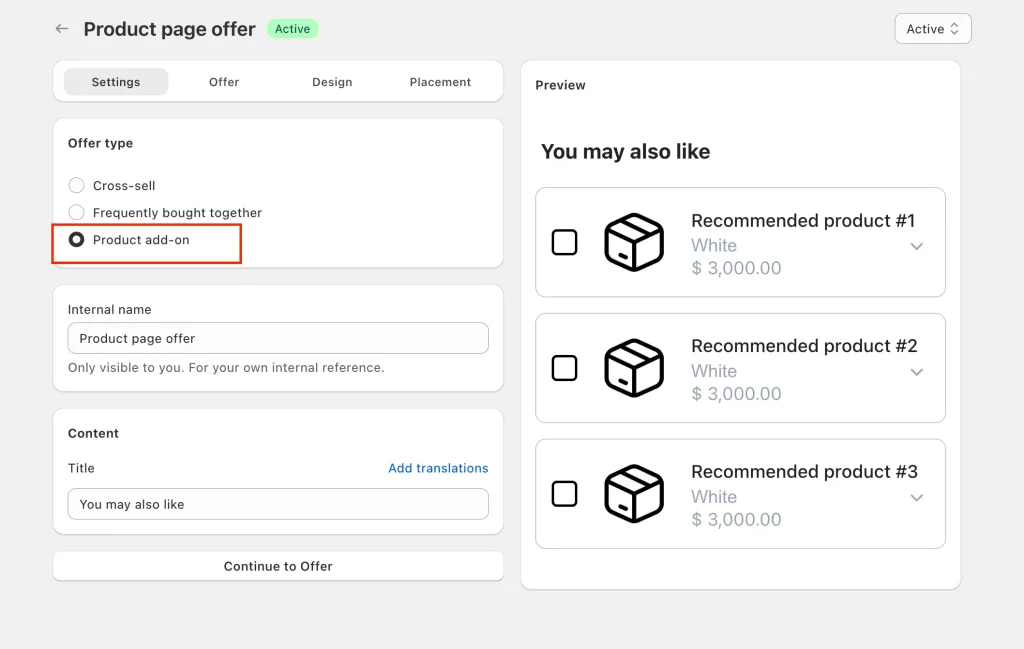
The shopper sees a clean checkbox list under the main product. One tap, and the add-on goes to cart with the original item.
The three features competitors don't combine
1. Collection-level trigger targeting. Choose which product pages show the add-on: all products, specific products, or entire collections (only "Skincare" products show "Travel-size cleanser," say). You run different add-ons per category without managing 10 separate offers. Selleasy and Essential Upsell make you set this up product-by-product.
2. Conditional discounts that protect margin. Offer percentage-off, fixed-amount, or no discount — and choose when it applies: always, or only when the trigger product is in the cart. That second mode stops shoppers from buying only the discounted add-on on its own. We covered this margin logic in how to stack Buy More Save More with other deals.
3. FBT from Shopify's own engine. Instead of hand-picking add-ons for every product, Oxify can pull recommendations from Shopify's native Search & Discovery data — the same engine behind Shopify's built-in recommendations — with per-product manual overrides.
Pricing breakdown
Order-based pricing, no usage fees, no per-impression costs:
| Total monthly store orders | Price |
|---|---|
| 0–100 orders | $9.99/month |
| 101–200 orders | $19.99/month |
| 201–500 orders | $29.99/month |
| 501–1,000 orders | $49.99/month |
| 1,001–2,000 orders | $79.99/month |
| 2,001–3,000 orders | $99.99/month |
| 3,001+ orders | $149.99/month |
| Enterprise | $299/month |
Real merchant story
A skincare brand we work with replaced four apps (a cart upsell tool, a free gift app, a shipping bar app, and a post-purchase upsell) with Oxify. Their average order value went up 22% in 30 days, and they cut $87/month from their app stack. We wrote a similar case study on a beauty brand using FBT for reference.
Honest drawbacks
- 37 reviews is the smallest social-proof base on this list — Selleasy and BOGOS have thousands.
- No dedicated thank-you-page editor as deep as ReConvert's.
Best for: stores doing $5k–$500k/month that want one tool for the whole add-on journey instead of 3–4 separate apps fragmenting data and page speed. If you're comparing against a specific competitor, we've written detailed comparisons vs iCart, UpCart, Rebuy, and Kaching.
Try it free: apps.shopify.com/ia-cart-drawer-free-gifts
2. Selleasy Upsell & Cross Sell — Best Free Tier
Selleasy — 4.9 stars, 2,493 reviews, Built for Shopify, free up to 50 orders/month, then $9–$29/month. The most-installed Amazon-style FBT widget on Shopify, and the only app here whose free plan is genuinely free with no revenue cap or lifetime trap.
Strengths:
- Clean Amazon-style "Frequently bought together" widget, mobile-friendly out of the box.
- Multi-language and multi-currency.
- Setup in under 10 minutes.
- Free tier resets monthly — 50 orders every month, forever.
Drawbacks:
- No free gift logic ("spend $X get Y free" not supported) and no volume discounts.
- No collection-level trigger targeting — offers are set manually per product.
- The cart drawer upsell is basic; see our cart drawer apps comparison for stronger options.
Best for: brand-new stores under 50 orders/month that need product page FBT at zero cost.
3. Essential Upsell & Cross Sell — Best Pure Product Page App
Essential Upsell & Cross Sell — 5.0 stars, 2,210 reviews, Built for Shopify, free plan (capped at $100 of generated revenue), then $9.99–$39.99/month. A perfect 5.0 across 2,000+ reviews is rare — and Essential earned it fast: the app only launched in June 2024.
Strengths:
- Drag-and-drop editor; most merchants are live in 30 minutes.
- FBT widget on product pages plus cart drawer add-ons.
- Automatic discounts on add-on products, plus post-purchase upsell.
Drawbacks:
- The "free plan" stops being free the moment it works — it caps at $100 of additional generated revenue, then you upgrade ($9.99 Starter, $19.99 Essential, $39.99 Professional).
- No free shipping bar, no volume discounts, no subscription support.
- Essential Apps ships each feature as a separate app — covering the full funnel means installing 4–5 of them side by side.
Best for: stores that want product page FBT and cart upsells with best-in-class polish, and nothing else.
4. BOGOS Free Gift Bundle Upsell — Best for Free Gift Add-ons
BOGOS — 5.0 stars, 4,057 reviews, Built for Shopify, paid plans from $29.99/month. The deepest social proof on this list, laser-focused on free gift add-ons — the "spend $75, get a free travel-size cleanser" offer. If that's your main play, nothing does it as cleanly.
Strengths:
- The most flexible cart-value triggers on Shopify; Buy X Get Y rules layer easily.
- Gift widgets work on product, cart, and checkout pages.
- 4,057 reviews at a 5.0 average is the strongest track record in this comparison.
Drawbacks:
- The advertised free plan is 30 free orders total — lifetime, not monthly. Real pricing starts at $29.99/month (Basic), then $49.99 (Grow) and $109.99 (Plus), with $0.05 per order beyond plan limits.
- Limited beyond gifts and BOGO — no volume discounts, no real cart drawer customization.
- Widget styling feels dated next to newer apps.
Best for: beauty, supplement, and food brands past ~200 orders/month where free samples drive conversion and the $29.99 floor pays for itself.
5. EPA ‑ Easy Product Addons — Best Checkbox-Style Add-ons
EPA ‑ Easy Product Addons — 5.0 stars, 277 reviews, Built for Shopify, $9.99–$29.99/month with a 21-day free trial (free on development stores). The most literal "product add-ons" app on this list: simple checkbox add-ons rendered directly under the buy button — gift wrap +$5, batteries +$8, setup service +$25.
Strengths:
- Purpose-built for one job, so setup is fast and the widget stays lightweight.
- Perfect 5.0 rating and the longest free trial here (21 days).
Drawbacks:
- Narrow by design — no cart drawer, post-purchase, or free-gift funnel around it.
- No general free plan; the free tier is for Partner development stores only.
- 277 reviews is a modest base next to Globo or Easify.
Best for: stores that want exactly one thing: priced checkbox add-ons on the product page, nothing more.
6. Candy Rack • Upsell Cross‑sell — Best for Warranty & Service Add-ons
Candy Rack — 4.9 stars, 222 reviews, Built for Shopify, live since 2018, from $29.99/month (Lite) with an 8-day trial. The specialist for "Job 2" service add-ons: extended warranties, protection plans, priority processing — presented as one-click offers in a pop-up the moment the shopper hits add-to-cart.
Strengths:
- The cleanest warranty/service add-on flow we've tested — services attach without needing their own product pages cluttering your catalog.
- Seven years on the App Store at 4.9 stars.
Drawbacks:
- Ties with BOGOS for the highest entry price on this list — $29.99/month (then $39.99 Starter, $59.99 Growth) with only an 8-day trial to decide.
- Pop-up-style offers add a step to checkout; test the impact on your conversion rate.
Best for: electronics, appliance, and furniture stores where a 20–35% warranty attach rate justifies a premium subscription.
7. Wrapped: Gift Wrap & Messages — Best for Gift Wrap
Wrapped — 4.9 stars, 125 reviews, Built for Shopify, live since 2021, from $19/month (Access 1x) with a 7-day trial. A single-job specialist: gift wrap, gift messages, and greeting cards, handled properly — including per-item wrap selection, which generic add-on widgets fumble.
Strengths:
- Purpose-built gift flow: shoppers pick wrap per item, add a message, and see it reflected in the order.
- Built for Shopify badge — rare among niche gift apps.
Drawbacks:
- One job only — you'll still need a general add-ons app for everything else.
- Plans scale from $19 to $149/month (Access 1x to Pro), which is steep if gift orders are seasonal for you. Outside November–December, gift wrap attach rates drop to 5–10% in the store data we've seen.
Best for: gifting-heavy stores (candles, jewelry, toys) where wrap and messages are a year-round offer, not a December afterthought.
8. Upsell.com ‑ ReConvert Upsell — Best for Post-Purchase Add-ons
Upsell.com ‑ ReConvert Upsell — 4.8 stars, 2,803 reviews, Built for Shopify, live since 2018, from $4.99/month. The app formerly known as ReConvert — the listing was renamed in 2026, and most app lists haven't caught up. It owns the thank-you page: the highest-converting placement for a one-click add-on, because the shopper has already paid.
Strengths:
- One-click post-purchase add-ons with no payment re-entry.
- Customizable thank-you page with upsell blocks and strong A/B testing.
- The cheapest entry price on this list at $4.99/month.
Drawbacks:
- Almost zero pre-purchase functionality — it starts working after checkout.
- Pricing turns usage-based at higher tiers and can climb at volume.
Best for: stores that already convert well and want to squeeze extra revenue from completed orders. Pair it with a pre-purchase app, or use Oxify's built-in post-purchase step to keep it to one tool.
9. Bold AI Upsell & Cross‑Sell — Best for Plus Stores
Bold AI Upsell & Cross‑Sell — 4.4 stars, 528 reviews, Built for Shopify, live since 2012, free to install + 3.5% of upsell revenue (or $10/month + 2.5% on Advanced). Bold relaunched its veteran upsell app around AI-driven funnels with a revenue-share model — the current listing's review count reset accordingly, so don't be surprised that a 14-year-old app shows 528 reviews.
Strengths:
- AI-selected offers across pre-purchase, in-cart, and post-purchase placements.
- Longest operating history in this comparison and deep checkout integration for Plus stores.
- Zero upfront cost — you pay only when upsells convert.
Drawbacks:
- Revenue share scales with your success: $2,000/month in upsell revenue costs $70/month on the Standard plan — more than every flat-priced app on this list.
- 4.4 stars is the lowest rating here.
Best for: established and Plus stores that want AI-managed funnels and accept revenue-share economics.
Best for in-cart add-ons: the cart drawer placement
Most add-on lists stop at the product page, but the cart drawer is often the higher-converting placement: the shopper has already committed to the main product, so a $5–$15 add-on (shipping protection, gift wrap, a travel size) attaches with far less friction. This is Oxify's home turf — the cart drawer is the core product, and add-ons, free gifts, shipping protection toggles, and a free shipping bar all live inside it. Honest caveat: if you only want a product-page checkbox and never touch the cart, EPA or Essential Upsell is the simpler install. For the placement decision itself, see how to add upsells to the cart drawer and in-cart recommendations.
Need bundles, not add-ons?
If your real goal is selling several products as one discounted package — build-your-own-bundle kits, mix-and-match sets, multi-SKU 3PL kits — you want a bundle app, not an add-ons app. The short version: FBP | Fast Bundle & Upsell App (5.0 stars, 3,036 reviews, from $19/month — renamed from "Fast Bundle" in 2026) leads the category, Bundler is the budget pick, and Simple Bundles & Kits handles multi-SKU inventory and 3PL fulfillment. We ranked and priced all of them in the best Shopify bundle apps guide, with pricing strategy in our bundle pricing guide.
What is the best product options app for Shopify? (checkboxes, engraving, uploads)
Sometimes the "add-on" you need isn't a separate product — it's a custom option on the product itself: an engraving field, a gift-message box, a file upload, an "add gift wrap +$5" checkbox, or option combinations beyond Shopify's variant limit. That's a product options app, and it's a different tool from the upsell widgets ranked above. Ratings and pricing verified live on the Shopify App Store, August 12, 2026:
| Options app | Rating | Reviews | Free plan | Paid from | Built for Shopify |
|---|---|---|---|---|---|
| Globo Product Options, Variant | 4.9 | 4,756 | ✅ | $9.90/mo | ✅ |
| Easify Custom Product Options | 4.9 | 2,884 | ✅ Free forever | $9.99/mo | ✅ |
| SC Product Options | 4.6 | 1,196 | Dev stores only | $14.99/mo | ✅ |
| EPA ‑ Easy Product Addons | 5.0 | 277 | Dev stores only | $9.99/mo | ✅ |
Globo Product Options, Variant — 4.9 stars, 4,756 reviews, live since 2020 — is the most-reviewed options app on Shopify, with a free plan and paid tiers at $9.90/month (Premium) and $19.90/month (Advanced); annual billing saves 17%.
Easify Custom Product Options — 4.9 stars, 2,884 reviews — is the fastest-growing challenger, launched in 2023 with a genuinely free "Free Forever" plan and paid tiers from $9.99/month (Pro) to $99.99/month (Enterprise).
SC Product Options (by Shop Circle) — 4.6 stars, 1,196 reviews, live since 2012 — is the veteran of the category, from $14.99/month (Basic) to $39.99/month (Premium) with a 14-day trial. The lower rating reflects its age; the feature depth is real.
EPA ‑ Easy Product Addons — 5.0 stars, 277 reviews — bridges both categories: priced checkbox add-ons that behave like options fields. It's ranked #5 in the main list above.
Also worth shortlisting if none of these fit: Hulk Product Options, Avis Product Options, and Tepo Custom Product Options — we haven't re-verified their listings this pass, so check current ratings and pricing yourself.
Where Oxify fits: we also build Oxify Product Options & Variants, designed to pair with the Oxify upsell suite — custom options and add-on offers on the same product page, managed from one dashboard, without two overlapping widget stacks. We're the publisher, so weigh that disclosure accordingly and compare it against Globo and Easify yourself.
What is the best product recommendation app for Shopify?
The third intent people mix into "Shopify add-ons": a product recommendation app that shows "You may also like" or "Frequently bought together" suggestions driven by sales data. Three tools cover most stores:
| Recommendation app | Rating | Reviews | Price | Recommendation source |
|---|---|---|---|---|
| Oxify Cart Drawer & Upsell | 4.9 | 37 | From $9.99/mo | Shopify Search & Discovery engine + manual overrides per product or collection |
| Selleasy | 4.9 | 2,493 | Free to 50 orders/mo, then $9/mo | Manual pairing, Amazon-style FBT layout |
| Shopify Search & Discovery (native) | 2.7 | 456 | Free | Shopify's own AI recommendations |
The honest read: Shopify's free native Search & Discovery app provides the underlying recommendation data, but its 2.7-star rating reflects the trade-off — no discounts, no analytics, no cart drawer placement, and limited styling control. Oxify uses that same engine's data but adds the placements, discounts, and overrides on top; Selleasy is the free-tier path if you'd rather pair products manually. We ranked this category in depth in our Frequently Bought Together apps guide, and our FBT product page shows the Oxify implementation.
How to add product add-ons on Shopify without an app
Shopify has two native routes to add-on-like behavior. They're free, and for some stores they're enough:
1. Complementary products via Search & Discovery. Install Shopify's free Search & Discovery app, open a product, and assign "complementary products." Your theme (any recent OS 2.0 theme) can then render a "Pairs well with" section on the product page. Limits: product page only — no cart drawer, popup, or post-purchase placement; no add-on discounts; no attach-rate analytics; no checkbox one-click add.
2. Line-item properties for checkbox add-ons. A theme developer can add a checkbox or text field to your product form using line-item properties ("Add gift wrap," "Engraving text"). The selection rides along on the order. Limits: charging for the add-on requires wiring the checkbox to a separate product or variant with custom code; there's no inventory tracking on the property itself, no analytics, and every change is a theme edit.
When the free route is enough: under ~50 orders/month, a simple catalog, and no need to charge for the add-on — use complementary products and skip the app. The moment you want to price an add-on, discount it conditionally, or measure attach rate, an app pays for itself; that's the gap the ranked list above fills. Our gift wrap without an app guide walks through the line-item-property route step by step.
How to pick the right product add-ons app for your store
Three questions before you install anything:
1. Where do you want the add-on to show up?
- Product page only → Essential Upsell, EPA, or Selleasy
- Cart drawer → Oxify (best), Selleasy
- Product page + cart drawer + post-purchase → Oxify
- Thank-you page only → Upsell.com ‑ ReConvert
If you're stuck on cart drawer vs cart page first, we settled that debate in Shopify cart drawer vs page and slide cart vs mini cart.
2. What's your main add-on type?
- Standard related products → Oxify, Selleasy, Essential Upsell
- Warranties & shipping protection → Candy Rack or Oxify (see our shipping protection guide)
- Gift wrap & messages → Wrapped or Oxify
- Free gift at $X spend → BOGOS or Oxify
- Custom options on one product (engraving, uploads, checkboxes) → Globo, Easify, or Oxify Product Options
- Bundles & kits → see the bundle apps guide
3. What's your monthly order volume?
- Under 50 orders → Selleasy free
- 50–500 orders → Oxify ($9.99–$29.99) or Essential Upsell ($9.99)
- 500–2,000 orders → Oxify ($29.99–$79.99)
- 2,000+ orders → Oxify ($99.99–$149.99), or Bold if you prefer revenue-share pricing
5 mistakes I see merchants make with add-on apps
From hundreds of merchant support tickets:
1. Stacking too many apps. Three add-on apps don't give you 3× the lift. They slow your store, conflict with each other, and confuse shoppers. Pick one all-in-one or two specialists at most.
2. Showing add-ons that are too cheap. A $2 add-on next to a $40 product looks pointless. In the order data we've seen, shoppers most often accept add-ons priced at 10–25% of the main product. A $40 product needs a $4–$10 add-on.
3. Forgetting mobile. Most Shopify storefront traffic comes from phones. If your add-on widget pushes the buy button below the fold on mobile, conversion drops. Preview on mobile before going live.
4. Random product picks. Don't use "best sellers" as your add-on — use complementary products. A laptop sleeve next to a laptop, a fragrance refill next to the candle. Recommendation engines (built into Oxify and Bold) make this automatic.
5. Skipping post-purchase. The thank-you page is the highest-converting placement because the shopper has already paid, and most merchants ignore it. If cart abandonment is your bigger issue, start with our cart abandonment guide instead.
Frequently Asked Questions
What is a product add-ons app on Shopify?
What is the best product add-ons app for Shopify?
What's the difference between a product add-ons app and a product options app?
What is the best product options app for Shopify?
What is the best product recommendation app for Shopify?
Are there free Shopify product add-on apps or free trials?
Does Shopify have a built-in product add-ons feature?
Will an add-ons app slow down my Shopify store?
What's the average acceptance rate for product add-ons?
What's the best way to offer shipping protection as an add-on?
What's the difference between an upsell and an add-on?
What is the difference between a product add-on and a product bundle?
What is the best product variant app if I need more variants than Shopify allows?
How do I add product add-ons to my Shopify product page?
How quickly will I see results from an add-on app?
Which Shopify product add-ons apps support digital products?
What does the Built for Shopify badge mean when choosing an add-ons app?
Final word
If you remember one thing from this guide: the right product add-ons app is the one that matches where you want add-ons to appear and what kind of add-on you're selling.
For most Shopify stores, that's Oxify Cart Drawer & Upsell — product page, cart drawer, free gift, and post-purchase add-ons in one Built for Shopify app, with collection-level targeting, conditional discounts, and flat order-based pricing from $9.99/month. We build it, the data above is verified, and the 14-day trial is how you check our work.
For stores under 50 orders/month, start with Selleasy free. For warranties, Candy Rack. For gift wrap, Wrapped. For checkbox options on a single product, Globo or Easify. And if what you actually need is bundles, that's a different list — our bundle apps guide has it.